rosbag compare
v0.1.0

Compare the topic content between rosbags
Say you have a bunch of rosbags inside a folder and you don't know whether or not all those rosbags have the same topics. rosbag-compare will :
rosbag-compare can be installed from PyPi :
$ pip install rosbag-comparerosbag-compare can be used both as a command line application and in Python code.
A basic use of rosbag-compare is to simply call it with the path of the folder that contains rosbags. This will simply generate a JSON file with a summary of the comparison in topics_<name-of-bagfolder>.json.
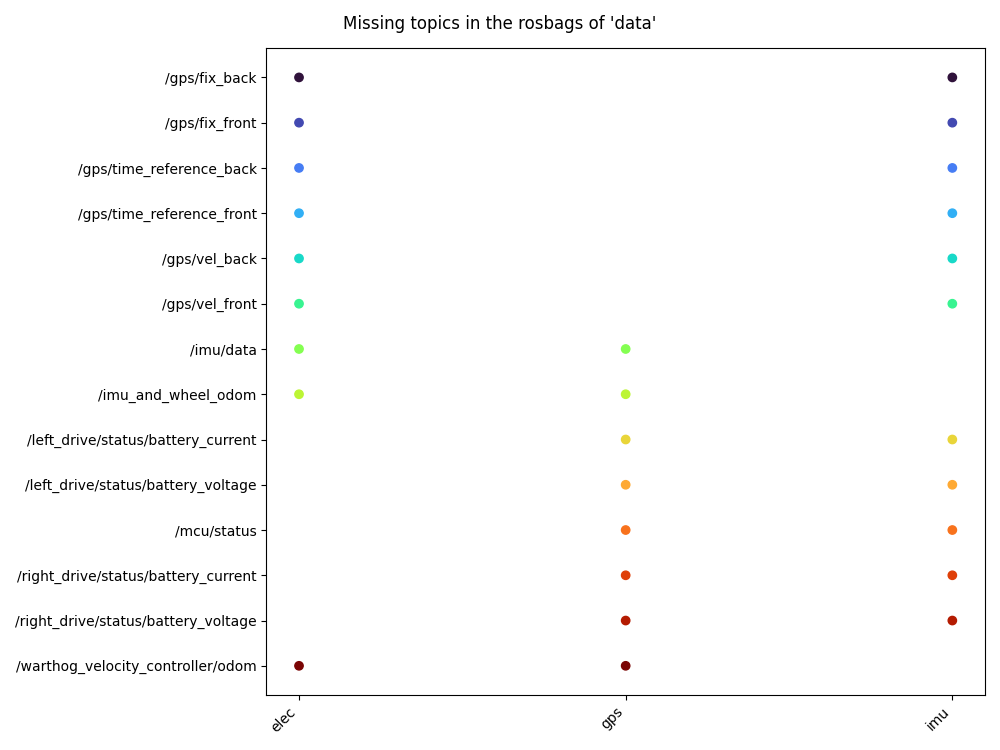
$ rosbag-compare -b /path/to/folder/with/rosbagsYou can also generate a figure that will show what topics are missing in each rosbag with the --plot/-p flag. This figure helps when you want to find out if all rosbags of your experiment contains the topics that are of your interest.
$ rosbag-compare -b /path/to/folder/with/rosbags -pYou can also call rosbag-compare directly into your Python code :
from rosbag_compare import RosbagComparator

data_path = "/path/to/folder/with/rosbags"
rbag_comp = RosbagComparator(data_path)

# This step may take time as it open each rosbag separately
# Will show a progress bar
rbag_comp.extract_data()

# Export summary to a JSON file
rbag_comp.to_json()  # Defaults to topics_<foldername>.json
rbag_comp.to_json("exported_summary.json")

# Generate a figure with the name of the
# missing topics for each rosbag
rbag_comp.plot()                                              # Show figure
rbag_comp.plot(save_fig=True)                                 # Save figure (defaults to missing_topics.png)
rbag_comp.plot(save_fig=True, img_path="topics_summary.jpg") # Save figure to pathPull requests are welcome and don't hesitate to open issues
Development requirements can be installed using pip :
$ python -m venv venv
$ source venv/bin/activate
$ pip install -r requirements/requirements-dev.txtThis project is licensed under a MIT license







