Whisper Finetune
1.0.0

簡體中文| English
OpenAI在開源了號稱其英文語音辨識能力已達到人類水準的Whisper項目,且它亦支持其它98種語言的自動語音辨識。 Whisper所提供的自動語音識與翻譯任務,它們能將各種語言的語音變成文本,也能將這些文本翻譯成英文。本項目主要的目的是為了對Whisper模型使用Lora進行微調,支持無時間戳數據訓練,有時間戳數據訓練、無語音數據訓練。目前開源了好幾個模型,具體可以在openai查看,下面列出了常用的幾個模型。另外項目最後還支持CTranslate2加速推理和GGML加速推理,提示一下,加速推理支持直接使用Whisper原模型轉換,並不一定需要微調。支持Windows桌面應用,Android應用和服務器部署。
歡迎大家掃碼入知識星球(左)或者QQ群(右)討論,知識星球裡面提供項目的模型文件和博主其他相關項目的模型文件,也包括其他一些資源。
使用環境:
aishell.py :製作AIShell訓練數據。finetune.py :微調模型。merge_lora.py :合併Whisper和Lora的模型。evaluation.py :評估使用微調後的模型或者Whisper原模型。infer.py :使用調用微調後的模型或者transformers上的Whisper模型預測。infer_ct2.py :使用轉換為CTranslate2的模型預測,主要參考這個程序用法。infer_gui.py :有GUI界面操作,使用調用微調後的模型或者transformers上的Whisper模型預測。infer_server.py :使用調用微調後的模型或者transformers上的Whisper模型部署到服務器端,提供給客戶端調用。convert-ggml.py :轉換模型為GGML格式模型,給Android應用或者Windows應用使用。AndroidDemo :該目錄存放的是部署模型到Android的源碼。WhisperDesktop :該目錄存放的是Windows桌面應用的程序。 | 使用模型 | 指定語言 | aishell_test | test_net | test_meeting | 粵語測試集 | 模型獲取 |
|---|---|---|---|---|---|---|
| whisper-tiny | Chinese | 0.31898 | 0.40482 | 0.75332 | N/A | 加入知識星球獲取 |
| whisper-base | Chinese | 0.22196 | 0.30404 | 0.50378 | N/A | 加入知識星球獲取 |
| whisper-small | Chinese | 0.13897 | 0.18417 | 0.31154 | N/A | 加入知識星球獲取 |
| whisper-medium | Chinese | 0.09538 | 0.13591 | 0.26669 | N/A | 加入知識星球獲取 |
| whisper-large | Chinese | 0.08969 | 0.12933 | 0.23439 | N/A | 加入知識星球獲取 |
| whisper-large-v2 | Chinese | 0.08817 | 0.12332 | 0.26547 | N/A | 加入知識星球獲取 |
| whisper-large-v3 | Chinese | 0.08086 | 0.11452 | 0.19878 | 0.18782 | 加入知識星球獲取 |
| 使用模型 | 指定語言 | 數據集 | aishell_test | test_net | test_meeting | 粵語測試集 | 模型獲取 |
|---|---|---|---|---|---|---|---|
| whisper-tiny | Chinese | AIShell | 0.13043 | 0.4463 | 0.57728 | N/A | 加入知識星球獲取 |
| whisper-base | Chinese | AIShell | 0.08999 | 0.33089 | 0.40713 | N/A | 加入知識星球獲取 |
| whisper-small | Chinese | AIShell | 0.05452 | 0.19831 | 0.24229 | N/A | 加入知識星球獲取 |
| whisper-medium | Chinese | AIShell | 0.03681 | 0.13073 | 0.16939 | N/A | 加入知識星球獲取 |
| whisper-large-v2 | Chinese | AIShell | 0.03139 | 0.12201 | 0.15776 | N/A | 加入知識星球獲取 |
| whisper-large-v3 | Chinese | AIShell | 0.03660 | 0.09835 | 0.13706 | 0.20060 | 加入知識星球獲取 |
| whisper-large-v3 | Cantonese | 粵語數據集 | 0.06857 | 0.11369 | 0.17452 | 0.03524 | 加入知識星球獲取 |
| whisper-tiny | Chinese | WenetSpeech | 0.17711 | 0.24783 | 0.39226 | N/A | 加入知識星球獲取 |
| whisper-base | Chinese | WenetSpeech | 0.14548 | 0.17747 | 0.30590 | N/A | 加入知識星球獲取 |
| whisper-small | Chinese | WenetSpeech | 0.08484 | 0.11801 | 0.23471 | N/A | 加入知識星球獲取 |
| whisper-medium | Chinese | WenetSpeech | 0.05861 | 0.08794 | 0.19486 | N/A | 加入知識星球獲取 |
| whisper-large-v2 | Chinese | WenetSpeech | 0.05443 | 0.08367 | 0.19087 | N/A | 加入知識星球獲取 |
| whisper-large-v3 | Chinese | WenetSpeech | 0.04947 | 0.10711 | 0.17429 | 0.47431 | 加入知識星球獲取 |
test_long.wav ,時長為3分鐘整,測試程序在tools/run_compute.sh 。| 加速方式 | tiny | base | small | medium | large-v2 | large-v3 |
|---|---|---|---|---|---|---|
Transformers ( fp16 + batch_size=16 ) | 1.458s | 1.671s | 2.331s | 11.071s | 4.779s | 12.826s |
Transformers ( fp16 + batch_size=16 + Compile ) | 1.477s | 1.675s | 2.357s | 11.003s | 4.799s | 12.643s |
Transformers ( fp16 + batch_size=16 + BetterTransformer ) | 1.461s | 1.676s | 2.301s | 11.062s | 4.608s | 12.505s |
Transformers ( fp16 + batch_size=16 + Flash Attention 2 ) | 1.436s | 1.630s | 2.258s | 10.533s | 4.344s | 11.651s |
Transformers ( fp16 + batch_size=16 + Compile + BetterTransformer ) | 1.442s | 1.686s | 2.277s | 11.000s | 4.543s | 12.592s |
Transformers ( fp16 + batch_size=16 + Compile + Flash Attention 2 ) | 1.409s | 1.643s | 2.220s | 10.390s | 4.377s | 11.703s |
Faster Whisper ( fp16 + beam_size=1 ) | 2.179s | 1.492s | 2.327s | 3.752s | 5.677s | 31.541s |
Faster Whisper ( 8-bit + beam_size=1 ) | 2.609s | 1.728s | 2.744s | 4.688s | 6.571s | 29.307s |
| 數據列表處理方式 | AiShell | WenetSpeech |
|---|---|---|
| 添加標點符號 | 加入知識星球獲取 | 加入知識星球獲取 |
| 添加標點符號和時間戳 | 加入知識星球獲取 | 加入知識星球獲取 |
重要說明:
aishell_test為AIShell的測試集, test_net和test_meeting為WenetSpeech的測試集。dataset/test_long.wav ,時長為3分鐘整。conda install pytorch==2.1.0 torchvision==0.16.0 torchaudio==2.1.0 pytorch-cuda=11.8 -c pytorch -c nvidiasudo docker pull pytorch/pytorch:2.1.0-cuda11.8-cudnn8-devel然後進入到鏡像中,同時將當前路徑掛載到容器的/workspace目錄下。
sudo nvidia-docker run --name pytorch -it -v $PWD :/workspace pytorch/pytorch:2.1.0-cuda11.8-cudnn8-devel /bin/bashpython -m pip install -r requirements.txt -i https://pypi.tuna.tsinghua.edu.cn/simplepython -m pip install https://github.com/jllllll/bitsandbytes-windows-webui/releases/download/wheels/bitsandbytes-0.41.2.post2-py3-none-win_amd64.whl訓練的數據集如下,是一個jsonlines的數據列表,也就是每一行都是一個JSON數據,數據格式如下。本項目提供了一個製作AIShell數據集的程序aishell.py ,執行這個程序可以自動下載並生成如下列格式的訓練集和測試集,注意:這個程序可以通過指定AIShell的壓縮文件來跳過下載過程的,如果直接下載會非常慢,可以使用一些如迅雷等下載器下載該數據集,然後通過參數--filepath指定下載的壓縮文件路徑,如/home/test/data_aishell.tgz 。
小提示:
sentences字段的數據。language字段數據。sentences字段為[] , sentence字段為"" , language字段可以不存在。{
"audio" : {
"path" : " dataset/0.wav "
},
"sentence" : "近几年,不但我用书给女儿压岁,也劝说亲朋不要给女儿压岁钱,而改送压岁书。 " ,
"language" : " Chinese " ,
"sentences" : [
{
"start" : 0 ,
"end" : 1.4 ,
"text" : "近几年, "
},
{
"start" : 1.42 ,
"end" : 8.4 ,
"text" : "不但我用书给女儿压岁,也劝说亲朋不要给女儿压岁钱,而改送压岁书。 "
}
],
"duration" : 7.37
}準備好數據之後,就可以開始微調模型了。訓練最重要的兩個參數分別是, --base_model指定微調的Whisper模型,這個參數值需要在HuggingFace存在的,這個不需要提前下載,啟動訓練時可以自動下載,當然也可以提前下載,那麼--base_model指定就是路徑,同時--local_files_only設置為True。第二個--output_path是是訓練時保存的Lora檢查點路徑,因為我們使用Lora來微調模型。如果想存足夠的話,最好將--use_8bit設置為False,這樣訓練速度快很多。其他更多的參數請查看這個程序。
單卡訓練命令如下,Windows系統可以不添加CUDA_VISIBLE_DEVICES參數。
CUDA_VISIBLE_DEVICES=0 python finetune.py --base_model=openai/whisper-tiny --output_dir=output/多卡訓練有兩種方法,分別是torchrun和accelerate,開發者可以根據自己的習慣使用對應的方式。
--nproc_per_node指定使用的顯卡數量。 torchrun --nproc_per_node=2 finetune.py --base_model=openai/whisper-tiny --output_dir=output/首先配置訓練參數,過程是讓開發者回答幾個問題,基本都是默認就可以,但有幾個參數需要看實際情況設置。
accelerate config大概過程就是這樣:
 --------------------------------------------------------------------In which compute environment are you running?
This machine
--------------------------------------------------------------------Which type of machine are you using?
multi-GPU
How many different machines will you use (use more than 1 for multi-node training)? [1]:
Do you wish to optimize your script with torch dynamo?[yes/NO]:
Do you want to use DeepSpeed? [yes/NO]:
Do you want to use FullyShardedDataParallel? [yes/NO]:
Do you want to use Megatron-LM ? [yes/NO]:
How many GPU(s) should be used for distributed training? [1]:2
What GPU(s) (by id) should be used for training on this machine as a comma-seperated list? [all]:
--------------------------------------------------------------------Do you wish to use FP16 or BF16 (mixed precision)?
fp16
accelerate configuration saved at /home/test/.cache/huggingface/accelerate/default_config.yaml
配置完成之後,可以使用以下命令查看配置。
accelerate env開始訓練命令如下。
accelerate launch finetune.py --base_model=openai/whisper-tiny --output_dir=output/輸出日誌如下:
{ ' loss ' : 0.9098, ' learning_rate ' : 0.000999046843662503, ' epoch ' : 0.01}
{ ' loss ' : 0.5898, ' learning_rate ' : 0.0009970611012927184, ' epoch ' : 0.01}
{ ' loss ' : 0.5583, ' learning_rate ' : 0.0009950753589229333, ' epoch ' : 0.02}
{ ' loss ' : 0.5469, ' learning_rate ' : 0.0009930896165531485, ' epoch ' : 0.02}
{ ' loss ' : 0.5959, ' learning_rate ' : 0.0009911038741833634, ' epoch ' : 0.03}微調完成之後會有兩個模型,第一個是Whisper基礎模型,第二個是Lora模型,需要把這兩個模型合併之後才能之後的操作。這個程序只需要傳遞兩個參數, --lora_model指定的是訓練結束後保存的Lora模型路徑,其實就是檢查點文件夾路徑,第二個--output_dir是合併後模型的保存目錄。
python merge_lora.py --lora_model=output/whisper-tiny/checkpoint-best/ --output_dir=models/執行以下程序進行評估模型,最重要的兩個參數分別是。第一個--model_path指定的是合併後的模型路徑,同時也支持直接使用Whisper原模型,例如直接指定openai/whisper-large-v2 ,第二個是--metric指定的是評估方法,例如有字錯率cer和詞錯率wer 。提示:沒有微調的模型,可能輸出帶有標點符號,影響準確率。其他更多的參數請查看這個程序。
python evaluation.py --model_path=models/whisper-tiny-finetune --metric=cer執行以下程序進行語音識別,這個使用transformers直接調用微調後的模型或者Whisper原模型預測,支持Pytorch2.0的編譯器加速、FlashAttention2加速、BetterTransformer加速。第一個--audio_path參數指定的是要預測的音頻路徑。第二個--model_path指定的是合併後的模型路徑,同時也支持直接使用Whisper原模型,例如直接指定openai/whisper-large-v2 。其他更多的參數請查看這個程序。
python infer.py --audio_path=dataset/test.wav --model_path=models/whisper-tiny-finetune--model_path指定Transformers模型。其他更多的參數請查看這個程序。
python infer_gui.py --model_path=models/whisper-tiny-finetune啟動後界面如下:
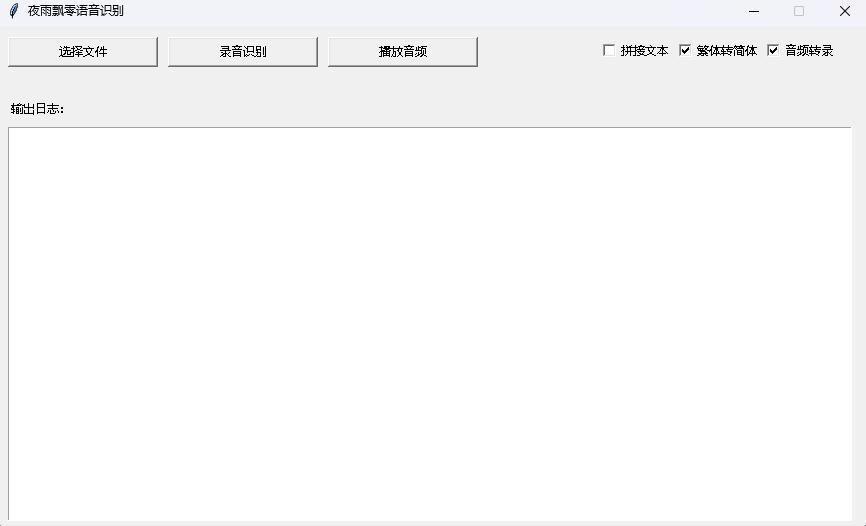
--host指定服務啟動的地址,這裡設置為0.0.0.0 ,即任何地址都可以訪問。 --port指定使用的端口號。 --model_path指定的Transformers模型。 --num_workers指定是使用多少個線程並發推理,這在Web部署上很重要,當有多個並發訪問是可以同時推理。其他更多的參數請查看這個程序。
python infer_server.py --host=0.0.0.0 --port=5000 --model_path=models/whisper-tiny-finetune --num_workers=2目前提供識別接口/recognition ,接口參數如下。
| 字段 | 是否必須 | 類型 | 預設值 | 說明 |
|---|---|---|---|---|
| audio | 是 | File | 要識別的音頻文件 | |
| to_simple | 否 | int | 1 | 是否繁體轉簡體 |
| remove_pun | 否 | int | 0 | 是否移除標點符號 |
| task | 否 | String | transcribe | 識別任務類型,支持transcribe和translate |
| language | 否 | String | zh | 設置語言,簡寫,如果為None則自動檢測語言 |
返回結果:
| 字段 | 類型 | 說明 |
|---|---|---|
| results | list | 分割的識別結果 |
| +result | str | 每片分隔的文本結果 |
| +start | int | 每片分隔的開始時間,單位秒 |
| +end | int | 每片分隔的結束時間,單位秒 |
| code | int | 錯誤碼,0即為成功識別 |
示例如下:
{
  "results" : [
    {
      "result" : "近几年,不但我用书给女儿压碎,也全说亲朋不要给女儿压碎钱,而改送压碎书。 " ,
      "start" : 0 ,
      "end" : 8
    }
  ],
  "code" : 0
}為了方便理解,這裡提供了調用Web接口的Python代碼,下面的是/recognition的調用方式。
 import requests

response = requests . post ( url = "http://127.0.0.1:5000/recognition" ,
                         files = [( "audio" , ( "test.wav" , open ( "dataset/test.wav" , 'rb' ), 'audio/wav' ))],
                         json = { "to_simple" : 1 , "remove_pun" : 0 , "language" : "zh" , "task" : "transcribe" }, timeout = 20 )
print ( response . text )
提供的測試頁面如下:
首頁http://127.0.0.1:5000/的頁面如下:
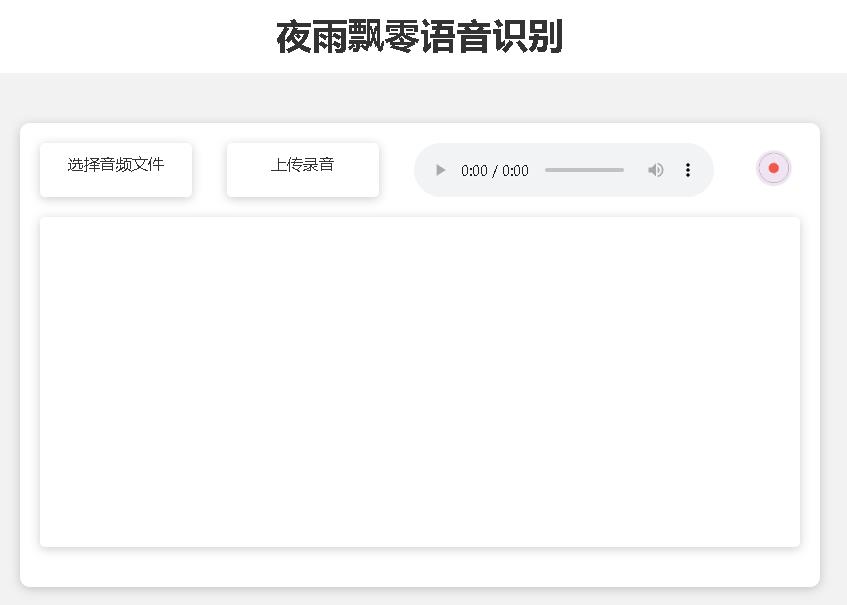
文檔頁面http://127.0.0.1:5000/docs的頁面如下:
這裡提供了一個CTranslate2加速的方式,儘管使用Transformers的pipeline推理速度已經很快了,首先要轉換模型,把合併後的模型轉換為CTranslate2模型。如下命令, --model參數指定的是合併後的模型路徑,同時也支持直接使用Whisper原模型,例如直接指定openai/whisper-large-v2 。 --output_dir參數指定的是轉換後的CTranslate2模型路徑, --quantization參數指定的是量化模型大小,不希望量化模型的可以直接去掉這個參數。
ct2-transformers-converter --model models/whisper-tiny-finetune --output_dir models/whisper-tiny-finetune-ct2 --copy_files tokenizer.json preprocessor_config.json --quantization float16執行以下程序進行語音識別, --audio_path參數指定的是要預測的音頻路徑。 --model_path指定的是轉換後的CTranslate2模型。其他更多的參數請查看這個程序。
python infer_ct2.py --audio_path=dataset/test.wav --model_path=models/whisper-tiny-finetune-ct2輸出結果如下:
-----------  Configuration Arguments -----------
audio_path: dataset/test.wav
model_path: models/whisper-tiny-finetune-ct2
language: zh
use_gpu: True
use_int8: False
beam_size: 10
num_workers: 1
vad_filter: False
local_files_only: True
------------------------------------------------
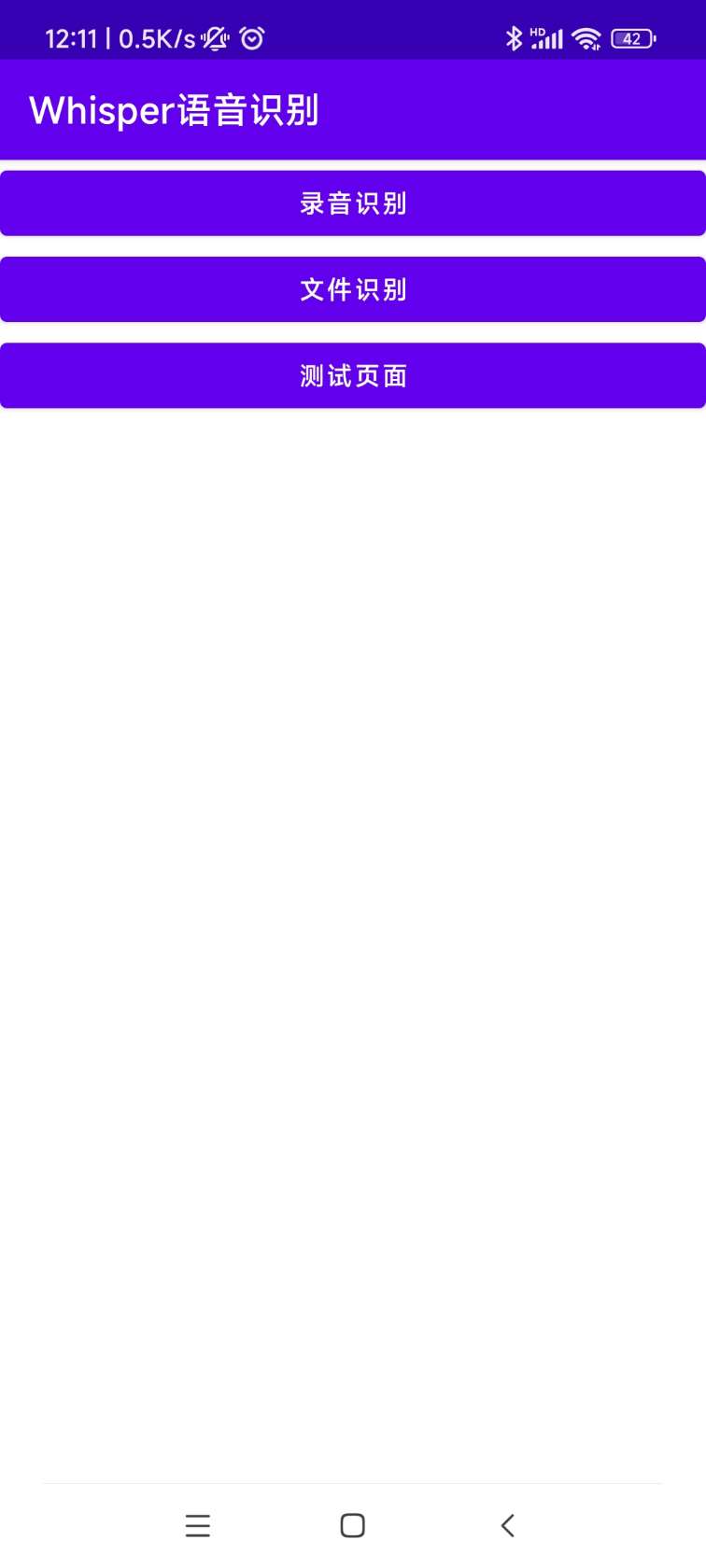
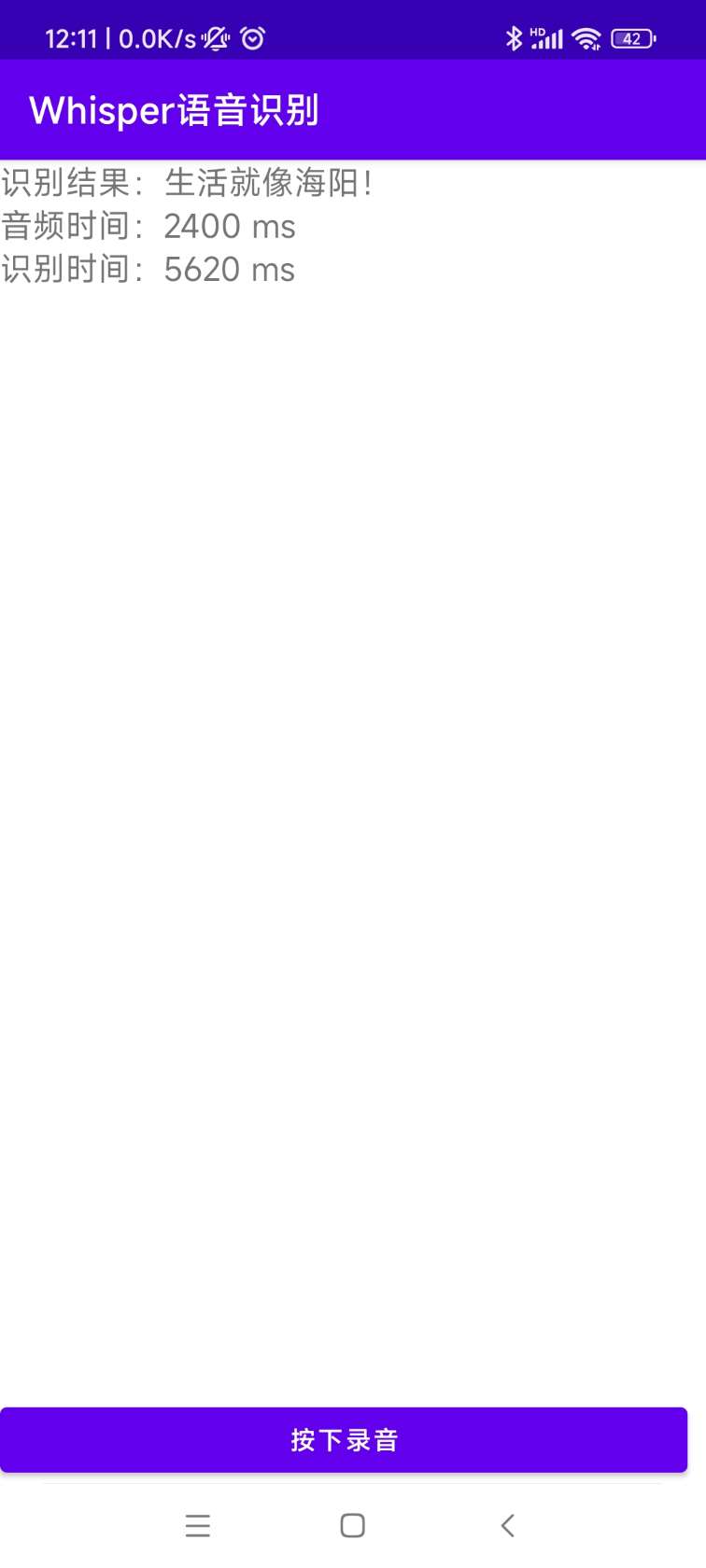
[0.0 - 8.0]:近几年,不但我用书给女儿压碎,也全说亲朋不要给女儿压碎钱,而改送压碎书。安裝部署的源碼在AndroidDemo目錄下,具體文檔可以到該目錄下的README.md查看。
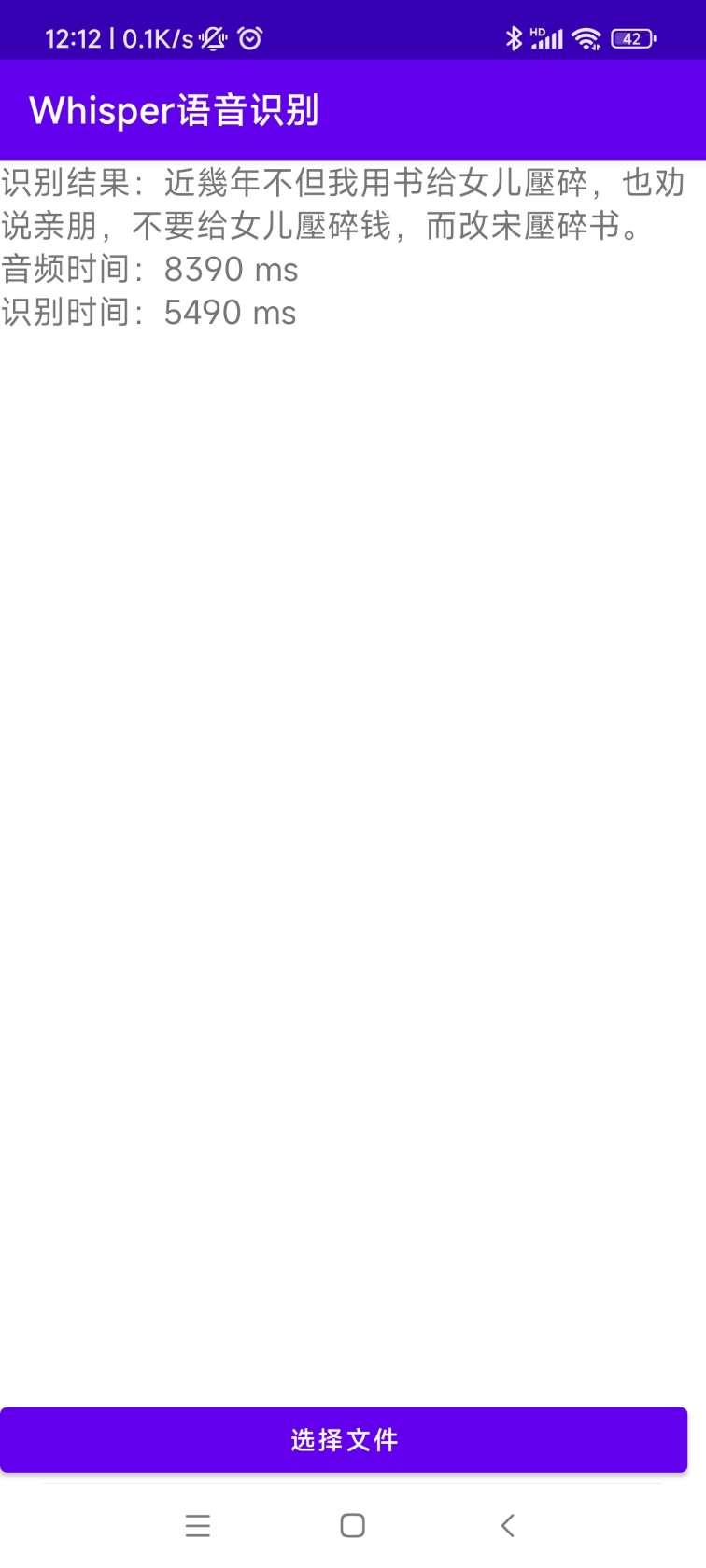
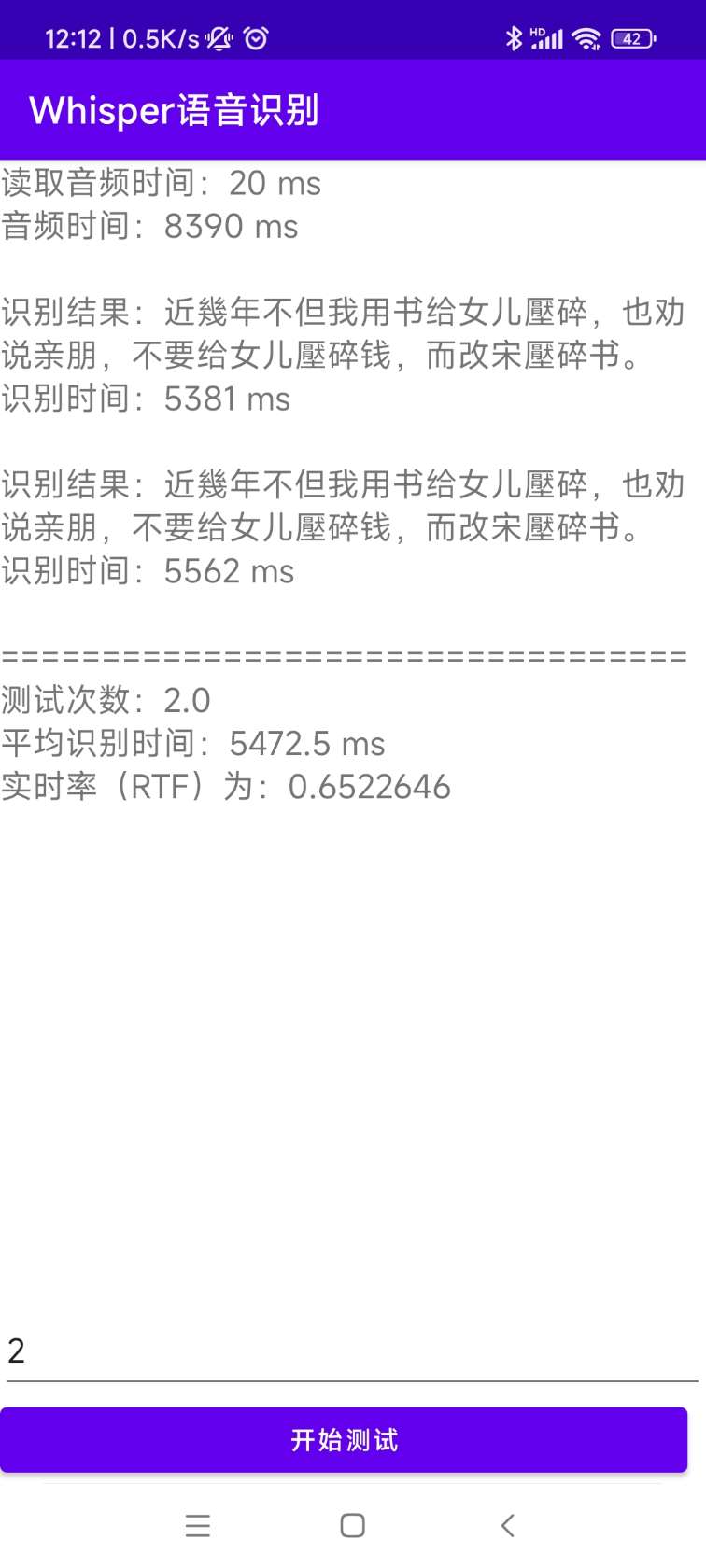
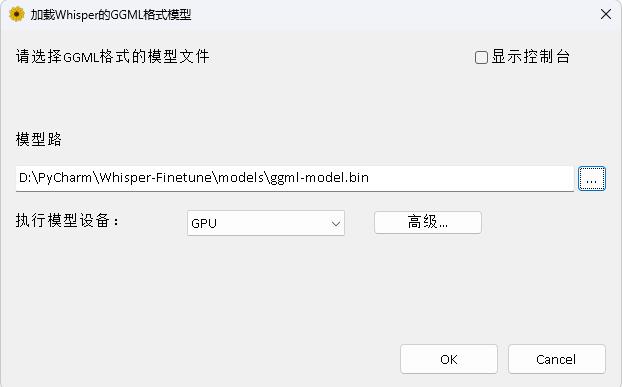
程序在WhisperDesktop目錄下,具體文檔可以到該目錄下的README.md查看。
打賞一塊錢支持一下作者







