Open3D ML
v0.18 release

安裝|入門|結構|任務和算法|模型動物園|數據集| How-Tos |貢獻
Open3D-ML是用於3D機器學習任務的Open3D的擴展。它建立在Open3D Core庫的頂部,並使用用於3D數據處理的機器學習工具擴展了它。該存儲庫的重點是語義點雲進行分割等應用,並提供了可以應用於常見任務以及訓練管道的驗證模型。
Open3D-ML與TensorFlow和Pytorch一起使用,可以輕鬆地集成到現有項目中,並且還提供了與ML框架(例如數據可視化)無關的一般功能。
Open3D-ML集成在Open3D V0.11+ Python分佈中,並且與以下ML框架的以下版本兼容。
GNU/Linux x86_64上,可選)您可以使用Open3D安裝
 # make sure you have the latest pip version
pip install --upgrade pip
# install open3d
pip install open3d
要安裝Pytorch或TensorFlow的兼容版本,您可以使用各自的要求文件:
 # To install a compatible version of TensorFlow
pip install -r requirements-tensorflow.txt
# To install a compatible version of PyTorch
pip install -r requirements-torch.txt
# To install a compatible version of PyTorch with CUDA on Linux
pip install -r requirements-torch-cuda.txt
測試安裝使用
 # with PyTorch
$ python -c " import open3d.ml.torch as ml3d "
# or with TensorFlow
$ python -c " import open3d.ml.tf as ml3d "
如果您需要使用不同版本的ML框架或CUDA,我們建議我們從源構建Open3D或在Docker中構建Open3D。
從Linux上的V0.18開始,PYPI Open3D Wheel由於在Pytorch和TensorFlow之間構建不兼容而沒有本機對張量的支持[請參閱Python 3.11支持PR]。如果您想在Linux上使用tensorflow的Open3D,則可以從Docker中的源構建Open3D Wheel,並支持TensorFlow(但不提供Pytorch),為:
 cd docker
# Build open3d and open3d-cpu wheels for Python 3.10 with Tensorflow support
export BUILD_PYTORCH_OPS=OFF BUILD_TENSORFLOW_OPS=ON
./docker_build.sh cuda_wheel_py310數據集名稱空間包含用於讀取常見數據集的類。在這裡,我們讀取Semantickitti數據集並對它進行可視化。
 import open3d . ml . torch as ml3d  # or open3d.ml.tf as ml3d

# construct a dataset by specifying dataset_path
dataset = ml3d . datasets . SemanticKITTI ( dataset_path = '/path/to/SemanticKITTI/' )

# get the 'all' split that combines training, validation and test set
all_split = dataset . get_split ( 'all' )

# print the attributes of the first datum
print ( all_split . get_attr ( 0 ))

# print the shape of the first point cloud
print ( all_split . get_data ( 0 )[ 'point' ]. shape )

# show the first 100 frames using the visualizer
vis = ml3d . vis . Visualizer ()
vis . visualize_dataset ( dataset , 'all' , indices = range ( 100 ))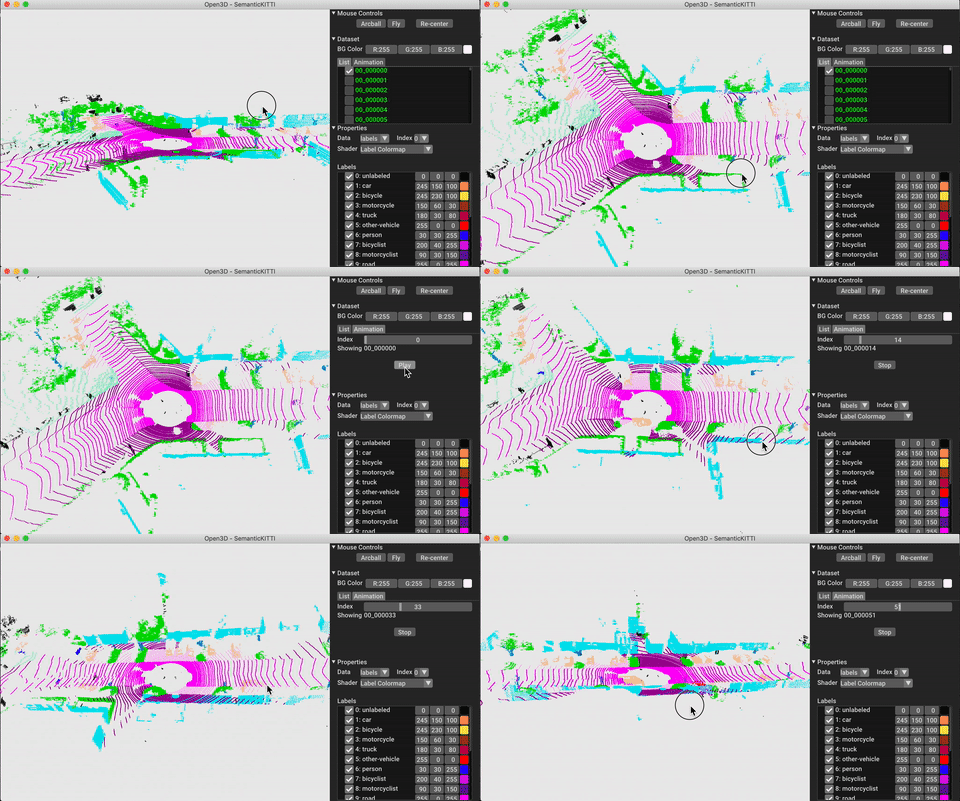
模型,數據集和管道的配置存儲在ml3d/configs中。用戶還可以構建自己的YAML文件,以保留其自定義配置的記錄。這是讀取配置文件並從中構建模塊的示例。
 import open3d . ml as _ml3d
import open3d . ml . torch as ml3d # or open3d.ml.tf as ml3d

framework = "torch" # or tf
cfg_file = "ml3d/configs/randlanet_semantickitti.yml"
cfg = _ml3d . utils . Config . load_from_file ( cfg_file )

# fetch the classes by the name
Pipeline = _ml3d . utils . get_module ( "pipeline" , cfg . pipeline . name , framework )
Model = _ml3d . utils . get_module ( "model" , cfg . model . name , framework )
Dataset = _ml3d . utils . get_module ( "dataset" , cfg . dataset . name )

# use the arguments in the config file to construct the instances
cfg . dataset [ 'dataset_path' ] = "/path/to/your/dataset"
dataset = Dataset ( cfg . dataset . pop ( 'dataset_path' , None ), ** cfg . dataset )
model = Model ( ** cfg . model )
pipeline = Pipeline ( model , dataset , ** cfg . pipeline )在上一個示例的基礎上,我們可以使用驗證的模型實例化管道,以進行語義分割,並將其運行在數據集的點雲上。有關獲取驗證模型的權重的,請參見模型動物園。
 import os
import open3d . ml as _ml3d
import open3d . ml . torch as ml3d

cfg_file = "ml3d/configs/randlanet_semantickitti.yml"
cfg = _ml3d . utils . Config . load_from_file ( cfg_file )

model = ml3d . models . RandLANet ( ** cfg . model )
cfg . dataset [ 'dataset_path' ] = "/path/to/your/dataset"
dataset = ml3d . datasets . SemanticKITTI ( cfg . dataset . pop ( 'dataset_path' , None ), ** cfg . dataset )
pipeline = ml3d . pipelines . SemanticSegmentation ( model , dataset = dataset , device = "gpu" , ** cfg . pipeline )

# download the weights.
ckpt_folder = "./logs/"
os . makedirs ( ckpt_folder , exist_ok = True )
ckpt_path = ckpt_folder + "randlanet_semantickitti_202201071330utc.pth"
randlanet_url = "https://storage.googleapis.com/open3d-releases/model-zoo/randlanet_semantickitti_202201071330utc.pth"
if not os . path . exists ( ckpt_path ):
    cmd = "wget {} -O {}" . format ( randlanet_url , ckpt_path )
    os . system ( cmd )

# load the parameters.
pipeline . load_ckpt ( ckpt_path = ckpt_path )

test_split = dataset . get_split ( "test" )
data = test_split . get_data ( 0 )

# run inference on a single example.
# returns dict with 'predict_labels' and 'predict_scores'.
result = pipeline . run_inference ( data )

# evaluate performance on the test set; this will write logs to './logs'.
pipeline . run_test ()
用戶還可以使用預定義的腳本來加載預告片的權重和運行測試。
與推理相似,管道提供了用於在數據集上訓練模型的接口。
 # use a cache for storing the results of the preprocessing (default path is './logs/cache')
dataset = ml3d . datasets . SemanticKITTI ( dataset_path = '/path/to/SemanticKITTI/' , use_cache = True )

# create the model with random initialization.
model = RandLANet ()

pipeline = SemanticSegmentation ( model = model , dataset = dataset , max_epoch = 100 )

# prints training progress in the console.
pipeline . run_train ()有關更多示例,請參見examples/和scripts/目錄。您還可以在配置文件中啟用保存培訓摘要,並通過張量板可視化地面真相和結果。有關詳細信息,請參見本教程。
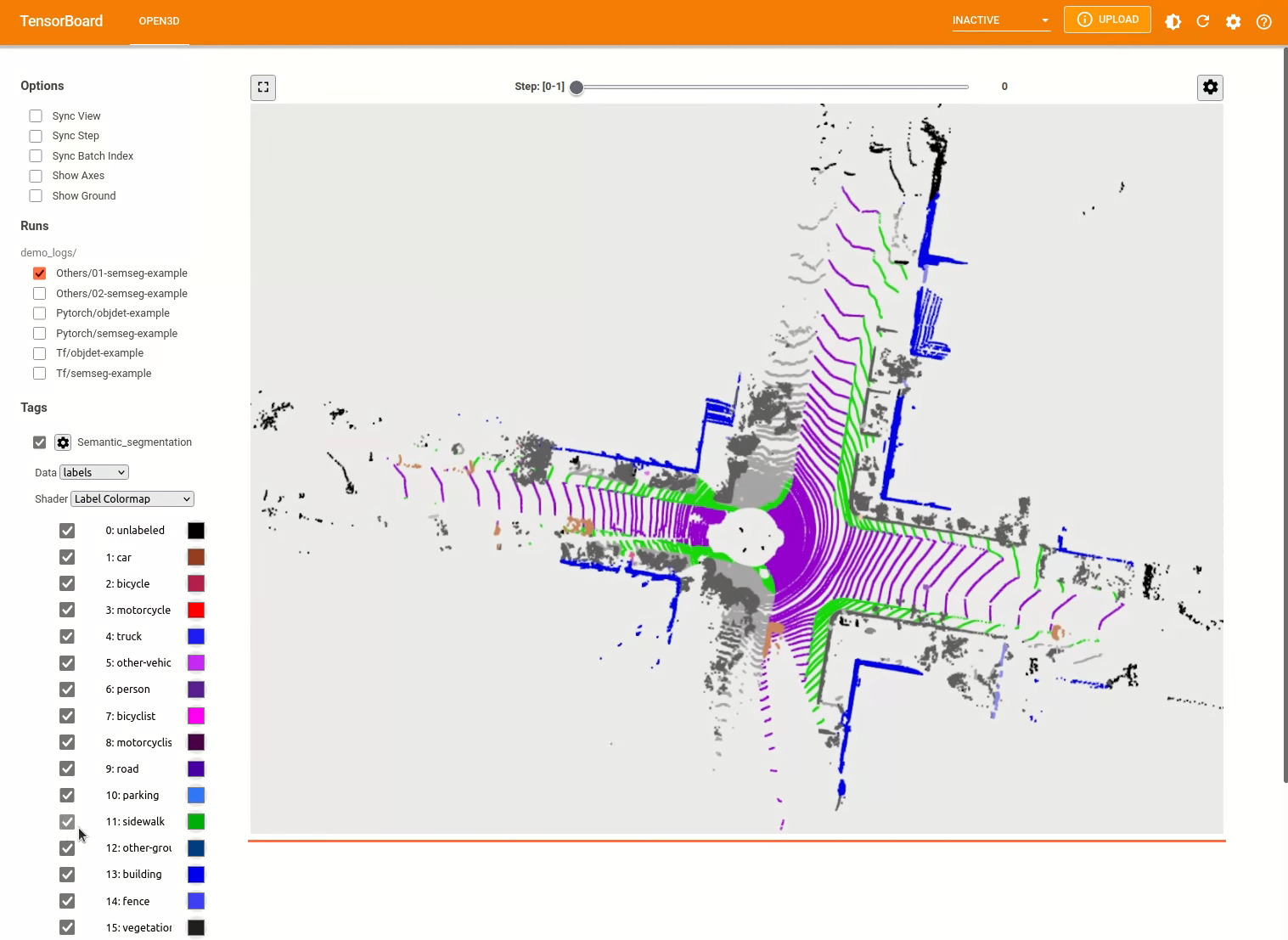
3D對象檢測模型類似於語義分割模型。我們可以使用驗證的模型實例化管道以進行對象檢測,並將其運行在數據集的點雲上。有關獲取驗證模型的權重的,請參見模型動物園。
 import os
import open3d . ml as _ml3d
import open3d . ml . torch as ml3d

cfg_file = "ml3d/configs/pointpillars_kitti.yml"
cfg = _ml3d . utils . Config . load_from_file ( cfg_file )

model = ml3d . models . PointPillars ( ** cfg . model )
cfg . dataset [ 'dataset_path' ] = "/path/to/your/dataset"
dataset = ml3d . datasets . KITTI ( cfg . dataset . pop ( 'dataset_path' , None ), ** cfg . dataset )
pipeline = ml3d . pipelines . ObjectDetection ( model , dataset = dataset , device = "gpu" , ** cfg . pipeline )

# download the weights.
ckpt_folder = "./logs/"
os . makedirs ( ckpt_folder , exist_ok = True )
ckpt_path = ckpt_folder + "pointpillars_kitti_202012221652utc.pth"
pointpillar_url = "https://storage.googleapis.com/open3d-releases/model-zoo/pointpillars_kitti_202012221652utc.pth"
if not os . path . exists ( ckpt_path ):
    cmd = "wget {} -O {}" . format ( pointpillar_url , ckpt_path )
    os . system ( cmd )

# load the parameters.
pipeline . load_ckpt ( ckpt_path = ckpt_path )

test_split = dataset . get_split ( "test" )
data = test_split . get_data ( 0 )

# run inference on a single example.
# returns dict with 'predict_labels' and 'predict_scores'.
result = pipeline . run_inference ( data )

# evaluate performance on the test set; this will write logs to './logs'.
pipeline . run_test ()
用戶還可以使用預定義的腳本來加載預告片的權重和運行測試。
與推理相似,管道提供了用於在數據集上訓練模型的接口。
 # use a cache for storing the results of the preprocessing (default path is './logs/cache')
dataset = ml3d . datasets . KITTI ( dataset_path = '/path/to/KITTI/' , use_cache = True )

# create the model with random initialization.
model = PointPillars ()

pipeline = ObjectDetection ( model = model , dataset = dataset , max_epoch = 100 )

# prints training progress in the console.
pipeline . run_train ()
以下是使用Kitti可視化的示例。該示例顯示了對Kitti數據集的邊界框的使用。
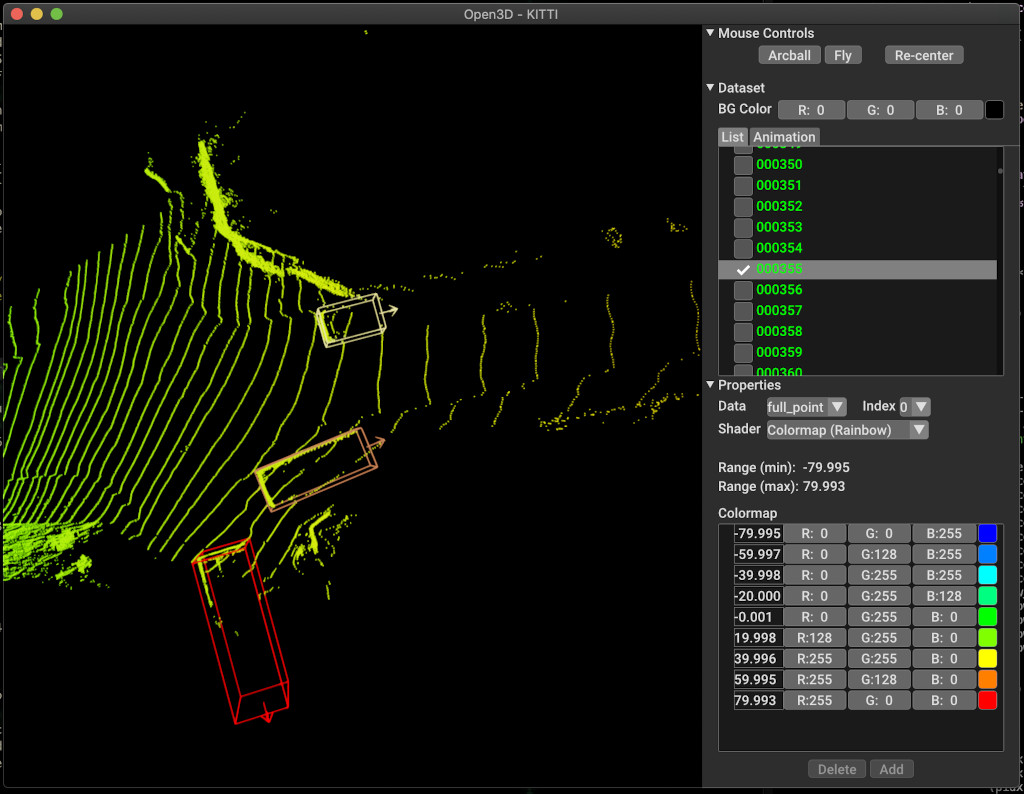
有關更多示例,請參見examples/和scripts/目錄。您還可以在配置文件中啟用保存培訓摘要,並通過張量板可視化地面真相和結果。有關詳細信息,請參見本教程。
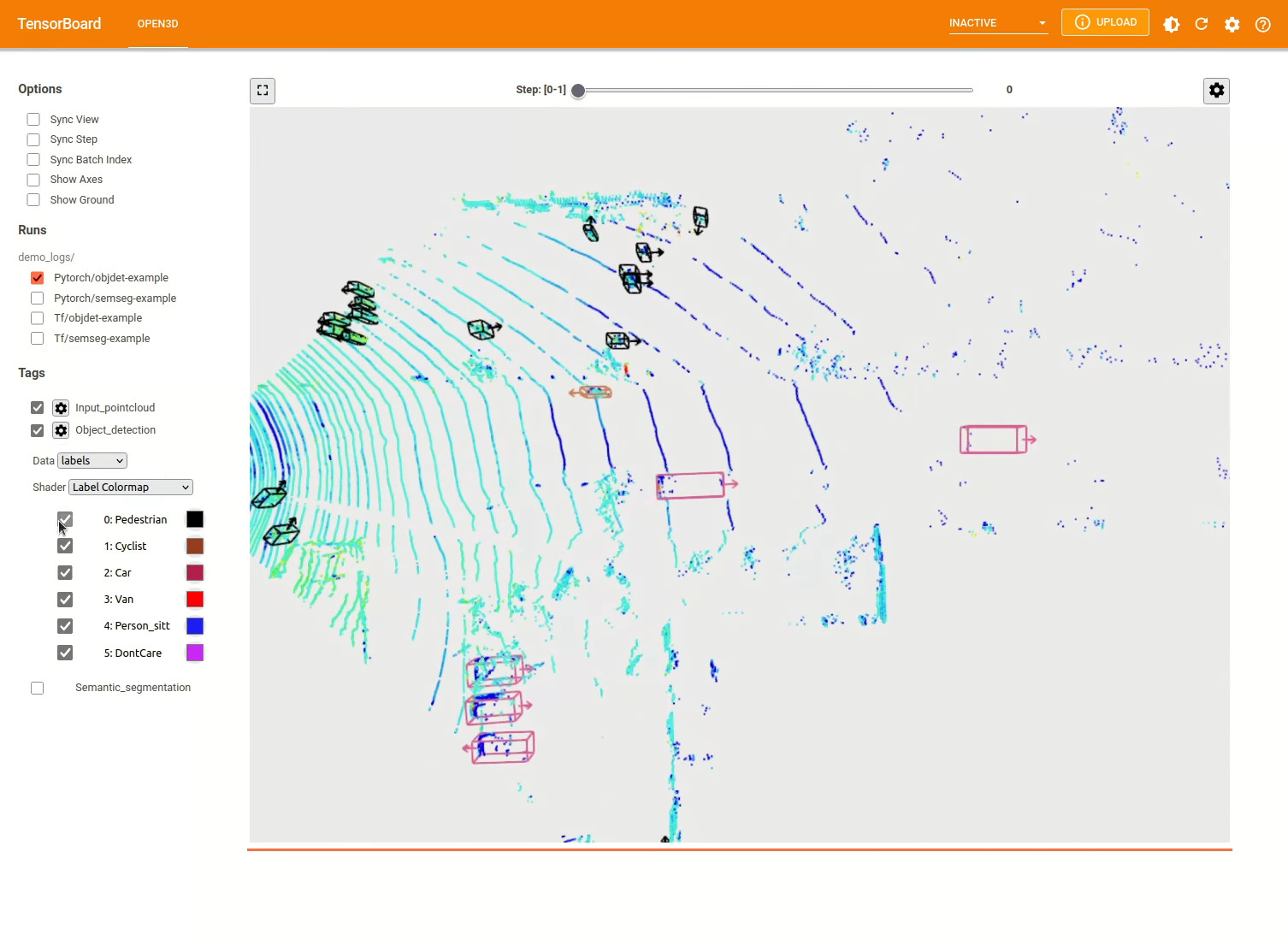
scripts/run_pipeline.py提供了一個簡單的接口,用於訓練和評估數據集上的模型。它節省了定義特定模型並傳遞精確配置的麻煩。
python scripts/run_pipeline.py {tf/torch} -c <path-to-config> --pipeline {SemanticSegmentation/ObjectDetection} --<extra args>
您可以使用腳本進行語義細分和對象檢測。您必須在pipeline參數中指定語義分割或對象進行。請注意, extra args將優先於配置文件中存在的相同參數。因此,在啟動腳本時,您可以將與命令行參數相同,而不是更改配置文件中的param。
例如。
 # Launch training for RandLANet on SemanticKITTI with torch.
python scripts/run_pipeline.py torch -c ml3d/configs/randlanet_semantickitti.yml --dataset.dataset_path <path-to-dataset> --pipeline SemanticSegmentation --dataset.use_cache True

# Launch testing for PointPillars on KITTI with torch.
python scripts/run_pipeline.py torch -c ml3d/configs/pointpillars_kitti.yml --split test --dataset.dataset_path <path-to-dataset> --pipeline ObjectDetection --dataset.use_cache True
為了進一步幫助,請運行python scripts/run_pipeline.py --help 。
Open3D-ML的核心部分生活在ml3d文件夾中,該子文件夾在ml名稱空間中集成到Open3D中。除了核心部分外,目錄examples和scripts還提供了支持腳本,以開始設置培訓管道或在數據集上運行網絡。
 ├─ docs                   # Markdown and rst files for documentation
├─ examples               # Place for example scripts and notebooks
├─ ml3d                   # Package root dir that is integrated in open3d
     ├─ configs           # Model configuration files
     ├─ datasets          # Generic dataset code; will be integratede as open3d.ml.{tf,torch}.datasets
     ├─ metrics           # Metrics available for evaluating ML models
     ├─ utils             # Framework independent utilities; available as open3d.ml.{tf,torch}.utils
     ├─ vis               # ML specific visualization functions
     ├─ tf                # Directory for TensorFlow specific code. same structure as ml3d/torch.
     │                    # This will be available as open3d.ml.tf
     ├─ torch             # Directory for PyTorch specific code; available as open3d.ml.torch
          ├─ dataloaders  # Framework specific dataset code, e.g. wrappers that can make use of the
          │               # generic dataset code.
          ├─ models       # Code for models
          ├─ modules      # Smaller modules, e.g., metrics and losses
          ├─ pipelines    # Pipelines for tasks like semantic segmentation
          ├─ utils        # Utilities for <>
├─ scripts                # Demo scripts for training and dataset download scripts
對於語義分割的任務,我們使用所有類別的平均交叉點(MIOU)來衡量不同方法的性能。該表顯示了用於分割任務和各個分數的可用模型和數據集。每個分數鏈接到相應的權重文件。
| 模型 /數據集 | Semantickitti | 多倫多3D | S3DIS | smantic3d | 巴黎 - 萊爾3D | 掃描儀 |
|---|---|---|---|---|---|---|
| Randla-Net(TF) | 53.7 | 73.7 | 70.9 | 76.0 | 70.0* | - |
| Randla-Net(火炬) | 52.8 | 74.0 | 70.9 | 76.0 | 70.0* | - |
| KPCONV(TF) | 58.7 | 65.6 | 65.0 | - | 76.7 | - |
| KPCONV(火炬) | 58.0 | 65.6 | 60.0 | - | 76.7 | - |
| sparseconvunet(火炬) | - | - | - | - | - | 68 |
| sparseconvunet(TF) | - | - | - | - | - | 68.2 |
| Point -Transformer(火炬) | - | - | 69.2 | - | - | - |
| Point Transformer(TF) | - | - | 69.2 | - | - | - |
(*)使用原始作者的權重。
對於對象檢測的任務,我們使用鳥類視圖(BEV)和3D的平均平均精度(MAP)來測量不同方法的性能。該表顯示了用於對象檢測任務和相應分數的可用模型和數據集。每個分數鏈接到相應的權重文件。對於評估,根據Kitti的驗證標準,使用驗證子集評估了模型。這些模型接受了三類培訓(汽車,行人和騎自行車的人)。計算值是所有難度級別的所有類圖的平均值。對於Waymo數據集,對模型進行了三類培訓(行人,車輛,騎自行車的人)。
| 模型 /數據集 | kitti [bev / 3d] @ 0.70 | Waymo(BEV / 3D) @ 0.50 |
|---|---|---|
| 點柱(TF) | 61.6 / 55.2 | - |
| 尖頭(火炬) | 61.2 / 52.8 | AVG:61.01 / 48.30 |最佳:61.47 / 57.55 [^wpp-train] |
| Pointrcnn(TF) | 78.2 / 65.9 | - |
| Pointrcnn(火炬) | 78.2 / 65.9 | - |
[^wpp-train]:avg。指標是三組訓練跑的平均值,其中4、8、16和32 GPU。訓練是在30個時期後停止的訓練。模型檢查點可用於最佳訓練運行。
要使用地面真相採樣數據增強進行培訓,我們可以生成地面真相數據庫如下:
python scripts/collect_bboxes.py --dataset_path <path_to_data_root>
這將生成一個由火車拆分對象組成的數據庫。建議將此增強物用於數據集,例如Kitti,其中對像很少。
Pointrcnn的兩個階段進行了分別訓練。要使用Pytorch訓練Pointrcnn的提案生成階段,請執行以下命令:
 # Train RPN for 100 epochs.
python scripts/run_pipeline.py torch -c ml3d/configs/pointrcnn_kitti.yml --dataset.dataset_path <path-to-dataset> --mode RPN --epochs 100
在獲得了訓練有素的RPN網絡後,我們可以使用冷凍RPN權重培訓RCNN網絡。
 # Train RCNN for 70 epochs.
python scripts/run_pipeline.py torch -c ml3d/configs/pointrcnn_kitti.yml --dataset.dataset_path <path-to-dataset> --mode RCNN --model.ckpt_path <path_to_checkpoint> --epochs 100
有關所有權重文件的完整列表,請參見Model_Weights.txt和MD5 checksum文件mode_weights.md5。
以下是我們提供數據集讀取器類的數據集列表。
要下載這些數據集,請訪問各自的網頁,並查看scripts/download_datasets中的腳本。
有很多方法可以為該項目做出貢獻。你可以:
請向開發分支提出拉的請求。 Open3D是社區努力。我們歡迎並慶祝社區的貢獻!
如果您想分享訓練的型號的權重,請連接或鏈接拉動請求中的權重文件。對於錯誤和問題,請打開一個問題。還請查看我們的溝通渠道,以與社區聯繫。
如果您使用Open3D,請引用我們的工作(PDF)。
 @article { Zhou2018 ,
    author    = { Qian-Yi Zhou and Jaesik Park and Vladlen Koltun } ,
    title     = { {Open3D}: {A} Modern Library for {3D} Data Processing } ,
    journal   = { arXiv:1801.09847 } ,
    year      = { 2018 } ,
}







