Open3D ML
v0.18 release

インストール|始めましょう|構造|タスクとアルゴリズム|モデル動物園|データセット| how-tos |貢献する
Open3D-MLは、3D機械学習タスク用のOpen3Dの拡張です。 Open3D Coreライブラリの上に構築され、3Dデータ処理のための機械学習ツールで拡張します。このレポは、セマンティックポイントクラウドセグメンテーションなどのアプリケーションに焦点を当てており、トレーニング用のパイプラインだけでなく、一般的なタスクにも適用できる前提型モデルを提供します。
Open3D-MLはTensorFlowとPytorchで動作し、既存のプロジェクトに簡単に統合し、データの視覚化などのMLフレームワークとは無関係に一般的な機能を提供します。
Open3D-MLは、Open3D V0.11+ Python分布に統合されており、MLフレームワークの次のバージョンと互換性があります。
GNU/Linux x86_64 、オプション)Open3Dをインストールできます
 # make sure you have the latest pip version
pip install --upgrade pip
# install open3d
pip install open3d
PytorchまたはTensorflowの互換性のあるバージョンをインストールするには、それぞれの要件ファイルを使用できます。
 # To install a compatible version of TensorFlow
pip install -r requirements-tensorflow.txt
# To install a compatible version of PyTorch
pip install -r requirements-torch.txt
# To install a compatible version of PyTorch with CUDA on Linux
pip install -r requirements-torch-cuda.txt
インストールの使用をテストします
 # with PyTorch
$ python -c " import open3d.ml.torch as ml3d "
# or with TensorFlow
$ python -c " import open3d.ml.tf as ml3d "
MLフレームワークまたはCUDAのさまざまなバージョンを使用する必要がある場合は、ソースからOpen3Dを構築するか、DockerでOpen3Dを構築することをお勧めします。
Linux上のv0.18以降、PytorchとTensorflow [Python 3.11 Support PRを参照]の互換性を構築するため、Pypi Open3DホイールはTensorflowのネイティブサポートを持っていません。 LinuxでTensorflowを使用してOpen3Dを使用したい場合は、Tensorflow(ただしPytorchではなく)をサポートして、DockerのソースからOpen3Dホイールを作成できます。
 cd docker
# Build open3d and open3d-cpu wheels for Python 3.10 with Tensorflow support
export BUILD_PYTORCH_OPS=OFF BUILD_TENSORFLOW_OPS=ON
./docker_build.sh cuda_wheel_py310データセット名空間には、一般的なデータセットを読むためのクラスが含まれています。ここでは、Semantickittiデータセットを読んで視覚化します。
 import open3d . ml . torch as ml3d  # or open3d.ml.tf as ml3d

# construct a dataset by specifying dataset_path
dataset = ml3d . datasets . SemanticKITTI ( dataset_path = '/path/to/SemanticKITTI/' )

# get the 'all' split that combines training, validation and test set
all_split = dataset . get_split ( 'all' )

# print the attributes of the first datum
print ( all_split . get_attr ( 0 ))

# print the shape of the first point cloud
print ( all_split . get_data ( 0 )[ 'point' ]. shape )

# show the first 100 frames using the visualizer
vis = ml3d . vis . Visualizer ()
vis . visualize_dataset ( dataset , 'all' , indices = range ( 100 ))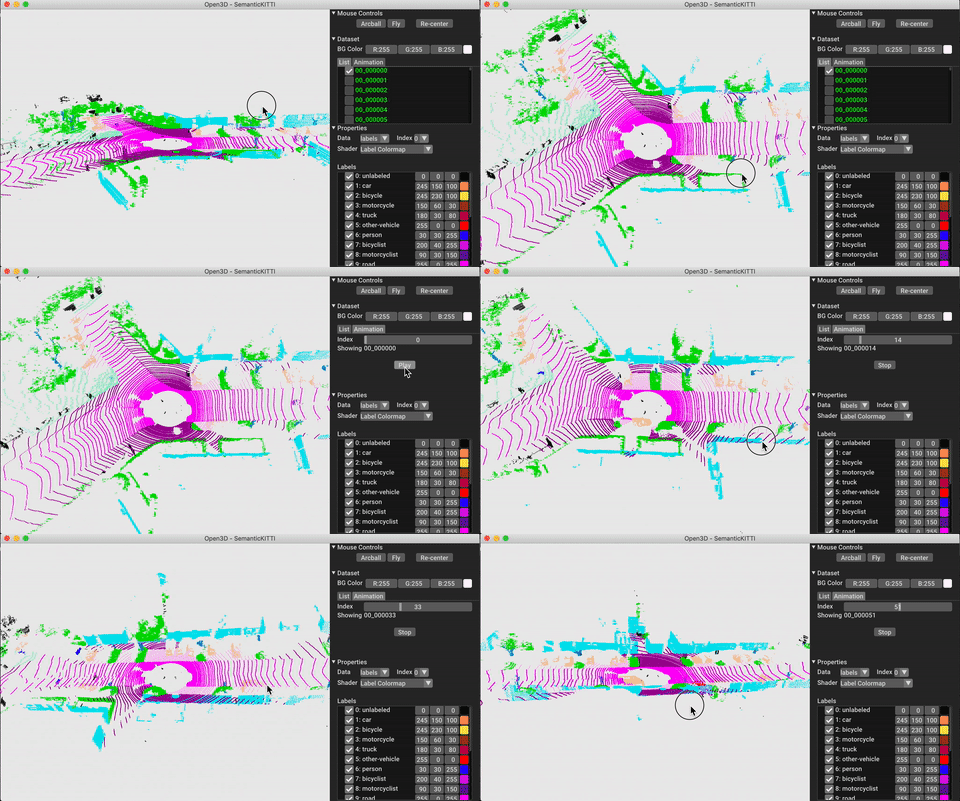
モデル、データセット、パイプラインの構成はml3d/configsに保存されます。ユーザーは、独自のYAMLファイルを構築して、カスタマイズされた構成の記録を保持することもできます。構成ファイルを読み取り、そこからモジュールを構築する例を示します。
 import open3d . ml as _ml3d
import open3d . ml . torch as ml3d # or open3d.ml.tf as ml3d

framework = "torch" # or tf
cfg_file = "ml3d/configs/randlanet_semantickitti.yml"
cfg = _ml3d . utils . Config . load_from_file ( cfg_file )

# fetch the classes by the name
Pipeline = _ml3d . utils . get_module ( "pipeline" , cfg . pipeline . name , framework )
Model = _ml3d . utils . get_module ( "model" , cfg . model . name , framework )
Dataset = _ml3d . utils . get_module ( "dataset" , cfg . dataset . name )

# use the arguments in the config file to construct the instances
cfg . dataset [ 'dataset_path' ] = "/path/to/your/dataset"
dataset = Dataset ( cfg . dataset . pop ( 'dataset_path' , None ), ** cfg . dataset )
model = Model ( ** cfg . model )
pipeline = Pipeline ( model , dataset , ** cfg . pipeline )前の例に基づいて、セマンティックセグメンテーションのための優先モデルを備えたパイプラインをインスタンス化し、データセットのポイントクラウドで実行できます。事前に処理されたモデルの重みを取得するには、モデル動物園を参照してください。
 import os
import open3d . ml as _ml3d
import open3d . ml . torch as ml3d

cfg_file = "ml3d/configs/randlanet_semantickitti.yml"
cfg = _ml3d . utils . Config . load_from_file ( cfg_file )

model = ml3d . models . RandLANet ( ** cfg . model )
cfg . dataset [ 'dataset_path' ] = "/path/to/your/dataset"
dataset = ml3d . datasets . SemanticKITTI ( cfg . dataset . pop ( 'dataset_path' , None ), ** cfg . dataset )
pipeline = ml3d . pipelines . SemanticSegmentation ( model , dataset = dataset , device = "gpu" , ** cfg . pipeline )

# download the weights.
ckpt_folder = "./logs/"
os . makedirs ( ckpt_folder , exist_ok = True )
ckpt_path = ckpt_folder + "randlanet_semantickitti_202201071330utc.pth"
randlanet_url = "https://storage.googleapis.com/open3d-releases/model-zoo/randlanet_semantickitti_202201071330utc.pth"
if not os . path . exists ( ckpt_path ):
    cmd = "wget {} -O {}" . format ( randlanet_url , ckpt_path )
    os . system ( cmd )

# load the parameters.
pipeline . load_ckpt ( ckpt_path = ckpt_path )

test_split = dataset . get_split ( "test" )
data = test_split . get_data ( 0 )

# run inference on a single example.
# returns dict with 'predict_labels' and 'predict_scores'.
result = pipeline . run_inference ( data )

# evaluate performance on the test set; this will write logs to './logs'.
pipeline . run_test ()
ユーザーは、事前に定義されたスクリプトを使用して、前提条件の重みをロードしてテストを実行することもできます。
推論と同様に、パイプラインはデータセットでモデルをトレーニングするためのインターフェイスを提供します。
 # use a cache for storing the results of the preprocessing (default path is './logs/cache')
dataset = ml3d . datasets . SemanticKITTI ( dataset_path = '/path/to/SemanticKITTI/' , use_cache = True )

# create the model with random initialization.
model = RandLANet ()

pipeline = SemanticSegmentation ( model = model , dataset = dataset , max_epoch = 100 )

# prints training progress in the console.
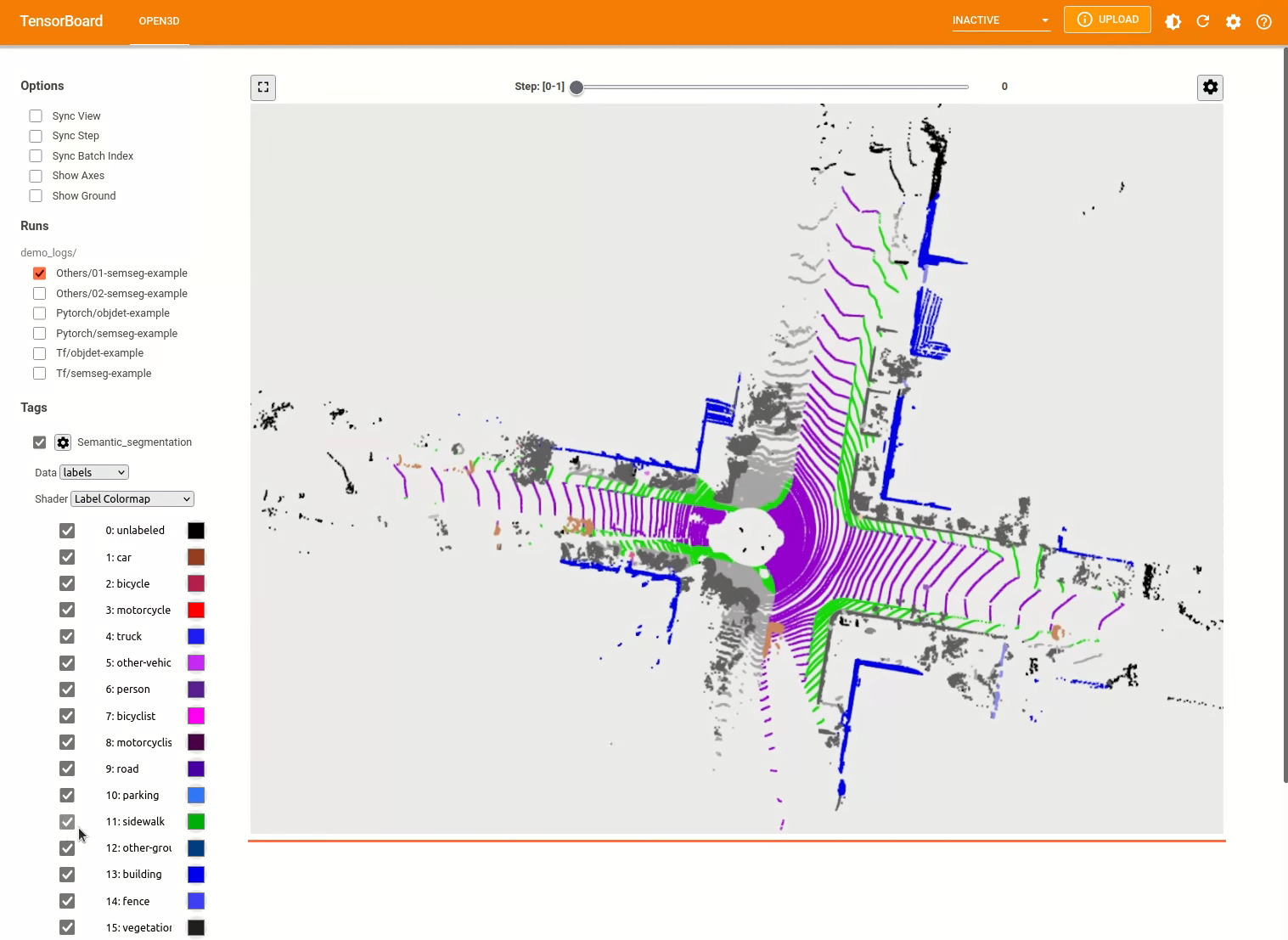
pipeline . run_train ()その他の例についてはexamples/およびscripts/ディレクトリを参照してください。また、構成ファイルでトレーニングの概要を保存できるようにし、テンソルボードでグラウンドトゥルースと結果を視覚化することもできます。詳細については、このチュートリアルを参照してください。
3Dオブジェクト検出モデルは、セマンティックセグメンテーションモデルに似ています。オブジェクト検出のための優先モデルを備えたパイプラインをインスタンス化し、データセットのポイントクラウドで実行できます。事前に処理されたモデルの重みを取得するには、モデル動物園を参照してください。
 import os
import open3d . ml as _ml3d
import open3d . ml . torch as ml3d

cfg_file = "ml3d/configs/pointpillars_kitti.yml"
cfg = _ml3d . utils . Config . load_from_file ( cfg_file )

model = ml3d . models . PointPillars ( ** cfg . model )
cfg . dataset [ 'dataset_path' ] = "/path/to/your/dataset"
dataset = ml3d . datasets . KITTI ( cfg . dataset . pop ( 'dataset_path' , None ), ** cfg . dataset )
pipeline = ml3d . pipelines . ObjectDetection ( model , dataset = dataset , device = "gpu" , ** cfg . pipeline )

# download the weights.
ckpt_folder = "./logs/"
os . makedirs ( ckpt_folder , exist_ok = True )
ckpt_path = ckpt_folder + "pointpillars_kitti_202012221652utc.pth"
pointpillar_url = "https://storage.googleapis.com/open3d-releases/model-zoo/pointpillars_kitti_202012221652utc.pth"
if not os . path . exists ( ckpt_path ):
    cmd = "wget {} -O {}" . format ( pointpillar_url , ckpt_path )
    os . system ( cmd )

# load the parameters.
pipeline . load_ckpt ( ckpt_path = ckpt_path )

test_split = dataset . get_split ( "test" )
data = test_split . get_data ( 0 )

# run inference on a single example.
# returns dict with 'predict_labels' and 'predict_scores'.
result = pipeline . run_inference ( data )

# evaluate performance on the test set; this will write logs to './logs'.
pipeline . run_test ()
ユーザーは、事前に定義されたスクリプトを使用して、前提条件の重みをロードしてテストを実行することもできます。
推論と同様に、パイプラインはデータセットでモデルをトレーニングするためのインターフェイスを提供します。
 # use a cache for storing the results of the preprocessing (default path is './logs/cache')
dataset = ml3d . datasets . KITTI ( dataset_path = '/path/to/KITTI/' , use_cache = True )

# create the model with random initialization.
model = PointPillars ()

pipeline = ObjectDetection ( model = model , dataset = dataset , max_epoch = 100 )

# prints training progress in the console.
pipeline . run_train ()
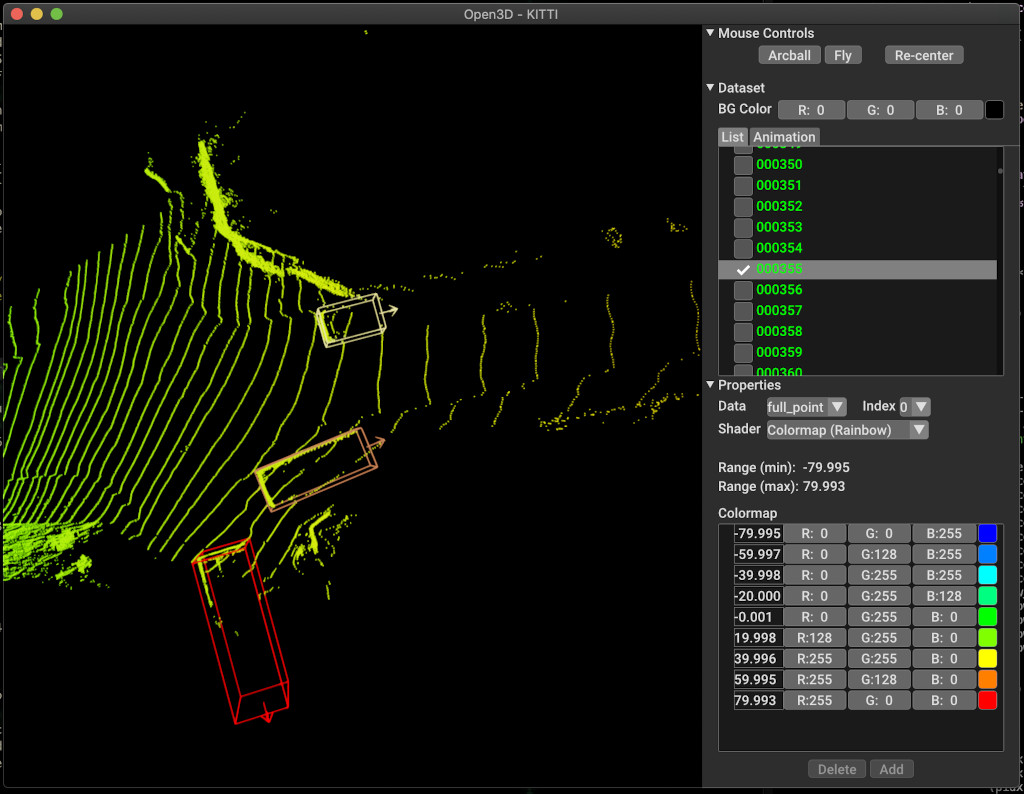
以下は、kittiを使用した視覚化の例です。この例は、Kittiデータセットの境界ボックスの使用を示しています。
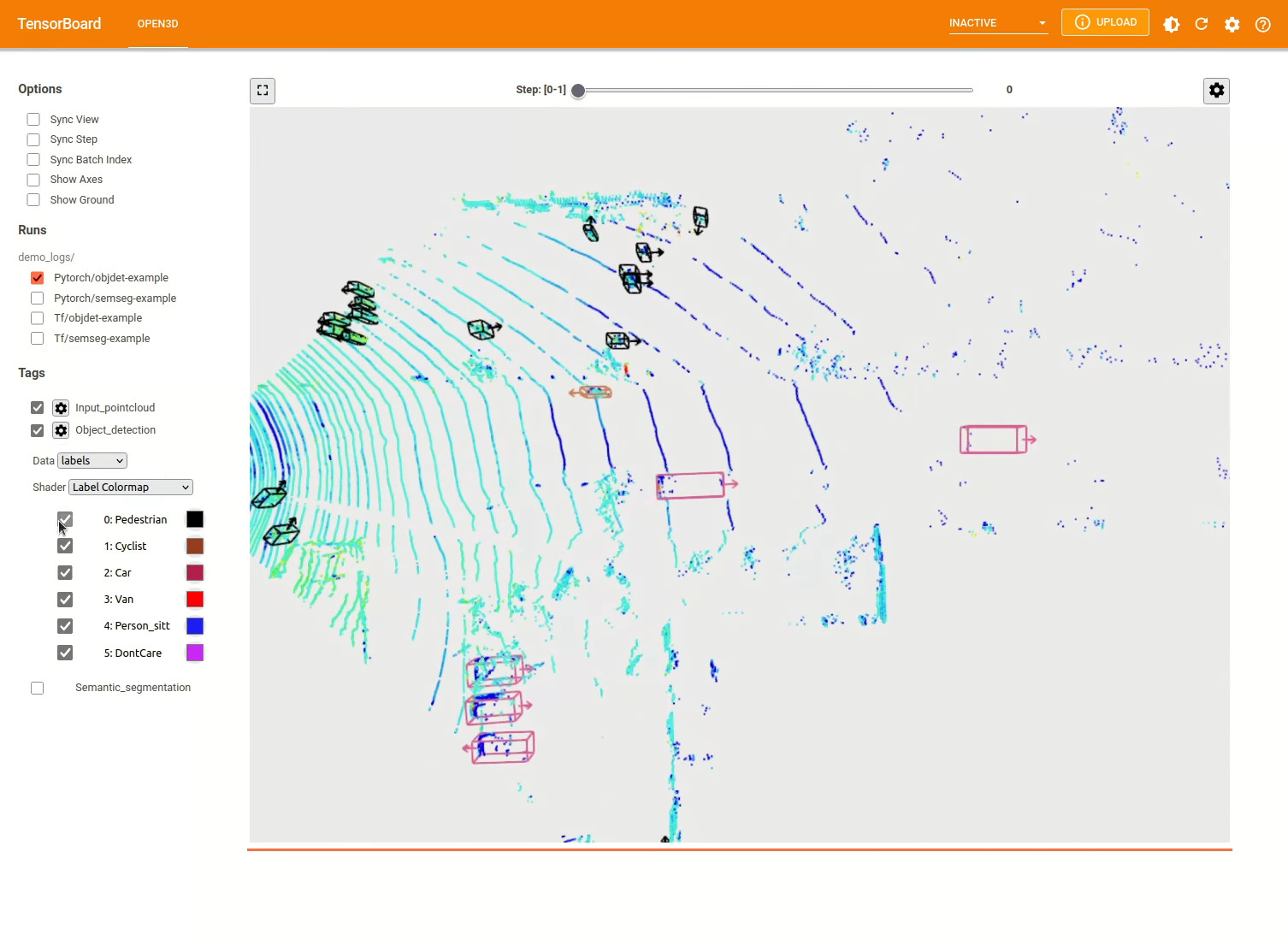
その他の例についてはexamples/およびscripts/ディレクトリを参照してください。また、構成ファイルでトレーニングの概要を保存できるようにし、テンソルボードでグラウンドトゥルースと結果を視覚化することもできます。詳細については、このチュートリアルを参照してください。
scripts/run_pipeline.pyデータセット上のモデルをトレーニングおよび評価するための簡単なインターフェイスを提供します。特定のモデルを定義し、正確な構成を渡す問題を節約します。
python scripts/run_pipeline.py {tf/torch} -c <path-to-config> --pipeline {SemanticSegmentation/ObjectDetection} --<extra args>
セマンティックセグメンテーションとオブジェクト検出の両方にスクリプトを使用できます。 pipelineパラメーターでセマンティックセグメンテーションまたはObjectDetectionを指定する必要があります。構成ファイルに存在するのと同じパラメーターで、 extra argsが優先されることに注意してください。したがって、構成ファイルでPARAMを変更する代わりに、スクリプトの起動中にコマンドライン引数と同じを渡すことができます。
例えば。
 # Launch training for RandLANet on SemanticKITTI with torch.
python scripts/run_pipeline.py torch -c ml3d/configs/randlanet_semantickitti.yml --dataset.dataset_path <path-to-dataset> --pipeline SemanticSegmentation --dataset.use_cache True

# Launch testing for PointPillars on KITTI with torch.
python scripts/run_pipeline.py torch -c ml3d/configs/pointpillars_kitti.yml --split test --dataset.dataset_path <path-to-dataset> --pipeline ObjectDetection --dataset.use_cache True
さらにヘルプについては、 python scripts/run_pipeline.py --helpを実行します。
Open3D-MLのコア部分は、 ml3dサブフォルダーに住んでおり、 mlネームスペースのOpen3Dに統合されています。コアパーツに加えて、ディレクトリのexamplesとscriptsトレーニングパイプラインのセットアップやデータセットでネットワークの実行を開始するためのサポートスクリプトを提供します。
 ├─ docs                   # Markdown and rst files for documentation
├─ examples               # Place for example scripts and notebooks
├─ ml3d                   # Package root dir that is integrated in open3d
     ├─ configs           # Model configuration files
     ├─ datasets          # Generic dataset code; will be integratede as open3d.ml.{tf,torch}.datasets
     ├─ metrics           # Metrics available for evaluating ML models
     ├─ utils             # Framework independent utilities; available as open3d.ml.{tf,torch}.utils
     ├─ vis               # ML specific visualization functions
     ├─ tf                # Directory for TensorFlow specific code. same structure as ml3d/torch.
     │                    # This will be available as open3d.ml.tf
     ├─ torch             # Directory for PyTorch specific code; available as open3d.ml.torch
          ├─ dataloaders  # Framework specific dataset code, e.g. wrappers that can make use of the
          │               # generic dataset code.
          ├─ models       # Code for models
          ├─ modules      # Smaller modules, e.g., metrics and losses
          ├─ pipelines    # Pipelines for tasks like semantic segmentation
          ├─ utils        # Utilities for <>
├─ scripts                # Demo scripts for training and dataset download scripts
セマンティックセグメンテーションのタスクについては、すべてのクラスにわたって平均交差点(MIOU)を使用して、さまざまな方法のパフォーマンスを測定します。この表は、セグメンテーションタスクで利用可能なモデルとデータセットとそれぞれのスコアを示しています。各スコアは、それぞれの重量ファイルにリンクします。
| モデル /データセット | Semantickitti | トロント3D | S3DIS | semantic3d | Paris-Lille3d | スキャネット |
|---|---|---|---|---|---|---|
| randla-net(tf) | 53.7 | 73.7 | 70.9 | 76.0 | 70.0* | - |
| Randla-net(トーチ) | 52.8 | 74.0 | 70.9 | 76.0 | 70.0* | - |
| KPCONV(TF) | 58.7 | 65.6 | 65.0 | - | 76.7 | - |
| KPCONV(トーチ) | 58.0 | 65.6 | 60.0 | - | 76.7 | - |
| Sparseconvunet(トーチ) | - | - | - | - | - | 68 |
| sparseconvunet(tf) | - | - | - | - | - | 68.2 |
| ポイントトランスフォーマー(トーチ) | - | - | 69.2 | - | - | - |
| PointTransformer(TF) | - | - | 69.2 | - | - | - |
(*)元の著者からのウェイトを使用します。
オブジェクト検出のタスクについては、バードアイビュー(BEV)および3Dの平均平均精度(MAP)を使用して、さまざまな方法のパフォーマンスを測定します。この表は、オブジェクト検出タスクとそれぞれのスコアで利用可能なモデルとデータセットを示しています。各スコアは、それぞれの重量ファイルにリンクします。評価のために、Kittiの検証基準に従って、モデルは検証サブセットを使用して評価されました。モデルは、3つのクラス(車、歩行者、サイクリスト)のためにトレーニングされました。計算された値は、すべての難易度レベルのすべてのクラスのマップ上の平均値です。 WAYMOデータセットの場合、モデルは3つのクラス(歩行者、車両、サイクリスト)でトレーニングされました。
| モデル /データセット | kitti [bev / 3d] @ 0.70 | Waymo(Bev / 3d) @ 0.50 |
|---|---|---|
| ポイントピラー(TF) | 61.6 / 55.2 | - |
| ポイントピラー(トーチ) | 61.2 / 52.8 | AVG:61.01 / 48.30 |ベスト:61.47 / 57.55 [^wpp-train] |
| pointrcnn(tf) | 78.2 / 65.9 | - |
| pointrcnn(トーチ) | 78.2 / 65.9 | - |
[^wpp-train]:平均。メトリックは、4、8、16、および32 GPUの3セットのトレーニングランの平均です。トレーニングは、30エポックの後に停止したためでした。モデルチェックポイントは、最高のトレーニング実行に利用できます。
トレーニングにグラウンドトゥルースサンプリングデータ増強を使用するには、次のようにグラウンドトゥルースデータベースを生成できます。
python scripts/collect_bboxes.py --dataset_path <path_to_data_root>
これにより、列車の分割からのオブジェクトで構成されるデータベースが生成されます。オブジェクトがまばらなKittiのようなデータセットにこの増強を使用することをお勧めします。
Pointrcnnの2つの段階は別々にトレーニングされています。 Pointrcnnの提案生成段階をPytorchで訓練するには、次のコマンドを実行します。
 # Train RPN for 100 epochs.
python scripts/run_pipeline.py torch -c ml3d/configs/pointrcnn_kitti.yml --dataset.dataset_path <path-to-dataset> --mode RPN --epochs 100
よく訓練されたRPNネットワークを取得した後、Frozen RPNウェイトでRCNNネットワークをトレーニングできます。
 # Train RCNN for 70 epochs.
python scripts/run_pipeline.py torch -c ml3d/configs/pointrcnn_kitti.yml --dataset.dataset_path <path-to-dataset> --mode RCNN --model.ckpt_path <path_to_checkpoint> --epochs 100
すべての重量ファイルの完全なリストについては、model_weights.txtおよびmd5 checksum file model_weights.md5を参照してください。
以下は、データセットリーダークラスを提供するデータセットのリストです。
これらのデータセットをダウンロードするには、それぞれのWebページにアクセスし、 scripts/download_datasetsのスクリプトをご覧ください。
このプロジェクトに貢献する方法はたくさんあります。あなたはできる:
devブランチへのプルリクエストをお願いします。 Open3Dはコミュニティの努力です。コミュニティからの貢献を歓迎し、祝います!
トレーニングしたモデルのウェイトを共有したい場合は、PullリクエストでWeightsファイルを添付またはリンクしてください。バグや問題については、問題を開きます。コミュニティと連絡を取るために、通信チャネルもチェックしてください。
Open3Dを使用する場合は、私たちの作業(PDF)を引用してください。
 @article { Zhou2018 ,
    author    = { Qian-Yi Zhou and Jaesik Park and Vladlen Koltun } ,
    title     = { {Open3D}: {A} Modern Library for {3D} Data Processing } ,
    journal   = { arXiv:1801.09847 } ,
    year      = { 2018 } ,
}







