Open3D ML
v0.18 release

설치 | 시작 | 구조 | 작업 및 알고리즘 | 모델 동물원 | 데이터 세트 | How-tos | 기여하다
Open3D-ML은 3D 머신 러닝 작업을위한 Open3D의 확장입니다. Open3D Core 라이브러리 위에 구축되어 3D 데이터 처리를위한 기계 학습 도구로 확장합니다. 이 리포지토리는 시맨틱 포인트 클라우드 세분화와 같은 응용 프로그램에 중점을두고 일반적인 작업과 교육을위한 파이프 라인에 적용될 수있는 사기 모델을 제공합니다.
Open3D-ML은 Tensorflow 및 Pytorch 와 협력하여 기존 프로젝트에 쉽게 통합되며 데이터 시각화와 같은 ML 프레임 워크와 무관하게 일반 기능을 제공합니다.
Open3D-ML은 Open3D v0.11+ 파이썬 분포에 통합되며 다음 버전의 ML 프레임 워크와 호환됩니다.
GNU/Linux x86_64 , 선택 사항)Open3D를 설치할 수 있습니다
 # make sure you have the latest pip version
pip install --upgrade pip
# install open3d
pip install open3d
호환되는 버전의 Pytorch 또는 Tensorflow를 설치하려면 해당 요구 사항 파일을 사용할 수 있습니다.
 # To install a compatible version of TensorFlow
pip install -r requirements-tensorflow.txt
# To install a compatible version of PyTorch
pip install -r requirements-torch.txt
# To install a compatible version of PyTorch with CUDA on Linux
pip install -r requirements-torch-cuda.txt
설치 사용을 테스트합니다
 # with PyTorch
$ python -c " import open3d.ml.torch as ml3d "
# or with TensorFlow
$ python -c " import open3d.ml.tf as ml3d "
다른 버전의 ML 프레임 워크 또는 CUDA를 사용해야하는 경우 소스에서 Open3D를 빌드하거나 Docker에서 Open3D를 빌드하는 것이 좋습니다.
Linux의 V0.18에서 PYPI Open3D 휠은 Pytorch와 Tensorflow 간의 비 호환성으로 인해 텐서 플로우를 기본적으로 지원하지 않습니다 [Python 3.11 지원 PR 참조] 자세한 내용. Linux에서 Tensorflow와 함께 Open3D를 사용하려면 Docker의 소스에서 Open3D 휠을 만들 수 있습니다.
 cd docker
# Build open3d and open3d-cpu wheels for Python 3.10 with Tensorflow support
export BUILD_PYTORCH_OPS=OFF BUILD_TENSORFLOW_OPS=ON
./docker_build.sh cuda_wheel_py310데이터 세트 네임 스페이스에는 공통 데이터 세트를 읽기위한 클래스가 포함되어 있습니다. 여기서 우리는 semantickitti 데이터 세트를 읽고 시각화합니다.
 import open3d . ml . torch as ml3d  # or open3d.ml.tf as ml3d

# construct a dataset by specifying dataset_path
dataset = ml3d . datasets . SemanticKITTI ( dataset_path = '/path/to/SemanticKITTI/' )

# get the 'all' split that combines training, validation and test set
all_split = dataset . get_split ( 'all' )

# print the attributes of the first datum
print ( all_split . get_attr ( 0 ))

# print the shape of the first point cloud
print ( all_split . get_data ( 0 )[ 'point' ]. shape )

# show the first 100 frames using the visualizer
vis = ml3d . vis . Visualizer ()
vis . visualize_dataset ( dataset , 'all' , indices = range ( 100 ))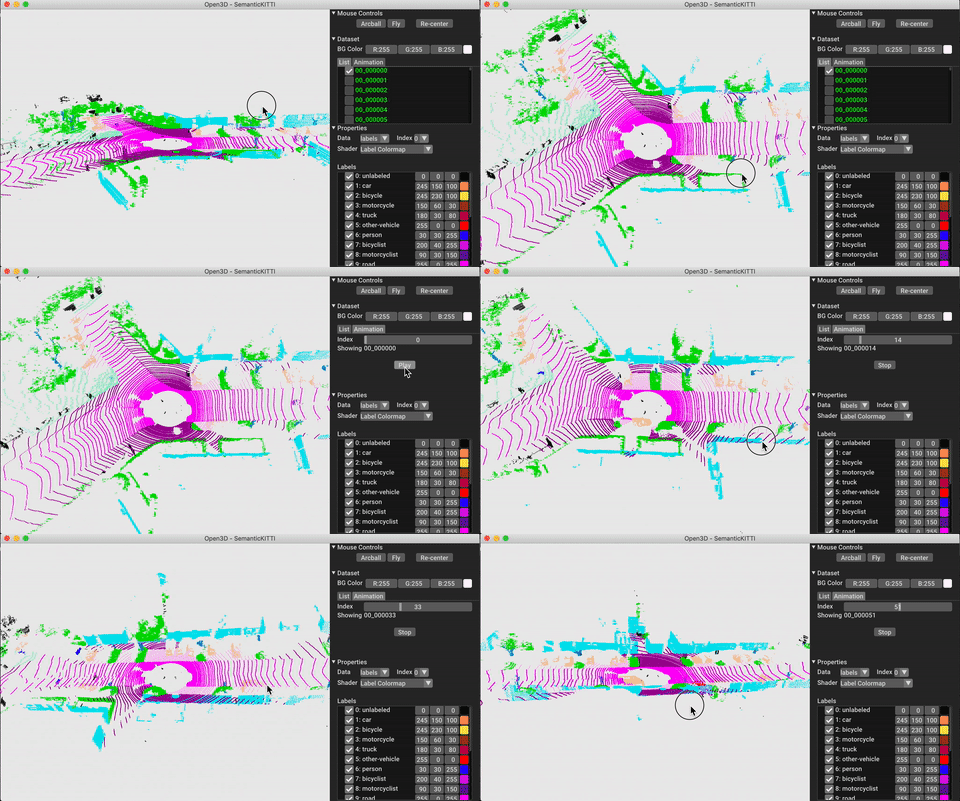
모델, 데이터 세트 및 파이프 라인 구성은 ml3d/configs 에 저장됩니다. 사용자는 사용자 정의 구성을 기록하기 위해 자체 YAML 파일을 구성 할 수 있습니다. 다음은 구성 파일을 읽고 모듈을 구성하는 예입니다.
 import open3d . ml as _ml3d
import open3d . ml . torch as ml3d # or open3d.ml.tf as ml3d

framework = "torch" # or tf
cfg_file = "ml3d/configs/randlanet_semantickitti.yml"
cfg = _ml3d . utils . Config . load_from_file ( cfg_file )

# fetch the classes by the name
Pipeline = _ml3d . utils . get_module ( "pipeline" , cfg . pipeline . name , framework )
Model = _ml3d . utils . get_module ( "model" , cfg . model . name , framework )
Dataset = _ml3d . utils . get_module ( "dataset" , cfg . dataset . name )

# use the arguments in the config file to construct the instances
cfg . dataset [ 'dataset_path' ] = "/path/to/your/dataset"
dataset = Dataset ( cfg . dataset . pop ( 'dataset_path' , None ), ** cfg . dataset )
model = Model ( ** cfg . model )
pipeline = Pipeline ( model , dataset , ** cfg . pipeline )이전 예제를 바탕으로 시맨틱 세분화를위한 사전 각인 모델로 파이프 라인을 인스턴스화하고 데이터 세트의 포인트 클라우드에서 실행할 수 있습니다. 사전에 걸린 모델의 무게를 얻으려면 모델 동물원을 참조하십시오.
 import os
import open3d . ml as _ml3d
import open3d . ml . torch as ml3d

cfg_file = "ml3d/configs/randlanet_semantickitti.yml"
cfg = _ml3d . utils . Config . load_from_file ( cfg_file )

model = ml3d . models . RandLANet ( ** cfg . model )
cfg . dataset [ 'dataset_path' ] = "/path/to/your/dataset"
dataset = ml3d . datasets . SemanticKITTI ( cfg . dataset . pop ( 'dataset_path' , None ), ** cfg . dataset )
pipeline = ml3d . pipelines . SemanticSegmentation ( model , dataset = dataset , device = "gpu" , ** cfg . pipeline )

# download the weights.
ckpt_folder = "./logs/"
os . makedirs ( ckpt_folder , exist_ok = True )
ckpt_path = ckpt_folder + "randlanet_semantickitti_202201071330utc.pth"
randlanet_url = "https://storage.googleapis.com/open3d-releases/model-zoo/randlanet_semantickitti_202201071330utc.pth"
if not os . path . exists ( ckpt_path ):
    cmd = "wget {} -O {}" . format ( randlanet_url , ckpt_path )
    os . system ( cmd )

# load the parameters.
pipeline . load_ckpt ( ckpt_path = ckpt_path )

test_split = dataset . get_split ( "test" )
data = test_split . get_data ( 0 )

# run inference on a single example.
# returns dict with 'predict_labels' and 'predict_scores'.
result = pipeline . run_inference ( data )

# evaluate performance on the test set; this will write logs to './logs'.
pipeline . run_test ()
사용자는 사전 정의 된 스크립트를 사용하여 사전 처리 된 무게를로드하고 테스트를 실행할 수도 있습니다.
추론과 유사하게 파이프 라인은 데이터 세트에서 모델을 훈련하기위한 인터페이스를 제공합니다.
 # use a cache for storing the results of the preprocessing (default path is './logs/cache')
dataset = ml3d . datasets . SemanticKITTI ( dataset_path = '/path/to/SemanticKITTI/' , use_cache = True )

# create the model with random initialization.
model = RandLANet ()

pipeline = SemanticSegmentation ( model = model , dataset = dataset , max_epoch = 100 )

# prints training progress in the console.
pipeline . run_train ()
더 많은 예는 examples/ 및 scripts/ 디렉토리를 참조하십시오. 구성 파일에서 교육 요약 저장을 활성화하고 Tensorboard를 사용하여 Ground Truth 및 결과를 시각화 할 수 있습니다. 자세한 내용은이 자습서를 참조하십시오.
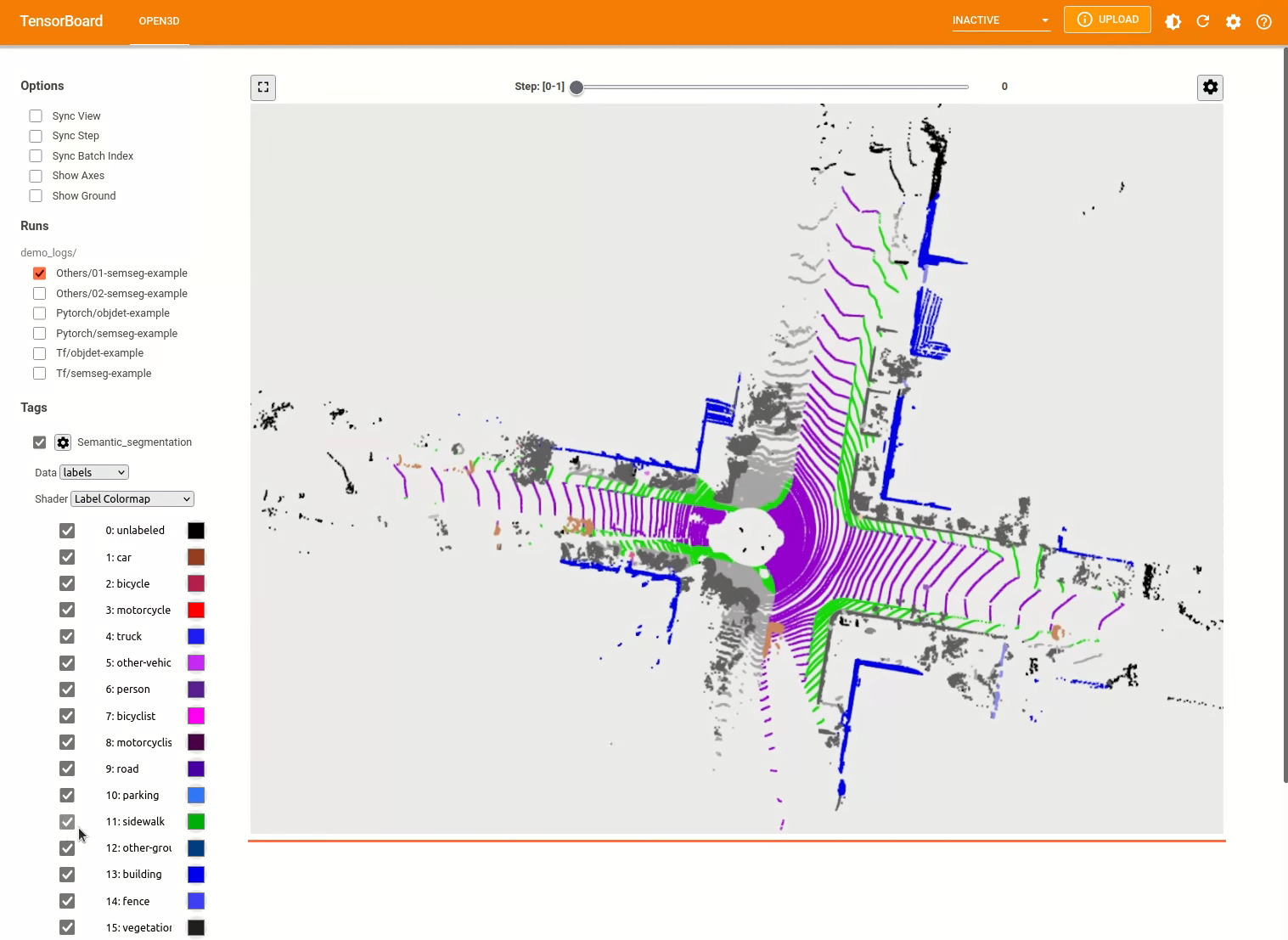
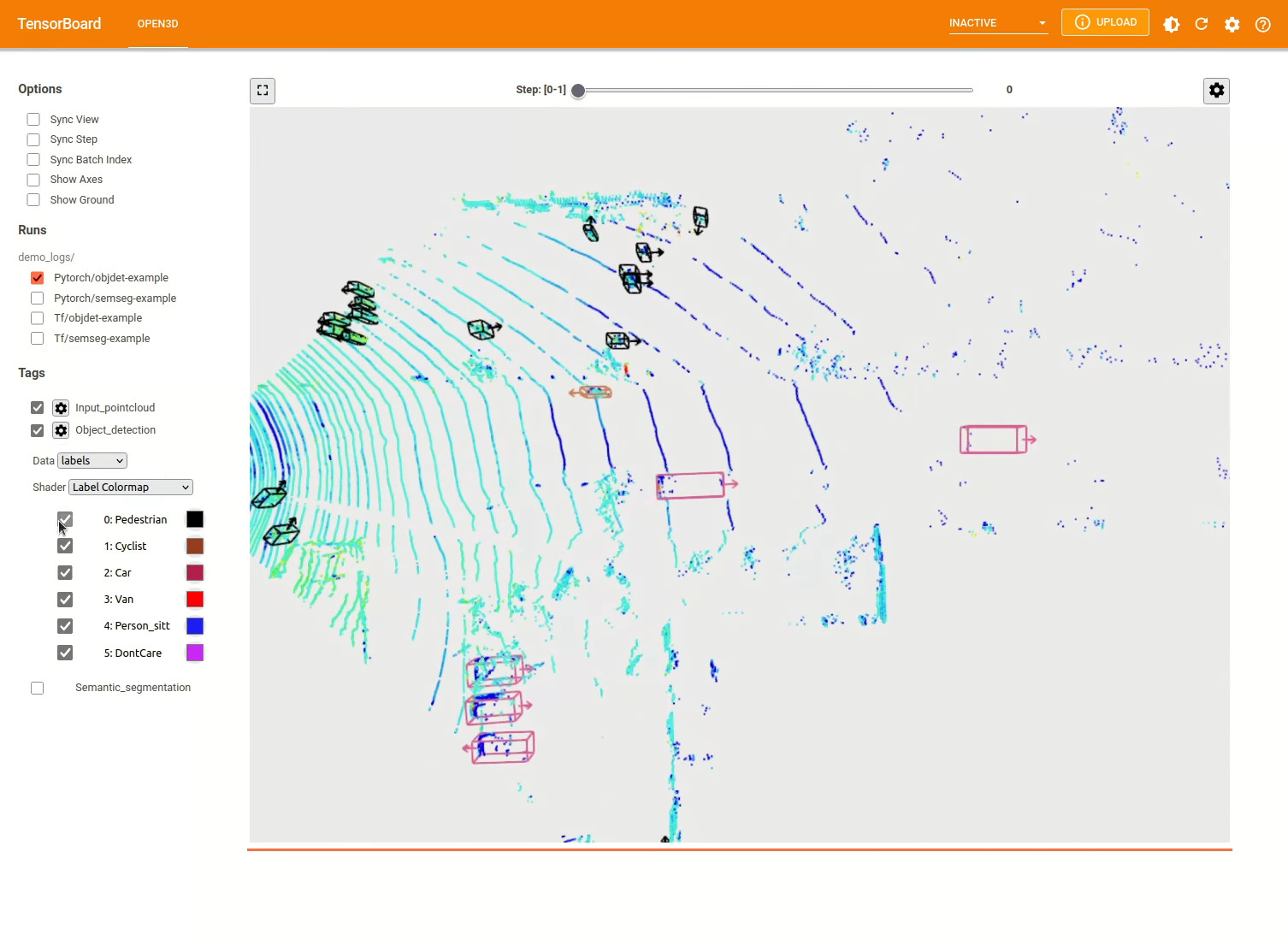
3D 객체 감지 모델은 시맨틱 세분화 모델과 유사합니다. 객체 감지를위한 사전 각인 모델로 파이프 라인을 인스턴스화하고 데이터 세트의 포인트 클라우드에서 실행할 수 있습니다. 사전에 걸린 모델의 무게를 얻으려면 모델 동물원을 참조하십시오.
 import os
import open3d . ml as _ml3d
import open3d . ml . torch as ml3d

cfg_file = "ml3d/configs/pointpillars_kitti.yml"
cfg = _ml3d . utils . Config . load_from_file ( cfg_file )

model = ml3d . models . PointPillars ( ** cfg . model )
cfg . dataset [ 'dataset_path' ] = "/path/to/your/dataset"
dataset = ml3d . datasets . KITTI ( cfg . dataset . pop ( 'dataset_path' , None ), ** cfg . dataset )
pipeline = ml3d . pipelines . ObjectDetection ( model , dataset = dataset , device = "gpu" , ** cfg . pipeline )

# download the weights.
ckpt_folder = "./logs/"
os . makedirs ( ckpt_folder , exist_ok = True )
ckpt_path = ckpt_folder + "pointpillars_kitti_202012221652utc.pth"
pointpillar_url = "https://storage.googleapis.com/open3d-releases/model-zoo/pointpillars_kitti_202012221652utc.pth"
if not os . path . exists ( ckpt_path ):
    cmd = "wget {} -O {}" . format ( pointpillar_url , ckpt_path )
    os . system ( cmd )

# load the parameters.
pipeline . load_ckpt ( ckpt_path = ckpt_path )

test_split = dataset . get_split ( "test" )
data = test_split . get_data ( 0 )

# run inference on a single example.
# returns dict with 'predict_labels' and 'predict_scores'.
result = pipeline . run_inference ( data )

# evaluate performance on the test set; this will write logs to './logs'.
pipeline . run_test ()
사용자는 사전 정의 된 스크립트를 사용하여 사전 처리 된 무게를로드하고 테스트를 실행할 수도 있습니다.
추론과 유사하게 파이프 라인은 데이터 세트에서 모델을 훈련하기위한 인터페이스를 제공합니다.
 # use a cache for storing the results of the preprocessing (default path is './logs/cache')
dataset = ml3d . datasets . KITTI ( dataset_path = '/path/to/KITTI/' , use_cache = True )

# create the model with random initialization.
model = PointPillars ()

pipeline = ObjectDetection ( model = model , dataset = dataset , max_epoch = 100 )

# prints training progress in the console.
pipeline . run_train ()
아래는 Kitti를 사용한 시각화의 예입니다. 이 예제는 Kitti 데이터 세트에 경계 박스를 사용하는 것을 보여줍니다.
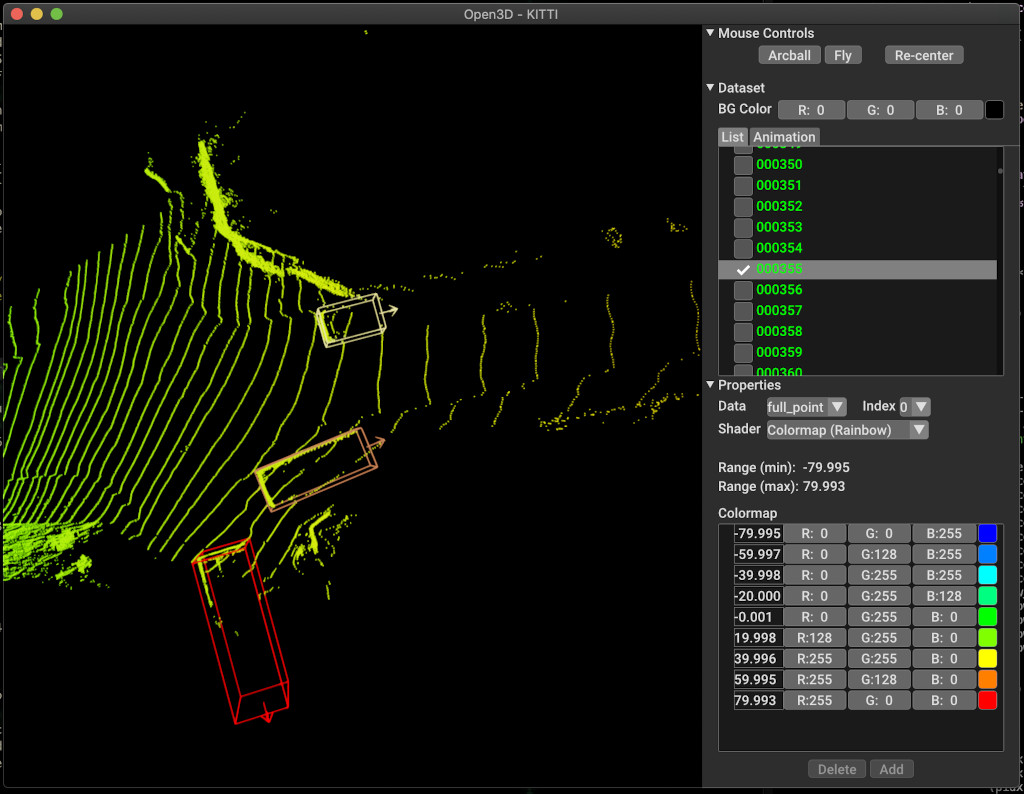
더 많은 예는 examples/ 및 scripts/ 디렉토리를 참조하십시오. 구성 파일에서 교육 요약 저장을 활성화하고 Tensorboard를 사용하여 Ground Truth 및 결과를 시각화 할 수 있습니다. 자세한 내용은이 자습서를 참조하십시오.
scripts/run_pipeline.py 데이터 세트에서 모델을 교육하고 평가하기위한 쉬운 인터페이스를 제공합니다. 특정 모델을 정의하고 정확한 구성을 전달하는 데 어려움이 있습니다.
python scripts/run_pipeline.py {tf/torch} -c <path-to-config> --pipeline {SemanticSegmentation/ObjectDetection} --<extra args>
시맨틱 세분화 및 객체 감지에 스크립트를 사용할 수 있습니다. pipeline 매개 변수에 Semanticsmentation 또는 ObjectDetection을 지정해야합니다. extra args 는 구성 파일에 존재하는 동일한 매개 변수보다 우선 순위가 결정됩니다. 따라서 구성 파일에서 Param을 변경하는 대신 스크립트를 시작하는 동안 명령 줄 인수와 동일하게 전달할 수 있습니다.
예를 들어.
 # Launch training for RandLANet on SemanticKITTI with torch.
python scripts/run_pipeline.py torch -c ml3d/configs/randlanet_semantickitti.yml --dataset.dataset_path <path-to-dataset> --pipeline SemanticSegmentation --dataset.use_cache True

# Launch testing for PointPillars on KITTI with torch.
python scripts/run_pipeline.py torch -c ml3d/configs/pointpillars_kitti.yml --split test --dataset.dataset_path <path-to-dataset> --pipeline ObjectDetection --dataset.use_cache True
추가 도움을 얻으려면 python scripts/run_pipeline.py --help 실행하십시오.
Open3D-ML의 핵심 부분은 ml3d 하위 폴더에 살고 있으며 ml 네임 스페이스에서 Open3D에 통합됩니다. 핵심 부분 외에도 디렉토리 examples 및 scripts 교육 파이프 라인 설정을 시작하거나 데이터 세트에서 네트워크를 실행하기위한 지원 스크립트를 제공합니다.
 ├─ docs                   # Markdown and rst files for documentation
├─ examples               # Place for example scripts and notebooks
├─ ml3d                   # Package root dir that is integrated in open3d
     ├─ configs           # Model configuration files
     ├─ datasets          # Generic dataset code; will be integratede as open3d.ml.{tf,torch}.datasets
     ├─ metrics           # Metrics available for evaluating ML models
     ├─ utils             # Framework independent utilities; available as open3d.ml.{tf,torch}.utils
     ├─ vis               # ML specific visualization functions
     ├─ tf                # Directory for TensorFlow specific code. same structure as ml3d/torch.
     │                    # This will be available as open3d.ml.tf
     ├─ torch             # Directory for PyTorch specific code; available as open3d.ml.torch
          ├─ dataloaders  # Framework specific dataset code, e.g. wrappers that can make use of the
          │               # generic dataset code.
          ├─ models       # Code for models
          ├─ modules      # Smaller modules, e.g., metrics and losses
          ├─ pipelines    # Pipelines for tasks like semantic segmentation
          ├─ utils        # Utilities for <>
├─ scripts                # Demo scripts for training and dataset download scripts
시맨틱 세분화 작업을 위해, 우리는 모든 클래스에서 평균 교차-노동 조합 (MIOU)을 사용하여 다른 방법의 성능을 측정합니다. 표는 분할 작업 및 각 점수에 사용 가능한 모델 및 데이터 세트를 보여줍니다. 각 점수는 해당 중량 파일로 연결됩니다.
| 모델 / 데이터 세트 | Semantickitti | 토론토 3d | s3dis | Semantic3d | 파리 릴리 3D | 스캐넷 |
|---|---|---|---|---|---|---|
| Randla-Net (TF) | 53.7 | 73.7 | 70.9 | 76.0 | 70.0* | - |
| Randla-Net (토치) | 52.8 | 74.0 | 70.9 | 76.0 | 70.0* | - |
| KPCONV (TF) | 58.7 | 65.6 | 65.0 | - | 76.7 | - |
| KPCONV (토치) | 58.0 | 65.6 | 60.0 | - | 76.7 | - |
| Sparseconvunet (토치) | - | - | - | - | - | 68 |
| Sparseconvunet (TF) | - | - | - | - | - | 68.2 |
| PointTransformer (토치) | - | - | 69.2 | - | - | - |
| PointTransformer (TF) | - | - | 69.2 | - | - | - |
(*) 원래 저자의 웨이트 사용.
물체 감지 작업의 경우 BEV (Bird 's Eye View) 및 3D에 대한 평균 평균 정밀 (MAP)을 사용하여 다른 방법의 성능을 측정합니다. 표는 객체 감지 작업 및 각 점수를위한 사용 가능한 모델 및 데이터 세트를 보여줍니다. 각 점수는 해당 중량 파일로 연결됩니다. 평가를 위해 Kitti의 검증 기준에 따라 유효성 검사 서브 세트를 사용하여 모델을 평가했습니다. 이 모델은 3 개의 클래스 (자동차, 보행자 및 사이클리스트)에 대해 교육을 받았습니다. 계산 된 값은 모든 난이도에 대한 모든 클래스의 맵보다 평균값입니다. Waymo 데이터 세트의 경우 모델은 3 개의 클래스 (보행자, 차량, 자전거 타는 사람)에 대해 교육을 받았습니다.
| 모델 / 데이터 세트 | Kitti [Bev / 3d] @ 0.70 | WAYMO (BEV / 3D) @ 0.50 |
|---|---|---|
| PointPillars (TF) | 61.6 / 55.2 | - |
| PointPillars (토치) | 61.2 / 52.8 | AVG : 61.01 / 48.30 | 최고 : 61.47 / 57.55 [^wpp-train] |
| pointrcnn (tf) | 78.2 / 65.9 | - |
| pointrcnn (토치) | 78.2 / 65.9 | - |
[^wpp-train] : AVG. 메트릭은 4, 8, 16 및 32 GPU로 평균 3 세트의 교육 실행입니다. 30 명의 시대가 끝난 후 훈련이 중단되었습니다. 모델 체크 포인트는 최고의 교육 실행을 위해 사용할 수 있습니다.
교육을 위해 Ground Truth 샘플링 데이터 증강을 사용하려면 다음과 같이 Ground Truth 데이터베이스를 생성 할 수 있습니다.
python scripts/collect_bboxes.py --dataset_path <path_to_data_root>
이렇게하면 열차 분할의 객체로 구성된 데이터베이스가 생성됩니다. 객체가 드물고 kitti와 같은 데이터 세트 에이 증강을 사용하는 것이 좋습니다.
pointrcnn의 두 단계는 별도로 훈련됩니다. Pytorch와 함께 PointrcNN의 제안 생성 단계를 훈련 시키려면 다음 명령을 실행하십시오.
 # Train RPN for 100 epochs.
python scripts/run_pipeline.py torch -c ml3d/configs/pointrcnn_kitti.yml --dataset.dataset_path <path-to-dataset> --mode RPN --epochs 100
잘 훈련 된 RPN 네트워크를 얻은 후 RCNN 네트워크를 냉동 RPN 무게로 훈련시킬 수 있습니다.
 # Train RCNN for 70 epochs.
python scripts/run_pipeline.py torch -c ml3d/configs/pointrcnn_kitti.yml --dataset.dataset_path <path-to-dataset> --mode RCNN --model.ckpt_path <path_to_checkpoint> --epochs 100
모든 중량 파일의 전체 목록은 Model_weights.txt 및 MD5 CheckSum 파일 Model_weights.md5를 참조하십시오.
다음은 데이터 세트 리더 클래스를 제공하는 데이터 세트 목록입니다.
이 데이터 세트를 다운로드하려면 해당 웹 페이지를 방문하여 scripts/download_datasets 의 스크립트를 살펴 봅니다.
이 프로젝트에 기여하는 방법에는 여러 가지가 있습니다. 당신은 할 수 있습니다 :
Dev Branch 에 풀 요청을 하십시오. Open3D는 커뮤니티 노력입니다. 우리는 지역 사회의 기여를 환영하고 축하합니다!
훈련 된 모델에 대한 가중치를 공유하려면 풀 요청에 가중치 파일을 첨부하거나 연결하십시오. 버그와 문제의 경우 문제를 열어보십시오. 또한 커뮤니케이션 채널을 확인하여 커뮤니티와 연락하십시오.
Open3D를 사용하는 경우 우리의 작업 (PDF)을 인용하십시오.
 @article { Zhou2018 ,
    author    = { Qian-Yi Zhou and Jaesik Park and Vladlen Koltun } ,
    title     = { {Open3D}: {A} Modern Library for {3D} Data Processing } ,
    journal   = { arXiv:1801.09847 } ,
    year      = { 2018 } ,
}







