GPT2
Pretrained Korean GPT2

語言模型是無監督的多任務學習者
該項目是OpenAI GPT-2模型的Pytorch實施。它提供模型培訓,句子產生和指標可視化。它被認為既可以理解又優化。我們設計的代碼是可理解的。另外,我們使用一些技術來提高性能。
在培訓GPT-2模型之前,應準備語料庫數據集。我們建議通過使用Expanda來構建自己的語料庫。取而代之的是,培訓模塊需要使用其詞彙文件的令牌化培訓和評估數據集。
準備數據集後,您可以使用以下方式訓練GPT-2:
 $ python -m gpt2 train --train_corpus           build/corpus.train.txt
                       --eval_corpus            build/corpus.test.txt
                       --vocab_path             build/vocab.txt
                       --save_checkpoint_path   ckpt-gpt2.pth
                       --save_model_path        gpt2-pretrained.pth
                       --batch_train            128
                       --batch_eval             128
                       --seq_len                64
                       --total_steps            1000000
                       --eval_steps             500
                       --save_steps             5000
要從上一個檢查點文件中恢復培訓,請使用--from_checkpoint [last checkpoint file]選項。如果要使用多個GPU訓練GPT-2,請使用--gpus [number of gpus]選項。
命令行使用的細節如下:
 usage: gpt2 train [-h] --train_corpus TRAIN_CORPUS --eval_corpus EVAL_CORPUS
                  --vocab_path VOCAB_PATH [--seq_len SEQ_LEN]
                  [--layers LAYERS] [--heads HEADS] [--dims DIMS]
                  [--rate RATE] [--dropout DROPOUT]
                  [--batch_train BATCH_TRAIN] [--batch_eval BATCH_EVAL]
                  [--base_lr BASE_LR] [--wd_rate WD_RATE]
                  [--total_steps TOTAL_STEPS] [--eval_steps EVAL_STEPS]
                  [--save_steps SAVE_STEPS]
                  [--save_model_path SAVE_MODEL_PATH]
                  [--save_checkpoint_path SAVE_CHECKPOINT_PATH]
                  [--from_checkpoint FROM_CHECKPOINT]
                  [--from_pretrained FROM_PRETRAINED] [--use_amp]
                  [--use_grad_ckpt] [--gpus GPUS]

optional arguments:
  -h, --help            show this help message and exit

Corpus and vocabulary:
  --train_corpus TRAIN_CORPUS
                        training corpus file path
  --eval_corpus EVAL_CORPUS
                        evaluation corpus file path
  --vocab_path VOCAB_PATH
                        vocabulary file path

Model configurations:
  --seq_len SEQ_LEN     maximum sequence length
  --layers LAYERS       number of transformer layers
  --heads HEADS         number of multi-heads in attention layer
  --dims DIMS           dimension of representation in each layer
  --rate RATE           increase rate of dimensionality in bottleneck
  --dropout DROPOUT     probability that each element is dropped

Training and evaluation:
  --batch_train BATCH_TRAIN
                        number of training batch size
  --batch_eval BATCH_EVAL
                        number of evaluation batch size
  --base_lr BASE_LR     default learning rate
  --wd_rate WD_RATE     weight decay rate
  --total_steps TOTAL_STEPS
                        number of total training steps
  --eval_steps EVAL_STEPS
                        period to evaluate model and record metrics
  --save_steps SAVE_STEPS
                        period to save training state to checkpoint

Saving and restoring:
  --save_model_path SAVE_MODEL_PATH
                        save trained model weights to the file
  --save_checkpoint_path SAVE_CHECKPOINT_PATH
                        save training state to the checkpoint file
  --from_checkpoint FROM_CHECKPOINT
                        load last training state from checkpoint file
  --from_pretrained FROM_PRETRAINED
                        initialize parameters from pretrained model

Extensions:
  --use_amp             use automatic mixed-precision in training
  --use_grad_ckpt       use gradient checkpointing in transformer layers
  --gpus GPUS           number of gpu devices to use in training
訓練GPT-2後,您可以在交互式模式下使用訓練有素的模型生成句子。
 $ python -m gpt2 generate --vocab_path      build/vocab.txt
                          --model_path      model.pth
                          --seq_len         64
                          --nucleus_prob    0.8
命令行使用的細節如下:
 usage: gpt2 generate [-h] --vocab_path VOCAB_PATH --model MODEL
                     [--seq_len SEQ_LEN] [--layers LAYERS] [--heads HEADS]
                     [--dims DIMS] [--rate RATE] [--top_p TOP_P] [--use_gpu]

optional arguments:
  -h, --help            show this help message and exit
  --vocab_path VOCAB_PATH
                        vocabulary file path
  --model_path MODEL_PATH
                        trained GPT-2 model file path

Model configurations:
  --seq_len SEQ_LEN     maximum sequence length
  --layers LAYERS       number of transformer layers
  --heads HEADS         number of multi-heads in attention layer
  --dims DIMS           dimension of representation in each layer
  --rate RATE           increase rate of dimensionality in bottleneck

Generating options:
  --nucleus_prob NUCLEUS_PROB
                        probability threshold for nucleus sampling
  --use_gpu             use gpu device in inferencing
估計訓練模型的性能的一種方法是通過評估數據集計算客觀指標,這在訓練階段未使用。
$ python -m gpt2 evaluate --model_path model.pth --eval_corpus corpus.test.txt --vocab_path vocab.txt
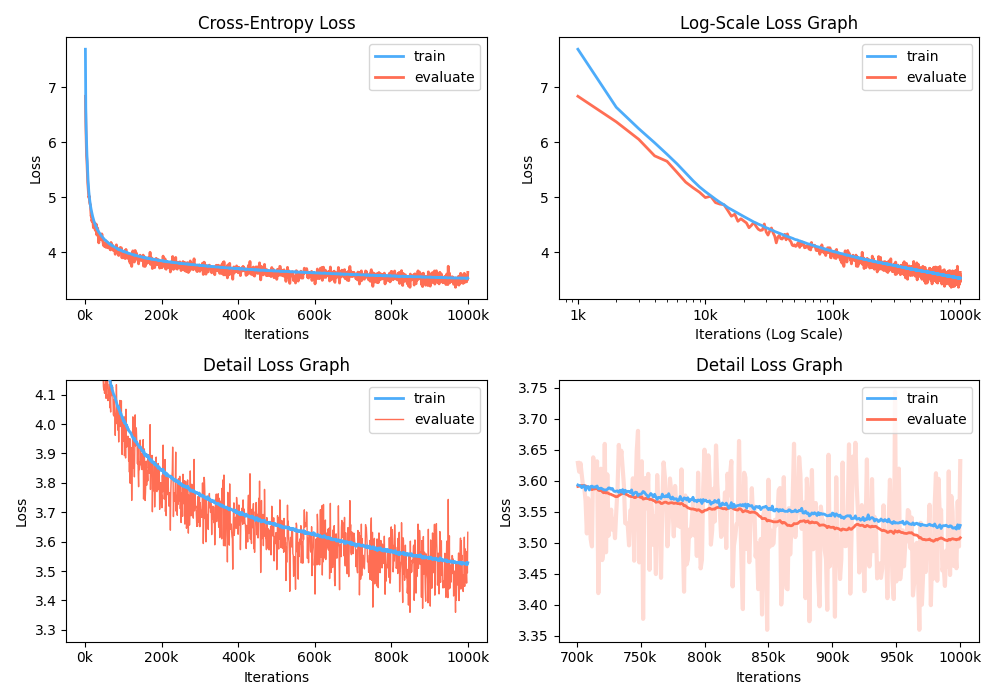
此外,您還可以通過可視化記錄的指標來分析培訓損失圖。
$ python -m gpt2 visualize --model_path model.pth --interactive
示例圖就是波紋管:
在訓練期間,您可以使用Nvidia Apex使用Fused Cuda層和混合精液優化。選項--use_amp在訓練中啟用自動混合精度。在使用這些性能提升之前,您應該按照存儲庫來安裝NVIDIA APEX庫,或運行BelOWS:
 $ git clone https://github.com/NVIDIA/apex
$ cd apex
$ pip install -v --no-cache-dir --global-option="--cpp_ext" --global-option="--cuda_ext" ./
如果您無法安裝庫或GPU設備不支持快速的混合精液訓練(確切地說,GPU應通過張量核心支持混合精液加速),則可以在單精度模式下訓練該模型。混合精液培訓是一種選擇。在這種情況下,您仍然可以使用融合的CUDA層,例如Adam Optimizer和訓練中的層歸一化。
您可以在Google Colab中玩受過訓練的GPT2模型!以上筆記本包含文本生成和指標評估。您需要將受過訓練的模型,詞彙文件和評估數據集上傳到Google Cloud Storage。
對於對GPT2韓國興趣感興趣的人,我們重寫了上述筆記本,以提供gpt2-ko-302M型號的案例,尤其是該型號,該模型接受了大約5.04b的韓國文檔培訓。您可以在此筆記本中播放演示。
該項目已獲得Apache-2.0許可。





