GPT2
Pretrained Korean GPT2

แบบจำลองภาษาเป็นผู้เรียนมัลติทาสก์ที่ไม่ได้รับการดูแล
โครงการนี้เป็นการใช้งาน Pytorch ของโมเดล OpenAI GPT-2 มันให้การฝึกอบรมแบบจำลองการสร้างประโยคและการสร้างภาพตัวชี้วัด ถือว่าเป็นทั้งที่เข้าใจได้และปรับให้เหมาะสม เราออกแบบรหัสให้เข้าใจได้ นอกจากนี้เรายังใช้เทคนิคบางอย่างเพื่อปรับปรุงประสิทธิภาพ
ก่อนการฝึกอบรมรุ่น GPT-2 ควรเตรียมชุดข้อมูล Corpus เราแนะนำให้สร้างคลังข้อมูลของคุณเองโดยใช้ ExpandA โมดูลการฝึกอบรมต้องใช้ชุดข้อมูลการฝึกอบรมและการประเมินผลด้วยไฟล์คำศัพท์
หลังจากเตรียมชุดข้อมูลคุณสามารถฝึก GPT-2 ได้โดยใช้ดังนี้:
 $ python -m gpt2 train --train_corpus           build/corpus.train.txt
                       --eval_corpus            build/corpus.test.txt
                       --vocab_path             build/vocab.txt
                       --save_checkpoint_path   ckpt-gpt2.pth
                       --save_model_path        gpt2-pretrained.pth
                       --batch_train            128
                       --batch_eval             128
                       --seq_len                64
                       --total_steps            1000000
                       --eval_steps             500
                       --save_steps             5000
ในการดำเนินการฝึกอบรมต่อจากไฟล์จุดตรวจสุดท้ายให้ใช้ตัวเลือก --from_checkpoint [last checkpoint file] หากคุณต้องการฝึก GPT-2 ด้วย GPU หลายตัวให้ใช้ --gpus [number of gpus]
รายละเอียดของการใช้บรรทัดคำสั่งมีดังนี้:
 usage: gpt2 train [-h] --train_corpus TRAIN_CORPUS --eval_corpus EVAL_CORPUS
                  --vocab_path VOCAB_PATH [--seq_len SEQ_LEN]
                  [--layers LAYERS] [--heads HEADS] [--dims DIMS]
                  [--rate RATE] [--dropout DROPOUT]
                  [--batch_train BATCH_TRAIN] [--batch_eval BATCH_EVAL]
                  [--base_lr BASE_LR] [--wd_rate WD_RATE]
                  [--total_steps TOTAL_STEPS] [--eval_steps EVAL_STEPS]
                  [--save_steps SAVE_STEPS]
                  [--save_model_path SAVE_MODEL_PATH]
                  [--save_checkpoint_path SAVE_CHECKPOINT_PATH]
                  [--from_checkpoint FROM_CHECKPOINT]
                  [--from_pretrained FROM_PRETRAINED] [--use_amp]
                  [--use_grad_ckpt] [--gpus GPUS]

optional arguments:
  -h, --help            show this help message and exit

Corpus and vocabulary:
  --train_corpus TRAIN_CORPUS
                        training corpus file path
  --eval_corpus EVAL_CORPUS
                        evaluation corpus file path
  --vocab_path VOCAB_PATH
                        vocabulary file path

Model configurations:
  --seq_len SEQ_LEN     maximum sequence length
  --layers LAYERS       number of transformer layers
  --heads HEADS         number of multi-heads in attention layer
  --dims DIMS           dimension of representation in each layer
  --rate RATE           increase rate of dimensionality in bottleneck
  --dropout DROPOUT     probability that each element is dropped

Training and evaluation:
  --batch_train BATCH_TRAIN
                        number of training batch size
  --batch_eval BATCH_EVAL
                        number of evaluation batch size
  --base_lr BASE_LR     default learning rate
  --wd_rate WD_RATE     weight decay rate
  --total_steps TOTAL_STEPS
                        number of total training steps
  --eval_steps EVAL_STEPS
                        period to evaluate model and record metrics
  --save_steps SAVE_STEPS
                        period to save training state to checkpoint

Saving and restoring:
  --save_model_path SAVE_MODEL_PATH
                        save trained model weights to the file
  --save_checkpoint_path SAVE_CHECKPOINT_PATH
                        save training state to the checkpoint file
  --from_checkpoint FROM_CHECKPOINT
                        load last training state from checkpoint file
  --from_pretrained FROM_PRETRAINED
                        initialize parameters from pretrained model

Extensions:
  --use_amp             use automatic mixed-precision in training
  --use_grad_ckpt       use gradient checkpointing in transformer layers
  --gpus GPUS           number of gpu devices to use in training
หลังจากฝึกอบรม GPT-2 คุณสามารถสร้างประโยคด้วยโมเดลที่ผ่านการฝึกอบรมของคุณในโหมดอินเทอร์แอคทีฟ
 $ python -m gpt2 generate --vocab_path      build/vocab.txt
                          --model_path      model.pth
                          --seq_len         64
                          --nucleus_prob    0.8
รายละเอียดของการใช้บรรทัดคำสั่งมีดังนี้:
 usage: gpt2 generate [-h] --vocab_path VOCAB_PATH --model MODEL
                     [--seq_len SEQ_LEN] [--layers LAYERS] [--heads HEADS]
                     [--dims DIMS] [--rate RATE] [--top_p TOP_P] [--use_gpu]

optional arguments:
  -h, --help            show this help message and exit
  --vocab_path VOCAB_PATH
                        vocabulary file path
  --model_path MODEL_PATH
                        trained GPT-2 model file path

Model configurations:
  --seq_len SEQ_LEN     maximum sequence length
  --layers LAYERS       number of transformer layers
  --heads HEADS         number of multi-heads in attention layer
  --dims DIMS           dimension of representation in each layer
  --rate RATE           increase rate of dimensionality in bottleneck

Generating options:
  --nucleus_prob NUCLEUS_PROB
                        probability threshold for nucleus sampling
  --use_gpu             use gpu device in inferencing
วิธีหนึ่งในการประเมินประสิทธิภาพของแบบจำลองที่ผ่านการฝึกอบรมคือการคำนวณตัวชี้วัดวัตถุประสงค์ด้วยชุดข้อมูลการประเมินผลซึ่งไม่ได้ใช้ในระหว่างขั้นตอนการฝึกอบรม
$ python -m gpt2 evaluate --model_path model.pth --eval_corpus corpus.test.txt --vocab_path vocab.txt
นอกจากนี้คุณยังสามารถวิเคราะห์กราฟการสูญเสียการฝึกอบรมโดยการแสดงตัวชี้วัดที่บันทึกไว้
$ python -m gpt2 visualize --model_path model.pth --interactive
ตัวอย่างตัวอย่างเป็นเสียงร้อง:
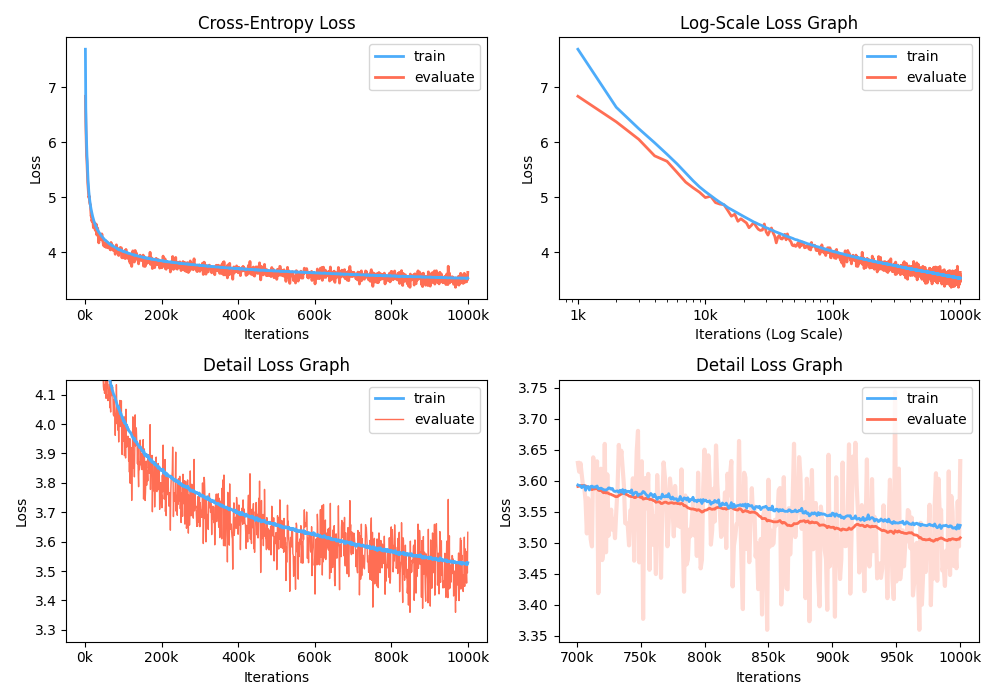
ในขณะที่การฝึกอบรมคุณสามารถใช้ Nvidia Apex เพื่อใช้เลเยอร์ CUDA ที่หลอมรวมและการเพิ่มประสิทธิภาพความแม่นยำผสม ตัวเลือก --use_amp เปิดใช้งาน ความแม่นยำผสมอัตโนมัติ ในการฝึกอบรม ก่อนที่จะใช้การเพิ่มประสิทธิภาพเหล่านี้คุณควรติดตั้งไลบรารี Nvidia Apex โดยทำตามที่เก็บหรือเรียกใช้ Belows:
 $ git clone https://github.com/NVIDIA/apex
$ cd apex
$ pip install -v --no-cache-dir --global-option="--cpp_ext" --global-option="--cuda_ext" ./
หากคุณไม่สามารถติดตั้งไลบรารีหรืออุปกรณ์ GPU ของคุณไม่รองรับการฝึกอบรมแบบผสมผสานอย่างรวดเร็ว (อย่างแม่นยำ GPU ควรรองรับการเร่งความเร็วแบบผสมผสานผ่านแกนเทนเซอร์) คุณสามารถฝึกอบรมโมเดลในโหมดความแม่นยำเดียว การฝึกอบรมแบบผสมผสานเป็นตัวเลือก ในกรณีนี้คุณยังสามารถใช้เลเยอร์ CUDA ที่หลอมรวมเช่น Adam Optimizer และ Layer Normalization ในการฝึกอบรม
คุณสามารถเล่นรุ่น GPT2 ที่ผ่านการฝึกอบรมได้ใน Google Colab! โน้ตบุ๊กข้างต้นประกอบด้วยการสร้างข้อความและการประเมินตัวชี้วัด คุณต้องอัปโหลดชุดข้อมูลคำศัพท์และชุดข้อมูลการประเมินไปยัง Google Cloud Storage
สำหรับผู้ที่มีความสนใจใน GPT2 รุ่นเกาหลีเราเขียนสมุดบันทึกข้างต้นใหม่เพื่อจัดทำกรณีของรุ่น gpt2-ko-302M โดยเฉพาะอย่างยิ่งซึ่งได้รับการฝึกฝนด้วยโทเค็น 5.04B จากเอกสารเกาหลี คุณสามารถเล่นตัวอย่างในสมุดบันทึกนี้
โครงการนี้ได้รับใบอนุญาต Apache-2.0





