huozi
Release huozi 3.5

 活字通用大模型
| 章節 | 說明 |
|---|---|
| ??♂ 開源清單 | 本倉庫開源項目清單 |
| 模型介紹 | 簡要介紹活字模型結構和訓練過程 |
| ? 模型下載 | 活字模型下載鏈接 |
| 模型推理 | 活字模型推理樣例,包括vLLM、llama.cpp、Ollama等推理框架的使用流程 |
| ? 模型性能 | 活字模型在主流評測任務上的性能 |
| ? 生成樣例 | 活字模型實際生成效果樣例 |

大規模語言模型(LLM)在自然語言處理領域取得了顯著的進展,並在廣泛的應用場景中展現了其強大的潛力。這一技術不僅吸引了學術界的廣泛關注,也成為了工業界的熱點。在此背景下,哈爾濱工業大學社會計算與信息檢索研究中心(HIT-SCIR)近期推出了最新成果——活字3.5 ,致力於為自然語言處理的研究和實際應用提供更多可能性和選擇。
活字3.5是在活字3.0和Chinese-Mixtral-8x7B基礎上,進行進一步性能增強得到的模型。活字3.5支持32K長上下文,繼承了活字3.0強大的綜合能力,並在中英文知識、數學推理、代碼生成、指令遵循能力、內容安全性等諸多方面實現了性能提升。
Important
活字系列模型仍然可能生成包含事實性錯誤的誤導性回复或包含偏見/歧視的有害內容,請謹慎鑑別和使用生成的內容,請勿將生成的有害內容傳播至互聯網。
活字1.0和活字2.0的文檔請見此處。 活字3.0和中文MT-Bench的文檔請見此處。
活字3.5是一個稀疏混合專家模型(SMoE),每個專家層包含8個FFN,每次前向計算採用top-2稀疏激活。活字3.5共擁有46.7B參數,得益於其稀疏激活的特性,實際推理時僅需激活13B參數,有效提升了計算效率和處理速度。
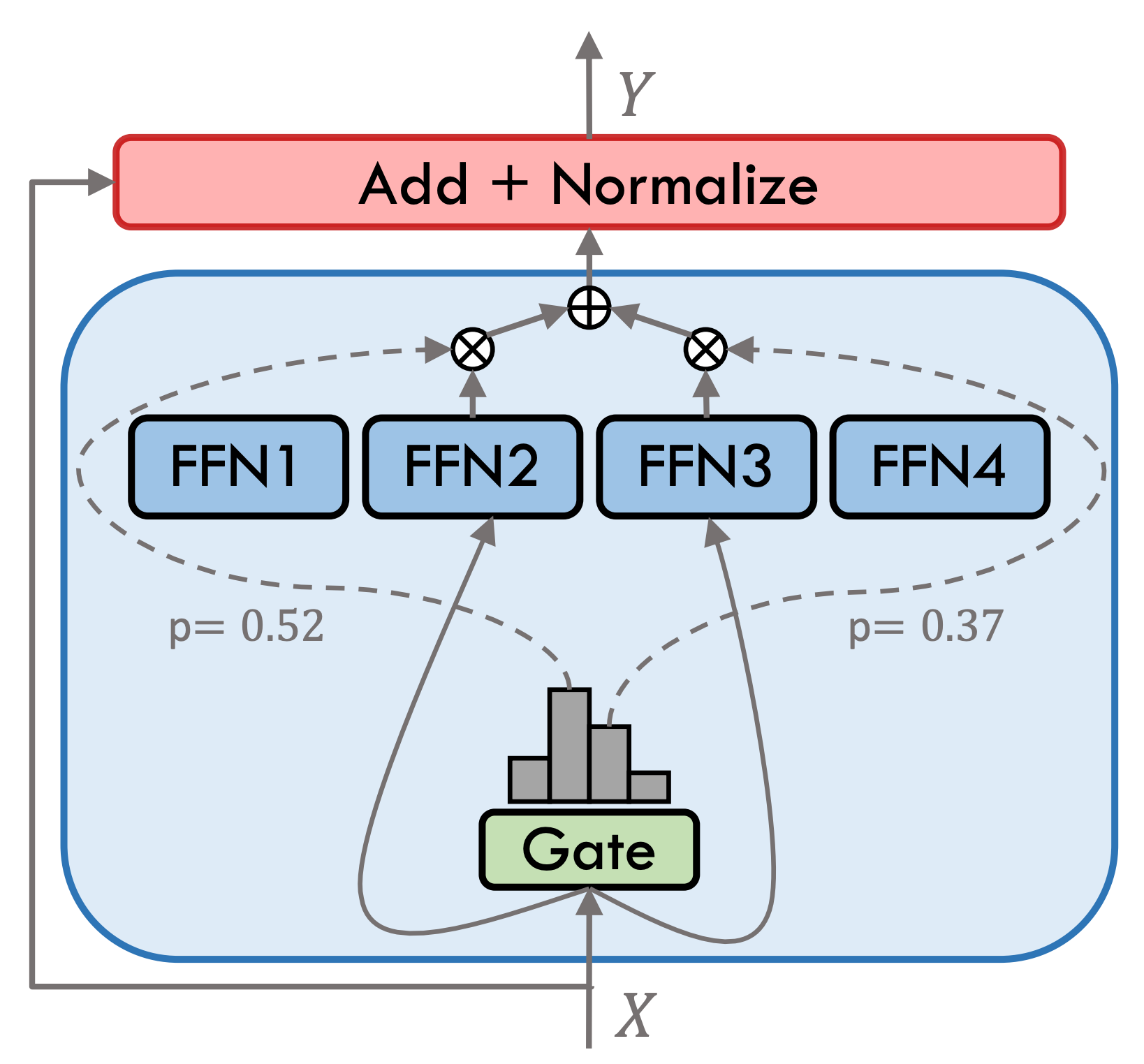
活字3.5經過了多步訓練,如下圖所示:
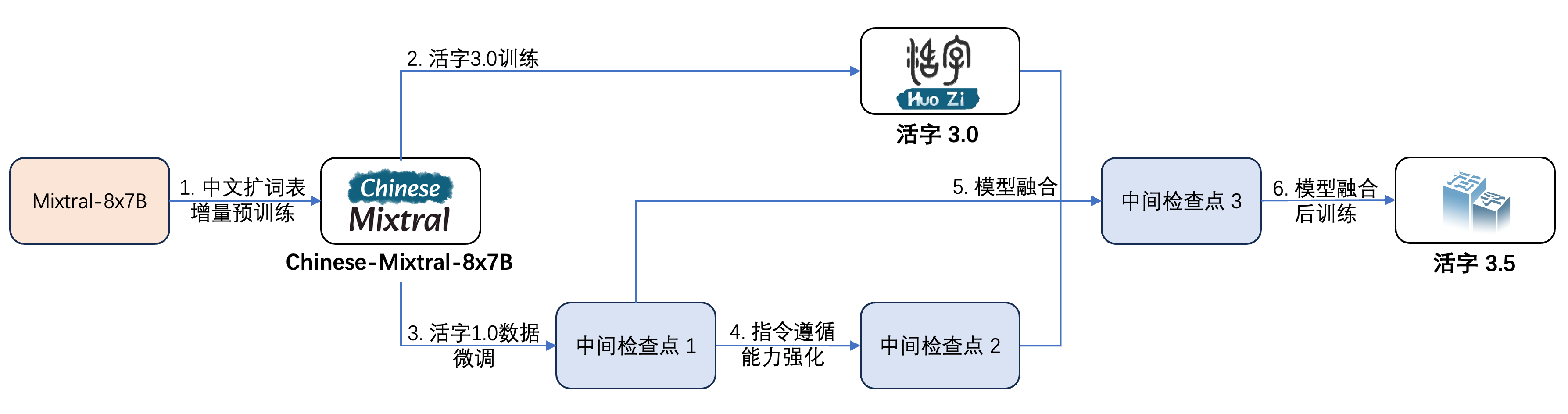
其訓練過程為:
| 模型名稱 | 文件大小 | 下載地址 | 備註 |
|---|---|---|---|
| huozi3.5 | 88GB | ?HuggingFace ModelScope | 活字3.5 完整模型 |
| huozi3.5-ckpt-1 | 88GB | ?HuggingFace ModelScope | 活字3.5 中間檢查點1 |
| huozi3.5-ckpt-2 | 88GB | ?HuggingFace ModelScope | 活字3.5 中間檢查點2 |
| huozi3.5-ckpt-3 | 88GB | ?HuggingFace ModelScope | 活字3.5 中間檢查點3 |
如果您希望微調活字3.5或Chinese-Mixtral-8x7B,請參考此處訓練代碼。
活字3.5採用ChatML格式的prompt模板,格式為:
 <|beginofutterance|>系统
{system prompt}<|endofutterance|>
<|beginofutterance|>用户
{input}<|endofutterance|>
<|beginofutterance|>助手
{output}<|endofutterance|>
使用活字3.5進行推理的示例代碼如下:
 # quickstart.py

import torch
from transformers import AutoModelForCausalLM , AutoTokenizer

model_id = "HIT-SCIR/huozi3.5"

tokenizer = AutoTokenizer . from_pretrained ( model_id )
model = AutoModelForCausalLM . from_pretrained (
    model_id ,
    attn_implementation = "flash_attention_2" ,
    torch_dtype = torch . bfloat16 ,
    device_map = "auto" ,
)

text = """<|beginofutterance|>系统
你是一个智能助手<|endofutterance|>
<|beginofutterance|>用户
请你用python写一段快速排序的代码<|endofutterance|>
<|beginofutterance|>助手
"""

inputs = tokenizer ( text , return_tensors = "pt" ). to ( 0 )

outputs = model . generate (
    ** inputs ,
    eos_token_id = 57001 ,
    temperature = 0.8 ,
    top_p = 0.9 ,
    max_new_tokens = 2048 ,
)
print ( tokenizer . decode ( outputs [ 0 ], skip_special_tokens = False ))
活字3.5支持全部Mixtral模型生態,包括Transformers、vLLM、llama.cpp、Ollama、Text generation web UI等框架。
如果您在下載模型時遇到網絡問題,可以使用我們在ModelScope上提供的檢查點。
transformers支持為tokenizer添加聊天模板,並支持流式生成。示例代碼如下:
 # example/transformers-stream/stream.py

import torch
from transformers import AutoModelForCausalLM , AutoTokenizer , TextStreamer

model_id = "HIT-SCIR/huozi3.5"

model = AutoModelForCausalLM . from_pretrained (
    model_id ,
    attn_implementation = "flash_attention_2" ,
    torch_dtype = torch . bfloat16 ,
    device_map = "auto" ,
)

tokenizer = AutoTokenizer . from_pretrained ( model_id )
tokenizer . chat_template = """{% for message in messages %}{{'<|beginofutterance|>' + message['role'] + ' n ' + message['content']}}{% if (loop.last and add_generation_prompt) or not loop.last %}{{ '<|endofutterance|>' + ' n '}}{% endif %}{% endfor %}
{% if add_generation_prompt and messages[-1]['role'] != '助手' %}{{ '<|beginofutterance|>助手n ' }}{% endif %}"""

chat = [
    { "role" : "系统" , "content" : "你是一个智能助手" },
    { "role" : "用户" , "content" : "请你用python写一段快速排序的代码" },
]

inputs = tokenizer . apply_chat_template (
    chat ,
    tokenize = True ,
    add_generation_prompt = True ,
    return_tensors = "pt" ,
). to ( 0 )

stream_output = model . generate (
    inputs ,
    streamer = TextStreamer ( tokenizer , skip_prompt = True , skip_special_tokens = True ),
    eos_token_id = 57001 ,
    temperature = 0.8 ,
    top_p = 0.9 ,
    max_new_tokens = 2048 ,
)ModelScope的接口與Transformers非常相似,只需將transformers替換為modelscope即可:
 # example/modelscope-generate/generate.py

import torch
- from transformers import AutoModelForCausalLM, AutoTokenizer
+ from modelscope import AutoTokenizer, AutoModelForCausalLM

model_id = "HIT-SCIR/huozi3.5"

tokenizer = AutoTokenizer.from_pretrained(model_id)
model = AutoModelForCausalLM.from_pretrained(
    model_id,
    attn_implementation="flash_attention_2",
    torch_dtype=torch.bfloat16,
    device_map="auto",
)

text = """<|beginofutterance|>系统
你是一个智能助手<|endofutterance|>
<|beginofutterance|>用户
请你用python写一段快速排序的代码<|endofutterance|>
<|beginofutterance|>助手
"""

inputs = tokenizer(text, return_tensors="pt").to(0)

outputs = model.generate(
    **inputs,
    eos_token_id=57001,
    temperature=0.8,
    top_p=0.9,
    max_new_tokens=2048,
)
print(tokenizer.decode(outputs[0], skip_special_tokens=False))活字3.5支持通過vLLM實現推理加速,示例代碼如下:
 # example/vllm-generate/generate.py

from vllm import LLM , SamplingParams

prompts = [
    """<|beginofutterance|>系统
你是一个智能助手<|endofutterance|>
<|beginofutterance|>用户
请你用python写一段快速排序的代码<|endofutterance|>
<|beginofutterance|>助手
""" ,
]

sampling_params = SamplingParams (
    temperature = 0.8 , top_p = 0.95 , stop_token_ids = [ 57001 ], max_tokens = 2048
)
llm = LLM (
    model = "HIT-SCIR/huozi3.5" ,
    tensor_parallel_size = 4 ,
)
outputs = llm . generate ( prompts , sampling_params )

for output in outputs :
    prompt = output . prompt
    generated_text = output . outputs [ 0 ]. text
print ( generated_text )活字3.5可以部署為支持OpenAI API協議的服務,這使得活字3.5可以直接通過OpenAI API進行調用。
環境準備:
$ pip install vllm openai啟動服務:
$ python -m vllm.entrypoints.openai.api_server --model /path/to/huozi3.5/checkpoint --served-model-name huozi --chat-template template.jinja --tensor-parallel-size 8 --response-role 助手 --max-model-len 2048使用OpenAI API發送請求:
 # example/openai-api/openai-client.py

from openai import OpenAI

openai_api_key = "EMPTY"
openai_api_base = "http://localhost:8000/v1"

client = OpenAI (
    api_key = openai_api_key ,
    base_url = openai_api_base ,
)

chat_response = client . chat . completions . create (
    model = "huozi" ,
    messages = [
        { "role" : "系统" , "content" : "你是一个智能助手" },
        { "role" : "用户" , "content" : "请你用python写一段快速排序的代码" },
    ],
    extra_body = { "stop_token_ids" : [ 57001 ]},
)
print ( "Chat response:" , chat_response . choices [ 0 ]. message . content )
下面是一個使用OpenAI API + Gradio + 流式生成的示例代碼:
 # example/openai-api/openai-client-gradio.py

from openai import OpenAI
import gradio as gr

openai_api_key = "EMPTY"
openai_api_base = "http://localhost:8000/v1"

client = OpenAI (
    api_key = openai_api_key ,
    base_url = openai_api_base ,
)


def predict ( message , history ):
    history_openai_format = [
        { "role" : "系统" , "content" : "你是一个智能助手" },
    ]
    for human , assistant in history :
        history_openai_format . append ({ "role" : "用户" , "content" : human })
        history_openai_format . append ({ "role" : "助手" , "content" : assistant })
    history_openai_format . append ({ "role" : "用户" , "content" : message })
    models = client . models . list ()

    stream = client . chat . completions . create (
        model = models . data [ 0 ]. id ,
        messages = history_openai_format ,
        temperature = 0.8 ,
        stream = True ,
        extra_body = { "repetition_penalty" : 1 , "stop_token_ids" : [ 57001 ]},
    )

    partial_message = ""
    for chunk in stream :
        partial_message += chunk . choices [ 0 ]. delta . content or ""
        yield partial_message


gr . ChatInterface ( predict ). queue (). launch ()GGUF格式旨在快速加載和保存模型,由llama.cpp團隊推出,適用於llama.cpp、Ollama等框架。您可以手動將HuggingFace格式的活字3.5轉換到GGUF格式。
首先需要下載llama.cpp的源碼。我們在倉庫中提供了llama.cpp的submodule,這個版本的llama.cpp已經過測試,可以成功進行推理:
$ git clone --recurse-submodules https://github.com/HIT-SCIR/huozi
$ cd examples/llama.cpp
您也可以下載最新版本的llama.cpp源碼:
$ git clone https://github.com/ggerganov/llama.cpp.git
$ cd llama.cpp
然後需要進行編譯。根據您的硬件平台,編譯命令有細微差異:
$ make  # 用于纯CPU推理
$ make LLAMA_CUBLAS=1  # 用于GPU推理
$ LLAMA_METAL=1 make # 用于Apple Silicon,暂未经过测试以下命令需要在llama.cpp/目錄下:
 # 转换为GGUF格式
$ python convert.py --outfile /path/to/huozi-gguf/huozi3.5.gguf /path/to/huozi3.5
# 进行GGUF格式的q4_0量化
$ quantize /path/to/huozi-gguf/huozi3.5.gguf /path/to/huozi-gguf/huozi3.5-q4_0.gguf q4_0以下命令需要在llama.cpp/目錄下:
$ main -m /path/to/huozi-gguf/huozi3.5-q4_0.gguf --color --interactive-first -c 2048 -t 6 --temp 0.2 --repeat_penalty 1.1 -ngl 999 --in-prefix " <|beginofutterance|>用户n " --in-suffix " <|endofutterance|>n<|beginofutterance|>助手" -r " <|endofutterance|> " -ngl參數表示向GPU中offload的層數,降低這個值可以緩解GPU顯存壓力。經過我們的實際測試,q2_k量化的模型offload 16層,顯存佔用可降低至9.6GB,可在消費級GPU上運行模型:
$ main -m /path/to/huozi-gguf/huozi3.5-q2_k.gguf --color --interactive-first -c 2048 -t 6 --temp 0.2 --repeat_penalty 1.1 -ngl 16 --in-prefix " <|beginofutterance|>用户n " --in-suffix " <|endofutterance|>n<|beginofutterance|>助手" -r " <|endofutterance|> "關於main的更多參數,可以參考llama.cpp的官方文檔。
使用Ollama框架進行推理,可以參考Ollama的README說明。
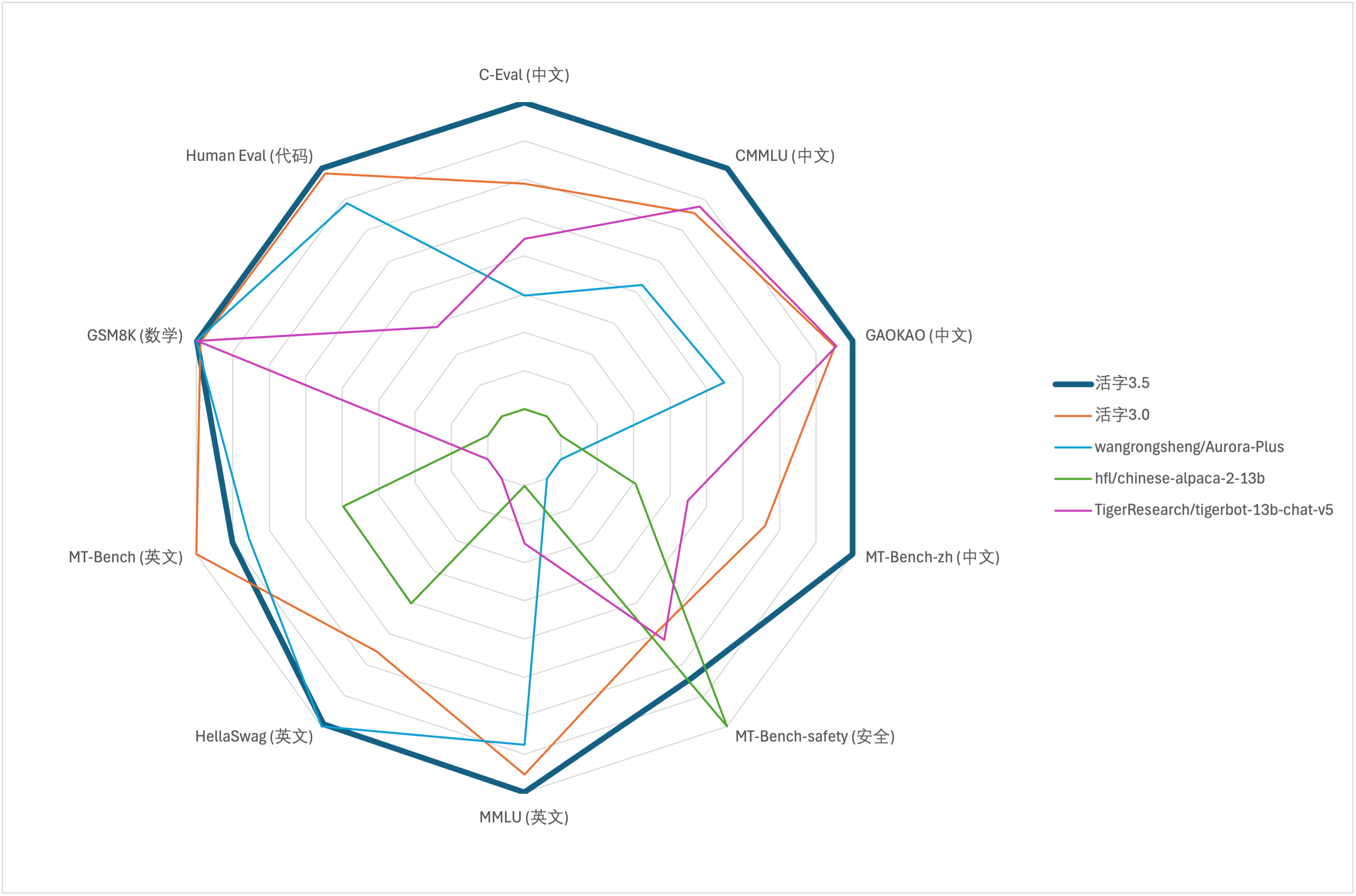
針對大模型綜合能力評價,我們分別使用以下評測數據集對活字3.5進行評測:
活字3.5在推理時僅激活13B參數。下表為活字3.5與其他13B規模的中文模型以及舊版活字在各個評測數據集上的結果:
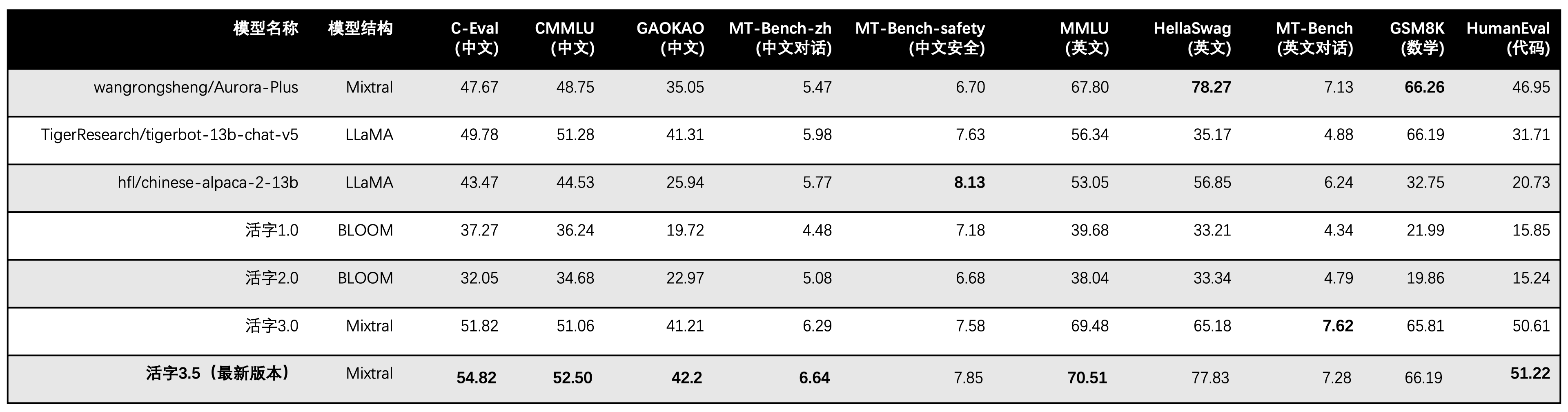
我們在C-Eval、CMMLU、MMLU採用5-shot,GSM8K採用4-shot,HellaSwag、HumanEval採用0-shot,HumanEval採用pass@1指標。所有測試均採用greedy策略。
我們使用OpenCompass作為評測框架,commit hash為4c87e77。評測代碼位於此處。
在活字3.0的性能評測中,我們在HumanEval錯誤使用了base模型的評測方法,正確的評測結果已在上表內更新。
根據上表中的測試結果,活字3.5較活字3.0取得了較穩定的性能提升,活字3.5的中英文知識、數學推理、代碼生成、中文指令遵循能力、中文內容安全性等多方面能力均得到了加強。
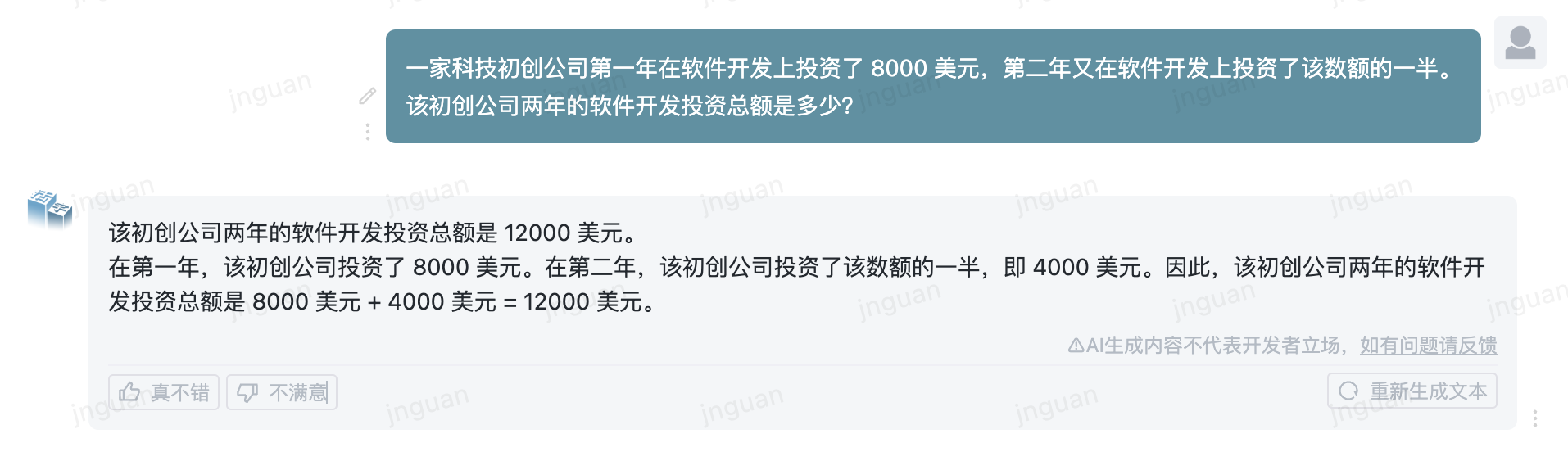
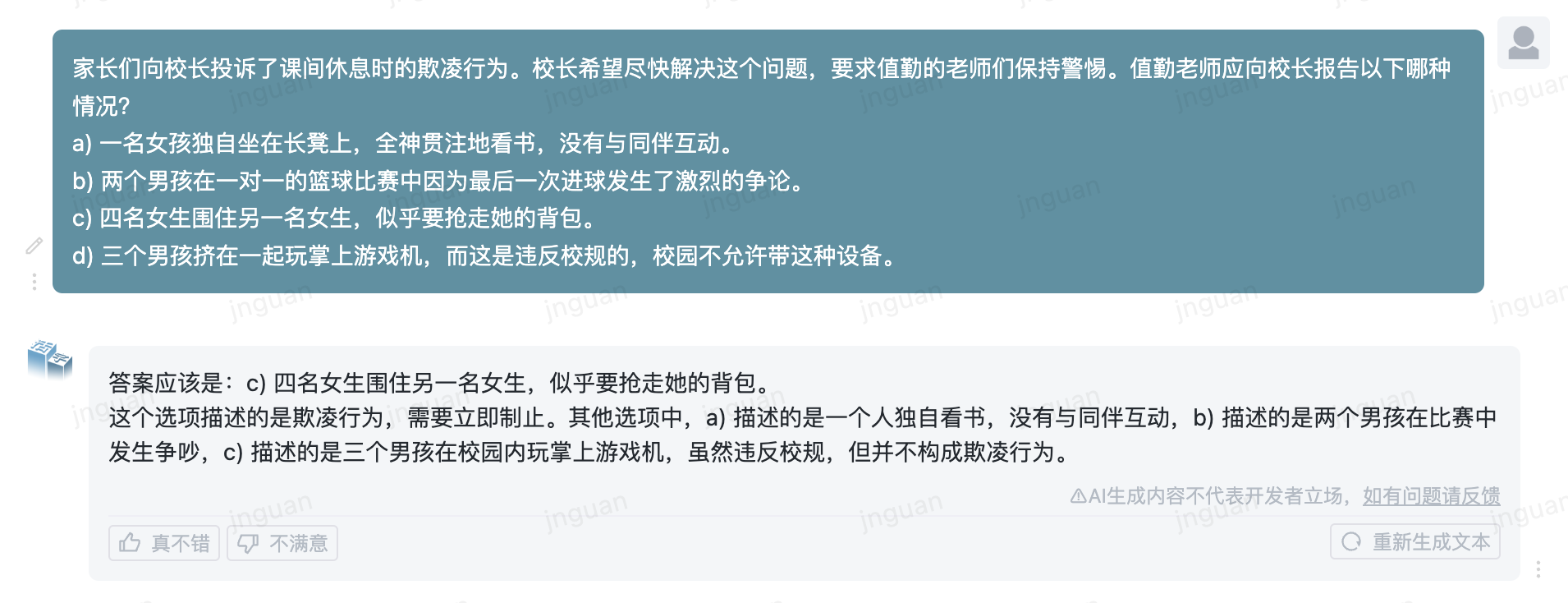
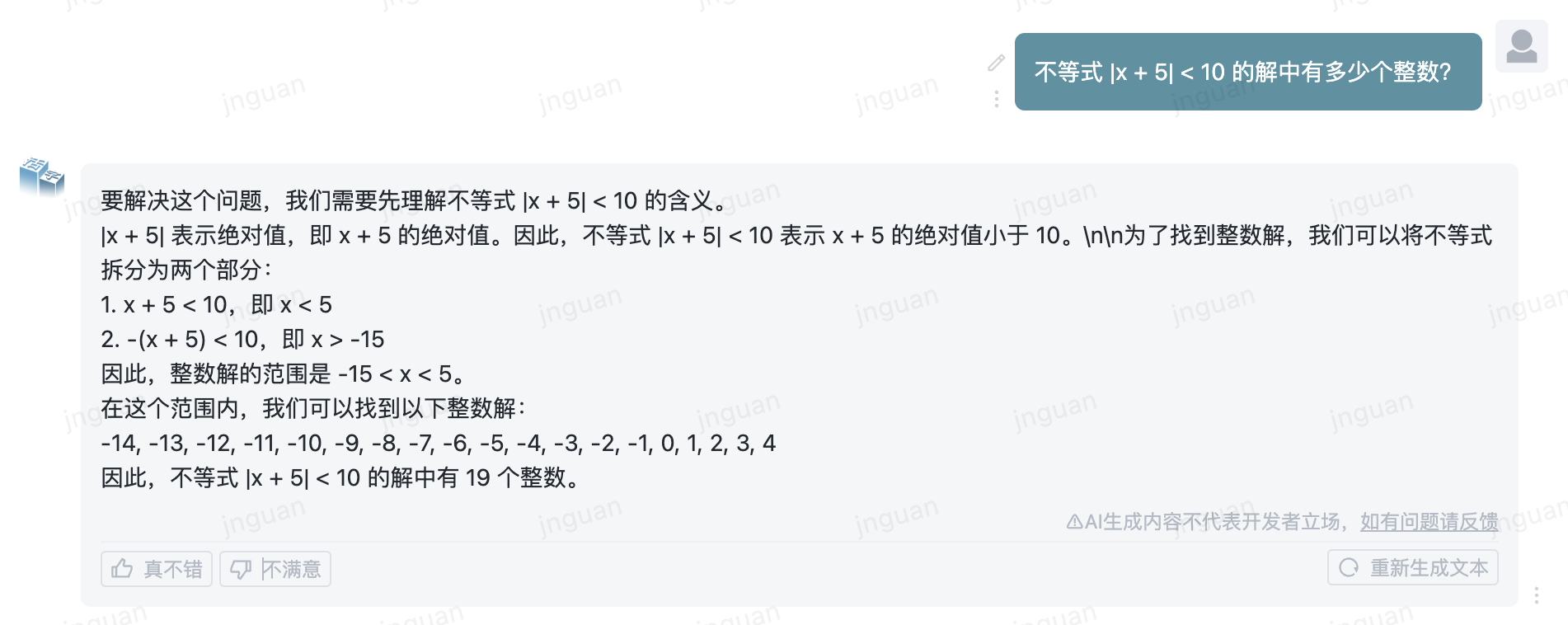
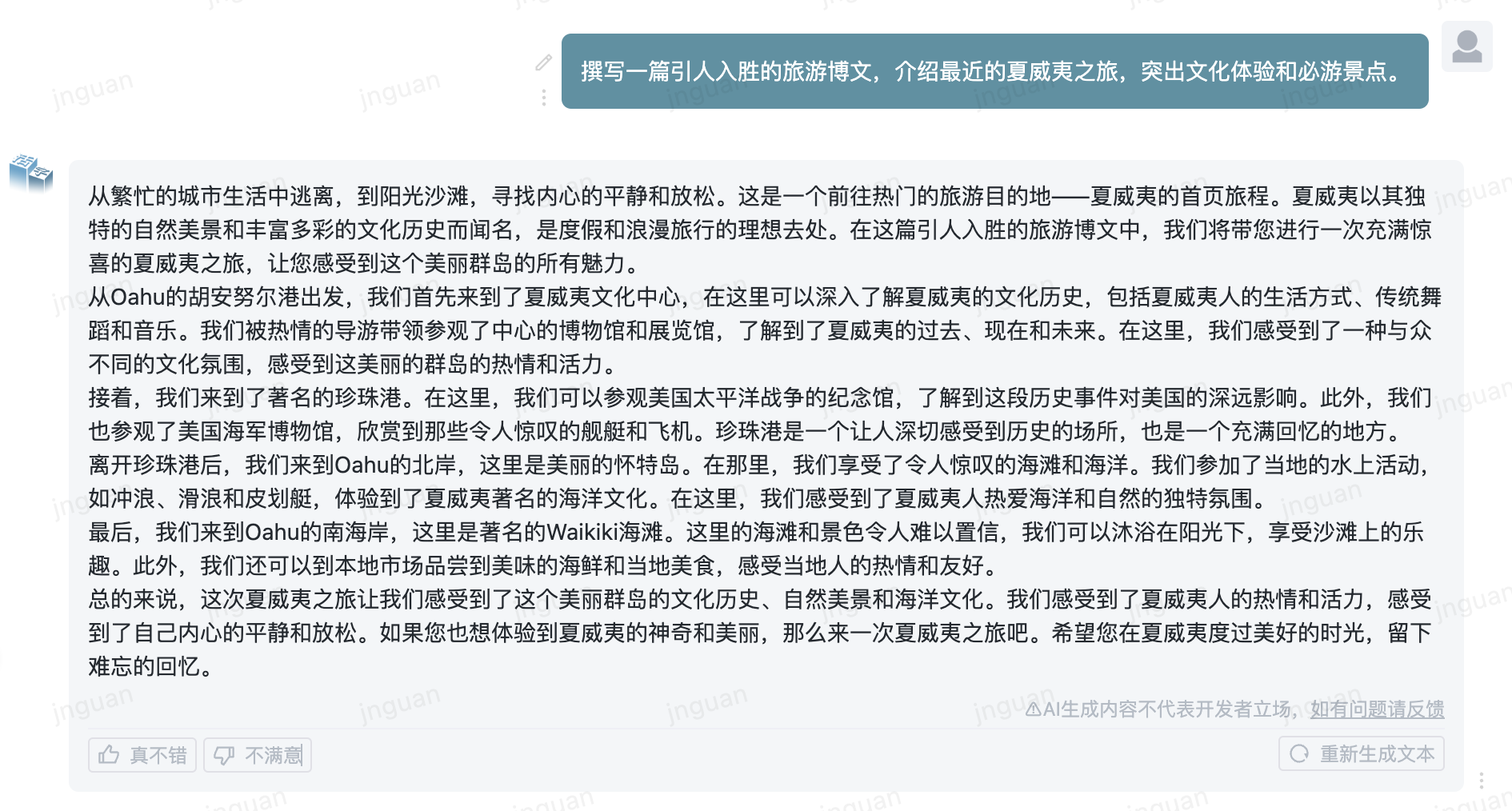
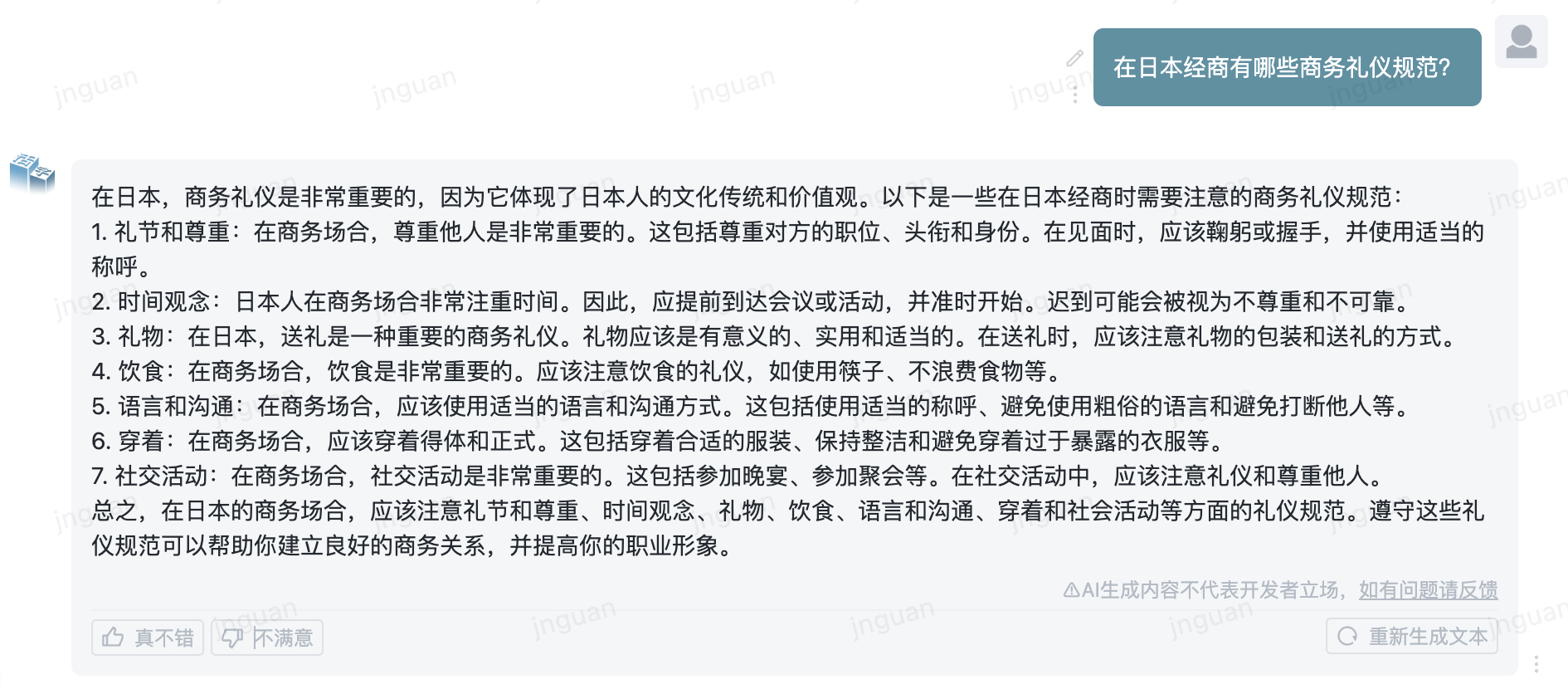
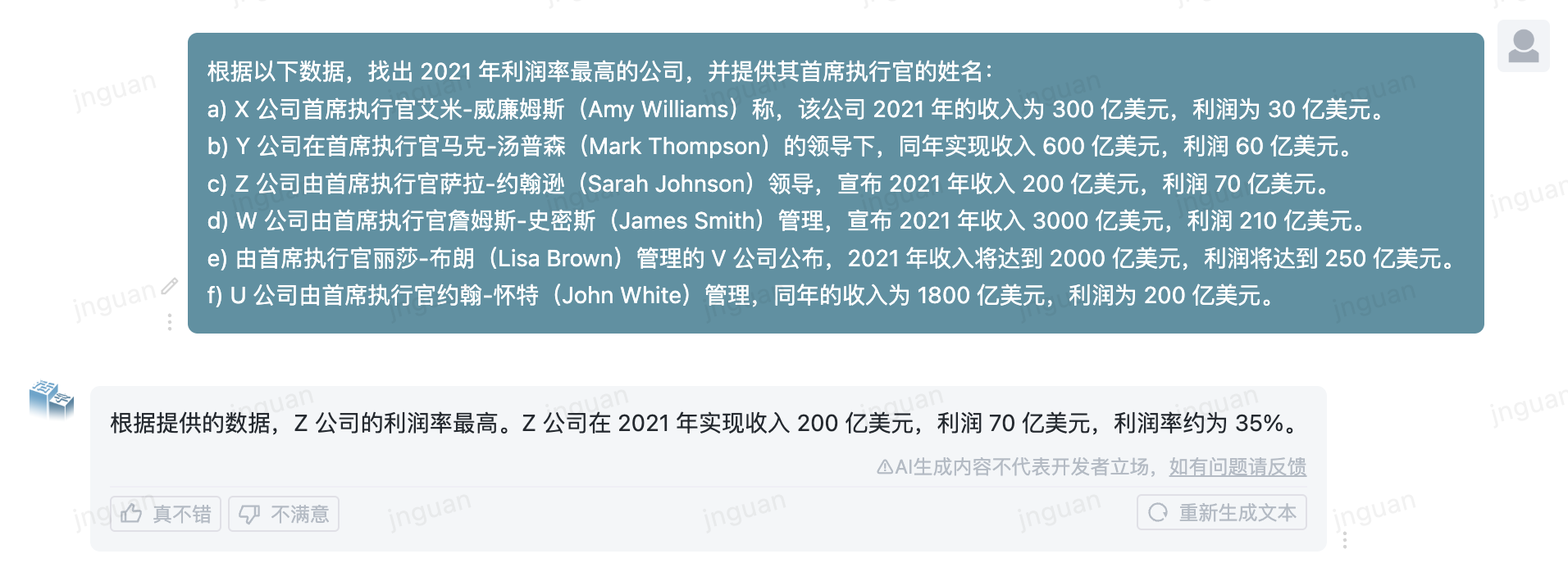
下面是活字3.5在MT-Bench-zh評測集上的生成效果展示:
對本倉庫源碼的使用遵循開源許可協議Apache 2.0。
活字支持商用。如果將活字模型或其衍生品用作商業用途,請您按照如下方式聯繫許可方,以進行登記並向許可方申請書面授權:聯繫郵箱:[email protected]。
@misc{huozi,
    author = {Huozi-Team}.
    title = {Huozi: Leveraging Large Language Models for Enhanced Open-Domain Chatting}
    year = {2024},
    publisher = {GitHub},
    journal = {GitHub repository}
    howpublished = { url {https://github.com/HIT-SCIR/huozi}}
}




