BambooAI
v0.3.52

使用大型語言模型(LLM)提供自然語言互動功能的輕量級庫,就像研究和數據分析助理促使您的數據對話一樣。您可以提供自己的數據集,也可以允許庫為您找到和獲取數據。它支持Internet搜索和外部API交互。
Bookeai庫是一種實驗性的,輕巧的工具,它利用大型語言模型(LLMS)來促進數據分析,使用戶更容易訪問,包括沒有編程專業知識的用戶。它是研究和數據分析的助手,使用戶可以通過自然語言與數據互動。用戶可以提供自己的數據集,或者Bookeai可以幫助採購必要的數據。該工具還集成了Internet搜索並訪問外部API以增強其功能。
Boogyai處理有關數據集的自然語言查詢,並可以生成和執行Python代碼以進行數據分析和可視化。這使用戶能夠在無廣泛的編碼知識的情況下從其數據中獲得見解。用戶只需輸入他們的數據集,用簡單的英語提出問題,而Bookyai則提供答案以及可視化,以幫助更好地理解數據。
Boogyai的目標是增強各個級別的數據分析師的功能。它簡化了數據分析和可視化,有助於簡化工作流程。該圖書館旨在用戶友好,高效且適應能夠滿足各種需求。
在Google Colab中嘗試一下:
使用提供的數據框的機器學習示例:
 !pip install pandas
!pip install bambooai

import pandas as pd
from bambooai import BambooAI

df = pd.read_csv('titanic.csv')
bamboo = BambooAI(df, debug=False, vector_db=False, search_tool=True)
bamboo.pd_agent_converse()
Jupyter筆記本:
任務:您能否設計一個機器Learnig模型來預測乘客在泰坦尼克號上的生存?輸出模型的準確性。繪製混淆矩陣,相關矩陣和其他相關指標。搜索Internet以獲取最佳方法來完成此任務。
Web UI:
任務:與體育數據分析有關的各種查詢
Bookeai代理通過幾個關鍵步驟操作,與用戶互動並產生響應:
1。啟動
2。任務評估
3。動態提示構建
4。調試,執行和錯誤糾正
5。結果,排名和知識基礎建立
6。人類反饋和循環繼續
在此過程中,代理會連續徵求用戶輸入,存儲消息以獲取上下文,並生成和執行代碼以確保最佳結果。在此過程中,採用了各種AI模型和矢量數據庫,以提供對用戶問題的準確和有用的回答。
流程圖(通用代理流):
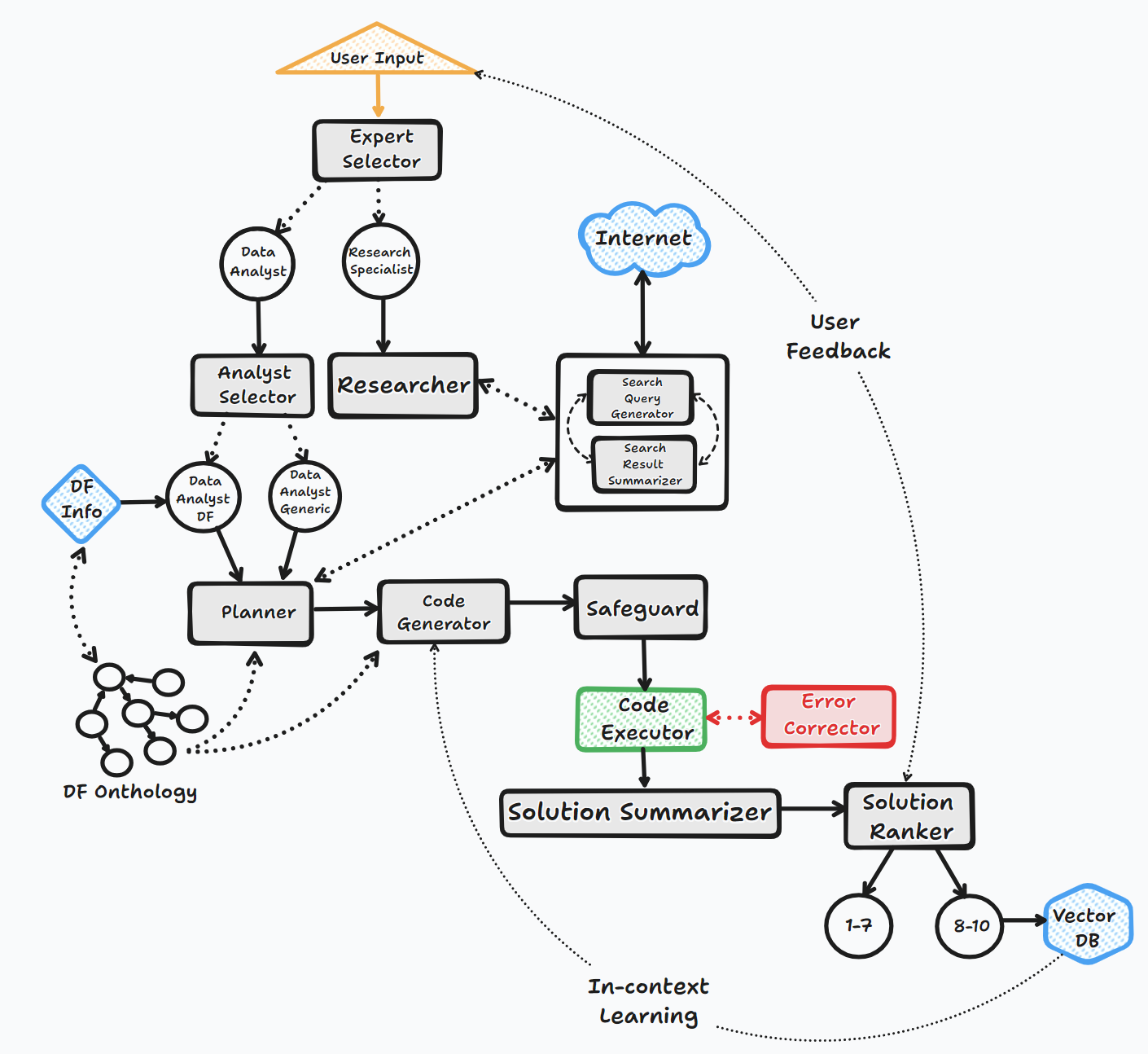
該圖書館支持通過API或Localy使用各種開源或專有模型。
API:
當地的:
您可以通過修改llm_config文件的內容來指定要用於特定代理的供應商/模型,用您選擇的模型和供應商替換默認的OpenAI模型名稱。例如。 {"agent": "Code Generator", "details": {"model": "open-mixtral-8x22b", "provider":"mistral","max_tokens": 4000, "temperature": 0}} 。 LLM_Config的目的將在下面更詳細地描述。
安裝
pip install bambooai
用法
 df: pd.DataFrame - Dataframe (It will try to source the data from internet, if 'df' is not provided)

max_conversations: int - Number of "user:assistant" conversation pairs to keep in memory for a context. Default=4

debug: bool - If True, the received code is sent back to the LLM for evaluation of its relevance to the user's question, along with code error checking and debugging.

search_tool: bool - If True, the Planner agent will use a "google search API: https://serper.dev/" if the required information is not available or satisfactory. By default it only support HTML sites, but can be enhanced with Selenium if the ChromeDriver exists on the system (details below).

vector_db: bool - If True, each answer will first be ranked from 1 to 10. If the rank surpasses a certain threshold (8), the corresponding question (vectorised), plan, code, and rank (metadata) are all stored in the Pinecone database. Each time a new question is asked, these records will be searched. If the similarity score is above 0.9, they will be offered as examples and included in the prompt (in a one-shot learning scenario)

df_onthology: bool - If True, the onthology defined in the module `df_onthology.py` will be used to inform LLM of the dataframe structure, metrics, record frequency, keys, joins, abstract functions etc. The onthology is custom for each dataframe type, and needs to be defined by the user. Sample onthology is included. This feature signifficantly improves performance, and quality of the solutions.

exploratory: bool - If set to True, the LLM will evaluate the user's question and select an "Expert" that is best suited to address the question (experts: Research Specialist, Data Analyst). In addition, if the task involves code generation/execution, it will generate a task list detailing the steps, which will subsequently be sent to the LLM as a part of the prompt for the next action. This method is particularly effective for vague user prompts, but it might not perform as efficiently with more specific prompts. The default setting is True.

e.g. bamboo = BambooAI(df, debug=True, vector_db=True, search_tool=True, exploratory=True)
     bamboo = BambooAI(df,debug=False, vector_db=False, exploratory=True, search_tool=True)
棄用通知(2023年10月25日):請注意,“ llm”,“ local_code_model”,“ llm_switch_plan”和“ llm_switch_code”參數已被棄用為v 0.3.29。現在通過llm_config來處理模型和模型參數對代理的分配。可以將其設置為環境變量,也可以通過工作目錄中的llm_config.json文件設置。請參閱下面的詳細信息
代理特定的LLM配置存儲在LLM_CONFIG環境中,或者需要存儲在Bookeai的工作目錄中的“ llm_config.json文件中。如果既不存在“ env var”和“ llm_config.json”,則Bookenai將使用所有代理使用“ GPT-3.5-Turbo”的默認硬編碼配置。
Bookeai庫為每個代理使用默認的硬編碼及時模板。如果您想與它們進行實驗,可以修改提供的“提示_templates_sample.json”文件,從其名稱中刪除“ _sample並存儲在工作目錄中。隨後,修改後的“ strump_templates.json.json”的內容將使用default/replevers remeptry/replate indepts/replate。
 # Run in a loop remembering the conversation history
import pandas as pd
from bambooai import BambooAI

df = pd.read_csv('test_activity_data.csv')
bamboo = BambooAI(df)
bamboo.pd_agent_converse()
 # Run programaticaly (Single execution).
import pandas as pd
from bambooai import BambooAI

df = pd.read_csv('test_activity_data.csv')
bamboo = BambooAI(df)
bamboo.pd_agent_converse("Calculate 30, 50, 75 and 90 percentiles of the heart rate column")
環境變量
該庫需要一個OpenAI API帳戶和API密鑰才能連接到OpenAI LLMS。 OpenAI API密鑰需要存儲在OPENAI_API_KEY環境變量中。可以從此處獲得鍵:https://platform.openai.com/account/api-keys。
除了OpenAI模型外,還支持來自不同提供商的模型(Groq,Gemini,Mistral,Anthropic)。 API鍵需要以以下格式存儲在環境變量中<VENDOR_NAME>_API_KEY 。您需要將GEMINI_API_KEY用於Google Gemini型號。
如上所述,LLM配置可以在LLM_CONFIG環境變量中以字符串格式存儲。您可以將提供的llm_config_sample.json的內容作為起點,並根據您可以訪問的模型進行修改。
Pincone Vector DB是可選的。如果您不想使用它,則無需做任何事情。如果您有Pinecone的帳戶,並且想使用知識庫和排名功能,則需要您設置PINECONE_API_KEY Envirooment變量,並將'vector_db'參數設置為true。向量數據庫索引是在第一次執行時創建的。
Google搜索也是可選的。如果您不想使用它,則無需做任何事情。如果您有一個帶有Serper的帳戶,並且想使用Google搜索功能,則將要求您設置和帳戶“:https://serper.dev/”,並設置SERPER_API_KEY環境變量,然後將'search_tool'參數設置為true。默認情況下,Bookeai只能刮擦帶有HTML內容的網站。但是,它也能夠將硒與Chromedriver一起使用,這更強大。要啟用此功能,您需要手動下載與Chrome瀏覽器版本相匹配的Chromedriver版本,將其存儲在文件系統中,並創建環境變量SELENIUM_WEBDRIVER_PATH ,並使用通往Chromedriver的路徑。 Boogyai Will會自動拾取它,並使用硒進行所有刮擦任務。
本地開源模型
該庫當前直接支持以下開源模型。我選擇了當前在人道基準測試中得分最高的型號。
如果要使用特定代理的本地模型,請修改llm_config內容,用本地模型名稱代替OpenAI模型名稱,然後將提供商值更改為“本地”。例如。 {"agent": "Code Generator", "details": {"model": "Phind-CodeLlama-34B-v2", "provider":"local","max_tokens": 2000, "temperature": 0}} At present it is recommended to use local models only for code generation tasks, all other tasks like pseudo code generaration, summarisation, error correction and ranking should be still handled by OpenAI models of choice.該模型是從HuggingFace下載的,並在Localy中下載以進行後續執行。為了合理的性能,它需要啟用CUDA的GPU,並且與CUDA版本兼容的Pytorch庫。以下是包裝中未包含的所需庫,需要獨立安裝:
 pip install torch torchvision torchaudio --index-url https://download.pytorch.org/whl/cu118 (Adjust to match your CUDA version. This library is already included in Colab notebooks)
pip install auto-gptq (Only required if using WizardCoder-15B-1.0-GPTQ model)
pip install accelerate
pip install einops
pip install xformers
pip install bitsandbytes
本地模型的設置和參數位於local_models.py模塊中,可以調整以匹配您的特定配置或首選項。
霍拉馬
圖書館還支持Ollama https://ollama.com/的使用以及所有模型。如果要為特定代理使用本地的Ollama模型,請修改llm_config內容,用Ollama模型名稱代替OpenAI模型名稱,然後將提供商的值更改為“ Ollama”。例如。 {"agent": "Code Generator", "details": {"model": "llama3:70b", "provider":"ollama","max_tokens": 2000, "temperature": 0}}
記錄
所有LLM交互(本地或通過API)均在bambooai_consolidated_log.json文件中記錄。當日誌文件的大小達到5 MB時,會創建一個新的日誌文件。在最舊的文件被覆蓋之前,總共將3個日誌文件保存在文件系統上。
捕獲以下細節:
日誌結構:
 - chain_id: 1695375585
  ├─ chain_details (LLM Calls)
  │   ├─ List of Dictionaries (Multiple Steps)
  │       ├─ Call 1
  │       │   ├─ agent (String)
  │       │   ├─ chain_id (Integer)
  │       │   ├─ timestamp (String)
  │       │   ├─ model (String)
  │       │   ├─ messages (List)
  │       │   │   └─ role (String)
  │       │   │   └─ content (String)
  │       │   └─ Other Fields (content, prompt_tokens, completion_tokens, total_tokens, elapsed_time, tokens_per_second, cost)
  │       ├─ Call 2
  │       │   └─ ... (Similar Fields)
  │       └─ ... (Call 3, Call 4, Call 5 ...)
  │
  ├─ chain_summary
  │   ├─ Dictionary
  │       ├─ Total LLM Calls (Integer)
  │       ├─ Prompt Tokens (Integer)
  │       ├─ Completion Tokens (Integer)
  │       ├─ Total Tokens (Integer)
  │       ├─ Total Time (Float)
  │       ├─ Tokens per Second (Float)
  │       ├─ Total Cost (Float)
  │
  ├─ summary_per_model
      ├─ Dictionary
          ├─ LLM 1 (Dictionary)
          │   ├─ LLM Calls (Integer)
          │   ├─ Prompt Tokens (Integer)
          │   ├─ Completion Tokens (Integer)
          │   ├─ Total Tokens (Integer)
          │   ├─ Total Time (Float)
          │   ├─ Tokens per Second (Float)
          │   ├─ Total Cost (Float)
          ├─ LLM 2
          |   └─ ... (Similar Fields)
          └─ ... (LLM 3, LLM 4, LLM 5 ...)
任務:設計機器學習模型,以預測乘客在泰坦尼克號上的生存。輸出應包括模型的準確性以及混淆矩陣,相關矩陣和其他相關指標的可視化。
數據集: Titanic.csv
型號: GPT-4-Turbo
| 公制 | 價值 |
|---|---|
| 執行時間 | 77.12秒 |
| 輸入令牌 | 7128 |
| 輸出令牌 | 1215 |
| 總成本 | $ 0.1077 |
| 公制 | 價值 |
|---|---|
| 執行時間 | 47.39秒 |
| 輸入令牌 | 722 |
| 輸出令牌 | 931 |
| 總成本 | $ 0.0353 |
體育數據分析的AI工具的客觀評估_ Maxwell-V2與通用LLMS.pdf
歡迎捐款;請隨時打開拉動請求。請記住,我們的目標是保持具有高可讀性的簡潔代碼庫。





