harbor
v0.2.18 -


毫不費力地使用一個命令運行LLM後端,API,前端和服務。
Harbor是一個容器化的LLM工具包,可讓您運行LLM和其他服務。它由一個CLI和一個伴隨應用程序組成,可讓您輕鬆管理和運行AI服務。
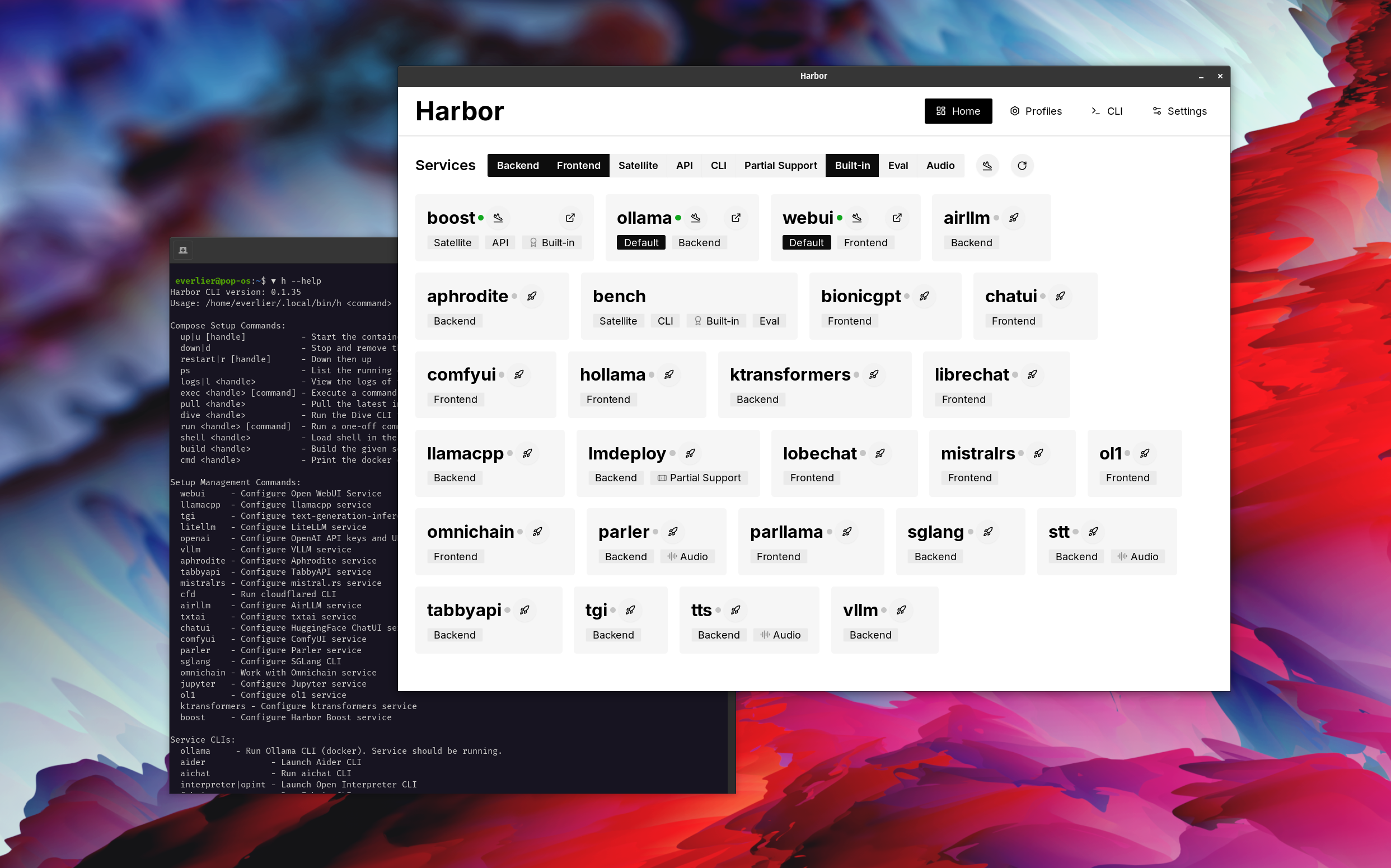
打開webui⦁︎comfyui⦁︎librechat⦁︎huggingface chatui to lobe聊天⦁︎hollama⦁︎
ollama⦁︎llama.cpp⦁︎vllm⦁︎tabbyapi⦁︎aphrodite Engine⦁︎mistral.rs⦁︎opendeedai-speech⦁︎更快 - 旋轉式服務器⦁︎parler⦁︎parler⦁︎parler⦁︎文本生成⦁︎lmdeploy⦁︎lmdeploy⦁︎airlllm⦁ ︎sglang⦁︎ktransformers⦁︎nexa sdk
港口長凳⦁︎港口boost⦁︎searxng⦁︎pleplexiga⦁︎dify dify plandex⦁︎litellm⦁︎langfuse langfuse⦁︎開放口譯⦁cmdflared cmdflared cmdh cmdh fabric⦁︎txtai rag t txtai rag textgrad textgrad⦁︎ ︎omnichain⦁︎lm-評估- jupyterlab⦁︎ol1⦁ ︎openhands⦁︎litlytics⦁︎repopack⦁︎repopack⦁︎n8n bolt.new new new open webui pipelines⦁︎ ︎omlniparser⦁︎流動
請參閱服務文檔以獲取每個文檔的簡要概述。
 # Run Harbor with default services:
# Open WebUI and Ollama
harbor up

# Run Harbor with additional services
# Running SearXNG automatically enables Web RAG in Open WebUI
harbor up searxng

# Run additional/alternative LLM Inference backends
# Open Webui is automatically connected to them.
harbor up llamacpp tgi litellm vllm tabbyapi aphrodite sglang ktransformers

# Run different Frontends
harbor up librechat chatui bionicgpt hollama

# Get a free quality boost with
# built-in optimizing proxy
harbor up boost

# Use FLUX in Open WebUI in one command
harbor up comfyui

# Use custom models for supported backends
harbor llamacpp model https://huggingface.co/user/repo/model.gguf

# Shortcut to HF Hub to find the models
harbor hf find gguf gemma-2
# Use HFDownloader and official HF CLI to download models
harbor hf dl -m google/gemma-2-2b-it -c 10 -s ./hf
harbor hf download google/gemma-2-2b-it

# Where possible, cache is shared between the services
harbor tgi model google/gemma-2-2b-it
harbor vllm model google/gemma-2-2b-it
harbor aphrodite model google/gemma-2-2b-it
harbor tabbyapi model google/gemma-2-2b-it-exl2
harbor mistralrs model google/gemma-2-2b-it
harbor opint model google/gemma-2-2b-it
harbor sglang model google/gemma-2-2b-it

# Convenience tools for docker setup
harbor logs llamacpp
harbor exec llamacpp ./scripts/llama-bench --help
harbor shell vllm

# Tell your shell exactly what you think about it
harbor opint
harbor aider
harbor aichat
harbor cmdh

# Use fabric to LLM-ify your linux pipes
cat ./file.md | harbor fabric --pattern extract_extraordinary_claims | grep " LK99 "

# Access service CLIs without installing them
harbor hf scan-cache
harbor ollama list

# Open services from the CLI
harbor open webui
harbor open llamacpp
# Print yourself a QR to quickly open the
# service on your phone
harbor qr
# Feeling adventurous? Expose your harbor
# to the internet
harbor tunnel

# Config management
harbor config list
harbor config set webui.host.port 8080

# Create and manage config profiles
harbor profile save l370b
harbor profile use default

# Lookup recently used harbor commands
harbor history

# Eject from Harbor into a standalone Docker Compose setup
# Will export related services and variables into a standalone file.
harbor eject searxng llamacpp > docker-compose.harbor.yml

# Run a build-in LLM benchmark with
# your own tasks
harbor bench run

# Gimmick/Fun Area

# Argument scrambling, below commands are all the same as above
# Harbor doesn't care if it's "vllm model" or "model vllm", it'll
# figure it out.
harbor model vllm
harbor vllm model

harbor config get webui.name
harbor get config webui_name

harbor tabbyapi shell
harbor shell tabbyapi

# 50% gimmick, 50% useful
# Ask harbor about itself
harbor how to ping ollama container from the webui ? 在演示中,Harbor App用於啟動使用Ollama和Open WebUI服務的默認堆棧。後來,還啟動了Searxng,WebUI可以連接到Web抹布。之後,Harbour Boost也開始並自動連接到WebUI,以誘導更多的創意輸出。作為最後一步,在Harbor Boost中的klmbr模塊的應用程序中調整了Harbor Config,這使LLM的輸出無法避免(但對於人類仍無法確定)。
如果您對Docker和Linux管理感到滿意 - 您可能不需要港口本身就可以管理當地的LLM環境。但是,您最終也可能達到類似的解決方案。我知道這是事實,因為我在搖擺不定的設置,而沒有所有的哨子和鈴鐺。
Harbor並非被設計為部署解決方案,而是作為當地LLM開發環境的幫助者。這是嘗試LLM和相關服務的好起點。
您以後可以從Harbor彈出並在您自己的設置中使用這些服務,或繼續使用Harbor作為您自己的配置的基礎。
該項目由一個相當大的外殼CLI組成,相當小的.env文件和Enourmous(用於一個存儲庫)數量的docker-compose文件。
hf , ollama等)harbor eject的奔跑




