harbor
v0.2.18 -


LLMバックエンド、API、フロントエンド、およびサービスを1つのコマンドで簡単に実行します。
ハーバーは、LLMSと追加サービスを実行できるコンテナ化されたLLMツールキットです。これは、CLIとコンパニオンアプリで構成されており、AIサービスを簡単に管理および実行できます。
Open webui
ollama⦁︎llama.cpp ︎sglang⦁︎kransformers⦁︎nexa sdk
ハーバーベンチ⦁︎港のブースト⦁︎searxng⦁︎perplexica Omnichain OpenHands
それぞれの簡単な概要については、サービスのドキュメントを参照してください。
 # Run Harbor with default services:
# Open WebUI and Ollama
harbor up

# Run Harbor with additional services
# Running SearXNG automatically enables Web RAG in Open WebUI
harbor up searxng

# Run additional/alternative LLM Inference backends
# Open Webui is automatically connected to them.
harbor up llamacpp tgi litellm vllm tabbyapi aphrodite sglang ktransformers

# Run different Frontends
harbor up librechat chatui bionicgpt hollama

# Get a free quality boost with
# built-in optimizing proxy
harbor up boost

# Use FLUX in Open WebUI in one command
harbor up comfyui

# Use custom models for supported backends
harbor llamacpp model https://huggingface.co/user/repo/model.gguf

# Shortcut to HF Hub to find the models
harbor hf find gguf gemma-2
# Use HFDownloader and official HF CLI to download models
harbor hf dl -m google/gemma-2-2b-it -c 10 -s ./hf
harbor hf download google/gemma-2-2b-it

# Where possible, cache is shared between the services
harbor tgi model google/gemma-2-2b-it
harbor vllm model google/gemma-2-2b-it
harbor aphrodite model google/gemma-2-2b-it
harbor tabbyapi model google/gemma-2-2b-it-exl2
harbor mistralrs model google/gemma-2-2b-it
harbor opint model google/gemma-2-2b-it
harbor sglang model google/gemma-2-2b-it

# Convenience tools for docker setup
harbor logs llamacpp
harbor exec llamacpp ./scripts/llama-bench --help
harbor shell vllm

# Tell your shell exactly what you think about it
harbor opint
harbor aider
harbor aichat
harbor cmdh

# Use fabric to LLM-ify your linux pipes
cat ./file.md | harbor fabric --pattern extract_extraordinary_claims | grep " LK99 "

# Access service CLIs without installing them
harbor hf scan-cache
harbor ollama list

# Open services from the CLI
harbor open webui
harbor open llamacpp
# Print yourself a QR to quickly open the
# service on your phone
harbor qr
# Feeling adventurous? Expose your harbor
# to the internet
harbor tunnel

# Config management
harbor config list
harbor config set webui.host.port 8080

# Create and manage config profiles
harbor profile save l370b
harbor profile use default

# Lookup recently used harbor commands
harbor history

# Eject from Harbor into a standalone Docker Compose setup
# Will export related services and variables into a standalone file.
harbor eject searxng llamacpp > docker-compose.harbor.yml

# Run a build-in LLM benchmark with
# your own tasks
harbor bench run

# Gimmick/Fun Area

# Argument scrambling, below commands are all the same as above
# Harbor doesn't care if it's "vllm model" or "model vllm", it'll
# figure it out.
harbor model vllm
harbor vllm model

harbor config get webui.name
harbor get config webui_name

harbor tabbyapi shell
harbor shell tabbyapi

# 50% gimmick, 50% useful
# Ask harbor about itself
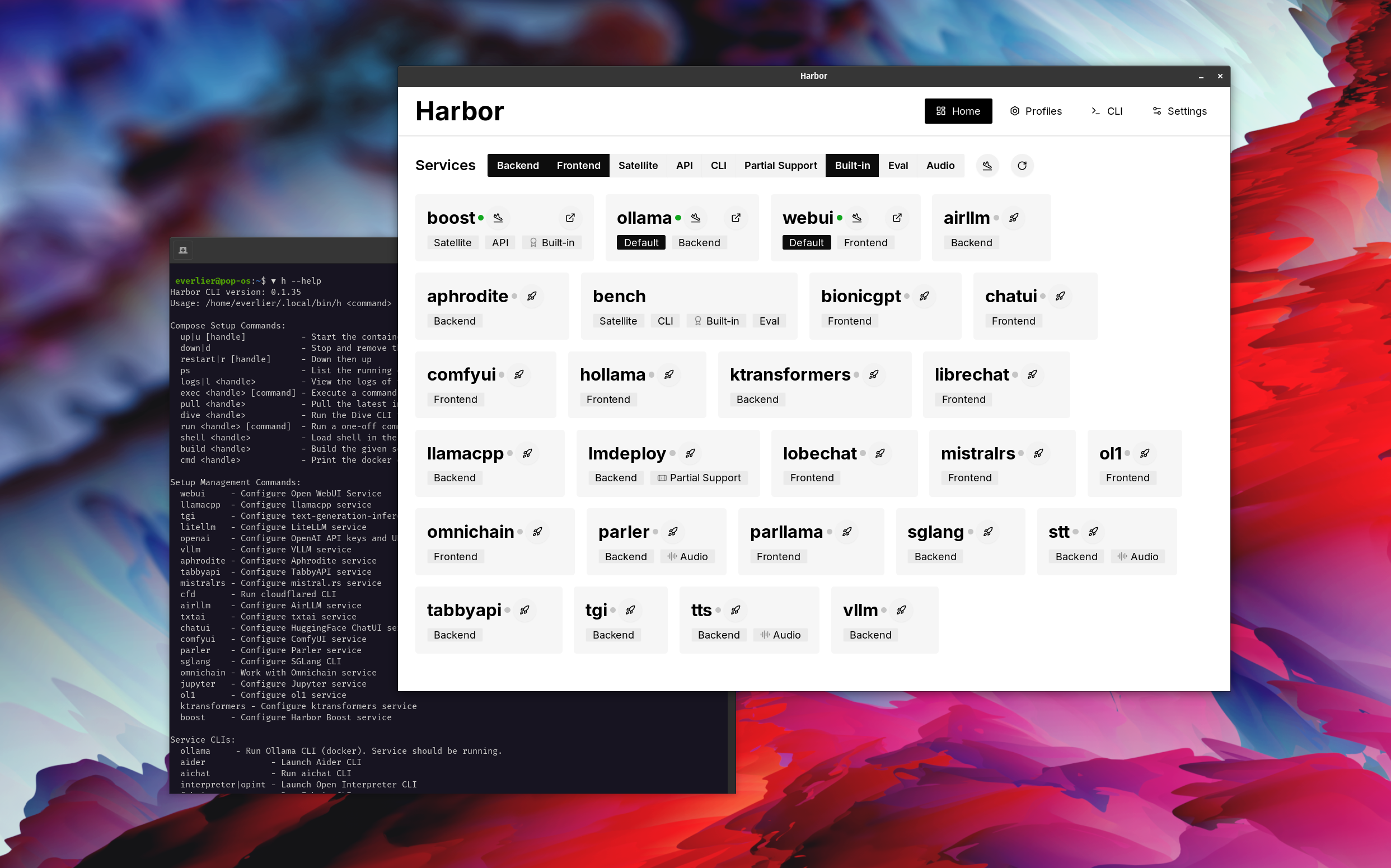
harbor how to ping ollama container from the webui ? デモでは、Harborアプリを使用して、OllamaとOpen WebUIサービスでデフォルトのスタックを起動します。その後、Searxngも開始され、WebUIは箱から出してWebラグに接続できます。その後、ハーバーブーストも開始され、WebUIに接続され、より創造的な出力を誘導します。最後のステップとして、ハーバーブーストのklmbrモジュールのアプリでハーバー構成が調整されているため、LLMに出力が比類のないものになります(まだ人間には魅了されません)。
DockerとLinuxの管理に満足している場合は、地元のLLM環境を管理するために港自体を必要としないでしょう。ただし、最終的には同様のソリューションに到着する可能性もあります。私はこれを事実のために知っています。なぜなら、私はほぼ同様のセットアップを揺さぶっていたので、すべてのホイッスルと鐘がなくても。
ハーバーは、展開ソリューションとしてではなく、ローカルLLM開発環境のヘルパーとして設計されています。これは、LLMSおよび関連サービスを実験するための良い出発点です。
後で港から排出して、独自のセットアップでサービスを使用するか、独自の構成のベースとしてハーバーを使用し続けることができます。
このプロジェクトは、かなり大きなシェルCLIで構成されており、かなり小さい.envファイルと、 docker-composeファイルの量のEnourmous(1つのレポ)です。
hf 、 ollamaなど)harbor ejectなしで走るために排出します




