harbor
v0.2.18 -


Exécutez sans effort LLM Backends, API, Frontends et Services avec une seule commande.
Harbor est une boîte à outils LLM contenerisée qui vous permet d'exécuter des LLM et des services supplémentaires. Il se compose d'une CLI et d'une application compagnon qui vous permet de gérer et d'exécuter facilement les services AI.
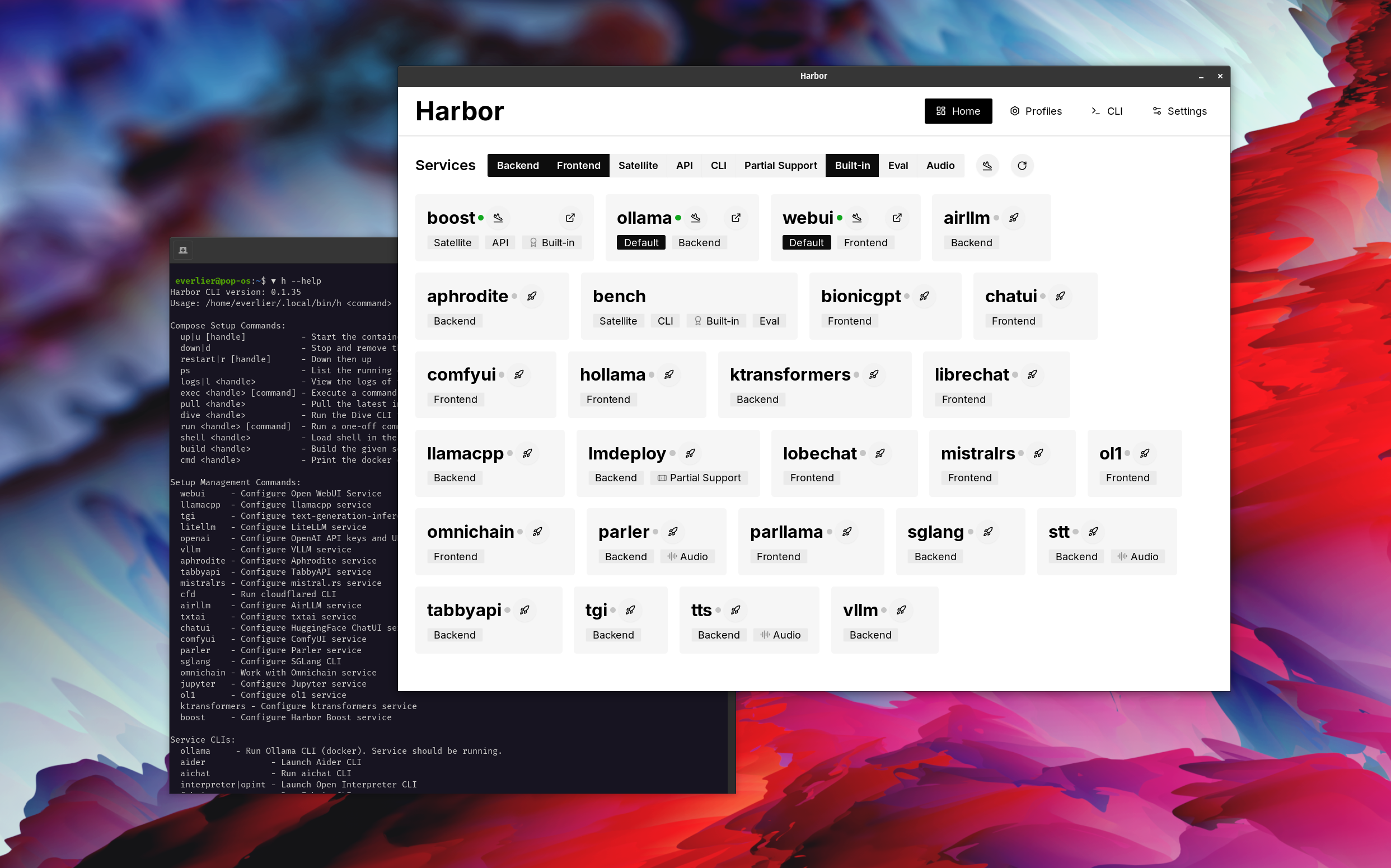
Ouvrir webui ⦁︎ Comfyui ⦁︎ Librechat ⦁︎ Huggingface Chatui ⦁︎ Chat lobe ⦁︎ Hollama ⦁︎ Parllama ⦁︎ bionicgpt ⦁︎ Tout
Olllama ⦁︎ lama.cpp ⦁︎ vllm ⦁︎ Tabbyapi ⦁︎ moteur aphrodite ⦁︎ Mistral.RS ⦁︎ Openedai-Speech ⦁︎ plus rapide-whisper-server ⦁︎ Parler ⦁︎ Génération de texte-inférence ⦁︎ lmdeploy ⦁︎ Airllm ⦁ ︎ SGLANG ⦁︎ KTRANSformateurs ⦁︎ SDK NEXA
Banc de port ⦁︎ Boost port ⦁︎ Searxng ⦁︎ perplexica ⦁︎ Dify ⦁︎ Planchex ⦁︎ litellm ⦁︎ Langfuse ⦁︎ Interpréteur ouvert ⦁ ︎cloudflared ⦁︎ cmdh ⦁︎ tissu ⦁︎ rag txtai ⦁︎ Textgrad ⦁︎ Aider ⦁︎ aichat ⦁ ︎ Omnichain ⦁︎ LM-Evaluation Harness ⦁︎ JupyterLab ⦁︎ OL1 ⦁︎ OpenHands ⦁︎ Litlytics ⦁︎ Repopack ⦁︎ N8n ⦁︎ Bolt.New ⦁︎ Ouvrez les pipelines webui ⦁︎ Qdrant ⦁︎ K6 ⦁︎ Promptfoo ⦁︎ webtop ⦁︎ omniparser ⦁︎ Flowise
Voir la documentation des services pour un bref aperçu de chacun.
 # Run Harbor with default services:
# Open WebUI and Ollama
harbor up

# Run Harbor with additional services
# Running SearXNG automatically enables Web RAG in Open WebUI
harbor up searxng

# Run additional/alternative LLM Inference backends
# Open Webui is automatically connected to them.
harbor up llamacpp tgi litellm vllm tabbyapi aphrodite sglang ktransformers

# Run different Frontends
harbor up librechat chatui bionicgpt hollama

# Get a free quality boost with
# built-in optimizing proxy
harbor up boost

# Use FLUX in Open WebUI in one command
harbor up comfyui

# Use custom models for supported backends
harbor llamacpp model https://huggingface.co/user/repo/model.gguf

# Shortcut to HF Hub to find the models
harbor hf find gguf gemma-2
# Use HFDownloader and official HF CLI to download models
harbor hf dl -m google/gemma-2-2b-it -c 10 -s ./hf
harbor hf download google/gemma-2-2b-it

# Where possible, cache is shared between the services
harbor tgi model google/gemma-2-2b-it
harbor vllm model google/gemma-2-2b-it
harbor aphrodite model google/gemma-2-2b-it
harbor tabbyapi model google/gemma-2-2b-it-exl2
harbor mistralrs model google/gemma-2-2b-it
harbor opint model google/gemma-2-2b-it
harbor sglang model google/gemma-2-2b-it

# Convenience tools for docker setup
harbor logs llamacpp
harbor exec llamacpp ./scripts/llama-bench --help
harbor shell vllm

# Tell your shell exactly what you think about it
harbor opint
harbor aider
harbor aichat
harbor cmdh

# Use fabric to LLM-ify your linux pipes
cat ./file.md | harbor fabric --pattern extract_extraordinary_claims | grep " LK99 "

# Access service CLIs without installing them
harbor hf scan-cache
harbor ollama list

# Open services from the CLI
harbor open webui
harbor open llamacpp
# Print yourself a QR to quickly open the
# service on your phone
harbor qr
# Feeling adventurous? Expose your harbor
# to the internet
harbor tunnel

# Config management
harbor config list
harbor config set webui.host.port 8080

# Create and manage config profiles
harbor profile save l370b
harbor profile use default

# Lookup recently used harbor commands
harbor history

# Eject from Harbor into a standalone Docker Compose setup
# Will export related services and variables into a standalone file.
harbor eject searxng llamacpp > docker-compose.harbor.yml

# Run a build-in LLM benchmark with
# your own tasks
harbor bench run

# Gimmick/Fun Area

# Argument scrambling, below commands are all the same as above
# Harbor doesn't care if it's "vllm model" or "model vllm", it'll
# figure it out.
harbor model vllm
harbor vllm model

harbor config get webui.name
harbor get config webui_name

harbor tabbyapi shell
harbor shell tabbyapi

# 50% gimmick, 50% useful
# Ask harbor about itself
harbor how to ping ollama container from the webui ? Dans la démo, l'application Harbor est utilisée pour lancer une pile par défaut avec Olllama et Open Webui Services. Plus tard, SearXng est également démarré et WebUI peut s'y connecter pour le chiffon Web dès la sortie de la boîte. Après cela, Harbour Boost est également démarré et connecté automatiquement au WebUI pour induire des sorties plus créatives. En tant que dernière étape, la configuration du port est ajustée dans l'application pour le module klmbr dans le port de port, ce qui rend la sortie incomparable pour le LLM (mais toujours indéfinissable pour les humains).
Si vous êtes à l'aise avec Docker et Linux Administration - vous n'avez probablement pas besoin de port en soi pour gérer votre environnement LLM local. Cependant, vous êtes également susceptible d'arriver à une solution similaire. Je le sais pour un fait, car je me balançais une configuration à peu près similaire, juste sans tous les sifflets et les cloches.
Harbor n'est pas conçu comme une solution de déploiement, mais plutôt comme une aide pour l'environnement de développement LLM local. C'est un bon point de départ pour expérimenter les LLM et les services connexes.
Vous pouvez ensuite éjecter à partir de Harbor et utiliser les services dans votre propre configuration, ou continuer à utiliser Harbor comme base pour votre propre configuration.
Ce projet se compose d'une CLI de coquille assez importante, d'un fichier .env assez petit et d'une quantité de fichiers docker-compose enourmous (pour un repo).
hf , ollama , etc.) via Docker sans installationharbor eject




