harbor
v0.2.18 -


LLM 백엔드, API, 프론트 엔드 및 서비스를 하나의 명령으로 쉽게 실행합니다.
Harbor는 LLM 및 추가 서비스를 실행할 수있는 컨테이너화 된 LLM 툴킷입니다. CLI와 동반자 앱으로 구성되어있어 AI 서비스를 쉽게 관리하고 실행할 수 있습니다.
오픈 webui ⦁︎ comfyui ⦁︎ librechat ⦁︎ huggingface chatui ⦁︎ lobe 채팅 ⦁︎ hollama ⦁︎ parllama ⦁︎ bionicgpt ⦁︎ wayllm ⦁︎ 채팅 nio
Ollama l llama.cpp ⦁︎ vllm ⦁︎ tabbyapi ⦁︎ aphrodite 엔진 ⦁︎ mistral.rs ⦁︎ Openedai-speech ⦁︎ 더 빠른-서퍼-서버 ⦁︎ parler ⦁︎ 텍스트-세대-주도 ⦁︎ lmdeploy ⦁︎ airllm ⦁ SGLANG ang KTRANSFORMERS ⦁︎ NEXA SDK
하버 벤치 bor 하버 부스트 ⦁︎ searxng ⦁︎ perplexica ⦁︎ dify ⦁︎ plandex ⦁︎ litellm ⦁︎ langfuse ⦁︎ 열린 통역사 ⦁ ︎ cloudflared ⦁︎ cmdh ⦁︎ 직물 ⦁︎ txtai grag ggrad ⦁︎ aider ⦁︎ aichat ⦁ Omnichain n LM-Evaluation-Harness ⦁︎ jupyterlab ⦁︎ ol1 ⦁︎ OpenHands Littytics ly repopack ⦁︎ repopack ⦁︎ n8n ⦁︎ bolt.new ⦁︎ Open WebUI 파이프 라인 ⦁︎ qdrant ⦁︎ k6 ⦁︎ promptfoo ⦁︎ webtop ⦁︎ omniparser ⦁︎ flowise
각각에 대한 간단한 개요는 서비스 문서를 참조하십시오.
 # Run Harbor with default services:
# Open WebUI and Ollama
harbor up

# Run Harbor with additional services
# Running SearXNG automatically enables Web RAG in Open WebUI
harbor up searxng

# Run additional/alternative LLM Inference backends
# Open Webui is automatically connected to them.
harbor up llamacpp tgi litellm vllm tabbyapi aphrodite sglang ktransformers

# Run different Frontends
harbor up librechat chatui bionicgpt hollama

# Get a free quality boost with
# built-in optimizing proxy
harbor up boost

# Use FLUX in Open WebUI in one command
harbor up comfyui

# Use custom models for supported backends
harbor llamacpp model https://huggingface.co/user/repo/model.gguf

# Shortcut to HF Hub to find the models
harbor hf find gguf gemma-2
# Use HFDownloader and official HF CLI to download models
harbor hf dl -m google/gemma-2-2b-it -c 10 -s ./hf
harbor hf download google/gemma-2-2b-it

# Where possible, cache is shared between the services
harbor tgi model google/gemma-2-2b-it
harbor vllm model google/gemma-2-2b-it
harbor aphrodite model google/gemma-2-2b-it
harbor tabbyapi model google/gemma-2-2b-it-exl2
harbor mistralrs model google/gemma-2-2b-it
harbor opint model google/gemma-2-2b-it
harbor sglang model google/gemma-2-2b-it

# Convenience tools for docker setup
harbor logs llamacpp
harbor exec llamacpp ./scripts/llama-bench --help
harbor shell vllm

# Tell your shell exactly what you think about it
harbor opint
harbor aider
harbor aichat
harbor cmdh

# Use fabric to LLM-ify your linux pipes
cat ./file.md | harbor fabric --pattern extract_extraordinary_claims | grep " LK99 "

# Access service CLIs without installing them
harbor hf scan-cache
harbor ollama list

# Open services from the CLI
harbor open webui
harbor open llamacpp
# Print yourself a QR to quickly open the
# service on your phone
harbor qr
# Feeling adventurous? Expose your harbor
# to the internet
harbor tunnel

# Config management
harbor config list
harbor config set webui.host.port 8080

# Create and manage config profiles
harbor profile save l370b
harbor profile use default

# Lookup recently used harbor commands
harbor history

# Eject from Harbor into a standalone Docker Compose setup
# Will export related services and variables into a standalone file.
harbor eject searxng llamacpp > docker-compose.harbor.yml

# Run a build-in LLM benchmark with
# your own tasks
harbor bench run

# Gimmick/Fun Area

# Argument scrambling, below commands are all the same as above
# Harbor doesn't care if it's "vllm model" or "model vllm", it'll
# figure it out.
harbor model vllm
harbor vllm model

harbor config get webui.name
harbor get config webui_name

harbor tabbyapi shell
harbor shell tabbyapi

# 50% gimmick, 50% useful
# Ask harbor about itself
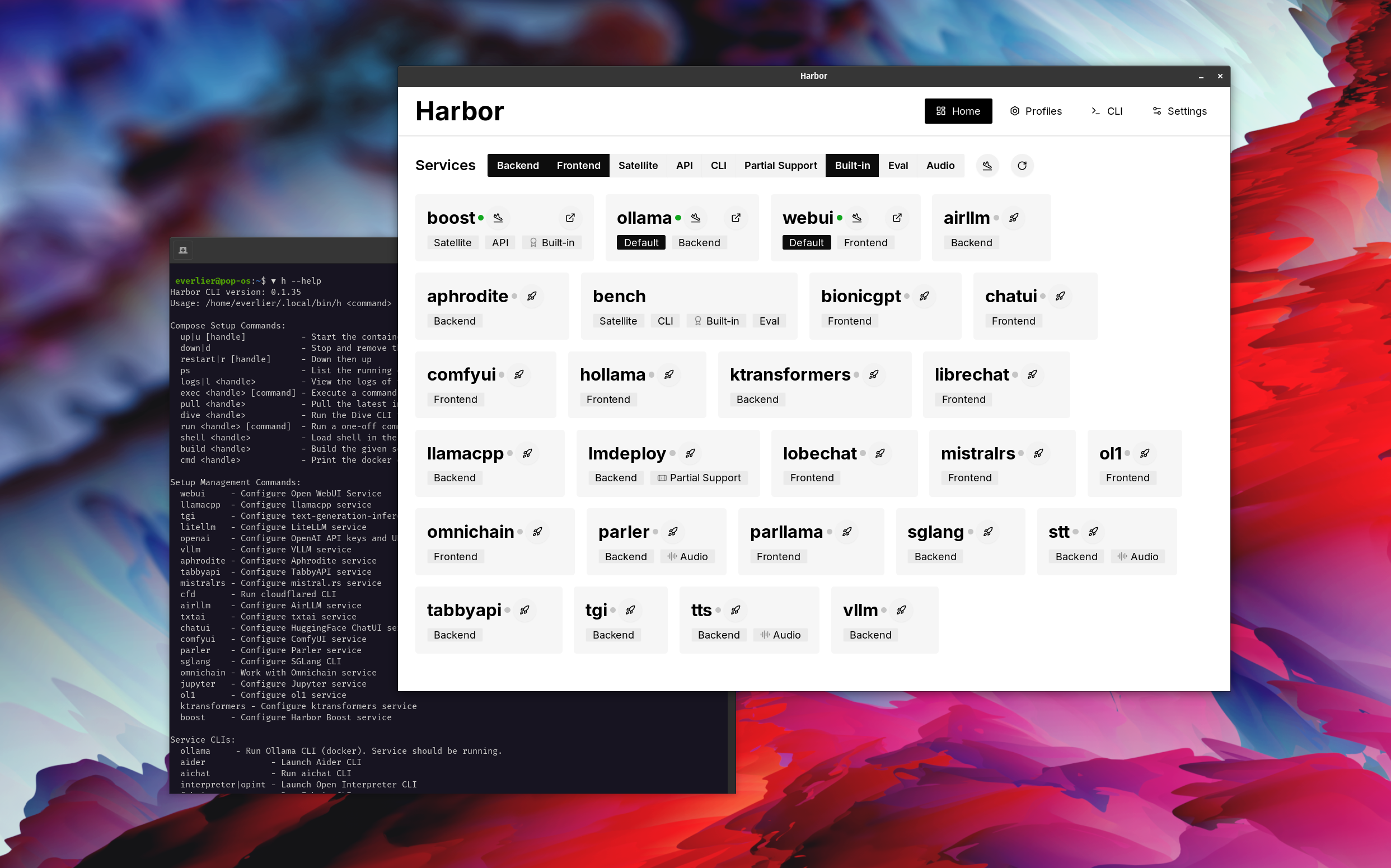
harbor how to ping ollama container from the webui ? 데모에서 Harbor App은 Ollama 및 Open WebUI 서비스와 함께 기본 스택을 시작하는 데 사용됩니다. 나중에 Searxng도 시작되었으며 Webui는 웹 래그에 바로 나가는 웹 래그에 연결할 수 있습니다. 그 후, Harbor Boost도 시작하여 WebUI에 연결되어보다 창의적인 출력을 유도합니다. 마지막 단계로, 하버 부스트의 klmbr 모듈의 앱에서 하버 구성이 조정되어 LLM에 대한 출력을 비교할 수 없게 만들 수 있습니다 (아직 인간에게는 아직 견딜 수없는).
Docker 및 Linux Administration에 익숙하다면 - 지역 LLM 환경을 관리하기 위해 Harbor Per Se가 필요하지 않을 수 있습니다. 그러나 결국 비슷한 솔루션에 도달 할 가능성이 높습니다. 나는 모든 휘파람과 종소리없이 거의 비슷한 설정을 흔들고 있었기 때문에 사실을 알고 있습니다.
하버는 배포 솔루션으로 설계된 것이 아니라 로컬 LLM 개발 환경의 도우미로 설계되었습니다. LLM 및 관련 서비스를 실험하기에 좋은 출발점입니다.
나중에 항구에서 퇴출하고 자신의 설정에서 서비스를 사용하거나 자신의 구성의 기반으로 항구를 계속 사용할 수 있습니다.
이 프로젝트는 상당히 큰 쉘 CLI, 상당히 작은 .env 파일 및 docker-compose 파일의 양이 적당합니다.
hf , ollama 등)harbor eject




