harbor
v0.2.18 -


Бесполезно запустить LLM Backends, API, фронтальные услуги и услуги с одной командой.
Harbour - это контейнерный инструментарий LLM, который позволяет запускать LLMS и дополнительные услуги. Он состоит из CLI и приложения -компаньона, которое позволяет легко управлять и запускать службы ИИ.
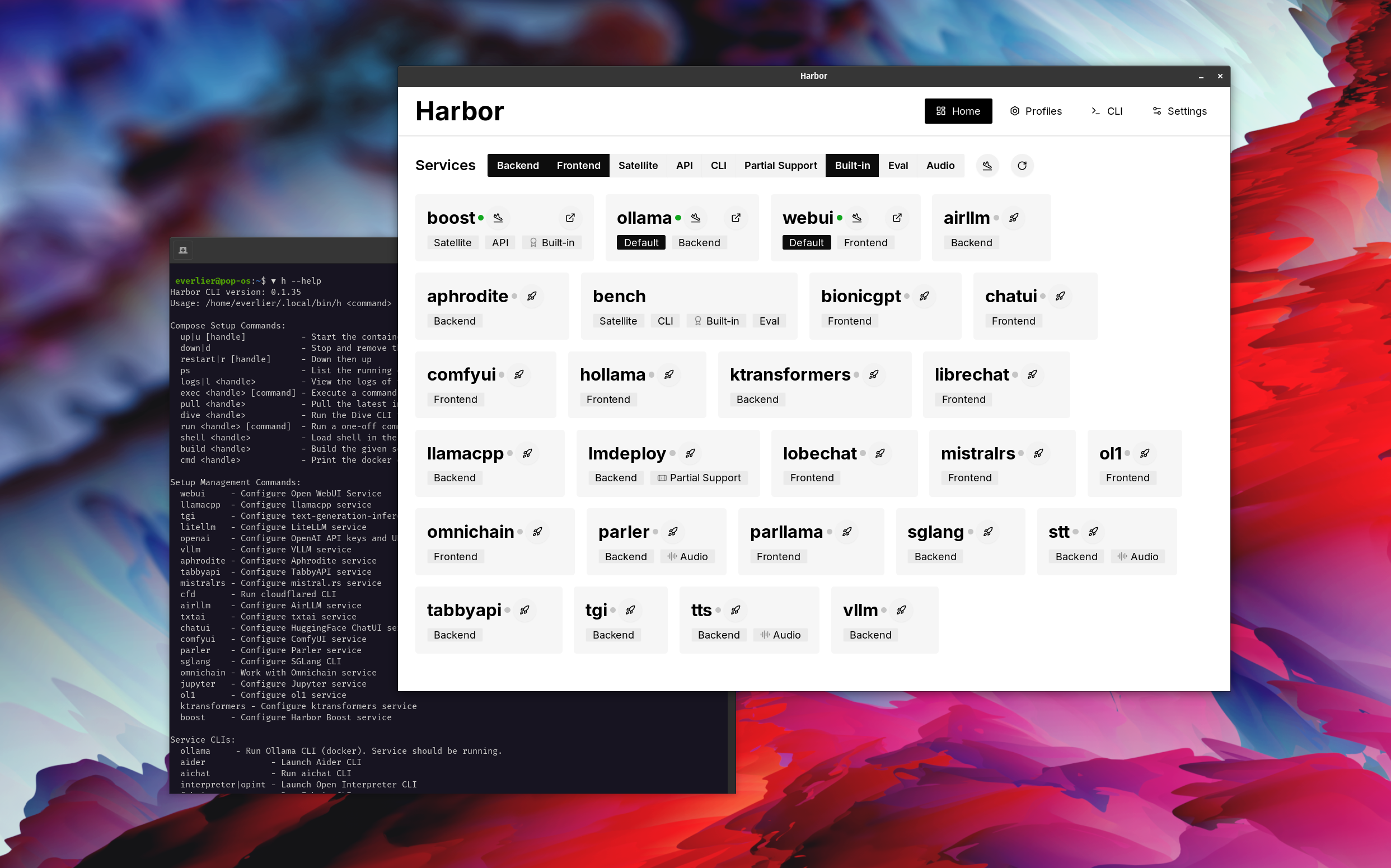
Откройте webui ⦁︎ comfyui ⦁︎ librechat ⦁︎ guggingface Chatui ⦁︎ чат доли ⦁︎ Hollama ⦁︎ parllama ⦁︎ bionicgpt ⦁︎ anmellmlm ⦁︎ чат nio
Ollama ⦁︎ llama.cpp ⦁︎ vllm ⦁︎ tabbyapi ⦁︎ Aphrodite Engine ⦁︎ ⦁︎ ⦁︎ rs ⦁︎ openedai-speech ⦁︎ ⦁︎ ⦁︎ ⦁︎ ⦁︎ ⦁︎ ⦁︎ ⦁︎ ⦁︎ ⦁︎ ⦁︎ ⦁︎ ⦁︎ ⦁︎ ⦁︎ ⦁︎ ⦁︎ ⦁︎ ⦁︎ ⦁︎ ⦁︎ ⦁︎ ⦁︎ ⦁︎ ⦁︎ ⦁︎ ⦁︎ ⦁︎ ︎ Sglang ⦁︎ Ktransformers ⦁︎ Nexa SDK
Скамья гавани ⦁︎ ⦁︎ Harbour Boost ⦁︎ searxng ⦁︎ pesplexica ⦁︎ dify ⦁︎ пландекс ⦁︎ litellm ⦁︎ langfuse ⦁︎ открытый интерпретатор ︎ Omnichain ⦁︎ LM-Evaluation-Harness ⦁︎ jupyterlab ⦁︎ ol1 ⦁︎ Openhands ⦁︎ Litlytics ⦁︎ Repopack ⦁︎ n8n ⦁︎ Bolt.new ⦁︎ Открыть трубопроводы webui ⦁︎ qdrant ⦁︎ k6 ⦁︎ rasmentfoo ⦁︎ webtop ⦁︎ Omniparser ⦁︎ Поток
См. Документацию Услуг для краткого обзора каждого.
 # Run Harbor with default services:
# Open WebUI and Ollama
harbor up

# Run Harbor with additional services
# Running SearXNG automatically enables Web RAG in Open WebUI
harbor up searxng

# Run additional/alternative LLM Inference backends
# Open Webui is automatically connected to them.
harbor up llamacpp tgi litellm vllm tabbyapi aphrodite sglang ktransformers

# Run different Frontends
harbor up librechat chatui bionicgpt hollama

# Get a free quality boost with
# built-in optimizing proxy
harbor up boost

# Use FLUX in Open WebUI in one command
harbor up comfyui

# Use custom models for supported backends
harbor llamacpp model https://huggingface.co/user/repo/model.gguf

# Shortcut to HF Hub to find the models
harbor hf find gguf gemma-2
# Use HFDownloader and official HF CLI to download models
harbor hf dl -m google/gemma-2-2b-it -c 10 -s ./hf
harbor hf download google/gemma-2-2b-it

# Where possible, cache is shared between the services
harbor tgi model google/gemma-2-2b-it
harbor vllm model google/gemma-2-2b-it
harbor aphrodite model google/gemma-2-2b-it
harbor tabbyapi model google/gemma-2-2b-it-exl2
harbor mistralrs model google/gemma-2-2b-it
harbor opint model google/gemma-2-2b-it
harbor sglang model google/gemma-2-2b-it

# Convenience tools for docker setup
harbor logs llamacpp
harbor exec llamacpp ./scripts/llama-bench --help
harbor shell vllm

# Tell your shell exactly what you think about it
harbor opint
harbor aider
harbor aichat
harbor cmdh

# Use fabric to LLM-ify your linux pipes
cat ./file.md | harbor fabric --pattern extract_extraordinary_claims | grep " LK99 "

# Access service CLIs without installing them
harbor hf scan-cache
harbor ollama list

# Open services from the CLI
harbor open webui
harbor open llamacpp
# Print yourself a QR to quickly open the
# service on your phone
harbor qr
# Feeling adventurous? Expose your harbor
# to the internet
harbor tunnel

# Config management
harbor config list
harbor config set webui.host.port 8080

# Create and manage config profiles
harbor profile save l370b
harbor profile use default

# Lookup recently used harbor commands
harbor history

# Eject from Harbor into a standalone Docker Compose setup
# Will export related services and variables into a standalone file.
harbor eject searxng llamacpp > docker-compose.harbor.yml

# Run a build-in LLM benchmark with
# your own tasks
harbor bench run

# Gimmick/Fun Area

# Argument scrambling, below commands are all the same as above
# Harbor doesn't care if it's "vllm model" or "model vllm", it'll
# figure it out.
harbor model vllm
harbor vllm model

harbor config get webui.name
harbor get config webui_name

harbor tabbyapi shell
harbor shell tabbyapi

# 50% gimmick, 50% useful
# Ask harbor about itself
harbor how to ping ollama container from the webui ? В демонстрации приложение Harbour используется для запуска стека по умолчанию с Ollama и Open Webui Services. Позже Searxng также запускается, и Webui может подключиться к нему для веб -тряпки прямо из коробки. После этого Harbour Boost также запускается и подключается к WebUI автоматически, чтобы вызвать более творческие результаты. В качестве последнего шага, конфигурация Harbour корректируется в приложении для модуля klmbr в Boost Harbour, что делает выходной сигнал неотъемлемой частью LLM (но все же не поддается для людей).
Если вам удобно с администрацией Docker и Linux - вам, вероятно, не нужна гавань как таковая, чтобы управлять вашей местной средой LLM. Тем не менее, вы также, вероятно, в конечном итоге прибудете к аналогичному решению. Я знаю это на самом деле, так как я качался почти похожей настройки, только без всех свистков и колокольчиков.
Harbour разработана не как решение развертывания, а скорее как помощник для местной среды разработки LLM. Это хорошая отправная точка для экспериментов с LLMS и связанными службами.
Позже вы можете изгнать из гавани и использовать Сервисы в своей собственной настройке или продолжать использовать гавань в качестве базы для вашей собственной конфигурации.
Этот проект состоит из довольно большого CLI Shell, довольно маленького файла .env и универсального (для одного репо) количества файлов docker-compose .
hf , ollama и т. Д.) через Docker без установкиharbor eject




