automate tech post
1.0.0

该存储库的目的是说明如何在总结和将内容从开源博客转换为生成社交媒体帖子时如何利用两种技术。
您可以根据llm-automation/blog_to_post.py和llm-automation/utils.py找到此方法的相关代码。
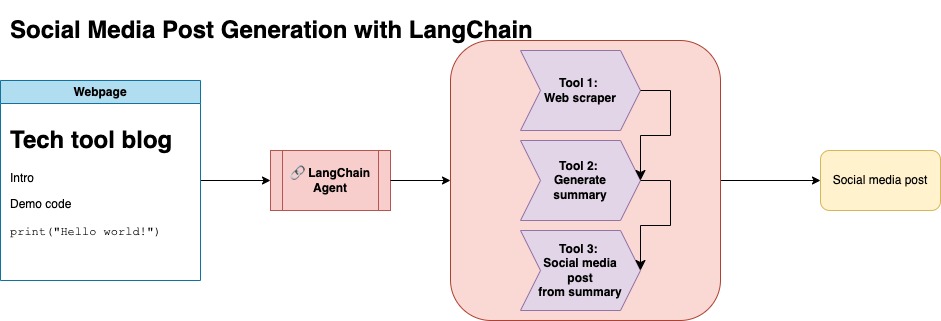
这种方法假设您有一个OpenAI API密钥。该存储库中的代码使用GPT-4,但是您可以修改此此内容以使用其他OpenAI模型。该脚本生成的综合数据由Numpy的Jupyterbook下的博客文章以及相应的链接和建议的社交媒体帖子组成。
我从Numpy的Jupyterbook中刮了数据,并使用Langchain和OpenAI API生成一个由博客摘要组成的合成数据集,以及建议的社交媒体帖子。
以下是示例数据输入:
 {
        "id": 1,
        "link": "https://numpy.org/numpy-tutorials/content/tutorial-air-quality-analysis.html",
        "summary": "Summary: Learn to perform air quality analysis using Python and NumPy in this tutorial! Discover how to import necessary libraries, build and process a dataset, calculate Air Quality Index (AQI), and perform paired Student's t-test on AQIs. We'll focus on the change in Delhi's air quality before and during the lockdown from March to June 2020.",
        "social_media_post": "?? Do you know how the lockdown affected Delhi's air quality? ?️? Dive into our latest tutorial exploring air quality analysis using Python ? and NumPy ?! Master the art of importing libraries , building and processing datasets , calculating the Air Quality Index (AQI) ?, and performing the notorious Student's t-test on the AQIs ?. Let's discover the effects of lockdown on Delhi's air quality from March to June 2020 ?. Unravel the truth, and #BreatheEasy! ? #Python #NumPy #AirQuality #DataScience #Tutorial #AQI #Delhi #Lockdown #EnvironmentalAwareness ?"
    }
然后将该数据集上传到拥抱的脸部。您可以通过模型卡LGFUNDERBUR/NUMPY-DOC找到它
这种方法假设您有一个拥抱的面部帐户,并且可以读写访问令牌。微调需要GPU和高RAM使用。
这种方法使用步骤1中生成的合成数据。
您可以在notebooks/bloom_tuning.ipynb下找到此方法的相关代码。
步骤如下:
通过其模型卡bigscience/bloomz-3b从拥抱面下载Bloomz-3b。对于所有Bloom模型,这都是令牌。
然后,我们对8位模型应用后处理来实现训练,冷冻层并在float32中施放层 - 层以保持稳定性。我们在float32中施放了最后一层的输出。
加载参数有效的微调(PEFT)模型,并应用低级适配器(LORA)。
通过提示进行预处理合成数据
 def generate_prompt(summary: str, social_media_post: str) -> str:
  prompt = f"### INSTRUCTIONnBelow is a summary of a post
           and its corresponding social media post, please
           write social media post for this blog.
           nn### Summary:n{summary}n### Post:n{social_media_post}n"
  return prompt
然后可以映射数据
mapped_dataset = dataset.map(lambda samples: tokenizer(generate_prompt(samples['summary'], samples['social_media_post'])))
transformers库的.Trainer方法。 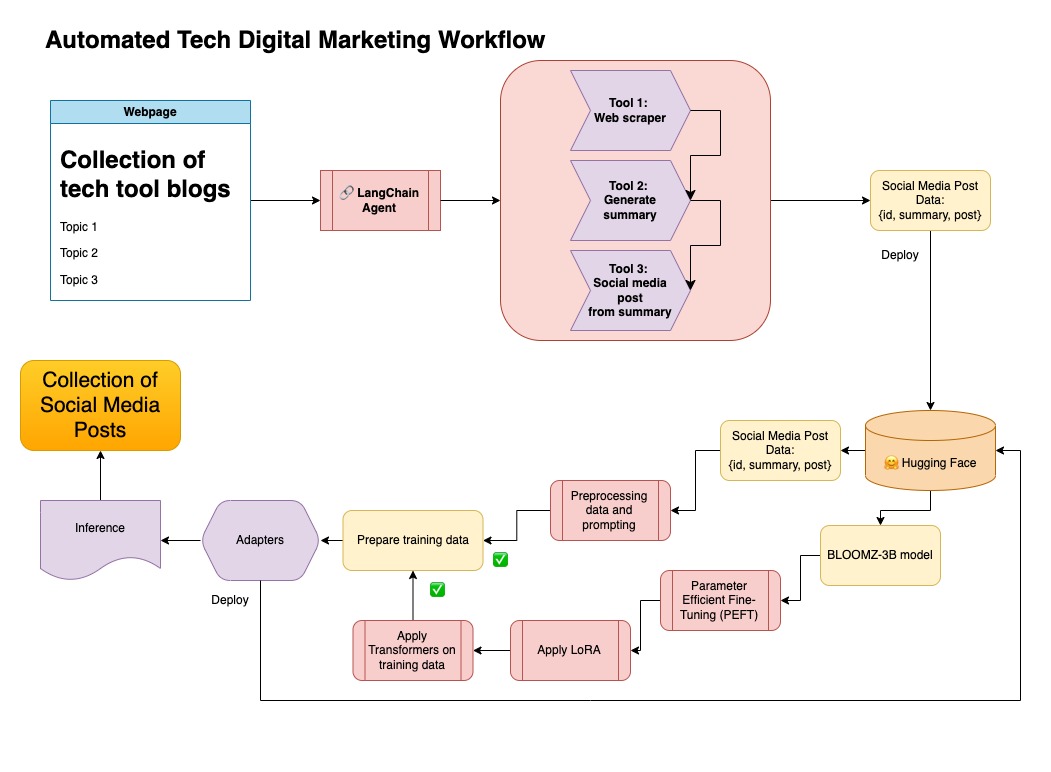
在此存储库中,我将两种方法都结合在一起,以首先策划合成数据和兰链管道,并使用了所得数据集以及所述的技术来微调模型。
创建虚拟环境
conda create --name postenv python==3.10
激活
conda activate postenv
克隆回购和安装依赖项
 git clone https://github.com/lfunderburk/automate-tech-post.git
cd automate-tech-post/
pip install -r requirements.txt
创建一个.env文件,您可以在其中存储OpenAI API键。将密钥设置在.env文件中如下:
OPENAI_API_KEY = <your-keyy>
您可以按照以下方式执行管道:
python llm-automation/blog_to_post.py
如果您希望不使用OpenAI API并微调模型,则可以使用以下COLAB笔记本。
训练该模型需要GPU和高RAM。如果您的本地计算机不支持这一点,则可以使用COLAB PRO具有以下规格:
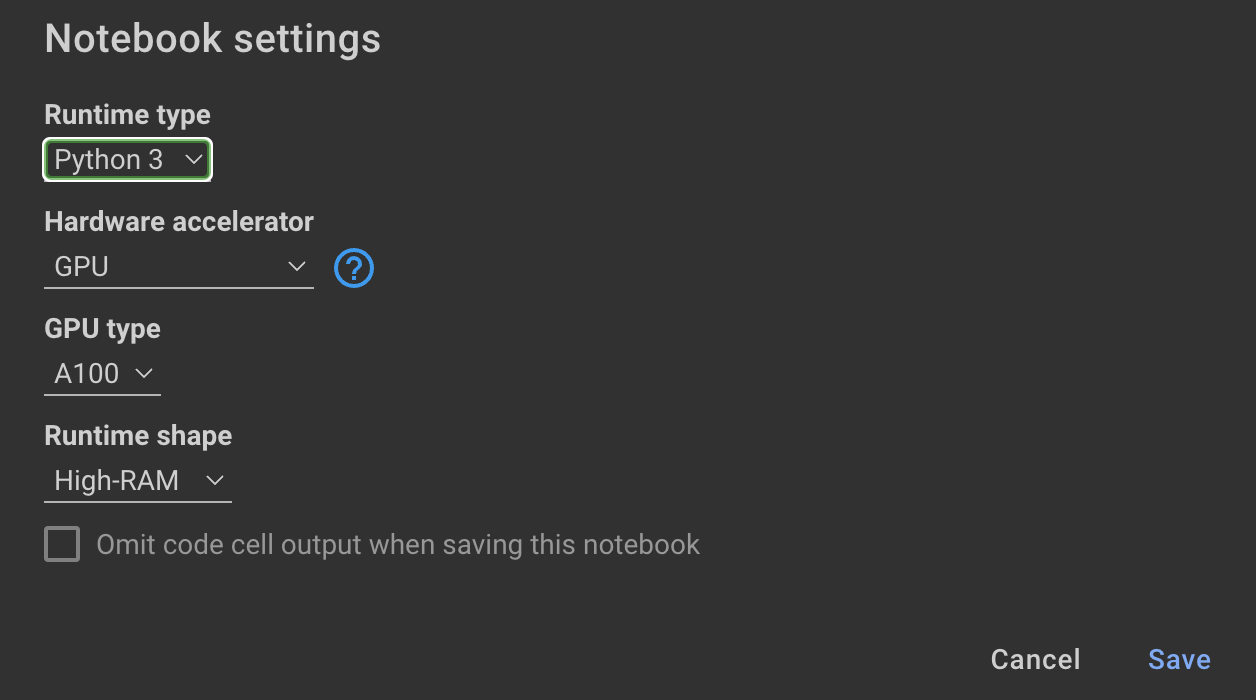
此存储库中的以下笔记本可以通过这些步骤引导您: notebooks/bloom_tuning.ipynb 。
如果您只想使用我对合成数据集进行微调的模型,则可以打开笔记本
noebooks/use_fine_tuned_model.ipynb
该主题可以指定如下:
topic = "This blog post is a tutorial about using NumPy to solve static equilibrium problems in three-dimensional space. Readers will learn how to represent points, vectors, and moments with NumPy, find the normal of vectors, and use NumPy for matrix calculations. The tutorial covers the application of Newton's second law to simple examples of force vectors and introduces more complex cases involving reaction forces and moments. The post also discusses the use of NumPy functions in more varied problems, including kinetic problems and different dimensions."
然后, make_inference功能将使用此主题来生成示例社交媒体帖子。







