pflowtts_pytorch
1.0.0

samples文件夹。 LJSpeech预估计的CKPT -GDRIVE LINK MULTISPEAKER VCTK预告片预读CKPT(VCTK上的1100个时代)-HuggingFace论文p-flow的非官方实施:通过NVIDIA的语音提示,快速且具有数据效率的零击中。
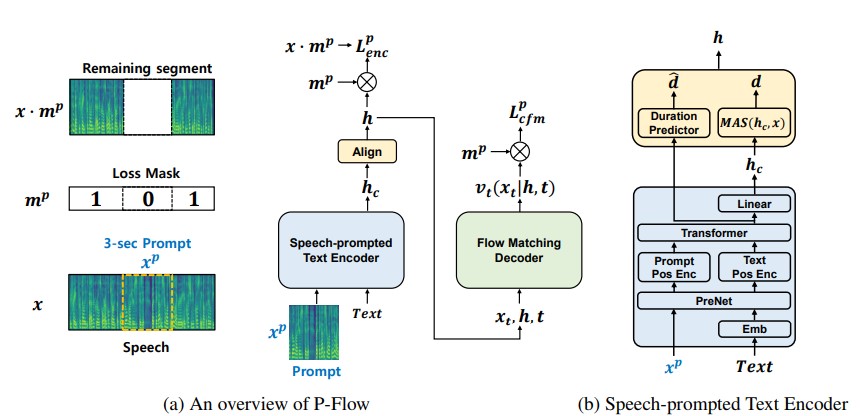
尽管最近大规模的神经编解码器语言模型通过对数千个小时的数据进行培训显示了零拍的零TTS的显着改善,但它们遭受了缺点,例如缺乏稳健性,与以前的自动回应TTS方法相似的缓慢采样速度以及对预先培训的神经编解码器表示的依赖。我们的工作提出了P-Flow,这是一种快速且数据效率高的零摄像TTS模型,该模型使用语音提示进行演讲者的适应性。 p-flow包含用于扬声器适应的语音提示的文本编码器,以及用于高质量和快速语音综合的流量匹配生成解码器。我们的语音启示文本编码器使用语音提示和文本输入来生成扬声器条件文本表示。流量匹配的生成解码器使用扬声器条件输出来综合高质量的个性化语音,明显快得多。与神经编解码器的语言模型不同,我们使用连续的MEL代理在Libritts数据集上专门训练P-Flow。通过我们使用连续语音提示的训练方法,p-flow匹配了大规模零击中TTS模型的扬声器相似性性能,其训练数据较少,并且具有超过20倍的训练速度。我们的结果表明,p-flow具有更好的发音,并且在人类的相似性和说话者的相似性中被优先于其最近的最新对应物,从而将p-flow定义为一种有吸引力且值得期望的替代方案。
cd pflowtts_pytorch/notebooks import sys
sys . path . append ( '..' )
from pflow . models . pflow_tts import pflowTTS
import torch
from dataclasses import dataclass
@ dataclass
class DurationPredictorParams :
filter_channels_dp : int
kernel_size : int
p_dropout : float
@ dataclass
class EncoderParams :
n_feats : int
n_channels : int
filter_channels : int
filter_channels_dp : int
n_heads : int
n_layers : int
kernel_size : int
p_dropout : float
spk_emb_dim : int
n_spks : int
prenet : bool
@ dataclass
class CFMParams :
name : str
solver : str
sigma_min : float
# Example usage
duration_predictor_params = DurationPredictorParams (
filter_channels_dp = 256 ,
kernel_size = 3 ,
p_dropout = 0.1
)
encoder_params = EncoderParams (
n_feats = 80 ,
n_channels = 192 ,
filter_channels = 768 ,
filter_channels_dp = 256 ,
n_heads = 2 ,
n_layers = 6 ,
kernel_size = 3 ,
p_dropout = 0.1 ,
spk_emb_dim = 64 ,
n_spks = 1 ,
prenet = True
)
cfm_params = CFMParams (
name = 'CFM' ,
solver = 'euler' ,
sigma_min = 1e-4
)
@ dataclass
class EncoderOverallParams :
encoder_type : str
encoder_params : EncoderParams
duration_predictor_params : DurationPredictorParams
encoder_overall_params = EncoderOverallParams (
encoder_type = 'RoPE Encoder' ,
encoder_params = encoder_params ,
duration_predictor_params = duration_predictor_params
)
@ dataclass
class DecoderParams :
channels : tuple
dropout : float
attention_head_dim : int
n_blocks : int
num_mid_blocks : int
num_heads : int
act_fn : str
decoder_params = DecoderParams (
channels = ( 256 , 256 ),
dropout = 0.05 ,
attention_head_dim = 64 ,
n_blocks = 1 ,
num_mid_blocks = 2 ,
num_heads = 2 ,
act_fn = 'snakebeta' ,
)
model = pflowTTS (
n_vocab = 100 ,
n_feats = 80 ,
encoder = encoder_overall_params ,
decoder = decoder_params . __dict__ ,
cfm = cfm_params ,
data_statistics = None ,
)
x = torch . randint ( 0 , 100 , ( 4 , 20 ))
x_lengths = torch . randint ( 10 , 20 , ( 4 ,))
y = torch . randn ( 4 , 80 , 500 )
y_lengths = torch . randint ( 300 , 500 , ( 4 ,))
dur_loss , prior_loss , diff_loss , attn = model ( x , x_lengths , y , y_lengths )
# backpropagate the loss
# now synthesises
x = torch . randint ( 0 , 100 , ( 1 , 20 ))
x_lengths = torch . randint ( 10 , 20 , ( 1 ,))
y_slice = torch . randn ( 1 , 80 , 264 )
model . synthesise ( x , x_lengths , y_slice , n_timesteps = 10 )conda create -n pflowtts python=3.10 -y
conda activate pflowtts留在根目录中(当然,首先克隆回购!)
 cd pflowtts_pytorch
pip install -r requirements.txt # Cython-version Monotonoic Alignment Search
python setup.py build_ext --inplace假设我们正在接受LJ演讲的培训
data/LJSpeech-1.1 ,然后准备文件列表以指向提取的数据,例如NVIDIA TACOTRON 2 REPO的设置中的项目5。 3a。转到configs/data/ljspeech.yaml并更改
 train_filelist_path : data/filelists/ljs_audio_text_train_filelist.txt
valid_filelist_path : data/filelists/ljs_audio_text_val_filelist.txt
3b。帮手命令懒惰
 ! mkdir -p /home/ubuntu/LJSpeech/LJSpeech-1.1/filelists
! wget -O /home/ubuntu/LJSpeech/LJSpeech-1.1/filelists/ljs_audio_text_test_filelist.txt https://raw.githubusercontent.com/NVIDIA/tacotron2/master/filelists/ljs_audio_text_test_filelist.txt
! wget -O /home/ubuntu/LJSpeech/LJSpeech-1.1/filelists/ljs_audio_text_train_filelist.txt https://raw.githubusercontent.com/NVIDIA/tacotron2/master/filelists/ljs_audio_text_train_filelist.txt
! wget -O /home/ubuntu/LJSpeech/LJSpeech-1.1/filelists/ljs_audio_text_val_filelist.txt https://raw.githubusercontent.com/NVIDIA/tacotron2/master/filelists/ljs_audio_text_val_filelist.txt

! sed -i -- ' s,DUMMY,/home/ubuntu/LJSpeech/LJSpeech-1.1/wavs,g ' /home/ubuntu/LJSpeech/LJSpeech-1.1/filelists/ * .txt

! sed -i -- ' s,train_filelist_path: data/filelists/ljs_audio_text_train_filelist.txt,train_filelist_path: /home/ubuntu/LJSpeech/LJSpeech-1.1/filelists/ljs_audio_text_train_filelist.txt,g ' /home/ubuntu/LJSpeech/pflowtts_pytorch/configs/data/ljspeech.yaml
! sed -i -- ' s,valid_filelist_path: data/filelists/ljs_audio_text_val_filelist.txt,valid_filelist_path: /home/ubuntu/LJSpeech/LJSpeech-1.1/filelists/ljs_audio_text_val_filelist.txt,g ' /home/ubuntu/LJSpeech/pflowtts_pytorch/configs/data/ljspeech.yaml cd pflowtts_pytorch/pflow/utils
python generate_data_statistics.py -i ljspeech.yaml
# Output:
#{ ' mel_mean ' : -5.53662231756592, ' mel_std ' : 2.1161014277038574}在data_statistics密钥下,在configs/data/ljspeech.yaml中更新这些值。
data_statistics:  # Computed for ljspeech dataset
  mel_mean: -5.536622
  mel_std: 2.116101
到您的火车和验证材料的道路。
python pflow/train.py experiment=ljspeechpython pflow/train.py experiment=ljspeech trainer.devices=[0,1]notebooks ,以便快速干燥运行和模型的体系结构测试。 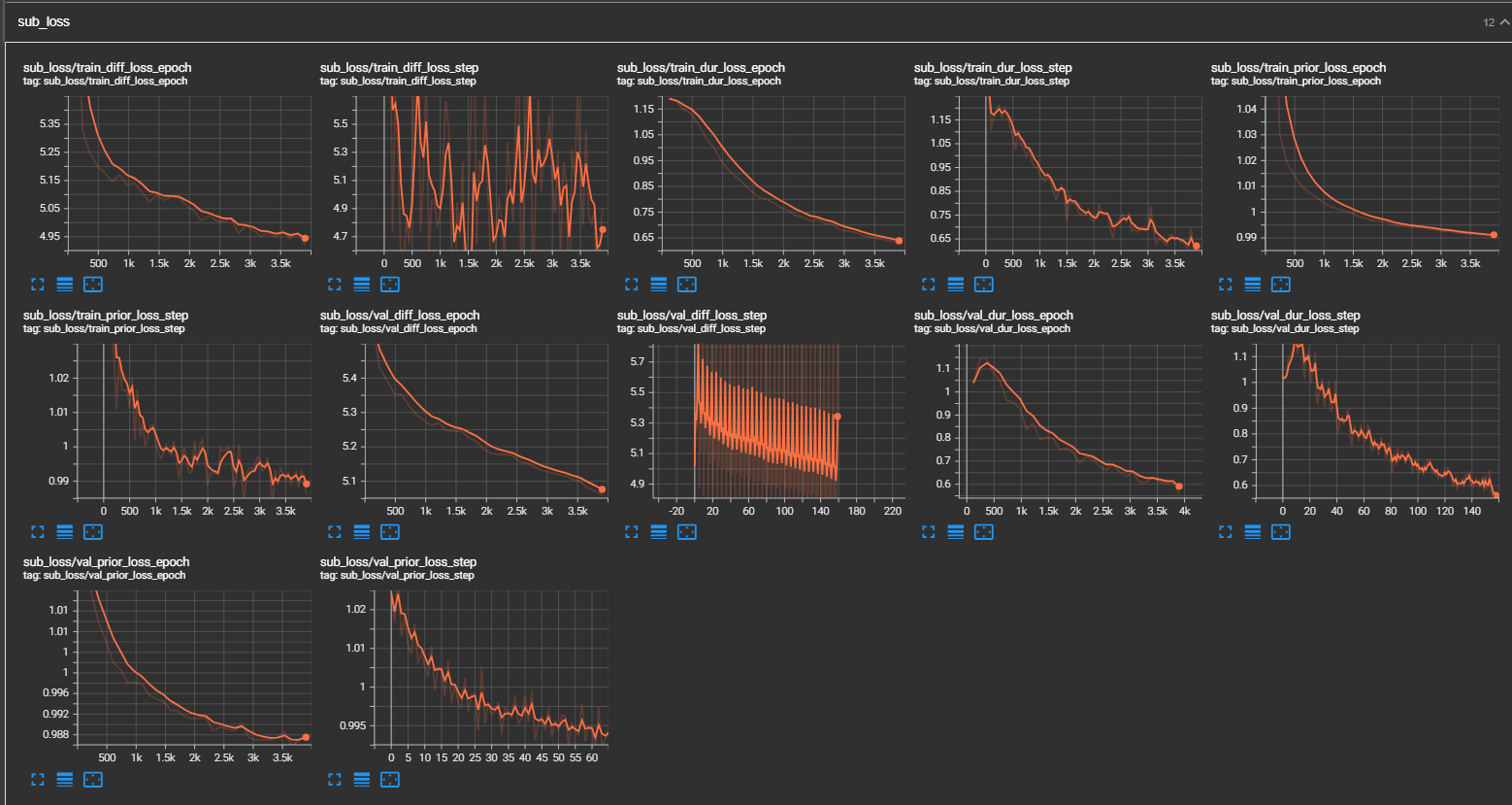
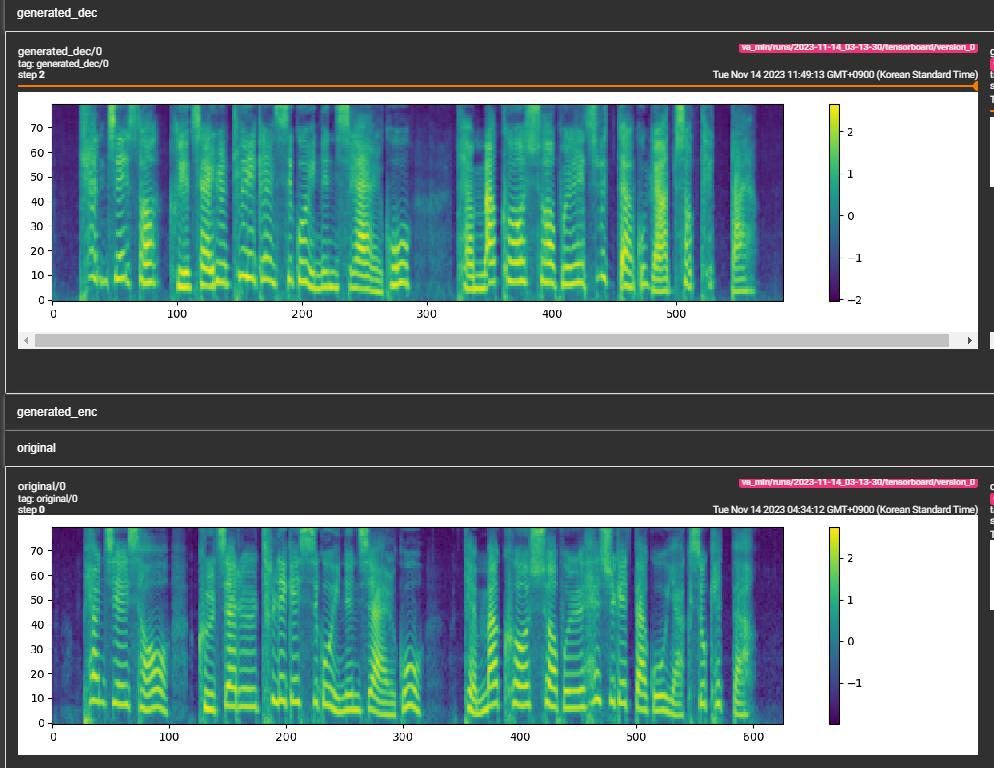
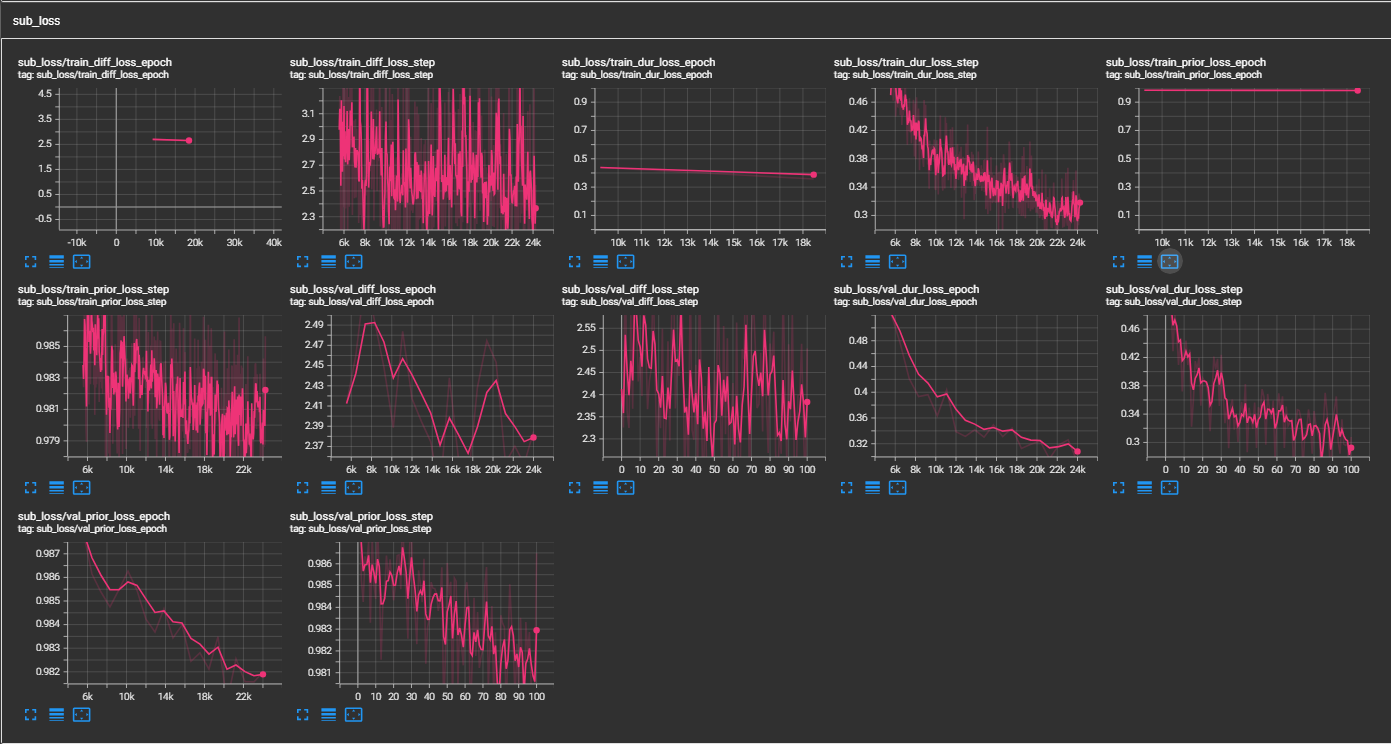
samples文件夹。 (经过30万步的LJSpeech培训)纸张建议800K步骤。 min_sample_size (默认为4s;因此,提示至少为3s,预测至少为1 s)prompt_size ,以控制提示的大小。它是在传输时用作WAV样品的提示的MEL框架的数量。 (默认值为〜3s; 3*22050 // 256 = 258;在配置中舍入为264dur_p_use_log ,以控制是否使用持续时间预测的日志进行损失计算。 (默认值是错误的)我的假设是,日志持续时间MSE损失在更长的暂停等(由于日志功能的性质)中无法正常工作。因此,在计算损失之前,我们只是e日志持续时间供电。替代方法可以使用relu代替日志。transfer_ckpt_path ,以控制用于传输学习的CKPT的路径。 (默认值无)如果无,则该模型将从从头开始训练。如果不是,则该模型是从CKPT路径加载并从步骤0进行训练的。如果ckpt_path也不是没有,则该模型是从ckpt_path加载的,并从保存的步骤中进行了训练。 transfer_ckpt_path可以处理CKPT和模型之间的层大小不匹配。 export.py和inference.py中的参数进行导出和测试模型。 (Arguemnts是不言自明的) 






