functionary
1.0.0


功能级是可以解释和执行功能/插件的语言模型。
该模型确定何时执行功能,无论是并行还是串行,并且可以理解其输出。它仅根据需要触发功能。功能定义作为JSON模式对象给出,类似于OpenAI GPT功能调用。
文档和更多示例:firsteramary.meetkai.com
{type: "code_interpreter"}中传递工具中! 可以使用我们的VLLM或SGLANG服务器部署工作人员。根据您的喜好选择一个。
vllm
pip install -e .[vllm]sglang
pip install -e .[sglang] --find-links https://flashinfer.ai/whl/cu121/torch2.4/flashinfer/vllm
python3 server_vllm.py --model " meetkai/functionary-small-v3.2 " --host 0.0.0.0 --port 8000 --max-model-len 8192sglang
python3 server_sglang.py --model-path " meetkai/functionary-small-v3.2 " --host 0.0.0.0 --port 8000 --context-length 8192我们的中型型号需要:4xa6000或2xA100 80GB要运行,需要使用: tensor-parallel-size或tp (sglang)
vllm
 # vllm requires to run this first: https://github.com/vllm-project/vllm/issues/6152
export VLLM_WORKER_MULTIPROC_METHOD=spawn

python server_vllm.py --model " meetkai/functionary-medium-v3.1 " --host 0.0.0.0 --port 8000 --max-model-len 8192 --tensor-parallel-size 2
sglang
python server_sglang.py --model-path " meetkai/functionary-medium-v3.1 " --host 0.0.0.0 --port 8000 --context-length 8192 --tp 2与VLLM中的Lora类似,我们的服务器支持在启动和动态上为Lora适配器提供服务。
要在启动时为LORA适配器服务,请使用--lora-modules参数运行服务器:
python server_vllm.py --model {BASE_MODEL} --enable-lora --lora-modules {name}={path} {name}={path} --host 0.0.0.0 --port 8000要动态使用LORA适配器,请使用/v1/load_lora_adapter端点:
python server_vllm.py --model {BASE_MODEL} --enable-lora --host 0.0.0.0 --port 8000
# Load a LoRA adapter dynamically
curl -X POST http://localhost:8000/v1/load_lora_adapter
  -H " Content-Type: application/json "
  -d ' {
    "lora_name": "my_lora",
    "lora_path": "/path/to/my_lora_adapter"
  } '
# Example chat request to lora adapter
curl -X POST http://localhost:8000/v1/chat/completions
  -H " Content-Type: application/json "
  -d ' {
    "model": "my_lora",
    "messages": [...],
    "tools": [...],
    "tool_choice": "auto"
  } '
# Unload a LoRA adapter dynamically
curl -X POST http://localhost:8000/v1/unload_lora_adapter
  -H " Content-Type: application/json "
  -d ' {
    "lora_name": "my_lora"
} '我们还提供了自己的功能称呼语法采样功能,该功能限制了LLM的生成以始终遵循及时模板,并确保功能名称的100%精度。参数是使用有效的LM-Format-Enforcer生成的,该参数可确保参数遵循该工具的架构。要启用语法采样,请使用命令行参数运行VLLM服务器--enable-grammar-sampling :
python3 server_vllm.py --model " meetkai/functionary-medium-v3.1 " --max-model-len 8192 --tensor-parallel-size 2 --enable-grammar-sampling注意:语法采样支持仅适用于V2,v3.0,v3.2型号。对V1和V3.1模型没有这样的支持。
我们还提供了使用文本生成推导(TGI)对工作模型进行推断的服务。请按照以下步骤开始:
按照其安装说明安装Docker。
为Python安装Docker SDK
pip install docker在启动时,功能性TGI服务器试图连接到现有的TGI端点。在这种情况下,您可以运行以下内容:
python3 server_tgi.py --model < REMOTE_MODEL_ID_OR_LOCAL_MODEL_PATH > --endpoint < TGI_SERVICE_ENDPOINT >如果不存在TGI端点,则使用已安装的Docker Python SDK在endpoint CLI参数中提供的地址启动新的TGI端点容器。分别为远程和本地模型运行以下命令:
python3 server_tgi.py --model < REMOTE_MODEL_ID > --remote_model_save_folder < PATH_TO_SAVE_AND_CACHE_REMOTE_MODEL > --endpoint < TGI_SERVICE_ENDPOINT > python3 server_tgi.py --model < LOCAL_MODEL_PATH > --endpoint < TGI_SERVICE_ENDPOINT >Docker
如果您在依赖方面遇到麻烦,并且有Nvidia-container-toolkit,则可以像这样开始环境:
sudo docker run --gpus all -it --ipc=host --name functionary -v ${PWD} /functionary_workspace:/workspace -p 8000:8000 nvcr.io/nvidia/pytorch:23.10-py3 from openai import OpenAI
client = OpenAI ( base_url = "http://localhost:8000/v1" , api_key = "functionary" )
client . chat . completions . create (
model = "meetkai/functionary-small-v3.2" ,
messages = [{ "role" : "user" ,
"content" : "What is the weather for Istanbul?" }
],
tools = [{
"type" : "function" ,
"function" : {
"name" : "get_current_weather" ,
"description" : "Get the current weather" ,
"parameters" : {
"type" : "object" ,
"properties" : {
"location" : {
"type" : "string" ,
"description" : "The city and state, e.g. San Francisco, CA"
}
},
"required" : [ "location" ]
}
}
}],
tool_choice = "auto"
) import requests
data = {
'model' : 'meetkai/functionary-small-v3.2' , # model name here is the value of argument "--model" in deploying: server_vllm.py or server.py
'messages' : [
{
"role" : "user" ,
"content" : "What is the weather for Istanbul?"
}
],
'tools' :[ # For functionary-7b-v2 we use "tools"; for functionary-7b-v1.4 we use "functions" = [{"name": "get_current_weather", "description":..., "parameters": ....}]
{
"type" : "function" ,
"function" : {
"name" : "get_current_weather" ,
"description" : "Get the current weather" ,
"parameters" : {
"type" : "object" ,
"properties" : {
"location" : {
"type" : "string" ,
"description" : "The city and state, e.g. San Francisco, CA"
}
},
"required" : [ "location" ]
}
}
}
]
}
response = requests . post ( "http://127.0.0.1:8000/v1/chat/completions" , json = data , headers = {
"Content-Type" : "application/json" ,
"Authorization" : "Bearer xxxx"
})
# Print the response text
print ( response . text )| 模型 | 描述 | VRAM FP16 |
|---|---|---|
| 功能性中等v3.2 | 128K上下文,代码解释器,使用我们自己的提示模板 | 160GB |
| 功能性 - small-v3.2 / gguf | 128K上下文,代码解释器,使用我们自己的提示模板 | 24GB |
| 功能性中等v3.1 / gguf | 128K上下文,代码解释器,使用原始Meta的提示模板 | 160GB |
| 功能性 - small-v3.1 / gguf | 128K上下文,代码解释器,使用原始Meta的提示模板 | 24GB |
| 功能性中等v3.0 / gguf | 8K上下文,基于元式/元路3-70B教学 | 160GB |
| 功能性 - small-v2.5 / gguf | 8K上下文,代码解释器 | 24GB |
| 功能级 - small-v2.4 / gguf | 8K上下文,代码解释器 | 24GB |
| 功能性中等v2.4 / gGGUF | 8K上下文,代码解释器,更好的准确性 | 90GB |
| 功能性 - small-v2.2 / gguf | 8K上下文 | 24GB |
| 功能中含量-v2.2 / gguf | 8K上下文 | 90GB |
| Firictary-7b-v2.1 / gguf | 8K上下文 | 24GB |
| 功能性-7B-V2 / GGUF | 并行功能呼叫支持。 | 24GB |
| 功能级-7B-V1.4 / GGUF | 4K上下文,更好的准确性(弃用) | 24GB |
| 功能性-7b-v1.1 | 4K上下文(已弃用) | 24GB |
| 功能级-7B-V0.1 | 2K上下文(不建议)不建议,请使用2.1 | 24GB |
Openai-Python V0和V1之间的区别您可以在此处参考官方文件
| 功能/项目 | 工作人员 | Nexusraven | 大猩猩 | glaive | GPT-4-1106-preiview |
|---|---|---|---|---|---|
| 单功能调用 | ✅ | ✅ | ✅ | ✅ | ✅ |
| 并行函数调用 | ✅ | ✅ | ✅ | ✅ | |
| 跟进丢失的函数参数 | ✅ | ✅ | |||
| 多转 | ✅ | ✅ | ✅ | ||
| 生成基于工具执行结果的模型响应 | ✅ | ✅ | |||
| 闲谈 | ✅ | ✅ | ✅ | ✅ | |
| 代码解释器 | ✅ | ✅ |
您可以在此处找到更多功能的详细信息
可以在以下内容中找到使用Llama-CPP-Python推断的示例:llama_cpp_inference.py。
此外,工作人员还将其集成到Llama-CPP-Python中,但是该集成可能不会快速更新,因此,如果结果有错误或怪异,请使用:llama_cpp_inference.py。当前,v2.5尚未集成,因此,如果您使用的是官僚主义v2.5-gguf ,请使用:llama_cpp_inference.py
确保最新版本的Llama-CPP-Python成功安装在系统中。功能性V2完全集成到Llama-CPP-Python中。您可以通过正常的聊天完成或通过与我们相似的Llama-CPP-Python的OpenAI兼容服务器进行推理。
以下是使用普通聊天完成的示例代码:
 from llama_cpp import Llama
from llama_cpp . llama_tokenizer import LlamaHFTokenizer

# We should use HF AutoTokenizer instead of llama.cpp's tokenizer because we found that Llama.cpp's tokenizer doesn't give the same result as that from Huggingface. The reason might be in the training, we added new tokens to the tokenizer and Llama.cpp doesn't handle this successfully
llm = Llama . from_pretrained (
    repo_id = "meetkai/functionary-small-v2.4-GGUF" ,
    filename = "functionary-small-v2.4.Q4_0.gguf" ,
    chat_format = "functionary-v2" ,
    tokenizer = LlamaHFTokenizer . from_pretrained ( "meetkai/functionary-small-v2.4-GGUF" ),
    n_gpu_layers = - 1
)

messages = [
    { "role" : "user" , "content" : "what's the weather like in Hanoi?" }
]
tools = [ # For functionary-7b-v2 we use "tools"; for functionary-7b-v1.4 we use "functions" = [{"name": "get_current_weather", "description":..., "parameters": ....}]
    {
        "type" : "function" ,
        "function" : {
            "name" : "get_current_weather" ,
            "description" : "Get the current weather" ,
            "parameters" : {
                "type" : "object" ,
                "properties" : {
                    "location" : {
                        "type" : "string" ,
                        "description" : "The city and state, e.g., San Francisco, CA"
                    }
                },
                "required" : [ "location" ]
            }
        }
    }
]

result = llm . create_chat_completion (
      messages = messages ,
      tools = tools ,
      tool_choice = "auto" ,
)

print ( result [ "choices" ][ 0 ][ "message" ])
输出将是:
{ 'role' : 'assistant' , 'content' : None , 'tool_calls' : [{ 'type' : 'function' , 'function' : { 'name' : 'get_current_weather' , 'arguments' : '{ n "location": "Hanoi" n }' }}]}有关更多详细信息,请参阅Llama-CPP-Python中的函数调用部分。要使用Llama-CPP-Python与OpenAI兼容的服务器使用我们的工作型GGUF模型,请参阅此处以获取更多详细信息和文档。
笔记:
messages中提供默认系统消息。要调用真实的Python函数,请获取结果并提取响应结果,您可以使用ChatLab。以下示例使用chatlab == 0.16.0:
请注意,ChatLab当前不支持并行功能调用。此示例代码仅与功能性1.4版兼容,并且可能无法与功能性2.0版正确使用。
 from chatlab import Conversation
import openai
import os
openai . api_key = "functionary" # We just need to set this something other than None
os . environ [ 'OPENAI_API_KEY' ] = "functionary" # chatlab requires us to set this too
openai . api_base = "http://localhost:8000/v1"

# now provide the function with description
def get_car_price ( car_name : str ):
    """this function is used to get the price of the car given the name
    :param car_name: name of the car to get the price
    """
    car_price = {
        "tang" : { "price" : "$20000" },
        "song" : { "price" : "$25000" }
    }
    for key in car_price :
        if key in car_name . lower ():
            return { "price" : car_price [ key ]}
    return { "price" : "unknown" }

chat = Conversation ( model = "meetkai/functionary-7b-v2" )
chat . register ( get_car_price )  # register this function
chat . submit ( "what is the price of the car named Tang?" ) # submit user prompt

# print the flow
for message in chat . messages :
    role = message [ "role" ]. upper ()
    if "function_call" in message :
        func_name = message [ "function_call" ][ "name" ]
        func_param = message [ "function_call" ][ "arguments" ]
        print ( f" { role } : call function: { func_name } , arguments: { func_param } " )
    else :
        content = message [ "content" ]
        print ( f" { role } : { content } " )
输出看起来像这样:
 USER: what is the price of the car named Tang?
ASSISTANT: call function: get_car_price, arguments:{
  "car_name": "Tang"
}
FUNCTION: {'price': {'price': '$20000'}}
ASSISTANT: The price of the car named Tang is $20,000.
通过Modal_server_vllm.py脚本支持功能模型的无服务器部署。注册并安装模态后,请按照以下步骤在模态上部署我们的VLLM服务器:
modal environment create dev如果您已经创建了开发环境,则无需创建另一个环境。只需在下一步中配置它。
modal config set-environment devmodal serve modal_server_vllmmodal deploy modal_server_vllm以下是如何使用此功能调用系统的一些示例:
功能plan_trip(destination: string, duration: int, interests: list)可以接受用户输入,例如“我想计划7天前往巴黎,重点关注艺术和文化”,并相应地生成行程。
 client . chat . completions . create ((
    model = "meetkai/functionary-7b-v2" ,
    messages = [
        { "role" : "user" , "content" : 'I want to plan a 7-day trip to Paris with a focus on art and culture' },
    ],
    tools = [
        {
            "type" : "function" ,
            "function" : {
                "name" : "plan_trip" ,
                "description" : "Plan a trip based on user's interests" ,
                "parameters" : {
                    "type" : "object" ,
                    "properties" : {
                        "destination" : {
                            "type" : "string" ,
                            "description" : "The destination of the trip" ,
                        },
                        "duration" : {
                            "type" : "integer" ,
                            "description" : "The duration of the trip in days" ,
                        },
                        "interests" : {
                            "type" : "array" ,
                            "items" : { "type" : "string" },
                            "description" : "The interests based on which the trip will be planned" ,
                        },
                    },
                    "required" : [ "destination" , "duration" , "interests" ],
                }
            }
        }
    ]
)
回应将有:
{ "role" : " assistant " , "content" : null , "tool_calls" : [{ "type" : " function " , "function" : { "name" : " plan_trip " , "arguments" : '{n "destination": "Paris",n "duration": 7,n "interests": ["art", "culture"]n } ' } } ]}然后,您需要使用提供的参数调用plan_trip函数。如果您想从模型中发表评论,那么您将通过功能的响应再次调用模型,该模型将编写必要的评论。
诸如estimate_property_value(property_details:dict)之类的函数可以允许用户输入有关属性的详细信息(例如位置,大小,房间数量等)并获得估计的市场价值。
 client . chat . completions . create (
    model = "meetkai/functionary-7b-v2" ,
    messages = [
        {
            "role" : "user" ,
            "content" : 'What is the estimated value of a 3-bedroom house in San Francisco with 2000 sq ft area?'
        },
        {
            "role" : "assistant" ,
            "content" : None ,
            "tool_calls" : [
                {
                    "type" : "function" ,
                    "function" : {
                        "name" : "estimate_property_value" ,
                        "arguments" : '{ n  "property_details": {"location": "San Francisco", "size": 2000, "rooms": 3} n }'
                    }
                }
            ]
        }
    ],
    tools = [
        {
            "type" : "function" ,
            "function" : {
                "name" : "estimate_property_value" ,
                "description" : "Estimate the market value of a property" ,
                "parameters" : {
                    "type" : "object" ,
                    "properties" : {
                        "property_details" : {
                            "type" : "object" ,
                            "properties" : {
                                "location" : {
                                    "type" : "string" ,
                                    "description" : "The location of the property"
                                },
                                "size" : {
                                    "type" : "integer" ,
                                    "description" : "The size of the property in square feet"
                                },
                                "rooms" : {
                                    "type" : "integer" ,
                                    "description" : "The number of rooms in the property"
                                }
                            },
                            "required" : [ "location" , "size" , "rooms" ]
                        }
                    },
                    "required" : [ "property_details" ]
                }
            }
        }
    ],
    tool_choice = "auto"
)
回应将有:
{ "role" : " assistant " , "content" : null , "tool_calls" : [{ "type" : " function " , "function" : { "name" : " plan_trip " , "arguments" : '{n "destination": "Paris",n "duration": 7,n "interests": ["art", "culture"]n } ' } } ]}然后,您需要使用提供的参数调用plan_trip函数。如果您想从模型中发表评论,那么您将通过功能的响应再次调用模型,该模型将编写必要的评论。
函数parse_customer_complaint(complaint: {issue: string, frequency: string, duration: string})可以帮助从复杂的叙述性客户投诉中提取结构化信息,从而确定核心问题和潜在的解决方案。 complaint对象可以包括issue (主要问题), frequency (问题发生的频率)和duration (问题已经发生多长时间)之类的属性。
 client . chat . completions . create (
    model = "meetkai/functionary-7b-v2" ,
    messages = [
        { "role" : "user" , "content" : 'My internet has been disconnecting frequently for the past week' },
    ],
    tools = [
        {
            "type" : "function" ,
            "function" : {
            "name" : "parse_customer_complaint" ,
            "description" : "Parse a customer complaint and identify the core issue" ,
            "parameters" : {
                "type" : "object" ,
                "properties" : {
                    "complaint" : {
                        "type" : "object" ,
                        "properties" : {
                            "issue" : {
                                "type" : "string" ,
                                "description" : "The main problem" ,
                            },
                            "frequency" : {
                                "type" : "string" ,
                                "description" : "How often the issue occurs" ,
                            },
                            "duration" : {
                                "type" : "string" ,
                                "description" : "How long the issue has been occurring" ,
                            },
                        },
                        "required" : [ "issue" , "frequency" , "duration" ],
                    },
                },
                "required" : [ "complaint" ],
            }
        }
     }
    ],
    tool_choice = "auto"
)
回应将有:
{ "role" : " assistant " , "content" : null , "tool_calls" : [{ "type" : " function " , "function" : { "name" : " parse_customer_complaint " , "arguments" : '{n "complaint": {"issue": "internet disconnecting", "frequency": "frequently", "duration": "past week" } n } '}} ]}然后,您需要使用提供的参数调用parse_customer_complaint函数。如果您想从模型中发表评论,那么您将通过功能的响应再次调用模型,该模型将编写必要的评论。
我们将函数定义转换为类似的文本为打字稿定义。然后,我们将这些定义注入系统提示。之后,我们注入默认系统提示。然后,我们开始对话消息。
备用示例可以在此处找到:v1(v1.4),v2(v2,v2.1,v2.2,v2.4)和v2.llama3(v2.5)
我们不会更改符合某个模式的logit概率,但是该模型本身知道如何符合。这使我们可以轻松地使用现有的工具和缓存系统。
我们在伯克利功能呼叫排行榜中排名第二(上次更新:2024-08-11)
| 模型名称 | 函数调用准确性(名称和参数) |
|---|---|
| Meetkai/工作人员中等v3.1 | 88.88% |
| GPT-4-1106-PREVIEW(提示) | 88.53% |
| Meetkai/工作人员 - small-v3.2 | 82.82% |
| Meetkai/Pilitchary-Small-V3.1 | 82.53% |
| Firefunction-V2(FC) | 78.82.47% |
我们还在ToolsAndbox上评估了模型,该基准测试比伯克利功能呼叫排行榜更加困难。该基准包括陈述的工具执行,工具之间的隐式状态依赖,内置的用户模拟器支持对话对话性评估,以及对任意轨迹的中级和最终里程碑的动态评估策略。该基准的作者表明,开源模型和专有模型之间存在巨大的性能差距。
从我们的评估结果中,我们的模型与最佳专有模型相当,并且比其他开源模型要好得多。
| 模型名称 | 平均相似性得分 |
|---|---|
| GPT-4O-2024-05-13 | 73 |
| Claude-3-Opus-20240229 | 69.2 |
| 功能性中v3.1 | 68.87 |
| GPT-3.5-Turbo-0125 | 65.6 |
| GPT-4-0125-Qureview | 64.3 |
| Claude-3-Sonnet-20240229 | 63.8 |
| 功能性 - small-v3.1 | 63.13 |
| Gemini-1.5-Pro-001 | 60.4 |
| 功能性 - small-v3.2 | 58.56 |
| Claude-3-Haiku-20240307 | 54.9 |
| 双子座1.0-Pro | 38.1 |
| Hermes-2-Pro-Mistral-7b | 31.4 |
| MISTRAL-7B-INSTRUCT-V0.3 | 29.8 |
| C4AI-Command-R-V01 | 26.2 |
| 大猩猩 - opunctions-v2 | 25.6 |
| C4ai-Command R+ | 24.7 |
SGD数据集中的评估功能调用预测。精度度量衡量预测功能调用的总体正确性,包括功能名称预测和参数提取。
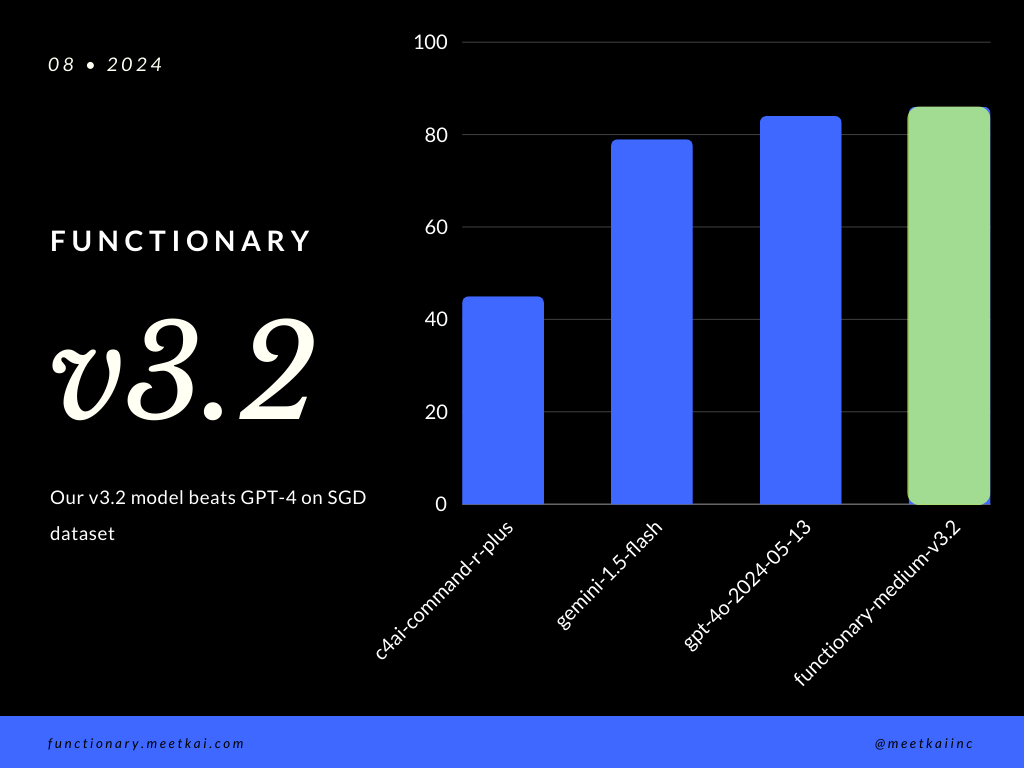
| 数据集 | 模型名称 | 函数调用准确性(名称和参数) |
|---|---|---|
| SGD | Meetkai/工作人员中等v3.1 | 88.11% |
| SGD | GPT-4O-2024-05-13 | 82.75% |
| SGD | 双子座1.5闪烁 | 79.64% |
| SGD | C4AI-Command-R-Plus | 45.66% |
请参阅培训读数
虽然它不是严格执行的,为了确保更安全的功能执行,但可以启用语法采样来强制执行类型检查。主要安全检查需要在功能/动作本身中进行。例如验证给定输入的验证,或将给出模型的OUPUT。





