functionary
1.0.0


Funktionär ist ein Sprachmodell, das Funktionen/Plugins interpretieren und ausführen kann.
Das Modell bestimmt, wann Funktionen ausgeführt werden sollen, sei es parallel oder seriell, und kann ihre Ausgänge verstehen. Es löst nur Funktionen nach Bedarf aus. Funktionsdefinitionen werden als JSON -Schema -Objekte angegeben, ähnlich wie bei OpenAI -GPT -Funktionsaufrufen.
Dokumentation und weitere Beispiele: Funktionary.meetkai.com
{type: "code_interpreter"} in Tools)! Funktionär kann entweder mit unseren VLLM- oder Sglang -Servern bereitgestellt werden. Wählen Sie je nach Ihren Vorlieben eines.
vllm
pip install -e .[vllm]Sglang
pip install -e .[sglang] --find-links https://flashinfer.ai/whl/cu121/torch2.4/flashinfer/vllm
python3 server_vllm.py --model " meetkai/functionary-small-v3.2 " --host 0.0.0.0 --port 8000 --max-model-len 8192Sglang
python3 server_sglang.py --model-path " meetkai/functionary-small-v3.2 " --host 0.0.0.0 --port 8000 --context-length 8192 Unsere mittleren Modelle erfordern: 4xa6000 oder 2xa100 80 GB, um zu laufen, müssen verwendet werden: tensor-parallel-size oder tp (Sglang)
vllm
 # vllm requires to run this first: https://github.com/vllm-project/vllm/issues/6152
export VLLM_WORKER_MULTIPROC_METHOD=spawn

python server_vllm.py --model " meetkai/functionary-medium-v3.1 " --host 0.0.0.0 --port 8000 --max-model-len 8192 --tensor-parallel-size 2
Sglang
python server_sglang.py --model-path " meetkai/functionary-medium-v3.1 " --host 0.0.0.0 --port 8000 --context-length 8192 --tp 2Ähnlich wie bei LORA in VLLM unterstützt unser Server sowohl beim Start als auch dynamisch das Servieren von LORA -Adaptern.
Führen Sie den Server mit dem Argument der --lora-modules einen Lora-Adapter beim Start bei Startup aus:
python server_vllm.py --model {BASE_MODEL} --enable-lora --lora-modules {name}={path} {name}={path} --host 0.0.0.0 --port 8000 Verwenden Sie den Endpunkt /v1/load_lora_adapter , um einen LORA -Adapter dynamisch zu bedienen, den /v1 /load_lora_adapter:
python server_vllm.py --model {BASE_MODEL} --enable-lora --host 0.0.0.0 --port 8000
# Load a LoRA adapter dynamically
curl -X POST http://localhost:8000/v1/load_lora_adapter
  -H " Content-Type: application/json "
  -d ' {
    "lora_name": "my_lora",
    "lora_path": "/path/to/my_lora_adapter"
  } '
# Example chat request to lora adapter
curl -X POST http://localhost:8000/v1/chat/completions
  -H " Content-Type: application/json "
  -d ' {
    "model": "my_lora",
    "messages": [...],
    "tools": [...],
    "tool_choice": "auto"
  } '
# Unload a LoRA adapter dynamically
curl -X POST http://localhost:8000/v1/unload_lora_adapter
  -H " Content-Type: application/json "
  -d ' {
    "lora_name": "my_lora"
} ' Wir bieten auch unsere eigene Funktion für funktionsfähige Grammatik-Stichproben an, die die Generation des LLM so einschränken, dass sie immer der Eingabeaufforderungsvorlage folgen und eine 100% ige Genauigkeit für den Funktionsnamen gewährleistet. Die Parameter werden unter Verwendung des effizienten LM-Format-Enforcers erzeugt, der sicherstellt, dass die Parameter dem aufgerufenen Schema des Tools folgen. Führen Sie den VllM-Server mit dem Befehlszeilenargument- --enable-grammar-sampling : zum Aktivieren der Grammatikabtastung: Führen Sie den VLLM-Server aus:
python3 server_vllm.py --model " meetkai/functionary-medium-v3.1 " --max-model-len 8192 --tensor-parallel-size 2 --enable-grammar-samplingHinweis: Die Grammatik -Stichprobenunterstützung ist nur für die Modelle V2, V3.0, V3.2 anwendbar. Es gibt keine solche Unterstützung für V1- und V3.1 -Modelle.
Wir bieten auch einen Dienst an, der unter Verwendung von Text-Generation-Inference (TGI) Inferenz in Funktionsmodellen durchführt. Befolgen Sie diese Schritte, um loszulegen:
Installieren Sie Docker nach ihren Installationsanweisungen.
Installieren Sie den Docker SDK für Python
pip install dockerBei Start-up versucht der Funktionäre TGI-Server, eine Verbindung zu einem vorhandenen TGI-Endpunkt herzustellen. In diesem Fall können Sie Folgendes ausführen:
python3 server_tgi.py --model < REMOTE_MODEL_ID_OR_LOCAL_MODEL_PATH > --endpoint < TGI_SERVICE_ENDPOINT > Wenn der TGI -Endpunkt nicht vorhanden ist, startet der Funktions -TGI -Server einen neuen TGI -Endpoint -Container mit der im endpoint CLI -Argument angegebenen Adresse über das installierte Docker Python SDK. Führen Sie die folgenden Befehle für Remote- bzw. lokale Modelle aus:
python3 server_tgi.py --model < REMOTE_MODEL_ID > --remote_model_save_folder < PATH_TO_SAVE_AND_CACHE_REMOTE_MODEL > --endpoint < TGI_SERVICE_ENDPOINT > python3 server_tgi.py --model < LOCAL_MODEL_PATH > --endpoint < TGI_SERVICE_ENDPOINT >Docker
Wenn Sie Probleme mit Abhängigkeiten haben und Nvidia-Container-Toolkit haben, können Sie Ihre Umgebung wie folgt starten:
sudo docker run --gpus all -it --ipc=host --name functionary -v ${PWD} /functionary_workspace:/workspace -p 8000:8000 nvcr.io/nvidia/pytorch:23.10-py3 from openai import OpenAI
client = OpenAI ( base_url = "http://localhost:8000/v1" , api_key = "functionary" )
client . chat . completions . create (
model = "meetkai/functionary-small-v3.2" ,
messages = [{ "role" : "user" ,
"content" : "What is the weather for Istanbul?" }
],
tools = [{
"type" : "function" ,
"function" : {
"name" : "get_current_weather" ,
"description" : "Get the current weather" ,
"parameters" : {
"type" : "object" ,
"properties" : {
"location" : {
"type" : "string" ,
"description" : "The city and state, e.g. San Francisco, CA"
}
},
"required" : [ "location" ]
}
}
}],
tool_choice = "auto"
) import requests
data = {
'model' : 'meetkai/functionary-small-v3.2' , # model name here is the value of argument "--model" in deploying: server_vllm.py or server.py
'messages' : [
{
"role" : "user" ,
"content" : "What is the weather for Istanbul?"
}
],
'tools' :[ # For functionary-7b-v2 we use "tools"; for functionary-7b-v1.4 we use "functions" = [{"name": "get_current_weather", "description":..., "parameters": ....}]
{
"type" : "function" ,
"function" : {
"name" : "get_current_weather" ,
"description" : "Get the current weather" ,
"parameters" : {
"type" : "object" ,
"properties" : {
"location" : {
"type" : "string" ,
"description" : "The city and state, e.g. San Francisco, CA"
}
},
"required" : [ "location" ]
}
}
}
]
}
response = requests . post ( "http://127.0.0.1:8000/v1/chat/completions" , json = data , headers = {
"Content-Type" : "application/json" ,
"Authorization" : "Bearer xxxx"
})
# Print the response text
print ( response . text )| Modell | Beschreibung | VRAM FP16 |
|---|---|---|
| Funktionärmedium-V3.2 | 128K -Kontext, Code -Interpreter, verwenden unsere eigene Eingabeaufforderung Vorlage | 160 GB |
| Funktionary-Small-V3.2 / GGUF | 128K -Kontext, Code -Interpreter, verwenden unsere eigene Eingabeaufforderung Vorlage | 24 GB |
| Funktionary-Medium-V3.1 / GGUF | 128K -Kontext, Code -Interpreter, verwendete die Eingabeaufforderung der Original -Meta | 160 GB |
| Funktionary-Small-V3.1 / GGUF | 128K -Kontext, Code -Interpreter, verwendete die Eingabeaufforderung der Original -Meta | 24 GB |
| Funktionary-Medium-V3.0 / GGUF | 8K-Kontext, basierend auf meta-llama/meta-llama-3-70b-instruktur | 160 GB |
| Funktionary-Small-V2.5 / GGUF | 8K -Kontext, Code -Interpreter | 24 GB |
| Funktionary-Small-V2.4 / GGUF | 8K -Kontext, Code -Interpreter | 24 GB |
| Funktionary-Medium-V2.4 / GGUF | 8K -Kontext, Code -Interpreter, bessere Genauigkeit | 90 GB |
| Funktionary-Small-V2.2 / GGUF | 8K -Kontext | 24 GB |
| Funktionary-Medium-V2.2 / GGUF | 8K -Kontext | 90 GB |
| Funktionary-7b-v2.1 / gguf | 8K -Kontext | 24 GB |
| Funktionary-7b-V2 / GGUF | Parallelfunktion Aufrufunterstützung. | 24 GB |
| Funktionary-7b-v1.4 / gguf | 4K -Kontext, bessere Genauigkeit (veraltet) | 24 GB |
| Funktionary-7b-V1.1 | 4K -Kontext (veraltet) | 24 GB |
| Funktionary-7b-V0.1 | 2K -Kontext (veraltet) Nicht empfohlen, verwenden Sie ab 2.1 | 24 GB |
Der Unterschied zwischen Openai-Python V0 und V1 Sie können sich hier auf die offizielle Dokumentation beziehen
| Funktion/Projekt | Funktionär | Nexusraven | Gorilla | Glaive | GPT-4-1106-Präview |
|---|---|---|---|---|---|
| Einzelfunktionsaufruf | ✅ | ✅ | ✅ | ✅ | ✅ |
| Parallele Funktionsaufrufe | ✅ | ✅ | ✅ | ✅ | |
| Nachfolger auf fehlende Funktionsargumente | ✅ | ✅ | |||
| Multiturn | ✅ | ✅ | ✅ | ||
| Generieren Sie Modellantworten, die in Tools -Ausführungsergebnissen basieren | ✅ | ✅ | |||
| Geplauder | ✅ | ✅ | ✅ | ✅ | |
| Code -Interpreter | ✅ | ✅ |
Weitere Details zu den Funktionen finden Sie hier
Beispiel für die Inferenz mit Lama-CPP-Python finden Sie in: lama_cpp_inference.py.
Außerdem wurde Funktionary auch in Lama-CPP-Python integriert, die Integration wurde jedoch möglicherweise nicht schnell aktualisiert . Wenn das Ergebnis etwas falsch oder seltsam ist, verwenden Sie also: LLAMA_CPP_Inference.py stattdessen. Derzeit wurde V2.5 nicht integriert. Wenn Sie also Funktionary-Small-V2.5-GUF verwenden, verwenden Sie bitte: llama_cpp_inference.py
Stellen Sie sicher, dass die neueste Version von Lama-CPP-Python in Ihrem System successully installiert ist. Funktionäres V2 ist vollständig in Lama-CPP-Python integriert. Sie können Inferenz mit den GGUF-Modellen von Funktionary entweder über den normalen Chat-Abschluss oder über den OpenAI-kompatiblen Server von LLAMA-CPP-Python ausführen, der sich ähnlich verhält.
Das Folgende ist der Beispielcode mit normaler Chat -Vervollständigung:
 from llama_cpp import Llama
from llama_cpp . llama_tokenizer import LlamaHFTokenizer

# We should use HF AutoTokenizer instead of llama.cpp's tokenizer because we found that Llama.cpp's tokenizer doesn't give the same result as that from Huggingface. The reason might be in the training, we added new tokens to the tokenizer and Llama.cpp doesn't handle this successfully
llm = Llama . from_pretrained (
    repo_id = "meetkai/functionary-small-v2.4-GGUF" ,
    filename = "functionary-small-v2.4.Q4_0.gguf" ,
    chat_format = "functionary-v2" ,
    tokenizer = LlamaHFTokenizer . from_pretrained ( "meetkai/functionary-small-v2.4-GGUF" ),
    n_gpu_layers = - 1
)

messages = [
    { "role" : "user" , "content" : "what's the weather like in Hanoi?" }
]
tools = [ # For functionary-7b-v2 we use "tools"; for functionary-7b-v1.4 we use "functions" = [{"name": "get_current_weather", "description":..., "parameters": ....}]
    {
        "type" : "function" ,
        "function" : {
            "name" : "get_current_weather" ,
            "description" : "Get the current weather" ,
            "parameters" : {
                "type" : "object" ,
                "properties" : {
                    "location" : {
                        "type" : "string" ,
                        "description" : "The city and state, e.g., San Francisco, CA"
                    }
                },
                "required" : [ "location" ]
            }
        }
    }
]

result = llm . create_chat_completion (
      messages = messages ,
      tools = tools ,
      tool_choice = "auto" ,
)

print ( result [ "choices" ][ 0 ][ "message" ])
Die Ausgabe wäre:
{ 'role' : 'assistant' , 'content' : None , 'tool_calls' : [{ 'type' : 'function' , 'function' : { 'name' : 'get_current_weather' , 'arguments' : '{ n "location": "Hanoi" n }' }}]}Weitere Informationen finden Sie im Abschnitt "Funktion Calling" in Lama-CPP-Python. Um unsere Funktions-GGUF-Modelle mit dem OpenAI-kompatiblen Server von LLAMA-CPP-Python zu verwenden, finden Sie hier weitere Informationen und Dokumentationen.
Notiz:
messages nicht bereitgestellt werden.Um die echte Python -Funktion aufzurufen, das Ergebnis abzurufen und das Ergebnis zu extrahieren, um zu antworten, können Sie Chatlab verwenden. Das folgende Beispiel verwendet ChatLab == 0.16.0:
Bitte beachten Sie, dass ChatLab derzeit keine parallele Funktionsaufrufe unterstützt. Dieser Beispielcode ist nur mit Funktionsversion 1.4 kompatibel und funktioniert möglicherweise nicht korrekt mit der Funktionsversion 2.0.
 from chatlab import Conversation
import openai
import os
openai . api_key = "functionary" # We just need to set this something other than None
os . environ [ 'OPENAI_API_KEY' ] = "functionary" # chatlab requires us to set this too
openai . api_base = "http://localhost:8000/v1"

# now provide the function with description
def get_car_price ( car_name : str ):
    """this function is used to get the price of the car given the name
    :param car_name: name of the car to get the price
    """
    car_price = {
        "tang" : { "price" : "$20000" },
        "song" : { "price" : "$25000" }
    }
    for key in car_price :
        if key in car_name . lower ():
            return { "price" : car_price [ key ]}
    return { "price" : "unknown" }

chat = Conversation ( model = "meetkai/functionary-7b-v2" )
chat . register ( get_car_price )  # register this function
chat . submit ( "what is the price of the car named Tang?" ) # submit user prompt

# print the flow
for message in chat . messages :
    role = message [ "role" ]. upper ()
    if "function_call" in message :
        func_name = message [ "function_call" ][ "name" ]
        func_param = message [ "function_call" ][ "arguments" ]
        print ( f" { role } : call function: { func_name } , arguments: { func_param } " )
    else :
        content = message [ "content" ]
        print ( f" { role } : { content } " )
Die Ausgabe sieht so aus:
 USER: what is the price of the car named Tang?
ASSISTANT: call function: get_car_price, arguments:{
  "car_name": "Tang"
}
FUNCTION: {'price': {'price': '$20000'}}
ASSISTANT: The price of the car named Tang is $20,000.
Serverlose Bereitstellung von Funktionsmodellen wird über das Skript modal_server_vll.py unterstützt. Befolgen Sie nach der Anmeldung und Installation von Modal diese Schritte, um unseren VLLM -Server auf Modal bereitzustellen:
modal environment create devWenn Sie bereits eine Entwicklerumgebung erstellt haben, müssen Sie keine weitere erstellen. Konfigurieren Sie es einfach im nächsten Schritt.
modal config set-environment devmodal serve modal_server_vllmmodal deploy modal_server_vllmHier sind einige Beispiele dafür, wie Sie dieses Funktionssystem verwenden können:
Der Funktionsplan_Trip plan_trip(destination: string, duration: int, interests: list) kann Benutzereingaben wie "Ich möchte eine 7-tägige Reise nach Paris mit Schwerpunkt auf Kunst und Kultur planen und eine Reiseroute entsprechend erstellen.
 client . chat . completions . create ((
    model = "meetkai/functionary-7b-v2" ,
    messages = [
        { "role" : "user" , "content" : 'I want to plan a 7-day trip to Paris with a focus on art and culture' },
    ],
    tools = [
        {
            "type" : "function" ,
            "function" : {
                "name" : "plan_trip" ,
                "description" : "Plan a trip based on user's interests" ,
                "parameters" : {
                    "type" : "object" ,
                    "properties" : {
                        "destination" : {
                            "type" : "string" ,
                            "description" : "The destination of the trip" ,
                        },
                        "duration" : {
                            "type" : "integer" ,
                            "description" : "The duration of the trip in days" ,
                        },
                        "interests" : {
                            "type" : "array" ,
                            "items" : { "type" : "string" },
                            "description" : "The interests based on which the trip will be planned" ,
                        },
                    },
                    "required" : [ "destination" , "duration" , "interests" ],
                }
            }
        }
    ]
)
Antwort wird:
{ "role" : " assistant " , "content" : null , "tool_calls" : [{ "type" : " function " , "function" : { "name" : " plan_trip " , "arguments" : '{n "destination": "Paris",n "duration": 7,n "interests": ["art", "culture"]n } ' } } ]} Anschließend müssen Sie die Funktion plan_trip mit bereitgestellten Argumenten aufrufen. Wenn Sie einen Kommentar aus dem Modell wünschen, rufen Sie das Modell erneut mit der Antwort aus der Funktion auf. Das Modell schreibt den erforderlichen Kommentar.
Eine Funktion wie uaal_property_value (Property_details: dict) kann es Benutzern ermöglichen, Details zu einer Eigenschaft (wie Standort, Größe, Anzahl der Räume usw.) einzugeben und einen geschätzten Marktwert zu erhalten.
 client . chat . completions . create (
    model = "meetkai/functionary-7b-v2" ,
    messages = [
        {
            "role" : "user" ,
            "content" : 'What is the estimated value of a 3-bedroom house in San Francisco with 2000 sq ft area?'
        },
        {
            "role" : "assistant" ,
            "content" : None ,
            "tool_calls" : [
                {
                    "type" : "function" ,
                    "function" : {
                        "name" : "estimate_property_value" ,
                        "arguments" : '{ n  "property_details": {"location": "San Francisco", "size": 2000, "rooms": 3} n }'
                    }
                }
            ]
        }
    ],
    tools = [
        {
            "type" : "function" ,
            "function" : {
                "name" : "estimate_property_value" ,
                "description" : "Estimate the market value of a property" ,
                "parameters" : {
                    "type" : "object" ,
                    "properties" : {
                        "property_details" : {
                            "type" : "object" ,
                            "properties" : {
                                "location" : {
                                    "type" : "string" ,
                                    "description" : "The location of the property"
                                },
                                "size" : {
                                    "type" : "integer" ,
                                    "description" : "The size of the property in square feet"
                                },
                                "rooms" : {
                                    "type" : "integer" ,
                                    "description" : "The number of rooms in the property"
                                }
                            },
                            "required" : [ "location" , "size" , "rooms" ]
                        }
                    },
                    "required" : [ "property_details" ]
                }
            }
        }
    ],
    tool_choice = "auto"
)
Antwort wird:
{ "role" : " assistant " , "content" : null , "tool_calls" : [{ "type" : " function " , "function" : { "name" : " plan_trip " , "arguments" : '{n "destination": "Paris",n "duration": 7,n "interests": ["art", "culture"]n } ' } } ]} Anschließend müssen Sie die Funktion plan_trip mit bereitgestellten Argumenten aufrufen. Wenn Sie einen Kommentar aus dem Modell wünschen, rufen Sie das Modell erneut mit der Antwort aus der Funktion auf. Das Modell schreibt den erforderlichen Kommentar.
Eine Funktion parse_customer_complaint(complaint: {issue: string, frequency: string, duration: string}) könnte helfen, strukturierte Informationen aus einer komplexen, narrativen Kundenbeschwerde zu extrahieren, das Kernproblem und potenzielle Lösungen zu identifizieren. Das complaint könnte Eigenschaften wie issue (das Hauptproblem), frequency (wie oft das Problem auftritt) und duration (wie lange das Problem aufgetreten ist) umfassen.
 client . chat . completions . create (
    model = "meetkai/functionary-7b-v2" ,
    messages = [
        { "role" : "user" , "content" : 'My internet has been disconnecting frequently for the past week' },
    ],
    tools = [
        {
            "type" : "function" ,
            "function" : {
            "name" : "parse_customer_complaint" ,
            "description" : "Parse a customer complaint and identify the core issue" ,
            "parameters" : {
                "type" : "object" ,
                "properties" : {
                    "complaint" : {
                        "type" : "object" ,
                        "properties" : {
                            "issue" : {
                                "type" : "string" ,
                                "description" : "The main problem" ,
                            },
                            "frequency" : {
                                "type" : "string" ,
                                "description" : "How often the issue occurs" ,
                            },
                            "duration" : {
                                "type" : "string" ,
                                "description" : "How long the issue has been occurring" ,
                            },
                        },
                        "required" : [ "issue" , "frequency" , "duration" ],
                    },
                },
                "required" : [ "complaint" ],
            }
        }
     }
    ],
    tool_choice = "auto"
)
Antwort wird:
{ "role" : " assistant " , "content" : null , "tool_calls" : [{ "type" : " function " , "function" : { "name" : " parse_customer_complaint " , "arguments" : '{n "complaint": {"issue": "internet disconnecting", "frequency": "frequently", "duration": "past week" } n } '}} ]}Anschließend müssen Sie die Funktion von Parse_Customer_Complaint mit bereitgestellten Argumenten aufrufen. Wenn Sie einen Kommentar aus dem Modell wünschen, rufen Sie das Modell erneut mit der Antwort aus der Funktion auf. Das Modell schreibt den erforderlichen Kommentar.
Wir konvertieren Funktionsdefinitionen in einen ähnlichen Text mit TypeScript -Definitionen. Dann injizieren wir diese Definitionen als Systemaufforderungen. Danach injizieren wir die Standardsystemaufforderung. Dann beginnen wir die Konversationsnachrichten.
Das schnelle Beispiel finden Sie hier: v1 (v1.4), v2 (v2, v2.1, v2.2, v2.4) und v2.llama3 (v2.5)
Wir ändern nicht die Logit -Wahrscheinlichkeiten, um sich einem bestimmten Schema anzupassen, aber das Modell selbst weiß, wie man sich anpasst. Auf diese Weise können wir vorhandene Tools und Caching -Systeme problemlos verwenden.
Wir sind den zweiten Platz in der Berkeley-Funktionsanlagen (zuletzt aktualisiert: 2024-08-11)
| Modellname | Funktionsgenauigkeit (Name und Argumente) |
|---|---|
| Meetkai/Funktionary-Medium-V3.1 | 88,88% |
| GPT-4-1106-Präview (Eingabeaufforderung) | 88,53% |
| Meetkai/Funktionary-Small-V3.2 | 82,82% |
| Meetkai/Funktionary-Small-V3.1 | 82,53% |
| Feuerfeuer-V2 (FC) | 78,82,47% |
Wir bewerten auch unsere Modelle auf Toolsandbox, dieser Benchmark ist viel schwieriger als Berkeley-Funktionsanlagen . Dieser Benchmark umfasst eine staatliche Werkzeugausführung, implizite Zustandsabhängigkeiten zwischen Tools, ein integrierter Benutzersimulator, der die On-Policy-Konversationsbewertung unterstützt, und eine dynamische Bewertungsstrategie für mittlere und endgültige Meilensteine über eine willkürliche Flugbahn. Die Autoren dieses Benchmarks zeigten, dass es eine enorme Leistungslücke zwischen Open -Source -Modellen und proprietären Modellen gibt.
Aus unserem Evaluierungsergebnis sind unsere Modelle vergleichbar mit den besten proprietären Modellen und viel besser als andere Open -Source -Modelle.
| Modellname | Durchschnittliche Ähnlichkeitsbewertung |
|---|---|
| GPT-4O-2024-05-13 | 73 |
| Claude-3-opus-20240229 | 69.2 |
| Funktionärmedium-V3.1 | 68,87 |
| GPT-3,5-Turbo-0125 | 65.6 |
| GPT-4-0125-Präview | 64.3 |
| Claude-3-sonnet-20240229 | 63,8 |
| Funktionary-Small-V3.1 | 63.13 |
| Gemini-1.5-Pro-001 | 60.4 |
| Funktionary-Small-V3.2 | 58,56 |
| Claude-3-Haiku-20240307 | 54.9 |
| Gemini-1.0-pro | 38.1 |
| Hermes-2-pro-MISTRAL-7B | 31.4 |
| Mistral-7b-Instruct-V0.3 | 29.8 |
| C4AI-Command-R-V01 | 26.2 |
| Gorilla-OpenFunctions-V2 | 25.6 |
| C4AI-Command R+ | 24.7 |
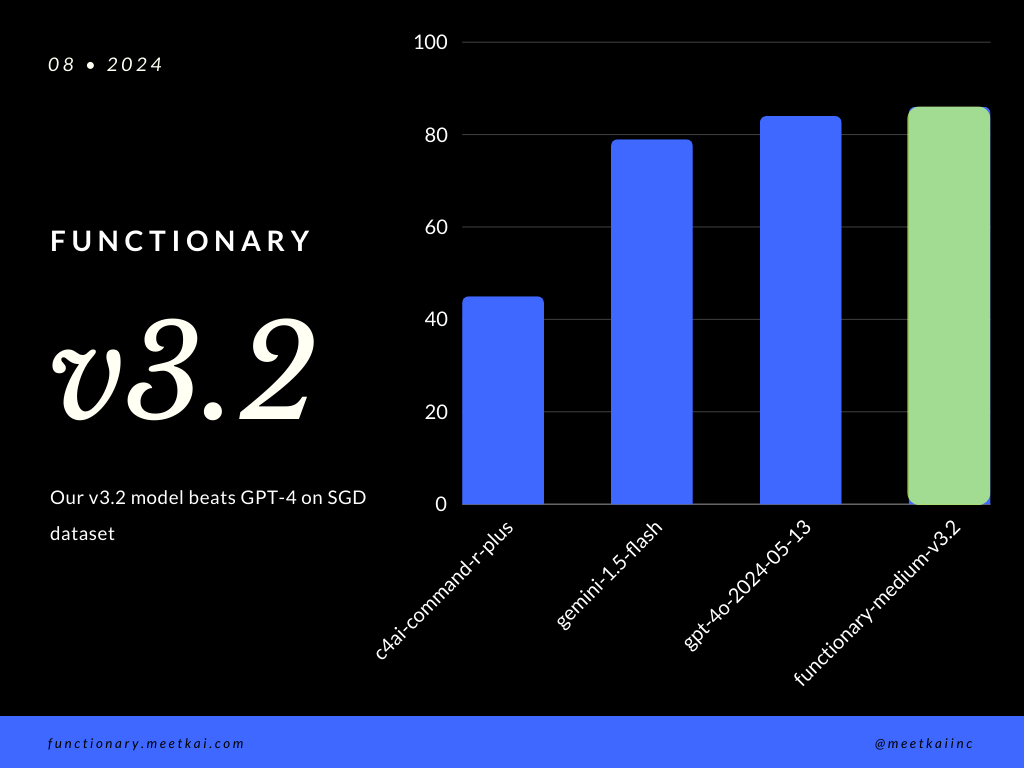
Bewertungsfunktion Aufrufvorhersage im SGD -Datensatz. Die Genauigkeitsmetrik misst die allgemeine Korrektheit der vorhergesagten Funktionsaufrufe, einschließlich der Vorhersage des Funktionsnamens und der Extraktion von Argumenten.
| Datensatz | Modellname | Funktionsgenauigkeit (Name und Argumente) |
|---|---|---|
| SGD | Meetkai/Funktionary-Medium-V3.1 | 88,11% |
| SGD | GPT-4O-2024-05-13 | 82,75% |
| SGD | Gemini-1.5-Flash | 79,64% |
| SGD | C4AI-Command-R-Plus | 45,66% |
Siehe Training Readme
Obwohl es nicht streng erzwungen wird, um eine sichere Funktionsausführung zu gewährleisten, kann die Grammatikprobene die Typ -Überprüfung durchsetzen. Hauptsicherheitsüberprüfungen müssen in den Funktionen/Aktionen selbst durchgeführt werden. Wie die Validierung der angegebenen Eingabe oder der Ousput, das dem Modell gegeben wird.





