functionary
1.0.0


機能は、関数/プラグインを解釈および実行できる言語モデルです。
このモデルは、並列であろうと連続的であろうと、いつ機能を実行するかを決定し、それらの出力を理解することができます。必要に応じて機能をトリガーするだけです。関数定義は、openai GPT関数呼び出しと同様に、JSONスキーマオブジェクトとして与えられます。
ドキュメントとその他の例:functionary.meetkai.com
{type: "code_interpreter"}を渡すこと)! 機能は、VLLMサーバーまたはSglangサーバーのいずれかを使用して展開できます。好みに応じていずれかを選択します。
vllm
pip install -e .[vllm]sglang
pip install -e .[sglang] --find-links https://flashinfer.ai/whl/cu121/torch2.4/flashinfer/vllm
python3 server_vllm.py --model " meetkai/functionary-small-v3.2 " --host 0.0.0.0 --port 8000 --max-model-len 8192sglang
python3 server_sglang.py --model-path " meetkai/functionary-small-v3.2 " --host 0.0.0.0 --port 8000 --context-length 8192中程度のモデルには、実行する必要があります: tensor-parallel-sizeまたはtp (sglang)を使用する必要があります。
vllm
 # vllm requires to run this first: https://github.com/vllm-project/vllm/issues/6152
export VLLM_WORKER_MULTIPROC_METHOD=spawn

python server_vllm.py --model " meetkai/functionary-medium-v3.1 " --host 0.0.0.0 --port 8000 --max-model-len 8192 --tensor-parallel-size 2
sglang
python server_sglang.py --model-path " meetkai/functionary-medium-v3.1 " --host 0.0.0.0 --port 8000 --context-length 8192 --tp 2VLLMのLoraと同様に、当社のサーバーは、起動時と動的にLORAアダプターの提供をサポートしています。
起動時にLORAアダプターを提供するには、 --lora-modules引数を使用してサーバーを実行します。
python server_vllm.py --model {BASE_MODEL} --enable-lora --lora-modules {name}={path} {name}={path} --host 0.0.0.0 --port 8000 LORAアダプターを動的に提供するには、 /v1/load_lora_adapterエンドポイントを使用します。
python server_vllm.py --model {BASE_MODEL} --enable-lora --host 0.0.0.0 --port 8000
# Load a LoRA adapter dynamically
curl -X POST http://localhost:8000/v1/load_lora_adapter
  -H " Content-Type: application/json "
  -d ' {
    "lora_name": "my_lora",
    "lora_path": "/path/to/my_lora_adapter"
  } '
# Example chat request to lora adapter
curl -X POST http://localhost:8000/v1/chat/completions
  -H " Content-Type: application/json "
  -d ' {
    "model": "my_lora",
    "messages": [...],
    "tools": [...],
    "tool_choice": "auto"
  } '
# Unload a LoRA adapter dynamically
curl -X POST http://localhost:8000/v1/unload_lora_adapter
  -H " Content-Type: application/json "
  -d ' {
    "lora_name": "my_lora"
} 'また、LLMの生成が常にプロンプトテンプレートに従うように制約し、関数名の100%の精度を確保する独自の関数をコールする文法サンプリング機能を提供します。パラメーターは、効率的なLM-Format-enforcerを使用して生成されます。これにより、パラメーターが呼ばれるツールのスキーマに従うことが保証されます。文法サンプリング--enable-grammar-sampling有効にするには、コマンドライン引数を使用してVLLMサーバーを実行します。
python3 server_vllm.py --model " meetkai/functionary-medium-v3.1 " --max-model-len 8192 --tensor-parallel-size 2 --enable-grammar-sampling注:文法サンプリングサポートは、V2、v3.0、v3.2モデルにのみ適用できます。 V1およびV3.1モデルに対するそのようなサポートはありません。
また、テキストジェネレーション推論(TGI)を使用して機能モデルに推論を実行するサービスも提供します。これらの手順に従って開始します。
インストール手順に従ってDockerをインストールします。
Python用のDocker SDKをインストールします
pip install docker起動時に、機能TGIサーバーは既存のTGIエンドポイントに接続しようとします。この場合、次を実行できます。
python3 server_tgi.py --model < REMOTE_MODEL_ID_OR_LOCAL_MODEL_PATH > --endpoint < TGI_SERVICE_ENDPOINT > TGIエンドポイントが存在しない場合、機能的なTGIサーバーは、インストールされたDocker Python SDKを介してendpoint CLI引数に提供されるアドレスを備えた新しいTGIエンドポイントコンテナを開始します。それぞれリモートモデルとローカルモデルに対して次のコマンドを実行します。
python3 server_tgi.py --model < REMOTE_MODEL_ID > --remote_model_save_folder < PATH_TO_SAVE_AND_CACHE_REMOTE_MODEL > --endpoint < TGI_SERVICE_ENDPOINT > python3 server_tgi.py --model < LOCAL_MODEL_PATH > --endpoint < TGI_SERVICE_ENDPOINT >Docker
依存関係に問題があり、nvidia-container-toolkitがある場合は、次のように環境を開始できます。
sudo docker run --gpus all -it --ipc=host --name functionary -v ${PWD} /functionary_workspace:/workspace -p 8000:8000 nvcr.io/nvidia/pytorch:23.10-py3 from openai import OpenAI
client = OpenAI ( base_url = "http://localhost:8000/v1" , api_key = "functionary" )
client . chat . completions . create (
model = "meetkai/functionary-small-v3.2" ,
messages = [{ "role" : "user" ,
"content" : "What is the weather for Istanbul?" }
],
tools = [{
"type" : "function" ,
"function" : {
"name" : "get_current_weather" ,
"description" : "Get the current weather" ,
"parameters" : {
"type" : "object" ,
"properties" : {
"location" : {
"type" : "string" ,
"description" : "The city and state, e.g. San Francisco, CA"
}
},
"required" : [ "location" ]
}
}
}],
tool_choice = "auto"
) import requests
data = {
'model' : 'meetkai/functionary-small-v3.2' , # model name here is the value of argument "--model" in deploying: server_vllm.py or server.py
'messages' : [
{
"role" : "user" ,
"content" : "What is the weather for Istanbul?"
}
],
'tools' :[ # For functionary-7b-v2 we use "tools"; for functionary-7b-v1.4 we use "functions" = [{"name": "get_current_weather", "description":..., "parameters": ....}]
{
"type" : "function" ,
"function" : {
"name" : "get_current_weather" ,
"description" : "Get the current weather" ,
"parameters" : {
"type" : "object" ,
"properties" : {
"location" : {
"type" : "string" ,
"description" : "The city and state, e.g. San Francisco, CA"
}
},
"required" : [ "location" ]
}
}
}
]
}
response = requests . post ( "http://127.0.0.1:8000/v1/chat/completions" , json = data , headers = {
"Content-Type" : "application/json" ,
"Authorization" : "Bearer xxxx"
})
# Print the response text
print ( response . text )| モデル | 説明 | VRAM FP16 |
|---|---|---|
| 機能メディアム-V3.2 | 独自のプロンプトテンプレートを使用して、128Kコンテキスト、コードインタープリター | 160GB |
| functionary-small-v3.2 / gguf | 独自のプロンプトテンプレートを使用して、128Kコンテキスト、コードインタープリター | 24GB |
| functionary-medium-v3.1 / gguf | オリジナルのMetaのプロンプトテンプレートを使用して、128Kコンテキスト、コードインタープリター | 160GB |
| functionary-small-v3.1 / gguf | オリジナルのMetaのプロンプトテンプレートを使用して、128Kコンテキスト、コードインタープリター | 24GB |
| functionary-medium-v3.0 / gguf | メタラマ/メタラマ-3-70B-B-Instructに基づく8Kコンテキスト | 160GB |
| functionary-small-v2.5 / gguf | 8Kコンテキスト、コードインタープリター | 24GB |
| functionary-small-v2.4 / gguf | 8Kコンテキスト、コードインタープリター | 24GB |
| functionary-medium-v2.4 / gguf | 8Kコンテキスト、コードインタープリター、より良い精度 | 90GB |
| functionary-small-v2.2 / gguf | 8Kコンテキスト | 24GB |
| functionary-med-v2.2 / gguf | 8Kコンテキスト | 90GB |
| functionary-7b-v2.1 / gguf | 8Kコンテキスト | 24GB |
| functionary-7b-v2 / gguf | 並列関数呼び出しサポート。 | 24GB |
| functionary-7b-v1.4 / gguf | 4Kコンテキスト、より良い精度(非推奨) | 24GB |
| functionary-7b-v1.1 | 4Kコンテキスト(非推奨) | 24GB |
| functionary-7b-v0.1 | 2Kコンテキスト(非推奨)推奨されない、2.1以降を使用します | 24GB |
Openai-Python V0とV1の違いは、ここで公式ドキュメントを参照できます
| 機能/プロジェクト | 機能 | Nexusraven | ゴリラ | glaive | GPT-4-1106-PREVIEW |
|---|---|---|---|---|---|
| 単一関数呼び出し | ✅ | ✅ | ✅ | ✅ | ✅ |
| 並列関数呼び出し | ✅ | ✅ | ✅ | ✅ | |
| 欠落している関数引数のフォローアップ | ✅ | ✅ | |||
| マルチターン | ✅ | ✅ | ✅ | ||
| ツールの実行結果に基づいたモデル応答を生成します | ✅ | ✅ | |||
| チットチャット | ✅ | ✅ | ✅ | ✅ | |
| コードインタープリター | ✅ | ✅ |
ここで機能の詳細を見つけることができます
llama-cpp-pythonを使用した推論の例は、llama_cpp_inference.pyにあります。
その上、機能はLlama-CPP-Pythonにも統合されていましたが、統合はすぐに更新されない可能性があるため、結果に何か問題があるか奇妙な場合は、代わりにllama_cpp_inference.pyを使用してください。現在、v2.5は統合されていないため、 functionary-small-v2.5-ggufを使用している場合は、llama_cpp_inference.pyを使用してください
Llama-CPP-Pythonの最新バージョンがシステムに連続してインストールされていることを確認してください。機能V2は、Llama-CPP-Pythonに完全に統合されています。通常のチャット完了を介して、またはLlama-CPP-PythonのOpenai互換サーバーを介して、functionaryのGGUFモデルを使用して推論を実行できます。
以下は、通常のチャット完了を使用したサンプルコードです。
 from llama_cpp import Llama
from llama_cpp . llama_tokenizer import LlamaHFTokenizer

# We should use HF AutoTokenizer instead of llama.cpp's tokenizer because we found that Llama.cpp's tokenizer doesn't give the same result as that from Huggingface. The reason might be in the training, we added new tokens to the tokenizer and Llama.cpp doesn't handle this successfully
llm = Llama . from_pretrained (
    repo_id = "meetkai/functionary-small-v2.4-GGUF" ,
    filename = "functionary-small-v2.4.Q4_0.gguf" ,
    chat_format = "functionary-v2" ,
    tokenizer = LlamaHFTokenizer . from_pretrained ( "meetkai/functionary-small-v2.4-GGUF" ),
    n_gpu_layers = - 1
)

messages = [
    { "role" : "user" , "content" : "what's the weather like in Hanoi?" }
]
tools = [ # For functionary-7b-v2 we use "tools"; for functionary-7b-v1.4 we use "functions" = [{"name": "get_current_weather", "description":..., "parameters": ....}]
    {
        "type" : "function" ,
        "function" : {
            "name" : "get_current_weather" ,
            "description" : "Get the current weather" ,
            "parameters" : {
                "type" : "object" ,
                "properties" : {
                    "location" : {
                        "type" : "string" ,
                        "description" : "The city and state, e.g., San Francisco, CA"
                    }
                },
                "required" : [ "location" ]
            }
        }
    }
]

result = llm . create_chat_completion (
      messages = messages ,
      tools = tools ,
      tool_choice = "auto" ,
)

print ( result [ "choices" ][ 0 ][ "message" ])
出力は次のとおりです。
{ 'role' : 'assistant' , 'content' : None , 'tool_calls' : [{ 'type' : 'function' , 'function' : { 'name' : 'get_current_weather' , 'arguments' : '{ n "location": "Hanoi" n }' }}]}詳細については、llama-cpp-pythonの関数呼び出しセクションを参照してください。 Llama-CPP-PythonのOpenai互換サーバーを使用して機能するGGUFモデルを使用するには、詳細とドキュメントについてはこちらを参照してください。
注記:
messagesにデフォルトのシステムメッセージを提供する必要はありません。実際のPython関数を呼び出すには、結果を取得して結果を抽出して応答します。ChatLabを使用できます。次の例では、chatlab == 0.16.0を使用しています。
ChatLabは現在、並列関数呼び出しをサポートしていないことに注意してください。このサンプルコードは、機能バージョン1.4とのみ互換性があり、機能バージョン2.0で正しく動作しない場合があります。
 from chatlab import Conversation
import openai
import os
openai . api_key = "functionary" # We just need to set this something other than None
os . environ [ 'OPENAI_API_KEY' ] = "functionary" # chatlab requires us to set this too
openai . api_base = "http://localhost:8000/v1"

# now provide the function with description
def get_car_price ( car_name : str ):
    """this function is used to get the price of the car given the name
    :param car_name: name of the car to get the price
    """
    car_price = {
        "tang" : { "price" : "$20000" },
        "song" : { "price" : "$25000" }
    }
    for key in car_price :
        if key in car_name . lower ():
            return { "price" : car_price [ key ]}
    return { "price" : "unknown" }

chat = Conversation ( model = "meetkai/functionary-7b-v2" )
chat . register ( get_car_price )  # register this function
chat . submit ( "what is the price of the car named Tang?" ) # submit user prompt

# print the flow
for message in chat . messages :
    role = message [ "role" ]. upper ()
    if "function_call" in message :
        func_name = message [ "function_call" ][ "name" ]
        func_param = message [ "function_call" ][ "arguments" ]
        print ( f" { role } : call function: { func_name } , arguments: { func_param } " )
    else :
        content = message [ "content" ]
        print ( f" { role } : { content } " )
出力は次のようになります:
 USER: what is the price of the car named Tang?
ASSISTANT: call function: get_car_price, arguments:{
  "car_name": "Tang"
}
FUNCTION: {'price': {'price': '$20000'}}
ASSISTANT: The price of the car named Tang is $20,000.
機能モデルのサーバーレス展開は、 Modal_Server_Vllm.pyスクリプトを介してサポートされています。サインアップしてモーダルをインストールした後、次の手順に従ってMODALにVLLMサーバーを展開します。
modal environment create devすでに作成された開発環境がある場合、別の環境を作成する必要はありません。次のステップで構成するだけです。
modal config set-environment devmodal serve modal_server_vllmmodal deploy modal_server_vllmこの関数呼び出しシステムを使用する方法のいくつかの例を次に示します。
function plan_trip(destination: string, duration: int, interests: list) 「アートと文化に焦点を当ててパリへの7日間の旅行を計画したい」などのユーザー入力を取得し、それに応じて旅程を生成します。
 client . chat . completions . create ((
    model = "meetkai/functionary-7b-v2" ,
    messages = [
        { "role" : "user" , "content" : 'I want to plan a 7-day trip to Paris with a focus on art and culture' },
    ],
    tools = [
        {
            "type" : "function" ,
            "function" : {
                "name" : "plan_trip" ,
                "description" : "Plan a trip based on user's interests" ,
                "parameters" : {
                    "type" : "object" ,
                    "properties" : {
                        "destination" : {
                            "type" : "string" ,
                            "description" : "The destination of the trip" ,
                        },
                        "duration" : {
                            "type" : "integer" ,
                            "description" : "The duration of the trip in days" ,
                        },
                        "interests" : {
                            "type" : "array" ,
                            "items" : { "type" : "string" },
                            "description" : "The interests based on which the trip will be planned" ,
                        },
                    },
                    "required" : [ "destination" , "duration" , "interests" ],
                }
            }
        }
    ]
)
応答は次のとおりです。
{ "role" : " assistant " , "content" : null , "tool_calls" : [{ "type" : " function " , "function" : { "name" : " plan_trip " , "arguments" : '{n "destination": "Paris",n "duration": 7,n "interests": ["art", "culture"]n } ' } } ]}次に、提供された引数でplan_trip関数を呼び出す必要があります。モデルからの解説が必要な場合は、関数からの応答でモデルを再度呼び出します。モデルは必要な解説を書きます。
atmatiate_property_value(Property_details:dict)のような関数は、ユーザーがプロパティ(場所、サイズ、部屋数など)の詳細を入力し、推定市場価値を受け取ることができます。
 client . chat . completions . create (
    model = "meetkai/functionary-7b-v2" ,
    messages = [
        {
            "role" : "user" ,
            "content" : 'What is the estimated value of a 3-bedroom house in San Francisco with 2000 sq ft area?'
        },
        {
            "role" : "assistant" ,
            "content" : None ,
            "tool_calls" : [
                {
                    "type" : "function" ,
                    "function" : {
                        "name" : "estimate_property_value" ,
                        "arguments" : '{ n  "property_details": {"location": "San Francisco", "size": 2000, "rooms": 3} n }'
                    }
                }
            ]
        }
    ],
    tools = [
        {
            "type" : "function" ,
            "function" : {
                "name" : "estimate_property_value" ,
                "description" : "Estimate the market value of a property" ,
                "parameters" : {
                    "type" : "object" ,
                    "properties" : {
                        "property_details" : {
                            "type" : "object" ,
                            "properties" : {
                                "location" : {
                                    "type" : "string" ,
                                    "description" : "The location of the property"
                                },
                                "size" : {
                                    "type" : "integer" ,
                                    "description" : "The size of the property in square feet"
                                },
                                "rooms" : {
                                    "type" : "integer" ,
                                    "description" : "The number of rooms in the property"
                                }
                            },
                            "required" : [ "location" , "size" , "rooms" ]
                        }
                    },
                    "required" : [ "property_details" ]
                }
            }
        }
    ],
    tool_choice = "auto"
)
応答は次のとおりです。
{ "role" : " assistant " , "content" : null , "tool_calls" : [{ "type" : " function " , "function" : { "name" : " plan_trip " , "arguments" : '{n "destination": "Paris",n "duration": 7,n "interests": ["art", "culture"]n } ' } } ]}次に、提供された引数でplan_trip関数を呼び出す必要があります。モデルからの解説が必要な場合は、関数からの応答でモデルを再度呼び出します。モデルは必要な解説を書きます。
関数parse_customer_complaint(complaint: {issue: string, frequency: string, duration: string})複雑で物語の顧客の苦情から構造化された情報を抽出し、コアの問題と潜在的なソリューションを特定するのに役立ちます。 complaintオブジェクトには、 issue (主な問題)、 frequency (問題が発生する頻度)、およびduration (問題が発生している期間)などのプロパティを含めることができます。
 client . chat . completions . create (
    model = "meetkai/functionary-7b-v2" ,
    messages = [
        { "role" : "user" , "content" : 'My internet has been disconnecting frequently for the past week' },
    ],
    tools = [
        {
            "type" : "function" ,
            "function" : {
            "name" : "parse_customer_complaint" ,
            "description" : "Parse a customer complaint and identify the core issue" ,
            "parameters" : {
                "type" : "object" ,
                "properties" : {
                    "complaint" : {
                        "type" : "object" ,
                        "properties" : {
                            "issue" : {
                                "type" : "string" ,
                                "description" : "The main problem" ,
                            },
                            "frequency" : {
                                "type" : "string" ,
                                "description" : "How often the issue occurs" ,
                            },
                            "duration" : {
                                "type" : "string" ,
                                "description" : "How long the issue has been occurring" ,
                            },
                        },
                        "required" : [ "issue" , "frequency" , "duration" ],
                    },
                },
                "required" : [ "complaint" ],
            }
        }
     }
    ],
    tool_choice = "auto"
)
応答は次のとおりです。
{ "role" : " assistant " , "content" : null , "tool_calls" : [{ "type" : " function " , "function" : { "name" : " parse_customer_complaint " , "arguments" : '{n "complaint": {"issue": "internet disconnecting", "frequency": "frequently", "duration": "past week" } n } '}} ]}次に、提供された引数でparse_customer_complaint関数を呼び出す必要があります。モデルからの解説が必要な場合は、関数からの応答でモデルを再度呼び出します。モデルは必要な解説を書きます。
関数の定義を同様のテキストにTypeScript定義に変換します。次に、システムプロンプトとしてこれらの定義を挿入します。その後、デフォルトのシステムプロンプトを注入します。次に、会話メッセージを開始します。
迅速な例は、V1(V1.4)、V2(V2、V2.1、V2.2、V2.4)およびV2.llama3(v2.5)にあります。
特定のスキーマに準拠するためにロジット確率を変更するわけではありませんが、モデル自体は適合する方法を知っています。これにより、既存のツールとキャッシュシステムを簡単に使用できます。
私たちはバークレー機能をコールするリーダーボードで2位にランクされています(最終更新:2024-08-11)
| モデル名 | 関数呼び出しの精度(名前と引数) |
|---|---|
| Meetkai/Functionary-Medium-V3.1 | 88.88% |
| GPT-4-1106-PREVIEW(プロンプト) | 88.53% |
| Meetkai/functionary-small-v3.2 | 82.82% |
| Meetkai/functionary-small-v3.1 | 82.53% |
| Firefunction-V2(FC) | 78.82.47% |
また、Toolsandboxでモデルを評価します。このベンチマークは、 Berkeley Function-Calling Leaderboardよりもはるかに困難です。このベンチマークには、ステートフルなツールの実行、ツール間の暗黙の状態依存関係、ポリシーでの会話評価をサポートする組み込みのユーザーシミュレーター、および任意の軌跡を介した中間および最終的なマイルストーンの動的評価戦略が含まれます。このベンチマークの著者は、オープンソースモデルと独自モデルの間に大きなパフォーマンスギャップがあることを示しました。
評価の結果から、私たちのモデルは最高の独自モデルに匹敵し、他のオープンソースモデルよりもはるかに優れています。
| モデル名 | 平均類似性スコア |
|---|---|
| GPT-4O-2024-05-13 | 73 |
| Claude-3-OPUS-20240229 | 69.2 |
| 機能メディアム-V3.1 | 68.87 |
| GPT-3.5-Turbo-0125 | 65.6 |
| GPT-4-0125-PREVIEW | 64.3 |
| claude-3-sonnet-20240229 | 63.8 |
| functionary-small-v3.1 | 63.13 |
| Gemini-1.5-Pro-001 | 60.4 |
| functionary-small-v3.2 | 58.56 |
| Claude-3-Haiku-20240307 | 54.9 |
| gemini-1.0-pro | 38.1 |
| エルメス-2-pro-mistral-7b | 31.4 |
| Mistral-7B-Instruct-V0.3 | 29.8 |
| C4AI-Command-R-V01 | 26.2 |
| Gorilla-OpenFunctions-V2 | 25.6 |
| C4AI-Command R+ | 24.7 |
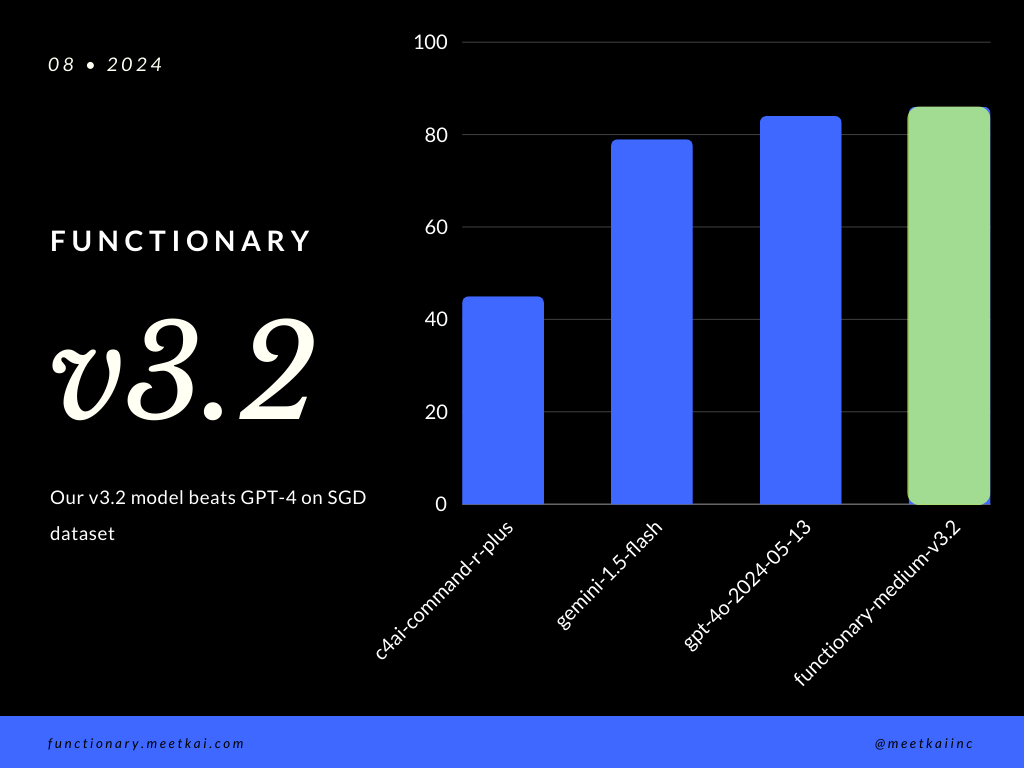
SGDデータセットの評価関数呼び出し予測。精度メトリックは、関数名の予測や引数抽出を含む、予測された関数呼び出しの全体的な正確性を測定します。
| データセット | モデル名 | 関数呼び出しの精度(名前と引数) |
|---|---|---|
| SGD | Meetkai/Functionary-Medium-V3.1 | 88.11% |
| SGD | GPT-4O-2024-05-13 | 82.75% |
| SGD | Gemini-1.5-flash | 79.64% |
| SGD | c4ai-command-r-plus | 45.66% |
ReadMeのトレーニングを参照してください
より安全な機能の実行を確保するために、厳密に強制されていませんが、文法サンプリングがタイプチェックを実施できるようにすることができます。主な安全チェックは、機能/アクション自体で行う必要があります。指定された入力の検証、またはモデルに与えられるオープルなど。





