functionary
1.0.0


기능은 기능/플러그인을 해석하고 실행할 수있는 언어 모델입니다.
이 모델은 병렬이든 일련의 함수를 실행할시기를 결정하고 출력을 이해할 수 있습니다. 필요에 따라 기능 만 트리거합니다. 기능 정의는 OpenAI GPT 기능 호출과 유사한 JSON 스키마 객체로 제공됩니다.
문서 및 더 많은 예 : functionary.meetkai.com
{type: "code_interpreter"} 통과하여)! VLLM 또는 SGLANG 서버를 사용하여 기능을 배포 할 수 있습니다. 선호도에 따라 하나를 선택하십시오.
vllm
pip install -e .[vllm]Sglang
pip install -e .[sglang] --find-links https://flashinfer.ai/whl/cu121/torch2.4/flashinfer/vllm
python3 server_vllm.py --model " meetkai/functionary-small-v3.2 " --host 0.0.0.0 --port 8000 --max-model-len 8192Sglang
python3 server_sglang.py --model-path " meetkai/functionary-small-v3.2 " --host 0.0.0.0 --port 8000 --context-length 8192 우리의 중간 모델은 tp 을 필요로합니다 tensor-parallel-size
vllm
 # vllm requires to run this first: https://github.com/vllm-project/vllm/issues/6152
export VLLM_WORKER_MULTIPROC_METHOD=spawn

python server_vllm.py --model " meetkai/functionary-medium-v3.1 " --host 0.0.0.0 --port 8000 --max-model-len 8192 --tensor-parallel-size 2
Sglang
python server_sglang.py --model-path " meetkai/functionary-medium-v3.1 " --host 0.0.0.0 --port 8000 --context-length 8192 --tp 2VLLM의 LORA와 마찬가지로, 우리의 서버는 스타트 업 및 동적으로 LORA 어댑터를 제공하는 것을 지원합니다.
스타트 업에서 Lora 어댑터를 제공하려면 --lora-modules 인수로 서버를 실행하십시오.
python server_vllm.py --model {BASE_MODEL} --enable-lora --lora-modules {name}={path} {name}={path} --host 0.0.0.0 --port 8000 LORA 어댑터를 동적으로 제공하려면 /v1/load_lora_adapter 엔드 포인트를 사용하십시오.
python server_vllm.py --model {BASE_MODEL} --enable-lora --host 0.0.0.0 --port 8000
# Load a LoRA adapter dynamically
curl -X POST http://localhost:8000/v1/load_lora_adapter
  -H " Content-Type: application/json "
  -d ' {
    "lora_name": "my_lora",
    "lora_path": "/path/to/my_lora_adapter"
  } '
# Example chat request to lora adapter
curl -X POST http://localhost:8000/v1/chat/completions
  -H " Content-Type: application/json "
  -d ' {
    "model": "my_lora",
    "messages": [...],
    "tools": [...],
    "tool_choice": "auto"
  } '
# Unload a LoRA adapter dynamically
curl -X POST http://localhost:8000/v1/unload_lora_adapter
  -H " Content-Type: application/json "
  -d ' {
    "lora_name": "my_lora"
} ' 또한 LLM 생성이 항상 프롬프트 템플릿을 따르도록 제한하고 기능 이름에 대해 100% 정확도를 보장하는 자체 기능을 전달하는 문법 샘플링 기능을 제공합니다. 매개 변수는 효율적인 LM-Format-Enforcer를 사용하여 생성되며, 이는 매개 변수가 호출 된 도구의 스키마를 따를 수 있도록합니다. 문법 샘플링을 활성화하려면 명령 줄 인수 --enable-grammar-sampling 와 함께 VLLM 서버를 실행하십시오.
python3 server_vllm.py --model " meetkai/functionary-medium-v3.1 " --max-model-len 8192 --tensor-parallel-size 2 --enable-grammar-sampling참고 : 문법 샘플링 지원은 V2, v3.0, v3.2 모델에만 적용됩니다. V1 및 v3.1 모델에 대한 그러한 지원은 없습니다.
또한 TGI (Text-Generation-Inference)를 사용하여 기능 모델에서 추론을 수행하는 서비스도 제공합니다. 다음 단계에 따라 시작하십시오.
설치 지침에 따라 Docker를 설치하십시오.
Python 용 Docker SDK를 설치하십시오
pip install docker시작시 Functionary TGI 서버는 기존 TGI 엔드 포인트에 연결하려고합니다. 이 경우 다음을 실행할 수 있습니다.
python3 server_tgi.py --model < REMOTE_MODEL_ID_OR_LOCAL_MODEL_PATH > --endpoint < TGI_SERVICE_ENDPOINT > TGI 엔드 포인트가 존재하지 않으면 기능적 TGI 서버는 설치된 Docker Python SDK를 통해 endpoint CLI 인수에 제공된 주소와 함께 새로운 TGI 엔드 포인트 컨테이너를 시작합니다. 원격 및 로컬 모델에 대해 각각 다음 명령을 실행하십시오.
python3 server_tgi.py --model < REMOTE_MODEL_ID > --remote_model_save_folder < PATH_TO_SAVE_AND_CACHE_REMOTE_MODEL > --endpoint < TGI_SERVICE_ENDPOINT > python3 server_tgi.py --model < LOCAL_MODEL_PATH > --endpoint < TGI_SERVICE_ENDPOINT >도커
의존성에 문제가 있고 Nvidia-container-toolkit이있는 경우 다음과 같이 환경을 시작할 수 있습니다.
sudo docker run --gpus all -it --ipc=host --name functionary -v ${PWD} /functionary_workspace:/workspace -p 8000:8000 nvcr.io/nvidia/pytorch:23.10-py3 from openai import OpenAI
client = OpenAI ( base_url = "http://localhost:8000/v1" , api_key = "functionary" )
client . chat . completions . create (
model = "meetkai/functionary-small-v3.2" ,
messages = [{ "role" : "user" ,
"content" : "What is the weather for Istanbul?" }
],
tools = [{
"type" : "function" ,
"function" : {
"name" : "get_current_weather" ,
"description" : "Get the current weather" ,
"parameters" : {
"type" : "object" ,
"properties" : {
"location" : {
"type" : "string" ,
"description" : "The city and state, e.g. San Francisco, CA"
}
},
"required" : [ "location" ]
}
}
}],
tool_choice = "auto"
) import requests
data = {
'model' : 'meetkai/functionary-small-v3.2' , # model name here is the value of argument "--model" in deploying: server_vllm.py or server.py
'messages' : [
{
"role" : "user" ,
"content" : "What is the weather for Istanbul?"
}
],
'tools' :[ # For functionary-7b-v2 we use "tools"; for functionary-7b-v1.4 we use "functions" = [{"name": "get_current_weather", "description":..., "parameters": ....}]
{
"type" : "function" ,
"function" : {
"name" : "get_current_weather" ,
"description" : "Get the current weather" ,
"parameters" : {
"type" : "object" ,
"properties" : {
"location" : {
"type" : "string" ,
"description" : "The city and state, e.g. San Francisco, CA"
}
},
"required" : [ "location" ]
}
}
}
]
}
response = requests . post ( "http://127.0.0.1:8000/v1/chat/completions" , json = data , headers = {
"Content-Type" : "application/json" ,
"Authorization" : "Bearer xxxx"
})
# Print the response text
print ( response . text )| 모델 | 설명 | VRAM FP16 |
|---|---|---|
| 기능성-미디어 -V3.2 | 128K 컨텍스트, 코드 통역사, 자체 프롬프트 템플릿을 사용합니다 | 160GB |
| 기능성-매일 -V3.2 / gguf | 128K 컨텍스트, 코드 통역사, 자체 프롬프트 템플릿을 사용합니다 | 24GB |
| 기능성-미디어 -V3.1 / gguf | 원래 메타의 프롬프트 템플릿을 사용하는 128K 컨텍스트, 코드 통역사 | 160GB |
| 기능성-매일 -V3.1 / gguf | 원래 메타의 프롬프트 템플릿을 사용하는 128K 컨텍스트, 코드 통역사 | 24GB |
| 기능성-미디어 -V3.0 / GGUF | 메타-롤라마/메타-롤라마 -3-70b 비율을 기반으로하는 8k 컨텍스트 | 160GB |
| 기능성-금속 -v2.5 / gguf | 8K 컨텍스트, 코드 통역사 | 24GB |
| 기능성-금속 -v2.4 / gguf | 8K 컨텍스트, 코드 통역사 | 24GB |
| 기능성-미디어 -V2.4 / GGUF | 8K 컨텍스트, 코드 통역사, 더 나은 정확도 | 90GB |
| 기능성-금속 -v2.2 / gguf | 8K 컨텍스트 | 24GB |
| 기능성-미디어 -V2.2 / GGUF | 8K 컨텍스트 | 90GB |
| 기능적 -7b-v2.1 / gguf | 8K 컨텍스트 | 24GB |
| 기능적 -7b-v2 / gguf | 병렬 기능 호출 지원. | 24GB |
| 기능적 -7b-v1.4 / gguf | 4K 컨텍스트, 더 나은 정확도 (감가 상승) | 24GB |
| 기능적 -7b-v1.1 | 4K 컨텍스트 (감가 상각) | 24GB |
| 기능적 -7B-V0.1 | 2K 컨텍스트 (더 이상 사용되지 않음) 권장되지 않으므로 2.1을 사용하십시오 | 24GB |
Openai-Python V0과 V1의 차이점은 여기에서 공식 문서를 참조 할 수 있습니다.
| 기능/프로젝트 | 기능적 | Nexusraven | 고릴라 | 검 | GPT-4-1106-- 검색 |
|---|---|---|---|---|---|
| 단일 기능 호출 | ✅ | ✅ | ✅ | ✅ | ✅ |
| 병렬 기능 호출 | ✅ | ✅ | ✅ | ✅ | |
| 누락 된 기능 인수에 대한 후속 조치 | ✅ | ✅ | |||
| 멀티 턴 | ✅ | ✅ | ✅ | ||
| 도구 실행 결과에 근거한 모델 응답을 생성합니다 | ✅ | ✅ | |||
| 잡담 | ✅ | ✅ | ✅ | ✅ | |
| 코드 통역사 | ✅ | ✅ |
여기에서 기능에 대한 자세한 내용을 찾을 수 있습니다.
llama-cpp-python을 사용한 추론의 예 : llama_cpp_inference.py에서 찾을 수 있습니다.
게다가 기능은 Llama-CPP-Python에도 통합되었지만 통합이 신속하게 업데이트 되지 않을 수 있으므로 결과에 잘못되거나 이상한 경우 LLAMA_CPP_INFERFER.PY를 대신 사용하십시오. 현재 v2.5는 통합되지 않았으므로 functionary-small-v2.5-gguf를 사용하는 경우 llama_cpp_inference.py를 사용하십시오.
Llama-CPP-Python의 최신 버전이 시스템에 성공적으로 설치되어 있는지 확인하십시오. Functionary V2는 LLAMA-CPP-Python에 완전히 통합됩니다. 일반 채팅 완료 또는 Llama-CPP-Python의 OpenAi 호환 서버를 통해 Functionary의 GGUF 모델을 사용하여 추론을 수행 할 수 있습니다.
다음은 정상 채팅 완료를 사용한 샘플 코드입니다.
 from llama_cpp import Llama
from llama_cpp . llama_tokenizer import LlamaHFTokenizer

# We should use HF AutoTokenizer instead of llama.cpp's tokenizer because we found that Llama.cpp's tokenizer doesn't give the same result as that from Huggingface. The reason might be in the training, we added new tokens to the tokenizer and Llama.cpp doesn't handle this successfully
llm = Llama . from_pretrained (
    repo_id = "meetkai/functionary-small-v2.4-GGUF" ,
    filename = "functionary-small-v2.4.Q4_0.gguf" ,
    chat_format = "functionary-v2" ,
    tokenizer = LlamaHFTokenizer . from_pretrained ( "meetkai/functionary-small-v2.4-GGUF" ),
    n_gpu_layers = - 1
)

messages = [
    { "role" : "user" , "content" : "what's the weather like in Hanoi?" }
]
tools = [ # For functionary-7b-v2 we use "tools"; for functionary-7b-v1.4 we use "functions" = [{"name": "get_current_weather", "description":..., "parameters": ....}]
    {
        "type" : "function" ,
        "function" : {
            "name" : "get_current_weather" ,
            "description" : "Get the current weather" ,
            "parameters" : {
                "type" : "object" ,
                "properties" : {
                    "location" : {
                        "type" : "string" ,
                        "description" : "The city and state, e.g., San Francisco, CA"
                    }
                },
                "required" : [ "location" ]
            }
        }
    }
]

result = llm . create_chat_completion (
      messages = messages ,
      tools = tools ,
      tool_choice = "auto" ,
)

print ( result [ "choices" ][ 0 ][ "message" ])
출력은 다음과 같습니다.
{ 'role' : 'assistant' , 'content' : None , 'tool_calls' : [{ 'type' : 'function' , 'function' : { 'name' : 'get_current_weather' , 'arguments' : '{ n "location": "Hanoi" n }' }}]}자세한 내용은 Llama-CPP-Python의 기능 호출 섹션을 참조하십시오. Llama-CPP-Python의 OpenAi 호환 서버를 사용하여 기능적 GGUF 모델을 사용하려면 자세한 내용과 설명서는 여기를 참조하십시오.
메모:
messages 에 기본 시스템 메시지를 제공 할 필요가 없습니다.실제 Python 함수를 호출하려면 결과를 얻고 결과를 추출하여 응답하면 chatlab을 사용할 수 있습니다. 다음 예제는 chatlab == 0.16.0을 사용합니다.
ChatLab은 현재 병렬 기능 호출을 지원하지 않습니다. 이 샘플 코드는 기능 버전 1.4 와만 호환되며 기능 버전 2.0에서 올바르게 작동하지 않을 수 있습니다.
 from chatlab import Conversation
import openai
import os
openai . api_key = "functionary" # We just need to set this something other than None
os . environ [ 'OPENAI_API_KEY' ] = "functionary" # chatlab requires us to set this too
openai . api_base = "http://localhost:8000/v1"

# now provide the function with description
def get_car_price ( car_name : str ):
    """this function is used to get the price of the car given the name
    :param car_name: name of the car to get the price
    """
    car_price = {
        "tang" : { "price" : "$20000" },
        "song" : { "price" : "$25000" }
    }
    for key in car_price :
        if key in car_name . lower ():
            return { "price" : car_price [ key ]}
    return { "price" : "unknown" }

chat = Conversation ( model = "meetkai/functionary-7b-v2" )
chat . register ( get_car_price )  # register this function
chat . submit ( "what is the price of the car named Tang?" ) # submit user prompt

# print the flow
for message in chat . messages :
    role = message [ "role" ]. upper ()
    if "function_call" in message :
        func_name = message [ "function_call" ][ "name" ]
        func_param = message [ "function_call" ][ "arguments" ]
        print ( f" { role } : call function: { func_name } , arguments: { func_param } " )
    else :
        content = message [ "content" ]
        print ( f" { role } : { content } " )
출력은 다음과 같습니다.
 USER: what is the price of the car named Tang?
ASSISTANT: call function: get_car_price, arguments:{
  "car_name": "Tang"
}
FUNCTION: {'price': {'price': '$20000'}}
ASSISTANT: The price of the car named Tang is $20,000.
기능 모델의 서버리스 배포는 modal_server_vllm.py 스크립트를 통해 지원됩니다. Modal에 가입하고 설치 한 후 다음 단계를 따라 Modal에 VLLM 서버를 배포하십시오.
modal environment create devDEV 환경이 이미 생성 된 경우 다른 환경을 만들 필요가 없습니다. 다음 단계에서 구성하십시오.
modal config set-environment devmodal serve modal_server_vllmmodal deploy modal_server_vllm다음은이 기능 호출 시스템을 사용하는 방법에 대한 몇 가지 예입니다.
function plan_trip(destination: string, duration: int, interests: list) "예술과 문화에 중점을 둔 파리로 7 일 여행을 계획하고 싶다"와 같은 사용자 입력을 취할 수 있으며 그에 따라 여정을 생성 할 수 있습니다.
 client . chat . completions . create ((
    model = "meetkai/functionary-7b-v2" ,
    messages = [
        { "role" : "user" , "content" : 'I want to plan a 7-day trip to Paris with a focus on art and culture' },
    ],
    tools = [
        {
            "type" : "function" ,
            "function" : {
                "name" : "plan_trip" ,
                "description" : "Plan a trip based on user's interests" ,
                "parameters" : {
                    "type" : "object" ,
                    "properties" : {
                        "destination" : {
                            "type" : "string" ,
                            "description" : "The destination of the trip" ,
                        },
                        "duration" : {
                            "type" : "integer" ,
                            "description" : "The duration of the trip in days" ,
                        },
                        "interests" : {
                            "type" : "array" ,
                            "items" : { "type" : "string" },
                            "description" : "The interests based on which the trip will be planned" ,
                        },
                    },
                    "required" : [ "destination" , "duration" , "interests" ],
                }
            }
        }
    ]
)
응답은 다음과 같습니다.
{ "role" : " assistant " , "content" : null , "tool_calls" : [{ "type" : " function " , "function" : { "name" : " plan_trip " , "arguments" : '{n "destination": "Paris",n "duration": 7,n "interests": ["art", "culture"]n } ' } } ]} 그런 다음 제공된 인수로 plan_trip 함수를 호출해야합니다. 모델의 해설을 원한다면 기능의 응답으로 모델을 다시 호출하면 모델이 필요한 주석을 작성합니다.
추정치 _property_value (property_details : dict)와 같은 함수를 통해 사용자는 속성 (예 : 위치, 크기, 객실 수 등)에 대한 세부 정보를 입력하고 예상 시장 가치를받을 수 있습니다.
 client . chat . completions . create (
    model = "meetkai/functionary-7b-v2" ,
    messages = [
        {
            "role" : "user" ,
            "content" : 'What is the estimated value of a 3-bedroom house in San Francisco with 2000 sq ft area?'
        },
        {
            "role" : "assistant" ,
            "content" : None ,
            "tool_calls" : [
                {
                    "type" : "function" ,
                    "function" : {
                        "name" : "estimate_property_value" ,
                        "arguments" : '{ n  "property_details": {"location": "San Francisco", "size": 2000, "rooms": 3} n }'
                    }
                }
            ]
        }
    ],
    tools = [
        {
            "type" : "function" ,
            "function" : {
                "name" : "estimate_property_value" ,
                "description" : "Estimate the market value of a property" ,
                "parameters" : {
                    "type" : "object" ,
                    "properties" : {
                        "property_details" : {
                            "type" : "object" ,
                            "properties" : {
                                "location" : {
                                    "type" : "string" ,
                                    "description" : "The location of the property"
                                },
                                "size" : {
                                    "type" : "integer" ,
                                    "description" : "The size of the property in square feet"
                                },
                                "rooms" : {
                                    "type" : "integer" ,
                                    "description" : "The number of rooms in the property"
                                }
                            },
                            "required" : [ "location" , "size" , "rooms" ]
                        }
                    },
                    "required" : [ "property_details" ]
                }
            }
        }
    ],
    tool_choice = "auto"
)
응답은 다음과 같습니다.
{ "role" : " assistant " , "content" : null , "tool_calls" : [{ "type" : " function " , "function" : { "name" : " plan_trip " , "arguments" : '{n "destination": "Paris",n "duration": 7,n "interests": ["art", "culture"]n } ' } } ]} 그런 다음 제공된 인수로 plan_trip 함수를 호출해야합니다. 모델의 해설을 원한다면 기능의 응답으로 모델을 다시 호출하면 모델이 필요한 주석을 작성합니다.
parse_customer_complaint(complaint: {issue: string, frequency: string, duration: string}) 는 복잡한 내러티브 고객 불만에서 구조화 된 정보를 추출하여 핵심 문제 및 잠재적 솔루션을 식별하는 데 도움이 될 수 있습니다. complaint 개체에는 issue (주요 문제), frequency (문제가 발생하는 빈도) 및 duration (문제가 얼마나 오래 발생했는지)와 같은 속성이 포함될 수 있습니다.
 client . chat . completions . create (
    model = "meetkai/functionary-7b-v2" ,
    messages = [
        { "role" : "user" , "content" : 'My internet has been disconnecting frequently for the past week' },
    ],
    tools = [
        {
            "type" : "function" ,
            "function" : {
            "name" : "parse_customer_complaint" ,
            "description" : "Parse a customer complaint and identify the core issue" ,
            "parameters" : {
                "type" : "object" ,
                "properties" : {
                    "complaint" : {
                        "type" : "object" ,
                        "properties" : {
                            "issue" : {
                                "type" : "string" ,
                                "description" : "The main problem" ,
                            },
                            "frequency" : {
                                "type" : "string" ,
                                "description" : "How often the issue occurs" ,
                            },
                            "duration" : {
                                "type" : "string" ,
                                "description" : "How long the issue has been occurring" ,
                            },
                        },
                        "required" : [ "issue" , "frequency" , "duration" ],
                    },
                },
                "required" : [ "complaint" ],
            }
        }
     }
    ],
    tool_choice = "auto"
)
응답은 다음과 같습니다.
{ "role" : " assistant " , "content" : null , "tool_calls" : [{ "type" : " function " , "function" : { "name" : " parse_customer_complaint " , "arguments" : '{n "complaint": {"issue": "internet disconnecting", "frequency": "frequently", "duration": "past week" } n } '}} ]}그런 다음 제공된 인수와 함께 parse_customer_complaint 함수를 호출해야합니다. 모델의 해설을 원한다면 기능의 응답으로 모델을 다시 호출하면 모델이 필요한 주석을 작성합니다.
기능 정의를 유사한 텍스트로 변환하여 TypeScript 정의로 변환합니다. 그런 다음 이러한 정의를 시스템 프롬프트로 주입합니다. 그런 다음 기본 시스템 프롬프트를 주입합니다. 그런 다음 대화 메시지를 시작합니다.
프롬프트 예는 여기에서 찾을 수 있습니다 : V1 (v1.4), v2 (v2, v2.1, v2.2, v2.4) 및 v2.llama3 (v2.5)
우리는 특정 스키마를 준수하기 위해 로이트 확률을 변경하지는 않지만 모델 자체는 준수 방법을 알고 있습니다. 이를 통해 기존 도구와 캐싱 시스템을 쉽게 사용할 수 있습니다.
우리는 버클리 기능을 전달하는 리더 보드에서 2 위를 차지했습니다 (마지막 업데이트 : 2024-08-11)
| 모델 이름 | 기능 호출 정확도 (이름 및 인수) |
|---|---|
| MeetKai/Functionary-Medium-V3.1 | 88.88% |
| gpt-4-1106- 프리 뷰 (프롬프트) | 88.53% |
| MeetKai/Functionary-Small-V3.2 | 82.82% |
| MeetKai/Functionary-Small-V3.1 | 82.53% |
| 소방 장전 V2 (FC) | 78.82.47% |
우리는 또한 도구 및 박스에서 모델을 평가합니다.이 벤치 마크는 버클리 기능을 전달하는 리더 보드 보다 훨씬 어렵습니다. 이 벤치 마크에는 상태가 완성 된 도구 실행, 도구 간의 암묵적 상태 종속성, 정책 대화 평가를 지원하는 내장 사용자 시뮬레이터 및 임의의 궤적에 대한 중간 및 최종 이정표에 대한 동적 평가 전략이 포함됩니다. 이 벤치 마크의 저자는 오픈 소스 모델과 독점 모델 사이에 큰 성능 차이가 있음을 보여주었습니다.
우리의 평가 결과에서 우리의 모델은 최고의 독점 모델과 비교할 수 있으며 다른 오픈 소스 모델보다 훨씬 우수합니다.
| 모델 이름 | 평균 유사성 점수 |
|---|---|
| GPT-4O-2024-05-13 | 73 |
| Claude-3-Opus-20240229 | 69.2 |
| 기능성-미디어 -V3.1 | 68.87 |
| GPT-3.5-Turbo-0125 | 65.6 |
| GPT-4-0125-- 검색 | 64.3 |
| Claude-3-Sonnet-20240229 | 63.8 |
| 기능성-스몰 -V3.1 | 63.13 |
| Gemini-1.5-Pro-001 | 60.4 |
| 기능성-스몰 -V3.2 | 58.56 |
| Claude-3-Haiku-20240307 | 54.9 |
| Gemini-1.0-Pro | 38.1 |
| 헤르메스 -2- 프로 미스 랄 -7b | 31.4 |
| Mistral-7B-instruct-V0.3 | 29.8 |
| C4AI-Command-R-V01 | 26.2 |
| Gorilla-Openfinctions-V2 | 25.6 |
| C4ai-command r+ | 24.7 |
SGD 데이터 세트의 평가 함수 호출 예측. 정확도 메트릭은 함수 이름 예측 및 인수 추출을 포함하여 예측 된 기능 호출의 전체 정확성을 측정합니다.
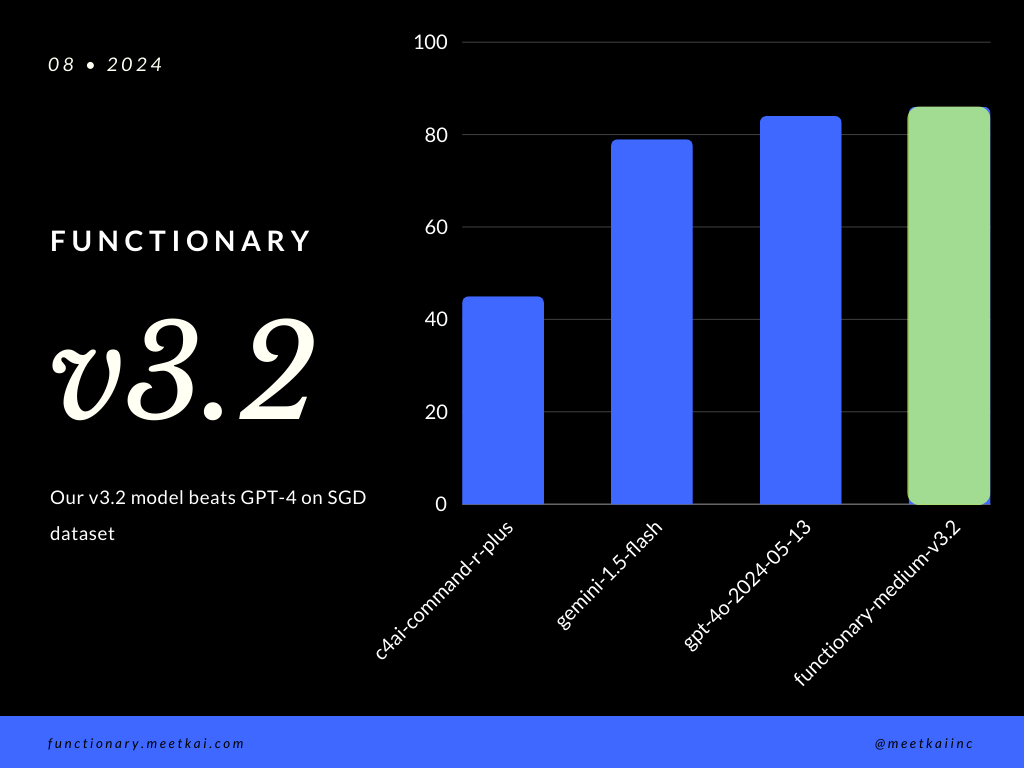
| 데이터 세트 | 모델 이름 | 기능 호출 정확도 (이름 및 인수) |
|---|---|---|
| sgd | MeetKai/Functionary-Medium-V3.1 | 88.11% |
| sgd | GPT-4O-2024-05-13 | 82.75% |
| sgd | Gemini-1.5-Flash | 79.64% |
| sgd | C4ai-Command-R-Plus | 45.66% |
교육 readme를 참조하십시오
엄격하게 시행되지는 않지만보다 안전한 기능 실행을 보장하기 위해 문법 샘플링이 유형 검사를 시행 할 수 있습니다. 주요 안전 점검은 기능/작업 자체에서 수행해야합니다. 주어진 입력의 검증 또는 모델에 주어진 OUPUT와 같은.





