functionary
1.0.0


Fungsi adalah model bahasa yang dapat menafsirkan dan menjalankan fungsi/plugin.
Model menentukan kapan harus menjalankan fungsi, baik secara paralel atau serial, dan dapat memahami output mereka. Ini hanya memicu fungsi sesuai kebutuhan. Definisi fungsi diberikan sebagai objek skema JSON, mirip dengan panggilan fungsi OpenAI GPT.
Dokumentasi dan lebih banyak contoh: functionary.meetkai.com
{type: "code_interpreter"} di alat)! Fungsionaler dapat digunakan menggunakan server VLLM atau SGLang kami. Pilih salah satu tergantung pada preferensi Anda.
vllm
pip install -e .[vllm]Sglang
pip install -e .[sglang] --find-links https://flashinfer.ai/whl/cu121/torch2.4/flashinfer/vllm
python3 server_vllm.py --model " meetkai/functionary-small-v3.2 " --host 0.0.0.0 --port 8000 --max-model-len 8192Sglang
python3 server_sglang.py --model-path " meetkai/functionary-small-v3.2 " --host 0.0.0.0 --port 8000 --context-length 8192 Model medium kami membutuhkan: 4xA6000 atau 2XA100 80GB untuk berjalan, perlu digunakan: tensor-parallel-size atau tp (SGLANG)
vllm
 # vllm requires to run this first: https://github.com/vllm-project/vllm/issues/6152
export VLLM_WORKER_MULTIPROC_METHOD=spawn

python server_vllm.py --model " meetkai/functionary-medium-v3.1 " --host 0.0.0.0 --port 8000 --max-model-len 8192 --tensor-parallel-size 2
Sglang
python server_sglang.py --model-path " meetkai/functionary-medium-v3.1 " --host 0.0.0.0 --port 8000 --context-length 8192 --tp 2Mirip dengan Lora di VLLM, server kami mendukung adaptor Lora baik di startup dan secara dinamis.
Untuk melayani adaptor Lora saat startup, jalankan server dengan argumen --lora-modules :
python server_vllm.py --model {BASE_MODEL} --enable-lora --lora-modules {name}={path} {name}={path} --host 0.0.0.0 --port 8000 Untuk melayani adaptor Lora secara dinamis, gunakan titik akhir /v1/load_lora_adapter :
python server_vllm.py --model {BASE_MODEL} --enable-lora --host 0.0.0.0 --port 8000
# Load a LoRA adapter dynamically
curl -X POST http://localhost:8000/v1/load_lora_adapter
  -H " Content-Type: application/json "
  -d ' {
    "lora_name": "my_lora",
    "lora_path": "/path/to/my_lora_adapter"
  } '
# Example chat request to lora adapter
curl -X POST http://localhost:8000/v1/chat/completions
  -H " Content-Type: application/json "
  -d ' {
    "model": "my_lora",
    "messages": [...],
    "tools": [...],
    "tool_choice": "auto"
  } '
# Unload a LoRA adapter dynamically
curl -X POST http://localhost:8000/v1/unload_lora_adapter
  -H " Content-Type: application/json "
  -d ' {
    "lora_name": "my_lora"
} ' Kami juga menawarkan fitur pengambilan sampel pemanggilan fungsi kami sendiri yang membatasi generasi LLM untuk selalu mengikuti templat prompt, dan memastikan akurasi 100% untuk nama fungsi. Parameter dihasilkan menggunakan LM-format-eVorcer yang efisien, yang memastikan bahwa parameter mengikuti skema alat yang disebut. Untuk mengaktifkan pengambilan sampel tata bahasa, jalankan server VLLM dengan argumen baris perintah --enable-grammar-sampling :
python3 server_vllm.py --model " meetkai/functionary-medium-v3.1 " --max-model-len 8192 --tensor-parallel-size 2 --enable-grammar-samplingCatatan: Dukungan pengambilan sampel tata bahasa hanya berlaku untuk model V2, V3.0, V3.2. Tidak ada dukungan seperti itu untuk model V1 dan V3.1.
Kami juga menyediakan layanan yang melakukan inferensi pada model fungsionalis menggunakan teks-generasi-inferensi (TGI). Ikuti langkah -langkah ini untuk memulai:
Instal Docker mengikuti instruksi instalasi mereka.
Pasang SDK Docker untuk Python
pip install dockerSaat start-up, server TGI fungsionalis mencoba untuk terhubung ke titik akhir TGI yang ada. Dalam hal ini, Anda dapat menjalankan yang berikut:
python3 server_tgi.py --model < REMOTE_MODEL_ID_OR_LOCAL_MODEL_PATH > --endpoint < TGI_SERVICE_ENDPOINT > Jika titik akhir TGI tidak ada, server TGI pejabat akan memulai wadah titik akhir TGI baru dengan alamat yang disediakan dalam argumen CLI endpoint melalui Docker Python SDK yang diinstal. Jalankan perintah berikut untuk masing -masing model jarak jauh dan lokal:
python3 server_tgi.py --model < REMOTE_MODEL_ID > --remote_model_save_folder < PATH_TO_SAVE_AND_CACHE_REMOTE_MODEL > --endpoint < TGI_SERVICE_ENDPOINT > python3 server_tgi.py --model < LOCAL_MODEL_PATH > --endpoint < TGI_SERVICE_ENDPOINT >Buruh pelabuhan
Jika Anda mengalami masalah dengan dependensi, dan Anda memiliki nvidia-container-toolkit, Anda dapat memulai lingkungan Anda seperti ini:
sudo docker run --gpus all -it --ipc=host --name functionary -v ${PWD} /functionary_workspace:/workspace -p 8000:8000 nvcr.io/nvidia/pytorch:23.10-py3 from openai import OpenAI
client = OpenAI ( base_url = "http://localhost:8000/v1" , api_key = "functionary" )
client . chat . completions . create (
model = "meetkai/functionary-small-v3.2" ,
messages = [{ "role" : "user" ,
"content" : "What is the weather for Istanbul?" }
],
tools = [{
"type" : "function" ,
"function" : {
"name" : "get_current_weather" ,
"description" : "Get the current weather" ,
"parameters" : {
"type" : "object" ,
"properties" : {
"location" : {
"type" : "string" ,
"description" : "The city and state, e.g. San Francisco, CA"
}
},
"required" : [ "location" ]
}
}
}],
tool_choice = "auto"
) import requests
data = {
'model' : 'meetkai/functionary-small-v3.2' , # model name here is the value of argument "--model" in deploying: server_vllm.py or server.py
'messages' : [
{
"role" : "user" ,
"content" : "What is the weather for Istanbul?"
}
],
'tools' :[ # For functionary-7b-v2 we use "tools"; for functionary-7b-v1.4 we use "functions" = [{"name": "get_current_weather", "description":..., "parameters": ....}]
{
"type" : "function" ,
"function" : {
"name" : "get_current_weather" ,
"description" : "Get the current weather" ,
"parameters" : {
"type" : "object" ,
"properties" : {
"location" : {
"type" : "string" ,
"description" : "The city and state, e.g. San Francisco, CA"
}
},
"required" : [ "location" ]
}
}
}
]
}
response = requests . post ( "http://127.0.0.1:8000/v1/chat/completions" , json = data , headers = {
"Content-Type" : "application/json" ,
"Authorization" : "Bearer xxxx"
})
# Print the response text
print ( response . text )| Model | Keterangan | VRAM FP16 |
|---|---|---|
| Functionary-Medium-V3.2 | Konteks 128k, juru bahasa kode, menggunakan template prompt kami sendiri | 160GB |
| Functionary-Small-V3.2 / GGUF | Konteks 128k, juru bahasa kode, menggunakan template prompt kami sendiri | 24GB |
| Functionary-Medium-V3.1 / GGUF | Konteks 128k, Interpreter Kode, Menggunakan Template Prompt Meta Asli | 160GB |
| Functionary-Small-V3.1 / GGUF | Konteks 128k, Interpreter Kode, Menggunakan Template Prompt Meta Asli | 24GB |
| Functionary-Medium-V3.0 / GGUF | Konteks 8K, berdasarkan meta-llama/meta-llama-3-70b-instruct | 160GB |
| Functionary-Small-V2.5 / GGUF | Konteks 8k, juru bahasa kode | 24GB |
| Functionary-Small-V2.4 / GGUF | Konteks 8k, juru bahasa kode | 24GB |
| Functionary-Medium-V2.4 / GGUF | Konteks 8k, juru bahasa kode, akurasi yang lebih baik | 90GB |
| Functionary-Small-V2.2 / GGUF | Konteks 8K | 24GB |
| Functionary-Medium-V2.2 / GGUF | Konteks 8K | 90GB |
| Functionary-7b-V2.1 / GGUF | Konteks 8K | 24GB |
| Functionary-7b-V2 / GGUF | Dukungan Panggilan Fungsi Paralel. | 24GB |
| Functionary-7b-V1.4 / GGUF | Konteks 4K, akurasi yang lebih baik (sudah usang) | 24GB |
| Functionary-7b-V1.1 | Konteks 4K (Teram) | 24GB |
| Functionary-7b-V0.1 | Konteks 2K (sudah usang) tidak disarankan, gunakan 2.1 dan seterusnya | 24GB |
Perbedaan antara Openai-Python V0 dan V1 Anda dapat merujuk pada dokumentasi resmi di sini
| Fitur/proyek | Pejabat | Nexusraven | Gorila | Pedang | GPT-4-1106-preview |
|---|---|---|---|---|---|
| Panggilan fungsi tunggal | ✅ | ✅ | ✅ | ✅ | ✅ |
| Panggilan fungsi paralel | ✅ | ✅ | ✅ | ✅ | |
| Menindaklanjuti argumen fungsi yang hilang | ✅ | ✅ | |||
| Multi-turn | ✅ | ✅ | ✅ | ||
| Menghasilkan respons model yang didasarkan pada hasil eksekusi alat | ✅ | ✅ | |||
| Basa basi | ✅ | ✅ | ✅ | ✅ | |
| Interpreter Kode | ✅ | ✅ |
Anda dapat menemukan lebih banyak detail fitur di sini
Contoh untuk inferensi menggunakan llama-cpp-python dapat ditemukan di: llama_cpp_inference.py.
Selain itu, pejabat juga diintegrasikan ke dalam llama-cpp-python, namun integrasi mungkin tidak diperbarui dengan cepat , jadi jika ada sesuatu yang salah atau aneh dalam hasilnya, silakan gunakan: llama_cpp_inference.py sebagai gantinya. Saat ini, v2.5 belum terintegrasi, jadi jika Anda menggunakan fungsionaler-small-v2.5-gguf , silakan gunakan: llama_cpp_inference.py
Pastikan versi terbaru Llama-CPP-Python terpasang dengan sukses di sistem Anda. Fungsionaler V2 sepenuhnya terintegrasi ke dalam llama-cpp-python. Anda dapat melakukan inferensi menggunakan model GGUF fungsionaler baik melalui penyelesaian obrolan normal atau melalui server kompatibel openai Llama-CPP-Python yang berperilaku serupa dengan kami.
Berikut ini adalah kode sampel menggunakan penyelesaian obrolan normal:
 from llama_cpp import Llama
from llama_cpp . llama_tokenizer import LlamaHFTokenizer

# We should use HF AutoTokenizer instead of llama.cpp's tokenizer because we found that Llama.cpp's tokenizer doesn't give the same result as that from Huggingface. The reason might be in the training, we added new tokens to the tokenizer and Llama.cpp doesn't handle this successfully
llm = Llama . from_pretrained (
    repo_id = "meetkai/functionary-small-v2.4-GGUF" ,
    filename = "functionary-small-v2.4.Q4_0.gguf" ,
    chat_format = "functionary-v2" ,
    tokenizer = LlamaHFTokenizer . from_pretrained ( "meetkai/functionary-small-v2.4-GGUF" ),
    n_gpu_layers = - 1
)

messages = [
    { "role" : "user" , "content" : "what's the weather like in Hanoi?" }
]
tools = [ # For functionary-7b-v2 we use "tools"; for functionary-7b-v1.4 we use "functions" = [{"name": "get_current_weather", "description":..., "parameters": ....}]
    {
        "type" : "function" ,
        "function" : {
            "name" : "get_current_weather" ,
            "description" : "Get the current weather" ,
            "parameters" : {
                "type" : "object" ,
                "properties" : {
                    "location" : {
                        "type" : "string" ,
                        "description" : "The city and state, e.g., San Francisco, CA"
                    }
                },
                "required" : [ "location" ]
            }
        }
    }
]

result = llm . create_chat_completion (
      messages = messages ,
      tools = tools ,
      tool_choice = "auto" ,
)

print ( result [ "choices" ][ 0 ][ "message" ])
Outputnya adalah:
{ 'role' : 'assistant' , 'content' : None , 'tool_calls' : [{ 'type' : 'function' , 'function' : { 'name' : 'get_current_weather' , 'arguments' : '{ n "location": "Hanoi" n }' }}]}Untuk detail lebih lanjut, silakan merujuk ke bagian panggilan fungsi di llama-cpp-python. Untuk menggunakan model GGUF fungsionalis kami menggunakan server yang kompatibel dengan OpenAI Llama-CPP-Python, silakan merujuk di sini untuk detail dan dokumentasi lebih lanjut.
Catatan:
messages .Untuk memanggil fungsi Python asli, dapatkan hasilnya dan mengekstrak hasilnya untuk merespons, Anda dapat menggunakan ChatLab. Contoh berikut menggunakan chatlab == 0.16.0:
Harap dicatat bahwa ChatLab saat ini tidak mendukung panggilan fungsi paralel. Kode sampel ini hanya kompatibel dengan fungsi fungsionaler 1.4 dan mungkin tidak berfungsi dengan benar dengan fungsi fungsionaler 2.0.
 from chatlab import Conversation
import openai
import os
openai . api_key = "functionary" # We just need to set this something other than None
os . environ [ 'OPENAI_API_KEY' ] = "functionary" # chatlab requires us to set this too
openai . api_base = "http://localhost:8000/v1"

# now provide the function with description
def get_car_price ( car_name : str ):
    """this function is used to get the price of the car given the name
    :param car_name: name of the car to get the price
    """
    car_price = {
        "tang" : { "price" : "$20000" },
        "song" : { "price" : "$25000" }
    }
    for key in car_price :
        if key in car_name . lower ():
            return { "price" : car_price [ key ]}
    return { "price" : "unknown" }

chat = Conversation ( model = "meetkai/functionary-7b-v2" )
chat . register ( get_car_price )  # register this function
chat . submit ( "what is the price of the car named Tang?" ) # submit user prompt

# print the flow
for message in chat . messages :
    role = message [ "role" ]. upper ()
    if "function_call" in message :
        func_name = message [ "function_call" ][ "name" ]
        func_param = message [ "function_call" ][ "arguments" ]
        print ( f" { role } : call function: { func_name } , arguments: { func_param } " )
    else :
        content = message [ "content" ]
        print ( f" { role } : { content } " )
Output akan terlihat seperti ini:
 USER: what is the price of the car named Tang?
ASSISTANT: call function: get_car_price, arguments:{
  "car_name": "Tang"
}
FUNCTION: {'price': {'price': '$20000'}}
ASSISTANT: The price of the car named Tang is $20,000.
Penyebaran model fungsioner tanpa server didukung melalui skrip MODAL_SERVER_VLLM.PY . Setelah mendaftar dan menginstal modal, ikuti langkah -langkah ini untuk menggunakan server VLLM kami pada modal:
modal environment create devJika Anda sudah memiliki lingkungan dev, tidak perlu membuat yang lain. Cukup konfigurasikan untuk itu di langkah berikutnya.
modal config set-environment devmodal serve modal_server_vllmmodal deploy modal_server_vllmBerikut adalah beberapa contoh bagaimana Anda dapat menggunakan sistem panggilan fungsi ini:
Fungsi plan_trip(destination: string, duration: int, interests: list) dapat mengambil input pengguna seperti "Saya ingin merencanakan perjalanan 7 hari ke Paris dengan fokus pada seni dan budaya" dan menghasilkan rencana perjalanan yang sesuai.
 client . chat . completions . create ((
    model = "meetkai/functionary-7b-v2" ,
    messages = [
        { "role" : "user" , "content" : 'I want to plan a 7-day trip to Paris with a focus on art and culture' },
    ],
    tools = [
        {
            "type" : "function" ,
            "function" : {
                "name" : "plan_trip" ,
                "description" : "Plan a trip based on user's interests" ,
                "parameters" : {
                    "type" : "object" ,
                    "properties" : {
                        "destination" : {
                            "type" : "string" ,
                            "description" : "The destination of the trip" ,
                        },
                        "duration" : {
                            "type" : "integer" ,
                            "description" : "The duration of the trip in days" ,
                        },
                        "interests" : {
                            "type" : "array" ,
                            "items" : { "type" : "string" },
                            "description" : "The interests based on which the trip will be planned" ,
                        },
                    },
                    "required" : [ "destination" , "duration" , "interests" ],
                }
            }
        }
    ]
)
Respons akan memiliki:
{ "role" : " assistant " , "content" : null , "tool_calls" : [{ "type" : " function " , "function" : { "name" : " plan_trip " , "arguments" : '{n "destination": "Paris",n "duration": 7,n "interests": ["art", "culture"]n } ' } } ]} Maka Anda perlu memanggil fungsi plan_trip dengan argumen yang disediakan. Jika Anda ingin komentar dari model, maka Anda akan menelepon model lagi dengan respons dari fungsi, model akan menulis komentar yang diperlukan.
Fungsi seperti Estimate_property_value (properti_details: Dict) dapat memungkinkan pengguna untuk memasukkan detail tentang properti (seperti lokasi, ukuran, jumlah kamar, dll.) Dan menerima nilai pasar yang diperkirakan.
 client . chat . completions . create (
    model = "meetkai/functionary-7b-v2" ,
    messages = [
        {
            "role" : "user" ,
            "content" : 'What is the estimated value of a 3-bedroom house in San Francisco with 2000 sq ft area?'
        },
        {
            "role" : "assistant" ,
            "content" : None ,
            "tool_calls" : [
                {
                    "type" : "function" ,
                    "function" : {
                        "name" : "estimate_property_value" ,
                        "arguments" : '{ n  "property_details": {"location": "San Francisco", "size": 2000, "rooms": 3} n }'
                    }
                }
            ]
        }
    ],
    tools = [
        {
            "type" : "function" ,
            "function" : {
                "name" : "estimate_property_value" ,
                "description" : "Estimate the market value of a property" ,
                "parameters" : {
                    "type" : "object" ,
                    "properties" : {
                        "property_details" : {
                            "type" : "object" ,
                            "properties" : {
                                "location" : {
                                    "type" : "string" ,
                                    "description" : "The location of the property"
                                },
                                "size" : {
                                    "type" : "integer" ,
                                    "description" : "The size of the property in square feet"
                                },
                                "rooms" : {
                                    "type" : "integer" ,
                                    "description" : "The number of rooms in the property"
                                }
                            },
                            "required" : [ "location" , "size" , "rooms" ]
                        }
                    },
                    "required" : [ "property_details" ]
                }
            }
        }
    ],
    tool_choice = "auto"
)
Respons akan memiliki:
{ "role" : " assistant " , "content" : null , "tool_calls" : [{ "type" : " function " , "function" : { "name" : " plan_trip " , "arguments" : '{n "destination": "Paris",n "duration": 7,n "interests": ["art", "culture"]n } ' } } ]} Maka Anda perlu memanggil fungsi plan_trip dengan argumen yang disediakan. Jika Anda ingin komentar dari model, maka Anda akan menelepon model lagi dengan respons dari fungsi, model akan menulis komentar yang diperlukan.
Fungsi parse_customer_complaint(complaint: {issue: string, frequency: string, duration: string}) dapat membantu dalam mengekstraksi informasi terstruktur dari keluhan pelanggan yang kompleks, naratif, mengidentifikasi masalah inti dan solusi potensial. Objek complaint dapat mencakup properti seperti issue (masalah utama), frequency (seberapa sering masalah terjadi), dan duration (berapa lama masalah telah terjadi).
 client . chat . completions . create (
    model = "meetkai/functionary-7b-v2" ,
    messages = [
        { "role" : "user" , "content" : 'My internet has been disconnecting frequently for the past week' },
    ],
    tools = [
        {
            "type" : "function" ,
            "function" : {
            "name" : "parse_customer_complaint" ,
            "description" : "Parse a customer complaint and identify the core issue" ,
            "parameters" : {
                "type" : "object" ,
                "properties" : {
                    "complaint" : {
                        "type" : "object" ,
                        "properties" : {
                            "issue" : {
                                "type" : "string" ,
                                "description" : "The main problem" ,
                            },
                            "frequency" : {
                                "type" : "string" ,
                                "description" : "How often the issue occurs" ,
                            },
                            "duration" : {
                                "type" : "string" ,
                                "description" : "How long the issue has been occurring" ,
                            },
                        },
                        "required" : [ "issue" , "frequency" , "duration" ],
                    },
                },
                "required" : [ "complaint" ],
            }
        }
     }
    ],
    tool_choice = "auto"
)
Respons akan memiliki:
{ "role" : " assistant " , "content" : null , "tool_calls" : [{ "type" : " function " , "function" : { "name" : " parse_customer_complaint " , "arguments" : '{n "complaint": {"issue": "internet disconnecting", "frequency": "frequently", "duration": "past week" } n } '}} ]}Maka Anda perlu memanggil fungsi parse_customer_complaint dengan argumen yang disediakan. Jika Anda ingin komentar dari model, maka Anda akan menelepon model lagi dengan respons dari fungsi, model akan menulis komentar yang diperlukan.
Kami mengonversi definisi fungsi ke teks yang serupa dengan definisi TypeScript. Kemudian kami menyuntikkan definisi ini sebagai permintaan sistem. Setelah itu, kami menyuntikkan prompt sistem default. Kemudian kami memulai pesan percakapan.
Contoh cepat dapat ditemukan di sini: v1 (v1.4), v2 (v2, v2.1, v2.2, v2.4) dan v2.llama3 (v2.5)
Kami tidak mengubah probabilitas logit untuk menyesuaikan diri dengan skema tertentu, tetapi model itu sendiri tahu bagaimana menyesuaikan diri. Ini memungkinkan kita untuk menggunakan alat yang ada dan sistem caching dengan mudah.
Kami berada di peringkat ke-2 di papan peringkat pemanggilan fungsi Berkeley (terakhir diperbarui: 2024-08-11)
| Nama model | Akurasi Panggilan Fungsi (Nama & Argumen) |
|---|---|
| Meetkai/Functionary-Medium-V3.1 | 88,88% |
| GPT-4-1106-Preveview (Prompt) | 88,53% |
| Meetkai/Functionary-Small-V3.2 | 82,82% |
| Meetkai/Functionary-Small-V3.1 | 82,53% |
| Firefunction-V2 (FC) | 78.82.47% |
Kami juga mengevaluasi model kami di ToolsAndbox, tolok ukur ini jauh lebih sulit daripada papan peringkat pemanggilan fungsi Berkeley . Benchmark ini mencakup pelaksanaan alat stateful, ketergantungan keadaan implisit antara alat, simulator pengguna bawaan yang mendukung evaluasi percakapan on-policy dan strategi evaluasi dinamis untuk tonggak antara dan akhir atas lintasan yang sewenang-wenang. Para penulis tolok ukur ini menunjukkan bahwa ada kesenjangan kinerja yang sangat besar antara model open source dan model kepemilikan.
Dari hasil evaluasi kami, model kami sebanding dengan model berpemilik terbaik dan jauh lebih baik daripada model open source lainnya.
| Nama model | Skor kesamaan rata -rata |
|---|---|
| GPT-4O-2024-05-13 | 73 |
| Claude-3-Opus-20240229 | 69.2 |
| Functionary-Medium-V3.1 | 68.87 |
| GPT-3.5-TURBO-0125 | 65.6 |
| GPT-4-0125-preview | 64.3 |
| Claude-3-Sonnet-20240229 | 63.8 |
| Functionary-Small-V3.1 | 63.13 |
| Gemini-1.5-Pro-001 | 60.4 |
| Functionary-Small-V3.2 | 58.56 |
| Claude-3-haiku-20240307 | 54.9 |
| Gemini-1.0-Pro | 38.1 |
| Hermes-2-Pro-Mistral-7b | 31.4 |
| Mistral-7b-instruct-V0.3 | 29.8 |
| C4AI-Command-R-V01 | 26.2 |
| Gorilla-OpenFunctions-V2 | 25.6 |
| C4AI-Command R+ | 24.7 |
Fungsi Evaluasi Prediksi panggilan dalam dataset SGD. Metrik akurasi mengukur keseluruhan kebenaran panggilan fungsi yang diprediksi, termasuk prediksi nama fungsi dan ekstraksi argumen.
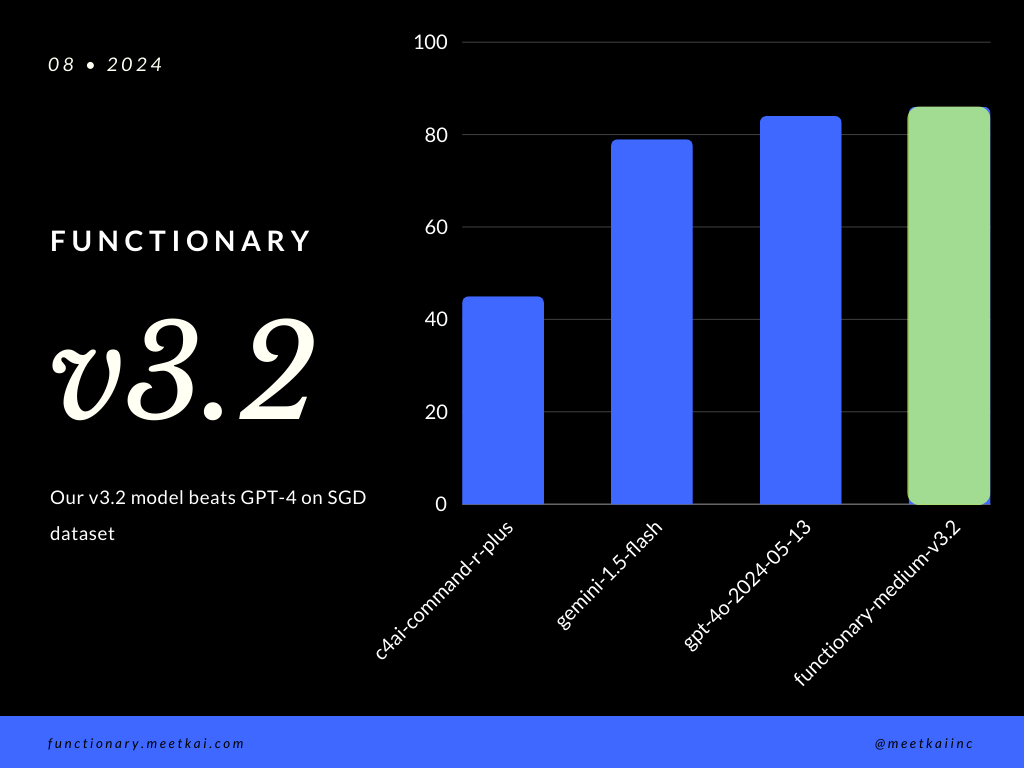
| Dataset | Nama model | Akurasi Panggilan Fungsi (Nama & Argumen) |
|---|---|---|
| SGD | Meetkai/Functionary-Medium-V3.1 | 88,11% |
| SGD | GPT-4O-2024-05-13 | 82,75% |
| SGD | Gemini-1.5-flash | 79,64% |
| SGD | C4AI-Command-R-Plus | 45,66% |
Lihat pelatihan readme
Meskipun tidak ditegakkan secara ketat, untuk memastikan eksekusi fungsi yang lebih aman , seseorang dapat mengaktifkan pengambilan sampel tata bahasa untuk menegakkan jenis pengecekan. Pemeriksaan keamanan utama perlu dilakukan dalam fungsi/tindakan itu sendiri. Seperti validasi input yang diberikan, atau ouput yang akan diberikan kepada model.





