functionary
1.0.0


ฟังก์ชั่นเป็นรูปแบบภาษาที่สามารถตีความและดำเนินการฟังก์ชั่น/ปลั๊กอิน
โมเดลกำหนดว่าจะดำเนินการเมื่อใดไม่ว่าจะเป็นแบบขนานหรือแบบอนุกรมและสามารถเข้าใจผลลัพธ์ของพวกเขา มันกระตุ้นฟังก์ชั่นตามต้องการเท่านั้น คำจำกัดความของฟังก์ชั่นจะได้รับเป็นวัตถุ JSON Schema คล้ายกับการเรียกใช้ฟังก์ชัน OpenAI GPT
เอกสารและตัวอย่างเพิ่มเติม: functionary.meetkai.com
{type: "code_interpreter"} ในเครื่องมือ)! ฟังก์ชั่นสามารถปรับใช้ได้โดยใช้เซิร์ฟเวอร์ VLLM หรือ SGLANG ของเรา เลือกอย่างใดอย่างหนึ่งขึ้นอยู่กับการตั้งค่าของคุณ
vllm
pip install -e .[vllm]sglang
pip install -e .[sglang] --find-links https://flashinfer.ai/whl/cu121/torch2.4/flashinfer/vllm
python3 server_vllm.py --model " meetkai/functionary-small-v3.2 " --host 0.0.0.0 --port 8000 --max-model-len 8192sglang
python3 server_sglang.py --model-path " meetkai/functionary-small-v3.2 " --host 0.0.0.0 --port 8000 --context-length 8192 รุ่นสื่อของเราต้องการ: 4xA6000 หรือ 2xA100 80GB เพื่อเรียกใช้จำเป็นต้องใช้: tensor-parallel-size หรือ tp (SGLANG)
vllm
 # vllm requires to run this first: https://github.com/vllm-project/vllm/issues/6152
export VLLM_WORKER_MULTIPROC_METHOD=spawn

python server_vllm.py --model " meetkai/functionary-medium-v3.1 " --host 0.0.0.0 --port 8000 --max-model-len 8192 --tensor-parallel-size 2
sglang
python server_sglang.py --model-path " meetkai/functionary-medium-v3.1 " --host 0.0.0.0 --port 8000 --context-length 8192 --tp 2เช่นเดียวกับ LORA ใน VLLM เซิร์ฟเวอร์ของเรารองรับการให้บริการอะแดปเตอร์ LORA ทั้งในการเริ่มต้นและแบบไดนามิก
ในการให้บริการอะแดปเตอร์ Lora เมื่อเริ่มต้นใช้เซิร์ฟเวอร์ด้วยอาร์กิวเมนต์ --lora-modules :
python server_vllm.py --model {BASE_MODEL} --enable-lora --lora-modules {name}={path} {name}={path} --host 0.0.0.0 --port 8000 ในการให้บริการอะแดปเตอร์ LORA แบบไดนามิกให้ใช้จุดสิ้นสุด /v1/load_lora_adapter :
python server_vllm.py --model {BASE_MODEL} --enable-lora --host 0.0.0.0 --port 8000
# Load a LoRA adapter dynamically
curl -X POST http://localhost:8000/v1/load_lora_adapter
  -H " Content-Type: application/json "
  -d ' {
    "lora_name": "my_lora",
    "lora_path": "/path/to/my_lora_adapter"
  } '
# Example chat request to lora adapter
curl -X POST http://localhost:8000/v1/chat/completions
  -H " Content-Type: application/json "
  -d ' {
    "model": "my_lora",
    "messages": [...],
    "tools": [...],
    "tool_choice": "auto"
  } '
# Unload a LoRA adapter dynamically
curl -X POST http://localhost:8000/v1/unload_lora_adapter
  -H " Content-Type: application/json "
  -d ' {
    "lora_name": "my_lora"
} ' นอกจากนี้เรายังนำเสนอคุณสมบัติการสุ่มตัวอย่างไวยากรณ์การเรียกใช้ฟังก์ชั่นของเราเองซึ่ง จำกัด การสร้าง LLM ให้ติดตามเทมเพลตพรอมต์เสมอและมั่นใจได้ถึงความแม่นยำ 100% สำหรับชื่อฟังก์ชั่น พารามิเตอร์ถูกสร้างขึ้นโดยใช้ LM-format-enforcer ที่มีประสิทธิภาพซึ่งทำให้มั่นใจได้ว่าพารามิเตอร์จะเป็นไปตามสคีมาของเครื่องมือที่เรียกว่า ในการเปิดใช้งานการสุ่มตัวอย่างไวยากรณ์ให้เรียกใช้เซิร์ฟเวอร์ VLLM ด้วยอาร์กิวเมนต์บรรทัดคำสั่ง --enable-grammar-sampling :
python3 server_vllm.py --model " meetkai/functionary-medium-v3.1 " --max-model-len 8192 --tensor-parallel-size 2 --enable-grammar-samplingหมายเหตุ: การสนับสนุนการสุ่มตัวอย่างไวยากรณ์ใช้ได้เฉพาะสำหรับรุ่น V2, v3.0, v3.2 ไม่มีการสนับสนุนดังกล่าวสำหรับรุ่น V1 และ V3.1
นอกจากนี้เรายังให้บริการที่ดำเนินการอนุมานในโมเดลฟังก์ชั่นโดยใช้การระบุรุ่นข้อความ (TGI) ทำตามขั้นตอนเหล่านี้เพื่อเริ่มต้น:
ติดตั้ง Docker ตามคำแนะนำการติดตั้ง
ติดตั้ง Docker SDK สำหรับ Python
pip install dockerเมื่อเริ่มต้นขึ้นเซิร์ฟเวอร์ TGI ที่ใช้งานได้พยายามเชื่อมต่อกับจุดสิ้นสุด TGI ที่มีอยู่ ในกรณีนี้คุณสามารถเรียกใช้สิ่งต่อไปนี้:
python3 server_tgi.py --model < REMOTE_MODEL_ID_OR_LOCAL_MODEL_PATH > --endpoint < TGI_SERVICE_ENDPOINT > หากไม่มีจุดสิ้นสุด TGI เซิร์ฟเวอร์ TGI ที่ใช้งานได้จะเริ่มคอนเทนเนอร์ปลายทาง TGI ใหม่พร้อมที่อยู่ที่มีให้ใน endpoint CLI ผ่านทาง Docker Python SDK ที่ติดตั้ง เรียกใช้คำสั่งต่อไปนี้สำหรับโมเดลระยะไกลและท้องถิ่นตามลำดับ:
python3 server_tgi.py --model < REMOTE_MODEL_ID > --remote_model_save_folder < PATH_TO_SAVE_AND_CACHE_REMOTE_MODEL > --endpoint < TGI_SERVICE_ENDPOINT > python3 server_tgi.py --model < LOCAL_MODEL_PATH > --endpoint < TGI_SERVICE_ENDPOINT >นักเทียบท่า
หากคุณมีปัญหากับการพึ่งพาและคุณมี nvidia-container-toolkit คุณสามารถเริ่มสภาพแวดล้อมของคุณเช่นนี้:
sudo docker run --gpus all -it --ipc=host --name functionary -v ${PWD} /functionary_workspace:/workspace -p 8000:8000 nvcr.io/nvidia/pytorch:23.10-py3 from openai import OpenAI
client = OpenAI ( base_url = "http://localhost:8000/v1" , api_key = "functionary" )
client . chat . completions . create (
model = "meetkai/functionary-small-v3.2" ,
messages = [{ "role" : "user" ,
"content" : "What is the weather for Istanbul?" }
],
tools = [{
"type" : "function" ,
"function" : {
"name" : "get_current_weather" ,
"description" : "Get the current weather" ,
"parameters" : {
"type" : "object" ,
"properties" : {
"location" : {
"type" : "string" ,
"description" : "The city and state, e.g. San Francisco, CA"
}
},
"required" : [ "location" ]
}
}
}],
tool_choice = "auto"
) import requests
data = {
'model' : 'meetkai/functionary-small-v3.2' , # model name here is the value of argument "--model" in deploying: server_vllm.py or server.py
'messages' : [
{
"role" : "user" ,
"content" : "What is the weather for Istanbul?"
}
],
'tools' :[ # For functionary-7b-v2 we use "tools"; for functionary-7b-v1.4 we use "functions" = [{"name": "get_current_weather", "description":..., "parameters": ....}]
{
"type" : "function" ,
"function" : {
"name" : "get_current_weather" ,
"description" : "Get the current weather" ,
"parameters" : {
"type" : "object" ,
"properties" : {
"location" : {
"type" : "string" ,
"description" : "The city and state, e.g. San Francisco, CA"
}
},
"required" : [ "location" ]
}
}
}
]
}
response = requests . post ( "http://127.0.0.1:8000/v1/chat/completions" , json = data , headers = {
"Content-Type" : "application/json" ,
"Authorization" : "Bearer xxxx"
})
# Print the response text
print ( response . text )| แบบอย่าง | คำอธิบาย | VRAM FP16 |
|---|---|---|
| ฟังก์ชั่นสื่อกลาง -V3.2 | บริบท 128K รหัสล่ามโดยใช้ เทมเพลตพรอมต์ของเราเอง | 160GB |
| ฟังก์ชั่น-SMALL-V3.2 / GGUF | บริบท 128K รหัสล่ามโดยใช้ เทมเพลตพรอมต์ของเราเอง | 24GB |
| ฟังก์ชั่นการใช้งานสื่อกลาง -V3.1 / GGUF | บริบท 128K, Code Interpreter โดยใช้ เทมเพลตพรอมต์ของ Meta ดั้งเดิม | 160GB |
| ฟังก์ชั่น-SMALL-V3.1 / GGUF | บริบท 128K, Code Interpreter โดยใช้ เทมเพลตพรอมต์ของ Meta ดั้งเดิม | 24GB |
| ฟังก์ชั่นการใช้งานสื่อกลาง -V3.0 / GGUF | บริบท 8K ขึ้นอยู่กับ Meta-Llama/Meta-Llama-3-70B-Instruct | 160GB |
| ฟังก์ชั่น SMALL-V2.5 / GGUF | บริบท 8K รหัสล่าม | 24GB |
| ฟังก์ชั่น-SMALL-V2.4 / GGUF | บริบท 8K รหัสล่าม | 24GB |
| ฟังก์ชั่นการใช้งานสื่อกลาง -V2.4 / GGUF | บริบท 8K, Code Interpreter, ความแม่นยำที่ดีขึ้น | 90GB |
| ฟังก์ชั่น-SMALL-V2.2 / GGUF | บริบท 8K | 24GB |
| ฟังก์ชั่นการใช้งานสื่อกลาง -v2.2 / gguf | บริบท 8K | 90GB |
| functionary-7b-v2.1 / gguf | บริบท 8K | 24GB |
| functionary-7b-v2 / gguf | ฟังก์ชั่นการเรียกใช้ฟังก์ชั่นแบบขนาน | 24GB |
| functionary-7b-v1.4 / gguf | บริบท 4K ความแม่นยำที่ดีกว่า (เลิกใช้แล้ว) | 24GB |
| functionary-7b-v1.1 | บริบท 4K (เลิกใช้แล้ว) | 24GB |
| functionary-7b-v0.1 | ไม่แนะนำบริบท 2K (เลิกใช้แล้ว) ใช้ 2.1 เป็นต้นไป | 24GB |
ความแตกต่างระหว่าง Openai-Python V0 และ V1 คุณอาจอ้างถึงเอกสารอย่างเป็นทางการที่นี่
| ฟีเจอร์/โครงการ | ฟังก์ชั่น | Nexusraven | กอริลลา | เกี่ยวกับกลลา | GPT-4-1106-PREVIEW |
|---|---|---|---|---|---|
| การโทรฟังก์ชั่นเดียว | |||||
| การเรียกใช้ฟังก์ชันแบบขนาน | |||||
| ติดตามข้อโต้แย้งฟังก์ชั่นที่หายไป | |||||
| เลี้ยว | |||||
| สร้างการตอบสนองแบบจำลองที่มีพื้นฐานในผลการดำเนินการเครื่องมือ | |||||
| Chit-Chat | |||||
| ล่ามรหัส |
คุณสามารถค้นหารายละเอียดเพิ่มเติมของคุณสมบัติได้ที่นี่
ตัวอย่างสำหรับการอนุมานโดยใช้ llama-cpp-python สามารถพบได้ใน: llama_cpp_inference.py
นอกจากนี้ฟังก์ชั่นยังรวมอยู่ใน LLAMA-CPP-PYTHON อย่างไรก็ตามการรวมอาจไม่ได้ รับการปรับปรุงอย่างรวดเร็ว ดังนั้นหากมีบางอย่างผิดปกติหรือแปลกในผลลัพธ์โปรดใช้: llama_cpp_inference.py แทน ปัจจุบัน v2.5 ยังไม่ได้รวมเข้าด้วยกันดังนั้นหากคุณใช้ functionary-small-v2.5-gguf โปรดใช้: llama_cpp_inference.py
ตรวจสอบให้แน่ใจว่า LLAMA-CPP-PYTHON เวอร์ชันล่าสุดได้รับการติดตั้งในระบบของคุณ ฟังก์ชั่น V2 ถูกรวมเข้ากับ LLAMA-CPP-PYTHON อย่างสมบูรณ์ คุณสามารถทำการอนุมานโดยใช้โมเดล GGUF ของ Functionary ผ่านการแชทปกติเสร็จสิ้นหรือผ่านเซิร์ฟเวอร์ที่เข้ากันได้กับ OpenAI ของ LLAMA-CPP-PYTHON ซึ่งทำงานคล้ายกับเรา
ต่อไปนี้เป็นรหัสตัวอย่างโดยใช้การแชทปกติเสร็จสิ้น:
 from llama_cpp import Llama
from llama_cpp . llama_tokenizer import LlamaHFTokenizer

# We should use HF AutoTokenizer instead of llama.cpp's tokenizer because we found that Llama.cpp's tokenizer doesn't give the same result as that from Huggingface. The reason might be in the training, we added new tokens to the tokenizer and Llama.cpp doesn't handle this successfully
llm = Llama . from_pretrained (
    repo_id = "meetkai/functionary-small-v2.4-GGUF" ,
    filename = "functionary-small-v2.4.Q4_0.gguf" ,
    chat_format = "functionary-v2" ,
    tokenizer = LlamaHFTokenizer . from_pretrained ( "meetkai/functionary-small-v2.4-GGUF" ),
    n_gpu_layers = - 1
)

messages = [
    { "role" : "user" , "content" : "what's the weather like in Hanoi?" }
]
tools = [ # For functionary-7b-v2 we use "tools"; for functionary-7b-v1.4 we use "functions" = [{"name": "get_current_weather", "description":..., "parameters": ....}]
    {
        "type" : "function" ,
        "function" : {
            "name" : "get_current_weather" ,
            "description" : "Get the current weather" ,
            "parameters" : {
                "type" : "object" ,
                "properties" : {
                    "location" : {
                        "type" : "string" ,
                        "description" : "The city and state, e.g., San Francisco, CA"
                    }
                },
                "required" : [ "location" ]
            }
        }
    }
]

result = llm . create_chat_completion (
      messages = messages ,
      tools = tools ,
      tool_choice = "auto" ,
)

print ( result [ "choices" ][ 0 ][ "message" ])
ผลลัพธ์จะเป็น:
{ 'role' : 'assistant' , 'content' : None , 'tool_calls' : [{ 'type' : 'function' , 'function' : { 'name' : 'get_current_weather' , 'arguments' : '{ n "location": "Hanoi" n }' }}]}สำหรับรายละเอียดเพิ่มเติมโปรดดูส่วนการเรียกใช้ฟังก์ชันใน llama-cpp-python หากต้องการใช้โมเดล GGUF ฟังก์ชั่นของเราโดยใช้เซิร์ฟเวอร์ที่เข้ากันได้ของ OpenAI ของ LLAMA-CPP-PYTHON โปรดดูที่นี่สำหรับรายละเอียดและเอกสารเพิ่มเติมที่นี่
บันทึก:
messagesในการเรียกใช้ฟังก์ชัน Python จริงรับผลลัพธ์และแยกผลลัพธ์เพื่อตอบสนองคุณสามารถใช้ chatlab ตัวอย่างต่อไปนี้ใช้ chatlab == 0.16.0:
โปรดทราบว่าปัจจุบัน chatlab ไม่รองรับการโทรฟังก์ชั่นแบบขนาน โค้ดตัวอย่างนี้เข้ากันได้เฉพาะกับฟังก์ชันเวอร์ชัน 1.4 และอาจใช้งานไม่ได้อย่างถูกต้องกับฟังก์ชั่นเวอร์ชัน 2.0
 from chatlab import Conversation
import openai
import os
openai . api_key = "functionary" # We just need to set this something other than None
os . environ [ 'OPENAI_API_KEY' ] = "functionary" # chatlab requires us to set this too
openai . api_base = "http://localhost:8000/v1"

# now provide the function with description
def get_car_price ( car_name : str ):
    """this function is used to get the price of the car given the name
    :param car_name: name of the car to get the price
    """
    car_price = {
        "tang" : { "price" : "$20000" },
        "song" : { "price" : "$25000" }
    }
    for key in car_price :
        if key in car_name . lower ():
            return { "price" : car_price [ key ]}
    return { "price" : "unknown" }

chat = Conversation ( model = "meetkai/functionary-7b-v2" )
chat . register ( get_car_price )  # register this function
chat . submit ( "what is the price of the car named Tang?" ) # submit user prompt

# print the flow
for message in chat . messages :
    role = message [ "role" ]. upper ()
    if "function_call" in message :
        func_name = message [ "function_call" ][ "name" ]
        func_param = message [ "function_call" ][ "arguments" ]
        print ( f" { role } : call function: { func_name } , arguments: { func_param } " )
    else :
        content = message [ "content" ]
        print ( f" { role } : { content } " )
ผลลัพธ์จะมีลักษณะเช่นนี้:
 USER: what is the price of the car named Tang?
ASSISTANT: call function: get_car_price, arguments:{
  "car_name": "Tang"
}
FUNCTION: {'price': {'price': '$20000'}}
ASSISTANT: The price of the car named Tang is $20,000.
การปรับใช้เซิร์ฟเวอร์แบบไม่มีการใช้งานของโมเดลฟังก์ชั่นได้รับการสนับสนุนผ่านสคริปต์ modal_server_vllm.py หลังจากลงทะเบียนและติดตั้ง Modal ให้ทำตามขั้นตอนเหล่านี้เพื่อปรับใช้เซิร์ฟเวอร์ VLLM ของเราบน Modal:
modal environment create devหากคุณมีสภาพแวดล้อมที่สร้างขึ้นแล้วไม่จำเป็นต้องสร้างอีกสภาพแวดล้อม เพียงกำหนดค่าไว้ในขั้นตอนต่อไป
modal config set-environment devmodal serve modal_server_vllmmodal deploy modal_server_vllmนี่คือตัวอย่างบางส่วนของวิธีที่คุณสามารถใช้ระบบการเรียกใช้ฟังก์ชันนี้:
ฟังก์ชั่น plan_trip(destination: string, duration: int, interests: list) สามารถนำข้อมูลผู้ใช้เช่น "ฉันต้องการวางแผนการเดินทาง 7 วันไปปารีสโดยมุ่งเน้นไปที่ศิลปะและวัฒนธรรม" และสร้างรายละเอียดการเดินทางตามลำดับ
 client . chat . completions . create ((
    model = "meetkai/functionary-7b-v2" ,
    messages = [
        { "role" : "user" , "content" : 'I want to plan a 7-day trip to Paris with a focus on art and culture' },
    ],
    tools = [
        {
            "type" : "function" ,
            "function" : {
                "name" : "plan_trip" ,
                "description" : "Plan a trip based on user's interests" ,
                "parameters" : {
                    "type" : "object" ,
                    "properties" : {
                        "destination" : {
                            "type" : "string" ,
                            "description" : "The destination of the trip" ,
                        },
                        "duration" : {
                            "type" : "integer" ,
                            "description" : "The duration of the trip in days" ,
                        },
                        "interests" : {
                            "type" : "array" ,
                            "items" : { "type" : "string" },
                            "description" : "The interests based on which the trip will be planned" ,
                        },
                    },
                    "required" : [ "destination" , "duration" , "interests" ],
                }
            }
        }
    ]
)
การตอบสนองจะมี:
{ "role" : " assistant " , "content" : null , "tool_calls" : [{ "type" : " function " , "function" : { "name" : " plan_trip " , "arguments" : '{n "destination": "Paris",n "duration": 7,n "interests": ["art", "culture"]n } ' } } ]} จากนั้นคุณต้องเรียกฟังก์ชั่น plan_trip พร้อมอาร์กิวเมนต์ที่ให้ไว้ หากคุณต้องการคำอธิบายจากโมเดลคุณจะเรียกโมเดลอีกครั้งด้วยการตอบกลับจากฟังก์ชั่นโมเดลจะเขียนคำอธิบายที่จำเป็น
ฟังก์ชั่นเช่น estimate_property_value (property_details: dict) สามารถอนุญาตให้ผู้ใช้สามารถป้อนรายละเอียดเกี่ยวกับคุณสมบัติ (เช่นที่ตั้งขนาดจำนวนห้อง ฯลฯ ) และรับมูลค่าตลาดโดยประมาณ
 client . chat . completions . create (
    model = "meetkai/functionary-7b-v2" ,
    messages = [
        {
            "role" : "user" ,
            "content" : 'What is the estimated value of a 3-bedroom house in San Francisco with 2000 sq ft area?'
        },
        {
            "role" : "assistant" ,
            "content" : None ,
            "tool_calls" : [
                {
                    "type" : "function" ,
                    "function" : {
                        "name" : "estimate_property_value" ,
                        "arguments" : '{ n  "property_details": {"location": "San Francisco", "size": 2000, "rooms": 3} n }'
                    }
                }
            ]
        }
    ],
    tools = [
        {
            "type" : "function" ,
            "function" : {
                "name" : "estimate_property_value" ,
                "description" : "Estimate the market value of a property" ,
                "parameters" : {
                    "type" : "object" ,
                    "properties" : {
                        "property_details" : {
                            "type" : "object" ,
                            "properties" : {
                                "location" : {
                                    "type" : "string" ,
                                    "description" : "The location of the property"
                                },
                                "size" : {
                                    "type" : "integer" ,
                                    "description" : "The size of the property in square feet"
                                },
                                "rooms" : {
                                    "type" : "integer" ,
                                    "description" : "The number of rooms in the property"
                                }
                            },
                            "required" : [ "location" , "size" , "rooms" ]
                        }
                    },
                    "required" : [ "property_details" ]
                }
            }
        }
    ],
    tool_choice = "auto"
)
การตอบสนองจะมี:
{ "role" : " assistant " , "content" : null , "tool_calls" : [{ "type" : " function " , "function" : { "name" : " plan_trip " , "arguments" : '{n "destination": "Paris",n "duration": 7,n "interests": ["art", "culture"]n } ' } } ]} จากนั้นคุณต้องเรียกฟังก์ชั่น plan_trip พร้อมอาร์กิวเมนต์ที่ให้ไว้ หากคุณต้องการคำอธิบายจากโมเดลคุณจะเรียกโมเดลอีกครั้งด้วยการตอบกลับจากฟังก์ชั่นโมเดลจะเขียนคำอธิบายที่จำเป็น
ฟังก์ชั่น parse_customer_complaint(complaint: {issue: string, frequency: string, duration: string}) สามารถช่วยในการแยกข้อมูลที่มีโครงสร้างจากการร้องเรียนลูกค้าที่ซับซ้อนการเล่าเรื่องการระบุปัญหาหลักและการแก้ปัญหาที่อาจเกิดขึ้น วัตถุ complaint อาจรวมถึงคุณสมบัติเช่น issue (ปัญหาหลัก) frequency (ความถี่เกิดขึ้น) และ duration (ระยะเวลาที่เกิดขึ้น)
 client . chat . completions . create (
    model = "meetkai/functionary-7b-v2" ,
    messages = [
        { "role" : "user" , "content" : 'My internet has been disconnecting frequently for the past week' },
    ],
    tools = [
        {
            "type" : "function" ,
            "function" : {
            "name" : "parse_customer_complaint" ,
            "description" : "Parse a customer complaint and identify the core issue" ,
            "parameters" : {
                "type" : "object" ,
                "properties" : {
                    "complaint" : {
                        "type" : "object" ,
                        "properties" : {
                            "issue" : {
                                "type" : "string" ,
                                "description" : "The main problem" ,
                            },
                            "frequency" : {
                                "type" : "string" ,
                                "description" : "How often the issue occurs" ,
                            },
                            "duration" : {
                                "type" : "string" ,
                                "description" : "How long the issue has been occurring" ,
                            },
                        },
                        "required" : [ "issue" , "frequency" , "duration" ],
                    },
                },
                "required" : [ "complaint" ],
            }
        }
     }
    ],
    tool_choice = "auto"
)
การตอบสนองจะมี:
{ "role" : " assistant " , "content" : null , "tool_calls" : [{ "type" : " function " , "function" : { "name" : " parse_customer_complaint " , "arguments" : '{n "complaint": {"issue": "internet disconnecting", "frequency": "frequently", "duration": "past week" } n } '}} ]}จากนั้นคุณต้องโทรหาฟังก์ชั่น parse_customer_complaint พร้อมอาร์กิวเมนต์ที่ให้ไว้ หากคุณต้องการคำอธิบายจากโมเดลคุณจะเรียกโมเดลอีกครั้งด้วยการตอบกลับจากฟังก์ชั่นโมเดลจะเขียนคำอธิบายที่จำเป็น
เราแปลงคำจำกัดความของฟังก์ชั่นเป็นคำจำกัดความที่คล้ายกันกับคำจำกัดความ typeScript จากนั้นเราฉีดคำจำกัดความเหล่านี้เมื่อระบบแจ้ง หลังจากนั้นเราฉีดพรอมต์ระบบเริ่มต้น จากนั้นเราเริ่มข้อความการสนทนา
ตัวอย่างพรอมต์สามารถพบได้ที่นี่: v1 (v1.4), v2 (v2, v2.1, v2.2, v2.4) และ v2.llama3 (v2.5)
เราไม่เปลี่ยนความน่าจะเป็นของ logit เพื่อให้สอดคล้องกับสคีมาบางอย่าง แต่ตัวแบบเองรู้วิธีการปฏิบัติตาม สิ่งนี้ช่วยให้เราสามารถใช้เครื่องมือและระบบแคชที่มีอยู่ได้อย่างง่ายดาย
เราได้รับการจัดอันดับที่ 2 ในบอร์ดการเรียกใช้ฟังก์ชัน Berkeley (อัปเดตล่าสุด: 2024-08-11)
| ชื่อนางแบบ | ฟังก์ชั่นการเรียกความถูกต้อง (ชื่อและอาร์กิวเมนต์) |
|---|---|
| MEASHKAI/ฟังก์ชั่น MIDIOM-V3.1 | 88.88% |
| GPT-4-1106-PREVIEW (พรอมต์) | 88.53% |
| Meetkai/ฟังก์ชั่น-SMALL-V3.2 | 82.82% |
| Meetkai/functionary-small-v3.1 | 82.53% |
| Firefunction-V2 (FC) | 78.82.47% |
นอกจากนี้เรายังประเมินโมเดลของเราบนเครื่องมือและกล่องข้อมูลนี้ยากกว่า บอร์ดการเรียกใช้ฟังก์ชัน Berkeley เกณฑ์มาตรฐานนี้รวมถึงการดำเนินการเครื่องมือที่เป็นสถานะการพึ่งพาสถานะโดยนัยระหว่างเครื่องมือเครื่องจำลองผู้ใช้ในตัวที่สนับสนุนการประเมินการสนทนาตามนโยบายและกลยุทธ์การประเมินแบบไดนามิกสำหรับเหตุการณ์สำคัญระดับกลางและขั้นสุดท้ายผ่านวิถีการเคลื่อนที่โดยพลการ ผู้เขียนของเกณฑ์มาตรฐานนี้แสดงให้เห็นว่ามีช่องว่างประสิทธิภาพขนาดใหญ่ระหว่างโมเดลโอเพนซอร์สและโมเดลที่เป็นกรรมสิทธิ์
จากผลการประเมินของเราแบบจำลองของเราเปรียบได้กับโมเดลที่เป็นกรรมสิทธิ์ที่ดีที่สุดและดีกว่าแบบจำลองโอเพนซอร์สอื่น ๆ
| ชื่อนางแบบ | คะแนนความคล้ายคลึงกันโดยเฉลี่ย |
|---|---|
| GPT-4O-20124-05-13 | 73 |
| Claude-3-Opus-201240229 | 69.2 |
| ฟังก์ชั่นสื่อกลาง -V3.1 | 68.87 |
| GPT-3.5-turbo-0125 | 65.6 |
| GPT-4-0125-PREVIEW | 64.3 |
| Claude-3-Sonnet-201240229 | 63.8 |
| ฟังก์ชั่น-SMALL-V3.1 | 63.13 |
| Gemini-1.5-Pro-001 | 60.4 |
| ฟังก์ชั่น-SMALL-V3.2 | 58.56 |
| Claude-3-Haiku-201240307 | 54.9 |
| ราศีเมถุน -1.0-pro | 38.1 |
| Hermes-2-Pro-Mistral-7b | 31.4 |
| MISTRAL-7B-Instruct-V0.3 | 29.8 |
| C4AI-Command-R-V01 | 26.2 |
| Gorilla-Openfunctions-V2 | 25.6 |
| C4AI-Command R+ | 24.7 |
ฟังก์ชั่นการประเมินผลการทำนายการโทรในชุดข้อมูล SGD ตัวชี้วัดความแม่นยำวัดความถูกต้องโดยรวมของการเรียกใช้ฟังก์ชันที่คาดการณ์รวมถึงการทำนายชื่อฟังก์ชั่นและการสกัดอาร์กิวเมนต์
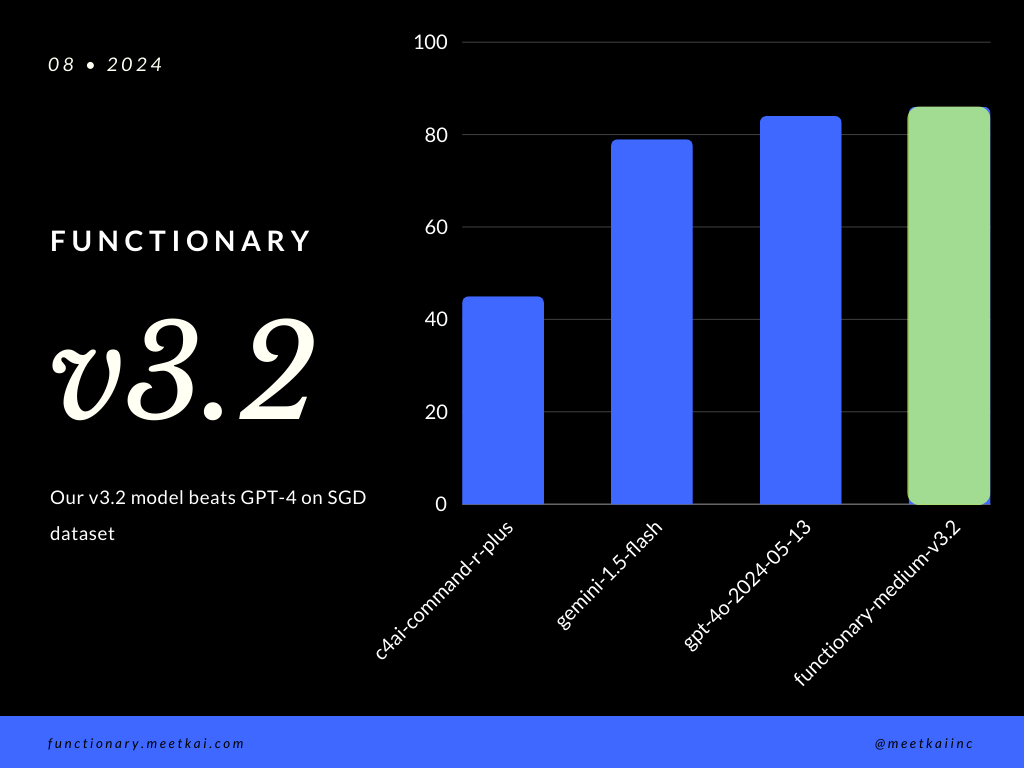
| ชุดข้อมูล | ชื่อนางแบบ | ฟังก์ชั่นการเรียกความถูกต้อง (ชื่อและอาร์กิวเมนต์) |
|---|---|---|
| SGD | MEASHKAI/ฟังก์ชั่น MIDIOM-V3.1 | 88.11% |
| SGD | GPT-4O-20124-05-13 | 82.75% |
| SGD | Gemini-1.5-flash | 79.64% |
| SGD | C4AI-command-r-plus | 45.66% |
ดูการฝึกอบรม readme
ในขณะที่มันไม่ได้บังคับใช้อย่างเคร่งครัดเพื่อให้แน่ใจว่าการดำเนินการ ที่ปลอดภัย ยิ่งขึ้นเราสามารถเปิดใช้งานการสุ่มตัวอย่างไวยากรณ์เพื่อบังคับใช้การตรวจสอบประเภท การตรวจสอบความปลอดภัยหลักจะต้องทำในฟังก์ชั่น/การกระทำด้วยตนเอง เช่นการตรวจสอบความถูกต้องของอินพุตที่กำหนดหรือ ouput ที่จะมอบให้กับโมเดล





