functionary
1.0.0


الموظف هو نموذج لغة يمكنه تفسير وتنفيذ الوظائف/الإضافات.
يحدد النموذج متى يتم تنفيذ الوظائف ، سواء بالتوازي أو بشكل متسلسل ، ويمكنه فهم مخرجاتها. انها تسببت فقط وظائف حسب الحاجة. يتم إعطاء تعريفات الوظائف ككائنات مخطط JSON ، على غرار مكالمات وظائف Openai GPT.
الوثائق والمزيد من الأمثلة: الموظفين. meetkai.com
{type: "code_interpreter"} في الأدوات)! يمكن نشر الموظفين باستخدام خوادم VLLM أو SGLANG. اختر أي واحد اعتمادا على تفضيلاتك.
vllm
pip install -e .[vllm]Sglang
pip install -e .[sglang] --find-links https://flashinfer.ai/whl/cu121/torch2.4/flashinfer/vllm
python3 server_vllm.py --model " meetkai/functionary-small-v3.2 " --host 0.0.0.0 --port 8000 --max-model-len 8192Sglang
python3 server_sglang.py --model-path " meetkai/functionary-small-v3.2 " --host 0.0.0.0 --port 8000 --context-length 8192 تتطلب نماذجنا المتوسطة: 4xa6000 أو 2xa100 80 جيجابايت لتشغيلها ، تحتاج إلى استخدام: tensor-parallel-size أو tp (SGLANG)
vllm
 # vllm requires to run this first: https://github.com/vllm-project/vllm/issues/6152
export VLLM_WORKER_MULTIPROC_METHOD=spawn

python server_vllm.py --model " meetkai/functionary-medium-v3.1 " --host 0.0.0.0 --port 8000 --max-model-len 8192 --tensor-parallel-size 2
Sglang
python server_sglang.py --model-path " meetkai/functionary-medium-v3.1 " --host 0.0.0.0 --port 8000 --context-length 8192 --tp 2على غرار LORA في VLLM ، يدعم الخادم الخاص بنا تقديم محولات LORA على حد سواء عند بدء التشغيل وديناميكي.
لخدمة محول Lora عند بدء التشغيل ، قم بتشغيل الخادم باستخدام وسيطة- --lora-modules :
python server_vllm.py --model {BASE_MODEL} --enable-lora --lora-modules {name}={path} {name}={path} --host 0.0.0.0 --port 8000 لخدمة محول LORA ديناميكيًا ، استخدم نقطة النهاية /v1/load_lora_adapter :
python server_vllm.py --model {BASE_MODEL} --enable-lora --host 0.0.0.0 --port 8000
# Load a LoRA adapter dynamically
curl -X POST http://localhost:8000/v1/load_lora_adapter
  -H " Content-Type: application/json "
  -d ' {
    "lora_name": "my_lora",
    "lora_path": "/path/to/my_lora_adapter"
  } '
# Example chat request to lora adapter
curl -X POST http://localhost:8000/v1/chat/completions
  -H " Content-Type: application/json "
  -d ' {
    "model": "my_lora",
    "messages": [...],
    "tools": [...],
    "tool_choice": "auto"
  } '
# Unload a LoRA adapter dynamically
curl -X POST http://localhost:8000/v1/unload_lora_adapter
  -H " Content-Type: application/json "
  -d ' {
    "lora_name": "my_lora"
} ' نقدم أيضًا ميزة أخذ عينات قواعد الدقة الخاصة بنا والتي تقيد جيل LLM على اتباع القالب المطري دائمًا ، ويضمن دقة 100 ٪ لاسم الوظيفة. يتم إنشاء المعلمات باستخدام LM-Format-Enforcer الفعالة ، مما يضمن أن المعلمات تتبع مخطط الأداة المسمى. لتمكين أخذ العينات النحوية ، قم بتشغيل خادم VLLM باستخدام وسيطة سطر الأوامر --enable-grammar-sampling :
python3 server_vllm.py --model " meetkai/functionary-medium-v3.1 " --max-model-len 8192 --tensor-parallel-size 2 --enable-grammar-samplingملاحظة: ينطبق دعم أخذ العينات النحوي فقط على طرازات V2 و V3.0 و V3.2. لا يوجد مثل هذا الدعم لنماذج V1 و V3.1.
نحن نقدم أيضًا خدمة تؤدي الاستدلال على النماذج الوظيفية باستخدام مؤتمر الولادة النصية (TGI). اتبع هذه الخطوات للبدء:
تثبيت Docker بعد تعليمات التثبيت الخاصة بهم.
قم بتثبيت Docker SDK لـ Python
pip install dockerعند بدء التشغيل ، يحاول خادم TGI الموظف الاتصال بنقطة نهاية TGI موجودة. في هذه الحالة ، يمكنك تشغيل ما يلي:
python3 server_tgi.py --model < REMOTE_MODEL_ID_OR_LOCAL_MODEL_PATH > --endpoint < TGI_SERVICE_ENDPOINT > إذا لم تكن نقطة نهاية TGI موجودة ، فسيبدأ خادم TGI الموظفي حاوية نقطة نهاية TGI جديدة مع العنوان المقدم في وسيطة CLI endpoint عبر Docker Python SDK المثبت. قم بتشغيل الأوامر التالية للنماذج البعيدة والمحلية على التوالي:
python3 server_tgi.py --model < REMOTE_MODEL_ID > --remote_model_save_folder < PATH_TO_SAVE_AND_CACHE_REMOTE_MODEL > --endpoint < TGI_SERVICE_ENDPOINT > python3 server_tgi.py --model < LOCAL_MODEL_PATH > --endpoint < TGI_SERVICE_ENDPOINT >عامل ميناء
إذا كنت تواجه مشكلة في التبعيات ، وكان لديك Nvidia-container-toolkit ، يمكنك بدء بيئتك مثل هذا:
sudo docker run --gpus all -it --ipc=host --name functionary -v ${PWD} /functionary_workspace:/workspace -p 8000:8000 nvcr.io/nvidia/pytorch:23.10-py3 from openai import OpenAI
client = OpenAI ( base_url = "http://localhost:8000/v1" , api_key = "functionary" )
client . chat . completions . create (
model = "meetkai/functionary-small-v3.2" ,
messages = [{ "role" : "user" ,
"content" : "What is the weather for Istanbul?" }
],
tools = [{
"type" : "function" ,
"function" : {
"name" : "get_current_weather" ,
"description" : "Get the current weather" ,
"parameters" : {
"type" : "object" ,
"properties" : {
"location" : {
"type" : "string" ,
"description" : "The city and state, e.g. San Francisco, CA"
}
},
"required" : [ "location" ]
}
}
}],
tool_choice = "auto"
) import requests
data = {
'model' : 'meetkai/functionary-small-v3.2' , # model name here is the value of argument "--model" in deploying: server_vllm.py or server.py
'messages' : [
{
"role" : "user" ,
"content" : "What is the weather for Istanbul?"
}
],
'tools' :[ # For functionary-7b-v2 we use "tools"; for functionary-7b-v1.4 we use "functions" = [{"name": "get_current_weather", "description":..., "parameters": ....}]
{
"type" : "function" ,
"function" : {
"name" : "get_current_weather" ,
"description" : "Get the current weather" ,
"parameters" : {
"type" : "object" ,
"properties" : {
"location" : {
"type" : "string" ,
"description" : "The city and state, e.g. San Francisco, CA"
}
},
"required" : [ "location" ]
}
}
}
]
}
response = requests . post ( "http://127.0.0.1:8000/v1/chat/completions" , json = data , headers = {
"Content-Type" : "application/json" ,
"Authorization" : "Bearer xxxx"
})
# Print the response text
print ( response . text )| نموذج | وصف | VRAM FP16 |
|---|---|---|
| الموسيقي Medium-V3.2 | سياق 128 كيلو ، مترجم رمز ، باستخدام قالب موجه الخاص بنا | 160 جيجابايت |
| الموظفين small-v3.2 / gguf | سياق 128 كيلو ، مترجم رمز ، باستخدام قالب موجه الخاص بنا | 24 جيجابايت |
| الموظفين Medium-V3.1 / GGUF | سياق 128K ، مترجم رمز ، باستخدام قالب موجه Meta الأصلي | 160 جيجابايت |
| الموظفين SMALL-V3.1 / GGUF | سياق 128K ، مترجم رمز ، باستخدام قالب موجه Meta الأصلي | 24 جيجابايت |
| الموظف المتوسط-V3.0 / GGUF | سياق 8K ، استنادًا إلى meta-llama/meta-llama-3-70b-instruct | 160 جيجابايت |
| الموظفين small-v2.5 / gguf | سياق 8K ، مترجم رمز | 24 جيجابايت |
| الموظفين small-v2.4 / gguf | سياق 8K ، مترجم رمز | 24 جيجابايت |
| الموظفين Medium-V2.4 / GGUF | سياق 8K ، مترجم رمز ، دقة أفضل | 90 جيجابايت |
| الموظفين SMALL-V2.2 / GGUF | سياق 8K | 24 جيجابايت |
| الموظفين المتوسط-V2.2 / GGUF | سياق 8K | 90 جيجابايت |
| الموظف -7B-V2.1 / GGUF | سياق 8K | 24 جيجابايت |
| الموظف -7B-V2 / GGUF | دعم استدعاء الوظيفة الموازية. | 24 جيجابايت |
| الموظف -7B-V1.4 / GGUF | سياق 4K ، دقة أفضل (تم إهمالها) | 24 جيجابايت |
| الموظف -7B-V1.1 | 4K سياق (تم إهماله) | 24 جيجابايت |
| الموظف -7B-V0.1 | سياق 2K (تم إهماله) غير موصى به ، استخدم 2.1 فصاعدًا | 24 جيجابايت |
الفرق بين Openai-Python V0 و V1 يمكنك الرجوع إلى الوثائق الرسمية هنا
| ميزة/مشروع | الموظف | Nexusraven | غوريلا | جليف | GPT-4-1106-PREVIEW |
|---|---|---|---|---|---|
| استدعاء وظيفة واحدة | ✅ | ✅ | ✅ | ✅ | ✅ |
| مكالمات الوظيفة الموازية | ✅ | ✅ | ✅ | ✅ | |
| المتابعة على حجج الوظيفة المفقودة | ✅ | ✅ | |||
| متعدد المنعطفات | ✅ | ✅ | ✅ | ||
| إنشاء استجابات نموذجية على أساس نتائج تنفيذ الأدوات | ✅ | ✅ | |||
| لغو | ✅ | ✅ | ✅ | ✅ | |
| رمز مترجم | ✅ | ✅ |
يمكنك العثور على مزيد من التفاصيل عن الميزات هنا
مثال على الاستدلال باستخدام llama-cpp-python يمكن العثور عليه في: llama_cpp_inference.py.
علاوة على ذلك ، تم دمج الموظف أيضًا في Llama-CPP-Python ، ومع ذلك قد لا يتم تحديث التكامل بسرعة ، لذلك إذا كان هناك شيء خاطئ أو غريب في النتيجة ، فيرجى استخدام: llama_cpp_inference.py بدلاً من ذلك. حاليًا ، لم يتم دمج v2.5 ، لذلك إذا كنت تستخدم الموظفين small-v2.5-gguf ، يرجى استخدام: llama_cpp_inference.py
تأكد من أن أحدث إصدار من Llama-CPP-Python يتم تثبيته في نظامك. تم دمج V2 الموظف بالكامل في Llama-CPP-Python. يمكنك إجراء الاستدلال باستخدام نماذج GGUF الخاصة بالموظفين إما عبر إكمال الدردشة العادية أو من خلال خادم Llama-CPP-Python المتوافق مع OpenAI والذي يتصرف بشكل مشابه لنا.
ما يلي هو رمز العينة باستخدام إكمال الدردشة العادية:
 from llama_cpp import Llama
from llama_cpp . llama_tokenizer import LlamaHFTokenizer

# We should use HF AutoTokenizer instead of llama.cpp's tokenizer because we found that Llama.cpp's tokenizer doesn't give the same result as that from Huggingface. The reason might be in the training, we added new tokens to the tokenizer and Llama.cpp doesn't handle this successfully
llm = Llama . from_pretrained (
    repo_id = "meetkai/functionary-small-v2.4-GGUF" ,
    filename = "functionary-small-v2.4.Q4_0.gguf" ,
    chat_format = "functionary-v2" ,
    tokenizer = LlamaHFTokenizer . from_pretrained ( "meetkai/functionary-small-v2.4-GGUF" ),
    n_gpu_layers = - 1
)

messages = [
    { "role" : "user" , "content" : "what's the weather like in Hanoi?" }
]
tools = [ # For functionary-7b-v2 we use "tools"; for functionary-7b-v1.4 we use "functions" = [{"name": "get_current_weather", "description":..., "parameters": ....}]
    {
        "type" : "function" ,
        "function" : {
            "name" : "get_current_weather" ,
            "description" : "Get the current weather" ,
            "parameters" : {
                "type" : "object" ,
                "properties" : {
                    "location" : {
                        "type" : "string" ,
                        "description" : "The city and state, e.g., San Francisco, CA"
                    }
                },
                "required" : [ "location" ]
            }
        }
    }
]

result = llm . create_chat_completion (
      messages = messages ,
      tools = tools ,
      tool_choice = "auto" ,
)

print ( result [ "choices" ][ 0 ][ "message" ])
سيكون الإخراج:
{ 'role' : 'assistant' , 'content' : None , 'tool_calls' : [{ 'type' : 'function' , 'function' : { 'name' : 'get_current_weather' , 'arguments' : '{ n "location": "Hanoi" n }' }}]}لمزيد من التفاصيل ، يرجى الرجوع إلى قسم استدعاء الوظائف في Llama-CPP-Python. لاستخدام نماذج GGUF الوظيفية الخاصة بنا باستخدام خادم OpenAI المتوافق مع Llama-CPP-Python ، يرجى الرجوع إلى هنا للحصول على مزيد من التفاصيل والوثائق.
ملحوظة:
messages .للاتصال بوظيفة Python الحقيقية ، احصل على النتيجة واستخراج النتيجة للرد ، يمكنك استخدام ChatLab. يستخدم المثال التالي chatlab == 0.16.0:
يرجى ملاحظة أن ChatLab حاليًا لا يدعم مكالمات الوظائف المتوازية. هذا الرمز العينة متوافق فقط مع الإصدار الوظيفي 1.4 وقد لا يعمل بشكل صحيح مع الإصدار الوظيفي 2.0.
 from chatlab import Conversation
import openai
import os
openai . api_key = "functionary" # We just need to set this something other than None
os . environ [ 'OPENAI_API_KEY' ] = "functionary" # chatlab requires us to set this too
openai . api_base = "http://localhost:8000/v1"

# now provide the function with description
def get_car_price ( car_name : str ):
    """this function is used to get the price of the car given the name
    :param car_name: name of the car to get the price
    """
    car_price = {
        "tang" : { "price" : "$20000" },
        "song" : { "price" : "$25000" }
    }
    for key in car_price :
        if key in car_name . lower ():
            return { "price" : car_price [ key ]}
    return { "price" : "unknown" }

chat = Conversation ( model = "meetkai/functionary-7b-v2" )
chat . register ( get_car_price )  # register this function
chat . submit ( "what is the price of the car named Tang?" ) # submit user prompt

# print the flow
for message in chat . messages :
    role = message [ "role" ]. upper ()
    if "function_call" in message :
        func_name = message [ "function_call" ][ "name" ]
        func_param = message [ "function_call" ][ "arguments" ]
        print ( f" { role } : call function: { func_name } , arguments: { func_param } " )
    else :
        content = message [ "content" ]
        print ( f" { role } : { content } " )
سيبدو الإخراج هكذا:
 USER: what is the price of the car named Tang?
ASSISTANT: call function: get_car_price, arguments:{
  "car_name": "Tang"
}
FUNCTION: {'price': {'price': '$20000'}}
ASSISTANT: The price of the car named Tang is $20,000.
يتم دعم نشر النماذج الوظيفية بدون خادم عبر البرنامج النصي modal_server_vllm.py . بعد التسجيل وتثبيت Modal ، اتبع هذه الخطوات لنشر خادم VLLM الخاص بنا على Modal:
modal environment create devإذا كان لديك بيئة dev التي تم إنشاؤها بالفعل ، فليست هناك حاجة لإنشاء نسخة أخرى. مجرد تكوين لها في الخطوة التالية.
modal config set-environment devmodal serve modal_server_vllmmodal deploy modal_server_vllmفيما يلي بعض الأمثلة على كيفية استخدام نظام استدعاء الوظيفة هذا:
يمكن لـ Function plan_trip(destination: string, duration: int, interests: list) أن تأخذ إدخال المستخدم مثل "أريد أن أخطط لرحلة لمدة 7 أيام إلى باريس مع التركيز على الفن والثقافة" وتوليد خط سير وفقًا لذلك.
 client . chat . completions . create ((
    model = "meetkai/functionary-7b-v2" ,
    messages = [
        { "role" : "user" , "content" : 'I want to plan a 7-day trip to Paris with a focus on art and culture' },
    ],
    tools = [
        {
            "type" : "function" ,
            "function" : {
                "name" : "plan_trip" ,
                "description" : "Plan a trip based on user's interests" ,
                "parameters" : {
                    "type" : "object" ,
                    "properties" : {
                        "destination" : {
                            "type" : "string" ,
                            "description" : "The destination of the trip" ,
                        },
                        "duration" : {
                            "type" : "integer" ,
                            "description" : "The duration of the trip in days" ,
                        },
                        "interests" : {
                            "type" : "array" ,
                            "items" : { "type" : "string" },
                            "description" : "The interests based on which the trip will be planned" ,
                        },
                    },
                    "required" : [ "destination" , "duration" , "interests" ],
                }
            }
        }
    ]
)
سيكون الرد:
{ "role" : " assistant " , "content" : null , "tool_calls" : [{ "type" : " function " , "function" : { "name" : " plan_trip " , "arguments" : '{n "destination": "Paris",n "duration": 7,n "interests": ["art", "culture"]n } ' } } ]} ثم تحتاج إلى استدعاء وظيفة plan_trip مع وسيطات متوفرة. إذا كنت ترغب في الحصول على تعليق من النموذج ، فسوف تتصل بالنموذج مرة أخرى مع الاستجابة من الوظيفة ، فسيقوم النموذج بكتابة التعليقات اللازمة.
يمكن أن تسمح وظيفة مثل alucess_property_value (property_details: DICT) للمستخدمين بإدخال تفاصيل حول خاصية (مثل الموقع والحجم وعدد الغرف وما إلى ذلك) وتلقي القيمة السوقية المقدرة.
 client . chat . completions . create (
    model = "meetkai/functionary-7b-v2" ,
    messages = [
        {
            "role" : "user" ,
            "content" : 'What is the estimated value of a 3-bedroom house in San Francisco with 2000 sq ft area?'
        },
        {
            "role" : "assistant" ,
            "content" : None ,
            "tool_calls" : [
                {
                    "type" : "function" ,
                    "function" : {
                        "name" : "estimate_property_value" ,
                        "arguments" : '{ n  "property_details": {"location": "San Francisco", "size": 2000, "rooms": 3} n }'
                    }
                }
            ]
        }
    ],
    tools = [
        {
            "type" : "function" ,
            "function" : {
                "name" : "estimate_property_value" ,
                "description" : "Estimate the market value of a property" ,
                "parameters" : {
                    "type" : "object" ,
                    "properties" : {
                        "property_details" : {
                            "type" : "object" ,
                            "properties" : {
                                "location" : {
                                    "type" : "string" ,
                                    "description" : "The location of the property"
                                },
                                "size" : {
                                    "type" : "integer" ,
                                    "description" : "The size of the property in square feet"
                                },
                                "rooms" : {
                                    "type" : "integer" ,
                                    "description" : "The number of rooms in the property"
                                }
                            },
                            "required" : [ "location" , "size" , "rooms" ]
                        }
                    },
                    "required" : [ "property_details" ]
                }
            }
        }
    ],
    tool_choice = "auto"
)
سيكون الرد:
{ "role" : " assistant " , "content" : null , "tool_calls" : [{ "type" : " function " , "function" : { "name" : " plan_trip " , "arguments" : '{n "destination": "Paris",n "duration": 7,n "interests": ["art", "culture"]n } ' } } ]} ثم تحتاج إلى استدعاء وظيفة plan_trip مع وسيطات متوفرة. إذا كنت ترغب في الحصول على تعليق من النموذج ، فسوف تتصل بالنموذج مرة أخرى مع الاستجابة من الوظيفة ، فسيقوم النموذج بكتابة التعليقات اللازمة.
يمكن أن يساعد parse_customer_complaint(complaint: {issue: string, frequency: string, duration: string}) في استخراج المعلومات المهيكلة من شكوى معقدة وسردية العميل ، وتحديد المشكلة الأساسية والحلول المحتملة. يمكن أن يتضمن كائن complaint خصائص مثل issue (المشكلة الرئيسية) ، frequency (عدد المرات التي تحدث فيها المشكلة) ، duration (كم من الوقت تحدث المشكلة).
 client . chat . completions . create (
    model = "meetkai/functionary-7b-v2" ,
    messages = [
        { "role" : "user" , "content" : 'My internet has been disconnecting frequently for the past week' },
    ],
    tools = [
        {
            "type" : "function" ,
            "function" : {
            "name" : "parse_customer_complaint" ,
            "description" : "Parse a customer complaint and identify the core issue" ,
            "parameters" : {
                "type" : "object" ,
                "properties" : {
                    "complaint" : {
                        "type" : "object" ,
                        "properties" : {
                            "issue" : {
                                "type" : "string" ,
                                "description" : "The main problem" ,
                            },
                            "frequency" : {
                                "type" : "string" ,
                                "description" : "How often the issue occurs" ,
                            },
                            "duration" : {
                                "type" : "string" ,
                                "description" : "How long the issue has been occurring" ,
                            },
                        },
                        "required" : [ "issue" , "frequency" , "duration" ],
                    },
                },
                "required" : [ "complaint" ],
            }
        }
     }
    ],
    tool_choice = "auto"
)
سيكون الرد:
{ "role" : " assistant " , "content" : null , "tool_calls" : [{ "type" : " function " , "function" : { "name" : " parse_customer_complaint " , "arguments" : '{n "complaint": {"issue": "internet disconnecting", "frequency": "frequently", "duration": "past week" } n } '}} ]}ثم تحتاج إلى استدعاء وظيفة parse_customer_complaint بوسيطات متوفرة. إذا كنت ترغب في الحصول على تعليق من النموذج ، فسوف تتصل بالنموذج مرة أخرى مع الاستجابة من الوظيفة ، فسيقوم النموذج بكتابة التعليقات اللازمة.
نقوم بتحويل تعريفات الوظيفة إلى نص مشابه لتعريفات TypeScript. ثم حقن هذه التعريفات كمطالبات النظام. بعد ذلك ، حقن موجه النظام الافتراضي. ثم نبدأ رسائل المحادثة.
يمكن العثور على مثال موجه هنا: v1 (v1.4) و v2 (v2 و v2.1 و v2.2 و v2.4) و v2.llama3 (v2.5)
نحن لا نغير احتمالات السجل لتتوافق مع مخطط معين ، لكن النموذج نفسه يعرف كيفية الامتثال. هذا يتيح لنا استخدام الأدوات الحالية وأنظمة التخزين المؤقت بسهولة.
لقد احتلنا المرتبة الثانية في لوحة المتصدرين في بيركلي (آخر تحديث: 2024-08-11)
| اسم النموذج | دقة استدعاء الوظيفة (الاسم والوسائط) |
|---|---|
| Meetkai/الموظفين Medium-V3.1 | 88.88 ٪ |
| GPT-4-1106-Preview (موجه) | 88.53 ٪ |
| Meetkai/الموظفين Small-V3.2 | 82.82 ٪ |
| Meetkai/الموظفين Small-V3.1 | 82.53 ٪ |
| Firefunction-V2 (FC) | 78.82.47 ٪ |
نقوم أيضًا بتقييم نماذجنا على ToolsAndbox ، هذا المعيار أكثر صعوبة بكثير من لوحة المتصدرين في Berkeley . يتضمن هذا المعيار تنفيذ الأدوات الهادئ ، وتبعيات الحالة الضمنية بين الأدوات ، ومحاكاة المستخدم المدمجة التي تدعم التقييم المحادثة على الجودة واستراتيجية تقييم ديناميكية للمعالم الوسيطة والنهائية على مسار تعسفي. أظهر مؤلفو هذا المعيار أن هناك فجوة أداء ضخمة بين النماذج المفتوحة المصدر والنماذج الملكية.
من نتيجة تقييمنا ، تكون نماذجنا قابلة للمقارنة مع أفضل نماذج الملكية وأفضل بكثير من نماذج المصادر المفتوحة الأخرى.
| اسم النموذج | متوسط درجة التشابه |
|---|---|
| GPT-4O-2024-05-13 | 73 |
| Claude-3-Opus-20240229 | 69.2 |
| الموظف الوظيفي-V3.1 | 68.87 |
| GPT-3.5-TURBO-0125 | 65.6 |
| GPT-4-0125-PREVIEW | 64.3 |
| Claude-3-Sonnet-20240229 | 63.8 |
| الموظفين Small-V3.1 | 63.13 |
| Gemini-1.5-Pro-001 | 60.4 |
| الموظفين SMALL-V3.2 | 58.56 |
| كلود-3-هايكو -20240307 | 54.9 |
| Gemini-1.0-Pro | 38.1 |
| HERMES-2-PRO-MISTRAL-7B | 31.4 |
| MISTRAL-7B-instruct-V0.3 | 29.8 |
| C4ai-Command-R-V01 | 26.2 |
| غوريلا-openfunctions-V2 | 25.6 |
| C4ai-Command R+ | 24.7 |
استدعاء وظيفة التقييم التنبؤ في مجموعة بيانات SGD. يقيس مقياس الدقة الصواب الكلي لمكالمات الوظائف المتوقعة ، بما في ذلك التنبؤ بأسماء الوظيفة واستخراج الوسائط.
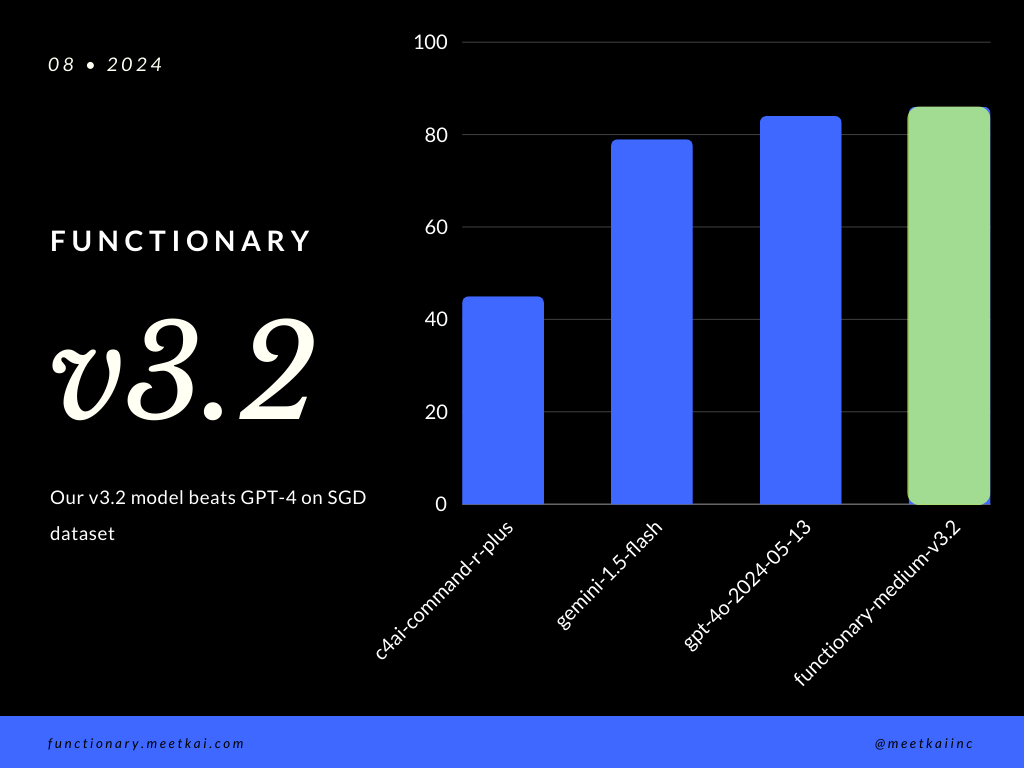
| مجموعة البيانات | اسم النموذج | دقة استدعاء الوظيفة (الاسم والوسائط) |
|---|---|---|
| SGD | Meetkai/الموظفين Medium-V3.1 | 88.11 ٪ |
| SGD | GPT-4O-2024-05-13 | 82.75 ٪ |
| SGD | Gemini-1.5-Flash | 79.64 ٪ |
| SGD | C4AI-Command-R-Plus | 45.66 ٪ |
انظر التدريب readme
على الرغم من عدم فرضه بشكل صارم ، لضمان تنفيذ المزيد من الوظائف ، يمكن للمرء تمكين أخذ عينات من القواعد من فرض فحص النوع. يجب القيام بفحوصات السلامة الرئيسية في الوظائف/الإجراءات نفسها. مثل التحقق من صحة المدخلات المحددة ، أو OUPUT التي سيتم إعطاؤها للنموذج.





