mlm scoring
1.0.0

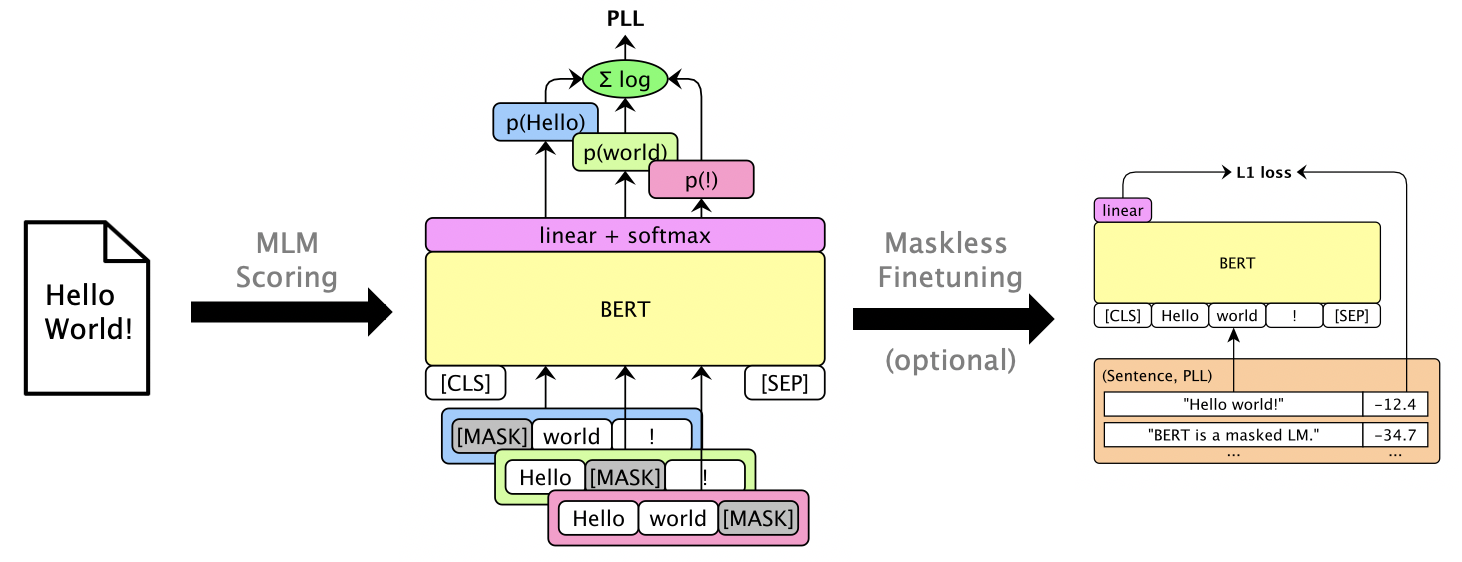
แพ็คเกจนี้ใช้ LMS ที่สวมหน้ากากเช่น Bert, Roberta และ XLM เพื่อให้คะแนนประโยคและ Rescore N-Best List ผ่าน คะแนนความน่าจะเป็นแบบหลอกหลอก ซึ่งคำนวณโดยการปิดบังคำแต่ละคำ นอกจากนี้เรายังรองรับ LMS แบบอัตโนมัติเช่น GPT-2 ตัวอย่างการใช้งานรวม:
กระดาษ: Julian Salazar, Davis Liang, Toan Q. Nguyen, Katrin Kirchhoff "การให้คะแนนแบบจำลองภาษาที่สวมหน้ากาก", ACL 2020
ต้องใช้ Python 3.6+ โคลนที่เก็บนี้และติดตั้ง:
pip install -e .
pip install torch mxnet-cu102mkl  # Replace w/ your CUDA version; mxnet-mkl if CPU only.
บางรุ่นผ่าน Gluonnlp และรุ่นอื่น ๆ ผ่าน? Transformers ดังนั้นตอนนี้เราต้องการทั้ง MXNET และ PYTORCH ตอนนี้คุณสามารถนำเข้าห้องสมุดได้โดยตรง:
 from mlm . scorers import MLMScorer , MLMScorerPT , LMScorer
from mlm . models import get_pretrained
import mxnet as mx
ctxs = [ mx . cpu ()] # or, e.g., [mx.gpu(0), mx.gpu(1)]

# MXNet MLMs (use names from mlm.models.SUPPORTED_MLMS)
model , vocab , tokenizer = get_pretrained ( ctxs , 'bert-base-en-cased' )
scorer = MLMScorer ( model , vocab , tokenizer , ctxs )
print ( scorer . score_sentences ([ "Hello world!" ]))
# >> [-12.410664200782776]
print ( scorer . score_sentences ([ "Hello world!" ], per_token = True ))
# >> [[None, -6.126736640930176, -5.501412391662598, -0.7825151681900024, None]]

# EXPERIMENTAL: PyTorch MLMs (use names from https://huggingface.co/transformers/pretrained_models.html)
model , vocab , tokenizer = get_pretrained ( ctxs , 'bert-base-cased' )
scorer = MLMScorerPT ( model , vocab , tokenizer , ctxs )
print ( scorer . score_sentences ([ "Hello world!" ]))
# >> [-12.411025047302246]
print ( scorer . score_sentences ([ "Hello world!" ], per_token = True ))
# >> [[None, -6.126738548278809, -5.501765727996826, -0.782496988773346, None]]

# MXNet LMs (use names from mlm.models.SUPPORTED_LMS)
model , vocab , tokenizer = get_pretrained ( ctxs , 'gpt2-117m-en-cased' )
scorer = LMScorer ( model , vocab , tokenizer , ctxs )
print ( scorer . score_sentences ([ "Hello world!" ]))
# >> [-15.995375633239746]
print ( scorer . score_sentences ([ "Hello world!" ], per_token = True ))
# >> [[-8.293947219848633, -6.387561798095703, -1.3138668537139893]]
(อินเทอร์เฟซ MXNET และ PYTORCH จะรวมเป็นหนึ่งในไม่ช้า!)
เรียกใช้ mlm score --help เพื่อดูรุ่นที่รองรับ ฯลฯ ดู examples/demo/format.json สำหรับรูปแบบไฟล์ สำหรับอินพุต "คะแนน" เป็นทางเลือก เอาต์พุตจะเพิ่มฟิลด์ "คะแนน" ที่มีคะแนน PLL
มีสามประเภทคะแนนขึ้นอยู่กับรุ่น:
--no-mask ) เราให้คะแนนสมมติฐานสำหรับ 3 คำพูดของ librispeech dev-other บน GPU 0 โดยใช้ Bert Base (uncased):
mlm score
    --mode hyp
    --model bert-base-en-uncased
    --max-utts 3
    --gpus 0
    examples/asr-librispeech-espnet/data/dev-other.am.json
> examples/demo/dev-other-3.lm.json หนึ่งสามารถช่วยเหลือรายการ N-Best ที่ดีที่สุดผ่านการแก้ไขเชิงเส้นเชิงเส้น เรียกใช้ mlm rescore --help เพื่อดูตัวเลือกทั้งหมด อินพุตหนึ่งคือไฟล์ที่มีคะแนนดั้งเดิม อินพุตสองเป็นคะแนนจาก mlm score
เราช่วยให้คะแนนอะคูสติก (จาก dev-other.am.json ) โดยใช้คะแนนของ Bert (จากส่วนก่อนหน้า) ภายใต้น้ำหนัก LM ที่แตกต่างกัน:
 for weight in 0 0.5 ; do
    echo " lambda= ${weight} " ;
    mlm rescore
        --model bert-base-en-uncased
        --weight ${weight}
        examples/asr-librispeech-espnet/data/dev-other.am.json
        examples/demo/dev-other-3.lm.json
        > examples/demo/dev-other-3.lambda- ${weight} .json
done
WER ดั้งเดิมคือ 12.2% ในขณะที่ผู้ช่วยชีวิตอยู่ที่ 8.5%
หนึ่งสามารถ finetune สวมหน้ากาก LMS เพื่อให้คะแนน PLL ที่ใช้งานได้โดยไม่ต้องปิดบัง ดู Librispeech Maskless Finetuning
Run pip install -e .[dev] เพื่อติดตั้งแพ็คเกจทดสอบเพิ่มเติม แล้ว:
pytest --cov=src/mlm ในไดเรกทอรีราก




