mlm scoring
1.0.0

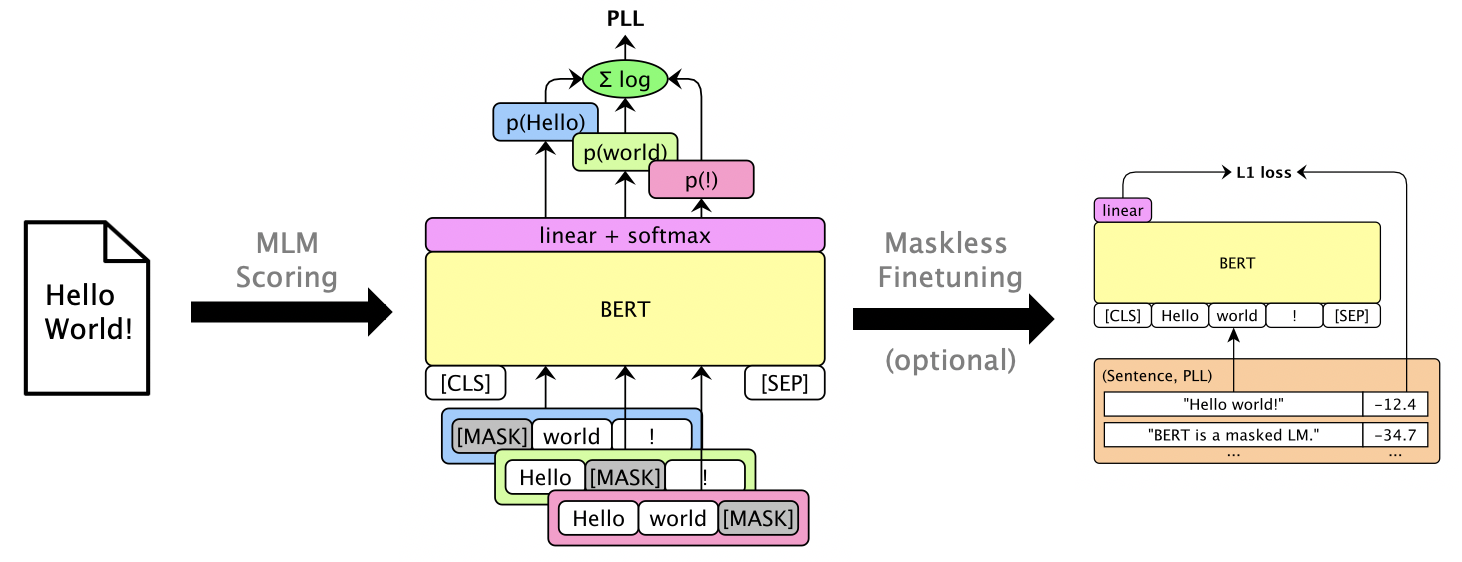
このパッケージでは、Bert、Roberta、XLMなどのマスクされたLMSを使用して、個々の単語のマスキングによって計算される擬似ログリケリフッドスコアを介して、文章とRescore N-Bestリストを獲得します。また、GPT-2のような自己回帰LMSもサポートしています。使用する例は次のとおりです。
論文:ジュリアン・サラザール、デイビス・リアン、トーンQ. nguyen、カトリン・キルチホフ。 「マスクされた言語モデルのスコアリング」、ACL 2020。
Python 3.6+が必要です。このリポジトリをクローンしてインストールします。
pip install -e .
pip install torch mxnet-cu102mkl  # Replace w/ your CUDA version; mxnet-mkl if CPU only.
gluonnlp経由であるモデルもありますが、他のモデルは通過していますか?トランスフォーマーなので、今のところMXNETとPytorchの両方が必要です。これでライブラリを直接インポートできます。
 from mlm . scorers import MLMScorer , MLMScorerPT , LMScorer
from mlm . models import get_pretrained
import mxnet as mx
ctxs = [ mx . cpu ()] # or, e.g., [mx.gpu(0), mx.gpu(1)]

# MXNet MLMs (use names from mlm.models.SUPPORTED_MLMS)
model , vocab , tokenizer = get_pretrained ( ctxs , 'bert-base-en-cased' )
scorer = MLMScorer ( model , vocab , tokenizer , ctxs )
print ( scorer . score_sentences ([ "Hello world!" ]))
# >> [-12.410664200782776]
print ( scorer . score_sentences ([ "Hello world!" ], per_token = True ))
# >> [[None, -6.126736640930176, -5.501412391662598, -0.7825151681900024, None]]

# EXPERIMENTAL: PyTorch MLMs (use names from https://huggingface.co/transformers/pretrained_models.html)
model , vocab , tokenizer = get_pretrained ( ctxs , 'bert-base-cased' )
scorer = MLMScorerPT ( model , vocab , tokenizer , ctxs )
print ( scorer . score_sentences ([ "Hello world!" ]))
# >> [-12.411025047302246]
print ( scorer . score_sentences ([ "Hello world!" ], per_token = True ))
# >> [[None, -6.126738548278809, -5.501765727996826, -0.782496988773346, None]]

# MXNet LMs (use names from mlm.models.SUPPORTED_LMS)
model , vocab , tokenizer = get_pretrained ( ctxs , 'gpt2-117m-en-cased' )
scorer = LMScorer ( model , vocab , tokenizer , ctxs )
print ( scorer . score_sentences ([ "Hello world!" ]))
# >> [-15.995375633239746]
print ( scorer . score_sentences ([ "Hello world!" ], per_token = True ))
# >> [[-8.293947219848633, -6.387561798095703, -1.3138668537139893]]
(MXNETとPytorchインターフェイスはまもなく統一されます!)
mlm score --helpサポートされているモデルなどを見るためにヘルプ。ファイル形式についてはexamples/demo/format.json参照してください。入力の場合、「スコア」はオプションです。出力は、PLLスコアを含む「スコア」フィールドを追加します。
モデルに応じて、3つのスコアタイプがあります。
--no-mask ) Bert Baseを使用して、GPU 0でLibrispeech dev-otherの3つの発話の仮説を採点します(焦点なし):
mlm score
    --mode hyp
    --model bert-base-en-uncased
    --max-utts 3
    --gpus 0
    examples/asr-librispeech-espnet/data/dev-other.am.json
> examples/demo/dev-other-3.lm.json対数線形補間を介して、N-BESTリストを再実行できます。 mlm rescore --helpすべてのオプションを確認するためにヘルプ。入力1は、元のスコアを持つファイルです。入力2はmlm scoreのスコアです。
Bertのスコア(前のセクションから)を使用して、さまざまなLMウェイトの下で( dev-other.am.jsonから)Acoustic ScoresをRuccore(Dev-Other.am.jsonから)。
 for weight in 0 0.5 ; do
    echo " lambda= ${weight} " ;
    mlm rescore
        --model bert-base-en-uncased
        --weight ${weight}
        examples/asr-librispeech-espnet/data/dev-other.am.json
        examples/demo/dev-other-3.lm.json
        > examples/demo/dev-other-3.lambda- ${weight} .json
done
元のWERは12.2%ですが、救助されたWERは8.5%です。
マスキングなしで使用可能なPLLスコアを提供するために、マスクされたLMSをFintuneすることができます。 Librispeech Maskless Finetuningを参照してください。
pip install -e .[dev]実行して、追加のテストパッケージをインストールします。それから:
pytest --cov=src/mlmを実行します。




