UVViewer
Version 1.0.1

UVVIEWERWINDOW is an editor Windows expansion class where you can check Messi's UV in Unity Editor. Unity 5.4 is required.
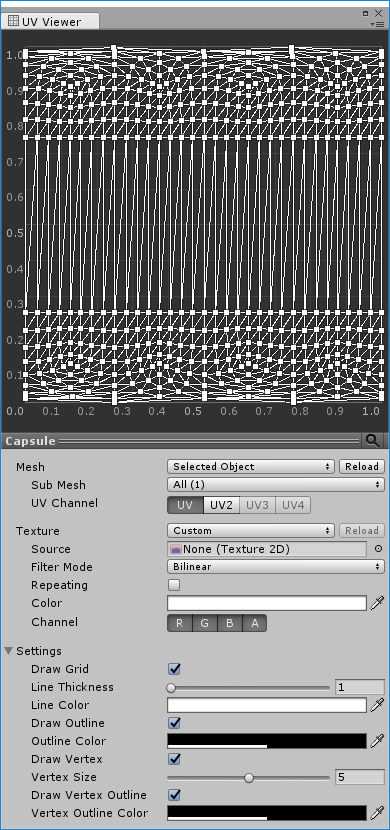
Download the Unity Package from the Release page to import or copy the Assets/Plugins folder to the project to add UV Viewer to the Window item in the menu bar. Run the item to create an editor window.
If the mesh item is Selected Object, select the game object that contains a mesh or meshfilter, or SkinnedMeshRenderer component to display the UV.
If you set the mesh item to Custom, you can set the mesh directly. Draging and dropping the object to the view area will perform the same action. Dragging objects are game objects that include mesh or meshfilter, or skinnedMeshRenderer components.
If the mesh item is the Selected Object, if the selected game object includes MeshRenderer or SkinnedMeshRenderer component, you can select the texture of the material contained in the renderer if the Texture item is set to Materials.
If you set the Texture item to Custom, you can set the texture directly. Draging and dropping the texture to the view area will perform the same action.
You can set the mesh or texture created by the editor script. The following code sets the value to the window that is displayed if the Windows is displayed, creates a new window and sets the value if there is no Windows displayed.
 using Macaron . UVViewer . Editor ;

class EditorClass
{
    void SetCustom ( Mesh mesh , Texture texture )
    {
        // 메시 설정.
        UVViewerWindow . ShowWindow ( ) . SetCustomMesh ( mesh ) ;

        // 텍스처 설정.
        UVViewerWindow . ShowWindow ( ) . SetCustomTexture ( texture ) ;
    }
}
If you call SetCustomMesh , SetCustomTexture method, the Mesh, Texture item is changed to Custom and the source is set to the call value. Each method can be called individually.
The UVs and textures shown are not automatically reflected in the original change. If you need a renewal, you need to press the Reload button on the Mesh, Texture item.
If the Geometry Shader is not supported, the Line Thickness item cannot be used, and the view area is displayed as a low resolution in the HIDPI environment.






