full lattice search
2.0.0 for Elasticsearch 7.3.0


This Elasticsearch plugin enables search across transcripts in the form of probabilistic lattice structures. These lattices are in the form output by Automated Speech Recognition (ASR) or Speech-to-text (STT), Optical Character recognition (OCR), Machine Translation (MT), Automated Image Captioning, etc. The lattices, regardless of the analytic, can be viewed as the Finite State Machine (FST) structure below, where each set of arcs (transitioning from one state to another) represents a set of possible outputs at some location in the source document (e.g. at the first location below, the possible outputs are 'the' and 'a'). In the case of STT the locations would be time ranges, in the case of OCR the locations could be x y coordinates, or perhaps a reading order location. Each possible output has an associated probability of occurrence at that location allowing relevance scoring to be affected by the quality of the lattice output.
The plugin consists of three components:
A token filter of type lattice that processes a lattice token stream. Tokens in the stream indicate the token
position, allowing the stream to represent a lattice structure like the one above. Tokens in the stream also have a
score, which is stored in the token payload when indexed so that is can be used to affect scoring.
The token filter accepts tokens in one of two formats. The format set with the lattice_format parameter, which can
be set to lattice, or audio.
lattice_format=latticeTokens should be in the form
<token:string>|<position:int>|<rank:int>|<score:float>
Example stream: the|0|0|0.9, quick|1|0|0.6, brick|1|1|0.2, fox|2|0|0.5, box|2|1|0.09, jumped|3|0|1.0
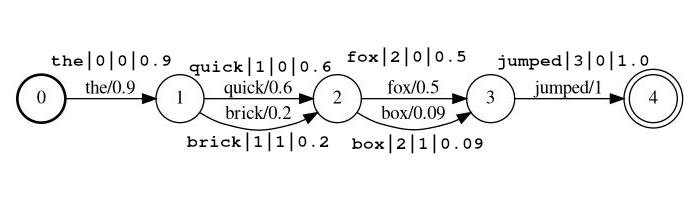
In the example above the tokens quick and brick will be index at the same position, because they both have position
set to 1.
token the actual string token to be searched against and to be processed by follow-on filtersposition is the global position of the token in the source document
(used to determine if the token should be places at same location as the previous token)rank the token's rank relative to the other possible tokens at this position (0 is the most probable rank)score a float between 0.0 and 1.0 (inclusive). The probability of a this token at this position.
Note if you actually have a score of zero the token will not return is a search, and should
probably be omitted from the stream.lattice_format=audioTokens have all the fields from the lattice format with the addition of start_time and stop_time.
Tokens should be in the form
<token:string>|<position:int>|<rank:int>|<score:float>|<start_time:float>|<stop_time:float>
Example stream: the|0|0|0.9|0.15|0.25, quick|1|0|0.6|0.25|0.5, brick|1|1|0.2|0.25|0.5, fox|2|0|0.5|1.0|1.3, box|2|1|0.09|1.0|1.3, jumped|3|0|1.0|2.0|2.5
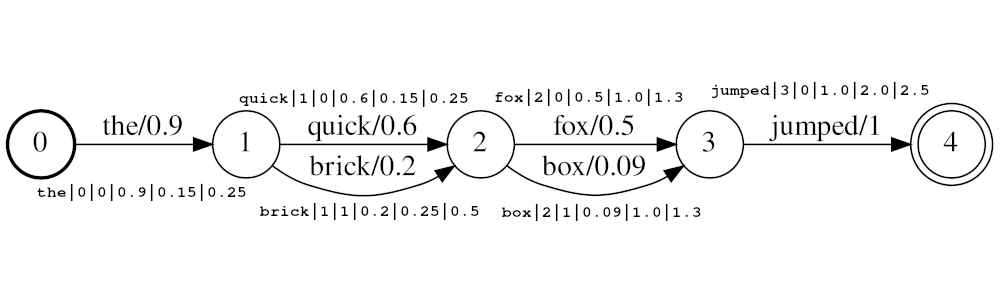
In the example above the tokens quick and brick will be index at the same position, because they both have position
set to 1. The actual position value of the tokens is determined by the times and audio_position_increment_seconds.
Currently the filter only looks a token start times
If audio_position_increment_seconds=0.01 in the example above the would be indexed with a position of 15;
quick and brick would be indexed at a position of 25; etc.
start_time the start time in seconds of this token relative to the beginning of the source audiostop_time the start time in seconds of this token relative to the beginning of the source audioParameters include:
lattice_format (default is lattice)
audio or latticeaudio_position_increment_secondsscore_buckets (default is no duplication)
[0.9, 10, 0.8, 8, 0.7, 7, 0.2, 1], tokens with a score >= 0.9 will be duplicated 10 times; tokens
with a score >= 0.8 will be duplicated 8 times, etc.audio_position_increment_seconds (default is 0.01)
lattice=format=audio this is the precision at which the audio times are encoded into position in the indexfloor(token_start_time / audio_position_increment_seconds)A field of type lattice holds parameters of LatticeTokenFilter for reference at search time. Functions exactly
like a text field.
If you use lattice_format=audio you need to use a lattice field type for MatchLatticeQueries
to work correctly with times.
Note: this only exists because currently there does not seem to be a way to get the necessary (or any) information
from the analyzer at query time. I think there could be a getChainAware() or similar method added to AnalysisProvider
functioning similar to SynonymGraphTokenFilterFactory.getChainAwareTokenFilterFactory() within AnalysisRegistry.
(For more details, see the comment at the top of
this class)
Parameters include:
lattice_format must match the configuration of the LatticeTokenFilter set on this field.audio_position_increment_seconds must match the configuration of the LatticeTokenFilter set on this field.A query of type match_lattice queries a lattice field configured with a lattice token filter.
Performs a SpanNearQuery
wrapped in a LatticePayloadScoreQuery
(extension of PayloadScoreQuery),
which uses the scores encoded in each token payload to score matching spans. The score from each span is combined to
give the document score (See the payload_function parameter for details).
If include_span_score is set, the score above is multiplied by the configured similarity score.
Parameters include:
slop number of skipped tokens allowed in matchslop_seconds used when lattice_format=audio. Maximum seconds the match is allowed to span.in_order whether the token must appear in order (should be true for lattice_format=audio)include_span_score if true the configured similarity score will be multiplied with the payload score (described above)payload_function one of sum, max, or min (default is sum)
sum sums the scores of matching spansmax selects the max score from all the matching spansmin selects the min score from all the matching spanspayload_length_norm_factor a float defining how much the length of the matching span should normalize the span score.
A value of one means that score are divided by the length of the span (Note this in not the width of the span in lucene terms).
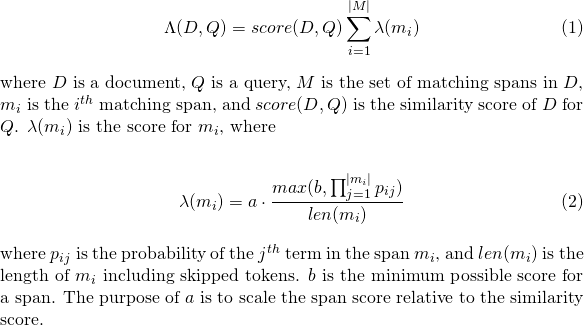
A value of 0 means there is no length normalization.When using a match_lattice query with payload_function=sum a document score is computed (in principal) as
Similarly for payload_function=min

And for payload_function=max

For development you can use the docker image below, which simply takes from official Elasticsearch image and installs this plugin. You can read this for instructions on how to use the Elasticsearch images.
docker pull messiaen/full-lattice-search:2.0.0-7.3.0
docker-compose.yaml example:
version: "2"
services:
  kibana:
    image: docker.elastic.co/kibana/kibana:7.3.0
    ports:
      - 5601:5601
    environment:
      ELASTICSEARCH_HOSTS: http://es01:9200
  es01:
    image: messiaen/full-lattice-search:2.0.0-7.3.0
    environment:
      - node.name=es01
      - discovery.type=single-node
      - "ES_JAVA_OPTS=-Xms1024m -Xmx1024m"
    ulimits:
      memlock:
        soft: -1
        hard: -1
    volumes:
      - esdata01:/usr/share/elasticsearch/data
    ports:
      - 9200:9200

volumes:
  esdata01:
    driver: local
Simply copy the yaml above into a file named docker-compose.yaml, and from that directory run docker-compose up
Assuming you are using the docker-compose.yaml above navigate to localhost:5601 in your browser and paste the
following examples into Kibana's Dev Tools console.
PUT audio_lattices
{
  "settings": {
    "index": {
      "number_of_shards": 1,
      "number_of_replicas": 0
    },
    "analysis": {
      "analyzer": {
        "lattice_analyzer": {
          "type": "custom",
          "tokenizer": "whitespace",
          "filter": ["lattice_filter", "lowercase"]
        }
      },
      "filter": {
        "lattice_filter": {
          "type": "lattice",
          "lattice_format": "audio",
          "audio_position_increment_seconds": 0.1
        }
      }
    }
  },
  "mappings": {
    "dynamic": "strict",
    "properties": {
      "lattices": {
        "type": "lattice",
        "lattice_format": "audio",
        "audio_position_increment_seconds": 0.1,
        "analyzer": "lattice_analyzer"
      }
    }
  }
}

POST audio_lattices/_doc/1
{
  "lattices": """the|0|0|0.9|0.15|0.25
  quick|1|0|0.6|0.25|0.5 brick|1|1|0.2|0.25|0.5
  fox|2|0|0.5|1.0|1.3 box|2|1|0.09|1.0|1.3
  jumped|3|0|1.0|2.0|2.5"""
}

GET audio_lattices/_search
{
  "query": {
    "match_lattice": {
      "lattices": {

        "query": "quick box jumped",
        "slop_seconds": 2,
        "include_span_score": "true",
        "payload_function": "sum",
        "in_order": "true"
      }
    }
  }
}
View in console
Search Response
{
  "took" : 1,
  "timed_out" : false,
  "_shards" : {
    "total" : 1,
    "successful" : 1,
    "skipped" : 0,
    "failed" : 0
  },
  "hits" : {
    "total" : {
      "value" : 1,
      "relation" : "eq"
    },
    "max_score" : 36.987705,
    "hits" : [
      {
        "_index" : "audio_lattices",
        "_type" : "_doc",
        "_id" : "1",
        "_score" : 36.987705,
        "_source" : {
          "lattices" : """
the|0|0|0.9|0.15|0.25
  quick|1|0|0.6|0.25|0.5 brick|1|1|0.2|0.25|0.5
  fox|2|0|0.5|1.0|1.3 box|2|1|0.09|1.0|1.3
  jumped|3|0|1.0|2.0|2.5
"""
        }
      }
    ]
  }
}
PUT text_lattices
{
  "settings": {
    "index": {
      "number_of_shards": 1,
      "number_of_replicas": 0
    },
    "analysis": {
      "analyzer": {
        "lattice_analyzer": {
          "type": "custom",
          "tokenizer": "whitespace",
          "filter": ["lattice_filter", "lowercase"]
        }
      },
      "filter": {
        "lattice_filter": {
          "type": "lattice",
          "lattice_format": "lattice"
        }
      }
    }
  },
  "mappings": {
    "dynamic": "strict",
    "properties": {
      "lattices": {
        "type": "lattice",
        "lattice_format": "lattice",
        "analyzer": "lattice_analyzer"
      }
    }
  }
}

POST text_lattices/_doc/1
{
  "lattices": """the|0|0|0.9
  quick|1|0|0.6 brick|1|1|0.2
  fox|2|0|0.5 box|2|1|0.09
  jumped|3|0|1.0"""
}

GET text_lattices/_search
{
  "query": {
    "match_lattice": {
      "lattices": {

        "query": "quick jumped",
        "slop": 1,
        "include_span_score": "true",
        "payload_function": "sum",
        "in_order": "true"
      }
    }
  }
}
View in console
Search Response
{
  "took" : 0,
  "timed_out" : false,
  "_shards" : {
    "total" : 1,
    "successful" : 1,
    "skipped" : 0,
    "failed" : 0
  },
  "hits" : {
    "total" : {
      "value" : 1,
      "relation" : "eq"
    },
    "max_score" : 9041.438,
    "hits" : [
      {
        "_index" : "text_lattices",
        "_type" : "_doc",
        "_id" : "1",
        "_score" : 9041.438,
        "_source" : {
          "lattices" : """
the|0|0|0.9
  quick|1|0|0.6 brick|1|1|0.2
  fox|2|0|0.5 box|2|1|0.09
  jumped|3|0|1.0
"""
        }
      }
    ]
  }
}
Simply run make in the root directory
If you wish to only build the plugin without running tests you can run
./gradlew clean assemble
In either case, the built plugin will be build/distributions/full-lattice-search-*.zip
make run will build the plugin and stand up an Elasticsearch (with the plugin installed) and a Kibana with
docker-compose
Requires Elasticsearch 7.3.0 (Support for other versions (>=6.0.0) coming soon / on request)

This plugin is not designed to work with generalized lattice structures, but to work with a compressed form known as a
confusion network, or sausage string. A confusion
network represents a generalized lattice with a fixed set of positions (time ranges, image locations, etc).
Each position has a set of possible words, and each word has an associated likelihood of occurrence.
For example an Automated Speech Recognizer could generate the lattice below where the speaker really said
"Each video should be under ten minutes"

The lattice above can be compressed into the confusion network below.

Note the <epsilon> tokens (meaning the absence of a word) have been inserted to allow for the word "understand'
to have a longer duration than others.
It is also worth noting that the process of compressing a lattice into a confusion network is generally lossy, meaning that some paths through a confusion network are not present in the source lattice. For example, the phrase "be understand ten minutes" is present in the confusion network, but not in the lattice.
Note you are responsible for ensuring your lattice structures are formatted a confusion networks.
See LatticeTokenFilter docs for usage details.
As mentioned in the LatticeTokenFilter docs, the score_buckets parameter may be used to index
duplicate tokens at the same position in order to boost the term-frequency of those tokens relative to there score.
Although this does have the desired affect, there few considerations.
8x linear duplication of tokens
(score_buckets=[0.9, 72, 0.8, 64, 0.7, 56, 0.6, 48, 0.5, 40, 0.4, 32, 0.2, 16, 0.1, 8, 0.01, 2]) performed much
better than configurations with less duplication.8x duplication configuration in 1, removing the phonetic token filter from the
analysis stream resulted in a 5x speedup in indexing.




