LangChain Chinese Getting Started Guide
1.0.0

For easy reading, gitbooks have been generated: https://liaokong.gitbook.io/llm-kai-fa-jiao-cheng/
github address: https://github.com/liaokongVFX/LangChain-Chinese-Getting-Started-Guide
"LangChain Technology Decryption: A Panoramic Guide to Building Large Model Applications" has been published now: https://item.jd.com/14598210.html
Low-priced domestic and foreign ai model api Transfer: https://api.91ai.me
Because the langchain library has been rapidly updated and iterating, but the document is written in early April, and I have limited personal energy, so the code in colab may be somewhat outdated. If there is any failure in operation, you can first search for whether the current document has been updated. If the document has not been updated, please mention the issue, or directly mention the pr after repair. Thank you~
I added a CHANGELOG and updated the new content. I will write it here, so that friends who have read it before can quickly view the new updated content.
If you want to modify the request root route of the OPENAI API to your own proxy address, you can modify it by setting the environment variable "OPENAI_API_BASE".
Related reference code: https://github.com/openai/openai-python/blob/d6fa3bfaae69d639b0dd2e9251b375d7070bbef1/openai/__init__.py#L48
Or when initializing OpenAI-related model objects, pass in the "openai_api_base" variable.
Related reference code: https://github.com/hwchase17/langchain/blob/master/langchain/llms/openai.py#L148
As we all know, OpenAI's API cannot be connected to the Internet, so it is definitely impossible to use its own functions to search and give answers, summarize PDF documents, and perform Q&A based on a Youtube video. So, let's introduce a very powerful third-party open source library: LangChain .
Document address: https://python.langchain.com/en/latest/
This library is currently very active and iterates every day. It already has 22k stars, and the update speed is very fast.
LangChain is a framework for developing applications powered by language models. He has 2 main abilities:
LLM model: Large Language Model, large language model
LLM Call
Prompt management, supports various custom templates
It has a large number of document loaders, such as Email, Markdown, PDF, Youtube...
Support for indexes
Chains
I believe everyone will be confused after reading the above introduction. Don’t worry, the above concept is actually not very important when we first started learning. After we finish the following examples, we will understand a lot when we look back at the above content.
However, here are several concepts that must be known.
As the name implies, this is to load data from a specified source. For example: folder DirectoryLoader , Azure Storage AzureBlobStorageContainerLoader , CSV file CSVLoader , Evernote EverNoteLoader , Google GoogleDriveLoader , any web page UnstructuredHTMLLoader , PDF PyPDFLoader , S3 S3DirectoryLoader / S3FileLoader ,
Youtube YoutubeLoader , etc., I just briefly listed a few of them. The official provides a lot of loaders for you to use.
https://python.langchain.com/docs/modules/data_connection/document_loaders.html
After reading the data source using the loader loader, the data source needs to be converted into a Document object before it can be used later.
As the name suggests, text segmentation is used to divide text. Why do you need to split text? Because every time we send text as propt to openai API or use the openai API embedding function, there are character restrictions.
For example, if we send a 300-page PDF to the Openai API and ask him to summarize, he will definitely report a mistake that exceeds the maximum token. So here we need to use a text splitter to split the Document that our loader comes in.
Because data correlation search is actually a vector operation. Therefore, whether we use the openai api embedding function or directly query through the vector database, we need to vectorize our loaded data Document in order to perform vector operation search. Converting into a vector is also very simple. We only need to store the data in the corresponding vector database to complete the conversion of the vector.
The official also provides a lot of vector databases for us to use.
https://python.langchain.com/en/latest/modules/indexes/vectorstores.html
We can understand Chain as a task. A Chain is a task, and of course it can also execute multiple chains one by one like a chain.
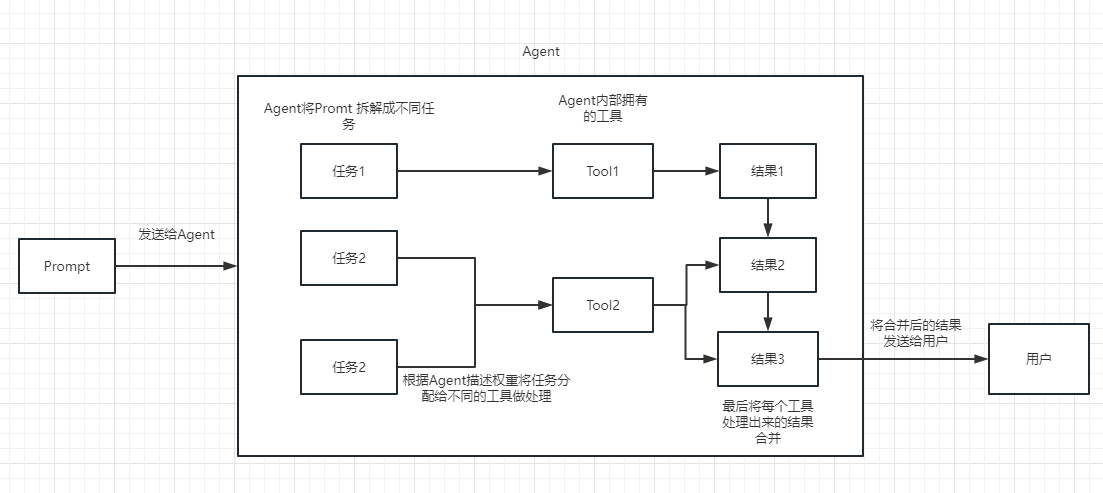
We can simply understand that it can dynamically help us choose and call chain or existing tools.
For the execution process, please refer to the following picture:
Used to measure the relevance of text. This is also the key to the OpenAI API's ability to build its own knowledge base.
His biggest advantage over fine-tuning is that he does not need to train and can add new content in real time, instead of adding new content once, and the cost in all aspects is much lower than fine-tuning.
For specific comparisons and selections, please refer to this video: https://www.youtube.com/watch?v=9qq6HTr7Ocw
Through the above essential concepts, you should have a certain understanding of LangChain, but you may still be a little confused.
These are all small questions. I believe that after reading the actual combat, you will thoroughly understand the above content and feel the true power of this library.
Because our OpenAI API is advanced, the LLM used in our subsequent examples are all based on Open AI as an example. Later, you can change to the LLM model you need according to your own tasks.
Of course, at the end of this article, all the code will be saved as a colab ipynb file and provided for everyone to learn.
It is recommended that you look at each example in order, because the next example will use the knowledge points in the previous example.
Of course, if you don’t understand something, don’t worry. You can continue to read it back. The first time you learn it is to not seek too much understanding.
In the first case, we will use LangChain to load OpenAI model and complete a Q&A.
Before starting, we need to set up our openai key first. This key can be created in user management, so I won’t go into details here.
 import os
os . environ [ "OPENAI_API_KEY" ] = '你的api key'
Then we import and execute
 from langchain . llms import OpenAI

llm = OpenAI ( model_name = "text-davinci-003" , max_tokens = 1024 )
llm ( "怎么评价人工智能" )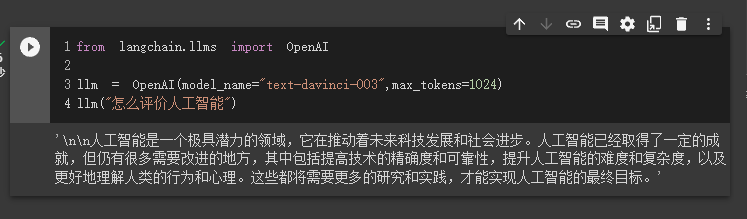
At this time, we can see the result he gave us. How is it? Isn’t it very simple?
Next, let’s do something interesting. Let's get our OpenAI API to search online and return the answers to us.
Here we need to use Serpapi to implement it, which provides a API interface for Google search.
First, we need to register a user on the Serpapi official website, https://serpapi.com/ and copy it to generate the API key for us.
Then we need to set it into the environment variable like the openai api key above.
 import os
os . environ [ "OPENAI_API_KEY" ] = '你的api key'
os . environ [ "SERPAPI_API_KEY" ] = '你的api key'
Then, start writing my code
 from langchain . agents import load_tools
from langchain . agents import initialize_agent
from langchain . llms import OpenAI
from langchain . agents import AgentType

# 加载 OpenAI 模型
llm = OpenAI ( temperature = 0 , max_tokens = 2048 )

 # 加载 serpapi 工具
tools = load_tools ([ "serpapi" ])

# 如果搜索完想再计算一下可以这么写
# tools = load_tools(['serpapi', 'llm-math'], llm=llm)

# 如果搜索完想再让他再用python的print做点简单的计算,可以这样写
# tools=load_tools(["serpapi","python_repl"])

# 工具加载后都需要初始化,verbose 参数为 True,会打印全部的执行详情
agent = initialize_agent ( tools , llm , agent = AgentType . ZERO_SHOT_REACT_DESCRIPTION , verbose = True )

# 运行 agent
agent . run ( "What's the date today? What great events have taken place today in history?" )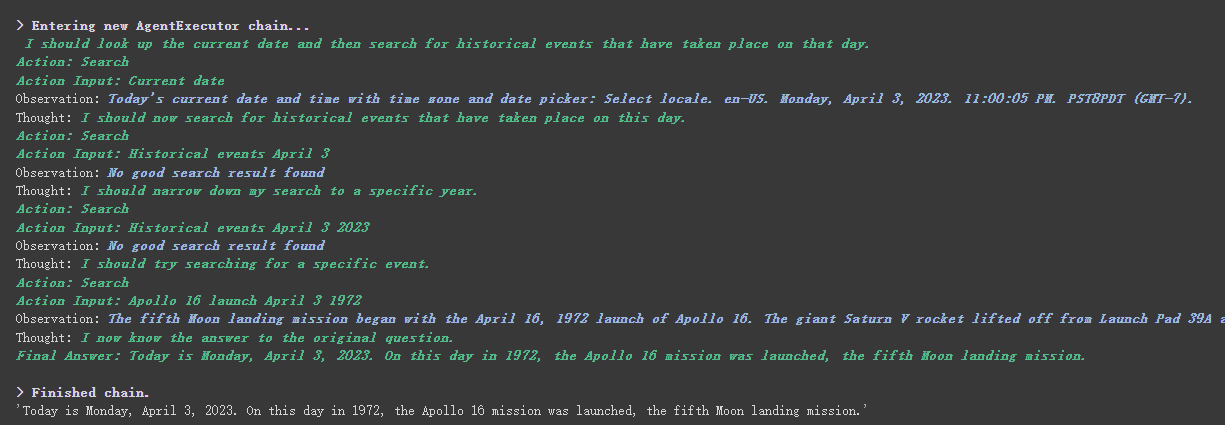
We can see that he correctly returned the date (sometimes difference) and returned to today in history.
There is the parameter verbose on chain and agent objects. This is a very useful parameter. After opening it, we can see the complete chain execution process.
As you can see from the result returned above, he splits our question into several steps and then gets the final answer step by step.
Regarding the meaning of several options for agent type (if you cannot understand it, it will not affect the following learning. If you use it too much, you will naturally understand it):
Search and Lookup tools, the former is used to search, and the latter is used to find the term, for example: Wipipedia toolGoogle search API toolYou can see this for reAct introduction: https://arxiv.org/pdf/2210.03629.pdf
Python implementation of ReAct pattern of LLM: https://til.simonwillison.net/llms/python-react-pattern
agent type official explanation:
https://python.langchain.com/en/latest/modules/agents/agents/agent_types.html?highlight=zero-shot-react-description
One thing to be noted is that this
serpapiseems not very friendly to Chinese, so the prompt asked is recommended to use English.
Of course, the official has written the agent of ChatGPT Plugins . What plugins can be used in chatgpt in the future? We can also use plugins in the API, which is very exciting to think about.
However, at present, only plug-ins that do not require authorization can be used. We look forward to the official solution to this in the future.
Those who are interested can read this document: https://python.langchain.com/en/latest/modules/agents/tools/examples/chatgpt_plugins.html
Chatgpt can only make money for the official, and Openai API can make money for me
If we want to use the openai API to summarize a paragraph of text, our usual way is to send it directly to the API for it to summarize. However, if the text exceeds the maximum token limit of the API, an error will be reported.
At this time, we generally segment the article, such as calculating and dividing it through tiktoken, then sending each paragraph to the API for summary, and finally summarizing the summary of each paragraph.
If you use LangChain, he helped us handle this process very well, making it very easy for us to write code.
Without further ado, just upload the code.
 from langchain . document_loaders import UnstructuredFileLoader
from langchain . chains . summarize import load_summarize_chain
from langchain . text_splitter import RecursiveCharacterTextSplitter
from langchain import OpenAI

# 导入文本
loader = UnstructuredFileLoader ( "/content/sample_data/data/lg_test.txt" )
# 将文本转成 Document 对象
document = loader . load ()
print ( f'documents: { len ( document ) } ' )

# 初始化文本分割器
text_splitter = RecursiveCharacterTextSplitter (
    chunk_size = 500 ,
    chunk_overlap = 0
)

# 切分文本
split_documents = text_splitter . split_documents ( document )
print ( f'documents: { len ( split_documents ) } ' )

# 加载 llm 模型
llm = OpenAI ( model_name = "text-davinci-003" , max_tokens = 1500 )

# 创建总结链
chain = load_summarize_chain ( llm , chain_type = "refine" , verbose = True )

# 执行总结链,(为了快速演示,只总结前5段)
chain . run ( split_documents [: 5 ])
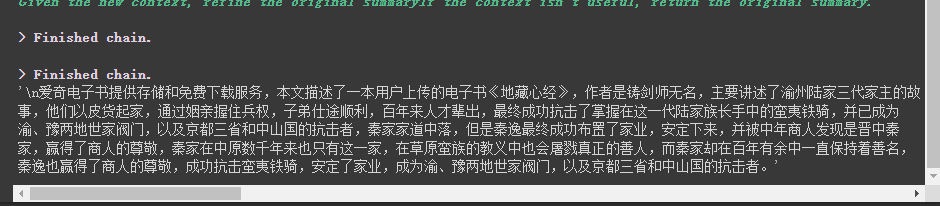
First, we print the number of documents before and after cutting. We can see that before cutting, there is only one document in the whole article. After cutting, the above document will be cut into 317 documents.

Finally, a summary of the first 5 documents is output.
Here are a few parameters to note:
The chunk_overlap parameter of the text splitter
This refers to the contents ending with several previous document in each document after cutting. The main purpose is to increase the context association of each document. For example, when chunk_overlap=0 , the first document is aaaaaaa, the second is bbbbbb; when chunk_overlap=2 , the first document is aaaaaaa and the second is aabbbbbbb.
However, this is not absolute, it depends on the specific algorithm inside the text segmentation model used.
You can refer to this document for text splitters: https://python.langchain.com/en/latest/modules/indexes/text_splitters.html
chain_type parameter of chain
This parameter mainly controls the way the document is passed to the llm model, and there are 4 ways in total:
stuff : This is simplest and crude, and will pass all documents to the llm model at once for summary. If there are many documents, it will inevitably report an error that exceeds the maximum token limit, so this is generally not selected when summarizing the text.
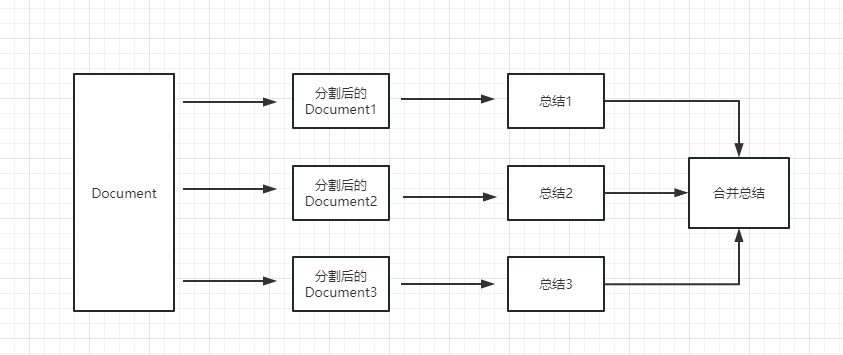
map_reduce : This method will first summarize each document, and finally summarize the results summarized by all documents.
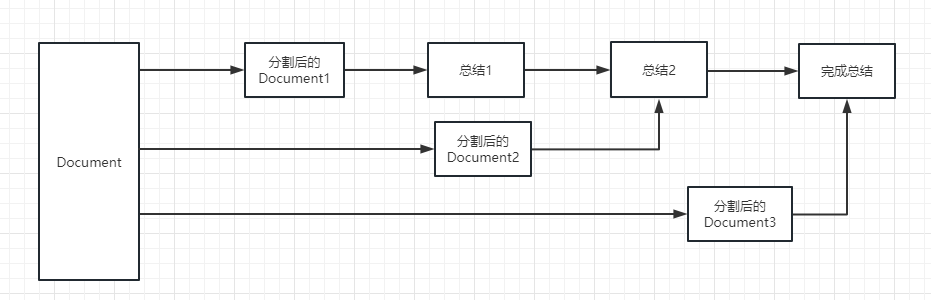
refine : This method will first summarize the first document, and then send the content summarized by the first document and the second document to the llm model for summary, and so on. The advantage of this method is that when summarizing the latter document, it will take the previous document to summarize, add context to the document that needs to be summarized, and increase the consistency of the summary content.
map_rerank : This type of chain is generally not used in summary, but in question and answer chain. It is actually a way to match the answers. First, you need to give a question. It will calculate a probability score for each document to answer the question based on the question, and then find the document with the highest score, and send it to the llm model by converting this document into a part of the prompt of the question (question + document), and finally the llm model returns the specific answer.
In this example, we will explain how to build a knowledge base by reading multiple documents from us locally and use the Openai API to search and give answers in the knowledge base.
This is a very useful tutorial, such as a robot that can easily introduce the company's business or a robot that introduces a product.
 from langchain . embeddings . openai import OpenAIEmbeddings
from langchain . vectorstores import Chroma
from langchain . text_splitter import CharacterTextSplitter
from langchain import OpenAI
from langchain . document_loaders import DirectoryLoader
from langchain . chains import RetrievalQA

# 加载文件夹中的所有txt类型的文件
loader = DirectoryLoader ( '/content/sample_data/data/' , glob = '**/*.txt' )
# 将数据转成 document 对象,每个文件会作为一个 document
documents = loader . load ()

# 初始化加载器
text_splitter = CharacterTextSplitter ( chunk_size = 100 , chunk_overlap = 0 )
# 切割加载的 document
split_docs = text_splitter . split_documents ( documents )

# 初始化 openai 的 embeddings 对象
embeddings = OpenAIEmbeddings ()
# 将 document 通过 openai 的 embeddings 对象计算 embedding 向量信息并临时存入 Chroma 向量数据库,用于后续匹配查询
docsearch = Chroma . from_documents ( split_docs , embeddings )

# 创建问答对象
qa = RetrievalQA . from_chain_type ( llm = OpenAI (), chain_type = "stuff" , retriever = docsearch . as_retriever (), return_source_documents = True )
# 进行问答
result = qa ({ "query" : "科大讯飞今年第一季度收入是多少?" })
print ( result )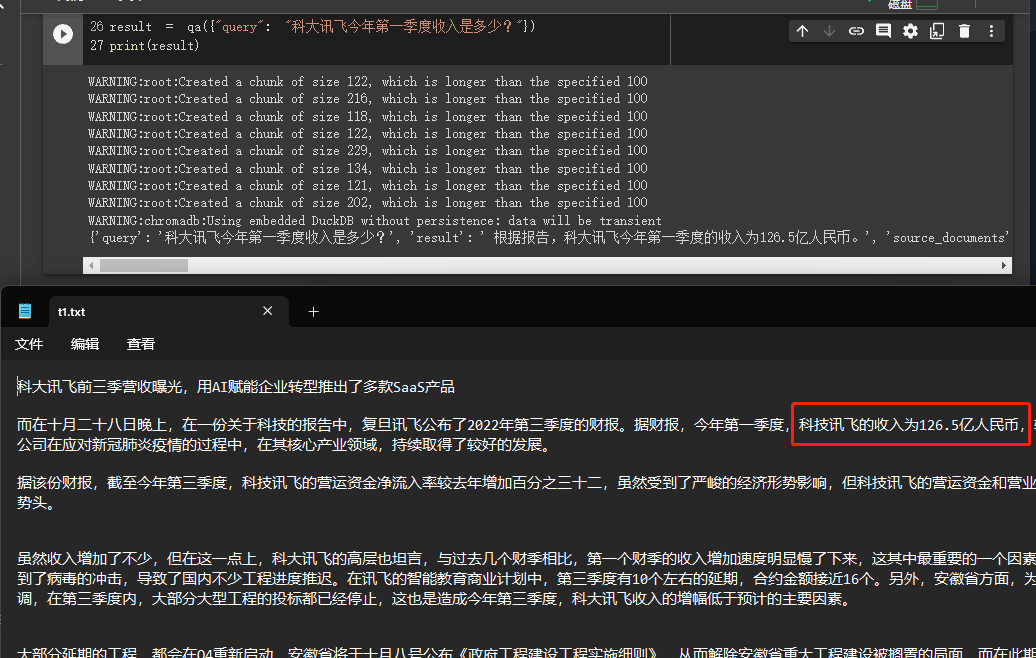
We can see through the results that he successfully obtained the correct answer from the data we gave.
For details about Openai embeddings, please refer to this link: https://platform.openai.com/docs/guides/embeddings
One step in our previous case was to convert document information into vector information and embeddings information and temporarily store it into the Chroma database.
Because it is temporarily stored, when the code above is executed, the data after vectorization above will be lost. If you want to use it next time, you need to calculate embeddings again, which is definitely not what we want.
So, in this case, we will talk about how to persist vector data through the two databases of Chroma and Pinecone.
Because LangChain supports many databases, here are two that are used more frequently. For more information, please refer to the documentation: https://python.langchain.com/en/latest/modules/indexes/vectorstores/getting_started.html
Chroma
chroma is a local vector database, which provides a persist_directory to set the persistent directory for persistence. When reading, you only need to call the from_document method to load.
 from langchain . vectorstores import Chroma

# 持久化数据
docsearch = Chroma . from_documents ( documents , embeddings , persist_directory = "D:/vector_store" )
docsearch . persist ()

# 加载数据
docsearch = Chroma ( persist_directory = "D:/vector_store" , embedding_function = embeddings )
Pinecone
Pinecone is an online vector database. So, the first step I can still register and get the corresponding API key. https://app.pinecone.io/
The free version will be automatically cleared if the index is not used for 14 days.
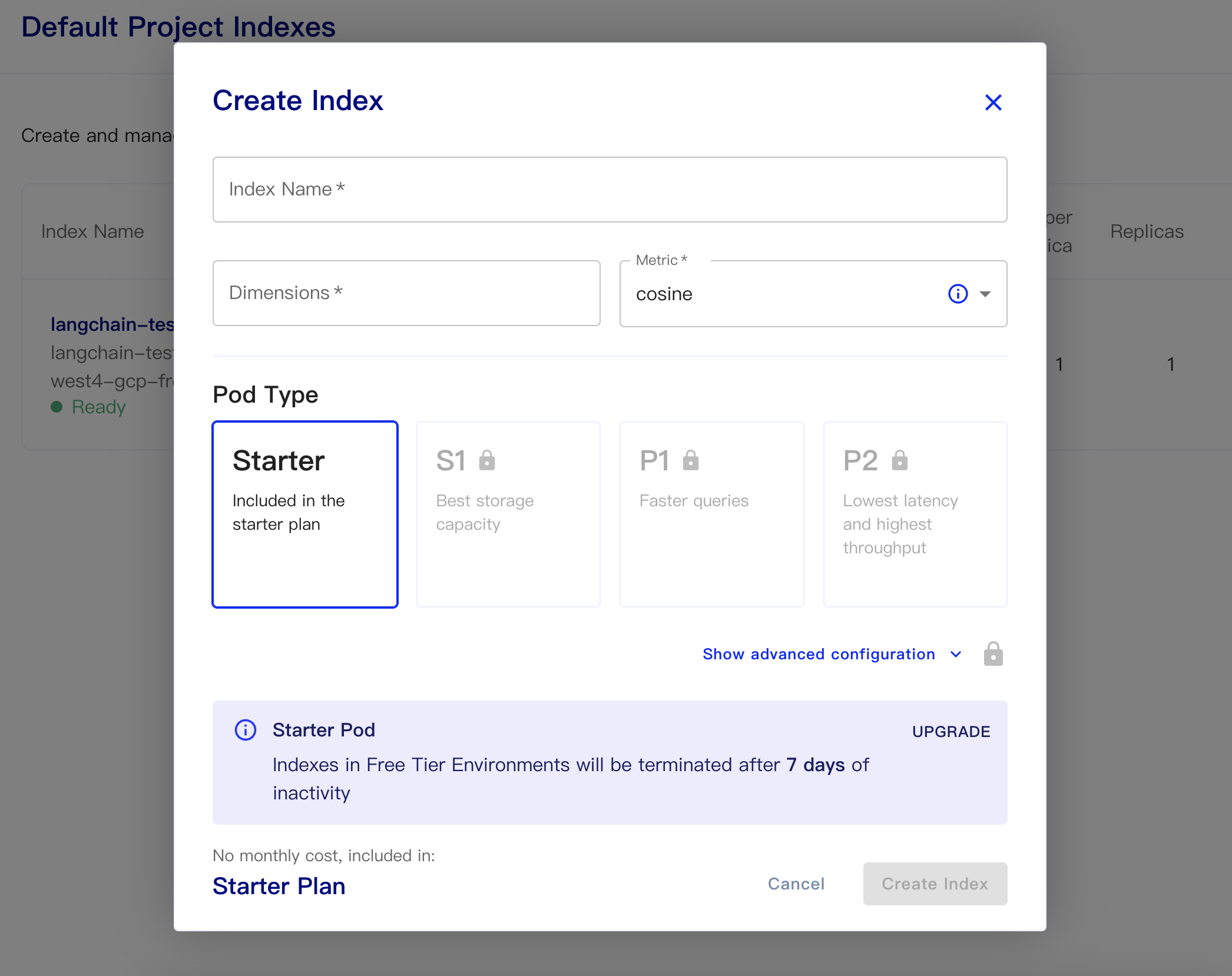
Then create our database:
Index Name: This is casual
Dimensions: OpenAI's text-embedding-ada-002 model is OUTPUT DIMENSIONS is 1536, so we fill in 1536 here
Metric: can default to cosine
Select starter plan
The persistent data and load data codes are as follows
 # 持久化数据
docsearch = Pinecone . from_texts ([ t . page_content for t in split_docs ], embeddings , index_name = index_name )

# 加载数据
docsearch = Pinecone . from_existing_index ( index_name , embeddings )
A simple code to get embeddings from the database and answer it is as follows
 from langchain . text_splitter import CharacterTextSplitter
from langchain . document_loaders import DirectoryLoader
from langchain . vectorstores import Chroma , Pinecone
from langchain . embeddings . openai import OpenAIEmbeddings
from langchain . llms import OpenAI
from langchain . chains . question_answering import load_qa_chain

import pinecone

# 初始化 pinecone
pinecone . init (
  api_key = "你的api key" ,
  environment = "你的Environment"
)

loader = DirectoryLoader ( '/content/sample_data/data/' , glob = '**/*.txt' )
# 将数据转成 document 对象,每个文件会作为一个 document
documents = loader . load ()

# 初始化加载器
text_splitter = CharacterTextSplitter ( chunk_size = 500 , chunk_overlap = 0 )
# 切割加载的 document
split_docs = text_splitter . split_documents ( documents )

index_name = "liaokong-test"

# 持久化数据
# docsearch = Pinecone.from_texts([t.page_content for t in split_docs], embeddings, index_name=index_name)

# 加载数据
docsearch = Pinecone . from_existing_index ( index_name , embeddings )

query = "科大讯飞今年第一季度收入是多少?"
docs = docsearch . similarity_search ( query , include_metadata = True )

llm = OpenAI ( temperature = 0 )
chain = load_qa_chain ( llm , chain_type = "stuff" , verbose = True )
chain . run ( input_documents = docs , question = query )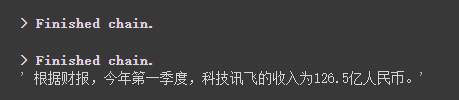
After the chatgpt api (that is, GPT-3.5-Turbo) model was released, it was loved by everyone because it was less money, so LangChain also added exclusive chains and models. Let's follow this example to see how to use it.
 import os

from langchain . document_loaders import YoutubeLoader
from langchain . embeddings . openai import OpenAIEmbeddings
from langchain . vectorstores import Chroma
from langchain . text_splitter import RecursiveCharacterTextSplitter
from langchain . chains import ChatVectorDBChain , ConversationalRetrievalChain

from langchain . chat_models import ChatOpenAI
from langchain . prompts . chat import (
  ChatPromptTemplate ,
  SystemMessagePromptTemplate ,
  HumanMessagePromptTemplate
)

# 加载 youtube 频道
loader = YoutubeLoader . from_youtube_url ( 'https://www.youtube.com/watch?v=Dj60HHy-Kqk' )
# 将数据转成 document
documents = loader . load ()

# 初始化文本分割器
text_splitter = RecursiveCharacterTextSplitter (
  chunk_size = 1000 ,
  chunk_overlap = 20
)

# 分割 youtube documents
documents = text_splitter . split_documents ( documents )

# 初始化 openai embeddings
embeddings = OpenAIEmbeddings ()

# 将数据存入向量存储
vector_store = Chroma . from_documents ( documents , embeddings )
# 通过向量存储初始化检索器
retriever = vector_store . as_retriever ()

system_template = """
Use the following context to answer the user's question.
If you don't know the answer, say you don't, don't try to make it up. And answer in Chinese.
-----------
{question}
-----------
{chat_history}
"""

# 构建初始 messages 列表,这里可以理解为是 openai 传入的 messages 参数
messages = [
  SystemMessagePromptTemplate . from_template ( system_template ),
  HumanMessagePromptTemplate . from_template ( '{question}' )
]

# 初始化 prompt 对象
prompt = ChatPromptTemplate . from_messages ( messages )


# 初始化问答链
qa = ConversationalRetrievalChain . from_llm ( ChatOpenAI ( temperature = 0.1 , max_tokens = 2048 ), retriever , condense_question_prompt = prompt )


chat_history = []
while True :
  question = input ( '问题:' )
  # 开始发送问题 chat_history 为必须参数,用于存储对话历史
  result = qa ({ 'question' : question , 'chat_history' : chat_history })
  chat_history . append (( question , result [ 'answer' ]))
  print ( result [ 'answer' ])
We can see that he can accurately answer questions and answers around this oil pipe video

Streaming answers are also very convenient
 from langchain . callbacks . base import CallbackManager
from langchain . callbacks . streaming_stdout import StreamingStdOutCallbackHandler

chat = ChatOpenAI ( streaming = True , callback_manager = CallbackManager ([ StreamingStdOutCallbackHandler ()]), verbose = True , temperature = 0 )
resp = chat ( chat_prompt_with_values . to_messages ()) We mainly use zapier to connect thousands of tools.
So our first step is to apply for an account and its natural language API key. https://zapier.com/l/natural-language-actions
His API key needs to fill in the information application. However, after basically filling in the information, you can basically see the approved email in the email address in seconds.
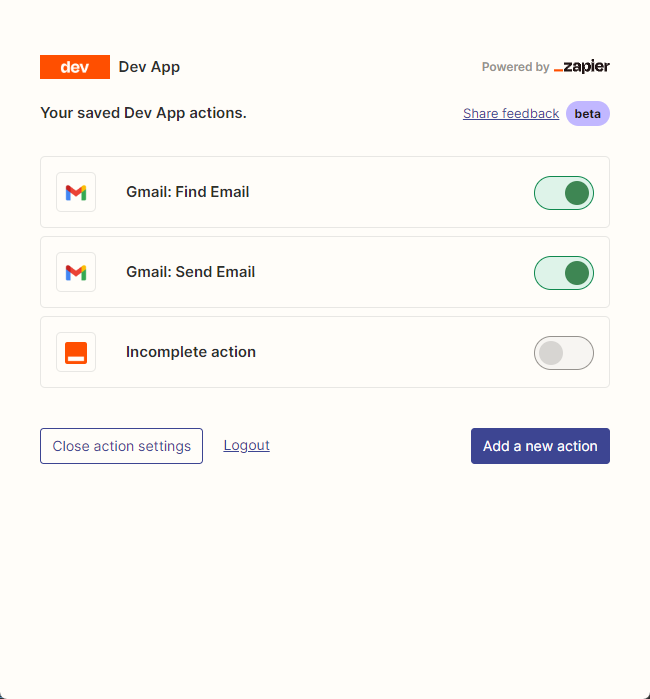
Then, we open our API configuration page by right-clicking the connection. We click Manage Actions on the right to configure which applications we want to use.
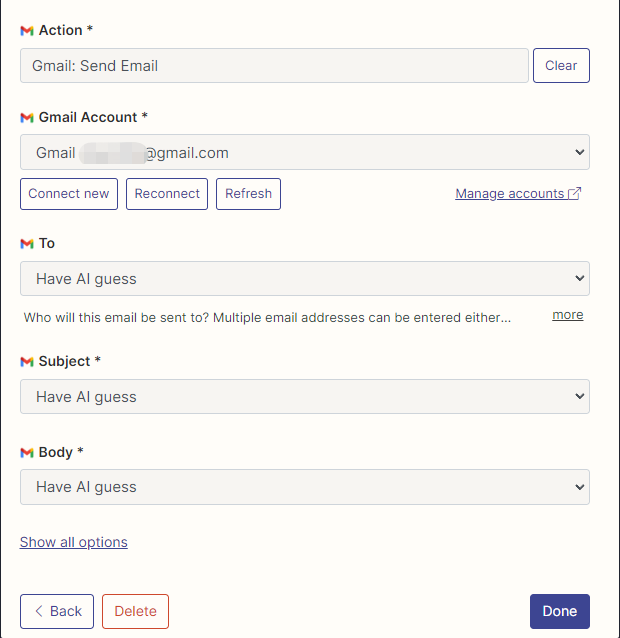
I have configured Gmail's actions to read and send emails here, and all fields are selected by AI guessing.
After the configuration is complete, we start writing code
 import os
os . environ [ "ZAPIER_NLA_API_KEY" ] = ''
from langchain . llms import OpenAI
from langchain . agents import initialize_agent
from langchain . agents . agent_toolkits import ZapierToolkit
from langchain . utilities . zapier import ZapierNLAWrapper
llm = OpenAI ( temperature = .3 )
zapier = ZapierNLAWrapper ()
toolkit = ZapierToolkit . from_zapier_nla_wrapper ( zapier )
agent = initialize_agent ( toolkit . get_tools (), llm , agent = "zero-shot-react-description" , verbose = True )
# 我们可以通过打印的方式看到我们都在 Zapier 里面配置了哪些可以用的工具
for tool in toolkit . get_tools ():
print ( tool . name )
print ( tool . description )
print ( " n n " )
agent . run ( '请用中文总结最后一封"******@qq.com"发给我的邮件。并将总结发送给"******@qq.com"' )
We can see that he successfully read the last email sent to him by ******@qq.com and sent the summary content to ******@qq.com again.
This is the email I sent to Gmail.
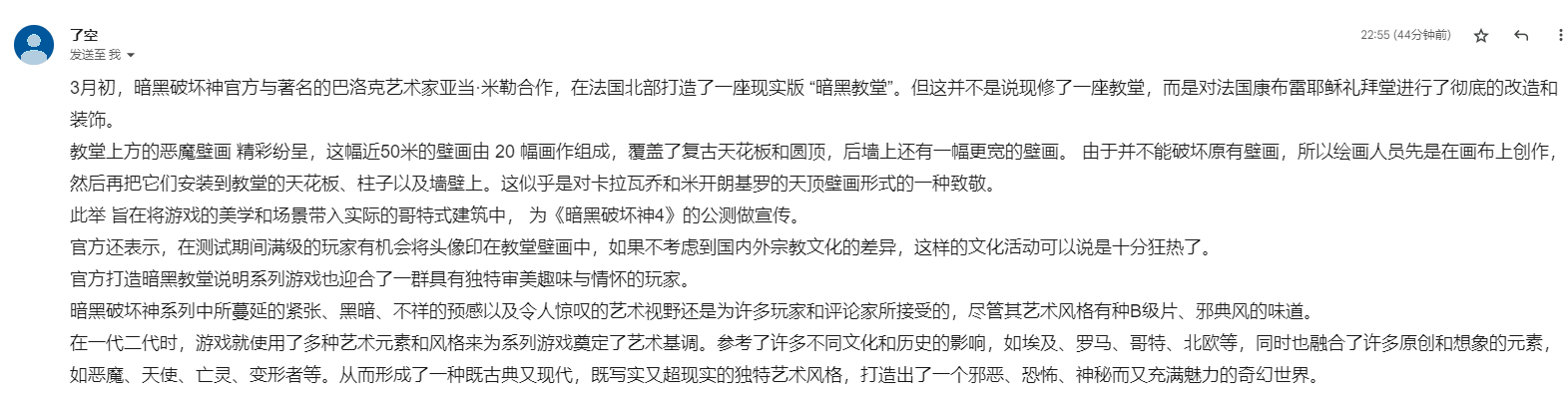
This is the email he sent to his QQ email.
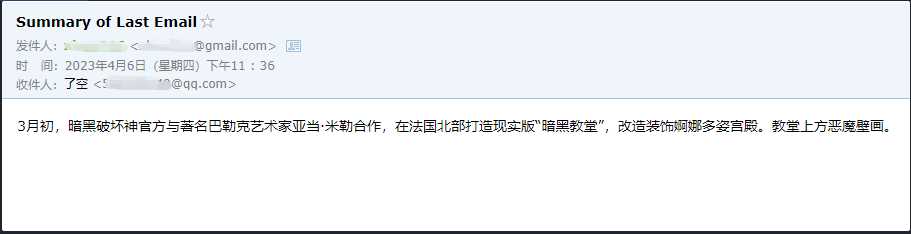
This is just a small example, because zapier has thousands of applications, so we can easily build our own workflows with the openai API.
Some of the larger knowledge points have been explained, and the following content is all about some interesting small examples, as extensions.
Because it is chained, he can also execute multiple chains in sequence.
 from langchain . llms import OpenAI
from langchain . chains import LLMChain
from langchain . prompts import PromptTemplate
from langchain . chains import SimpleSequentialChain

# location 链
llm = OpenAI ( temperature = 1 )
template = """Your job is to come up with a classic dish from the area that the users suggests.
% USER LOCATION
{user_location}

YOUR RESPONSE:
"""
prompt_template = PromptTemplate ( input_variables = [ "user_location" ], template = template )
location_chain = LLMChain ( llm = llm , prompt = prompt_template )

# meal 链
template = """Given a meal, give a short and simple recipe on how to make that dish at home.
% MEAL
{user_meal}

YOUR RESPONSE:
"""
prompt_template = PromptTemplate ( input_variables = [ "user_meal" ], template = template )
meal_chain = LLMChain ( llm = llm , prompt = prompt_template )

# 通过 SimpleSequentialChain 串联起来,第一个答案会被替换第二个中的user_meal,然后再进行询问
overall_chain = SimpleSequentialChain ( chains = [ location_chain , meal_chain ], verbose = True )
review = overall_chain . run ( "Rome" )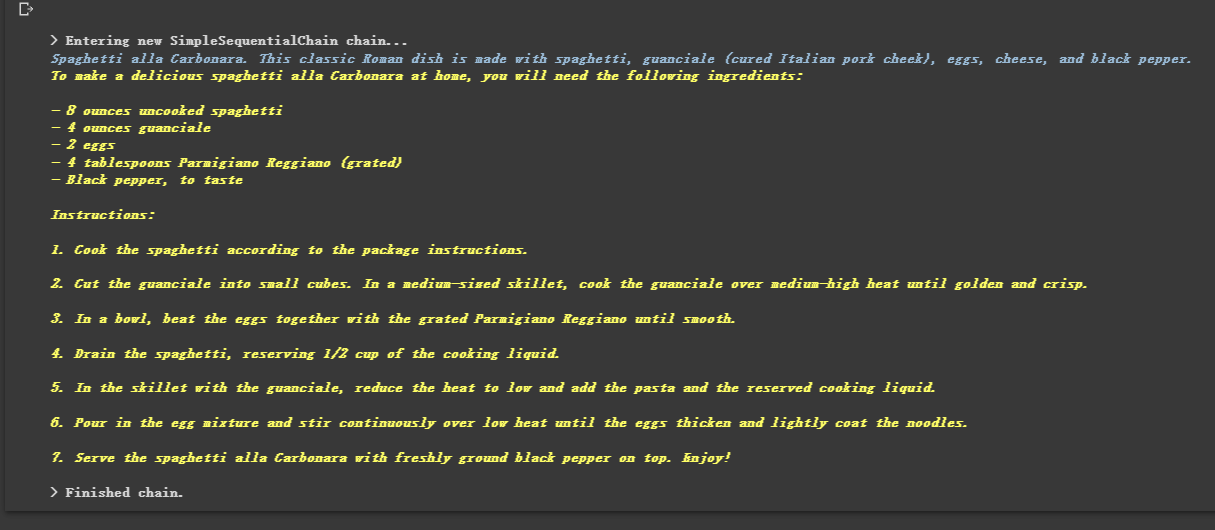
Sometimes we want the output to be not text, but structured data like json.
 from langchain . output_parsers import StructuredOutputParser , ResponseSchema
from langchain . prompts import PromptTemplate
from langchain . llms import OpenAI

llm = OpenAI ( model_name = "text-davinci-003" )

# 告诉他我们生成的内容需要哪些字段,每个字段类型式啥
response_schemas = [
    ResponseSchema ( name = "bad_string" , description = "This a poorly formatted user input string" ),
    ResponseSchema ( name = "good_string" , description = "This is your response, a reformatted response" )
]

# 初始化解析器
output_parser = StructuredOutputParser . from_response_schemas ( response_schemas )

# 生成的格式提示符
# {
#	"bad_string": string  // This a poorly formatted user input string
#	"good_string": string  // This is your response, a reformatted response
#}
format_instructions = output_parser . get_format_instructions ()

template = """
You will be given a poorly formatted string from a user.
Reformat it and make sure all the words are spelled correctly

{format_instructions}

% USER INPUT:
{user_input}

YOUR RESPONSE:
"""

# 将我们的格式描述嵌入到 prompt 中去,告诉 llm 我们需要他输出什么样格式的内容
prompt = PromptTemplate (
    input_variables = [ "user_input" ],
    partial_variables = { "format_instructions" : format_instructions },
    template = template
)

promptValue = prompt . format ( user_input = "welcom to califonya!" )
llm_output = llm ( promptValue )

# 使用解析器进行解析生成的内容
output_parser . parse ( llm_output )
Sometimes we need to crawl some Stronger structure and the information in the web page needs to be returned in JSON mode.
We can use the LLMRequestsChain class to implement it. For details, please refer to the following code
For the sake of easy understanding, I directly used the Prompt method to format the output results in the example, but did not use
StructuredOutputParserused in the previous case to format it, which can also be regarded as providing another formatting idea.
 from langchain . prompts import PromptTemplate
from langchain . llms import OpenAI
from langchain . chains import LLMRequestsChain , LLMChain

llm = OpenAI ( model_name = "gpt-3.5-turbo" , temperature = 0 )

template = """在 >>> 和 <<< 之间是网页的返回的HTML内容。
网页是新浪财经A股上市公司的公司简介。
请抽取参数请求的信息。

>>> {requests_result} <<<
请使用如下的JSON格式返回数据
{{
  "company_name":"a",
  "company_english_name":"b",
  "issue_price":"c",
  "date_of_establishment":"d",
  "registered_capital":"e",
  "office_address":"f",
  "Company_profile":"g"

}}
Extracted:"""

prompt = PromptTemplate (
    input_variables = [ "requests_result" ],
    template = template
)

chain = LLMRequestsChain ( llm_chain = LLMChain ( llm = llm , prompt = prompt ))
inputs = {
  "url" : "https://vip.stock.finance.sina.com.cn/corp/go.php/vCI_CorpInfo/stockid/600519.phtml"
}

response = chain ( inputs )
print ( response [ 'output' ])
We can see that he outputs the formatted results very well

 from langchain . agents import initialize_agent , Tool
from langchain . agents import AgentType
from langchain . tools import BaseTool
from langchain . llms import OpenAI
from langchain import LLMMathChain , SerpAPIWrapper

llm = OpenAI ( temperature = 0 )

# 初始化搜索链和计算链
search = SerpAPIWrapper ()
llm_math_chain = LLMMathChain ( llm = llm , verbose = True )

# 创建一个功能列表,指明这个 agent 里面都有哪些可用工具,agent 执行过程可以看必知概念里的 Agent 那张图
tools = [
    Tool (
        name = "Search" ,
        func = search . run ,
        description = "useful for when you need to answer questions about current events"
    ),
    Tool (
        name = "Calculator" ,
        func = llm_math_chain . run ,
        description = "useful for when you need to answer questions about math"
    )
]

# 初始化 agent
agent = initialize_agent ( tools , llm , agent = AgentType . ZERO_SHOT_REACT_DESCRIPTION , verbose = True )

# 执行 agent
agent . run ( "Who is Leo DiCaprio's girlfriend? What is her current age raised to the 0.43 power?" )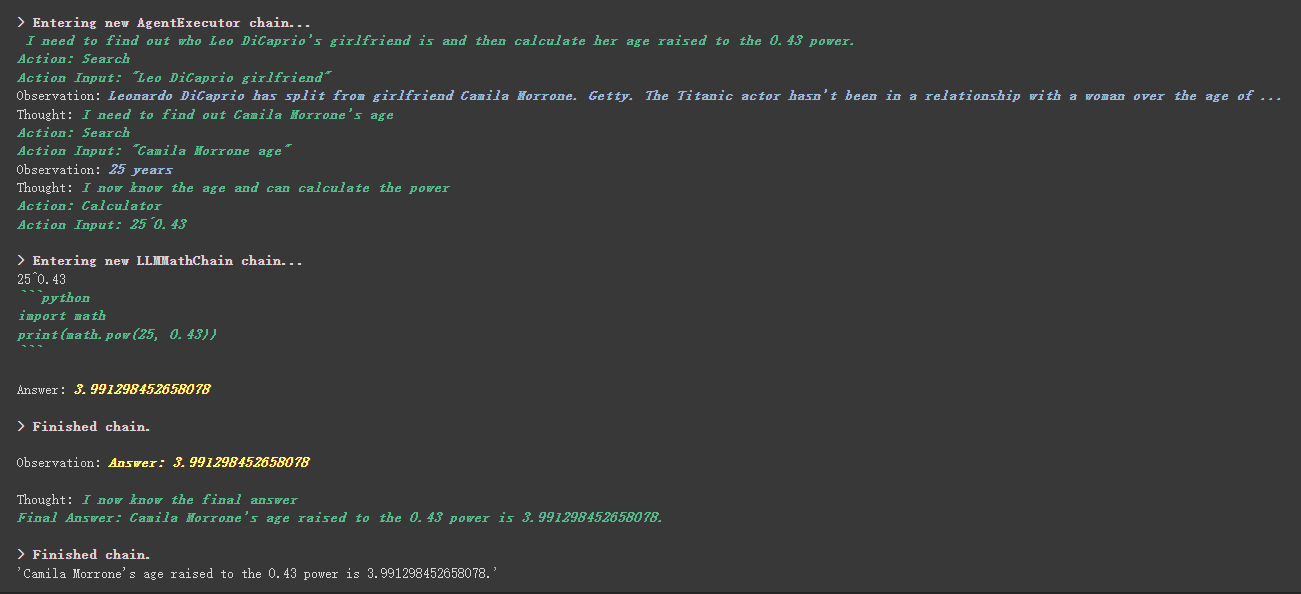
There is a more interesting thing in the custom tool. Which tool is used to achieve the weights based on工具中描述内容, which is completely different from the previous programming that we rely on numerical values to control weights.
For example, Calculator wrote in the description that if you ask questions about mathematics, use this tool. We can see in the above execution process that in the math part of our requested propt, he used the Calculator tool for calculations.
In the previous example, we used the way we saved history by customizing a list to store conversations.
Of course, you can also use the included memory object to achieve this.
 from langchain . memory import ChatMessageHistory
from langchain . chat_models import ChatOpenAI

chat = ChatOpenAI ( temperature = 0 )

# 初始化 MessageHistory 对象
history = ChatMessageHistory ()

# 给 MessageHistory 对象添加对话内容
history . add_ai_message ( "你好!" )
history . add_user_message ( "中国的首都是哪里?" )

# 执行对话
ai_response = chat ( history . messages )
print ( ai_response )Before using the Hugging Face model, you need to set environment variables first
 import os
os . environ [ 'HUGGINGFACEHUB_API_TOKEN' ] = ''
Using the Hugging Face model online
 from langchain import PromptTemplate , HuggingFaceHub , LLMChain

template = """Question: {question}
Answer: Let's think step by step."""

prompt = PromptTemplate ( template = template , input_variables = [ "question" ])
llm = HuggingFaceHub ( repo_id = "google/flan-t5-xl" , model_kwargs = { "temperature" : 0 , "max_length" : 64 })
llm_chain = LLMChain ( prompt = prompt , llm = llm )

question = "What NFL team won the Super Bowl in the year Justin Beiber was born?"
print ( llm_chain . run ( question ))
Pull the Hugging Face model directly to use locally
 from langchain import PromptTemplate , LLMChain
from langchain . llms import HuggingFacePipeline
from transformers import AutoTokenizer , AutoModelForCausalLM , pipeline , AutoModelForSeq2SeqLM

model_id = 'google/flan-t5-large'
tokenizer = AutoTokenizer . from_pretrained ( model_id )
model = AutoModelForSeq2SeqLM . from_pretrained ( model_id )

pipe = pipeline (
    "text2text-generation" ,
    model = model ,
    tokenizer = tokenizer ,
    max_length = 100
)

local_llm = HuggingFacePipeline ( pipeline = pipe )
print ( local_llm ( 'What is the capital of France? ' ))


template = """Question: {question} Answer: Let's think step by step."""
prompt = PromptTemplate ( template = template , input_variables = [ "question" ])

llm_chain = LLMChain ( prompt = prompt , llm = local_llm )
question = "What is the capital of England?"
print ( llm_chain . run ( question ))
Benefits of pulling the model to use locally:
We can implement SQL commands through SQLDatabaseToolkit or SQLDatabaseChain
 from langchain . agents import create_sql_agent
from langchain . agents . agent_toolkits import SQLDatabaseToolkit
from langchain . sql_database import SQLDatabase
from langchain . llms . openai import OpenAI

db = SQLDatabase . from_uri ( "sqlite:///../notebooks/Chinook.db" )
toolkit = SQLDatabaseToolkit ( db = db )

agent_executor = create_sql_agent (
    llm = OpenAI ( temperature = 0 ),
    toolkit = toolkit ,
    verbose = True
)

agent_executor . run ( "Describe the playlisttrack table" )
from langchain import OpenAI , SQLDatabase , SQLDatabaseChain
db = SQLDatabase . from_uri ( "mysql+pymysql://root:[email protected]/chinook" )
llm = OpenAI ( temperature = 0 )
db_chain = SQLDatabaseChain ( llm = llm , database = db , verbose = True )
db_chain . run ( "How many employees are there?" )Here you can refer to these two documents:
https://python.langchain.com/en/latest/modules/agents/toolkits/examples/sql_database.html
https://python.langchain.com/en/latest/modules/chains/examples/sqlite.html
All cases have basically ended. I hope everyone can gain something through the study of this article. This article is just a preliminary explanation of LangChain. I hope everyone will continue to explore the advanced functions.
And because LangChain iterates very quickly, it will definitely iterate better functions as AI continues to develop, so I am very optimistic about this open source library.
I hope everyone can combine LangChain to develop more creative products, rather than just creating a bunch of products that build chat clients with one click.
I added a 01 after this title. I hope this article is just the beginning. How can better technologies appear later? I still hope to continue to update this series.
All the sample codes in this article are here, I wish you a happy learning.
https://colab.research.google.com/drive/1ArRVMiS-YkhUlobHrU6BeS8fF57UeaPQ?usp=sharing





