MockingBird
1.0.0

While I no longer actively update this repo, you can find me continuously pushing this tech forward to good side and open-source. I'm also building an optimized and cloud hosted version: https://noiz.ai/ and it's free but not ready for commersial use now.
English | 中文| 中文Linux
Chinese supported mandarin and tested with multiple datasets: aidatatang_200zh, magicdata, aishell3, data_aishell, and etc.
PyTorch worked for pytorch, tested in version of 1.9.0(latest in August 2021), with GPU Tesla T4 and GTX 2060
Windows + Linux run in both Windows OS and linux OS (even in M1 MACOS)
Easy & Awesome effect with only newly-trained synthesizer, by reusing the pretrained encoder/vocoder
Webserver Ready to serve your result with remote calling
Follow the original repo to test if you got all environment ready. **Python 3.7 or higher ** is needed to run the toolbox.
Install PyTorch.
If you get an
ERROR: Could not find a version that satisfies the requirement torch==1.9.0+cu102 (from versions: 0.1.2, 0.1.2.post1, 0.1.2.post2 )This error is probably due to a low version of python, try using 3.9 and it will install successfully
Install ffmpeg.
Run pip install -r requirements.txt to install the remaining necessary packages.
The recommended environment here is
Repo Tag 0.0.1Pytorch1.9.0 with Torchvision0.10.0 and cudatoolkit10.2requirements.txtwebrtcvad-wheelsbecauserequirements. txtwas exported a few months ago, so it doesn't work with newer versions
Install webrtcvad pip install webrtcvad-wheels(If you need)
or
install dependencies with conda or mamba
conda env create -n env_name -f env.yml
mamba env create -n env_name -f env.yml
will create a virtual environment where necessary dependencies are installed. Switch to the new environment by conda activate env_name and enjoy it.
env.yml only includes the necessary dependencies to run the project,temporarily without monotonic-align. You can check the official website to install the GPU version of pytorch.
The following steps are a workaround to directly use the original
demo_toolbox.pywithout the changing of codes.Since the major issue comes with the PyQt5 packages used in
demo_toolbox.pynot compatible with M1 chips, were one to attempt on training models with the M1 chip, either that person can forgodemo_toolbox.py, or one can try theweb.pyin the project.
PyQt5, with ref here.Create and open a Rosetta Terminal, with ref here.
Use system Python to create a virtual environment for the project
/usr/bin/python3 -m venv /PathToMockingBird/venv
source /PathToMockingBird/venv/bin/activate
Upgrade pip and install PyQt5
pip install --upgrade pip
pip install pyqt5
pyworld and ctc-segmentationBoth packages seem to be unique to this project and are not seen in the original Real-Time Voice Cloning project. When installing with
pip install, both packages lack wheels so the program tries to directly compile from c code and could not findPython.h.
Install pyworld
brew install python Python.h can come with Python installed by brew
export CPLUS_INCLUDE_PATH=/opt/homebrew/Frameworks/Python.framework/Headers The filepath of brew-installed Python.h is unique to M1 MacOS and listed above. One needs to manually add the path to the environment variables.
pip install pyworld that should do.
Installctc-segmentation
Same method does not apply to
ctc-segmentation, and one needs to compile it from the source code on github.
git clone https://github.com/lumaku/ctc-segmentation.git
cd ctc-segmentation
source /PathToMockingBird/venv/bin/activate If the virtual environment hasn't been deployed, activate it.
cythonize -3 ctc_segmentation/ctc_segmentation_dyn.pyx
/usr/bin/arch -x86_64 python setup.py build Build with x86 architecture.
/usr/bin/arch -x86_64 python setup.py install --optimize=1 --skip-buildInstall with x86 architecture.
/usr/bin/arch -x86_64 pip install torch torchvision torchaudio Pip installing PyTorch as an example, articulate that it's installed with x86 architecture
pip install ffmpeg Install ffmpeg
pip install -r requirements.txt Install other requirements.
To run the project on x86 architecture. ref.
vim /PathToMockingBird/venv/bin/pythonM1 Create an executable file pythonM1 to condition python interpreter at /PathToMockingBird/venv/bin.
Write in the following content:
#!/usr/bin/env zsh
mydir=${0:a:h}
/usr/bin/arch -x86_64 $mydir/python "$@"
chmod +x pythonM1 Set the file as executable.
If using PyCharm IDE, configure project interpreter to pythonM1(steps here), if using command line python, run /PathToMockingBird/venv/bin/pythonM1 demo_toolbox.py
Note that we are using the pretrained encoder/vocoder but not synthesizer, since the original model is incompatible with the Chinese symbols. It means the demo_cli is not working at this moment, so additional synthesizer models are required.
You can either train your models or use existing ones:
Preprocess with the audios and the mel spectrograms:python encoder_preprocess.py <datasets_root> Allowing parameter --dataset {dataset} to support the datasets you want to preprocess. Only the train set of these datasets will be used. Possible names: librispeech_other, voxceleb1, voxceleb2. Use comma to sperate multiple datasets.
Train the encoder: python encoder_train.py my_run <datasets_root>/SV2TTS/encoder
For training, the encoder uses visdom. You can disable it with
--no_visdom, but it's nice to have. Run "visdom" in a separate CLI/process to start your visdom server.
Download dataset and unzip: make sure you can access all .wav in folder
Preprocess with the audios and the mel spectrograms:python pre.py <datasets_root>Allowing parameter --dataset {dataset} to support aidatatang_200zh, magicdata, aishell3, data_aishell, etc.If this parameter is not passed, the default dataset will be aidatatang_200zh.
Train the synthesizer:python train.py --type=synth mandarin <datasets_root>/SV2TTS/synthesizer
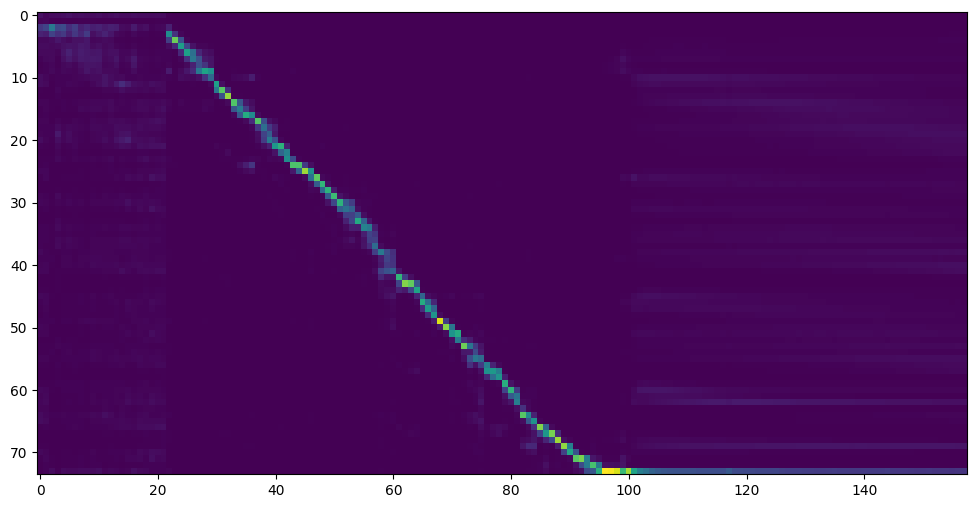
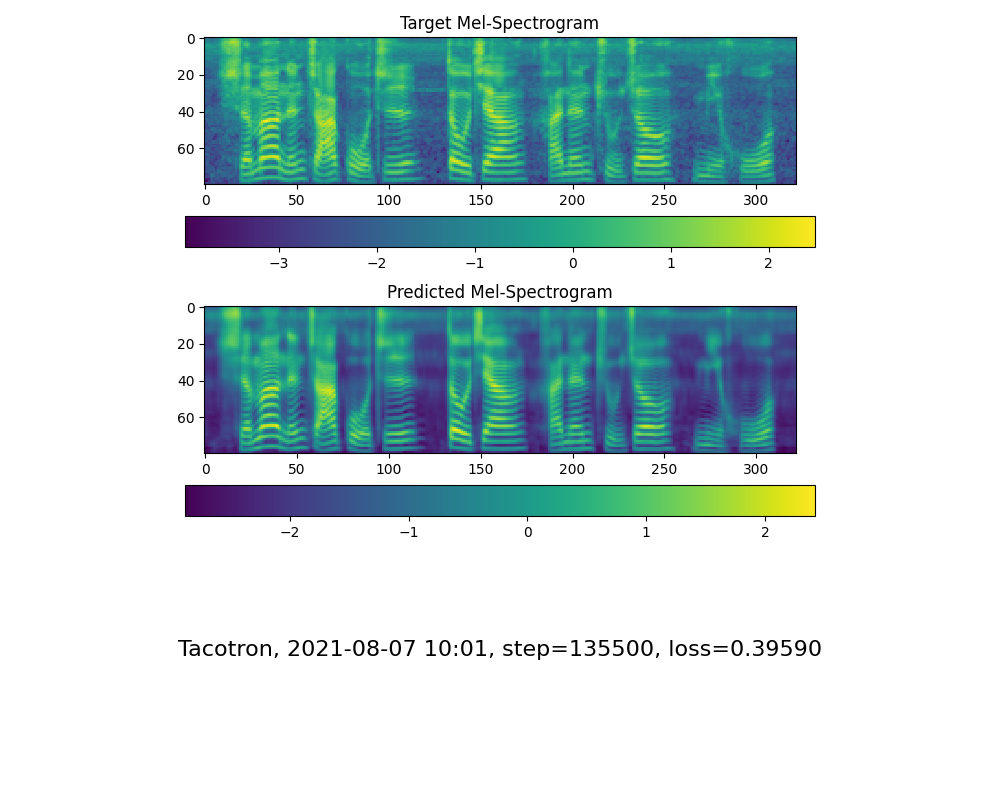
Go to next step when you see attention line show and loss meet your need in training folder synthesizer/saved_models/.
Thanks to the community, some models will be shared:
| author | Download link | Preview Video | Info |
|---|---|---|---|
| @author | https://pan.baidu.com/s/1iONvRxmkI-t1nHqxKytY3g Baidu 4j5d | 75k steps trained by multiple datasets | |
| @author | https://pan.baidu.com/s/1fMh9IlgKJlL2PIiRTYDUvw Baidu code:om7f | 25k steps trained by multiple datasets, only works under version 0.0.1 | |
| @FawenYo | https://yisiou-my.sharepoint.com/:u:/g/personal/lawrence_cheng_fawenyo_onmicrosoft_com/EWFWDHzee-NNg9TWdKckCc4BC7bK2j9cCbOWn0-_tK0nOg?e=n0gGgC | input output | 200k steps with local accent of Taiwan, only works under version 0.0.1 |
| @miven | https://pan.baidu.com/s/1PI-hM3sn5wbeChRryX-RCQ code: 2021 https://www.aliyundrive.com/s/AwPsbo8mcSP code: z2m0 | https://www.bilibili.com/video/BV1uh411B7AD/ | only works under version 0.0.1 |
note: vocoder has little difference in effect, so you may not need to train a new one.
Preprocess the data:python vocoder_preprocess.py <datasets_root> -m <synthesizer_model_path>
<datasets_root>replace with your dataset root,<synthesizer_model_path>replace with directory of your best trained models of sythensizer, e.g. sythensizersaved_modexxx
Train the wavernn vocoder:python vocoder_train.py mandarin <datasets_root>
Train the hifigan vocoderpython vocoder_train.py mandarin <datasets_root> hifigan
You can then try to run:python web.py and open it in browser, default as http://localhost:8080
You can then try the toolbox:python demo_toolbox.py -d <datasets_root>
You can then try the command:python gen_voice.py <text_file.txt> your_wav_file.wavyou may need to install cn2an by "pip install cn2an" for better digital number result.
This repository is forked from Real-Time-Voice-Cloning which only support English.
| URL | Designation | Title | Implementation source |
|---|---|---|---|
| 1803.09017 | GlobalStyleToken (synthesizer) | Style Tokens: Unsupervised Style Modeling, Control and Transfer in End-to-End Speech Synthesis | This repo |
| 2010.05646 | HiFi-GAN (vocoder) | Generative Adversarial Networks for Efficient and High Fidelity Speech Synthesis | This repo |
| 2106.02297 | Fre-GAN (vocoder) | Fre-GAN: Adversarial Frequency-consistent Audio Synthesis | This repo |
| 1806.04558 | SV2TTS | Transfer Learning from Speaker Verification to Multispeaker Text-To-Speech Synthesis | This repo |
| 1802.08435 | WaveRNN (vocoder) | Efficient Neural Audio Synthesis | fatchord/WaveRNN |
| 1703.10135 | Tacotron (synthesizer) | Tacotron: Towards End-to-End Speech Synthesis | fatchord/WaveRNN |
| 1710.10467 | GE2E (encoder) | Generalized End-To-End Loss for Speaker Verification | This repo |
| Dataset | Original Source | Alternative Sources |
|---|---|---|
| aidatatang_200zh | OpenSLR | Google Drive |
| magicdata | OpenSLR | Google Drive (Dev set) |
| aishell3 | OpenSLR | Google Drive |
| data_aishell | OpenSLR |
After unzip aidatatang_200zh, you need to unzip all the files under
aidatatang_200zhcorpustrain
<datasets_root>?If the dataset path is D:dataaidatatang_200zh,then <datasets_root> isD:data
Train the synthesizer:adjust the batch_size in synthesizer/hparams.py
//Before
tts_schedule = [(2,  1e-3,  20_000,  12),   # Progressive training schedule
                (2,  5e-4,  40_000,  12),   # (r, lr, step, batch_size)
                (2,  2e-4,  80_000,  12),   #
                (2,  1e-4, 160_000,  12),   # r = reduction factor (# of mel frames
                (2,  3e-5, 320_000,  12),   #     synthesized for each decoder iteration)
                (2,  1e-5, 640_000,  12)],  # lr = learning rate
//After
tts_schedule = [(2,  1e-3,  20_000,  8),   # Progressive training schedule
                (2,  5e-4,  40_000,  8),   # (r, lr, step, batch_size)
                (2,  2e-4,  80_000,  8),   #
                (2,  1e-4, 160_000,  8),   # r = reduction factor (# of mel frames
                (2,  3e-5, 320_000,  8),   #     synthesized for each decoder iteration)
                (2,  1e-5, 640_000,  8)],  # lr = learning rate
Train Vocoder-Preprocess the data:adjust the batch_size in synthesizer/hparams.py
//Before
### Data Preprocessing
        max_mel_frames = 900,
        rescale = True,
        rescaling_max = 0.9,
        synthesis_batch_size = 16,                  # For vocoder preprocessing and inference.
//After
### Data Preprocessing
        max_mel_frames = 900,
        rescale = True,
        rescaling_max = 0.9,
        synthesis_batch_size = 8,                  # For vocoder preprocessing and inference.
Train Vocoder-Train the vocoder:adjust the batch_size in vocoder/wavernn/hparams.py
//Before
# Training
voc_batch_size = 100
voc_lr = 1e-4
voc_gen_at_checkpoint = 5
voc_pad = 2

//After
# Training
voc_batch_size = 6
voc_lr = 1e-4
voc_gen_at_checkpoint = 5
voc_pad =2
RuntimeError: Error(s) in loading state_dict for Tacotron: size mismatch for encoder.embedding.weight: copying a param with shape torch.Size([70, 512]) from checkpoint, the shape in current model is torch.Size([75, 512]).Please refer to issue #37
Adjust the batch_size as appropriate to improve
the page file is too small to complete the operationPlease refer to this video and change the virtual memory to 100G (102400), for example : When the file is placed in the D disk, the virtual memory of the D disk is changed.
FYI, my attention came after 18k steps and loss became lower than 0.4 after 50k steps.