BRIO
1.0.0

يحتوي هذا الريبو على الكود والبيانات والنماذج المدربة لورقنا Brio: تقديم الطلب إلى تلخيص جذاب.
نقدم نموذج تدريب جديد لتلخيص الجذاب العصبي. بدلاً من استخدام التدريب MLE وحده ، نقدم مكونًا تعليميًا متناقضًا ، والذي يشجع النماذج المفعمة بالحيوية على تقدير احتمال الملخصات التي تم إنشاؤها بشكل أكثر دقة.
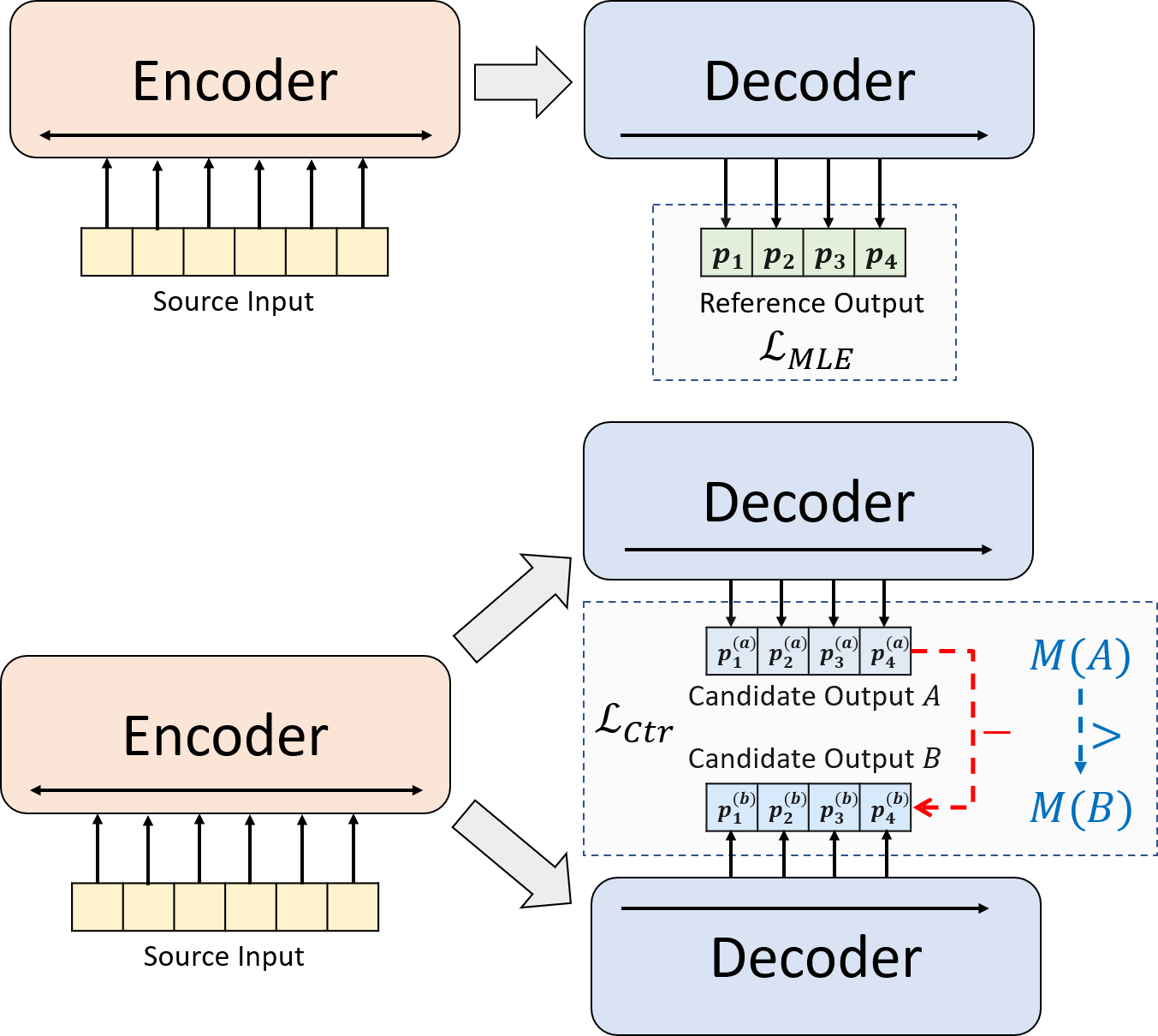
python3.8conda create --name env --file spec-file.txtpip install -r requirements.txtcompare_mt -> https://github.com/neulab/compare-mt git clone https://github.com/neulab/compare-mt.git
cd ./compare-mt
pip install -r requirements.txt
python setup.py installيعتمد كودنا على مكتبة Transformers الخاصة بـ Huggingface.
cal_rouge.py -> حساب روجconfig.py -> تكوين النموذجdata_utils.py -> dataloaderlabel_smoothing_loss.py -> تسمية خسارة تجانسmain.py -> إجراء التدريب والتقييمmodel.py -> النماذجmodeling_bart.py ، modeling_pegasus.py -> تم تعديله من مكتبة Transformers لدعم تدريب أكثر كفاءةpreprocess.py -> معالجة البيانات المسبقةutils.py -> وظائف الأداة المساعدةgen_candidate.py -> إنشاء ملخصات المرشحيجب إنشاء الدلائل التالية لتجاربنا.
./cache -> تخزين نقاط التفتيش./result -> تخزين نتائج التقييم نستخدم مجموعات البيانات التالية لتجاربنا.
يمكنك تنزيل البيانات المعالجة مسبقًا لتجاربنا على CNNDM و CNNDM (Cased) و Xsum.
بعد Donwloading ، يجب عليك إلغاء ضغط ملفات zip في هذا الدليل الجذر.
بالنسبة لـ NYT ، ستحتاج إلى الحصول على الترخيص ويرجى متابعة https://github.com/kedz/summarization-datasets للمعالجة المسبقة.
لإنشاء ملخصات المرشح من نموذج تدريب مسبقًا ، يرجى التشغيل
python gen_candidate.py --gpuid [gpuid] --src_dir [path of the input file (e.g. test.source)] --tgt_dir [path of the output file] --dataset [cnndm/xsum] للمعالجة المسبقة للبيانات ، يرجى التشغيل
python preprocess.py --src_dir [path of the raw data] --tgt_dir [output path] --split [train/val/test] --cand_num [number of candidate summaries] --dataset [cnndm/xsum/nyt] -l [lowercase if the flag is set] يجب أن يحتوي src_dir على الملفات التالية (باستخدام Test Split كمثال):
test.sourcetest.source.tokenizedtest.targettest.target.tokenizedtest.outtest.out.tokenized يجب أن يحتوي كل سطر من هذه الملفات على عينة باستثناء test.out و test.out.tokenized . على وجه الخصوص ، يجب عليك وضع ملخصات المرشح لعينة بيانات واحدة في الخطوط المجاورة في test.out و test.out.tokenized .
ملاحظات : بعد المعالجة المسبقة للبيانات ، ./cnndm/diverse/test.source عليك أيضًا وضع test.source الملف الخام test.target
نستخدم Tokenizer PTB المقدمة من Standford Corenlp (تنزيل هنا). يرجى ملاحظة أن النصوص المميزة تستخدم فقط للتقييم. لرمز ملف ، يمكنك تشغيل (باستخدام test.source كمثال)
 export CLASSPATH=/your_path/stanford-corenlp-3.8.0.jar
cat test.source | java edu.stanford.nlp.process.PTBTokenizer -ioFileList -preserveLines > test.source.tokenized
لقد قدمنا ملفات الأمثلة في ./examples/raw_data .
سيقوم إجراء المعالجة المسبقة بتخزين البيانات المعالجة كملفات JSON منفصلة في tgt_dir .
# starting from the root directory

# create folders
mkdir ./cnndm
mkdir ./cnndm/diverse
mkdir ./cnndm/diverse/test

# suppose that the raw files are at ./raw_data, the results will be saved at ./cnndm/diverse/test
# please remember to put the source file and the target file on test set into the folder, e.g. ./cnndm/diverse/test.source

python preprocess.py --src_dir ./raw_data --tgt_dir ./cnndm/diverse --split test --cand_num 16 --dataset cnndm -l
يمكنك تحديد المعلمات المفرطة في main.py نقدم أيضًا إعدادات محددة على CNNDM (NYT تشارك نفس الإعداد) و XSUM في config.py .
python main.py --cuda --gpuid [list of gpuid] --config [name of the config (cnndm/xsum)] -l سيتم حفظ نقاط التفتيش والسجل في مقلوب فرعي لـ ./cache .
python main.py --cuda --gpuid 0 1 2 3 --config cnndm -l python main.py --cuda --gpuid [list of gpuid] -l --config [name of the config (cnndm/xsum)] --model_pt [model path] يجب أن يكون مسار النموذج دليلًا فرعيًا في دليل ./cache ، على سبيل المثال cnndm/model.pt (يجب ألا يحتوي على البادئة ./cache/ ).
لحساب Rouge ، نستخدم حزمة Rouge Perl القياسية من هنا في ورقتنا. قمنا بتدوين نصوص ورمز رمزية (باستخدام Tokenizer) قبل حساب درجات Rouge. يرجى ملاحظة أن الدرجات التي تم حسابها بواسطة هذه الحزمة ستكون مختلفة بشكل رائع عن درجات Rouge المحسوبة/الإبلاغ عنها أثناء مرحلة التدريب/المتداخلة من التقييم ، لأننا نستخدم تطبيق Rouge القائم على Python لحساب تلك الدرجات لتحسين الكفاءة.
إذا واجهت مشاكل عند إعداد حزمة Rouge Perl (لسوء الحظ ، فإنها تحدث كثيرًا :() ، فيمكنك التفكير في استخدام حزمة Rouge القائمة على Python مثل الحزمة التي استخدمناها من حزمة المقارنة.
نحن نقدم البرنامج النصي للتقييم في cal_rouge.py . إذا كنت ستستخدم حزمة Perl Rouge ، فيرجى تغيير السطر 13 إلى مسار حزمة Perl Rouge الخاصة بك.
_ROUGE_PATH = '/YOUR-ABSOLUTE-PATH/ROUGE-RELEASE-1.5.5/'لتقييم أداء النموذج ، يرجى أولاً استخدام الأمر التالي لإنشاء الملخصات.
python main.py --cuda --gpuid [single gpu] --config [name of the config (cnndm/xsum)] -e --model_pt [model path] -g [evaluate the model as a generator] -r [evaluate the model as a scorer/reranker] يجب أن يكون مسار النموذج دليلًا فرعيًا في دليل ./cache ، على سبيل المثال cnndm/model.pt (يجب ألا يحتوي على البادئة ./cache/ ). سيتم حفظ الإخراج في مقلع فرعي لـ ./result له نفس اسم مجلد نقطة التفتيش.
# write the system-generated files to a file: ./result/cnndm/test.out
python main.py --cuda --gpuid 0 --config cnndm -e --model_pt cnndm/model_generation.bin -g

# tokenize the output file - > ./result/cnndm/test.out.tokenized (you may use other tokenizers)
export CLASSPATH=/your_path/stanford-corenlp-3.8.0.jar
cat ./result/cnndm/test.out | java edu.stanford.nlp.process.PTBTokenizer -ioFileList -preserveLines > ./result/cnndm/test.out.tokenized

# calculate the ROUGE scores using ROUGE Perl Package
python cal_rouge.py --ref ./cnndm/test.target.tokenized --hyp ./result/cnndm/test.out.tokenized -l

# calculate the ROUGE scores using ROUGE Python Implementation
python cal_rouge.py --ref ./cnndm/test.target.tokenized --hyp ./result/cnndm/test.out.tokenized -l -p # rerank the candidate summaries
python main.py --cuda --gpuid 0 --config cnndm -e --model_pt cnndm/model_ranking.bin -r
# calculate the ROUGE scores using ROUGE Perl Package
# ./result/cnndm/reference and ./result/cnndm/candidate are two folders containing files. Each one of those files contain one summary
python cal_rouge.py --ref ./result/cnndm/reference --hyp ./result/cnndm/candidate -l
# calculate the ROUGE scores using ROUGE Python Implementation
# ./result/cnndm/reference and ./result/cnndm/candidate are two folders containing files. Each one of those files contain one summary
python cal_rouge.py --ref ./result/cnndm/reference --hyp ./result/cnndm/candidate -l -p فيما يلي درجات Rouge التي تم تركيبها بواسطة حزمة Rouge Perl القياسية.
| روج -1 | Rouge-2 | روج ل | |
|---|---|---|---|
| بارت | 44.29 | 21.17 | 41.09 |
| Brio-Ctr | 47.28 | 22.93 | 44.15 |
| بريو مول | 47.78 | 23.55 | 44.57 |
| بريو مول (غلاف) | 48.01 | 23.76 | 44.63 |
| روج -1 | Rouge-2 | روج ل | |
|---|---|---|---|
| بيغاسوس | 47.46 | 24.69 | 39.53 |
| Brio-Ctr | 48.13 | 25.13 | 39.84 |
| بريو مول | 49.07 | 25.59 | 40.40 |
| روج -1 | Rouge-2 | روج ل | |
|---|---|---|---|
| بارت | 55.78 | 36.61 | 52.60 |
| Brio-Ctr | 55.98 | 36.54 | 52.51 |
| بريو مول | 57.75 | 38.64 | 54.54 |
يمكن العثور على مخرجات نموذجنا على مجموعات البيانات هذه في ./output .
نلخص المخرجات ونقاط التفتيش النموذجية أدناه. يمكنك تحميل نقاط التفتيش هذه باستخدام model.load_state_dict(torch.load(path_to_checkpoint)) .
| نقاط التفتيش | إخراج النموذج | الإخراج المرجعي | |
|---|---|---|---|
| CNNDM | model_generation.bin model_ranking.bin | cnndm.test.ours.out | CNNDM.Test. Reference |
| CNNDM (غلاف) | model_generation.bin | cnndm.test.ours.cased.out | cnndm.test.cased.reference |
| Xsum | model_generation.bin model_ranking.bin | xsum.test.ours.out | XSUM.Test.Reference |
يمكنك تحميل نماذجنا المدربة لتوليد من محولات Luggingface. تعد نقطة تفتيش نموذجنا على CNNDM ( Yale-LILY/brio-cnndm-uncased ، Yale-LILY/brio-cnndm-cased ) نموذج BART قياسي (أي BARTForCondCondicitalGeneration) في حين أن نقطة تفتيش نموذجنا على XSUM ( Yale-LILY/brio-xsum-cased ) هي نموذج PEGASUS المعتاد).
 from transformers import BartTokenizer , PegasusTokenizer
from transformers import BartForConditionalGeneration , PegasusForConditionalGeneration

IS_CNNDM = True # whether to use CNNDM dataset or XSum dataset
LOWER = False
ARTICLE_TO_SUMMARIZE = "Manchester United superstar Cristiano Ronaldo scored his 806th career goal in Old Trafford,
 breaking FIFA's all-time record for most goals in competitive matches in men's football history.
 It was the second of three goals the Portuguese attacker scored during the game,
 leading United to a 3-2 victory over Tottenham and finishing the day with 807 total career goals.
 The previous FIFA goal record was held by Josef Bican, with 805 goals."

# Load our model checkpoints
if IS_CNNDM :
    model = BartForConditionalGeneration . from_pretrained ( 'Yale-LILY/brio-cnndm-uncased' )
    tokenizer = BartTokenizer . from_pretrained ( 'Yale-LILY/brio-cnndm-uncased' )
else :
    model = PegasusForConditionalGeneration . from_pretrained ( 'Yale-LILY/brio-xsum-cased' )
    tokenizer = PegasusTokenizer . from_pretrained ( 'Yale-LILY/brio-xsum-cased' )

max_length = 1024 if IS_CNNDM else 512
# generation example
if LOWER :
    article = ARTICLE_TO_SUMMARIZE . lower ()
else :
    article = ARTICLE_TO_SUMMARIZE
inputs = tokenizer ([ article ], max_length = max_length , return_tensors = "pt" , truncation = True )
# Generate Summary
summary_ids = model . generate ( inputs [ "input_ids" ])
print ( tokenizer . batch_decode ( summary_ids , skip_special_tokens = True , clean_up_tokenization_spaces = False )[ 0 ])
ملاحظات : لا يمكن تحميل نقاط التفتيش الخاصة بنا على LuggingFace مباشرة إلى نموذج Pytorch ( BRIO ) في الكود لدينا لأن نموذج Pytorch الخاص بنا هو غلاف على BART/Pegasus لتحسين كفاءة التدريب. ومع ذلك ، يمكنك استخدامه لبدء نموذج Pytorch ، على سبيل المثال ،
model = BRIO ( 'Yale-LILY/brio-cnndm-uncased' , tok . pad_token_id , is_pegasus = False )




