mLoRA
1.0.0

Mlora
高效的“工廠”來構建多個洛拉適配器

Mlora(又名Multi-Lora微調)是一個開源框架,旨在使用Lora及其變體對多種大型語言模型(LLMS)進行有效的微調。 Mlora的主要特徵包括:
多個Lora適配器的同時微調。
多個洛拉適配器之間的共享基本模型。
有效的管道並行算法。
支持多種Lora變體算法和各種基本模型。
支持多種強化學習偏好一致性算法。
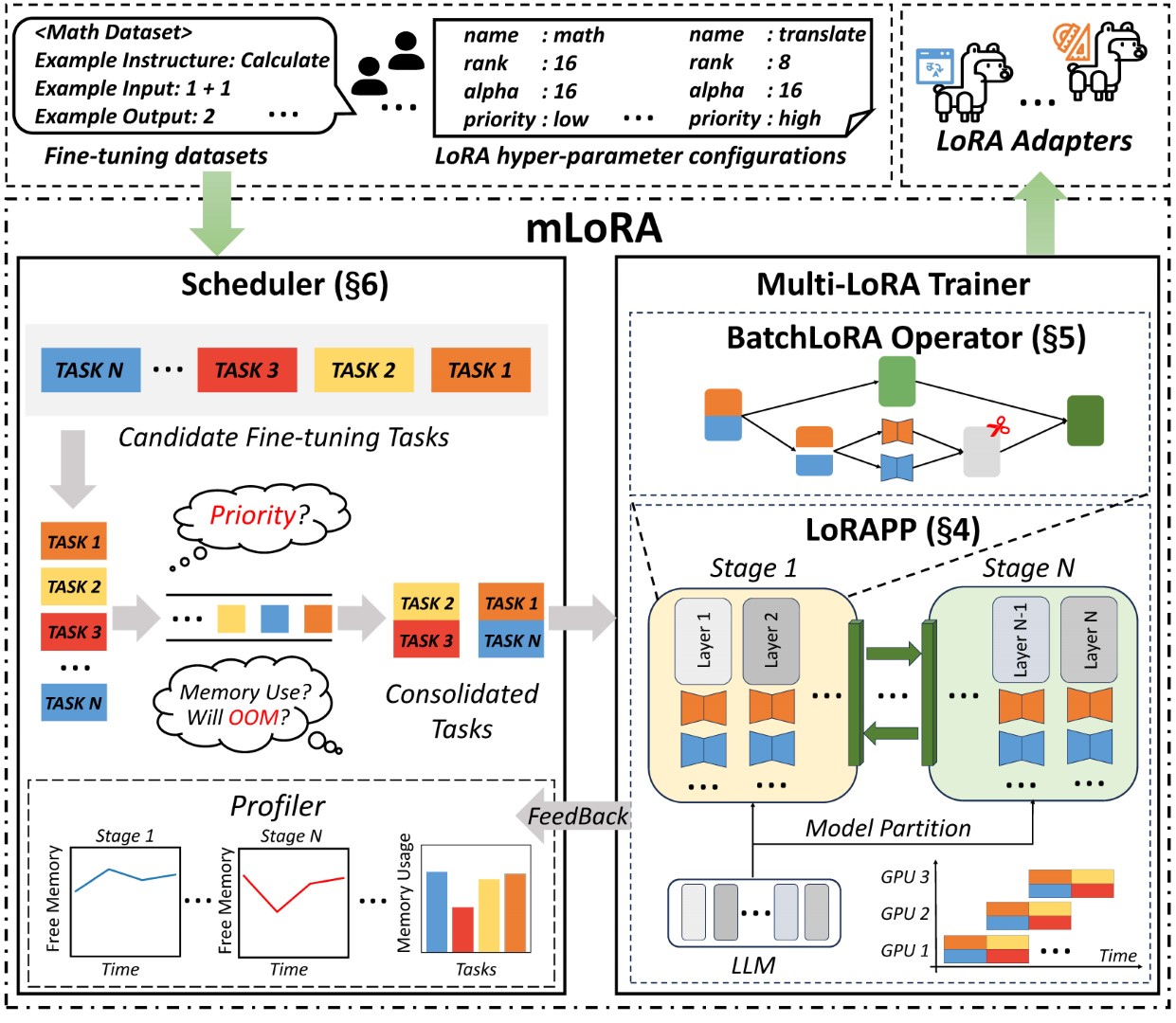
Mlora的端到端結構如圖所示:
首先,您應該克隆此存儲庫並安裝依賴項(或使用我們的映像):
 # Clone Repository
git clone https://github.com/TUDB-Labs/mLoRA
cd mLoRA
# Install requirements need the Python >= 3.12
pip install . mlora_train.py代碼是批次微調洛拉適配器的起點。
python mlora_train.py
  --base_model TinyLlama/TinyLlama-1.1B-Chat-v0.4
  --config demo/lora/lora_case_1.yaml
您可以在演示文件夾中查看適配器的配置,有關使用不同的lora變體和增強學習優先對齊算法的配置。
有關進一步詳細的用法信息,請使用--help HELP選項:
python mlora_train.py --help與Quickstart類似,在兩個節點環境中啟動的命令如下:
注意1:使用環境變量MASTER_ADDR/MASTER_PORT設置主節點。
Note2:設置平衡,指示分配給每個等級的解碼器層的數量。
 # in the first node
export MASTER_ADDR=master.svc.cluster.local
export MASTER_PORT=12355
python mlora_pp_train.py
  --base_model TinyLlama/TinyLlama-1.1B-Chat-v0.4
  --config demo/lora/lora_case_1.yaml
  --pipeline
  --device " cuda:0 "
  --rank 0
  --balance 12 13
  --no-recompute
  --precision fp32

# in the second node
export MASTER_ADDR=master.svc.cluster.local
export MASTER_PORT=12355
python mlora_pp_train.py
  --base_model TinyLlama/TinyLlama-1.1B-Chat-v0.4
  --config demo/lora/lora_case_1.yaml
  --pipeline
  --device " cuda:1 "
  --rank 1
  --balance 12 13
  --no-recompute
--precision fp32Mlora提供了官方的Docker圖像,可快速啟動和開發,該圖像可在Dockerhub軟件包註冊表中獲得。
首先,您應該拉出最新圖像(該圖像也用於開發):
docker pull yezhengmaolove/mlora:latest部署並輸入一個容器以運行Mlora:
docker run -itd --runtime nvidia --gpus all
    -v ~ /your_dataset_dir:/dataset
    -v ~ /your_model_dir:/model
    -p < host_port > :22
    --name mlora
    yezhengmaolove/mlora:latest
# when the container started, use the ssh to login
# the default password is mlora@123
ssh root@localhost -p < host_port >
# pull the latest code and run the mlora
cd /mLoRA
git pull
python mlora_train.py
  --base_model TinyLlama/TinyLlama-1.1B-Chat-v0.4
--config demo/lora/lora_case_1.yaml我們可以部署Mloar作為服務,以連續接收用戶請求並執行微調任務。
首先,您應該拉最新圖像(使用相同的圖像進行部署):
docker pull yezhengmaolove/mlora:latest部署我們的Mlora服務器:
docker run -itd --runtime nvidia --gpus all
    -v ~ /your_dataset_cache_dir:/cache
    -v ~ /your_model_dir:/model
    -p < host_port > :8000
    --name mlora_server
    -e " BASE_MODEL=TinyLlama/TinyLlama-1.1B-Chat-v0.4 "
    -e " STORAGE_DIR=/cache "
yezhengmaolove/mlora:latest /bin/bash /opt/deploy.sh部署服務後,安裝並使用mlora_cli.py與服務器進行交互。
 # install the client tools
pip install mlora-cli
# use the mlora cli tool to connect to mlora server
mlora_cli
(mLoRA) set port < host_port >
(mLoRA) set host http:// < host_ip >
# and enjoy it!!docker pull yezhengmaolove/mlora:latest
pip install mlora-cli # first, we create a cache dir in host for cache some file
mkdir ~ /cache
# second, we manually download the model weights from Hugging Face.
mkdir ~ /model && cd ~ /model
git clone https://huggingface.co/TinyLlama/TinyLlama-1.1B-Chat-v1.0
# we map port 8000 used by the mlora server to port 1288 on the host machine.
# the BASE_MODEL environment variable indicates the path of the base model used by mlora.
# the STORAGE_DIR environment variable indicates the path where datasets and lora adapters are stored.
# we use the script /opt/deploy.sh in container to start the server.
docker run -itd --runtime nvidia --gpus all
-v ~ /cache:/cache
-v ~ /model:/model
-p 1288:8000
--name mlora_server
-e " BASE_MODEL=/model/TinyLlama-1.1B-Chat-v1.0 "
-e " STORAGE_DIR=/cache "
yezhengmaolove/mlora:latest /bin/bash /opt/deploy.sh我們使用MLORA_CLI鏈接到服務器http://127.0.0.1:1288(必須使用HTTP ProtoCal)
(mLoRA) set port 1288
(mLoRA) set host http://127.0.0.1我們將斯坦福羊駝數據集用作演示,如下所示:
[{ "instruction" : " " , "input" : " " , "output" : }, { ... }](mLoRA) file upload
? file type: train data
? name: alpaca
? file path: /home/yezhengmao/alpaca-lora/alpaca_data.jsonYAML文件中的模板,然後通過模板語言Jinja2寫入,請參見Demo/stript.yaml文件
您上傳的數據文件可以視為數組數據,而數組中的元素是字典類型。我們將每個元素視為模板中的數據點。
(mLoRA) file upload
? file type: prompt template
? name: simple_prompt
? file path: /home/yezhengmao/mLoRA/demo/prompt.yaml我們創建一個數據集,數據集由數據,模板和相應的提示器組成。我們可以使用dataset showcase命令來檢查提示是否正確生成。
(mLoRA) dataset create
? name: alpaca_dataset
? train data file: alpaca
? prompt template file: simple_prompt
? prompter: instruction
? data preprocessing: default
(mLoRA) dataset showcase
? dataset name: alpaca_dataset現在,我們可以使用adapter create命令來創建用於火車的適配器。
最後,我們可以使用定義的數據集提交任務以訓練適配器。注意:您可以連續提交或終端培訓任務。使用adapter ls或task ls檢查任務的狀態
同時訓練多個適配器時,使用Mlora可以節省大量的計算和內存資源。
我們使用帶有FP32精確度的四張A6000圖形卡微調了多個Lora適配器,而無需使用檢查點和任何量化技術:
| 模型 | mlora(令牌/s) | 帶有FSDP的PEFT-LORA(令牌/s) | 帶有TP的PEFT-LORA(令牌/s) |
|---|---|---|---|
| Llama-2-7b(32FP) | 2364 | 1750 | 1500 |
| Llama-2-13b(32FP) | 1280 | oom | 875 |
| 模型 | |
|---|---|
| ✓ | 駱駝 |
| 變體 | |
|---|---|
| ✓ | Qlora,Nips,2023年 |
| ✓ | Lora+,ICML,2024 |
| ✓ | Vera,ICLR,2024 |
| ✓ | Dora,ICML,2024年 |
| 變體 | |
|---|---|
| ✓ | DPO,神經,2024年 |
| ✓ | CPO,ICML,2024 |
| ✓ | CIT,ARXIV,2024年 |
我們歡迎捐款改善此存儲庫!在提交拉動請求或問題之前,請查看貢獻指南。
分叉存儲庫。為您的功能或修復創建一個新的分支。提交拉動請求,並詳細說明您的更改。
您可以使用預先承諾來檢查您的代碼。
 # Install requirements
pip install .[ci_test]
ln -s ../../.github/workflows/pre-commit .git/hooks/pre-commit
或只需致電腳本檢查您的代碼
.github/workflows/pre-commit如果您在此存儲庫中使用代碼,請引用回購。
 @misc { m-LoRA ,
  author = { Zhengmao, Yetextsuperscript{*} and Dengchun, Litextsuperscript{*} and Jingqi, Tian and Tingfeng, Lan and Yanbo, Liang and Yexi, Jiang and Jie, Zuo and Hui, Lu and Lei, Duan and Mingjie, Tang } ,
  title = { m-LoRA: Efficient LLM Model Fine-tune and Inference via Multi-Lora Optimization } ,
  year = { 2023 } ,
  publisher = { GitHub } ,
  howpublished = { url{https://github.com/TUDB-Labs/mLoRA} } ,
  note = { textsuperscript{*}: these authors contributed equally to this work. }
}版權所有©2024保留所有權利。
該項目是根據Apache 2.0許可證獲得許可的。
 Licensed under the Apache License, Version 2.0 (the "License");
you may not use this file except in compliance with the License.
You may obtain a copy of the License at

     http://www.apache.org/licenses/LICENSE-2.0

Unless required by applicable law or agreed to in writing, software
distributed under the License is distributed on an "AS IS" BASIS,
WITHOUT WARRANTIES OR CONDITIONS OF ANY KIND, either express or implied.
See the License for the specific language governing permissions and
limitations under the License.







