data efficient gans
1.0.0


僅使用100張奧巴馬,脾氣暴躁的貓,熊貓,嘆息的橋,美第奇噴泉,天堂廟,沒有預先訓練而產生。
[new! ]使用Diffaigment-Stylegan2-Pytorch進行的Pytorch培訓現已上市!
[new! ]我們的COLAB教程已發布!
[new! ] FFHQ培訓得到了支持!請參閱Diffaugment-Stylegan2 readme。
[new! ]是時候使用generate_gif.py生成100張插值視頻了!
[new! ]我們的diffaigment-biggan-imagenet repo(用於TPU培訓)已發布!
[new! ]我們的diffaigment-biggan-cifar pytorch存儲庫已發布!
該存儲庫包含我們在Pytorch和TensorFlow中實現可區分的增強(差異)。它可用於顯著提高GAN培訓的數據效率。我們為GPU訓練提供了diffaight-stylegan2(Tensorflow)和Diffaigment-Stylegan2-Pytorch,diffaigment-biggan-cifar(pytorch),以及用於TPU訓練的diffaigment-biggan-imagenet(Tensorflow)。
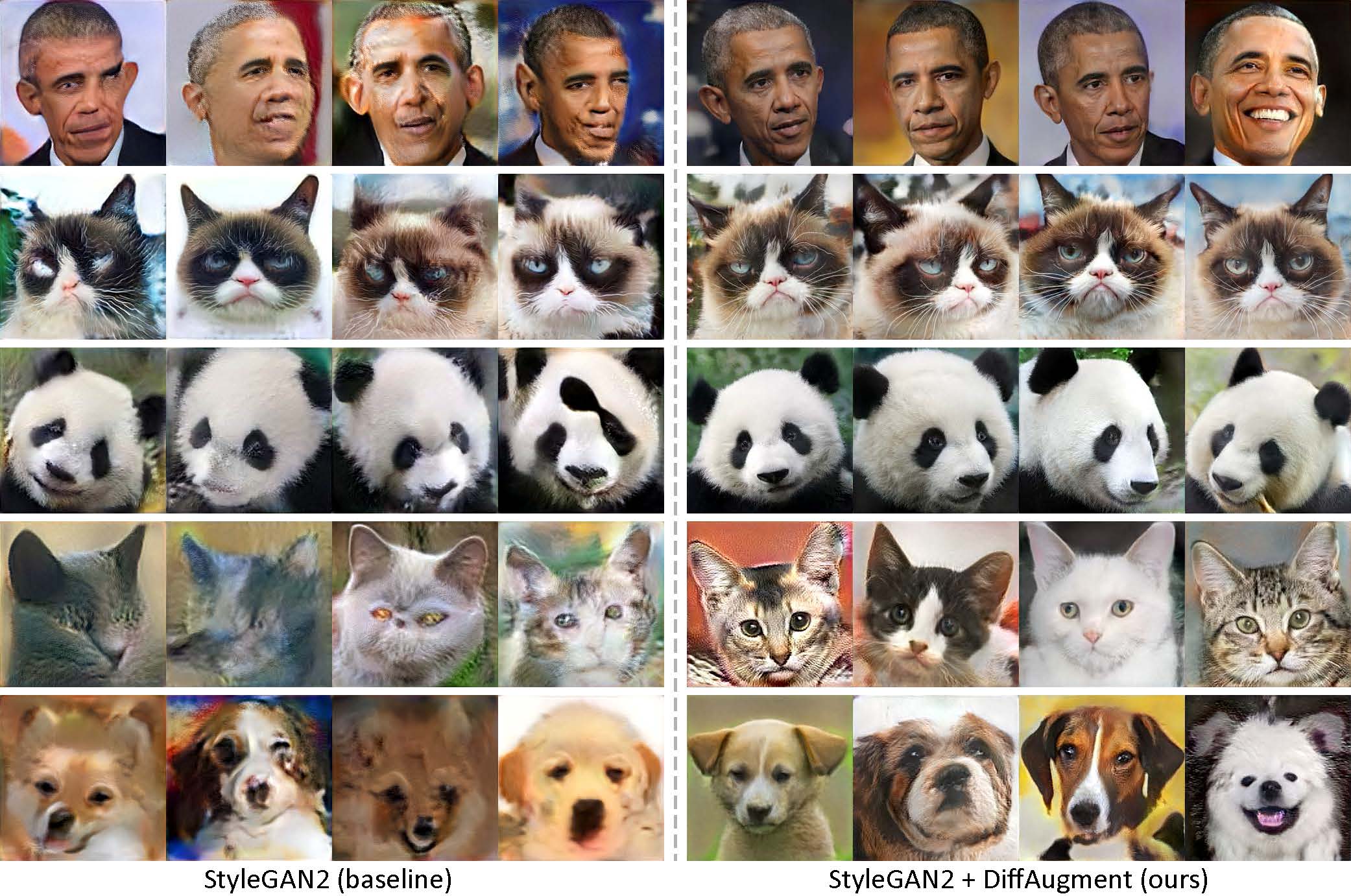
低射擊生成而沒有預訓練。使用Diffaigment,我們的模型只能使用我們收集的100張數據集,160隻貓或389狗從Animalface數據集中以256×256分辨率從我們收集的100張貓或389隻狗中產生高保真圖像。
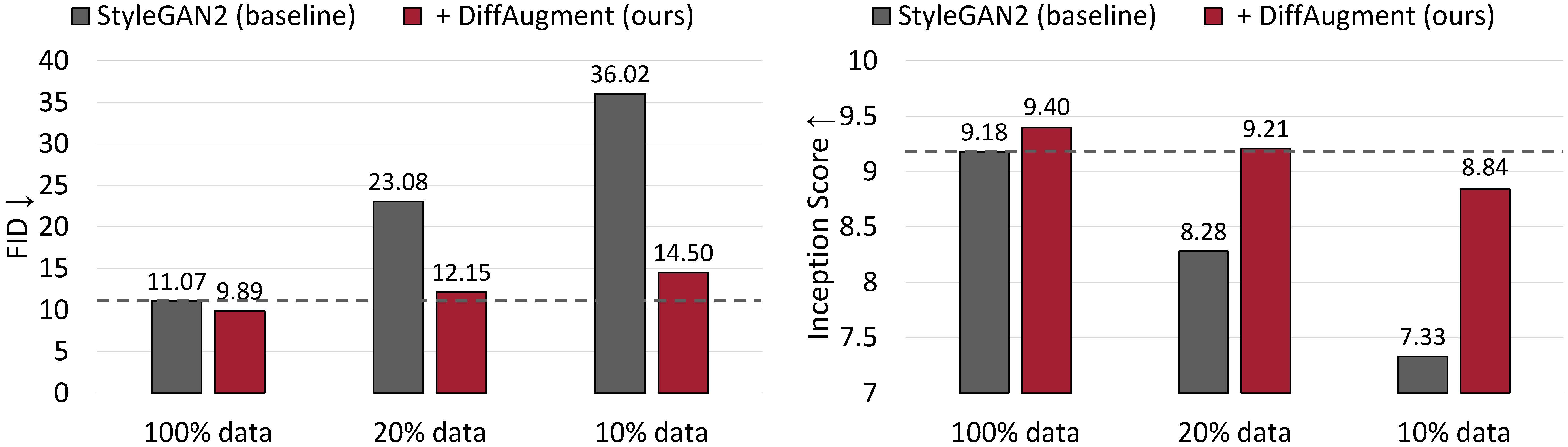
CIFAR-10的無條件產生結果。在培訓數據的情況下,StyleGAN2的性能會大大降級。通過Diffaigment,我們只能使用20%的培訓數據大致匹配其FID,並勝過其成立得分(IS)。
用於數據效率GAN培訓的可區分增強
Shengyu Zhao,Zhijian Liu,Ji Lin,Jun-Yan Zhu和Song Han
MIT,Tsinghua大學,Adobe Research,CMU
arxiv

更新D(左)和G(右)的Diffaigment概述。 Diffaigment將增強t應用於真實樣品X和生成的輸出g(z)。當我們更新G時,需要通過t(iii)對梯度進行後傳達,這需要t是可區分的輸入。
使用我們的預訓練模型生成插值視頻:
 cd DiffAugment-stylegan2
python generate_gif.py -r mit-han-lab:DiffAugment-stylegan2-100-shot-obama.pkl -o obama.gif
或培訓新型號:
python run_low_shot.py --dataset=100-shot-obama --num-gpus=4您也可以嘗試100-shot-grumpy_cat , 100-shot-panda , 100-shot-bridge_of_sighs , 100-shot-medici_fountain , 100-shot-temple_of_heaven , 100-shot-wuzhen ,或包含您自己培訓圖像的文件夾。有關依賴項和詳細信息,請參閱Diffaigment-Stylegan2 redme。
[new! ] Pytorch培訓現已上市:
 cd DiffAugment-stylegan2-pytorch
python train.py --outdir=training-runs --data=https://data-efficient-gans.mit.edu/datasets/100-shot-obama.zip --gpus=1要在100張數據集(CIFAR,FFHQ或LSUN)上運行stylegan2 + diffaigment ,請參閱Diffaigment-Stylegan2 readme或diffaighatment-stylegan2-pytorch,以獲取Pytorch版本。
請參閱diffaigment-biggan-cifar redme以在CIFAR(使用GPU)上運行Biggan + Diffaigment ,以及在Imagenet上運行的Diffaigment-biggan-Imagenet Readme(使用TPU)。
為了幫助您在自己的代碼庫中使用Diffaigment,我們在diffaugment_tf.py and diffaugment_pytorch.py中提供Tensorflow和Pytorch版本的便攜式功能操作。通常,在任何模型中都可以輕鬆地通過將每個d(x)用d(t(x))替換,其中x可以是真實的圖像或假圖像, d是歧視器,而t是差異操作。例如,
 from DiffAugment_pytorch import DiffAugment
# from DiffAugment_tf import DiffAugment
policy = 'color,translation,cutout' # If your dataset is as small as ours (e.g.,
# hundreds of images), we recommend using the strongest Color + Translation + Cutout.
# For large datasets, try using a subset of transformations in ['color', 'translation', 'cutout'].
# Welcome to discover more DiffAugment transformations!

...
# Training loop: update D
reals = sample_real_images () # a batch of real images
z = sample_latent_vectors ()
fakes = Generator ( z ) # a batch of fake images
real_scores = Discriminator ( DiffAugment ( reals , policy = policy ))
fake_scores = Discriminator ( DiffAugment ( fakes , policy = policy ))
# Calculating D's loss based on real_scores and fake_scores...
...

...
# Training loop: update G
z = sample_latent_vectors ()
fakes = Generator ( z ) # a batch of fake images
fake_scores = Discriminator ( DiffAugment ( fakes , policy = policy ))
# Calculating G's loss based on fake_scores...
...
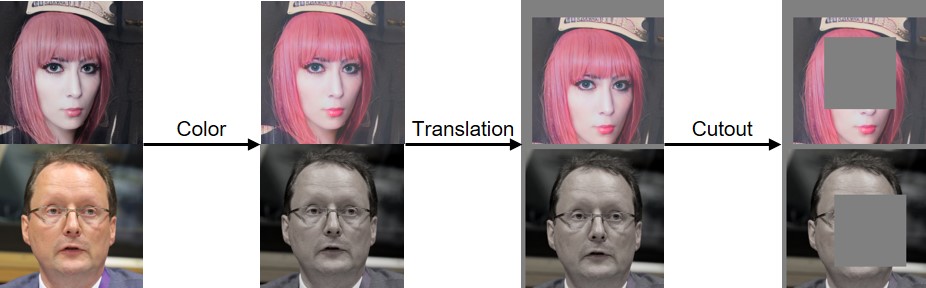
我們已經實施了顏色,翻譯和切口差異,如下所示:
如果您發現此代碼有幫助,請引用我們的論文:
 @inproceedings{zhao2020diffaugment,
  title={Differentiable Augmentation for Data-Efficient GAN Training},
  author={Zhao, Shengyu and Liu, Zhijian and Lin, Ji and Zhu, Jun-Yan and Han, Song},
  booktitle={Conference on Neural Information Processing Systems (NeurIPS)},
  year={2020}
}
我們感謝NSF職業獎#1943349,MIT-IBM Watson AI實驗室,Google,Adobe和Sony支持這項研究。 Google Tensorflow Research Cloud(TFRC)的Cloud TPU支持研究。我們感謝William S. Peebles和Yijun Li有用的評論。








