TurboTransformers
v0.5.1


微信AI具有以下特徵的開源渦輪轉換器。
Turbotransformer已應用於Tencent的多個在線BERT服務方案。例如,它為微信加速服務帶來了1.88倍的加速度,2.11倍加速到公共雲情緒分析服務,並加速了13.6倍加速度,加速了QQ建議系統。此外,它已經應用於構建諸如修道,搜索和建議之類的服務。
下表是渦輪變壓器和相關工作的比較。
| 相關作品 | 表現 | 需要預處理 | 可變長度 | 用法 |
|---|---|---|---|---|
| Pytorch JIT(CPU) | 快速地 | 是的 | 不 | 難的 |
| 張力(GPU) | 快速地 | 是的 | 不 | 難的 |
| TF式變壓器(GPU) | 快速地 | 是的 | 不 | 難的 |
| onnx-luntime(CPU/GPU) | 快速/快速 | 不 | 是的 | 中等的 |
| TensorFlow-1.x(CPU/GPU) | 緩慢/中等 | 是的 | 不 | 簡單的 |
| Pytorch(CPU/GPU) | 中/中等 | 不 | 是的 | 簡單的 |
| 渦輪轉化器(CPU/GPU) | 最快/最快 | 不 | 是的 | 簡單的 |
我們目前支持以下變壓器模型。
 import torch
import transformers
import turbo_transformers

if __name__ == "__main__" :
    turbo_transformers . set_num_threads ( 4 )
    torch . set_num_threads ( 4 )
    model_id = "bert-base-uncased"
    model = transformers . BertModel . from_pretrained ( model_id )
    model . eval ()
    cfg = model . config

    input_ids = torch . tensor (
        ([ 12166 , 10699 , 16752 , 4454 ], [ 5342 , 16471 , 817 , 16022 ]),
        dtype = torch . long )
    position_ids = torch . tensor (([ 1 , 0 , 0 , 0 ], [ 1 , 1 , 1 , 0 ]), dtype = torch . long )
    segment_ids = torch . tensor (([ 1 , 1 , 1 , 0 ], [ 1 , 0 , 0 , 0 ]), dtype = torch . long )
    torch . set_grad_enabled ( False )
    torch_res = model (
        input_ids , position_ids = position_ids , token_type_ids = segment_ids
    )  # sequence_output, pooled_output, (hidden_states), (attentions)
    torch_seqence_output = torch_res [ 0 ][:, 0 , :]
    tt_model = turbo_transformers . BertModel . from_torch ( model )
    res = tt_model (
        input_ids , position_ids = position_ids ,
        token_type_ids = segment_ids )  # pooled_output, sequence_output
tt_seqence_output = res [ 0 ]請注意,構建腳本僅適用於特定的OS和軟件(Pytorch,OpenNMT,Transformers等)版本。請根據您的需要調整它們。
git clone https://github.com/Tencent/TurboTransformers --recursive
 sh tools/build_docker_cpu.sh
# optional: If you want to compare the performance of onnxrt-mkldnn during benchmark, you need to set BUILD_TYPE=dev to compile onnxruntime into the docker image, as follows
env BUILD_TYPE=dev sh tools/build_docker_cpu.sh
docker run -it --rm --name=turbort -v $PWD:/workspace your_image_name /bin/bash
方法1:我想unitest
 cd /workspace
sh tools/build_and_run_unittests.sh $PWD -DWITH_GPU=OFF
# you can switch between Openblas and MKL by modifying this line in CMakeList.txt
# set(BLAS_PROVIDER "mkl" CACHE STRING "Set the blas provider library, in [openblas, mkl, blis]")
方法2:我不想unitest
 cd /workspace
mkdir -p build && cd build
cmake .. -DWITH_GPU=OFF
make -j 4
pip install `find . -name *whl`
 cd benchmark
bash run_benchmark.sh
 sh tool/build_conda_package.sh
# The conda package will be in /workspace/dist/*.tar.bz2
# When using turbo_transformers in other environments outside this container: conda install your_root_path/dist/*.tar.bz2
我們還準備了包含CPU版本的Turbotransformers以及其他相關作品的Docker映像,即onnxrt v1.2.0和dockerhub上的pytorch-jit
docker pull thufeifeibear/turbo_transformers_cpu:latest
git clone https://github.com/Tencent/TurboTransformers --recursive
 # You can modify the environment variables in the script to specify the cuda version and operating system version
sh tools/build_docker_gpu.sh $PWD
nvidia-docker run --gpus all --net=host --rm -it -v $PWD:/workspace -v /etc/passwd:/etc/passwd --name=your_container_name REPOSITORY:TAG
# for example: nvidia-docker run --gpus all --net=host --rm -it -v $PWD:/workspace -v /etc/passwd:/etc/passwd --name=turbo_gpu_env thufeifeibear:0.1.1-cuda9.0-ubuntu16.04-gpu-dev
 cd /workspace
sh tools/build_and_run_unittests.sh $PWD -DWITH_GPU=ON
 cd benchmark
bash gpu_run_benchmark.sh
我們還準備了包含GPU版本的Turbotransformers的Docker映像。
docker pull thufeifeibear/turbo_transformers_gpu:latest
張量芯可以在GPU上加速計算。默認情況下,在turbotransformer中被禁用。如果要打開它,在編譯代碼之前,請使用_module_benchmakr在cmakelists.txt中設置選項。
option(WITH_TENSOR_CORE "Use Tensor core to accelerate" ON)
Turbotransformer提供C ++ / Python API接口。我們希望盡力適應各種在線環境,以減少用戶開發的困難。
使用渦輪增壓的第一步是加載預訓練的模型。我們提供了一種在擁抱面/變壓器中加載Pytorch和Tensorflow預訓練模型的方法。特定的轉換方法是使用./tool中的相應腳本將預訓練的模型轉換為NPZ格式文件,而Turbo使用C ++或Python接口來加載NPZ格式模型。特別是,我們認為大多數預訓練的模型都採用Pytorch格式,並與Python一起使用。我們提供了直接在Python中呼叫的快捷方式,以供Pytorch保存的模型。
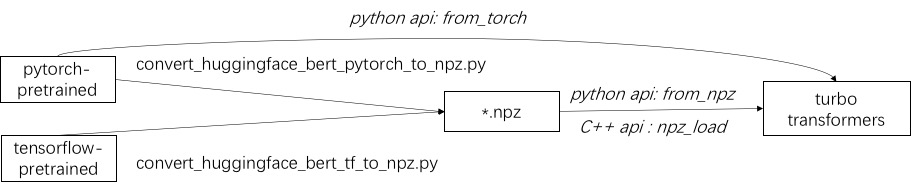
請參閱./example/python中支持的模型的示例。 turbonlp/translate-demo顯示了在翻譯任務中應用渦輪變壓器的演示。由於BERT加速度的用戶始終需要為任務進行自定義的後處理過程,因此我們提供了一個如何編寫序列分類應用程序的示例。
有關一個示例,請參閱./example/cpp。我們的示例提供了GPU和兩個CPU多線程調用方法。一種是使用多個線程進行一個BERT推斷。另一個是進行多個BERT推斷,每種推理都使用一個線程。用戶可以通過add_subdirectory將渦輪轉化器鏈接到您的代碼。
通常,將一批不同長度的請求送入BERT模型以進行推理,需要零填充才能使所有請求具有相同的長度。例如,服務長度列表(100、10、50)的請求列表,您需要一個預處理階段才能將其作為長度(100、100、100)添加。這樣,浪費了最後兩個序列計算的90%和50%。如有效變壓器所示,不需要填充輸入張量。作為替代方案,您只需要在多頭注意力中添加批處理操作,這使得對整個BERT計算的少量提高。因此,大多數GEMM操作都是在沒有零蓋的情況下處理的。 Turbo提供了一個模型,即BertModelSmartBatch包括智能批處理技術。該示例以.//example/python/bert_smart_pad.py表示。
如何知道代碼的熱點?
如何添加新圖層?
目前(2020年6月),在不久的將來,我們將增加對低精度模型(CPU INT8,GPU FP16)的支持。期待您的貢獻!
BSD 3條規定許可證
如果您在研究出版物中使用Turbotrandformer,請引用本文。
 @inproceedings{fang2021turbotransformers,
  title={TurboTransformers: an efficient GPU serving system for transformer models},
  author={Fang, Jiarui and Yu, Yang and Zhao, Chengduo and Zhou, Jie},
  booktitle={Proceedings of the 26th ACM SIGPLAN Symposium on Principles and Practice of Parallel Programming},
  pages={389--402},
  year={2021}
}
可以在分支ppopp21_artifact_centos上找到紙張的工件。
儘管我們建議您在GitHub問題上發布問題,但您也可以加入我們的Turbo用戶組。





