TurboTransformers
v0.5.1


WeChat AIは、次の特性を持つオープンソースターボトランフォーザーです。
TurboTransformersは、Tencentの複数のオンラインBERTサービスシナリオに適用されています。たとえば、WeChat FAQサービスに1.88倍の加速、パブリッククラウドセンチメント分析サービスへの2.11倍の加速、QQ推奨システムへの13.6倍の加速をもたらします。さらに、それは既に、窒息、検索、推奨などのサービスを構築するために適用されています。
次の表は、ターボトランスフォーマーと関連する作業の比較です。
| 関連作品 | パフォーマンス | プリプロースが必要です | 可変長 | 使用法 |
|---|---|---|---|---|
| Pytorch JIT(CPU) | 速い | はい | いいえ | 難しい |
| Tensort(GPU) | 速い | はい | いいえ | 難しい |
| TF速いトランス(GPU) | 速い | はい | いいえ | 難しい |
| onnx-runtime(cpu/gpu) | 高速/高速 | いいえ | はい | 中くらい |
| Tensorflow-1.x(CPU/GPU) | 遅い/中程度 | はい | いいえ | 簡単 |
| Pytorch(CPU/GPU) | 中/媒体 | いいえ | はい | 簡単 |
| ターボ変換(CPU/GPU) | 最速/最速 | いいえ | はい | 簡単 |
現在、次の変圧器モデルをサポートしています。
 import torch
import transformers
import turbo_transformers

if __name__ == "__main__" :
    turbo_transformers . set_num_threads ( 4 )
    torch . set_num_threads ( 4 )
    model_id = "bert-base-uncased"
    model = transformers . BertModel . from_pretrained ( model_id )
    model . eval ()
    cfg = model . config

    input_ids = torch . tensor (
        ([ 12166 , 10699 , 16752 , 4454 ], [ 5342 , 16471 , 817 , 16022 ]),
        dtype = torch . long )
    position_ids = torch . tensor (([ 1 , 0 , 0 , 0 ], [ 1 , 1 , 1 , 0 ]), dtype = torch . long )
    segment_ids = torch . tensor (([ 1 , 1 , 1 , 0 ], [ 1 , 0 , 0 , 0 ]), dtype = torch . long )
    torch . set_grad_enabled ( False )
    torch_res = model (
        input_ids , position_ids = position_ids , token_type_ids = segment_ids
    )  # sequence_output, pooled_output, (hidden_states), (attentions)
    torch_seqence_output = torch_res [ 0 ][:, 0 , :]
    tt_model = turbo_transformers . BertModel . from_torch ( model )
    res = tt_model (
        input_ids , position_ids = position_ids ,
        token_type_ids = segment_ids )  # pooled_output, sequence_output
tt_seqence_output = res [ 0 ]建物のスクリプトは、特定のOSおよびソフトウェア(Pytorch、OpenNMT、Transformerなど)バージョンにのみ適用されることに注意してください。あなたのニーズに応じてそれらを調整してください。
git clone https://github.com/Tencent/TurboTransformers --recursive
 sh tools/build_docker_cpu.sh
# optional: If you want to compare the performance of onnxrt-mkldnn during benchmark, you need to set BUILD_TYPE=dev to compile onnxruntime into the docker image, as follows
env BUILD_TYPE=dev sh tools/build_docker_cpu.sh
docker run -it --rm --name=turbort -v $PWD:/workspace your_image_name /bin/bash
方法1:ユニットにしたい
 cd /workspace
sh tools/build_and_run_unittests.sh $PWD -DWITH_GPU=OFF
# you can switch between Openblas and MKL by modifying this line in CMakeList.txt
# set(BLAS_PROVIDER "mkl" CACHE STRING "Set the blas provider library, in [openblas, mkl, blis]")
方法2:ユニットにしたくありません
 cd /workspace
mkdir -p build && cd build
cmake .. -DWITH_GPU=OFF
make -j 4
pip install `find . -name *whl`
 cd benchmark
bash run_benchmark.sh
 sh tool/build_conda_package.sh
# The conda package will be in /workspace/dist/*.tar.bz2
# When using turbo_transformers in other environments outside this container: conda install your_root_path/dist/*.tar.bz2
また、TurboTransformersのCPUバージョンを含むDocker画像、およびその他の関連作品、すなわちDockerHubのPytorch-Jitを含むDocker画像も準備しました。
docker pull thufeifeibear/turbo_transformers_cpu:latest
git clone https://github.com/Tencent/TurboTransformers --recursive
 # You can modify the environment variables in the script to specify the cuda version and operating system version
sh tools/build_docker_gpu.sh $PWD
nvidia-docker run --gpus all --net=host --rm -it -v $PWD:/workspace -v /etc/passwd:/etc/passwd --name=your_container_name REPOSITORY:TAG
# for example: nvidia-docker run --gpus all --net=host --rm -it -v $PWD:/workspace -v /etc/passwd:/etc/passwd --name=turbo_gpu_env thufeifeibear:0.1.1-cuda9.0-ubuntu16.04-gpu-dev
 cd /workspace
sh tools/build_and_run_unittests.sh $PWD -DWITH_GPU=ON
 cd benchmark
bash gpu_run_benchmark.sh
また、TurboTransformersのGPUバージョンを含むDocker画像も準備しました。
docker pull thufeifeibear/turbo_transformers_gpu:latest
テンソルコアは、GPUのコンピューティングを加速できます。デフォルトでは、ターボトランフォーマーで無効になっています。コンパイルする前に、電源を入れたい場合は、with_module_benchmakr on in cmakelists.txtでオプションを設定します
option(WITH_TENSOR_CORE "Use Tensor core to accelerate" ON)
TurboTransformersは、C ++ / Python APIインターフェイスを提供します。ユーザーの開発の難しさを減らすために、さまざまなオンライン環境に適応するために最善を尽くしたいと考えています。
ターボを使用する最初のステップは、事前に訓練されたモデルをロードすることです。 Huggingface/TransformersにPytorchとTensorflowの事前訓練モデルをロードする方法を提供します。特定の変換方法は、対応するスクリプトを./toolsで使用して事前に訓練されたモデルをNPZ形式ファイルに変換することであり、TurboはC ++またはPythonインターフェイスを使用してNPZ形式モデルをロードします。特に、事前に訓練されたモデルのほとんどはPytorch形式であり、Pythonで使用されていると考えています。 Pytorch保存モデルのPythonで直接電話をかけるためのショートカットを提供します。
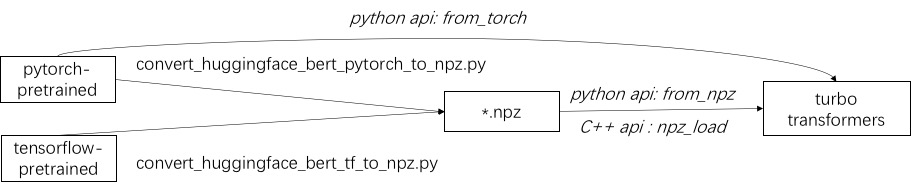
./example/pythonのサポートされているモデルの例を参照してください。 turbonlp/translate-demoは、翻訳タスクにターボトランファーダーを適用するデモを示しています。 Bert Accelerationのユーザーは常にタスクにカスタマイズされたポスト処理プロセスを必要とするため、シーケンス分類アプリケーションの作成方法の例を提供します。
例については、./example/cppを参照してください。私たちの例は、GPUと2つのCPUマルチスレッド呼び出し方法を提供します。 1つは、複数のスレッドを使用して1つのバート推論を行うことです。もう1つは、複数のBert推論を行うことであり、それぞれが1つのスレッドを使用しています。ユーザーは、add_subdirectoryを介してターボ変換器をコードにリンクできます。
通常、さまざまな長さのリクエストを推論のためにBERTモデルに供給するために、すべてのリクエストを同じ長さにするためにゼロパディングが必要です。たとえば、長さのリスト(100、10、50)のリストをリクエストするには、長さ(100、100、100)としてパディングするための前処理段階が必要です。このようにして、最後の2つのシーケンスの計算の90%と50%が無駄になります。効果的な変圧器に示されているように、入力テンソルをパッドする必要はありません。別の方法として、Batt-GEMM操作をマルチヘッドの注意を払うだけで、BERT計算全体のわずかな推進力にaccoutsしている必要があります。したがって、GEMM操作のほとんどは、ゼロパッジングなしで処理されます。 Turboは、スマートバッチング技術を含むBertModelSmartBatchとしてモデルを提供します。この例は、./example/python/bert_smart_pad.pyで表示されます。
あなたのコードのホットスポットを知る方法は?
新しいレイヤーを追加する方法は?
現在(2020年6月)、近い将来、低精度モデル(CPU INT8、GPU FP16)のサポートを追加します。あなたの貢献を楽しみにしています!
BSD 3-Clauseライセンス
研究出版物でターボトランファーバーを使用する場合、この論文を引用してください。
 @inproceedings{fang2021turbotransformers,
  title={TurboTransformers: an efficient GPU serving system for transformer models},
  author={Fang, Jiarui and Yu, Yang and Zhao, Chengduo and Zhou, Jie},
  booktitle={Proceedings of the 26th ACM SIGPLAN Symposium on Principles and Practice of Parallel Programming},
  pages={389--402},
  year={2021}
}
論文のアーティファクトは、 ppopp21_artifact_centosで見つけることができます。
GitHubの問題に問題を投稿することをお勧めしますが、Turboユーザーグループに参加することもできます。





