TurboTransformers
v0.5.1


Wechat AI 다음 특성을 가진 개방형 터보 트랜스 정보.
터보 트랜스 정보는 Tencent의 여러 온라인 버트 서비스 시나리오에 적용되었습니다. 예를 들어, WeChat FAQ 서비스에 1.88 배의 가속도, Public Cloud Sentiment Analysis Service에 2.11 배의 가속도, QQ 권장 시스템에 13.6 배의 가속도를 제공합니다. 또한, 그것은 이미 징계, 검색 및 권장 사항과 같은 서비스를 구축하기 위해 적용되었습니다.
다음 표는 터보 트랜스 정보와 관련 작업을 비교 한 것입니다.
| 관련 작품 | 성능 | 전처리가 필요합니다 | 가변 길이 | 용법 |
|---|---|---|---|---|
| Pytorch Jit (CPU) | 빠른 | 예 | 아니요 | 딱딱한 |
| Tensorrt (GPU) | 빠른 | 예 | 아니요 | 딱딱한 |
| TF 빠른 변압기 (GPU) | 빠른 | 예 | 아니요 | 딱딱한 |
| onnx-runtime (CPU/GPU) | 빠른/빠른 | 아니요 | 예 | 중간 |
| Tensorflow-1.x (CPU/GPU) | 느린/중간 | 예 | 아니요 | 쉬운 |
| Pytorch (CPU/GPU) | 중간/매체 | 아니요 | 예 | 쉬운 |
| 터보 변환기 (CPU/GPU) | 가장 빠른/빠른 | 아니요 | 예 | 쉬운 |
우리는 현재 다음 변압기 모델을 지원합니다.
 import torch
import transformers
import turbo_transformers

if __name__ == "__main__" :
    turbo_transformers . set_num_threads ( 4 )
    torch . set_num_threads ( 4 )
    model_id = "bert-base-uncased"
    model = transformers . BertModel . from_pretrained ( model_id )
    model . eval ()
    cfg = model . config

    input_ids = torch . tensor (
        ([ 12166 , 10699 , 16752 , 4454 ], [ 5342 , 16471 , 817 , 16022 ]),
        dtype = torch . long )
    position_ids = torch . tensor (([ 1 , 0 , 0 , 0 ], [ 1 , 1 , 1 , 0 ]), dtype = torch . long )
    segment_ids = torch . tensor (([ 1 , 1 , 1 , 0 ], [ 1 , 0 , 0 , 0 ]), dtype = torch . long )
    torch . set_grad_enabled ( False )
    torch_res = model (
        input_ids , position_ids = position_ids , token_type_ids = segment_ids
    )  # sequence_output, pooled_output, (hidden_states), (attentions)
    torch_seqence_output = torch_res [ 0 ][:, 0 , :]
    tt_model = turbo_transformers . BertModel . from_torch ( model )
    res = tt_model (
        input_ids , position_ids = position_ids ,
        token_type_ids = segment_ids )  # pooled_output, sequence_output
tt_seqence_output = res [ 0 ]건물 스크립트는 특정 OS 및 소프트웨어 (Pytorch, OpenNMT, Transformers 등) 버전에만 적용됩니다. 필요에 따라 조정하십시오.
git clone https://github.com/Tencent/TurboTransformers --recursive
 sh tools/build_docker_cpu.sh
# optional: If you want to compare the performance of onnxrt-mkldnn during benchmark, you need to set BUILD_TYPE=dev to compile onnxruntime into the docker image, as follows
env BUILD_TYPE=dev sh tools/build_docker_cpu.sh
docker run -it --rm --name=turbort -v $PWD:/workspace your_image_name /bin/bash
방법 1 : 단일 제사를 원합니다
 cd /workspace
sh tools/build_and_run_unittests.sh $PWD -DWITH_GPU=OFF
# you can switch between Openblas and MKL by modifying this line in CMakeList.txt
# set(BLAS_PROVIDER "mkl" CACHE STRING "Set the blas provider library, in [openblas, mkl, blis]")
방법 2 : 나는 Unitest를 원하지 않습니다
 cd /workspace
mkdir -p build && cd build
cmake .. -DWITH_GPU=OFF
make -j 4
pip install `find . -name *whl`
 cd benchmark
bash run_benchmark.sh
 sh tool/build_conda_package.sh
# The conda package will be in /workspace/dist/*.tar.bz2
# When using turbo_transformers in other environments outside this container: conda install your_root_path/dist/*.tar.bz2
또한 Turbotransformers의 CPU 버전과 다른 관련 작품 (예 : Onnxrt v1.2.0 및 pytorch-jit on dockerhub)이 포함 된 Docker 이미지를 준비했습니다.
docker pull thufeifeibear/turbo_transformers_cpu:latest
git clone https://github.com/Tencent/TurboTransformers --recursive
 # You can modify the environment variables in the script to specify the cuda version and operating system version
sh tools/build_docker_gpu.sh $PWD
nvidia-docker run --gpus all --net=host --rm -it -v $PWD:/workspace -v /etc/passwd:/etc/passwd --name=your_container_name REPOSITORY:TAG
# for example: nvidia-docker run --gpus all --net=host --rm -it -v $PWD:/workspace -v /etc/passwd:/etc/passwd --name=turbo_gpu_env thufeifeibear:0.1.1-cuda9.0-ubuntu16.04-gpu-dev
 cd /workspace
sh tools/build_and_run_unittests.sh $PWD -DWITH_GPU=ON
 cd benchmark
bash gpu_run_benchmark.sh
또한 Turbotransformers의 GPU 버전을 포함하는 Docker 이미지를 준비했습니다.
docker pull thufeifeibear/turbo_transformers_gpu:latest
텐서 코어는 GPU의 컴퓨팅을 가속화 할 수 있습니다. Turbotransformers에서는 기본적으로 비활성화됩니다. CMAKELISTS.TXT에서 _MODULE_BENCHMAKR을 켜고 옵션을 설정하기 전에 켜고 싶다면 옵션을 설정하십시오.
option(WITH_TENSOR_CORE "Use Tensor core to accelerate" ON)
Turbotransformers는 C ++ / Python API 인터페이스를 제공합니다. 우리는 사용자의 개발의 어려움을 줄이기 위해 다양한 온라인 환경에 적응하기 위해 최선을 다하기를 희망합니다.
터보 사용의 첫 번째 단계는 미리 훈련 된 모델을로드하는 것입니다. 우리는 Pytorch 및 Tensorflow 미리 훈련 된 모델을 Huggingface/Transformers에로드하는 방법을 제공합니다. 특정 변환 방법은 ./tools의 해당 스크립트를 사용하여 미리 훈련 된 모델을 NPZ 형식 파일로 변환하는 것입니다. Turbo는 C ++ 또는 Python 인터페이스를 사용하여 NPZ 형식 모델을로드합니다. 특히, 우리는 미리 훈련 된 모델의 대부분이 Pytorch 형식이며 Python과 함께 사용된다고 생각합니다. 우리는 Pytorch 저장 모델을 위해 Python에서 직접 호출하기위한 바로 가기를 제공합니다.
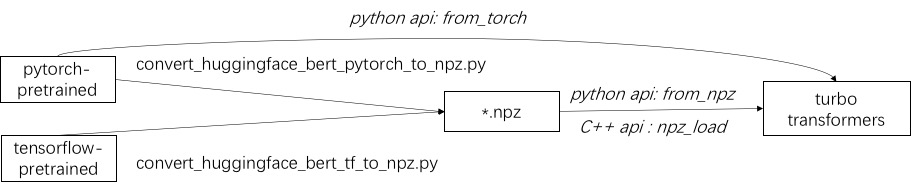
./example/python의 지원 모델의 예를 참조하십시오. Turbonlp/Translate-Demo는 번역 작업에 터보 트랜스 former를 적용하는 데모를 보여줍니다. Bert Acceleration 사용자는 항상 작업을위한 맞춤형 사후 처리 프로세스가 필요하므로 시퀀스 분류 응용 프로그램을 작성하는 방법의 예를 제공합니다.
예를 들어 ./example/cpp를 참조하십시오. 이 예제는 GPU와 2 개의 CPU 멀티 스레드 호출 방법을 제공합니다. 하나는 여러 스레드를 사용하여 하나의 버트 추론을 수행하는 것입니다. 다른 하나는 여러 개의 버트 추론을하는 것이며, 각 스레드는 하나의 스레드를 사용하는 것입니다. 사용자는 add_subdirectory를 통해 터보 전환기를 코드에 연결할 수 있습니다.
일반적으로 추론을 위해 다른 길이의 요청을 버트 모델에 공급하려면 모든 요청이 같은 길이를 갖도록 제로 패딩이 필요합니다. 예를 들어, 서빙 요청 목록 (100, 10, 50)은 길이 (100, 100, 100)로 패드하려면 전처리 단계가 필요합니다. 이러한 방식으로 마지막 두 시퀀스의 계산의 90% 및 50%가 낭비됩니다. 효과적인 변압기에 표시된 바와 같이, 입력 텐서를 패드 할 필요는 없습니다. 대안으로, 당신은 방수 보석 조작을 멀티 헤드 관심사 내부에 배치해야합니다. 따라서 대부분의 GEMM 작업은 제로 패딩없이 처리됩니다. Turbo는 스마트 배치 기술을 포함하여 BertModelSmartBatch 와 같은 모델을 제공합니다. 예제는 ./example/python/bert_smart_pad.py에 나와 있습니다.
코드의 핫스팟을 아는 방법?
새 레이어를 추가하는 방법?
현재 (2020 년 6 월), 가까운 시일 내에 저렴한 모델 (CPU INT8, GPU FP16)에 대한 지원을 추가 할 것입니다. 당신의 기여를 기대합니다!
BSD 3-Clause 라이센스
연구 간행물에서 터보 트랜스 정보를 사용하는 경우이 백서를 인용하십시오.
 @inproceedings{fang2021turbotransformers,
  title={TurboTransformers: an efficient GPU serving system for transformer models},
  author={Fang, Jiarui and Yu, Yang and Zhao, Chengduo and Zhou, Jie},
  booktitle={Proceedings of the 26th ACM SIGPLAN Symposium on Principles and Practice of Parallel Programming},
  pages={389--402},
  year={2021}
}
논문의 아티팩트는 분기 ppopp21_artifact_centos 에서 찾을 수 있습니다.
GitHub 문제에 문제를 게시하는 것이 좋습니다. Turbo 사용자 그룹에도 참여할 수도 있습니다.





