bertviz
v1.4.0

Bertviz是一種交互式工具,可在變壓器語言模型(例如BERT,GPT2或T5)中可視化注意力。它可以通過支持大多數擁抱面模型的簡單Python API在Jupyter或Colab筆記本中運行。 Bertviz擴展了Llion Jones的Tensor2Tensor可視化工具,提供了多種視圖,每個視圖都為註意機制提供了獨特的鏡頭。
在Twitter上獲取有關此的更新和相關項目。
頭視圖可視化同一層中一個或多個注意力頭的注意力。它基於Llion Jones的出色Tensor2Tensor可視化工具。
?在交互式COLAB教程中嘗試使用頭視圖(所有可視化預載)。
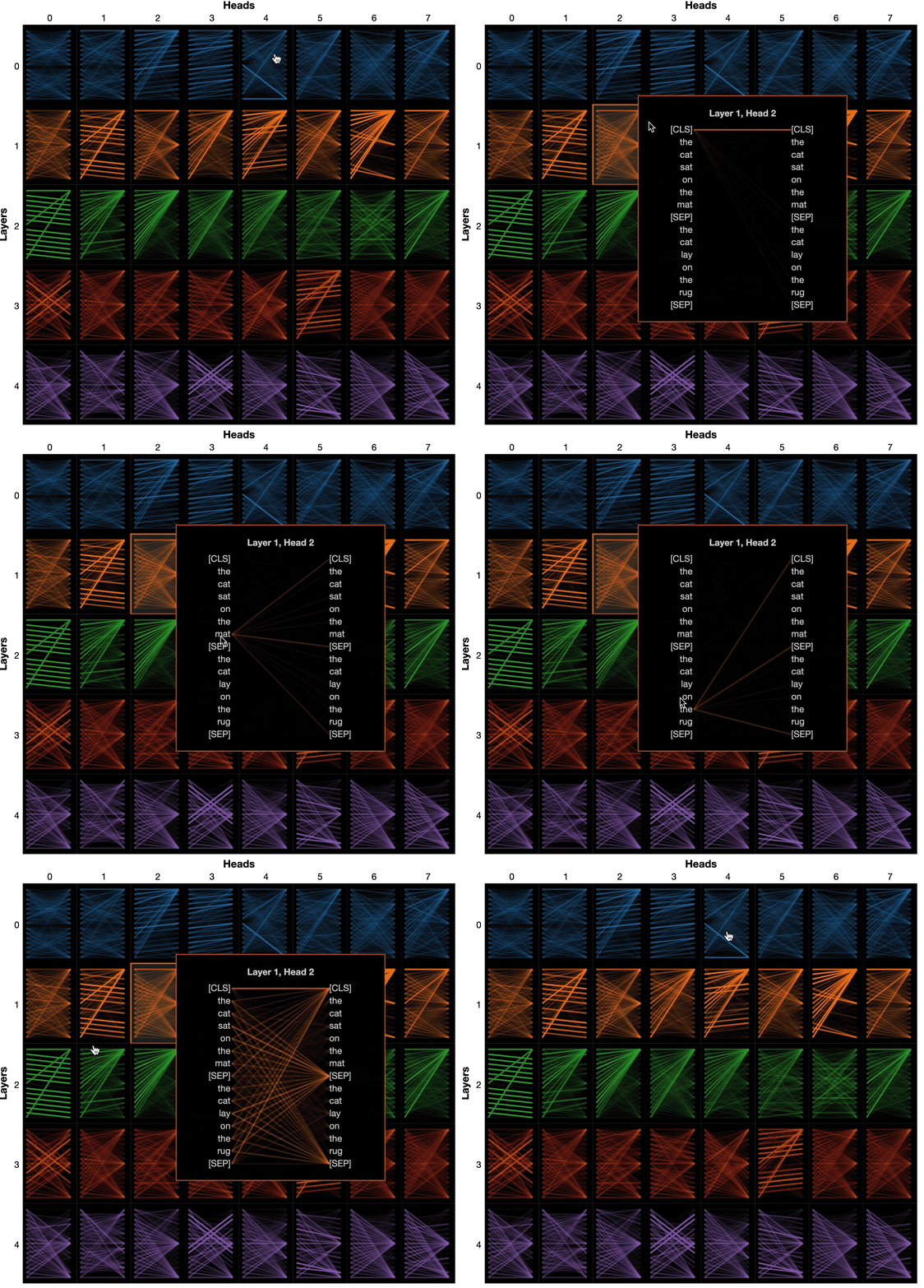
模型視圖顯示了各個層和頭部的鳥眼觀點。
?在交互式COLAB教程中嘗試模型視圖(所有可視化效果預載)。
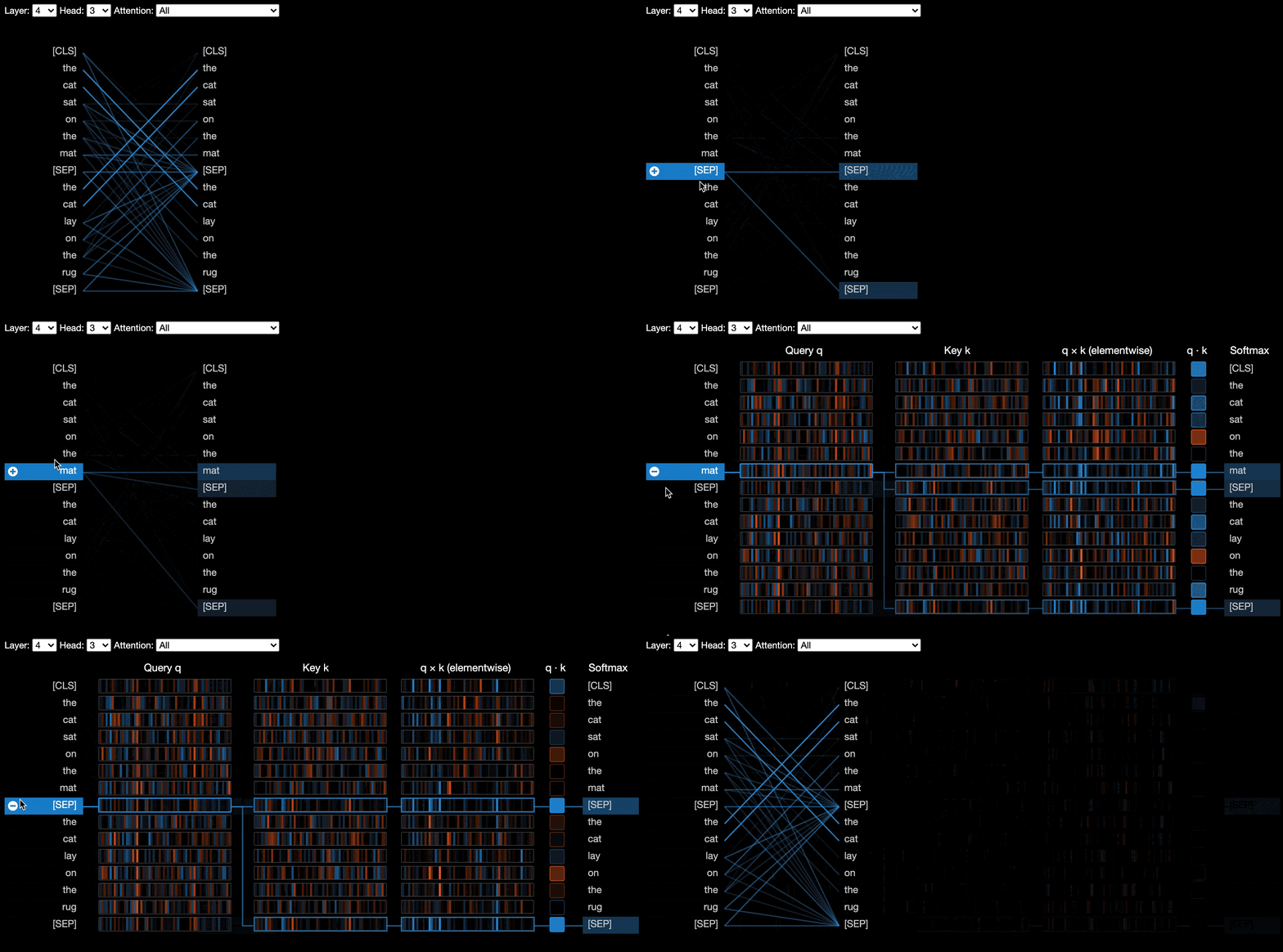
神經元視圖可視化查詢和關鍵矢量中的單個神經元,並展示了它們如何用於計算注意力。
?在交互式COLAB教程中嘗試使用神經元視圖(所有可視化量預載)。
從命令行:
pip install bertviz您還必須安裝Jupyter筆記本和IPYWIDGETS:
pip install jupyterlab
pip install ipywidgets
(如果您遇到安裝jupyter或ipywidgets的任何問題,請在此處和此處諮詢文檔。)
要創建一個新的Jupyter筆記本電腦,只需運行:
jupyter notebook然後單擊New ,然後選擇Python 3 (ipykernel) ,如果提示。
要在Colab中運行,只需在Colab筆記本開始時添加以下單元格:
!pip install bertviz
運行以下代碼以加載xtremedistil-l12-h384-uncased模型,並將其顯示在模型視圖中:
 from transformers import AutoTokenizer , AutoModel , utils
from bertviz import model_view
utils . logging . set_verbosity_error ()  # Suppress standard warnings

model_name = "microsoft/xtremedistil-l12-h384-uncased"  # Find popular HuggingFace models here: https://huggingface.co/models
input_text = "The cat sat on the mat"
model = AutoModel . from_pretrained ( model_name , output_attentions = True )  # Configure model to return attention values
tokenizer = AutoTokenizer . from_pretrained ( model_name )
inputs = tokenizer . encode ( input_text , return_tensors = 'pt' )  # Tokenize input text
outputs = model ( inputs )  # Run model
attention = outputs [ - 1 ]  # Retrieve attention from model outputs
tokens = tokenizer . convert_ids_to_tokens ( inputs [ 0 ])  # Convert input ids to token strings
model_view ( attention , tokens )  # Display model view
可視化可能需要幾秒鐘才能加載。可以隨意嘗試不同的輸入文本和模型。有關其他用例和示例,例如編碼器模型,請參見文檔。
您還可以運行Bertviz包含的任何示例筆記本:
git clone --depth 1 [email protected]:jessevig/bertviz.git
cd bertviz/notebooks
jupyter notebook查看交互式COLAB教程,以了解有關Bertviz的更多信息並嘗試該工具。注意:所有可視化均已預加載,因此無需執行任何單元格。
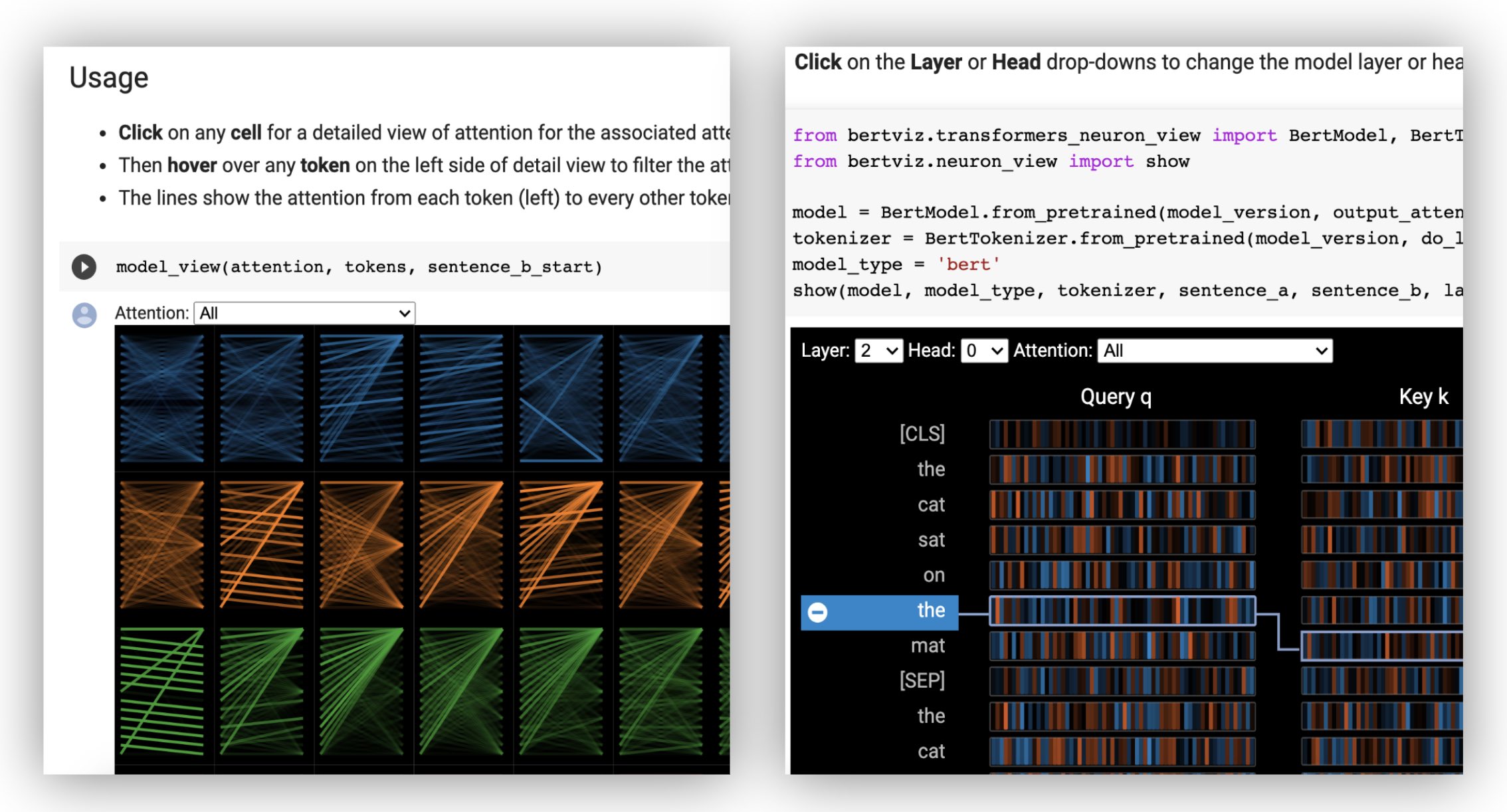
首先加載擁抱面模型,即如下所示的預訓練模型,或者您自己的微調模型。確保設置output_attentions=True 。
 from transformers import AutoTokenizer , AutoModel , utils
utils . logging . set_verbosity_error ()  # Suppress standard warnings
tokenizer = AutoTokenizer . from_pretrained ( "bert-base-uncased" )
model = AutoModel . from_pretrained ( "bert-base-uncased" , output_attentions = True )
然後準備輸入併計算注意力:
 inputs = tokenizer . encode ( "The cat sat on the mat" , return_tensors = 'pt' )
outputs = model ( inputs )
attention = outputs [ - 1 ]  # Output includes attention weights when output_attentions=True
tokens = tokenizer . convert_ids_to_tokens ( inputs [ 0 ]) 最後,使用head_view或model_view函數顯示注意力權重:
 from bertviz import head_view
head_view ( attention , tokens )示例:Distilbert(型號查看筆記本,頭部查看筆記本)
有關完整的API,請參閱源代碼以獲取頭部視圖或模型視圖。
由於需要訪問模型的查詢/密鑰向量,因此對神經元視圖的調用與頭部視圖或模型視圖的調用不同,而這些查詢/密鑰向量未通過HuggingFace API返回。目前,它僅限於Bertviz隨附的Bert,GPT-2和Roberta的定製版本。
 # Import specialized versions of models (that return query/key vectors)
from bertviz . transformers_neuron_view import BertModel , BertTokenizer
from bertviz . neuron_view import show

model_type = 'bert'
model_version = 'bert-base-uncased'
do_lower_case = True
sentence_a = "The cat sat on the mat"
sentence_b = "The cat lay on the rug"
model = BertModel . from_pretrained ( model_version , output_attentions = True )
tokenizer = BertTokenizer . from_pretrained ( model_version , do_lower_case = do_lower_case )
show ( model , model_type , tokenizer , sentence_a , sentence_b , layer = 2 , head = 0 )示例:Bert(筆記本,COLAB)•GPT-2(筆記本,Colab)•Roberta(筆記本)
有關完整的API,請參考來源。
頭視圖和模型視圖兩個支持編碼器模型。
首先,加載編碼器模型:
 from transformers import AutoTokenizer , AutoModel

tokenizer = AutoTokenizer . from_pretrained ( "Helsinki-NLP/opus-mt-en-de" )
model = AutoModel . from_pretrained ( "Helsinki-NLP/opus-mt-en-de" , output_attentions = True )
然後準備輸入併計算注意力:
 encoder_input_ids = tokenizer ( "She sees the small elephant." , return_tensors = "pt" , add_special_tokens = True ). input_ids
with tokenizer . as_target_tokenizer ():
    decoder_input_ids = tokenizer ( "Sie sieht den kleinen Elefanten." , return_tensors = "pt" , add_special_tokens = True ). input_ids

outputs = model ( input_ids = encoder_input_ids , decoder_input_ids = decoder_input_ids )

encoder_text = tokenizer . convert_ids_to_tokens ( encoder_input_ids [ 0 ])
decoder_text = tokenizer . convert_ids_to_tokens ( decoder_input_ids [ 0 ])最後,使用head_view或model_view顯示可視化。
 from bertviz import model_view
model_view (
    encoder_attention = outputs . encoder_attentions ,
    decoder_attention = outputs . decoder_attentions ,
    cross_attention = outputs . cross_attentions ,
    encoder_tokens = encoder_text ,
    decoder_tokens = decoder_text
)您可以從可視化的左上角的下拉角落選擇Encoder , Decoder或Cross注意。
示例:Marianmt(筆記本)•BART(筆記本)
有關完整的API,請參閱源代碼以獲取頭部視圖或模型視圖。
git clone https://github.com/jessevig/bertviz.git
cd bertviz
python setup.py develop模型視圖和神經元視圖支持黑暗(默認)和光模式。您可以使用display_mode參數設置模式:
model_view ( attention , tokens , display_mode = "light" )為了提高工具可視化較大的模型或輸入時的響應能力,您可以將include_layers參數設置為限制可視化到層的子集(零索引)。此選項可在Head View和Model View中使用。
示例:僅顯示圖層5和6的渲染模型視圖
model_view ( attention , tokens , include_layers = [ 5 , 6 ])對於模型視圖,您還可以通過設置include_heads參數將可視化限制為註意頭的子集(零索引)。
在頭視圖中,當可視化首次渲染時,您可以選擇特定的layer和heads作為默認選擇。注意:這與include_heads / include_layers參數(上)不同,該參數完全從可視化中刪除了圖層和頭部。
示例:使用第2層和頭部3和5預選的頭部視圖
head_view ( attention , tokens , layer = 2 , heads = [ 3 , 5 ])您也可以為神經元視圖預選特定layer和單head 。
某些模型(例如Bert)接受一對句子作為輸入。伯特維茲(Bertviz)可選支持下拉菜單,該菜單允許用戶根據令牌所處的句子過濾注意力,例如,僅在第一個句子中的令牌和第二句中的令牌之間顯示出注意力。
要啟用此功能在調用head_view或model_view功能時,將sentence_b_start參數設置為第二句的開始索引。請注意,計算此索引的方法將取決於模型。
示例(伯特):
 from bertviz import head_view
from transformers import AutoTokenizer , AutoModel , utils
utils . logging . set_verbosity_error ()  # Suppress standard warnings

# NOTE: This code is model-specific
model_version = 'bert-base-uncased'
model = AutoModel . from_pretrained ( model_version , output_attentions = True )
tokenizer = AutoTokenizer . from_pretrained ( model_version )
sentence_a = "the rabbit quickly hopped"
sentence_b = "The turtle slowly crawled"
inputs = tokenizer . encode_plus ( sentence_a , sentence_b , return_tensors = 'pt' )
input_ids = inputs [ 'input_ids' ]
token_type_ids = inputs [ 'token_type_ids' ] # token type id is 0 for Sentence A and 1 for Sentence B
attention = model ( input_ids , token_type_ids = token_type_ids )[ - 1 ]
sentence_b_start = token_type_ids [ 0 ]. tolist (). index ( 1 ) # Sentence B starts at first index of token type id 1
token_ids = input_ids [ 0 ]. tolist () # Batch index 0
tokens = tokenizer . convert_ids_to_tokens ( token_ids )
head_view ( attention , tokens , sentence_b_start )要在神經元視圖中啟用此選項,只需在neuron_view.show()中設置sentence_a和sentence_b參數即可。
支持檢索生成的HTML表示形式的支持已添加到HEAD_VIEW,model_view和neuron_view中。
將“ HTML_ACTION”參數設置為“返回”將使函數調用返回一個可以進一步處理的HTML Python對象。請記住,您可以使用Python HTML對象的數據屬性訪問HTML源。
“ HTML_ACTION”的默認行為是“視圖”,它將顯示可視化,但不會返回HTML對象。
如果您需要:此功能很有用:
示例(頭和模型視圖):
 from transformers import AutoTokenizer , AutoModel , utils
from bertviz import head_view

utils . logging . set_verbosity_error ()  # Suppress standard warnings
tokenizer = AutoTokenizer . from_pretrained ( "bert-base-uncased" )
model = AutoModel . from_pretrained ( "bert-base-uncased" , output_attentions = True )

inputs = tokenizer . encode ( "The cat sat on the mat" , return_tensors = 'pt' )
outputs = model ( inputs )
attention = outputs [ - 1 ]  # Output includes attention weights when output_attentions=True
tokens = tokenizer . convert_ids_to_tokens ( inputs [ 0 ])

html_head_view = head_view ( attention , tokens , html_action = 'return' )

with open ( "PATH_TO_YOUR_FILE/head_view.html" , 'w' ) as file :
    file . write ( html_head_view . data )
示例(神經元視圖):
 # Import specialized versions of models (that return query/key vectors)
from bertviz . transformers_neuron_view import BertModel , BertTokenizer
from bertviz . neuron_view import show

model_type = 'bert'
model_version = 'bert-base-uncased'
do_lower_case = True
sentence_a = "The cat sat on the mat"
sentence_b = "The cat lay on the rug"
model = BertModel . from_pretrained ( model_version , output_attentions = True )
tokenizer = BertTokenizer . from_pretrained ( model_version , do_lower_case = do_lower_case )
html_neuron_view = show ( model , model_type , tokenizer , sentence_a , sentence_b , layer = 2 , head = 0 , html_action = 'return' )

with open ( "PATH_TO_YOUR_FILE/neuron_view.html" , 'w' ) as file :
file . write ( html_neuron_view . data )只要可用注意權重並遵循head_view和model_view中指定的格式(這是從huggingface模型返回的格式),就可以使用頭部視圖和模型視圖來可視化任何標準變壓器模型的自我注意力。在某些情況下,如HuggingFace文檔中所述,可以將TensorFlow檢查點作為擁抱面模型加載。
include_layers參數(如上所述)來過濾所顯示的圖層。include_layers參數(如上所述)來過濾所顯示的圖層。transformers_neuron_view目錄),這僅針對這三個模型完成。 變壓器模型中註意力的多尺度可視化(ACL系統演示2019)。
 @inproceedings { vig-2019-multiscale ,
    title = " A Multiscale Visualization of Attention in the Transformer Model " ,
    author = " Vig, Jesse " ,
    booktitle = " Proceedings of the 57th Annual Meeting of the Association for Computational Linguistics: System Demonstrations " ,
    month = jul,
    year = " 2019 " ,
    address = " Florence, Italy " ,
    publisher = " Association for Computational Linguistics " ,
    url = " https://www.aclweb.org/anthology/P19-3007 " ,
    doi = " 10.18653/v1/P19-3007 " ,
    pages = " 37--42 " ,
}傑西·維格
我們感謝以下項目的作者,這些項目已納入此存儲庫:
該項目已在Apache 2.0許可證下獲得許可 - 有關詳細信息,請參見許可證文件





