bertviz
v1.4.0

Bertviz는 Bert, GPT2 또는 T5와 같은 변압기 언어 모델에서주의를 시각화하기위한 대화식 도구입니다. 대부분의 포옹 페이스 모델을 지원하는 간단한 Python API를 통해 Jupyter 또는 Colab 노트북 내부에서 실행할 수 있습니다. Bertviz는 Llion Jones의 Tensor2tensor 시각화 도구를 확장하여 각각은주의 메커니즘에 고유 한 렌즈를 제공하는 여러 뷰를 제공합니다.
트위터 에서이 프로젝트 및 관련 프로젝트에 대한 업데이트를 받으십시오.
헤드 뷰는 동일한 층에서 하나 이상의주의 헤드에 대한주의를 시각화합니다. Llion Jones의 우수한 Tensor2tensor 시각화 도구를 기반으로합니다.
? 대화식 Colab 튜토리얼 (모든 시각화 사전로드)에서 헤드 뷰를 사용해보십시오.
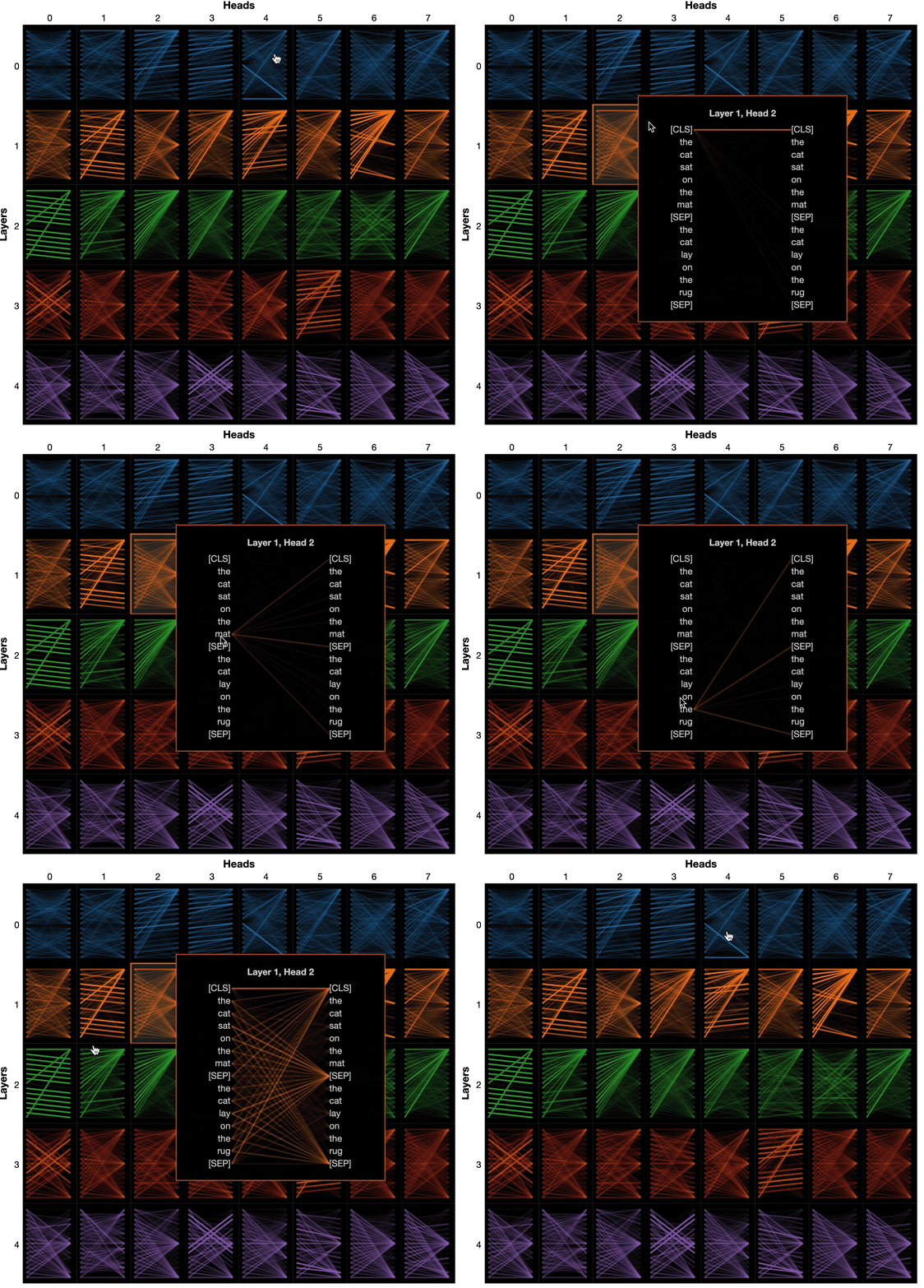
모델보기는 모든 레이어와 헤드에서주의를 기울이는 조감도를 보여줍니다.
? 대화식 Colab 튜토리얼 (모든 시각화 사전로드)에서 모델보기를 사용해보십시오.
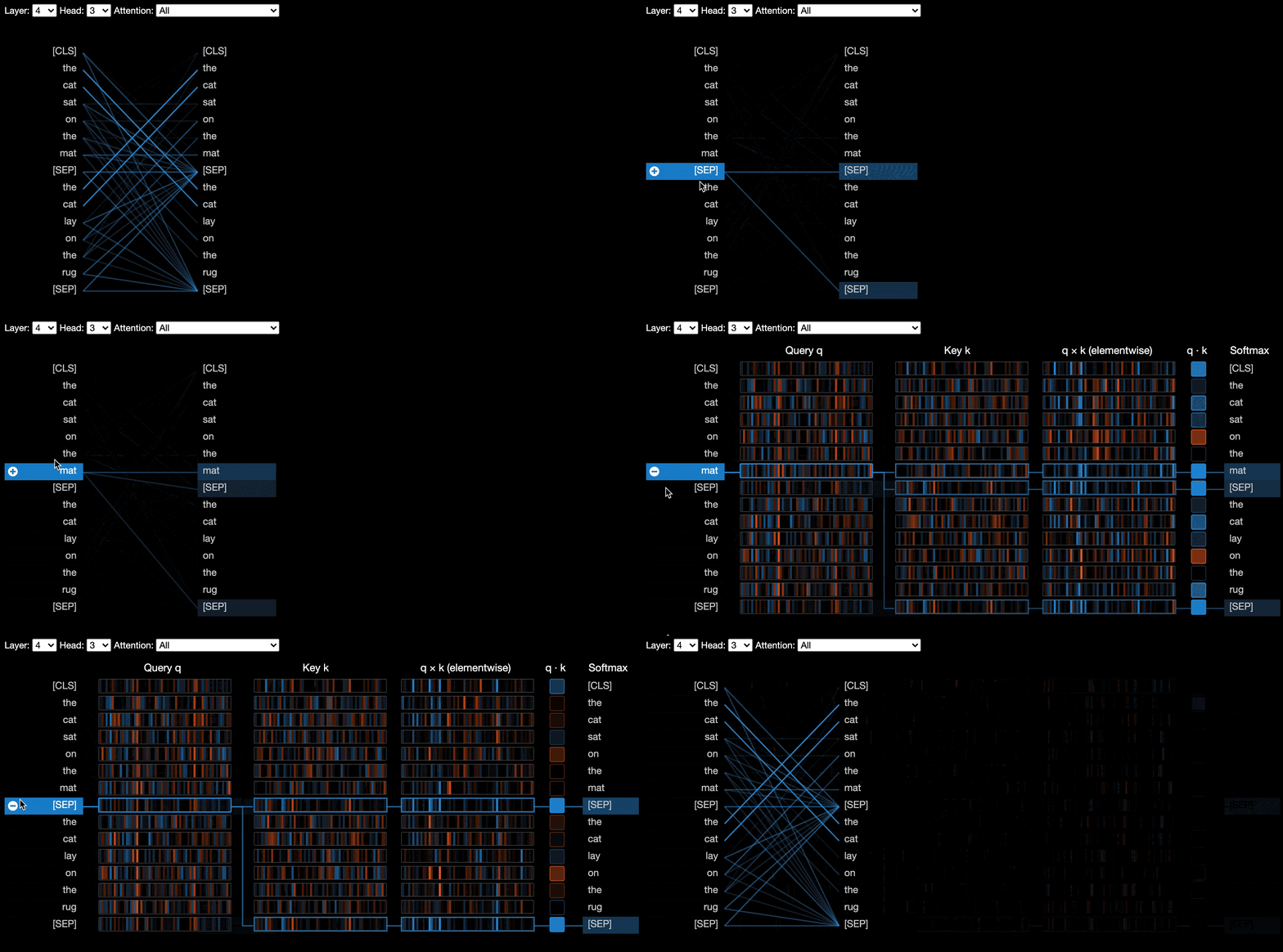
뉴런 뷰는 쿼리와 주요 벡터에서 개별 뉴런을 시각화하고주의를 계산하는 데 어떻게 사용되는지 보여줍니다.
? 대화식 Colab 튜토리얼 (모든 시각화 사전로드)에서 Neuron View를 사용해보십시오.
명령 줄에서 :
pip install bertviz또한 Jupyter 노트북 및 ipywidgets가 설치되어 있어야합니다.
pip install jupyterlab
pip install ipywidgets
(Jupyter 또는 ipywidgets를 설치하는 문제가 발생하면 여기 및 여기에서 문서를 참조하십시오.)
새로운 Jupyter 노트북을 만들려면 간단히 실행하십시오.
jupyter notebook 그런 다음 New 클릭하고 Python 3 (ipykernel) 선택하면 메시지가 표시됩니다.
Colab에서 실행하려면 Colab 노트의 시작 부분에 다음 셀을 추가하십시오.
!pip install bertviz
다음 코드를 실행하여 xtremedistil-l12-h384-uncased 모델을로드하고 모델보기에 표시하십시오.
 from transformers import AutoTokenizer , AutoModel , utils
from bertviz import model_view
utils . logging . set_verbosity_error ()  # Suppress standard warnings

model_name = "microsoft/xtremedistil-l12-h384-uncased"  # Find popular HuggingFace models here: https://huggingface.co/models
input_text = "The cat sat on the mat"
model = AutoModel . from_pretrained ( model_name , output_attentions = True )  # Configure model to return attention values
tokenizer = AutoTokenizer . from_pretrained ( model_name )
inputs = tokenizer . encode ( input_text , return_tensors = 'pt' )  # Tokenize input text
outputs = model ( inputs )  # Run model
attention = outputs [ - 1 ]  # Retrieve attention from model outputs
tokens = tokenizer . convert_ids_to_tokens ( inputs [ 0 ])  # Convert input ids to token strings
model_view ( attention , tokens )  # Display model view
시각화는로드하는 데 몇 초가 걸릴 수 있습니다. 다양한 입력 텍스트 및 모델을 실험 해보십시오. 추가 사용 사례 및 예제 (예 : 인코더 디코더 모델)는 문서를 참조하십시오.
Bertviz에 포함 된 샘플 노트북을 실행할 수도 있습니다.
git clone --depth 1 [email protected]:jessevig/bertviz.git
cd bertviz/notebooks
jupyter notebookBertviz에 대한 자세한 내용을 보려면 대화식 Colab 튜토리얼을 확인하고 도구를 사용해보십시오. 참고 : 모든 시각화는 사전로드되므로 셀을 실행할 필요가 없습니다.
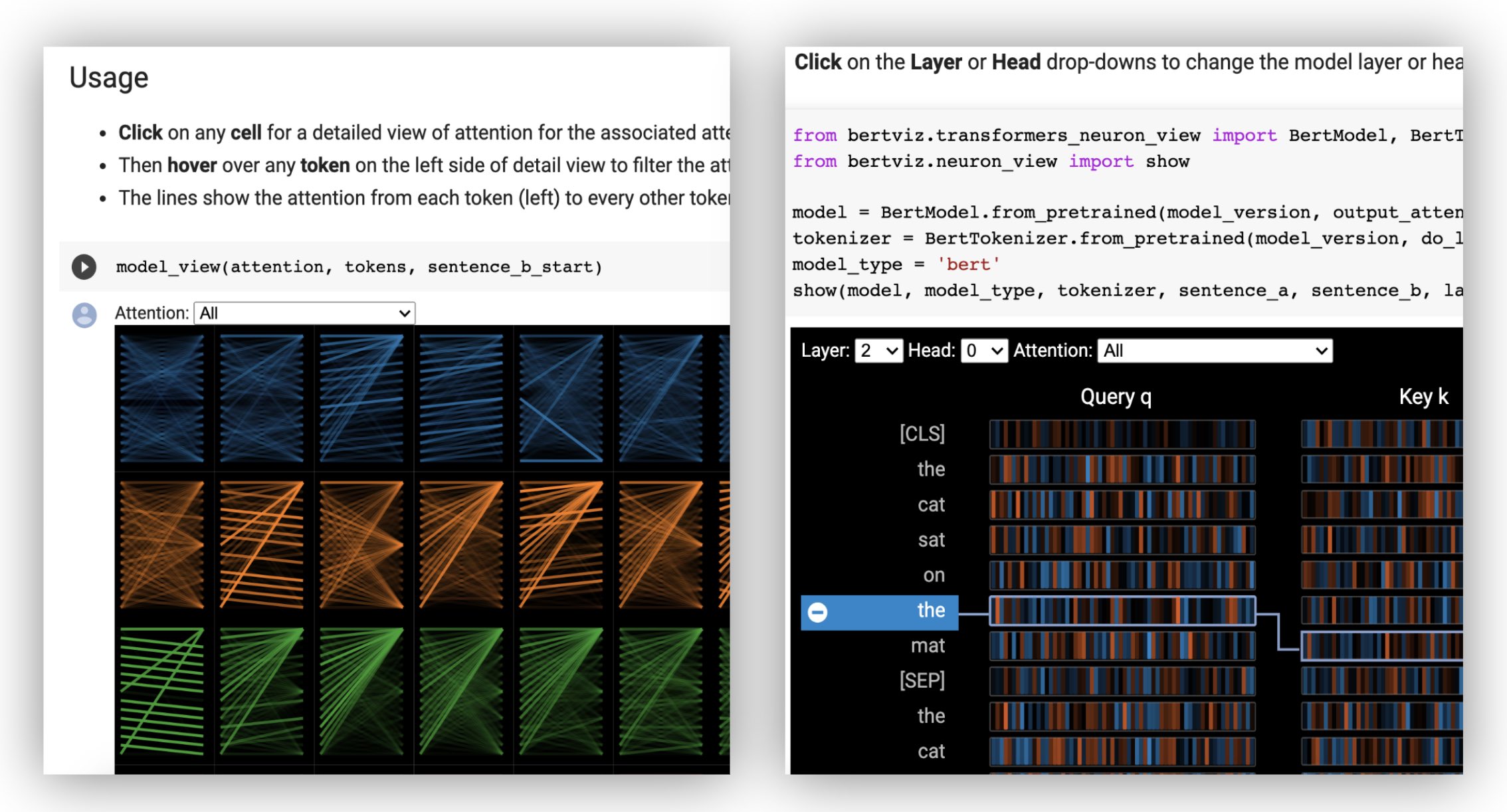
먼저 아래와 같이 미리 훈련 된 모델 또는 고유 한 미세 조정 모델 인 Huggingface 모델을로드하십시오. output_attentions=True 설정하십시오.
 from transformers import AutoTokenizer , AutoModel , utils
utils . logging . set_verbosity_error ()  # Suppress standard warnings
tokenizer = AutoTokenizer . from_pretrained ( "bert-base-uncased" )
model = AutoModel . from_pretrained ( "bert-base-uncased" , output_attentions = True )
그런 다음 입력을 준비하고주의를 계산하십시오.
 inputs = tokenizer . encode ( "The cat sat on the mat" , return_tensors = 'pt' )
outputs = model ( inputs )
attention = outputs [ - 1 ]  # Output includes attention weights when output_attentions=True
tokens = tokenizer . convert_ids_to_tokens ( inputs [ 0 ])
마지막으로 head_view 또는 model_view 함수를 사용하여 주의력 웨이트를 표시합니다.
 from bertviz import head_view
head_view ( attention , tokens )
예 : Distilbert (모델보기 노트북, 헤드 뷰 노트북)
전체 API의 경우 헤드 뷰 또는 모델보기의 소스 코드를 참조하십시오.
Neuron View는 Huggingface API를 통해 반환되지 않는 모델의 쿼리/키 벡터에 대한 액세스가 필요하기 때문에 헤드 뷰 또는 모델보기와 다르게 호출됩니다. 현재 Bert, GPT-2 및 Roberta의 맞춤형 버전은 Bertviz에 포함되어 있습니다.
 # Import specialized versions of models (that return query/key vectors)
from bertviz . transformers_neuron_view import BertModel , BertTokenizer
from bertviz . neuron_view import show

model_type = 'bert'
model_version = 'bert-base-uncased'
do_lower_case = True
sentence_a = "The cat sat on the mat"
sentence_b = "The cat lay on the rug"
model = BertModel . from_pretrained ( model_version , output_attentions = True )
tokenizer = BertTokenizer . from_pretrained ( model_version , do_lower_case = do_lower_case )
show ( model , model_type , tokenizer , sentence_a , sentence_b , layer = 2 , head = 0 )
예 : Bert (노트북, Colab) • GPT-2 (노트북, Colab) • Roberta (노트북)
전체 API의 경우 소스를 참조하십시오.
헤드 뷰 및 모델보기는 모두 인코더 디코더 모델을 지원합니다.
먼저 인코더 디코더 모델을로드하십시오.
 from transformers import AutoTokenizer , AutoModel

tokenizer = AutoTokenizer . from_pretrained ( "Helsinki-NLP/opus-mt-en-de" )
model = AutoModel . from_pretrained ( "Helsinki-NLP/opus-mt-en-de" , output_attentions = True )
그런 다음 입력을 준비하고주의를 계산하십시오.
 encoder_input_ids = tokenizer ( "She sees the small elephant." , return_tensors = "pt" , add_special_tokens = True ). input_ids
with tokenizer . as_target_tokenizer ():
    decoder_input_ids = tokenizer ( "Sie sieht den kleinen Elefanten." , return_tensors = "pt" , add_special_tokens = True ). input_ids

outputs = model ( input_ids = encoder_input_ids , decoder_input_ids = decoder_input_ids )

encoder_text = tokenizer . convert_ids_to_tokens ( encoder_input_ids [ 0 ])
decoder_text = tokenizer . convert_ids_to_tokens ( decoder_input_ids [ 0 ])
마지막으로 head_view 또는 model_view 사용하여 시각화를 표시하십시오.
 from bertviz import model_view
model_view (
    encoder_attention = outputs . encoder_attentions ,
    decoder_attention = outputs . decoder_attentions ,
    cross_attention = outputs . cross_attentions ,
    encoder_tokens = encoder_text ,
    decoder_tokens = decoder_text
)
시각화의 왼쪽 상단 모서리의 드롭 다운에서 Encoder , Decoder 또는 Cross 주의를 선택할 수 있습니다.
예 : Marianmt (노트북) • Bart (노트북)
전체 API의 경우 헤드 뷰 또는 모델보기의 소스 코드를 참조하십시오.
git clone https://github.com/jessevig/bertviz.git
cd bertviz
python setup.py develop 모델보기 및 뉴런보기는 어두운 (기본값) 및 조명 모드를 지원합니다. display_mode 매개 변수를 사용하여 모드를 설정할 수 있습니다.
model_view ( attention , tokens , display_mode = "light" ) 더 큰 모델 또는 입력을 시각화 할 때 도구의 응답 성을 향상 시키려면 include_layers 매개 변수를 설정하여 시각화를 서브 세트 (Zero-Indexed)로 제한 할 수 있습니다. 이 옵션은 헤드 뷰 및 모델보기에서 사용할 수 있습니다.
예 : 레이어 5와 6 만 표시된 모델보기 렌더링 렌더링
model_view ( attention , tokens , include_layers = [ 5 , 6 ]) 모델보기의 경우 include_heads 매개 변수를 설정하여 시각화를 서브 세트의주의 헤드 (Zero-Indexed)로 제한 할 수도 있습니다.
헤드 뷰에서 시각화가 먼저 렌더링 될 때 특정 layer 와 heads 모음을 기본 선택으로 선택할 수 있습니다. 참고 : 이것은 include_heads / include_layers 매개 변수 (위)와 다르며, 이는 시각화에서 레이어와 헤드를 완전히 제거합니다.
예 : 레이어 2 및 헤드 3 및 5를 사용하여 헤드 뷰를 렌더링합니다.
head_view ( attention , tokens , layer = 2 , heads = [ 3 , 5 ]) 또한 뉴런보기에 대한 특정 layer 과 단일 head 사전 선택할 수도 있습니다.
예를 들어 Bert와 같은 일부 모델은 한 쌍의 문장을 입력으로 받아들입니다. Bertviz는 선택적으로 드롭 다운 메뉴를 지원하여 사용자가 토큰이 어떤 문장에 있는지에 따라주의를 필터링 할 수있게합니다.
head_view 또는 model_view 함수를 호출 할 때이 기능을 활성화하려면 sentence_b_start 매개 변수를 두 번째 문장의 시작 색인으로 설정하십시오. 이 색인을 계산하는 방법은 모델에 따라 다릅니다.
예 (Bert) :
 from bertviz import head_view
from transformers import AutoTokenizer , AutoModel , utils
utils . logging . set_verbosity_error ()  # Suppress standard warnings

# NOTE: This code is model-specific
model_version = 'bert-base-uncased'
model = AutoModel . from_pretrained ( model_version , output_attentions = True )
tokenizer = AutoTokenizer . from_pretrained ( model_version )
sentence_a = "the rabbit quickly hopped"
sentence_b = "The turtle slowly crawled"
inputs = tokenizer . encode_plus ( sentence_a , sentence_b , return_tensors = 'pt' )
input_ids = inputs [ 'input_ids' ]
token_type_ids = inputs [ 'token_type_ids' ] # token type id is 0 for Sentence A and 1 for Sentence B
attention = model ( input_ids , token_type_ids = token_type_ids )[ - 1 ]
sentence_b_start = token_type_ids [ 0 ]. tolist (). index ( 1 ) # Sentence B starts at first index of token type id 1
token_ids = input_ids [ 0 ]. tolist () # Batch index 0
tokens = tokenizer . convert_ids_to_tokens ( token_ids )
head_view ( attention , tokens , sentence_b_start ) Neuron View 에서이 옵션을 활성화하려면 sentence_a 및 sentence_b 매개 변수를 neuron_view.show() 로 설정하십시오.
생성 된 HTML 표현을 검색하는 지원은 Head_View, Model_View 및 Neuron_View에 추가되었습니다.
'HTML_Action'매개 변수를 'return'으로 설정하면 기능 호출이 추가로 처리 할 수있는 단일 HTML Python 객체를 반환하게됩니다. Python HTML 객체의 데이터 속성을 사용하여 HTML 소스에 액세스 할 수 있습니다.
'html_action'의 기본 동작은 '보기'이며 시각화는 표시되지만 HTML 객체를 반환하지 않습니다.
이 기능은 필요한 경우 유용합니다.
예제 (헤드 및 모델보기) :
 from transformers import AutoTokenizer , AutoModel , utils
from bertviz import head_view

utils . logging . set_verbosity_error ()  # Suppress standard warnings
tokenizer = AutoTokenizer . from_pretrained ( "bert-base-uncased" )
model = AutoModel . from_pretrained ( "bert-base-uncased" , output_attentions = True )

inputs = tokenizer . encode ( "The cat sat on the mat" , return_tensors = 'pt' )
outputs = model ( inputs )
attention = outputs [ - 1 ]  # Output includes attention weights when output_attentions=True
tokens = tokenizer . convert_ids_to_tokens ( inputs [ 0 ])

html_head_view = head_view ( attention , tokens , html_action = 'return' )

with open ( "PATH_TO_YOUR_FILE/head_view.html" , 'w' ) as file :
    file . write ( html_head_view . data )
예 (뉴런보기) :
 # Import specialized versions of models (that return query/key vectors)
from bertviz . transformers_neuron_view import BertModel , BertTokenizer
from bertviz . neuron_view import show

model_type = 'bert'
model_version = 'bert-base-uncased'
do_lower_case = True
sentence_a = "The cat sat on the mat"
sentence_b = "The cat lay on the rug"
model = BertModel . from_pretrained ( model_version , output_attentions = True )
tokenizer = BertTokenizer . from_pretrained ( model_version , do_lower_case = do_lower_case )
html_neuron_view = show ( model , model_type , tokenizer , sentence_a , sentence_b , layer = 2 , head = 0 , html_action = 'return' )

with open ( "PATH_TO_YOUR_FILE/neuron_view.html" , 'w' ) as file :
file . write ( html_neuron_view . data ) Head View 및 Model View는주의 웨이트를 사용할 수있는 한 모든 표준 변압기 모델의 자체 변환을 시각화하는 데 사용될 수 있으며 head_view 및 model_view (HuggingFace 모델에서 반환 된 형식)에 지정된 형식을 따릅니다. 경우에 따라 텐서 플로우 체크 포인트는 Huggingface Docs에 설명 된대로 Huggingface 모델로로드 될 수 있습니다.
include_layers 매개 변수를 설정하여 표시된 레이어를 필터링 할 수 있습니다.include_layers 매개 변수를 설정하여 표시된 레이어를 필터링 할 수 있습니다.transformers_neuron_view 디렉토리 참조).이 세 가지 모델에 대해서만 수행되었습니다. 변압기 모델 (ACL 시스템 데모 2019)의 멀티 스케일 시각화 .
 @inproceedings { vig-2019-multiscale ,
    title = " A Multiscale Visualization of Attention in the Transformer Model " ,
    author = " Vig, Jesse " ,
    booktitle = " Proceedings of the 57th Annual Meeting of the Association for Computational Linguistics: System Demonstrations " ,
    month = jul,
    year = " 2019 " ,
    address = " Florence, Italy " ,
    publisher = " Association for Computational Linguistics " ,
    url = " https://www.aclweb.org/anthology/P19-3007 " ,
    doi = " 10.18653/v1/P19-3007 " ,
    pages = " 37--42 " ,
}제시 vig
우리는 다음 프로젝트의 저자들에게 감사합니다.이 프로젝트는이 저장소에 포함되어 있습니다.
이 프로젝트는 Apache 2.0 라이센스에 따라 라이센스가 부여됩니다. 자세한 내용은 라이센스 파일을 참조하십시오.





