neo4j nlp
1.0.0

截至2021年5月,該存儲庫已退休。
該NEO4J插件提供基於圖形的自然語言處理功能。
主模塊該模塊為基礎文本處理器以及在存儲過程和功能上構建的域特定語言提供了一個常見的接口,使您的自然語言處理工作流程開發人員友好。
它具有2個版本,社區(開源)和具有以下NLP功能的企業:
| 社區版 | 企業版 | |
|---|---|---|
| 文本信息提取 | ✔ | ✔ |
| 同一數據庫中的多語言 | ✔ | |
| 定制命名義務識別模型構建器 | ✔ | |
| ConceptNet5富集 | ✔ | ✔ |
| Microsoft概念豐富 | ✔ | ✔ |
| 關鍵字提取 | ✔ | ✔ |
| Textrank摘要 | ✔ | ✔ |
| 主題提取 | ✔ | |
| 單詞嵌入(Word2Vec) | ✔ | ✔ |
| 相似性計算 | ✔ | ✔ |
| PDF解析 | ✔ | ✔ |
| Apache Spark綁定分佈式算法 | ✔ | |
| DOC2VEC實施 | ✔ | |
| 使用者介面 | ✔ | |
| ML預測功能 | ✔ | |
| 實體合併 | ✔ |
提供了兩個NLP處理器實現,分別提供了Stanford NLP和OpenNLP(OpenNLP收到較少的更新,建議使用StanfordNLP)。
從版本3.5.1.53.15您需要下載語言模型,請參見下文
從Graphaware插件目錄中,下載以下jar文件:
neo4j-framework (此罐子的標籤為“ Graphaware-Server-enterprise-all”)neo4j-nlpneo4j-nlp-stanfordnlphttps://stanfordnlp.github.io/CoreNLP/#download下載的語言模型並在Neo4J的plugins目錄中復制它們。
請注意,您使用的框架的版本編號與您使用的Neo4J版本匹配。這是一個常見的設置問題。例如,如果您使用的是Neo4J 3.4.0及以上,則您下載的所有罐子都應在其版本號中包含3.4。
plugins/目錄示例:
 -rw-r--r--  1 ikwattro  staff    58M Oct 11 11:15 graphaware-nlp-3.5.1.53.14.jar
-rw-r--r--@ 1 ikwattro  staff    13M Aug 22 15:22 graphaware-server-community-all-3.5.1.53.jar
-rw-r--r--  1 ikwattro  staff    16M Oct 11 11:28 nlp-stanfordnlp-3.5.1.53.14.jar
-rw-r--r--@ 1 ikwattro  staff   991M Oct 11 11:45 stanford-english-corenlp-2018-10-05-models.jar
在config/目錄中的neo4j.conf文件中附加以下配置:
  dbms.unmanaged_extension_classes=com.graphaware.server=/graphaware
  com.graphaware.runtime.enabled=true
  com.graphaware.module.NLP.1=com.graphaware.nlp.module.NLPBootstrapper
  dbms.security.procedures.whitelist=ga.nlp.*
啟動或重新啟動您的Neo4J數據庫。
注意:兩個混凝土文本處理器都非常貪婪 - 您需要將足夠的內存用於Neo4J Heap空間。
此外,建議以下索引和約束來加快績效:
 CREATE CONSTRAINT ON (n:AnnotatedText) ASSERT n.id IS UNIQUE;
CREATE CONSTRAINT ON (n:Tag) ASSERT n.id IS UNIQUE;
CREATE CONSTRAINT ON (n:Sentence) ASSERT n.id IS UNIQUE;
CREATE INDEX ON :Tag(value);
或使用專用程序:
CALL ga.nlp.createSchema()
定義您將在此數據庫中使用哪種語言:
CALL ga.nlp.config.setDefaultLanguage('en')
加載擴展名後,您可以通過運行此Cypher查詢來查看所有可用過程的基本文檔:
 CALL dbms.procedures() YIELD name, signature, description
WHERE name =~ 'ga.nlp.*'
RETURN name, signature, description ORDER BY name asc;
文本提取階段是通過自然語言處理管道完成的,每個管道都有一個啟用的組件列表。
例如,基本的tokenizer管道具有以下組件:
必須首先創建您的管道:
 CALL ga.nlp.processor.addPipeline({textProcessor: 'com.graphaware.nlp.processor.stanford.StanfordTextProcessor', name: 'customStopWords', processingSteps: {tokenize: true, ner: true, dependency: false}, stopWords: '+,result, all, during',
threadNumber: 20})
可用的可選參數(默認值在括號中):
name :新管道的所需名稱textProcessor :應向哪個文本處理器添加新管道processingSteps :管道配置(除非另有說明,否則在斯坦福和OpenNLP中可用)tokenize (默認值:true):執行令牌化ner (默認值:true):命名實體識別sentiment (默認:false):對句子進行情感分析coref (默認值:false):核心分辨率(識別同一實體的多個提及,例如“巴拉克·奧巴馬”和“他”)relations (默認值:false):在兩個令牌之間運行關係識別dependency (默認:false,僅是stanfordnlp):提取鍵入依賴項(ex。:amod-形容詞修飾符,conj- conjunct,...)cleanxml (默認值:false,僅是stanfordnlp):刪除XML標籤truecase (默認:false,僅僅是stanfordnlp):識別令牌的“真實”案例(如何在精心編輯的文本中大寫)customNER :自定義NER模型標識符列表(作為字符串,由“'”隔開的模型標識符)stopWords :指定需要忽略的單詞(如果列表以 +開頭,以下單詞將附加到默認的stopwords列表中,否則默認列表被覆蓋)threadNumber (默認值:4):用於多線程excludedNER :(默認值:none)指定在大寫案例中未識別的NE列表,例如用於在標籤節點上排除NER_Money和NER_O ,請使用['o','Money']將管道設置為默認管道:
CALL ga.nlp.processor.pipeline.default(<your-pipeline-name>)
要刪除管道,請使用此命令:
CALL ga.nlp.processor.removePipeline(<pipeline-name>, <text-processor>)
查看所有現有管道的詳細信息:
CALL ga.nlp.processor.getPipelines()
讓我們以以下文本為例:
 Scores of people were already lying dead or injured inside a crowded Orlando nightclub,
and the police had spent hours trying to connect with the gunman and end the situation without further violence.
But when Omar Mateen threatened to set off explosives, the police decided to act, and pushed their way through a
wall to end the bloody standoff.
模擬您的原始語料庫
使用文本創建一個節點,此節點將表示您的原始語料庫或知識圖:
 CREATE (n:News)
SET n.text = "Scores of people were already lying dead or injured inside a crowded Orlando nightclub,
and the police had spent hours trying to connect with the gunman and end the situation without further violence.
But when Omar Mateen threatened to set off explosives, the police decided to act, and pushed their way through a
wall to end the bloody standoff.";
執行文本信息提取
提取是通過annotate過程完成的,這是文本信息提取的切入點
 MATCH (n:News)
CALL ga.nlp.annotate({text: n.text, id: id(n)})
YIELD result
MERGE (n)-[:HAS_ANNOTATED_TEXT]->(result)
RETURN result
annotate過程的可用參數:
text :以註釋為字符串的文字id :指定將用作新的註釋text節點的id屬性的IDtextProcessor (默認:“ Stanford”,如果不可用,則比可用文本處理器列表中的第一個條目)pipeline (默認:令牌)checkLanguage (默認值:true):在提供的文本上運行語言檢測並檢查是否支持此過程將將您的原始內容鏈接到:News節點與:AnnotatedText節點,該節點是該特定新聞基於圖的NLP的輸入點。原始文本分為單詞,語音的部分和功能。對文本的分析是後來步驟的起點。
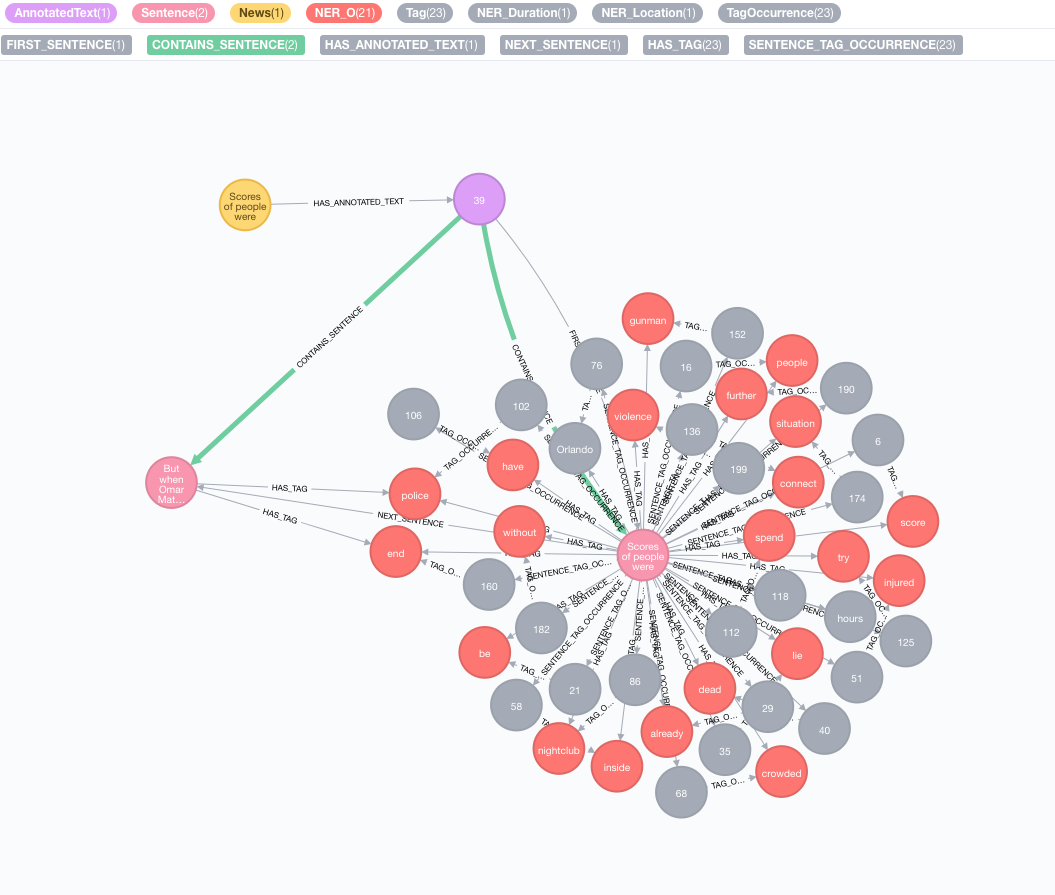
運行一批註釋
如果您有大量的註釋數據,我們建議使用apoc:
 CALL apoc.periodic.iterate(
"MATCH (n:News) RETURN n",
"CALL ga.nlp.annotate({text: n.text, id: id(n)})
YIELD result MERGE (n)-[:HAS_ANNOTATED_TEXT]->(result)", {batchSize:1, iterateList:true})
如示例中提到的那樣,保持batchSize和iterateList選項非常重要。並行運行註釋過程將造成死鎖。
我們實施外部知識庫,以豐富您當前數據的知識。
截至目前,有兩個實現:
此富集將擴展圖形中令牌(標籤節點)的含義。
 MATCH (n:Tag)
CALL ga.nlp.enrich.concept({enricher: 'conceptnet5', tag: n, depth:1, admittedRelationships:["IsA","PartOf"]})
YIELD result
RETURN result
可用參數(默認值在括號中):
tag :標籤要豐富enricher ( "conceptnet5" ):選擇microsoft或conceptnet5depth ( 2 ):在概念層次結構中有多深admittedRelationships :選擇所需的概念關係類型,請參閱概念文檔以獲取詳細信息pipeline :在將概念存儲到DB之前,請選擇用於清潔概念的管道名稱;您的系統默認管道否則使用filterByLanguage ( true ):僅允許outputLanguages中指定的語言概念;如果沒有指定語言,則需要與tag相同的語言outputLanguages ( [] ):僅返回帶有指定語言的概念relDirection ( "out" ):概念層次結構中的關係方向( "in" , "out" , "both" )中minWeight ( 0.0 ):最小的接納概念關係重量limit ( 10 ):最大概念tagsplitTag ( false ):如果為true ,則tag首先被標記,然後單個令牌豐富現在,標籤具有與其他豐富概念的IS_RELATED_TO 。
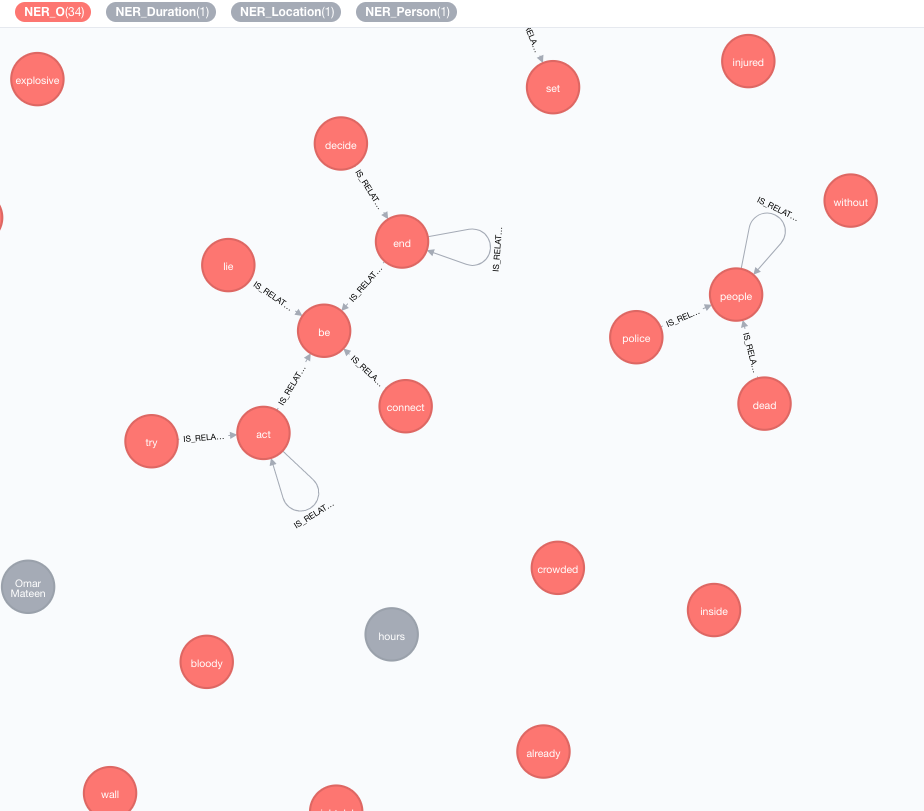
 MATCH (a:AnnotatedText)
CALL ga.nlp.ml.textRank({annotatedText: a, stopwords: '+,other,email', useDependencies: true})
YIELD result RETURN result
annotatedText是一個強制性參數,指的是需要分析的註釋文檔。
可選參數(默認值在括號中):
keywordLabel (關鍵字):關鍵字節點的標籤名稱useDependencies (true):使用通用依賴性通過複合和AMOD關係相關的標籤來豐富提取的關鍵字和關鍵短語dependenciesGraph (false):使用通用依賴關係來創建標籤共發生圖(默認為false,這意味著自然單詞流用於構建共發生)cleanKeywords (true):運行清潔程序topXTags (1/3):設置將用作關鍵字 /鍵短語的最高評級標籤的一小部分respectSentences (false):尊重或不句子的句子邊界共存圖形構建respectDirections (false):尊重或不尊重的指示(單詞如何互相跟隨)iterations (30):Pagerank迭代的數量damp (0.85):Pagerank阻尼因子threshold (0.0001):Pagerank收斂閾值removeStopwords (true):使用optwords列表共同出現圖形構建和關鍵字的最終清潔stopwords :customize stopwords列表(如果列表以+開頭,以下單詞將附加到默認的stopwords列表中,否則默認列表被覆蓋)admittedPOSs :指定哪些POS標籤被視為關鍵字候選人;使用與英語不同的語言時需要forbiddenPOSs :指定構造共匯圖時要忽略的POS標籤列表;使用與英語不同的語言時需要forbiddenNEs :指定要忽略的NES的列表有關詳細的TextRank算法說明,請參閱我們有關無監督關鍵字提取的博客文章。
將通用依賴項用於關鍵字富集( useDependencies選項)可能會導致關鍵字具有不必要的細節級別,例如關鍵字Space Shuttle Logistics程序。在許多用例中,我們也可能有興趣知道,給定文檔通常會談論航天飛機(或Logistic程序)。為此,請使用以下一個選項進行後處理:
direct - n個標籤數的每個密鑰短語都針對所有文檔的所有密鑰短語檢查,標籤數為1 <m <n ;如果前者包含後一個鍵短語,則DESCRIBES關係是從M鍵詞到N -Keyphrase的所有帶註釋的文本創建的subgroups - 與direct相同的過程,但沒有直接將較高級別的關鍵字連接到帶有註釋的文本,而是通過HAS_SUBGROUP關係連接到較低級別的關鍵字 // Important note: create subsequent indices to optimise the post-process method performance
CREATE INDEX ON :Keyword(numTerms)
CREATE INDEX ON :Keyword(value)
CALL ga.nlp.ml.textRank.postprocess({keywordLabel: "Keyword", method: "subgroups"})
YIELD result
RETURN result
keywordLabel是默認設置為“關鍵字”的可選參數。
默認情況下,後過程操作正在處理所有關鍵字,這在大圖上可能很重。您可以指定在該註釋上使用帶有annotatedText參數應用後處理操作的註釋文本:
 MATCH (n:AnnotatedText) WITH n LIMIT 100
CALL ga.nlp.ml.textRank.postprocess({annotatedText: n, method:'subgroups'}) YIELD result RETURN count(n)
示例用於使用apoc的完整關鍵字上有效運行它:
 CALL apoc.periodic.iterate(
'MATCH (n:AnnotatedText) RETURN n',
'CALL ga.nlp.ml.textRank.postprocess({annotatedText: n, method:"subgroups"}) YIELD result RETURN count(n)',
{batchSize: 1, iterateList:false}
)
可以採用類似的關鍵字提取方法來實施簡單的摘要。創建了一個密集的連接圖表,句子句句的關係代表其基於共享單詞的相似性(共享單詞的數量與句子中單詞數的對數的總和)。然後將Pagerank用作中心度度量,以對文檔中句子的相對重要性進行排名。
運行此算法:
 MATCH (a:AnnotatedText)
CALL ga.nlp.ml.textRank.summarize({annotatedText: a}) YIELD result
RETURN result
可用參數:
annotatedTextiterations (30):Pagerank迭代的數量damp (0.85):Pagerank阻尼因子threshold (0.0001):Pagerank收斂閾值摘要過程將新屬性保存到句子節點: summaryRelevance (給定句子的pagerank值)和summaryRank (排名; 1 =最高排名句)。檢索摘要的示例查詢:
 match (n:Kapitel)-[:HAS_ANNOTATED_TEXT]->(a:AnnotatedText)
where id(n) = 233
match (a)-[:CONTAINS_SENTENCE]->(s:Sentence)
with a, count(*) as nSentences
match (a)-[:CONTAINS_SENTENCE]->(s:Sentence)-[:HAS_TAG]->(t:Tag)
with a, s, count(distinct t) as nTags, (CASE WHEN nSentences*0.1 > 10 THEN 10 ELSE toInteger(nSentences*0.1) END) as nLimit
where nTags > 4
with a, s, nLimit
order by s.summaryRank
with a, collect({text: s.text, pos: s.sentenceNumber})[..nLimit] as summary
unwind summary as sent
return sent.text
order by sent.pos
您還可以確定呈現的文本是正面,負面還是中立。此過程需要一個註釋的節點,該節點由上面的ga.nlp.annotate產生。
 MATCH (t:MyNode)-[]-(a:AnnotatedText)
CALL ga.nlp.sentiment(a) YIELD result
RETURN result;
此過程將在成功時簡單地返回“成功”,但它將應用:POSITIVE :NEUTRAL或:NEGATIVE標籤對每個句子。結果,當完成情感檢測完成後,您可以查詢句子的情感:
 MATCH (s:Sentence)
RETURN s.text, labels(s)
 CALL ga.nlp.detectLanguage("What language is this in?")
YIELD result return result
 CALL ga.nlp.filter({text:'On 8 May 2013,
    one week before the Pakistani election, the third author,
    in his keynote address at the Sentiment Analysis Symposium,
    forecast the winner of the Pakistani election. The chart
    in Figure 1 shows varying sentiment on the candidates for
    prime minister of Pakistan in that election. The next day,
    the BBC’s Owen Bennett Jones, reporting from Islamabad, wrote
    an article titled Pakistan Elections: Five Reasons Why the
    Vote is Unpredictable, in which he claimed that the election
    was too close to call. It was not, and despite his being in Pakistan,
    the outcome of the election was exactly as we predicted.', filter: 'Owen Bennett Jones/PERSON, BBC, Pakistan/LOCATION'}) YIELD result
return result
一旦從包含某些文本的所有新聞或其他節點中提取標籤後,就可以使用基於內容的相似性來計算它們之間的相似性。在此過程中,使用TF-IDF編碼格式描述了每個帶註釋的文本。 TF-IDF是信息檢索領域已建立的技術,代表術語頻率為單位的文檔頻率。文本文檔可以在多維歐幾里得空間中編碼為tf-idf。空間尺寸對應於先前從文檔中提取的標籤。每個維度(即,對於每個標籤)中給定文檔的坐標被計算為兩個子測量的乘積:項頻率和反向文檔頻率。
 MATCH (a:AnnotatedText)
//WHERE ...
WITH collect(a) as nodes
CALL ga.nlp.ml.similarity.cosine({input: <list_of_annotated_texts>[, query: <tfidf_query>, relationshipType: "CUSTOM_SIMILARITY", ...]}) YIELD result
RETURN result
可用參數(默認值在括號中):
input :輸入節點列表-AntotatedTextsrelationshipType (Samelity_cosine):相似性關係的類型,將其與query一起使用query :指定自己的查詢以提取表格中提取TF和IDF ... RETURN id(Tag), tf, idfpropertyName (數值數組),該屬性包含已經準備好的文檔向量Word2Vec是一種淺的兩層神經網絡模型,用於產生單詞嵌入(表示為多維語義向量),它是ConceptNet Numberbatch中使用的模型之一。
將源模型(向量)添加到Lucene指數中
CALL ga.nlp.ml.word2vec.addModel(<path_to_source_dir>, <path_to_index>, <identifier>)
<path_to_source_dir>是通往目錄的完整途徑,該目錄用要索引的源向量<path_to_index>是一個完整的路徑,將存儲索引<identifier>是一個自定義字符串,可唯一標識模型列出可用模型:
CALL ga.nlp.ml.word2vec.listModels
該模型現在可以用來計算單詞之間的餘弦相似性:
 WITH ga.nlp.ml.word2vec.wordVector('äpple', 'swedish-numberbatch') AS appleVector,
ga.nlp.ml.word2vec.wordVector('frukt', 'swedish-numberbatch') AS fruitVector
RETURN ga.nlp.ml.similarity.cosine(appleVector, fruitVector) AS similarity
或者,您可以直接詢問一個節點的word2vec,該節點存儲在屬性value中:
 MATCH (n1:Tag), (n2:Tag)
WHERE ...
WITH ga.nlp.ml.word2vec.vector(n1, <model_name>) AS vector1,
ga.nlp.ml.word2vec.vector(n2, <model_name>) AS vector2
RETURN ga.nlp.ml.similarity.cosine(vector1, vector2) AS similarity
我們還可以永久存儲Word2Vec向量以標記節點:
CALL ga.nlp.ml.word2vec.attach({query:'MATCH (t:Tag) RETURN t', modelName:'swedish-numberbatch'})
query :返回標籤的查詢應附加嵌入向量modelName :使用的模型您還可以通過以下過程獲得最近的鄰居:
CALL ga.nlp.ml.word2vec.nn('analyzed', 10, 'fasttext') YIELD word, distance RETURN word, distance
對於大型型號,例如,英語的完整快速文本,大約200萬個單詞,即時計算最近的鄰居的效率低下。
您可以將模型加載到內存中,以使最近的鄰居更快(FastText 1M Word Vectors通常需要27秒,如果需要從磁盤讀取,則在內存中〜300ms):
確保具有專用於Neo4J的有效堆內存:
 dbms.memory.heap.initial_size=3000m
dbms.memory.heap.max_size=5000m
將模型加載到內存中:
CALL ga.nlp.ml.word2vec.load(<maxNeighbors>, <modelName>)
並取回
CALL ga.nlp.ml.word2vec.nn(<word>,<maxNeighbors>,<modelName>)
您可以使用任何單詞嵌入模型,只要以下內容是正確的:
.txt擴展名例如,您可以從fastText加載模型,然後將文件從.vec重命名為.txt :https://fasttext.cc/docs/en/english-vectors.html
CALL ga.nlp.parser.pdf("file:///Users/ikwattro/_graphs/nlp/import/myfile.pdf") YIELD number, paragraphs
該過程返回行,列number為頁碼, paragraphs是段落文本的List<String> 。
您還可以將http或https URL傳遞到從遠程位置加載文件的過程中。
在某些情況下,PDF文檔具有一些無用的內容,例如頁面頁腳等,您可以通過通過定義零件的零件列表來將它們排除在解析之外:
CALL ga.nlp.parser.pdf("myfile.pdf", ["^[0-9]$","^Licensed to"])
Tika可以被認為是爬行者,並被拒絕訪問某些包含PDF的站點。您可以通過傳遞UserAgent選項來覆蓋此內容:
CALL ga.nlp.parser.pdf($url, [], {UserAgent: 'Mozilla/5.0 (Windows; U; Win98; en-US; rv:1.7.2) Gecko/20040803'})
RETURN ga.nlp.parse.raw(<path-to-file>) AS content
在某些情況下,僅存儲某些值而不是完整圖是有用的,但請注意,儘管它可能會降低為EG提取見解(Textrank)的能力:
 CALL ga.nlp.processor.addPipeline({
name:"whitelist",
whitelist:"hello,john,ibm",
textProcessor:"com.graphaware.nlp.enterprise.processor.EnterpriseStanfordTextProcessor",
processingSteps:{tokenize:true, ner:true}})
 CALL ga.nlp.annotate({text:"Hello, my name is John and I worked at IBM.", id:"test-123", pipeline:"whitelist", checkLanguage:false})
YIELD result
RETURN result
WebVTT是網絡視頻文本軌道的格式,例如視頻的YouTube成績單:https://fr.wikipedia.org/wiki/webvtt
CALL ga.nlp.parser.webvtt("url-to-transcript.vtt") YIELD startTime, endTime, text
 CALL ga.nlp.utils.listFiles(<path-to-directory>, <extensionFilter>)

// eg:

CALL ga.nlp.utils.listFiles("/Users/ikwattro/dev/papers", ".pdf") YIELD filePath RETURN filePath
僅噹噹前目錄的上述過程列表文件,如果您還需要走兒童目錄,請使用walkdir :
CALL ga.nlp.utils.walkdir("/Users/ikwattro/dev/papers", ".pdf") YIELD filePath RETURN filePath
列表存儲的模型及其路徑
刪除並重新創建具有相同配置的管道(使用已更改的靜態NER文件時有用)
版權(C)2013-2019 Graphaware
Graphaware是免費軟件:您可以根據自由軟件基金會發布的GNU通用公共許可證的條款進行重新分配和/或對其進行修改。該程序的分佈是希望它將有用的,但沒有任何保修;即使沒有對特定目的的適銷性或適合性的隱含保證。有關更多詳細信息,請參見GNU通用公共許可證。您應該已經收到了GNU通用公共許可證的副本以及此計劃。如果沒有,請參見http://www.gnu.org/licenses/。





