gpt tokenizer
2.7.0

gpt-tokenizer是一個令牌字節對編碼器/解碼器,支持所有OpenAI模型(包括GPT-3.5,GPT-4,GPT-4,GPT-4O和O1)。它是所有JavaScript環境可用的最快,最小和最低的足跡GPT Tokenizer。它用打字稿編寫。
該圖書館已被信任:
請考慮?贊助該項目,如果您覺得有用。
截至2023年,它是NPM上最完整的開源GPT Tokenizer。該軟件包是Openai tiktoken的一個港口,頂部撒上一些其他獨特功能:
encodeChat功能,支持輕鬆地聊天r50k_base , p50k_base , p50k_edit , cl100k_base和o200k_base )decodeAsyncGenerator和decodeGenerator )isWithinTokenLimit函數,以評估令牌限製而無需編碼整個文本/聊天npm install gpt-tokenizer < script src =" https://unpkg.com/gpt-tokenizer " > </ script >
< script >
// the package is now available as a global:
const { encode , decode } = GPTTokenizer_cl100k_base
</ script >如果您想使用自定義編碼,請獲取相關腳本。
gpt-4o和o1 )gpt-4-*和gpt-3.5-turbo )全局名稱是一個串聯: GPTTokenizer_${encoding} 。
有關更多信息,請參閱支持的模型及其編碼部分。
操場在令人難忘的URL下出版:https://gpt-tokenizer.dev/
您可以使用Codesandbox Playground在瀏覽器中使用該軟件包。
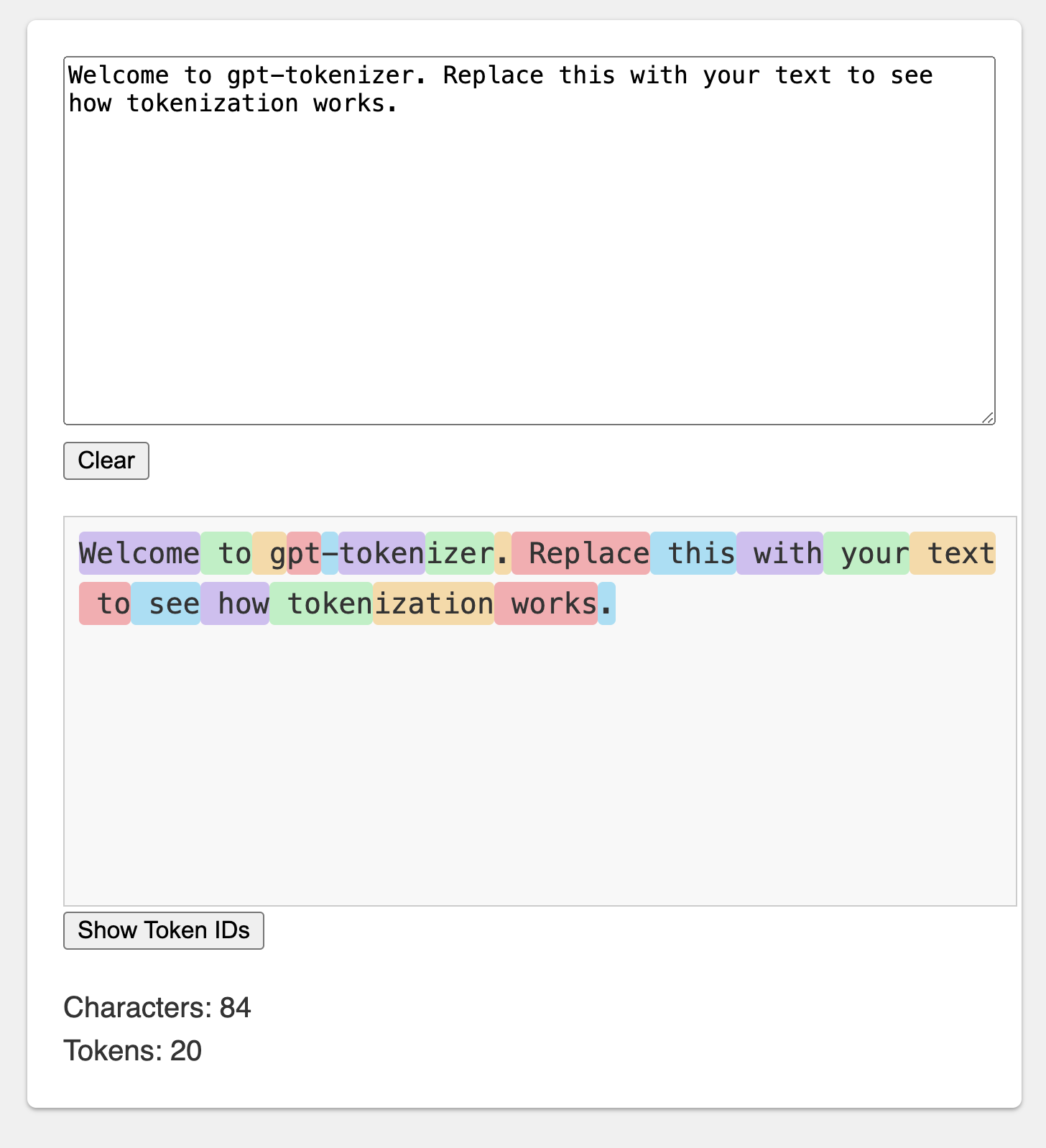
操場模仿了官方的Openai令牌。
該庫提供了各種功能,可以將文本轉換為一系列整數(令牌),這些序列可以饋入LLM模型。使用OpenAI使用的字節對編碼(BPE)算法進行轉換。
 import {
  encode ,
  encodeChat ,
  decode ,
  isWithinTokenLimit ,
  encodeGenerator ,
  decodeGenerator ,
  decodeAsyncGenerator ,
} from 'gpt-tokenizer'
// note: depending on the model, import from the respective file, e.g.:
// import {...} from 'gpt-tokenizer/model/gpt-4o'

const text = 'Hello, world!'
const tokenLimit = 10

// Encode text into tokens
const tokens = encode ( text )

// Decode tokens back into text
const decodedText = decode ( tokens )

// Check if text is within the token limit
// returns false if the limit is exceeded, otherwise returns the actual number of tokens (truthy value)
const withinTokenLimit = isWithinTokenLimit ( text , tokenLimit )

// Example chat:
const chat = [
  { role : 'system' , content : 'You are a helpful assistant.' } ,
  { role : 'assistant' , content : 'gpt-tokenizer is awesome.' } ,
] as const

// Encode chat into tokens
const chatTokens = encodeChat ( chat )

// Check if chat is within the token limit
const chatWithinTokenLimit = isWithinTokenLimit ( chat , tokenLimit )

// Encode text using generator
for ( const tokenChunk of encodeGenerator ( text ) ) {
  console . log ( tokenChunk )
}

// Decode tokens using generator
for ( const textChunk of decodeGenerator ( tokens ) ) {
  console . log ( textChunk )
}

// Decode tokens using async generator
// (assuming `asyncTokens` is an AsyncIterableIterator<number>)
for await ( const textChunk of decodeAsyncGenerator ( asyncTokens ) ) {
  console . log ( textChunk )
}默認情況下,從gpt-tokenizer導入的使用cl100k_base編碼,由gpt-3.5-turbo和gpt-4使用。
要獲得不同模型的令牌,請直接導入:例如:
 import {
  encode ,
  decode ,
  isWithinTokenLimit ,
  // etc...
} from 'gpt-tokenizer/model/gpt-3.5-turbo'
如果您正在處理不支持軟件包的解析器。JSON exports解決方案,您可能需要從相應的cjs或esm目錄中導入,例如:
 import {
  encode ,
  decode ,
  isWithinTokenLimit ,
  // etc...
} from 'gpt-tokenizer/cjs/model/gpt-3.5-turbo' 如果您不介意異步加載令牌,則可以在功能中使用動態導入,例如:
 const {
  encode ,
  decode ,
  isWithinTokenLimit ,
  // etc...
} = await import ( 'gpt-tokenizer/model/gpt-3.5-turbo' ) 如果軟件包不支持您的模型,但是您知道它使用了哪種BPE,則可以直接加載編碼,例如:
 import {
  encode ,
  decode ,
  isWithinTokenLimit ,
  // etc...
} from 'gpt-tokenizer/encoding/cl100k_base'o1-* ( o200k_base )gpt-4o ( o200k_base )gpt-4-* ( cl100k_base )gpt-3.5-turbo ( cl100k_base )text-davinci-003 ( p50k_base )text-davinci-002 ( p50k_base )text-davinci-001 ( r50k_base )注意:如果您使用的是gpt-3.5-*或gpt-4-* ,並且看不到您要尋找的模型,請直接使用cl100k_base 。
encode(text: string): number[]將給定文本編碼為一系列令牌。當您需要將一件文本轉換為GPT模型可以處理的令牌格式時,請使用此方法。
例子:
 import { encode } from 'gpt-tokenizer'

const text = 'Hello, world!'
const tokens = encode ( text )
decode(tokens: number[]): string將一系列令牌解碼為文本。當您想將輸出令牌從GPT模型轉換回人類可讀文本時,請使用此方法。
例子:
 import { decode } from 'gpt-tokenizer'

const tokens = [ 18435 , 198 , 23132 , 328 ]
const text = decode ( tokens )
isWithinTokenLimit(text: string, tokenLimit: number): false | number檢查文本是否在令牌限制之內。如果超過限制,則返回false ,否則返回令牌的數量。使用此方法快速檢查給定文本是否在GPT模型施加的令牌限制內,而無需編碼整個文本。
例子:
 import { isWithinTokenLimit } from 'gpt-tokenizer'

const text = 'Hello, world!'
const tokenLimit = 10
const withinTokenLimit = isWithinTokenLimit ( text , tokenLimit )
countTokens(text: string | Iterable<ChatMessage>): number計算輸入文本或聊天中的令牌數量。當您需要確定代幣數量而無需檢查限制時,請使用此方法。
例子:
 import { countTokens } from 'gpt-tokenizer'

const text = 'Hello, world!'
const tokenCount = countTokens ( text )
encodeChat(chat: ChatMessage[], model?: ModelName): number[]將給定的聊天編碼為一系列令牌。
如果您沒有直接導入模型版本,或者在初始化過程中未提供model ,則必須在此處提供它以正確地將聊天介紹給給定模型。當您需要將聊天轉換為GPT模型可以處理的令牌格式時,請使用此方法。
例子:
 import { encodeChat } from 'gpt-tokenizer'

const chat = [
  { role : 'system' , content : 'You are a helpful assistant.' } ,
  { role : 'assistant' , content : 'gpt-tokenizer is awesome.' } ,
]
const tokens = encodeChat ( chat )
請注意,如果您編碼一個空聊天,它仍然包含最少的特殊令牌數量。
encodeGenerator(text: string): Generator<number[], void, undefined>使用發電機來編碼給定文本,產生大量令牌。當您想在塊中編碼文本時,請使用此方法,這對於處理大型文本或流數據可能很有用。
例子:
 import { encodeGenerator } from 'gpt-tokenizer'

const text = 'Hello, world!'
const tokens = [ ]
for ( const tokenChunk of encodeGenerator ( text ) ) {
  tokens . push ( ... tokenChunk )
}
encodeChatGenerator(chat: Iterator<ChatMessage>, model?: ModelName): Generator<number[], void, undefined>與encodeChat相同,但使用生成器作為輸出,並且可以使用任何迭代器作為輸入chat 。
decodeGenerator(tokens: Iterable<number>): Generator<string, void, undefined>使用發電機來解碼一系列令牌,產生大量的解碼文本。當您想在塊中解碼令牌時,請使用此方法,這對於處理大型輸出或流數據可能很有用。
例子:
 import { decodeGenerator } from 'gpt-tokenizer'

const tokens = [ 18435 , 198 , 23132 , 328 ]
let decodedText = ''
for ( const textChunk of decodeGenerator ( tokens ) ) {
  decodedText += textChunk
}
decodeAsyncGenerator(tokens: AsyncIterable<number>): AsyncGenerator<string, void, undefined>使用發電機對一系列令牌進行解碼,從而產生大量的解碼文本。當您想在塊中解碼令牌時使用此方法,這對於在異步上下文中處理大型輸出或流數據可能很有用。
例子:
 import { decodeAsyncGenerator } from 'gpt-tokenizer'

async function processTokens ( asyncTokensIterator ) {
  let decodedText = ''
  for await ( const textChunk of decodeAsyncGenerator ( asyncTokensIterator ) ) {
    decodedText += textChunk
  }
} GPT模型使用了一些特殊的令牌。並非所有模型都支持所有這些令牌。
gpt-tokenizer允許您在編碼文本時指定允許的特殊令牌的自定義集。為此,將包含允許的特殊令牌作為參數的Set傳遞給encode函數:
 import {
  EndOfPrompt ,
  EndOfText ,
  FimMiddle ,
  FimPrefix ,
  FimSuffix ,
  ImStart ,
  ImEnd ,
  ImSep ,
  encode ,
} from 'gpt-tokenizer'

const inputText = `Some Text ${ EndOfPrompt } `
const allowedSpecialTokens = new Set ( [ EndOfPrompt ] )
const encoded = encode ( inputText , allowedSpecialTokens )
const expectedEncoded = [ 8538 , 2991 , 220 , 100276 ]

expect ( encoded ) . toBe ( expectedEncoded )同樣,您可以在編碼文本時指定自定義的特殊令牌。傳遞包含不允許特殊令牌作為encode函數的參數的Set :
 import { encode , EndOfText } from 'gpt-tokenizer'

const inputText = `Some Text ${ EndOfText } `
const disallowedSpecial = new Set ( [ EndOfText ] )
// throws an error:
const encoded = encode ( inputText , undefined , disallowedSpecial )
在此示例中,丟棄錯誤,因為輸入文本包含不允許的特殊令牌。
gpt-tokenizer在testplans.txt文件中包含一組測試用例,以確保其與OpenAI的Python tiktoken庫的兼容性。這些測試用例驗證了gpt-tokenizer的功能和行為,為開發人員提供了可靠的參考。
運行單元測試並驗證測試用例有助於保持庫與原始Python實現之間的一致性。
gpt-tokenizer通過gpt-tokenizer/models導出的models提供了有關所有OpenAI模型的全面數據。這包括有關上下文窗口,成本,培訓數據截止和貶值狀態的詳細信息。
定期保留數據以匹配OpenAI的官方文檔。歡迎保持這些數據的最新數據 - 如果您發現任何差異或有更新,請隨時打開PR。
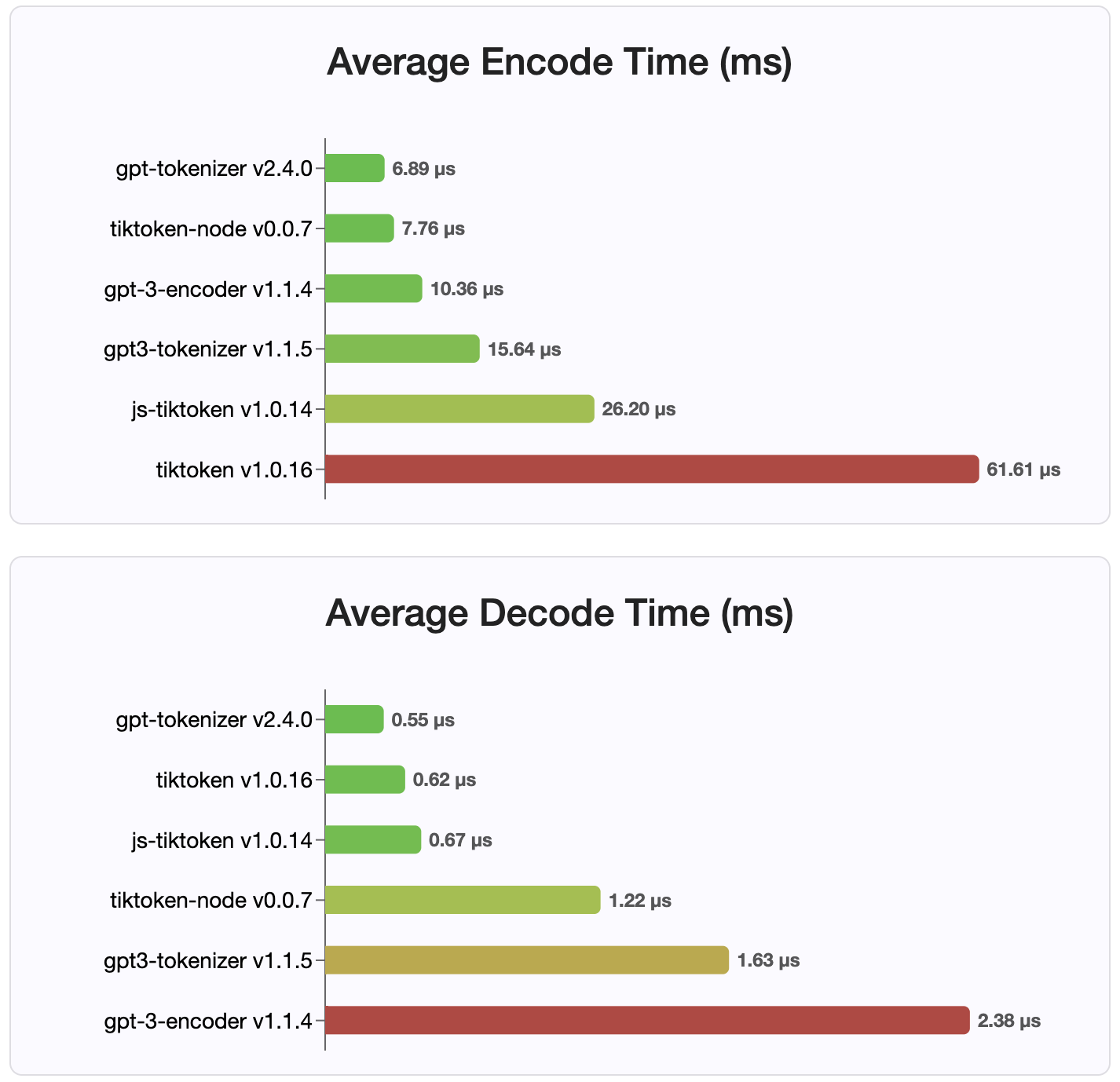
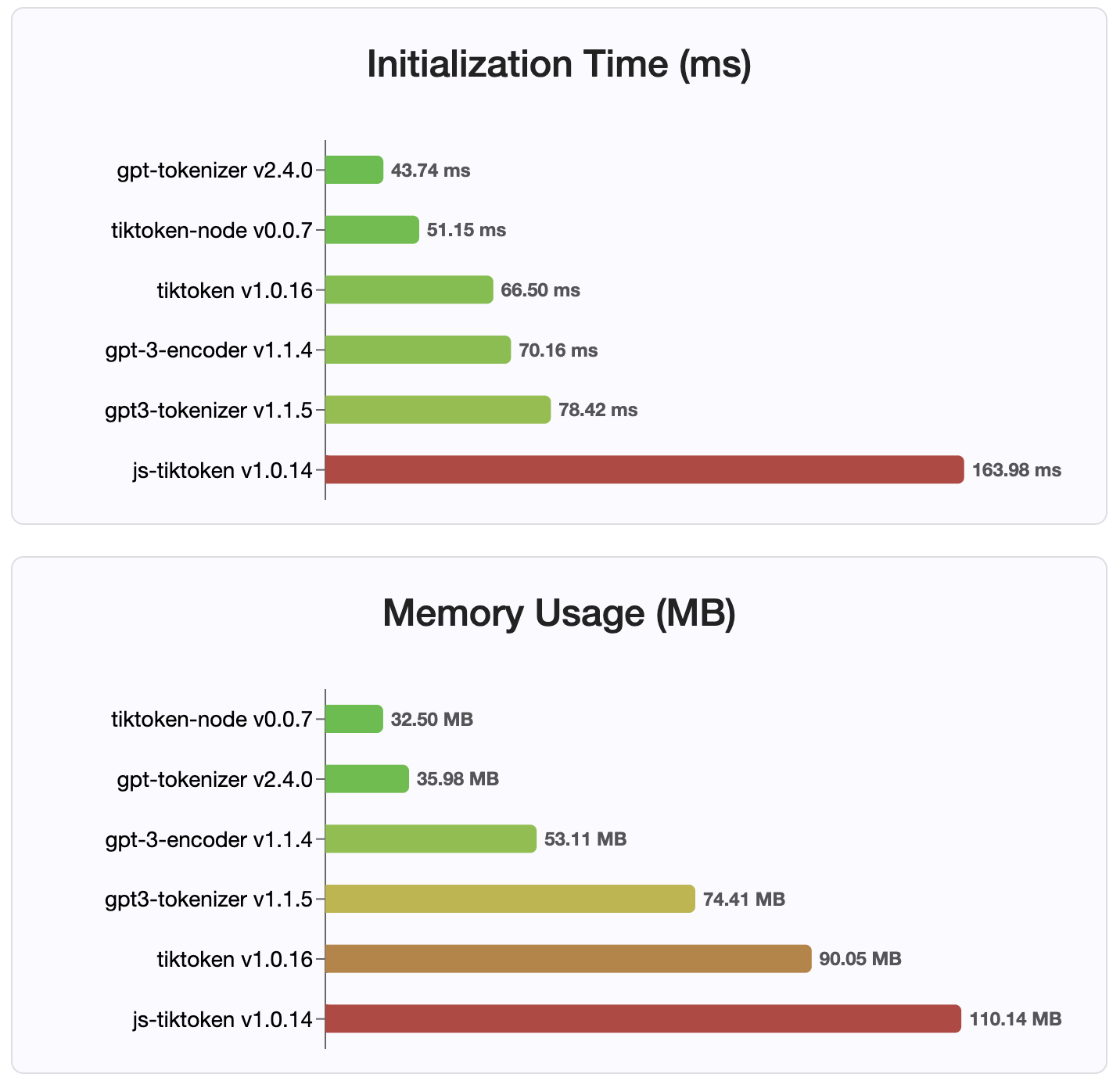
由於版本2.4.0, gpt-tokenizer是NPM上最快的令牌實現。它甚至比可用的WASM/節點綁定實現更快。它具有最快的編碼,解碼時間和很小的內存足跡。它還比所有其他實現都更快地初始化。
由於它們存儲在緊湊的格式中,編碼本身也是最小的大小。
麻省理工學院
歡迎捐款!請打開拉動請求或問題以討論您的錯誤報告,或將討論功能用於想法或任何其他查詢。
感謝 @dmitry-Brazhenko的Sharptoken,其代碼被用作該港口的參考。
希望您發現gpt-tokenizer對您的項目有用!





