nexa sdk
v0.0.9.7

设备模型中心|文档|不和谐|博客| x(Twitter)
NEXA SDK是针对ONNX和GGML模型的局部在设备推理框架中,支持文本生成,图像生成,视觉模型(VLM),音频语言模型,语音到文本(ASR)和文本对语音(TTS)功能。可通过Python软件包或可执行安装程序安装。
nexa run omniVLM和音频语言模型(2.9B参数): nexa run omniaudionexa run qwen2audio ,我们是第一个使用GGML Tensor库支持音频语言模型的开源工具包。nexa embed <model_path> <prompt>nexa run -hf <hf_model_id> -mt COMPUTER_VISION或nexa run -ms <ms_model_id> -mt COMPUTER_VISIONnexa run -hf <hf_model_id> -mt NLP或nexa run -ms <ms_model_id> -mt NLP欢迎通过问题提交您的请求,我们每周发货。
 MacOS安装程序
 Windows安装程序
 Linux安装程序
curl -fsSL https://public-storage.nexa4ai.com/install.sh | sh尝试使用nexa-exe :
nexa-exe < command > 我们已经发布了针对各种Python版本,平台和后端的预制车轮,以便在我们的索引页面上安装方便安装。
pip install nexaai --prefer-binary --index-url https://github.nexa.ai/whl/cpu --extra-index-url https://pypi.org/simple --no-cache-dir对于支持金属(MACOS)的GPU版本:
CMAKE_ARGS= " -DGGML_METAL=ON -DSD_METAL=ON " pip install nexaai --prefer-binary --index-url https://github.nexa.ai/whl/metal --extra-index-url https://pypi.org/simple --no-cache-dir尝试以下命令:
wget https://github.com/conda-forge/miniforge/releases/latest/download/Miniforge3-MacOSX-arm64.sh
bash Miniforge3-MacOSX-arm64.sh
conda create -n nexasdk python=3.10
conda activate nexasdk
CMAKE_ARGS= " -DGGML_METAL=ON -DSD_METAL=ON " pip install nexaai --prefer-binary --index-url https://github.nexa.ai/whl/metal --extra-index-url https://pypi.org/simple --no-cache-dir要在CUDA支持下安装,请确保您已安装了CUDA工具包12.0。
对于Linux :
CMAKE_ARGS= " -DGGML_CUDA=ON -DSD_CUBLAS=ON " pip install nexaai --prefer-binary --index-url https://github.nexa.ai/whl/cu124 --extra-index-url https://pypi.org/simple --no-cache-dir对于Windows PowerShell :
$env :CMAKE_ARGS= " -DGGML_CUDA=ON -DSD_CUBLAS=ON " ; pip install nexaai --prefer-binary --index-url https://github.nexa.ai/whl/cu124 --extra-index-url https://pypi.org/simple --no-cache-dir对于Windows命令提示:
set CMAKE_ARGS= " -DGGML_CUDA=ON -DSD_CUBLAS=ON " & pip install nexaai --prefer-binary --index-url https://github.nexa.ai/whl/cu124 --extra-index-url https://pypi.org/simple --no-cache-dir对于Windows Git Bash :
CMAKE_ARGS= " -DGGML_CUDA=ON -DSD_CUBLAS=ON " pip install nexaai --prefer-binary --index-url https://github.nexa.ai/whl/cu124 --extra-index-url https://pypi.org/simple --no-cache-dir如果您在构建时遇到以下问题:
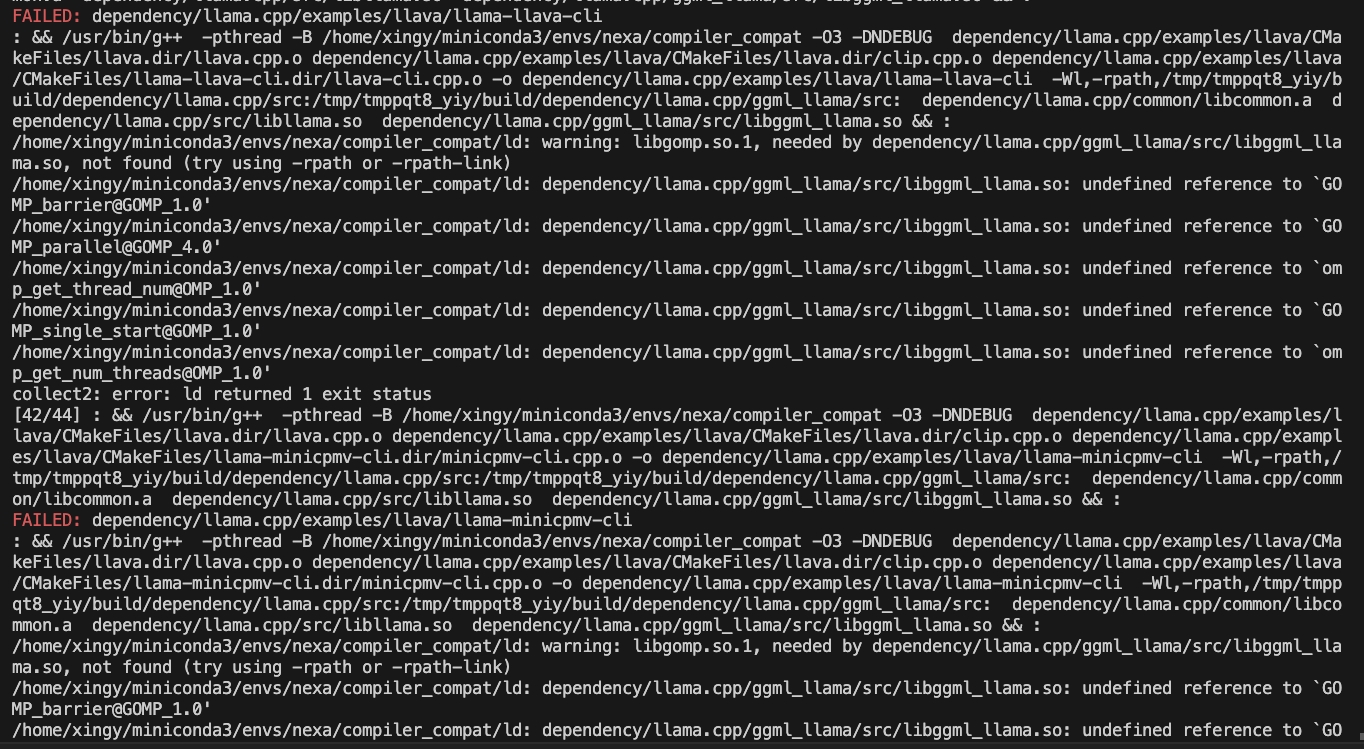
尝试以下命令:
CMAKE_ARGS= " -DCMAKE_CXX_FLAGS=-fopenmp " pip install nexaai要在ROCM支持下安装,请确保已安装ROCM 6.2.1或更高版本。
对于Linux :
CMAKE_ARGS= " -DGGML_HIPBLAS=on " pip install nexaai --prefer-binary --index-url https://github.nexa.ai/whl/rocm621 --extra-index-url https://pypi.org/simple --no-cache-dir要在Vulkan支持下安装,请确保您的Vulkan SDK 1.3.261.1或更高版本安装。
对于Windows PowerShell :
$env :CMAKE_ARGS= " -DGGML_VULKAN=on " ; pip install nexaai --prefer-binary --index-url https://github.nexa.ai/whl/vulkan --extra-index-url https://pypi.org/simple --no-cache-dir对于Windows命令提示:
set CMAKE_ARGS= " -DGGML_VULKAN=on " & pip install nexaai --prefer-binary --index-url https://github.nexa.ai/whl/vulkan --extra-index-url https://pypi.org/simple --no-cache-dir对于Windows Git Bash :
CMAKE_ARGS= " -DGGML_VULKAN=on " pip install nexaai --prefer-binary --index-url https://github.nexa.ai/whl/vulkan --extra-index-url https://pypi.org/simple --no-cache-dir如何克隆这个回购
git clone --recursive https://github.com/NexaAI/nexa-sdk如果您忘记使用--recursive ,则可以使用以下命令添加子模块
git submodule update --init --recursive然后,您可以构建和安装软件包
pip install -e . 以下是我们与其他类似工具的区分:
| 特征 | Nexa SDK | 霍拉马 | 最佳 | LM Studio |
|---|---|---|---|---|
| GGML支持 | ✅ | ✅ | ✅ | |
| ONNX支持 | ✅ | ✅ | ||
| 文字生成 | ✅ | ✅ | ✅ | ✅ |
| 图像生成 | ✅ | |||
| 视觉语言模型 | ✅ | ✅ | ✅ | ✅ |
| 音频模型 | ✅ | |||
| 文本到语音 | ✅ | ✅ | ||
| 服务器功能 | ✅ | ✅ | ✅ | ✅ |
| 用户界面 | ✅ | ✅ | ||
| 可执行安装 | ✅ | ✅ | ✅ |
我们的设备模型集线器提供了所有类型的量化模型(文本,图像,音频,多模式),并提供用于RAM,文件大小,任务等的过滤器,以帮助您轻松地使用UI探索模型。在设备模型中心探索设备模型
支持的模型示例(模型中心的完整列表):
| 模型 | 类型 | 格式 | 命令 |
|---|---|---|---|
| Omniaudio | audiolm | GGUF | nexa run omniaudio |
| qwen2audio | audiolm | GGUF | nexa run qwen2audio |
| 章鱼V2 | 功能调用 | GGUF | nexa run octopus-v2 |
| OCTO-NET | 文本 | GGUF | nexa run octo-net |
| Omnivlm | 多模式 | GGUF | nexa run omniVLM |
| Nanollava | 多模式 | GGUF | nexa run nanollava |
| llava-phi3 | 多模式 | GGUF | nexa run llava-phi3 |
| llava-llama3 | 多模式 | GGUF | nexa run llava-llama3 |
| llava1.6-Mistral | 多模式 | GGUF | nexa run llava1.6-mistral |
| llava1.6-Vicuna | 多模式 | GGUF | nexa run llava1.6-vicuna |
| Llama3.2 | 文本 | GGUF | nexa run llama3.2 |
| Llama3未经证实 | 文本 | GGUF | nexa run llama3-uncensored |
| Gemma2 | 文本 | GGUF | nexa run gemma2 |
| qwen2.5 | 文本 | GGUF | nexa run qwen2.5 |
| Mathqwen | 文本 | GGUF | nexa run mathqwen |
| codeqwen | 文本 | GGUF | nexa run codeqwen |
| Mistral | 文本 | GGUF/ONNX | nexa run mistral |
| DeepSeek-Coder | 文本 | GGUF | nexa run deepseek-coder |
| Phi3.5 | 文本 | GGUF | nexa run phi3.5 |
| Openelm | 文本 | GGUF | nexa run openelm |
| 稳定扩散-V2-1 | 图像生成 | GGUF | nexa run sd2-1 |
| 稳定扩散3中 | 图像生成 | GGUF | nexa run sd3 |
| Flux.1-Schnell | 图像生成 | GGUF | nexa run flux |
| lcm-dreamshaper | 图像生成 | GGUF/ONNX | nexa run lcm-dreamshaper |
| 窃窃私语-v3-turbo | 语音到文本 | 垃圾桶 | nexa run faster-whisper-large-turbo |
| 耳语微小 | 语音到文本 | onnx | nexa run whisper-tiny.en |
| MXBAI插入大型V1 | 嵌入 | GGUF | nexa embed mxbai |
| 提名 - Embed-Text-V1.5 | 嵌入 | GGUF | nexa embed nomic |
| All-Minilm-L12-V2 | 嵌入 | GGUF | nexa embed all-MiniLM-L12-v2:fp16 |
| 树皮小all | 文本到语音 | GGUF | nexa run bark-small:fp16 |
您可以从HF或使用NEXA SDK的HF或MS绘制,转换(转换为.GGUF),量化和运行Llama.cpp支持的文本生成模型。
使用nexa run -hf <hf-model-id>或nexa run -ms <ms-model-id>使用提供的.gguf文件运行模型:
nexa run -hf Qwen/Qwen2.5-Coder-7B-Instruct-GGUFnexa run -ms Qwen/Qwen2.5-Coder-7B-Instruct-GGUF注意:将提示您选择一个.GGUF文件。如果您所需的量化版本具有多个拆分文件(例如FP16-00001-of-00004),请使用NEXA的转换工具(请参见下文)在本地转换和量化该模型。
安装nexa python软件包,然后使用pip install "nexaai[convert]"安装nexa转换工具,然后使用nexa convert <hf-model-id>转换模型:
nexa convert HuggingFaceTB/SmolLM2-135M-Instruct或者,您可以使用nexa convert -ms <ms-model-id>从ModelsCope转换模型:
nexa convert -ms Qwen/Qwen2.5-7B-Instruct注意:检查我们的排行榜,以获取不同量化版本的主流语言模型和拥抱面文档的性能基准,以了解量化选项。
?您可以使用nexa list查看下载和转换的模型
笔记
pip install nexaai用pip install "nexaai[onnx]"即可。pip install nexaai替换为pip install "nexaai[eval]" 。pip install nexaai用pip install "nexaai[convert]" 。--extra-index-url https://pypi.org/simple与--extra-index-url https://pypi.tuna.tsinghua.edu.cn/simple commandsssssssssssssssssssssssssssssss。这是主要CLI命令的简要概述:
nexa run :使用GGGUF模型对各种任务进行推断。nexa onnx :使用ONNX型号对各种任务进行推断。nexa convert :将拥抱面模型转换为GGGUF模型。nexa server :运行NEXA AI文本生成服务。nexa eval :运行NEXA AI评估任务。nexa pull :从官方或枢纽中汲取模型。nexa remove :从本地机器中删除模型。nexa clean :清理所有模型文件。nexa list :列出本地计算机中的所有型号。nexa login :登录到NEXA API。nexa whoami :显示当前的用户信息。nexa logout :从NEXA API注销。有关CLI命令和用法的详细信息,请参阅CLI参考文档。
要使用本地计算机上的模型启动本地服务器,可以使用nexa server命令。有关服务器设置,API端点和使用示例的详细信息,请参阅服务器参考文献文档。
Swift SDK:提供一个swifty的API,使Swift开发人员可以轻松地集成和使用Llama.cpp模型。
更多文档
我们要感谢以下项目:







