nexa sdk
v0.0.9.7

On-Device Model Hub | Documentation | Discord | Blogs | X (Twitter)
Nexa SDK is a local on-device inference framework for ONNX and GGML models, supporting text generation, image generation, vision-language models (VLM), audio-language models, speech-to-text (ASR), and text-to-speech (TTS) capabilities. Installable via Python Package or Executable Installer.
nexa run omniVLM and audio language model (2.9B parameters): nexa run omniaudionexa run qwen2audio, we are the first open-source toolkit to support audio language model with GGML tensor library.nexa embed <model_path> <prompt>nexa run -hf <hf_model_id> -mt COMPUTER_VISION or nexa run -ms <ms_model_id> -mt COMPUTER_VISIONnexa run -hf <hf_model_id> -mt NLP or nexa run -ms <ms_model_id> -mt NLPWelcome to submit your requests through issues, we ship weekly.
 macOS Installer
 Windows Installer
 Linux Installer
curl -fsSL https://public-storage.nexa4ai.com/install.sh | shTry using nexa-exe instead:
nexa-exe <command>We have released pre-built wheels for various Python versions, platforms, and backends for convenient installation on our index page.
pip install nexaai --prefer-binary --index-url https://github.nexa.ai/whl/cpu --extra-index-url https://pypi.org/simple --no-cache-dirFor the GPU version supporting Metal (macOS):
CMAKE_ARGS="-DGGML_METAL=ON -DSD_METAL=ON" pip install nexaai --prefer-binary --index-url https://github.nexa.ai/whl/metal --extra-index-url https://pypi.org/simple --no-cache-dirTry the following command:
wget https://github.com/conda-forge/miniforge/releases/latest/download/Miniforge3-MacOSX-arm64.sh
bash Miniforge3-MacOSX-arm64.sh
conda create -n nexasdk python=3.10
conda activate nexasdk
CMAKE_ARGS="-DGGML_METAL=ON -DSD_METAL=ON" pip install nexaai --prefer-binary --index-url https://github.nexa.ai/whl/metal --extra-index-url https://pypi.org/simple --no-cache-dirTo install with CUDA support, make sure you have CUDA Toolkit 12.0 or later installed.
For Linux:
CMAKE_ARGS="-DGGML_CUDA=ON -DSD_CUBLAS=ON" pip install nexaai --prefer-binary --index-url https://github.nexa.ai/whl/cu124 --extra-index-url https://pypi.org/simple --no-cache-dirFor Windows PowerShell:
$env:CMAKE_ARGS="-DGGML_CUDA=ON -DSD_CUBLAS=ON"; pip install nexaai --prefer-binary --index-url https://github.nexa.ai/whl/cu124 --extra-index-url https://pypi.org/simple --no-cache-dirFor Windows Command Prompt:
set CMAKE_ARGS="-DGGML_CUDA=ON -DSD_CUBLAS=ON" & pip install nexaai --prefer-binary --index-url https://github.nexa.ai/whl/cu124 --extra-index-url https://pypi.org/simple --no-cache-dirFor Windows Git Bash:
CMAKE_ARGS="-DGGML_CUDA=ON -DSD_CUBLAS=ON" pip install nexaai --prefer-binary --index-url https://github.nexa.ai/whl/cu124 --extra-index-url https://pypi.org/simple --no-cache-dirIf you encounter the following issue while building:
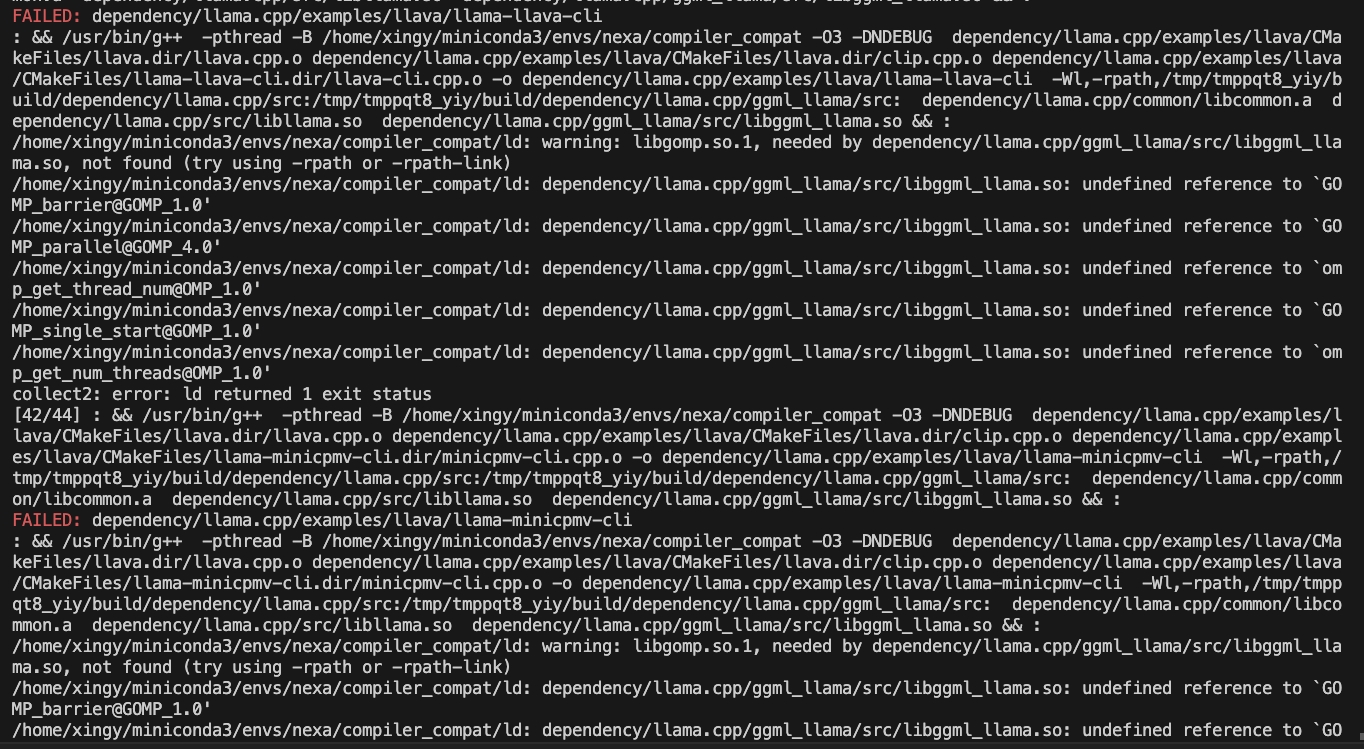
try the following command:
CMAKE_ARGS="-DCMAKE_CXX_FLAGS=-fopenmp" pip install nexaaiTo install with ROCm support, make sure you have ROCm 6.2.1 or later installed.
For Linux:
CMAKE_ARGS="-DGGML_HIPBLAS=on" pip install nexaai --prefer-binary --index-url https://github.nexa.ai/whl/rocm621 --extra-index-url https://pypi.org/simple --no-cache-dirTo install with Vulkan support, make sure you have Vulkan SDK 1.3.261.1 or later installed.
For Windows PowerShell:
$env:CMAKE_ARGS="-DGGML_VULKAN=on"; pip install nexaai --prefer-binary --index-url https://github.nexa.ai/whl/vulkan --extra-index-url https://pypi.org/simple --no-cache-dirFor Windows Command Prompt:
set CMAKE_ARGS="-DGGML_VULKAN=on" & pip install nexaai --prefer-binary --index-url https://github.nexa.ai/whl/vulkan --extra-index-url https://pypi.org/simple --no-cache-dirFor Windows Git Bash:
CMAKE_ARGS="-DGGML_VULKAN=on" pip install nexaai --prefer-binary --index-url https://github.nexa.ai/whl/vulkan --extra-index-url https://pypi.org/simple --no-cache-dirHow to clone this repo
git clone --recursive https://github.com/NexaAI/nexa-sdkIf you forget to use --recursive, you can use below command to add submodule
git submodule update --init --recursiveThen you can build and install the package
pip install -e .Below is our differentiation from other similar tools:
| Feature | Nexa SDK | ollama | Optimum | LM Studio |
|---|---|---|---|---|
| GGML Support | ✅ | ✅ | ✅ | |
| ONNX Support | ✅ | ✅ | ||
| Text Generation | ✅ | ✅ | ✅ | ✅ |
| Image Generation | ✅ | |||
| Vision-Language Models | ✅ | ✅ | ✅ | ✅ |
| Audio-Language Models | ✅ | |||
| Text-to-Speech | ✅ | ✅ | ||
| Server Capability | ✅ | ✅ | ✅ | ✅ |
| User Interface | ✅ | ✅ | ||
| Executable Installation | ✅ | ✅ | ✅ |
Our on-device model hub offers all types of quantized models (text, image, audio, multimodal) with filters for RAM, file size, Tasks, etc. to help you easily explore models with UI. Explore on-device models at On-device Model Hub
Supported model examples (full list at Model Hub):
| Model | Type | Format | Command |
|---|---|---|---|
| omniaudio | AudioLM | GGUF | nexa run omniaudio |
| qwen2audio | AudioLM | GGUF | nexa run qwen2audio |
| octopus-v2 | Function Call | GGUF | nexa run octopus-v2 |
| octo-net | Text | GGUF | nexa run octo-net |
| omniVLM | Multimodal | GGUF | nexa run omniVLM |
| nanollava | Multimodal | GGUF | nexa run nanollava |
| llava-phi3 | Multimodal | GGUF | nexa run llava-phi3 |
| llava-llama3 | Multimodal | GGUF | nexa run llava-llama3 |
| llava1.6-mistral | Multimodal | GGUF | nexa run llava1.6-mistral |
| llava1.6-vicuna | Multimodal | GGUF | nexa run llava1.6-vicuna |
| llama3.2 | Text | GGUF | nexa run llama3.2 |
| llama3-uncensored | Text | GGUF | nexa run llama3-uncensored |
| gemma2 | Text | GGUF | nexa run gemma2 |
| qwen2.5 | Text | GGUF | nexa run qwen2.5 |
| mathqwen | Text | GGUF | nexa run mathqwen |
| codeqwen | Text | GGUF | nexa run codeqwen |
| mistral | Text | GGUF/ONNX | nexa run mistral |
| deepseek-coder | Text | GGUF | nexa run deepseek-coder |
| phi3.5 | Text | GGUF | nexa run phi3.5 |
| openelm | Text | GGUF | nexa run openelm |
| stable-diffusion-v2-1 | Image Generation | GGUF | nexa run sd2-1 |
| stable-diffusion-3-medium | Image Generation | GGUF | nexa run sd3 |
| FLUX.1-schnell | Image Generation | GGUF | nexa run flux |
| lcm-dreamshaper | Image Generation | GGUF/ONNX | nexa run lcm-dreamshaper |
| whisper-large-v3-turbo | Speech-to-Text | BIN | nexa run faster-whisper-large-turbo |
| whisper-tiny.en | Speech-to-Text | ONNX | nexa run whisper-tiny.en |
| mxbai-embed-large-v1 | Embedding | GGUF | nexa embed mxbai |
| nomic-embed-text-v1.5 | Embedding | GGUF | nexa embed nomic |
| all-MiniLM-L12-v2 | Embedding | GGUF | nexa embed all-MiniLM-L12-v2:fp16 |
| bark-small | Text-to-Speech | GGUF | nexa run bark-small:fp16 |
You can pull, convert (to .gguf), quantize and run llama.cpp supported text generation models from HF or MS with Nexa SDK.
Use nexa run -hf <hf-model-id> or nexa run -ms <ms-model-id> to run models with provided .gguf files:
nexa run -hf Qwen/Qwen2.5-Coder-7B-Instruct-GGUFnexa run -ms Qwen/Qwen2.5-Coder-7B-Instruct-GGUFNote: You will be prompted to select a single .gguf file. If your desired quantization version has multiple split files (like fp16-00001-of-00004), please use Nexa's conversion tool (see below) to convert and quantize the model locally.
Install Nexa Python package, and install Nexa conversion tool with pip install "nexaai[convert]", then convert models from huggingface with nexa convert <hf-model-id>:
nexa convert HuggingFaceTB/SmolLM2-135M-InstructOr you can convert models from ModelScope with nexa convert -ms <ms-model-id>:
nexa convert -ms Qwen/Qwen2.5-7B-InstructNote: Check our leaderboard for performance benchmarks of different quantized versions of mainstream language models and HuggingFace docs to learn about quantization options.
? You can view downloaded and converted models with nexa list
Note
pip install nexaai with pip install "nexaai[onnx]" in provided commands.pip install nexaai with pip install "nexaai[eval]" in provided commands.pip install nexaai with pip install "nexaai[convert]" in provided commands.--extra-index-url https://pypi.org/simple with --extra-index-url https://pypi.tuna.tsinghua.edu.cn/simple in provided commands.Here's a brief overview of the main CLI commands:
nexa run: Run inference for various tasks using GGUF models.nexa onnx: Run inference for various tasks using ONNX models.nexa convert: Convert and quantize huggingface models to GGUF models.nexa server: Run the Nexa AI Text Generation Service.nexa eval: Run the Nexa AI Evaluation Tasks.nexa pull: Pull a model from official or hub.nexa remove: Remove a model from local machine.nexa clean: Clean up all model files.nexa list: List all models in the local machine.nexa login: Login to Nexa API.nexa whoami: Show current user information.nexa logout: Logout from Nexa API.For detailed information on CLI commands and usage, please refer to the CLI Reference document.
To start a local server using models on your local computer, you can use the nexa server command.
For detailed information on server setup, API endpoints, and usage examples, please refer to the Server Reference document.
Swift SDK: Provides a Swifty API, allowing Swift developers to easily integrate and use llama.cpp models in their projects.
More Docs
We would like to thank the following projects:







