nexa sdk
v0.0.9.7

ศูนย์กลางรุ่น เอกสาร ความไม่ลงรอยกัน บล็อก X (Twitter)
Nexa SDK เป็นเฟรมเวิร์กการอนุมานบนอุปกรณ์ในท้องถิ่นสำหรับรุ่น ONNX และ GGML, รองรับการสร้างข้อความ, การสร้างภาพ, โมเดล Vision-Language (VLM), โมเดลภาษาเสียง, คำพูดเป็นข้อความ (ASR) และความสามารถในการพูด ติดตั้งได้ผ่านแพ็คเกจ Python หรือตัวติดตั้งที่ใช้งานได้
nexa run omniVLM และรูปแบบภาษาเสียง (พารามิเตอร์ 2.9B): nexa run omniaudionexa run qwen2audio เราเป็นชุดเครื่องมือโอเพนซอร์ซแห่งแรกที่รองรับรูปแบบภาษาเสียงด้วยไลบรารี GGML Tensornexa embed <model_path> <prompt>nexa run -hf <hf_model_id> -mt COMPUTER_VISION หรือ nexa run -ms <ms_model_id> -mt COMPUTER_VISIONnexa run -hf <hf_model_id> -mt NLP หรือ nexa run -ms <ms_model_id> -mt NLPยินดีต้อนรับสู่การส่งคำขอของคุณผ่านปัญหาเราจัดส่งทุกสัปดาห์
 ตัวติดตั้ง MacOS
 ผู้ติดตั้ง Windows
 ตัวติดตั้ง Linux
curl -fsSL https://public-storage.nexa4ai.com/install.sh | sh ลองใช้ nexa-exe แทน:
nexa-exe < command > เราได้เปิดตัวล้อที่สร้างไว้ล่วงหน้าสำหรับรุ่น Python แพลตฟอร์มและแบ็กเอนด์สำหรับการติดตั้งที่สะดวกในหน้าดัชนีของเรา
pip install nexaai --prefer-binary --index-url https://github.nexa.ai/whl/cpu --extra-index-url https://pypi.org/simple --no-cache-dirสำหรับรุ่น GPU ที่รองรับ โลหะ (macOS) :
CMAKE_ARGS= " -DGGML_METAL=ON -DSD_METAL=ON " pip install nexaai --prefer-binary --index-url https://github.nexa.ai/whl/metal --extra-index-url https://pypi.org/simple --no-cache-dirลองใช้คำสั่งต่อไปนี้:
wget https://github.com/conda-forge/miniforge/releases/latest/download/Miniforge3-MacOSX-arm64.sh
bash Miniforge3-MacOSX-arm64.sh
conda create -n nexasdk python=3.10
conda activate nexasdk
CMAKE_ARGS= " -DGGML_METAL=ON -DSD_METAL=ON " pip install nexaai --prefer-binary --index-url https://github.nexa.ai/whl/metal --extra-index-url https://pypi.org/simple --no-cache-dirในการติดตั้งด้วยการสนับสนุน CUDA ตรวจสอบให้แน่ใจว่าคุณได้ติดตั้ง CUDA Toolkit 12.0 หรือติดตั้งใหม่กว่า
สำหรับ Linux :
CMAKE_ARGS= " -DGGML_CUDA=ON -DSD_CUBLAS=ON " pip install nexaai --prefer-binary --index-url https://github.nexa.ai/whl/cu124 --extra-index-url https://pypi.org/simple --no-cache-dirสำหรับ Windows PowerShell :
$env :CMAKE_ARGS= " -DGGML_CUDA=ON -DSD_CUBLAS=ON " ; pip install nexaai --prefer-binary --index-url https://github.nexa.ai/whl/cu124 --extra-index-url https://pypi.org/simple --no-cache-dirสำหรับ พรอมต์คำสั่ง Windows :
set CMAKE_ARGS= " -DGGML_CUDA=ON -DSD_CUBLAS=ON " & pip install nexaai --prefer-binary --index-url https://github.nexa.ai/whl/cu124 --extra-index-url https://pypi.org/simple --no-cache-dirสำหรับ Windows Git Bash :
CMAKE_ARGS= " -DGGML_CUDA=ON -DSD_CUBLAS=ON " pip install nexaai --prefer-binary --index-url https://github.nexa.ai/whl/cu124 --extra-index-url https://pypi.org/simple --no-cache-dirหากคุณพบปัญหาต่อไปนี้ในขณะที่สร้าง:
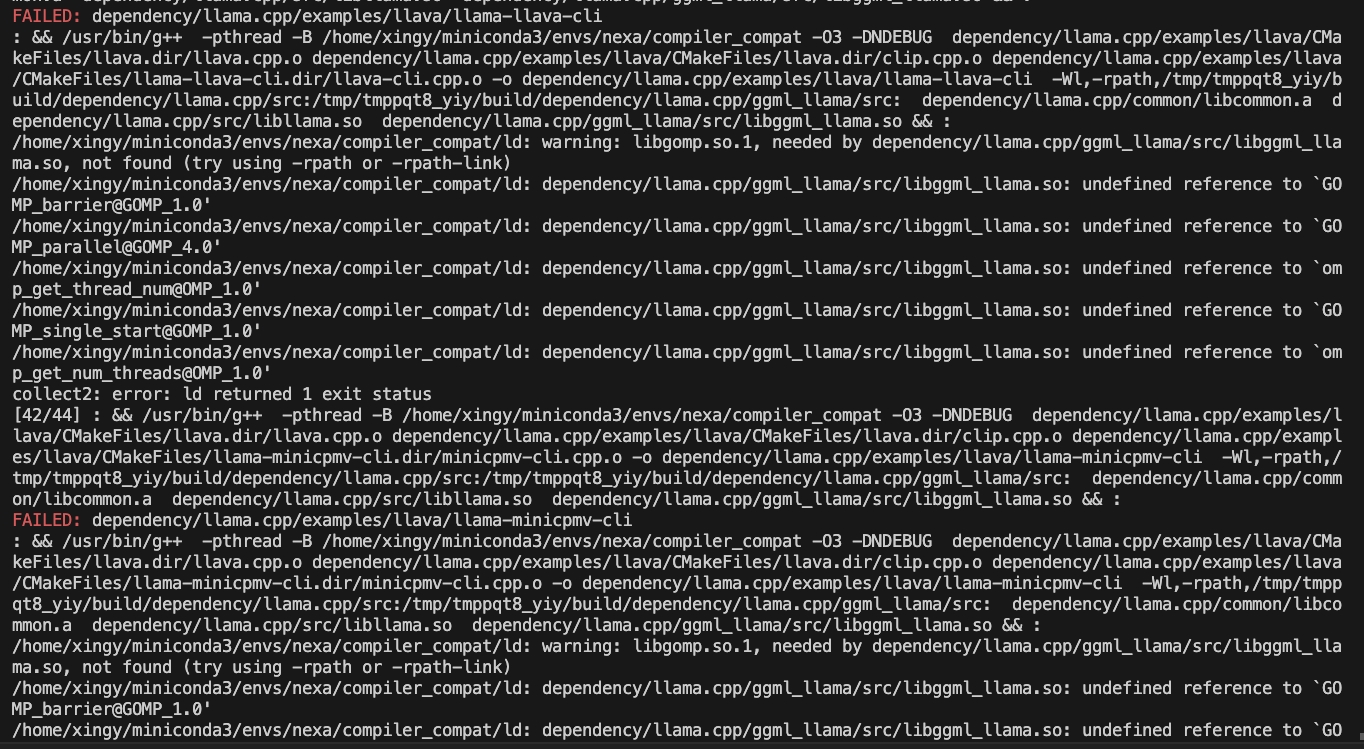
ลองใช้คำสั่งต่อไปนี้:
CMAKE_ARGS= " -DCMAKE_CXX_FLAGS=-fopenmp " pip install nexaaiในการติดตั้งด้วยการสนับสนุน ROCM ตรวจสอบให้แน่ใจว่าคุณติดตั้ง ROCM 6.2.1 หรือติดตั้งใหม่กว่า
สำหรับ Linux :
CMAKE_ARGS= " -DGGML_HIPBLAS=on " pip install nexaai --prefer-binary --index-url https://github.nexa.ai/whl/rocm621 --extra-index-url https://pypi.org/simple --no-cache-dirในการติดตั้งด้วยการสนับสนุน Vulkan ตรวจสอบให้แน่ใจว่าคุณมี Vulkan SDK 1.3.261.1 หรือติดตั้งใหม่
สำหรับ Windows PowerShell :
$env :CMAKE_ARGS= " -DGGML_VULKAN=on " ; pip install nexaai --prefer-binary --index-url https://github.nexa.ai/whl/vulkan --extra-index-url https://pypi.org/simple --no-cache-dirสำหรับ พรอมต์คำสั่ง Windows :
set CMAKE_ARGS= " -DGGML_VULKAN=on " & pip install nexaai --prefer-binary --index-url https://github.nexa.ai/whl/vulkan --extra-index-url https://pypi.org/simple --no-cache-dirสำหรับ Windows Git Bash :
CMAKE_ARGS= " -DGGML_VULKAN=on " pip install nexaai --prefer-binary --index-url https://github.nexa.ai/whl/vulkan --extra-index-url https://pypi.org/simple --no-cache-dirวิธีโคลน repo นี้
git clone --recursive https://github.com/NexaAI/nexa-sdk หากคุณลืมใช้ --recursive คุณสามารถใช้คำสั่งด้านล่างเพื่อเพิ่ม submodule
git submodule update --init --recursiveจากนั้นคุณสามารถสร้างและติดตั้งแพ็คเกจ
pip install -e . ด้านล่างคือความแตกต่างของเราจากเครื่องมืออื่น ๆ ที่คล้ายกัน:
| คุณสมบัติ | Nexa SDK | โอลลา | เหมาะสมที่สุด | สตูดิโอ LM |
|---|---|---|---|---|
| การสนับสนุน GGML | ||||
| การสนับสนุน onnx | ||||
| การสร้างข้อความ | ||||
| การสร้างภาพ | ||||
| แบบจำลองภาษาวิสัยทัศน์ | ||||
| โมเดลภาษาเสียง | ||||
| ข้อความเป็นคำพูด | ||||
| ความสามารถของเซิร์ฟเวอร์ | ||||
| ส่วนต่อประสานผู้ใช้ | ||||
| การติดตั้งแบบปฏิบัติการได้ |
ฮับโมเดลบนอุปกรณ์ของเรานำเสนอโมเดลเชิงปริมาณทุกประเภท (ข้อความ, รูปภาพ, เสียง, หลายรูปแบบ) พร้อมตัวกรองสำหรับ RAM, ขนาดไฟล์, งาน ฯลฯ เพื่อช่วยให้คุณสำรวจรุ่นด้วย UI ได้อย่างง่ายดาย สำรวจโมเดลบนอุปกรณ์ที่ Hub Model Model
ตัวอย่างรุ่นที่รองรับ (รายการเต็มที่ Model Hub):
| แบบอย่าง | พิมพ์ | รูปแบบ | สั่งการ |
|---|---|---|---|
| Omniaudio | เสียง | GGUF | nexa run omniaudio |
| QWEN2AUDIO | เสียง | GGUF | nexa run qwen2audio |
| Octopus-V2 | การเรียกใช้ฟังก์ชัน | GGUF | nexa run octopus-v2 |
| ต.ค. | ข้อความ | GGUF | nexa run octo-net |
| omnivlm | หลายรูปแบบ | GGUF | nexa run omniVLM |
| นาโนอลาวา | หลายรูปแบบ | GGUF | nexa run nanollava |
| llava-phi3 | หลายรูปแบบ | GGUF | nexa run llava-phi3 |
| llava-llama3 | หลายรูปแบบ | GGUF | nexa run llava-llama3 |
| llava1.6-mistral | หลายรูปแบบ | GGUF | nexa run llava1.6-mistral |
| llava1.6-vicuna | หลายรูปแบบ | GGUF | nexa run llava1.6-vicuna |
| llama3.2 | ข้อความ | GGUF | nexa run llama3.2 |
| llama3-uncensored | ข้อความ | GGUF | nexa run llama3-uncensored |
| Gemma2 | ข้อความ | GGUF | nexa run gemma2 |
| Qwen2.5 | ข้อความ | GGUF | nexa run qwen2.5 |
| Mathqwen | ข้อความ | GGUF | nexa run mathqwen |
| codeqwen | ข้อความ | GGUF | nexa run codeqwen |
| ผิดพลาด | ข้อความ | gguf/onnx | nexa run mistral |
| เขื่อนลึก | ข้อความ | GGUF | nexa run deepseek-coder |
| phi3.5 | ข้อความ | GGUF | nexa run phi3.5 |
| Openelm | ข้อความ | GGUF | nexa run openelm |
| เสถียร -Tiffusion-V2-1 | การสร้างภาพ | GGUF | nexa run sd2-1 |
| เสถียร-3-medium | การสร้างภาพ | GGUF | nexa run sd3 |
| ฟลักซ์ 1-schnell | การสร้างภาพ | GGUF | nexa run flux |
| LCM-Dreamshaper | การสร้างภาพ | gguf/onnx | nexa run lcm-dreamshaper |
| กระซิบขนาดใหญ่ -v3-turbo | คำพูดเป็นข้อความ | ถังขยะ | nexa run faster-whisper-large-turbo |
| เสียงกระซิบ | คำพูดเป็นข้อความ | onnx | nexa run whisper-tiny.en |
| MxBai-embed-v1 | การฝัง | GGUF | nexa embed mxbai |
| Nomic-embed-text-v1.5 | การฝัง | GGUF | nexa embed nomic |
| All-Minilm-L12-V2 | การฝัง | GGUF | nexa embed all-MiniLM-L12-v2:fp16 |
| เปลือกเปลือกหอย | ข้อความเป็นคำพูด | GGUF | nexa run bark-small:fp16 |
คุณสามารถดึงแปลง (เป็น. gguf), quantize และเรียกใช้ LLAMA.CPP รุ่นที่รองรับการสร้างข้อความจาก HF หรือ MS ด้วย NEXA SDK
ใช้ nexa run -hf <hf-model-id> หรือ nexa run -ms <ms-model-id> เพื่อเรียกใช้โมเดลที่มีไฟล์. gguf ที่ให้ไว้:
nexa run -hf Qwen/Qwen2.5-Coder-7B-Instruct-GGUFnexa run -ms Qwen/Qwen2.5-Coder-7B-Instruct-GGUFหมายเหตุ: คุณจะได้รับแจ้งให้เลือกไฟล์. gguf เดียว หากเวอร์ชันการหาปริมาณที่คุณต้องการมีไฟล์แยกหลายไฟล์ (เช่น FP16-00001-of-00004) โปรดใช้เครื่องมือแปลงของ NEXA (ดูด้านล่าง) เพื่อแปลงและหาปริมาณโมเดลในเครื่อง
ติดตั้งแพ็คเกจ Nexa Python และติดตั้งเครื่องมือแปลง Nexa ด้วย pip install "nexaai[convert]" จากนั้นแปลงรุ่นจาก HuggingFace ด้วย nexa convert <hf-model-id> :
nexa convert HuggingFaceTB/SmolLM2-135M-Instruct หรือคุณสามารถแปลงรุ่นจาก ModelsCope ด้วย nexa convert -ms <ms-model-id> :
nexa convert -ms Qwen/Qwen2.5-7B-Instructหมายเหตุ: ตรวจสอบกระดานผู้นำของเราสำหรับการวัดประสิทธิภาพของโมเดลภาษาหลักและเอกสาร HuggingFace รุ่นที่แตกต่างกันเพื่อเรียนรู้เกี่ยวกับตัวเลือกปริมาณ
- คุณสามารถดูรุ่นที่ดาวน์โหลดและแปลงด้วย nexa list
บันทึก
pip install nexaai ด้วย pip install "nexaai[onnx]" ในคำสั่งที่ให้ไว้pip install nexaai ด้วย pip install "nexaai[eval]" ในคำสั่งที่ให้ไว้pip install nexaai ด้วย pip install "nexaai[convert]" ในคำสั่งที่ให้ไว้--extra-index-url https://pypi.org/simple ด้วย --extra-index-url https://pypi.tuna.tsinghua.edu.cn/simpleนี่คือภาพรวมโดยย่อของคำสั่ง CLI หลัก:
nexa run : การอนุมานการทำงานต่าง ๆ โดยใช้รุ่น GGUFnexa onnx : การอนุมานการทำงานต่าง ๆ โดยใช้รุ่น ONNXnexa convert : แปลงและสร้าง Quantize Models HuggingFace เป็นรุ่น GGUFnexa server : เรียกใช้บริการสร้างข้อความ NEXA AInexa eval : รันงานประเมิน NEXA AInexa pull : ดึงโมเดลจากทางการหรือฮับnexa remove : ลบโมเดลออกจากเครื่องท้องถิ่นnexa clean : ทำความสะอาดไฟล์ทุกรุ่นnexa list : แสดงรายการทุกรุ่นในเครื่องท้องถิ่นnexa login : เข้าสู่ระบบ NEXA APInexa whoami : แสดงข้อมูลผู้ใช้ปัจจุบันnexa logout : ออกจากระบบจาก NEXA APIสำหรับข้อมูลรายละเอียดเกี่ยวกับคำสั่ง CLI และการใช้งานโปรดดูเอกสารอ้างอิง CLI
ในการเริ่มต้นเซิร์ฟเวอร์ท้องถิ่นโดยใช้โมเดลบนคอมพิวเตอร์ในพื้นที่ของคุณคุณสามารถใช้คำสั่ง nexa server สำหรับข้อมูลรายละเอียดเกี่ยวกับการตั้งค่าเซิร์ฟเวอร์จุดสิ้นสุด API และตัวอย่างการใช้งานโปรดดูเอกสารอ้างอิงเซิร์ฟเวอร์
Swift SDK: ให้ API Swifty ช่วยให้นักพัฒนา Swift สามารถรวมและใช้โมเดล LLAMA.CPP ได้อย่างง่ายดายในโครงการของพวกเขา
เอกสารเพิ่มเติม
เราขอขอบคุณโครงการต่อไปนี้:







