neuspell
1.0.0

Neuspell:神经拼写校正工具包
neuspell现在可以通过PIP获得。通过PIP查看安装BERT预估计模型现在可以作为HuggingFace模型的一部分,作为murali1996/bert-base-cased-spell-correction 。我们为好奇的从业人员提供一个示例代码段。git clone https://github.com/neuspell/neuspell ; cd neuspell
pip install -e .要安装额外的要求,
pip install -r extras-requirements.txt或单独为:
pip install -e .[elmo]
pip install -e .[spacy]注意:对于ZSH ,使用“。[Elmo]”和“。[Spacy]”
此外, spacy models可以下载为:
python -m spacy download en_core_web_sm然后,下载neuspell预估计的模型之后下载检查点
这是用于使用检查器模型的快速启动代码段(命令行的用法)。有关更多用法模式,请参见test_neuspell_correctors.py。
 import neuspell
from neuspell import available_checkers , BertChecker

""" see available checkers """
print ( f"available checkers: { neuspell . available_checkers () } " )
# → available checkers: ['BertsclstmChecker', 'CnnlstmChecker', 'NestedlstmChecker', 'SclstmChecker', 'SclstmbertChecker', 'BertChecker', 'SclstmelmoChecker', 'ElmosclstmChecker']

""" select spell checkers & load """
checker = BertChecker ()
checker . from_pretrained ()

""" spell correction """
checker . correct ( "I luk foward to receving your reply" )
# → "I look forward to receiving your reply"
checker . correct_strings ([ "I luk foward to receving your reply" , ])
# → ["I look forward to receiving your reply"]
checker . correct_from_file ( src = "noisy_texts.txt" )
# → "Found 450 mistakes in 322 lines, total_lines=350"

""" evaluation of models """
checker . evaluate ( clean_file = "bea60k.txt" , corrupt_file = "bea60k.noise.txt" )
# → data size: 63044
# → total inference time for this data is: 998.13 secs
# → total token count: 1032061
# → confusion table: corr2corr:940937, corr2incorr:21060,
#                    incorr2corr:55889, incorr2incorr:14175
# → accuracy is 96.58%
# → word correction rate is 79.76%
另外,一旦可以选择和加载咒语检查器,如下所示:
 from neuspell import SclstmChecker

checker = SclstmChecker ()
checker = checker . add_ ( "elmo" , at = "input" )  # "elmo" or "bert", "input" or "output"
checker . from_pretrained ()
目前,为选定模型支持添加Elmo或Bert模型的此功能。有关详细信息,请参见工具包中的神经模型列表。
如果有兴趣,请遵循安装非神经咒语检查器的其他要求Aspell和Jamspell 。
pip install neuspell在V1.0中, allennlp库未自动安装,该库用于包含Elmo的型号。因此,要使用这些检查器,请按安装和快速启动进行源安装
Neuspell是一种开源工具包,用于上下文敏感的英语拼写校正。该工具包包括10个咒语检查器,并对来自多个(公开)来源的自然散布进行了评估。为了制作拼写检查上下文依赖性的神经模型,(i)我们使用上下文中的拼写错误训练神经模型,这是通过反向工程隔离的错误拼写构建的; (ii)使用上下文的更丰富的表示。此工具包使NLP实践者能够通过简单的统一命令行以及Web界面使用我们建议的和现有的拼写校正系统。在许多潜在的应用中,我们证明了我们的拼写检查器在对抗障碍拼写过程中的实用性。
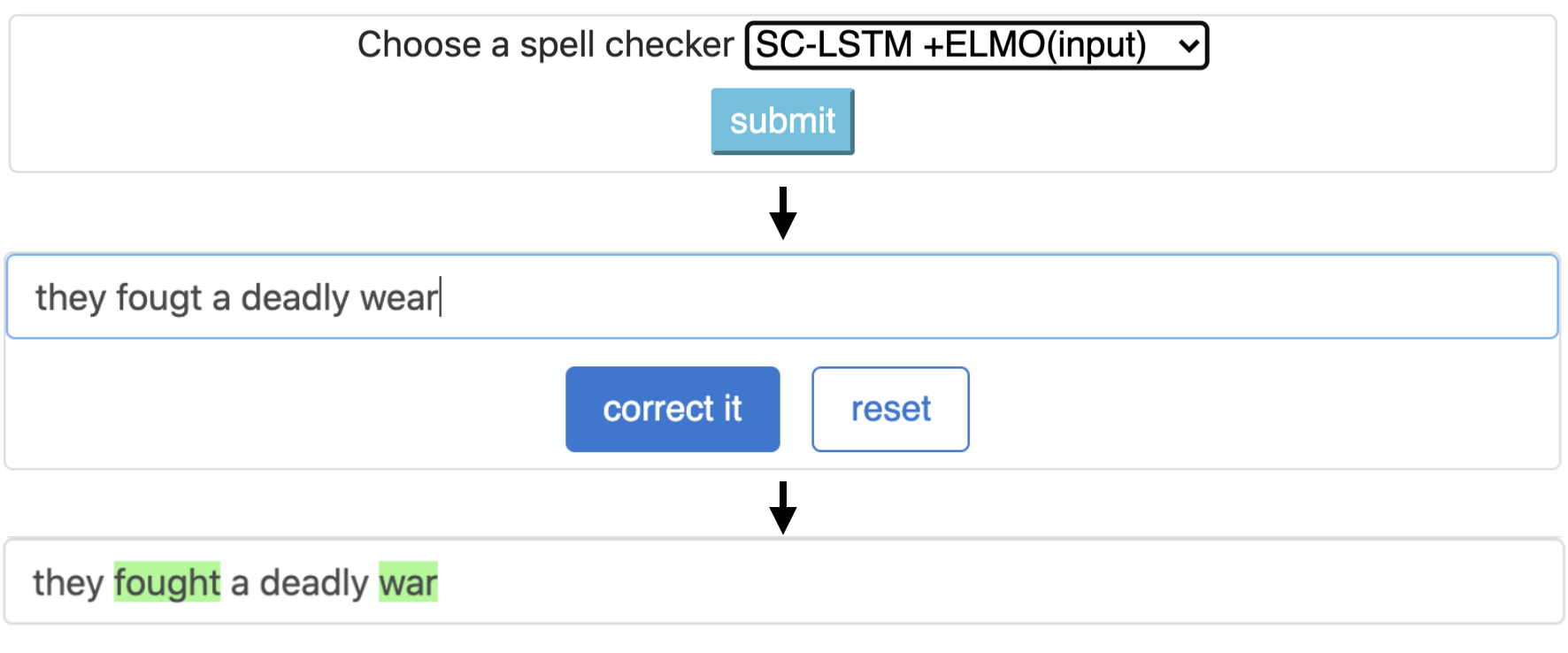
CNN-LSTMSC-LSTMNested-LSTMBERTSC-LSTM plus ELMO (at input)SC-LSTM plus ELMO (at output)SC-LSTM plus BERT (at input)SC-LSTM plus BERT (at output)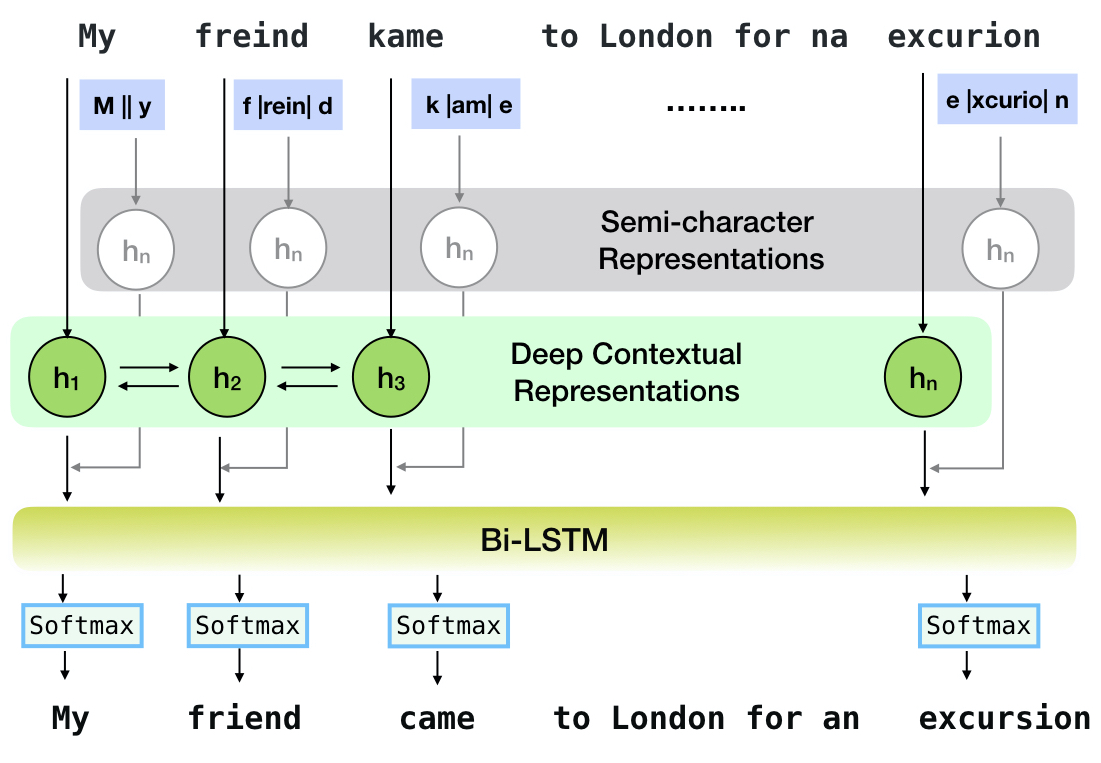
该管道对应于`sc-lstm加Elmo(在输入)`模型。
| 拼写 检查器 | 单词 更正 速度 | 时间 句子 (以毫秒为单位) |
|---|---|---|
Aspell | 48.7 | 7.3* |
Jamspell | 68.9 | 2.6* |
CNN-LSTM | 75.8 | 4.2 |
SC-LSTM | 76.7 | 2.8 |
Nested-LSTM | 77.3 | 6.4 |
BERT | 79.1 | 7.1 |
SC-LSTM plus ELMO (at input) | 79.8 | 15.8 |
SC-LSTM plus ELMO (at output) | 78.5 | 16.3 |
SC-LSTM plus BERT (at input) | 77.0 | 6.7 |
SC-LSTM plus BERT (at output) | 76.0 | 7.2 |
Neuspell工具包在BEA-60K数据集上具有实际拼写错误的性能。 *表示对CPU的评估(对于其他我们使用GeForce RTX 2080 Ti GPU)。
要下载选定的检查点,请从下面选择一个检查点名称,然后运行下载。每个检查点与表中的神经咒语检查器相关联。
| 拼写检查器 | 班级 | 检查点名称 | 磁盘空间(大约) |
|---|---|---|---|
CNN-LSTM | CnnlstmChecker | 'CNN-LSTM-Probwordnoise' | 450 MB |
SC-LSTM | SclstmChecker | 'scrnn-probwordnoise' | 450 MB |
Nested-LSTM | NestedlstmChecker | 'lstm-lstm-probwordnoise' | 455 MB |
BERT | BertChecker | “ Subwordbert-Probwordnoise” | 740 MB |
SC-LSTM plus ELMO (at input) | ElmosclstmChecker | 'elmoscrnn-probwordnoise' | 840 MB |
SC-LSTM plus BERT (at input) | BertsclstmChecker | 'Bertscrnn-Probwordnoise' | 900 MB |
SC-LSTM plus BERT (at output) | SclstmbertChecker | 'scrnnbert-probwordnoise' | 1.19 GB |
SC-LSTM plus ELMO (at output) | SclstmelmoChecker | 'scrnnelmo-probwordnoise' | 1.23 GB |
 import neuspell

neuspell . seq_modeling . downloads . download_pretrained_model ( "subwordbert-probwordnoise" )
或者,通过运行以下(v1.0之后的版本可用)下载所有Neuspell神经模型:
 import neuspell

neuspell . seq_modeling . downloads . download_pretrained_model ( "_all_" )
或者,
我们策划了几个合成和自然数据集,用于培训/评估Neuspell模型。有关完整的详细信息,请检查我们的论文。运行以下内容以下载所有数据集。
 cd data/traintest
python download_datafiles.py
有关更多详细信息,请参见data/traintest/README.md 。
火车文件被称为名称.random , .word , .prob , .probword ,用于用于创建它们的不同Nodising Startegies。对于每种策略(请参阅合成数据创建),我们在干净的语料库中噪声约为20%。我们将160万个One billion word benchmark数据集中的句子作为清洁语料库。
为了设置演示,请执行以下步骤:
pip install -e ".[flask]"CUDA_VISIBLE_DEVICES=0 python app.py (在gpu)或python app.py (在cpu上),在文件夹中启动烧瓶服务器。/scripts/flask-server。该工具包提供了3种人们物策略(从现有文献中识别),以生成合成的并行训练数据,以训练神经模型进行咒语校正。这些策略包括简单的基于查找的噪音拼写替换( en-word-replacement-noise ),字符级噪声诱导,例如交换/删除/删除/添加/替换字符( en-char-replacement-noise ),以及基于混淆矩阵的概率替代的概率替换,由错误的consecters consecters consector conserus conserus confors contry-contl of Confors en-probchar-replacement-noise )驱动。有关这些方法的完整详细信息,请查看我们的论文。
以下是使用上述噪声策划的相应类映射。由于某些噪音使用了一些预构建的数据文件,因此我们还提供了它们的大致磁盘空间。
| 文件夹 | 班级名称 | 磁盘空间(大约) |
|---|---|---|
en-word-replacement-noise | WordReplacementNoiser | 2 MB |
en-char-replacement-noise | CharacterReplacementNoiser | - - |
en-probchar-replacement-noise | ProbabilisticCharacterReplacementNoiser | 80 MB |
以下是用于使用这些噪音的片段 -
 from neuspell . noising import WordReplacementNoiser

example_texts = [
    "This is an example sentence to demonstrate noising in the neuspell repository." ,
    "Here is another such amazing example !!"
]

word_repl_noiser = WordReplacementNoiser ( language = "english" )
word_repl_noiser . load_resources ()
noise_texts = word_repl_noiser . noise ( example_texts )
print ( noise_texts ) Coming Soon ...
neuspell预算模型的顶部进行填充 from neuspell import BertChecker
checker = BertChecker ()
checker . from_pretrained ()
checker . finetune ( clean_file = "sample_clean.txt" , corrupt_file = "sample_corrupt.txt" , data_dir = "default" )此功能仅适用于BertChecker和ElmosclstmChecker 。
现在,我们支持初始化拥抱面模型并在您的自定义数据上进行填充。这是一个代码段,证明了:
首先标记包含线条分离格式的干净和损坏文本的文件
 from neuspell . commons import DEFAULT_TRAINTEST_DATA_PATH

data_dir = DEFAULT_TRAINTEST_DATA_PATH
clean_file = "sample_clean.txt"
corrupt_file = "sample_corrupt.txt"
from neuspell . seq_modeling . helpers import load_data , train_validation_split
from neuspell . seq_modeling . helpers import get_tokens
from neuspell import BertChecker
# Step-0: Load your train and test files, create a validation split
train_data = load_data ( data_dir , clean_file , corrupt_file )
train_data , valid_data = train_validation_split ( train_data , 0.8 , seed = 11690 )
# Step-1: Create vocab file. This serves as the target vocab file and we use the defined model's default huggingface
# tokenizer to tokenize inputs appropriately.
vocab = get_tokens ([ i [ 0 ] for i in train_data ], keep_simple = True , min_max_freq = ( 1 , float ( "inf" )), topk = 100000 )
# # Step-2: Initialize a model
checker = BertChecker ( device = "cuda" )
checker . from_huggingface ( bert_pretrained_name_or_path = "distilbert-base-cased" , vocab = vocab )
# Step-3: Finetune the model on your dataset
checker . finetune ( clean_file = clean_file , corrupt_file = corrupt_file , data_dir = data_dir )您可以按照以下方式在自定义数据上进一步评估您的模型:
 from neuspell import BertChecker

checker = BertChecker ()
checker . from_pretrained (
    bert_pretrained_name_or_path = "distilbert-base-cased" ,
    ckpt_path = f" { data_dir } /new_models/distilbert-base-cased"  # "<folder where the model is saved>"
)
checker . evaluate ( clean_file = clean_file , corrupt_file = corrupt_file , data_dir = data_dir )在上面的用法之后,一旦可以无缝地使用多语言模型,例如xlm-roberta-base , bert-base-multilingual-cased和distilbert-base-multilingual-cased of非英语脚本。
./applications/Adversarial-Misspellings-arxiv夹中可用。请参阅readme.md。Aspell Checker的要求:
 wget https://files.pythonhosted.org/packages/53/30/d995126fe8c4800f7a9b31aa0e7e5b2896f5f84db4b7513df746b2a286da/aspell-python-py3-1.15.tar.bz2
tar -C . -xvf aspell-python-py3-1.15.tar.bz2
cd aspell-python-py3-1.15
python setup.py install
Jamspell检查器的要求:
 sudo apt-get install -y swig3.0
wget -P ./ https://github.com/bakwc/JamSpell-models/raw/master/en.tar.gz
tar xf ./en.tar.gz --directory ./
 @inproceedings{jayanthi-etal-2020-neuspell,
    title = "{N}eu{S}pell: A Neural Spelling Correction Toolkit",
    author = "Jayanthi, Sai Muralidhar  and
      Pruthi, Danish  and
      Neubig, Graham",
    booktitle = "Proceedings of the 2020 Conference on Empirical Methods in Natural Language Processing: System Demonstrations",
    month = oct,
    year = "2020",
    address = "Online",
    publisher = "Association for Computational Linguistics",
    url = "https://www.aclweb.org/anthology/2020.emnlp-demos.21",
    doi = "10.18653/v1/2020.emnlp-demos.21",
    pages = "158--164",
    abstract = "We introduce NeuSpell, an open-source toolkit for spelling correction in English. Our toolkit comprises ten different models, and benchmarks them on naturally occurring misspellings from multiple sources. We find that many systems do not adequately leverage the context around the misspelt token. To remedy this, (i) we train neural models using spelling errors in context, synthetically constructed by reverse engineering isolated misspellings; and (ii) use richer representations of the context. By training on our synthetic examples, correction rates improve by 9{%} (absolute) compared to the case when models are trained on randomly sampled character perturbations. Using richer contextual representations boosts the correction rate by another 3{%}. Our toolkit enables practitioners to use our proposed and existing spelling correction systems, both via a simple unified command line, as well as a web interface. Among many potential applications, we demonstrate the utility of our spell-checkers in combating adversarial misspellings. The toolkit can be accessed at neuspell.github.io.",
}
链接出版。任何问题或建议,请通过JSaimurali001 [at] gmail [dot] com与作者联系





