neuspell
1.0.0

Neuspell: Toolkit Koreksi Ejaan Saraf
neuspell sekarang tersedia melalui PIP . Lihat instalasi melalui PIPBERT Neuspell sekarang tersedia sebagai bagian dari model Huggingface sebagai murali1996/bert-base-cased-spell-correction . Kami memberikan contoh cuplikan kode di ./scripts/huggingface untuk praktisi yang penasaran.git clone https://github.com/neuspell/neuspell ; cd neuspell
pip install -e .Untuk memasang persyaratan ekstra,
pip install -r extras-requirements.txtatau secara individual sebagai:
pip install -e .[elmo]
pip install -e .[spacy]
Catatan: untuk zsh , gunakan ". [Elmo]" dan ". [Spacy]" Sebaliknya
Selain itu, spacy models dapat diunduh sebagai:
python -m spacy download en_core_web_sm Kemudian, unduh model pretrain neuspell mengikuti pemeriksaan unduhan
Berikut ini adalah cuplikan kode awal (penggunaan baris perintah) untuk menggunakan model checker. Lihat test_neuspell_correctors.py untuk pola penggunaan lebih lanjut.
 import neuspell
from neuspell import available_checkers , BertChecker

""" see available checkers """
print ( f"available checkers: { neuspell . available_checkers () } " )
# → available checkers: ['BertsclstmChecker', 'CnnlstmChecker', 'NestedlstmChecker', 'SclstmChecker', 'SclstmbertChecker', 'BertChecker', 'SclstmelmoChecker', 'ElmosclstmChecker']

""" select spell checkers & load """
checker = BertChecker ()
checker . from_pretrained ()

""" spell correction """
checker . correct ( "I luk foward to receving your reply" )
# → "I look forward to receiving your reply"
checker . correct_strings ([ "I luk foward to receving your reply" , ])
# → ["I look forward to receiving your reply"]
checker . correct_from_file ( src = "noisy_texts.txt" )
# → "Found 450 mistakes in 322 lines, total_lines=350"

""" evaluation of models """
checker . evaluate ( clean_file = "bea60k.txt" , corrupt_file = "bea60k.noise.txt" )
# → data size: 63044
# → total inference time for this data is: 998.13 secs
# → total token count: 1032061
# → confusion table: corr2corr:940937, corr2incorr:21060,
#                    incorr2corr:55889, incorr2incorr:14175
# → accuracy is 96.58%
# → word correction rate is 79.76%
Atau, sekali juga dapat memilih dan memuat pemeriksa ejaan secara berbeda sebagai berikut:
 from neuspell import SclstmChecker

checker = SclstmChecker ()
checker = checker . add_ ( "elmo" , at = "input" )  # "elmo" or "bert", "input" or "output"
checker . from_pretrained ()
Fitur penambahan model Elmo atau Bert ini saat ini didukung untuk model yang dipilih. Lihat daftar model saraf di toolkit untuk detailnya.
Jika tertarik, ikuti persyaratan tambahan untuk menginstal pemeriksa ejaan non-neural- Aspell dan Jamspell .
pip install neuspell Di v1.0, perpustakaan allennlp tidak diinstal secara otomatis yang digunakan untuk model yang mengandung elmo. Oleh karena itu, untuk memanfaatkan pemeriksa tersebut, melakukan instalasi sumber seperti di Instalasi & Mulai Cepat
Neuspell adalah alat open-source untuk koreksi ejaan sensitif konteks dalam bahasa Inggris. Toolkit ini terdiri dari 10 pemeriksa ejaan, dengan evaluasi tentang kesalahan yang terjadi secara alami dari berbagai sumber (tersedia untuk umum). Untuk membuat model saraf untuk bergantung pada konteks pemeriksaan ejaan, (i) kami melatih model saraf menggunakan kesalahan ejaan dalam konteks, yang secara sintetis dibangun oleh rekayasa terbalik yang diisolasi mis-spelling; dan (ii) menggunakan representasi yang lebih kaya dari konteksnya. Toolkit ini memungkinkan praktisi NLP untuk menggunakan sistem koreksi ejaan yang kami usulkan dan yang ada, baik melalui baris perintah terpadu yang sederhana, serta antarmuka web. Di antara banyak aplikasi potensial, kami menunjukkan kegunaan pemeriksa ejaan kami dalam memerangi kesalahan ejaan permusuhan.
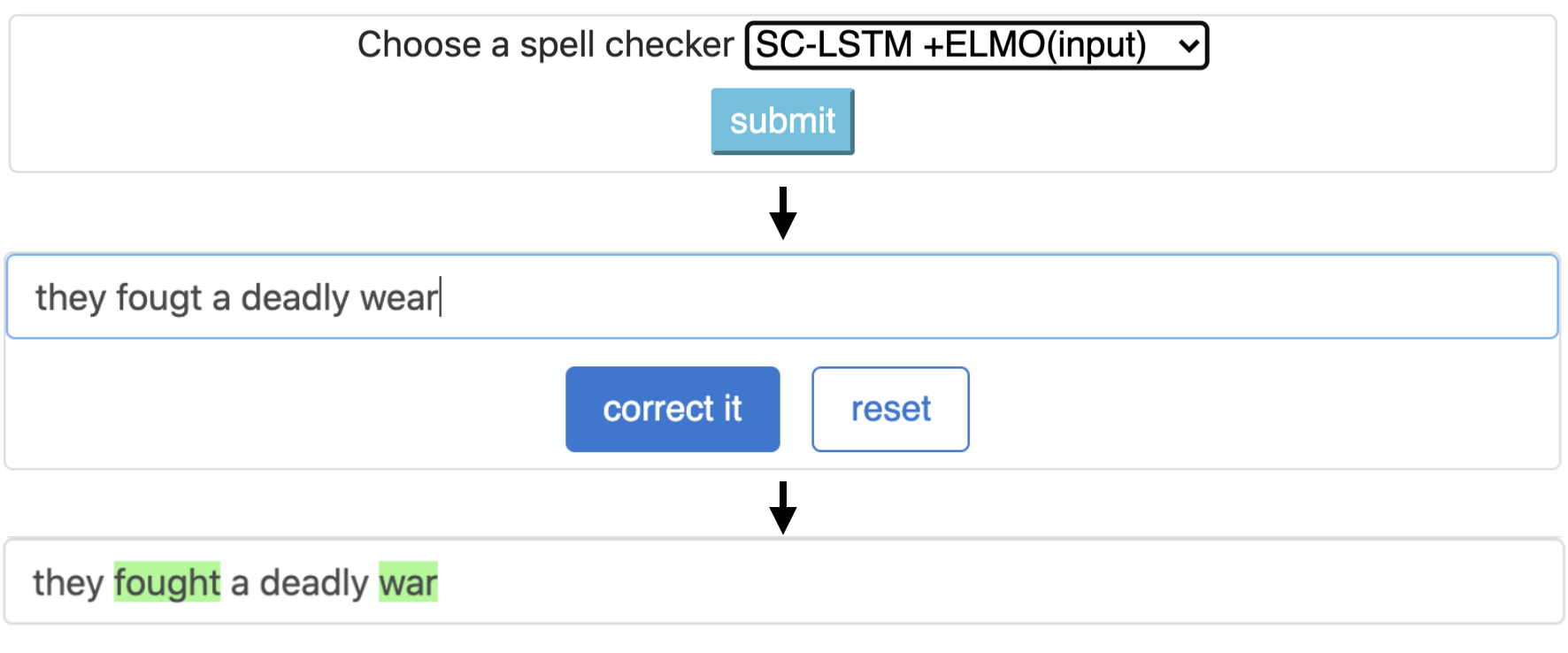
CNN-LSTMSC-LSTMNested-LSTMBERTSC-LSTM plus ELMO (at input)SC-LSTM plus ELMO (at output)SC-LSTM plus BERT (at input)SC-LSTM plus BERT (at output)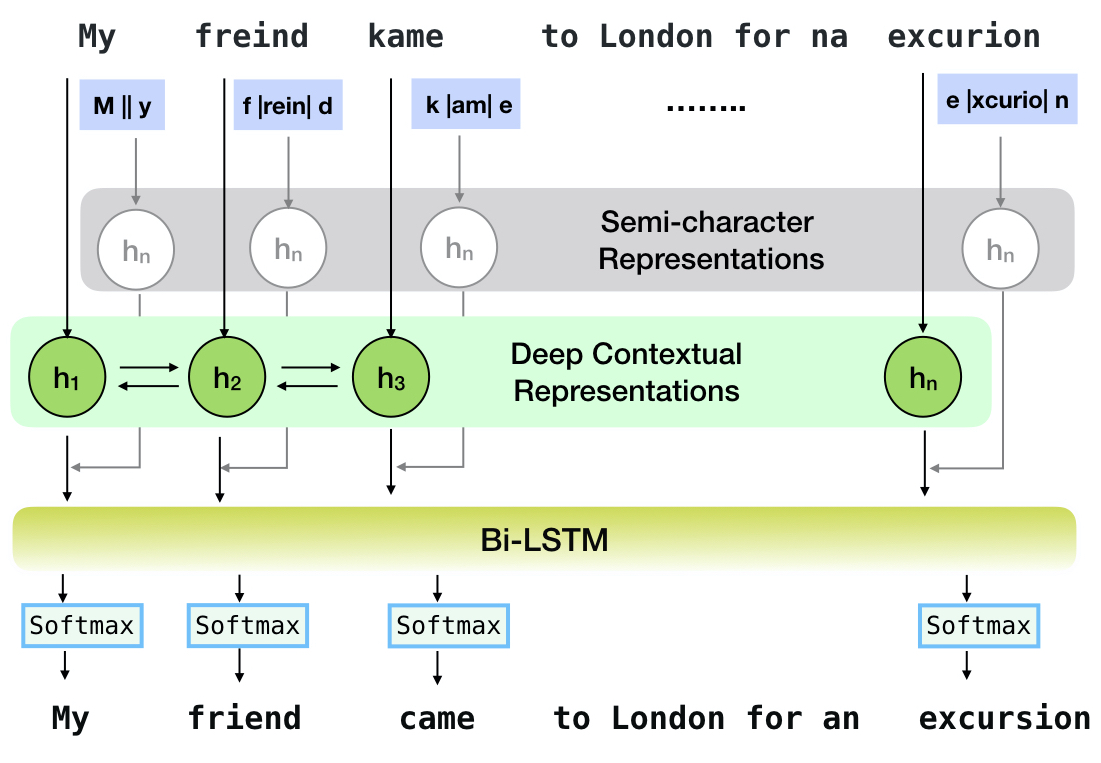
Pipa ini sesuai dengan model `sc-lstm plus elmo (at input).
| Mengeja Pemeriksa | Kata Koreksi Kecepatan | Waktu per kalimat (dalam milidetik) |
|---|---|---|
Aspell | 48.7 | 7.3* |
Jamspell | 68.9 | 2.6* |
CNN-LSTM | 75.8 | 4.2 |
SC-LSTM | 76.7 | 2.8 |
Nested-LSTM | 77.3 | 6.4 |
BERT | 79.1 | 7.1 |
SC-LSTM plus ELMO (at input) | 79.8 | 15.8 |
SC-LSTM plus ELMO (at output) | 78.5 | 16.3 |
SC-LSTM plus BERT (at input) | 77.0 | 6.7 |
SC-LSTM plus BERT (at output) | 76.0 | 7.2 |
Kinerja koreksi yang berbeda di Neuspell Toolkit pada dataset BEA-60K dengan kesalahan ejaan dunia nyata. ∗ Menunjukkan evaluasi pada CPU (untuk orang lain kami menggunakan GEFORCE RTX 2080 Ti GPU).
Untuk mengunduh pos pemeriksaan yang dipilih, pilih nama pos pemeriksaan dari bawah dan kemudian jalankan unduhan. Setiap pos pemeriksaan dikaitkan dengan pemeriksa ejaan saraf seperti yang ditunjukkan pada tabel.
| Pemeriksa ejaan | Kelas | Nama pemeriksaan | Ruang disk (kira -kira.) |
|---|---|---|---|
CNN-LSTM | CnnlstmChecker | 'cnn-lstm-probordnoise' | 450 MB |
SC-LSTM | SclstmChecker | 'scrnn-probwordnoise' | 450 MB |
Nested-LSTM | NestedlstmChecker | 'lstm-lstm-probwordnoise' | 455 MB |
BERT | BertChecker | 'SubwordBert-Probordnoise' | 740 MB |
SC-LSTM plus ELMO (at input) | ElmosclstmChecker | 'elmoscrnn-probwordnoise' | 840 MB |
SC-LSTM plus BERT (at input) | BertsclstmChecker | 'Bertscrnn-probordnoise' | 900 MB |
SC-LSTM plus BERT (at output) | SclstmbertChecker | 'scrnnbert-probwordnoise' | 1.19 GB |
SC-LSTM plus ELMO (at output) | SclstmelmoChecker | 'scrnnelmo-probordnoise' | 1.23 GB |
 import neuspell

neuspell . seq_modeling . downloads . download_pretrained_model ( "subwordbert-probwordnoise" )
Atau, unduh semua model neural neuspell dengan menjalankan yang berikut (tersedia dalam versi setelah v1.0):
 import neuspell

neuspell . seq_modeling . downloads . download_pretrained_model ( "_all_" )
Atau atau
Kami mengkuratori beberapa dataset sintetis dan alami untuk pelatihan/mengevaluasi model neuspell. Untuk detail lengkap, periksa kertas kami. Jalankan yang berikut untuk mengunduh semua dataset.
 cd data/traintest
python download_datafiles.py
Lihat data/traintest/README.md untuk lebih jelasnya.
File kereta dijuluki dengan nama .random , .word , .prob , .probword untuk startegies noising yang berbeda yang digunakan untuk membuatnya. Untuk setiap strategi (lihat Pembuatan Data Sintetis), kami kebisingan ∼20% dari token dalam korpus bersih. Kami menggunakan 1,6 juta kalimat dari One billion word benchmark dataset sebagai korpus bersih kami.
Untuk mengatur demo, ikuti langkah -langkah ini:
pip install -e ".[flask]"CUDA_VISIBLE_DEVICES=0 python app.py (pada GPU) atau python app.py (pada CPU) Toolkit ini menawarkan 3 jenis strategi noising (diidentifikasi dari literatur yang ada) untuk menghasilkan data pelatihan paralel sintetis untuk melatih model saraf untuk koreksi mantra. Strategi termasuk penggantian ejaan berbasis pencarian sederhana ( en-word-replacement-noise ), induksi noise tingkat karakter seperti menukar/menghapus/menambahkan/mengganti karakter ( en-char-replacement-noise ), dan corpus en-probchar-replacement-noise noise. Untuk detail lengkap tentang pendekatan ini, centang makalah kami.
Berikut ini adalah pemetaan kelas yang sesuai untuk memanfaatkan kurasi kebisingan di atas. Karena beberapa file data yang telah dibangun digunakan untuk beberapa noiser, kami juga memberikan ruang disk perkiraan.
| Map | Nama kelas | Ruang disk (kira -kira.) |
|---|---|---|
en-word-replacement-noise | WordReplacementNoiser | 2 MB |
en-char-replacement-noise | CharacterReplacementNoiser | - |
en-probchar-replacement-noise | ProbabilisticCharacterReplacementNoiser | 80 MB |
Berikut ini adalah cuplikan untuk menggunakan noiser ini-
 from neuspell . noising import WordReplacementNoiser

example_texts = [
    "This is an example sentence to demonstrate noising in the neuspell repository." ,
    "Here is another such amazing example !!"
]

word_repl_noiser = WordReplacementNoiser ( language = "english" )
word_repl_noiser . load_resources ()
noise_texts = word_repl_noiser . noise ( example_texts )
print ( noise_texts ) Coming Soon ...
neuspell from neuspell import BertChecker
checker = BertChecker ()
checker . from_pretrained ()
checker . finetune ( clean_file = "sample_clean.txt" , corrupt_file = "sample_corrupt.txt" , data_dir = "default" ) Fitur ini hanya tersedia untuk BertChecker dan ElmosclstmChecker .
Kami sekarang mendukung menginisialisasi model Huggingface dan finetuning pada data khusus Anda. Berikut adalah cuplikan kode yang menunjukkan bahwa:
Tandai pertama file Anda yang berisi teks bersih dan korup dalam format yang ditetapkan garis
 from neuspell . commons import DEFAULT_TRAINTEST_DATA_PATH

data_dir = DEFAULT_TRAINTEST_DATA_PATH
clean_file = "sample_clean.txt"
corrupt_file = "sample_corrupt.txt"
from neuspell . seq_modeling . helpers import load_data , train_validation_split
from neuspell . seq_modeling . helpers import get_tokens
from neuspell import BertChecker
# Step-0: Load your train and test files, create a validation split
train_data = load_data ( data_dir , clean_file , corrupt_file )
train_data , valid_data = train_validation_split ( train_data , 0.8 , seed = 11690 )
# Step-1: Create vocab file. This serves as the target vocab file and we use the defined model's default huggingface
# tokenizer to tokenize inputs appropriately.
vocab = get_tokens ([ i [ 0 ] for i in train_data ], keep_simple = True , min_max_freq = ( 1 , float ( "inf" )), topk = 100000 )
# # Step-2: Initialize a model
checker = BertChecker ( device = "cuda" )
checker . from_huggingface ( bert_pretrained_name_or_path = "distilbert-base-cased" , vocab = vocab )
# Step-3: Finetune the model on your dataset
checker . finetune ( clean_file = clean_file , corrupt_file = corrupt_file , data_dir = data_dir )Anda dapat mengevaluasi model Anda lebih lanjut tentang data khusus sebagai berikut:
 from neuspell import BertChecker

checker = BertChecker ()
checker . from_pretrained (
    bert_pretrained_name_or_path = "distilbert-base-cased" ,
    ckpt_path = f" { data_dir } /new_models/distilbert-base-cased"  # "<folder where the model is saved>"
)
checker . evaluate ( clean_file = clean_file , corrupt_file = corrupt_file , data_dir = data_dir ) Mengikuti penggunaan di atas, sekali sekarang dapat dengan mulus menggunakan model multibahasa seperti xlm-roberta-base , bert-base-multilingual-cased dan distilbert-base-multilingual-cased pada skrip non-Inggris.
./applications/Adversarial-Misspellings-arxiv . Lihat README.MD. Persyaratan untuk Aspell Checker:
 wget https://files.pythonhosted.org/packages/53/30/d995126fe8c4800f7a9b31aa0e7e5b2896f5f84db4b7513df746b2a286da/aspell-python-py3-1.15.tar.bz2
tar -C . -xvf aspell-python-py3-1.15.tar.bz2
cd aspell-python-py3-1.15
python setup.py install
Persyaratan untuk pemeriksa Jamspell :
 sudo apt-get install -y swig3.0
wget -P ./ https://github.com/bakwc/JamSpell-models/raw/master/en.tar.gz
tar xf ./en.tar.gz --directory ./
 @inproceedings{jayanthi-etal-2020-neuspell,
    title = "{N}eu{S}pell: A Neural Spelling Correction Toolkit",
    author = "Jayanthi, Sai Muralidhar  and
      Pruthi, Danish  and
      Neubig, Graham",
    booktitle = "Proceedings of the 2020 Conference on Empirical Methods in Natural Language Processing: System Demonstrations",
    month = oct,
    year = "2020",
    address = "Online",
    publisher = "Association for Computational Linguistics",
    url = "https://www.aclweb.org/anthology/2020.emnlp-demos.21",
    doi = "10.18653/v1/2020.emnlp-demos.21",
    pages = "158--164",
    abstract = "We introduce NeuSpell, an open-source toolkit for spelling correction in English. Our toolkit comprises ten different models, and benchmarks them on naturally occurring misspellings from multiple sources. We find that many systems do not adequately leverage the context around the misspelt token. To remedy this, (i) we train neural models using spelling errors in context, synthetically constructed by reverse engineering isolated misspellings; and (ii) use richer representations of the context. By training on our synthetic examples, correction rates improve by 9{%} (absolute) compared to the case when models are trained on randomly sampled character perturbations. Using richer contextual representations boosts the correction rate by another 3{%}. Our toolkit enables practitioners to use our proposed and existing spelling correction systems, both via a simple unified command line, as well as a web interface. Among many potential applications, we demonstrate the utility of our spell-checkers in combating adversarial misspellings. The toolkit can be accessed at neuspell.github.io.",
}
Tautan untuk publikasi. Setiap pertanyaan atau saran, silakan hubungi penulis di jsaimurali001 [at] gmail [dot] com





