neuspell
1.0.0

Neuspell : 신경 철자 수정 툴킷
neuspell 이제 PIP를 통해 제공됩니다. PIP를 통한 설치를 참조하십시오BERT Pretrated Model은 이제 murali1996/bert-base-cased-spell-correction 과 같은 Huggingface 모델의 일부로 제공됩니다. 우리는 호기심 많은 실무자들을위한 ./scripts/huggingface의 예제 코드 스 니펫을 제공합니다.git clone https://github.com/neuspell/neuspell ; cd neuspell
pip install -e .추가 요구 사항을 설치하려면
pip install -r extras-requirements.txt또는 개별적으로 :
pip install -e .[elmo]
pip install -e .[spacy]
참고 : ZSH 의 경우 "[Elmo]"및 ". [Spacy]"대신 사용하십시오
또한 spacy models 다음과 같이 다운로드 할 수 있습니다.
python -m spacy download en_core_web_sm 그런 다음 다운로드 체크 포인트에 이어 새로 neuspell 모델을 다운로드하십시오
다음은 체커 모델을 사용하기위한 빠른 시작 코드 스 니펫 (명령 줄 사용)입니다. 더 많은 사용 패턴은 test_neuspell_correctors.py를 참조하십시오.
 import neuspell
from neuspell import available_checkers , BertChecker

""" see available checkers """
print ( f"available checkers: { neuspell . available_checkers () } " )
# → available checkers: ['BertsclstmChecker', 'CnnlstmChecker', 'NestedlstmChecker', 'SclstmChecker', 'SclstmbertChecker', 'BertChecker', 'SclstmelmoChecker', 'ElmosclstmChecker']

""" select spell checkers & load """
checker = BertChecker ()
checker . from_pretrained ()

""" spell correction """
checker . correct ( "I luk foward to receving your reply" )
# → "I look forward to receiving your reply"
checker . correct_strings ([ "I luk foward to receving your reply" , ])
# → ["I look forward to receiving your reply"]
checker . correct_from_file ( src = "noisy_texts.txt" )
# → "Found 450 mistakes in 322 lines, total_lines=350"

""" evaluation of models """
checker . evaluate ( clean_file = "bea60k.txt" , corrupt_file = "bea60k.noise.txt" )
# → data size: 63044
# → total inference time for this data is: 998.13 secs
# → total token count: 1032061
# → confusion table: corr2corr:940937, corr2incorr:21060,
#                    incorr2corr:55889, incorr2incorr:14175
# → accuracy is 96.58%
# → word correction rate is 79.76%
또는 한 번도 다음과 같이 맞춤법 검사기를 다르게 선택하고로드 할 수도 있습니다.
 from neuspell import SclstmChecker

checker = SclstmChecker ()
checker = checker . add_ ( "elmo" , at = "input" )  # "elmo" or "bert", "input" or "output"
checker . from_pretrained ()
Elmo 또는 Bert 모델을 추가하는이 기능은 현재 선택된 모델에 대해 지원됩니다. 자세한 내용은 툴킷의 신경 모델 목록을 참조하십시오.
관심이 있으시면 비 신경 맞춤법 검사기를 설치하기위한 추가 요구 사항을 따르십시오 Aspell 및 Jamspell .
pip install neuspell v1.0에서는 allennlp 라이브러리가 자동으로 설치되지 않으며 Elmo가 포함 된 모델에 사용됩니다. 따라서 해당 체커를 활용하려면 설치 및 빠른 시작과 같이 소스 설치를하십시오.
Neuspell은 영어로 컨텍스트 민감한 철자 수정을위한 오픈 소스 툴킷입니다. 이 툴킷은 10 개의 맞춤법 검사기로 구성되며 여러 (공개적으로 사용 가능한) 소스에서 자연적으로 발생하는 잘못된 스펠링에 대한 평가가 있습니다. 맞춤법 검사 컨텍스트의 신경 모델을 만들기 위해 (i) 우리는 컨텍스트에서 맞춤법 오류를 사용하여 신경 모델을 훈련 시키며, 역 공학 고립 된 잘못된 스펠링에 의해 합성 적으로 구성됩니다. (ii) 컨텍스트의 더 풍부한 표현을 사용합니다.이 툴킷은 NLP 실무자가 간단한 통합 명령 줄과 웹 인터페이스를 통해 제안 된 기존 철자 수정 시스템을 사용할 수 있습니다. 많은 잠재적 인 응용 중에서, 우리는 대적 철자와 싸우는 데있어 맞춤법 검사기의 유용성을 보여줍니다.
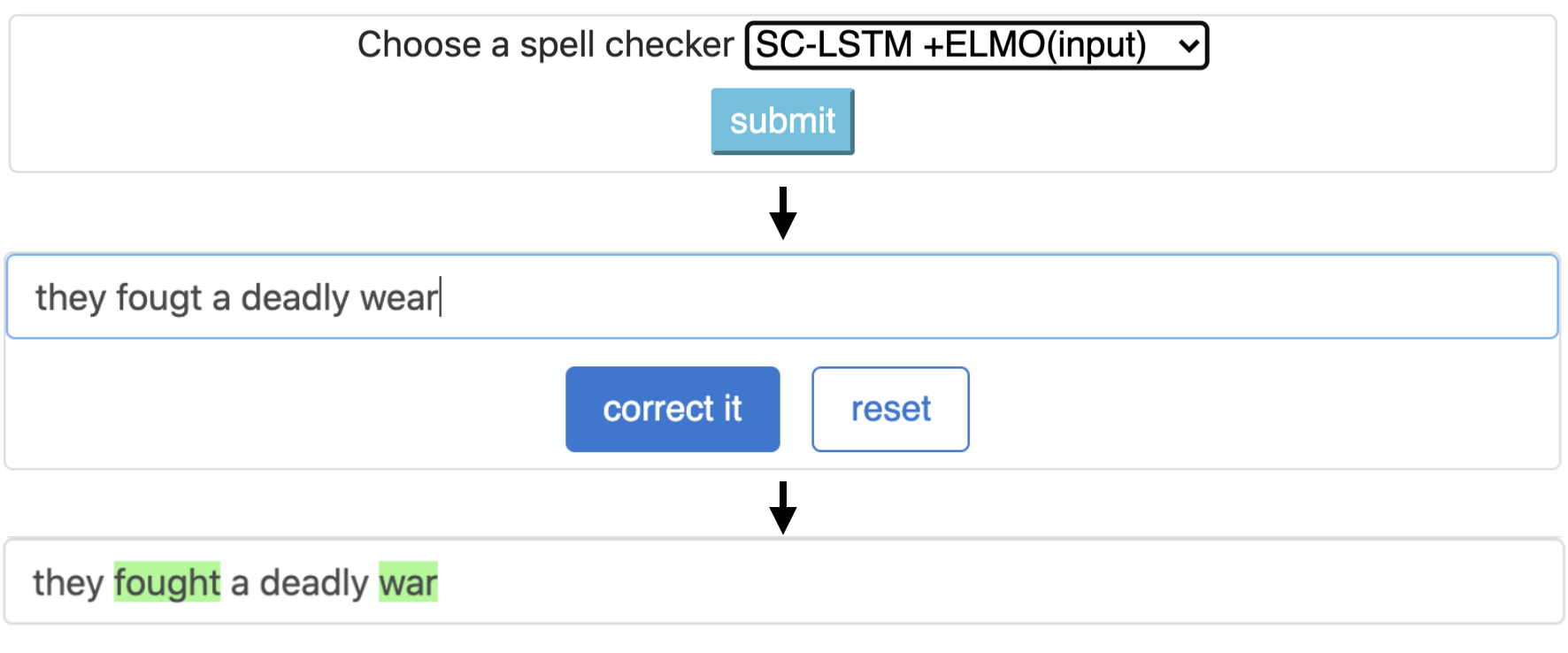
CNN-LSTMSC-LSTMNested-LSTMBERTSC-LSTM plus ELMO (at input)SC-LSTM plus ELMO (at output)SC-LSTM plus BERT (at input)SC-LSTM plus BERT (at output)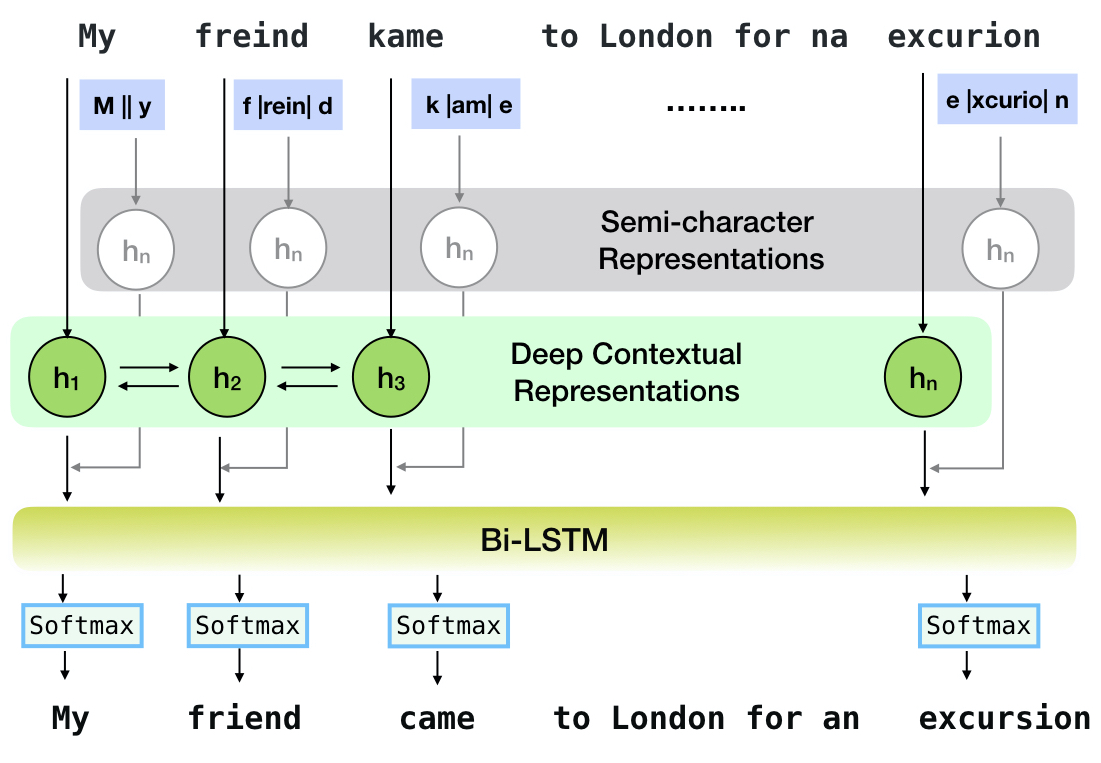
이 파이프 라인은`sc-lstm + elmo (입력)`모델에 해당합니다.
| 주문 체커 | 단어 보정 비율 | 당 시간 문장 (밀리 초) |
|---|---|---|
Aspell | 48.7 | 7.3* |
Jamspell | 68.9 | 2.6* |
CNN-LSTM | 75.8 | 4.2 |
SC-LSTM | 76.7 | 2.8 |
Nested-LSTM | 77.3 | 6.4 |
BERT | 79.1 | 7.1 |
SC-LSTM plus ELMO (at input) | 79.8 | 15.8 |
SC-LSTM plus ELMO (at output) | 78.5 | 16.3 |
SC-LSTM plus BERT (at input) | 77.0 | 6.7 |
SC-LSTM plus BERT (at output) | 76.0 | 7.2 |
실제 철자법 실수로 BEA-60K 데이터 세트의 Neuspell 툴킷에서 다양한 교정기의 성능. * CPU의 평가를 나타냅니다 (다른 사람들의 경우 Geforce RTX 2080 Ti GPU를 사용합니다).
선택한 체크 포인트를 다운로드하려면 아래에서 체크 포인트 이름을 선택한 다음 다운로드를 실행하십시오. 각 체크 포인트는 테이블에 표시된대로 신경 맞춤법 검사기와 관련이 있습니다.
| 맞춤법 검사기 | 수업 | 체크 포인트 이름 | 디스크 공간 (약) |
|---|---|---|---|
CNN-LSTM | CnnlstmChecker | 'cnn-lstm-probwordnoise' | 450MB |
SC-LSTM | SclstmChecker | 'scrnn-probwordnoise' | 450MB |
Nested-LSTM | NestedlstmChecker | 'lstm-lstm-probwordnoise' | 455MB |
BERT | BertChecker | 'subwordbert-probwordnoise' | 740 MB |
SC-LSTM plus ELMO (at input) | ElmosclstmChecker | 'Elmoscrnn-probwordnoise' | 840MB |
SC-LSTM plus BERT (at input) | BertsclstmChecker | 'Bertscrnn-probwordnoise' | 900MB |
SC-LSTM plus BERT (at output) | SclstmbertChecker | 'scrnnbert-probwordnoise' | 1.19GB |
SC-LSTM plus ELMO (at output) | SclstmelmoChecker | 'scrnnelmo-probwordnoise' | 1.23GB |
 import neuspell

neuspell . seq_modeling . downloads . download_pretrained_model ( "subwordbert-probwordnoise" )
또는 다음을 실행하여 모든 Neuspell Neural 모델을 다운로드하십시오 (v1.0 이후 버전으로 제공).
 import neuspell

neuspell . seq_modeling . downloads . download_pretrained_model ( "_all_" )
또는
Neuspell 모델을 훈련/평가하기 위해 여러 합성 및 천연 데이터 세트를 선별합니다. 자세한 내용은 논문을 확인하십시오. 모든 데이터 세트를 다운로드하려면 다음을 실행하십시오.
 cd data/traintest
python download_datafiles.py
자세한 내용은 data/traintest/README.md 참조하십시오.
열차 파일은 이름 .random , .word , .prob , .probword 를 만들기 위해 사용되는 다른 noising startegies로 더빙됩니다. 각 전략에 대해 (합성 데이터 생성 참조), 우리는 깨끗한 코퍼스의 토큰의 ~ 20%를 소음시킵니다. 우리는 청정 코퍼스로서 One billion word benchmark 데이터 세트에서 160 만 문장을 사용합니다.
데모를 설정하려면 다음을 수행하십시오.
pip install -e ".[flask]"CUDA_VISIBLE_DEVICES=0 python app.py (gpu) 또는 python app.py (cpu)를 실행하여 폴더에서 플라스크 서버를 시작하십시오 ./scripts/flask-server 이 툴킷은 철자 수정을 위해 신경 모델을 훈련시키기 위해 합성 병렬 훈련 데이터를 생성하기 위해 3 가지 종류의 노이즈 전략 (기존 문헌에서 확인)을 제공합니다. 전략에는 간단한 조회 기반의 시끄러운 철자 교체 ( en-word-replacement-noise ), 캐릭터 교환/삭제/추가/교체 ( en-char-replacement-noise )와 같은 캐릭터 레벨 노이즈 유도 및 철자법 ( en-probchar-replacement-noise )의 대규모 코퍼스에서 실수 패턴으로 인한 혼동 매트 기반의 확률 적 문자 교체가 포함됩니다. 이러한 접근 방식에 대한 자세한 내용은 종이를 확인하십시오.
다음은 위의 노이즈 큐 레이션을 활용하기위한 해당 클래스 매핑입니다. 일부 미리 구축 된 데이터 파일이 일부 Noisers에 사용되므로 대략적인 디스크 공간도 제공합니다.
| 접는 사람 | 클래스 이름 | 디스크 공간 (약) |
|---|---|---|
en-word-replacement-noise | WordReplacementNoiser | 2 MB |
en-char-replacement-noise | CharacterReplacementNoiser | - |
en-probchar-replacement-noise | ProbabilisticCharacterReplacementNoiser | 80MB |
다음은이 소음을 사용하기위한 스 니펫입니다.
 from neuspell . noising import WordReplacementNoiser

example_texts = [
    "This is an example sentence to demonstrate noising in the neuspell repository." ,
    "Here is another such amazing example !!"
]

word_repl_noiser = WordReplacementNoiser ( language = "english" )
word_repl_noiser . load_resources ()
noise_texts = word_repl_noiser . noise ( example_texts )
print ( noise_texts ) Coming Soon ...
neuspell 의 사전에 미세한 모델 위에 미세 조정 from neuspell import BertChecker
checker = BertChecker ()
checker . from_pretrained ()
checker . finetune ( clean_file = "sample_clean.txt" , corrupt_file = "sample_corrupt.txt" , data_dir = "default" ) 이 기능은 BertChecker 및 ElmosclstmChecker 에만 사용할 수 있습니다.
우리는 이제 Huggingface 모델 초기화를 지원하고 사용자 정의 데이터에서이를 미세 조정합니다. 다음은 다음을 보여주는 코드 스 니펫입니다.
먼저 깨끗하고 손상된 텍스트를 포함하는 파일을 라인이 부여 된 형식으로 표시합니다.
 from neuspell . commons import DEFAULT_TRAINTEST_DATA_PATH

data_dir = DEFAULT_TRAINTEST_DATA_PATH
clean_file = "sample_clean.txt"
corrupt_file = "sample_corrupt.txt"
from neuspell . seq_modeling . helpers import load_data , train_validation_split
from neuspell . seq_modeling . helpers import get_tokens
from neuspell import BertChecker
# Step-0: Load your train and test files, create a validation split
train_data = load_data ( data_dir , clean_file , corrupt_file )
train_data , valid_data = train_validation_split ( train_data , 0.8 , seed = 11690 )
# Step-1: Create vocab file. This serves as the target vocab file and we use the defined model's default huggingface
# tokenizer to tokenize inputs appropriately.
vocab = get_tokens ([ i [ 0 ] for i in train_data ], keep_simple = True , min_max_freq = ( 1 , float ( "inf" )), topk = 100000 )
# # Step-2: Initialize a model
checker = BertChecker ( device = "cuda" )
checker . from_huggingface ( bert_pretrained_name_or_path = "distilbert-base-cased" , vocab = vocab )
# Step-3: Finetune the model on your dataset
checker . finetune ( clean_file = clean_file , corrupt_file = corrupt_file , data_dir = data_dir )다음과 같이 사용자 정의 데이터에 대한 모델을 추가로 평가할 수 있습니다.
 from neuspell import BertChecker

checker = BertChecker ()
checker . from_pretrained (
    bert_pretrained_name_or_path = "distilbert-base-cased" ,
    ckpt_path = f" { data_dir } /new_models/distilbert-base-cased"  # "<folder where the model is saved>"
)
checker . evaluate ( clean_file = clean_file , corrupt_file = corrupt_file , data_dir = data_dir ) 위의 사용에 이어, 이제는 영어 이외의 스크립트에서 xlm-roberta-base , bert-base-multilingual-cased 및 distilbert-base-multilingual-cased 와 같은 다국어 모델을 원활하게 활용할 수 있습니다.
./applications/Adversarial-Misspellings-arxiv . readme.md를 참조하십시오. Aspell Checker에 대한 요구 사항 :
 wget https://files.pythonhosted.org/packages/53/30/d995126fe8c4800f7a9b31aa0e7e5b2896f5f84db4b7513df746b2a286da/aspell-python-py3-1.15.tar.bz2
tar -C . -xvf aspell-python-py3-1.15.tar.bz2
cd aspell-python-py3-1.15
python setup.py install
Jamspell 체커에 대한 요구 사항 :
 sudo apt-get install -y swig3.0
wget -P ./ https://github.com/bakwc/JamSpell-models/raw/master/en.tar.gz
tar xf ./en.tar.gz --directory ./
 @inproceedings{jayanthi-etal-2020-neuspell,
    title = "{N}eu{S}pell: A Neural Spelling Correction Toolkit",
    author = "Jayanthi, Sai Muralidhar  and
      Pruthi, Danish  and
      Neubig, Graham",
    booktitle = "Proceedings of the 2020 Conference on Empirical Methods in Natural Language Processing: System Demonstrations",
    month = oct,
    year = "2020",
    address = "Online",
    publisher = "Association for Computational Linguistics",
    url = "https://www.aclweb.org/anthology/2020.emnlp-demos.21",
    doi = "10.18653/v1/2020.emnlp-demos.21",
    pages = "158--164",
    abstract = "We introduce NeuSpell, an open-source toolkit for spelling correction in English. Our toolkit comprises ten different models, and benchmarks them on naturally occurring misspellings from multiple sources. We find that many systems do not adequately leverage the context around the misspelt token. To remedy this, (i) we train neural models using spelling errors in context, synthetically constructed by reverse engineering isolated misspellings; and (ii) use richer representations of the context. By training on our synthetic examples, correction rates improve by 9{%} (absolute) compared to the case when models are trained on randomly sampled character perturbations. Using richer contextual representations boosts the correction rate by another 3{%}. Our toolkit enables practitioners to use our proposed and existing spelling correction systems, both via a simple unified command line, as well as a web interface. Among many potential applications, we demonstrate the utility of our spell-checkers in combating adversarial misspellings. The toolkit can be accessed at neuspell.github.io.",
}
출판물 링크. 질문이나 제안이 있으시면 JSAIMURALI001 [AT] GMAIL [DOT] COM의 저자에게 문의하십시오.





