neuspell
1.0.0

Neuspell: ชุดเครื่องมือแก้ไขการสะกดคำของระบบประสาท
neuspell มีให้บริการผ่าน PIP แล้ว ดูการติดตั้งผ่าน PIPBERT Pretrained ของ Neuspell นั้นมีให้บริการในขณะนี้เป็นส่วนหนึ่งของ HuggingFace Model เป็น murali1996/bert-base-cased-spell-correction เราให้ตัวอย่างโค้ดตัวอย่างที่ ./scripts/huggingface สำหรับผู้ปฏิบัติงานที่อยากรู้อยากเห็นgit clone https://github.com/neuspell/neuspell ; cd neuspell
pip install -e .เพื่อติดตั้งข้อกำหนดพิเศษ
pip install -r extras-requirements.txtหรือเป็นรายบุคคลว่า:
pip install -e .[elmo]
pip install -e .[spacy]
หมายเหตุ: สำหรับ ZSH ใช้ ". [Elmo]" และ ". [spacy]" แทน
นอกจากนี้ spacy models สามารถดาวน์โหลดได้เป็น:
python -m spacy download en_core_web_sm จากนั้นดาวน์โหลดรุ่น Pretrained ของ neuspell หลังจากดาวน์โหลดจุดตรวจสอบ
นี่คือตัวอย่างโค้ดที่เริ่มต้นอย่างรวดเร็ว (การใช้บรรทัดคำสั่ง) เพื่อใช้โมเดลตัวตรวจสอบ ดู test_neuspell_correctors.py สำหรับรูปแบบการใช้งานเพิ่มเติม
 import neuspell
from neuspell import available_checkers , BertChecker

""" see available checkers """
print ( f"available checkers: { neuspell . available_checkers () } " )
# → available checkers: ['BertsclstmChecker', 'CnnlstmChecker', 'NestedlstmChecker', 'SclstmChecker', 'SclstmbertChecker', 'BertChecker', 'SclstmelmoChecker', 'ElmosclstmChecker']

""" select spell checkers & load """
checker = BertChecker ()
checker . from_pretrained ()

""" spell correction """
checker . correct ( "I luk foward to receving your reply" )
# → "I look forward to receiving your reply"
checker . correct_strings ([ "I luk foward to receving your reply" , ])
# → ["I look forward to receiving your reply"]
checker . correct_from_file ( src = "noisy_texts.txt" )
# → "Found 450 mistakes in 322 lines, total_lines=350"

""" evaluation of models """
checker . evaluate ( clean_file = "bea60k.txt" , corrupt_file = "bea60k.noise.txt" )
# → data size: 63044
# → total inference time for this data is: 998.13 secs
# → total token count: 1032061
# → confusion table: corr2corr:940937, corr2incorr:21060,
#                    incorr2corr:55889, incorr2incorr:14175
# → accuracy is 96.58%
# → word correction rate is 79.76%
อีกทางเลือกหนึ่งก็สามารถเลือกและโหลดตัวตรวจสอบการสะกดแตกต่างกันดังนี้:
 from neuspell import SclstmChecker

checker = SclstmChecker ()
checker = checker . add_ ( "elmo" , at = "input" )  # "elmo" or "bert", "input" or "output"
checker . from_pretrained ()
คุณลักษณะของการเพิ่ม Elmo หรือ Bert รุ่นนี้รองรับรุ่นที่เลือก ดูรายการรุ่นประสาทในชุดเครื่องมือสำหรับรายละเอียด
หากสนใจให้ทำตามข้อกำหนดเพิ่มเติมสำหรับการติดตั้งตัวตรวจสอบการสะกดที่ไม่ใช่เส้นประสาท Aspell และ Jamspell
pip install neuspell ใน v1.0 ไลบรารี allennlp ไม่ได้ติดตั้งโดยอัตโนมัติซึ่งใช้สำหรับรุ่นที่มี Elmo ดังนั้นเพื่อใช้เครื่องตรวจสอบเหล่านั้นให้ทำการติดตั้งแหล่งที่มาเช่นเดียวกับในการติดตั้งและเริ่มต้นอย่างรวดเร็ว
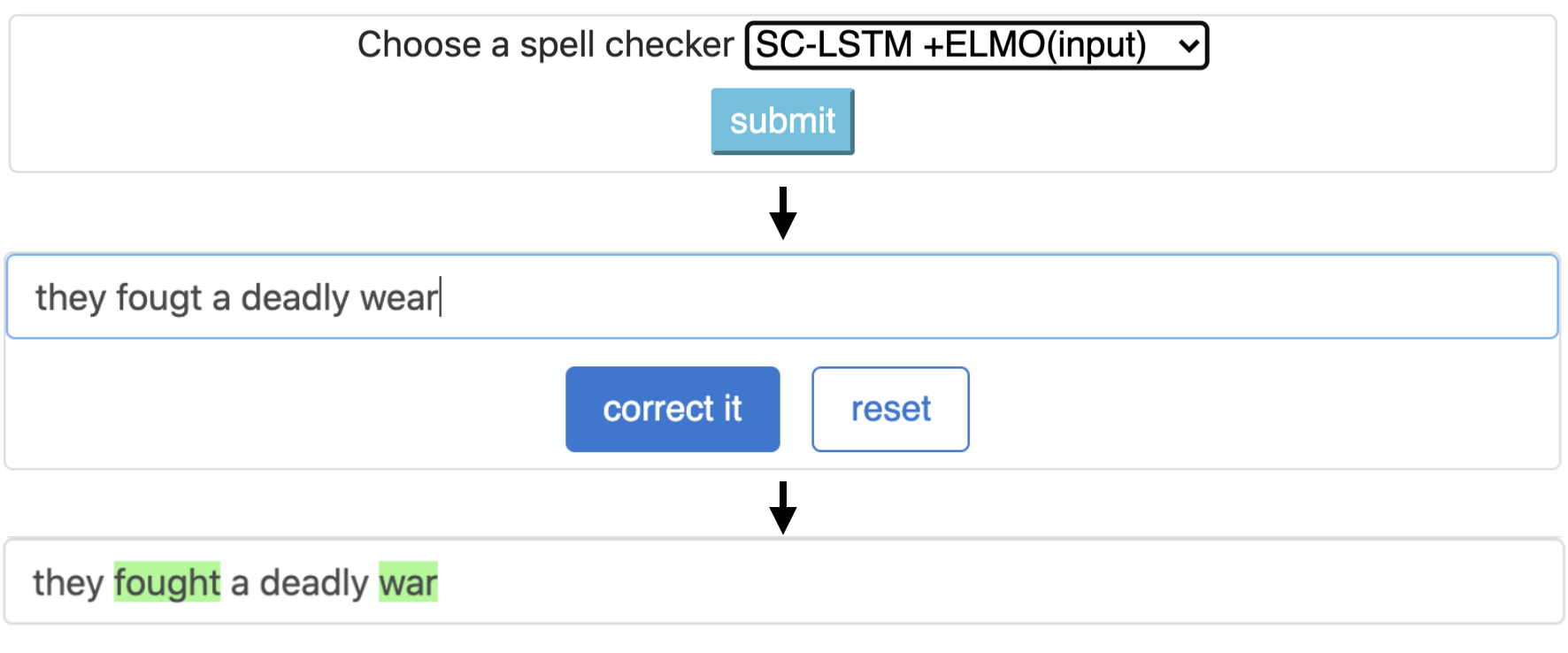
Neuspell เป็นชุดเครื่องมือโอเพ่นซอร์สสำหรับการแก้ไขการสะกดคำที่ละเอียดอ่อนในบริบทเป็นภาษาอังกฤษ ชุดเครื่องมือนี้ประกอบด้วยตัวตรวจสอบการสะกด 10 ตัวพร้อมการประเมินผลเกี่ยวกับการแยกผิดที่เกิดขึ้นตามธรรมชาติจากหลายแหล่ง (เปิดเผยต่อสาธารณะ) เพื่อสร้างแบบจำลองระบบประสาทสำหรับการตรวจสอบการสะกดบริบทขึ้นอยู่กับ (i) เราฝึกอบรมโมเดลระบบประสาทโดยใช้ข้อผิดพลาดในการสะกดคำในบริบทที่สร้างขึ้นโดยการสังเคราะห์โดยวิศวกรรมย้อนกลับแยก mis-spellings; และ (ii) ใช้การเป็นตัวแทนของบริบทที่สมบูรณ์ยิ่งขึ้นชุดเครื่องมือนี้ช่วยให้ผู้ปฏิบัติงาน NLP สามารถใช้ระบบแก้ไขการสะกดคำที่เราเสนอและมีอยู่ได้ทั้งผ่านสายคำสั่งแบบครบวงจรอย่างง่ายรวมถึงเว็บอินเตอร์เฟส ในบรรดาแอพพลิเคชั่นที่มีศักยภาพมากมายเราแสดงให้เห็นถึงประโยชน์ของผู้ตรวจสอบการสะกดคำของเราในการต่อสู้กับการสะกดคำผิดของฝ่ายตรงข้าม
CNN-LSTMSC-LSTMNested-LSTMBERTSC-LSTM plus ELMO (at input)SC-LSTM plus ELMO (at output)SC-LSTM plus BERT (at input)SC-LSTM plus BERT (at output)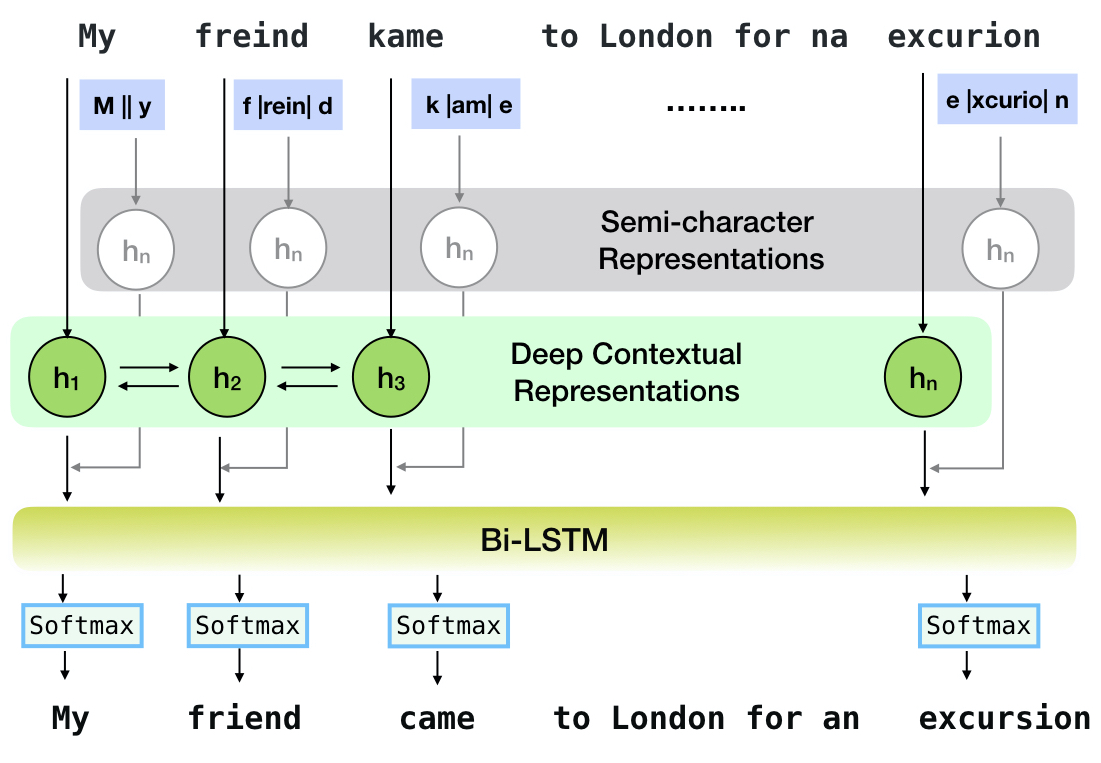
ไปป์ไลน์นี้สอดคล้องกับรุ่น `SC-LSTM Plus Elmo (ที่อินพุต)` รุ่น
| สะกด หมากฮอส | คำ การแก้ไข ประเมิน | เวลาต่อ ประโยค (เป็นมิลลิวินาที) |
|---|---|---|
Aspell | 48.7 | 7.3* |
Jamspell | 68.9 | 2.6* |
CNN-LSTM | 75.8 | 4.2 |
SC-LSTM | 76.7 | 2.8 |
Nested-LSTM | 77.3 | 6.4 |
BERT | 79.1 | 7.1 |
SC-LSTM plus ELMO (at input) | 79.8 | 15.8 |
SC-LSTM plus ELMO (at output) | 78.5 | 16.3 |
SC-LSTM plus BERT (at input) | 77.0 | 6.7 |
SC-LSTM plus BERT (at output) | 76.0 | 7.2 |
ประสิทธิภาพของตัวแก้ไขที่แตกต่างกันในชุดเครื่องมือ Neuspell บนชุดข้อมูล BEA-60K พร้อมข้อผิดพลาดในการสะกดคำในโลกแห่งความจริง ∗ หมายถึงการประเมินผลของ CPU (สำหรับคนอื่น ๆ เราใช้ GeForce RTX 2080 TI GPU)
ในการดาวน์โหลดจุดตรวจที่เลือกให้เลือก ชื่อจุดตรวจสอบ จากด้านล่างจากนั้นเรียกใช้ดาวน์โหลด จุดตรวจแต่ละจุดเชื่อมโยงกับตัวตรวจสอบการสะกดประสาทตามที่แสดงในตาราง
| ตัวตรวจสอบการสะกดคำ | ระดับ | ชื่อจุดตรวจ | พื้นที่ดิสก์ (ประมาณ) |
|---|---|---|---|
CNN-LSTM | CnnlstmChecker | 'CNN-LSTM-ProbwordNoise' | 450 MB |
SC-LSTM | SclstmChecker | 'scrnn-probwordnoise' | 450 MB |
Nested-LSTM | NestedlstmChecker | 'LSTM-LSTM-ProBwordNoise' | 455 MB |
BERT | BertChecker | 'subwordbert-probwordnoise' | 740 MB |
SC-LSTM plus ELMO (at input) | ElmosclstmChecker | 'elmoscrnn-probwordnoise' | 840 MB |
SC-LSTM plus BERT (at input) | BertsclstmChecker | 'bertscrnn-probwordnoise' | 900 MB |
SC-LSTM plus BERT (at output) | SclstmbertChecker | 'scrnnbert-probwordnoise' | 1.19 GB |
SC-LSTM plus ELMO (at output) | SclstmelmoChecker | 'scrnnelmo-probwordnoise' | 1.23 GB |
 import neuspell

neuspell . seq_modeling . downloads . download_pretrained_model ( "subwordbert-probwordnoise" )
อีกทางเลือกหนึ่งดาวน์โหลดรุ่น Neuspell Neural ทั้งหมดโดยใช้งานต่อไปนี้ (มีอยู่ในเวอร์ชันหลังจาก v1.0):
 import neuspell

neuspell . seq_modeling . downloads . download_pretrained_model ( "_all_" )
หรือ
เราดูแลชุดข้อมูลสังเคราะห์และธรรมชาติหลายชุดสำหรับการฝึกอบรม/ประเมินโมเดล Neuspell สำหรับรายละเอียดทั้งหมดตรวจสอบกระดาษของเรา รันต่อไปนี้เพื่อดาวน์โหลดชุดข้อมูลทั้งหมด
 cd data/traintest
python download_datafiles.py
ดู data/traintest/README.md สำหรับรายละเอียดเพิ่มเติม
ไฟล์รถไฟ .prob .random .word .probword มีชื่อ. สำหรับแต่ละกลยุทธ์ (ดูการสร้างข้อมูลสังเคราะห์) เรามีสัญญาณรบกวน ∼20% ของโทเค็นในคลังข้อมูลที่สะอาด เราใช้ประโยค 1.6 ล้านประโยคจากชุดข้อมูล One billion word benchmark เป็นคลังข้อมูลที่สะอาดของเรา
ในการตั้งค่าการสาธิตให้ทำตามขั้นตอนเหล่านี้:
pip install -e ".[flask]"CUDA_VISIBLE_DEVICES=0 python app.py (บน GPU) หรือ python app.py (บน CPU) ชุดเครื่องมือนี้นำเสนอกลยุทธ์ที่น่าสนใจ 3 ชนิด (ระบุจากวรรณกรรมที่มีอยู่) เพื่อสร้างข้อมูลการฝึกอบรมแบบคู่ขนานสังเคราะห์เพื่อฝึกอบรมแบบจำลองระบบประสาทสำหรับการแก้ไขการสะกดคำ กลยุทธ์รวมถึงการเปลี่ยนการสะกดคำที่มีเสียงดังอย่างง่าย ( en-word-replacement-noise ) การเหนี่ยวนำเสียงรบกวนระดับตัวละครเช่นการแลกเปลี่ยน/การลบ/เพิ่ม/แทนที่ตัวละคร ( en-probchar-replacement-noise en-char-replacement-noise ) สำหรับรายละเอียดทั้งหมดเกี่ยวกับวิธีการเหล่านี้ให้ชำระเงินกระดาษของเรา
ต่อไปนี้คือการแมปคลาสที่สอดคล้องกันเพื่อใช้การดูแลเสียงรบกวนข้างต้น เนื่องจากไฟล์ข้อมูลที่สร้างไว้ล่วงหน้าบางไฟล์ใช้สำหรับเสียงบางส่วนเราจึงให้พื้นที่ดิสก์โดยประมาณ
| โฟลเดอร์ | ชื่อชั้นเรียน | พื้นที่ดิสก์ (ประมาณ) |
|---|---|---|
en-word-replacement-noise | WordReplacementNoiser | 2 MB |
en-char-replacement-noise | CharacterReplacementNoiser | - |
en-probchar-replacement-noise | ProbabilisticCharacterReplacementNoiser | 80 MB |
ต่อไปนี้เป็นตัวอย่างสำหรับการใช้เสียงเหล่านี้-
 from neuspell . noising import WordReplacementNoiser

example_texts = [
    "This is an example sentence to demonstrate noising in the neuspell repository." ,
    "Here is another such amazing example !!"
]

word_repl_noiser = WordReplacementNoiser ( language = "english" )
word_repl_noiser . load_resources ()
noise_texts = word_repl_noiser . noise ( example_texts )
print ( noise_texts ) Coming Soon ...
neuspell Pretrained from neuspell import BertChecker
checker = BertChecker ()
checker . from_pretrained ()
checker . finetune ( clean_file = "sample_clean.txt" , corrupt_file = "sample_corrupt.txt" , data_dir = "default" ) คุณสมบัตินี้มีให้เฉพาะสำหรับ BertChecker และ ElmosclstmChecker
ตอนนี้เราสนับสนุนการเริ่มต้นโมเดล HuggingFace และ Finetuning บนข้อมูลที่กำหนดเองของคุณ นี่คือตัวอย่างโค้ดที่แสดงให้เห็นว่า:
ก่อนอื่นทำเครื่องหมายไฟล์ของคุณที่มีข้อความที่สะอาดและเสียหายในรูปแบบแยกสาย
 from neuspell . commons import DEFAULT_TRAINTEST_DATA_PATH

data_dir = DEFAULT_TRAINTEST_DATA_PATH
clean_file = "sample_clean.txt"
corrupt_file = "sample_corrupt.txt"
from neuspell . seq_modeling . helpers import load_data , train_validation_split
from neuspell . seq_modeling . helpers import get_tokens
from neuspell import BertChecker
# Step-0: Load your train and test files, create a validation split
train_data = load_data ( data_dir , clean_file , corrupt_file )
train_data , valid_data = train_validation_split ( train_data , 0.8 , seed = 11690 )
# Step-1: Create vocab file. This serves as the target vocab file and we use the defined model's default huggingface
# tokenizer to tokenize inputs appropriately.
vocab = get_tokens ([ i [ 0 ] for i in train_data ], keep_simple = True , min_max_freq = ( 1 , float ( "inf" )), topk = 100000 )
# # Step-2: Initialize a model
checker = BertChecker ( device = "cuda" )
checker . from_huggingface ( bert_pretrained_name_or_path = "distilbert-base-cased" , vocab = vocab )
# Step-3: Finetune the model on your dataset
checker . finetune ( clean_file = clean_file , corrupt_file = corrupt_file , data_dir = data_dir )คุณสามารถประเมินโมเดลของคุณเพิ่มเติมเกี่ยวกับข้อมูลที่กำหนดเองดังนี้:
 from neuspell import BertChecker

checker = BertChecker ()
checker . from_pretrained (
    bert_pretrained_name_or_path = "distilbert-base-cased" ,
    ckpt_path = f" { data_dir } /new_models/distilbert-base-cased"  # "<folder where the model is saved>"
)
checker . evaluate ( clean_file = clean_file , corrupt_file = corrupt_file , data_dir = data_dir ) หลังจากการใช้งานด้านบนตอนนี้สามารถใช้โมเดลหลายภาษาได้อย่างราบรื่นเช่น xlm-roberta-base , bert-base-multilingual-cased และ distilbert-base-multilingual-cased บนสคริปต์ที่ไม่ใช่ภาษาอังกฤษ
./applications/Adversarial-Misspellings-arxiv adversarial-misspellings-arxiv ดู readme.md ข้อกำหนดสำหรับ Aspell Checker:
 wget https://files.pythonhosted.org/packages/53/30/d995126fe8c4800f7a9b31aa0e7e5b2896f5f84db4b7513df746b2a286da/aspell-python-py3-1.15.tar.bz2
tar -C . -xvf aspell-python-py3-1.15.tar.bz2
cd aspell-python-py3-1.15
python setup.py install
ข้อกำหนดสำหรับตัวตรวจสอบ Jamspell :
 sudo apt-get install -y swig3.0
wget -P ./ https://github.com/bakwc/JamSpell-models/raw/master/en.tar.gz
tar xf ./en.tar.gz --directory ./
 @inproceedings{jayanthi-etal-2020-neuspell,
    title = "{N}eu{S}pell: A Neural Spelling Correction Toolkit",
    author = "Jayanthi, Sai Muralidhar  and
      Pruthi, Danish  and
      Neubig, Graham",
    booktitle = "Proceedings of the 2020 Conference on Empirical Methods in Natural Language Processing: System Demonstrations",
    month = oct,
    year = "2020",
    address = "Online",
    publisher = "Association for Computational Linguistics",
    url = "https://www.aclweb.org/anthology/2020.emnlp-demos.21",
    doi = "10.18653/v1/2020.emnlp-demos.21",
    pages = "158--164",
    abstract = "We introduce NeuSpell, an open-source toolkit for spelling correction in English. Our toolkit comprises ten different models, and benchmarks them on naturally occurring misspellings from multiple sources. We find that many systems do not adequately leverage the context around the misspelt token. To remedy this, (i) we train neural models using spelling errors in context, synthetically constructed by reverse engineering isolated misspellings; and (ii) use richer representations of the context. By training on our synthetic examples, correction rates improve by 9{%} (absolute) compared to the case when models are trained on randomly sampled character perturbations. Using richer contextual representations boosts the correction rate by another 3{%}. Our toolkit enables practitioners to use our proposed and existing spelling correction systems, both via a simple unified command line, as well as a web interface. Among many potential applications, we demonstrate the utility of our spell-checkers in combating adversarial misspellings. The toolkit can be accessed at neuspell.github.io.",
}
ลิงค์สำหรับการตีพิมพ์ คำถามหรือข้อเสนอแนะใด ๆ โปรดติดต่อผู้เขียนที่ JSaimurali001 [ที่] Gmail [dot] com





