neuspell
1.0.0

Neuspell: مجموعة أدوات تصحيح الإملاء العصبي
neuspell متاح الآن من خلال PIP . انظر التثبيت من خلال PIPBERT PretRained من Neuspell كجزء من نماذج Huggingface مثل murali1996/bert-base-cased-spell-correction . نحن نقدم مقتطف رمز مثال على ./scripts/huggingface للممارسين الفضوليين.git clone https://github.com/neuspell/neuspell ; cd neuspell
pip install -e .لتثبيت متطلبات إضافية ،
pip install -r extras-requirements.txtأو بشكل فردي على النحو التالي:
pip install -e .[elmo]
pip install -e .[spacy]
ملاحظة: بالنسبة لـ Zsh ، استخدم ". [Elmo]" و ". [spacy]" بدلاً من ذلك
بالإضافة إلى ذلك ، يمكن تنزيل spacy models على النحو التالي:
python -m spacy download en_core_web_sm بعد ذلك ، قم بتنزيل نماذج مسبقة من neuspell بعد تنزيل نقاط التفتيش
فيما يلي مقتطف رمز سريع التشغيل (استخدام سطر الأوامر) لاستخدام نموذج المدقق. انظر test_neuspell_correctors.py لمزيد من أنماط الاستخدام.
 import neuspell
from neuspell import available_checkers , BertChecker

""" see available checkers """
print ( f"available checkers: { neuspell . available_checkers () } " )
# → available checkers: ['BertsclstmChecker', 'CnnlstmChecker', 'NestedlstmChecker', 'SclstmChecker', 'SclstmbertChecker', 'BertChecker', 'SclstmelmoChecker', 'ElmosclstmChecker']

""" select spell checkers & load """
checker = BertChecker ()
checker . from_pretrained ()

""" spell correction """
checker . correct ( "I luk foward to receving your reply" )
# → "I look forward to receiving your reply"
checker . correct_strings ([ "I luk foward to receving your reply" , ])
# → ["I look forward to receiving your reply"]
checker . correct_from_file ( src = "noisy_texts.txt" )
# → "Found 450 mistakes in 322 lines, total_lines=350"

""" evaluation of models """
checker . evaluate ( clean_file = "bea60k.txt" , corrupt_file = "bea60k.noise.txt" )
# → data size: 63044
# → total inference time for this data is: 998.13 secs
# → total token count: 1032061
# → confusion table: corr2corr:940937, corr2incorr:21060,
#                    incorr2corr:55889, incorr2incorr:14175
# → accuracy is 96.58%
# → word correction rate is 79.76%
بدلاً من ذلك ، يمكن أيضًا تحديد وتحميل مدقق إملائي بشكل مختلف على النحو التالي:
 from neuspell import SclstmChecker

checker = SclstmChecker ()
checker = checker . add_ ( "elmo" , at = "input" )  # "elmo" or "bert", "input" or "output"
checker . from_pretrained ()
هذه الميزة لإضافة نموذج ELMO أو BERT مدعوم حاليًا للنماذج المحددة. انظر قائمة النماذج العصبية في مجموعة الأدوات للحصول على التفاصيل.
إذا كنت مهتمًا ، اتبع المتطلبات الإضافية لتثبيت الداما الإملائية غير النيجة- Aspell و Jamspell .
pip install neuspell في V1.0 ، لم يتم تثبيت مكتبة allennlp تلقائيًا والتي يتم استخدامها في النماذج التي تحتوي على Elmo. وبالتالي ، للاستفادة من تلك المدققات ، قم بتثبيت مصدر كما في التثبيت والبدء السريع
Neuspell هي مجموعة أدوات مفتوحة المصدر لتصحيح الإملاء الحساسة للسياق باللغة الإنجليزية. تتألف مجموعة الأدوات هذه من 10 مدققين إملائيين ، مع تقييمات على عمليات الإساءة التي تحدث بشكل طبيعي من مصادر متعددة (متاحة للجمهور). لجعل النماذج العصبية للتحقق من السياق التعويضي ، (1) نقوم بتدريب النماذج العصبية باستخدام أخطاء الإملاء في السياق ، والتي تم إنشاؤها صناعياً بواسطة الهندسة المعزولة المعزولة ؛ و (2) استخدام تمثيلات أكثر ثراءً للسياق. تتيح مجموعة الأدوات هذه ممارسي NLP استخدام أنظمة تصحيح الإملاء المقترحة والحالية ، سواء عبر سطر أوامر موحد بسيط ، بالإضافة إلى واجهة ويب. من بين العديد من التطبيقات المحتملة ، نوضح فائدة من محلباتنا الإملائية في مكافحة الأخطاء الإملائية العدائية.
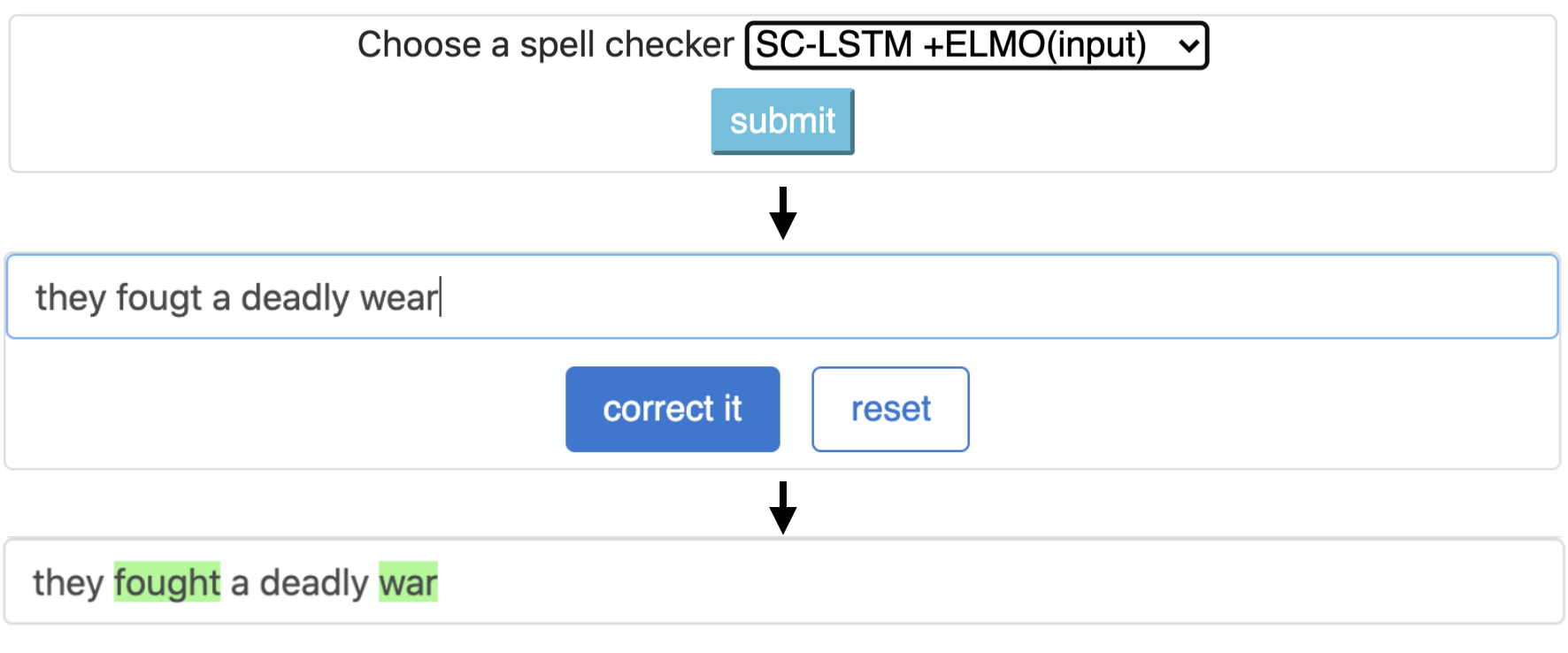
CNN-LSTMSC-LSTMNested-LSTMBERTSC-LSTM plus ELMO (at input)SC-LSTM plus ELMO (at output)SC-LSTM plus BERT (at input)SC-LSTM plus BERT (at output)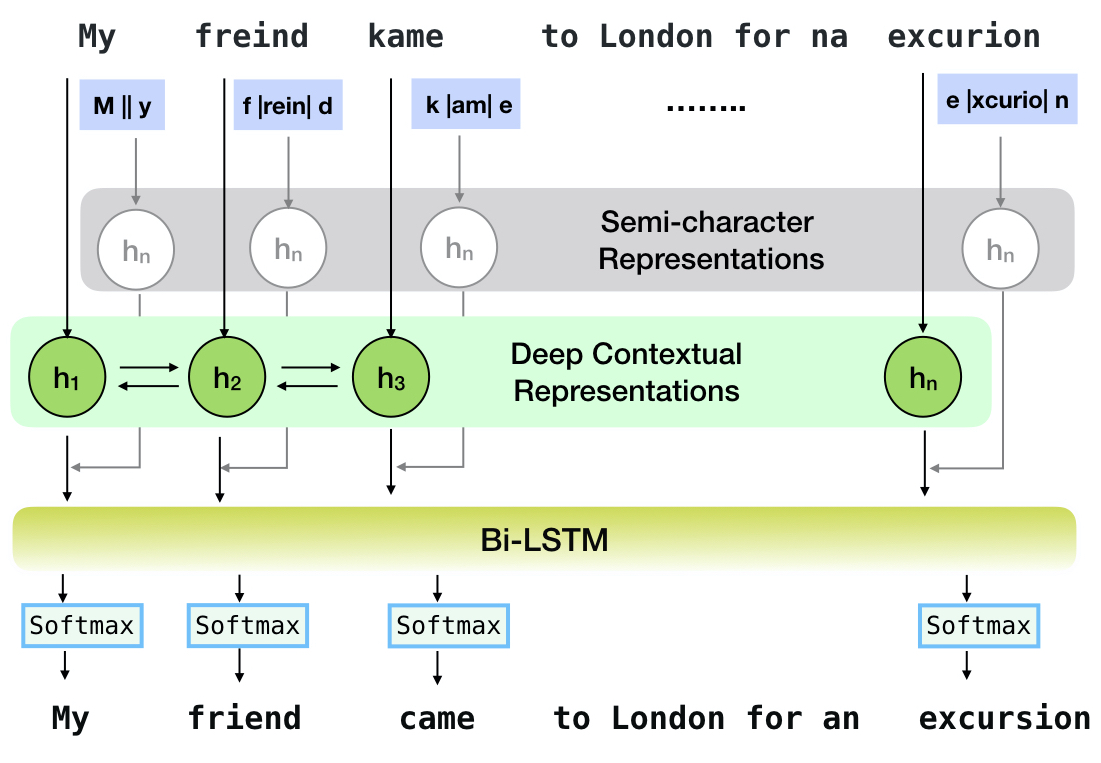
يتوافق خط الأنابيب هذا مع نموذج `sc-lstm plus elmo (عند الإدخال)`.
| يتهجى فاحص | كلمة تصحيح معدل | الوقت لكل جملة (بالميلي ثانية) |
|---|---|---|
Aspell | 48.7 | 7.3* |
Jamspell | 68.9 | 2.6* |
CNN-LSTM | 75.8 | 4.2 |
SC-LSTM | 76.7 | 2.8 |
Nested-LSTM | 77.3 | 6.4 |
BERT | 79.1 | 7.1 |
SC-LSTM plus ELMO (at input) | 79.8 | 15.8 |
SC-LSTM plus ELMO (at output) | 78.5 | 16.3 |
SC-LSTM plus BERT (at input) | 77.0 | 6.7 |
SC-LSTM plus BERT (at output) | 76.0 | 7.2 |
أداء مصححات مختلفة في مجموعة أدوات NeusPell على مجموعة بيانات BEA-60K مع أخطاء الإملاء في العالم الحقيقي. ∗ يشير إلى التقييم على وحدة المعالجة المركزية (للآخرين ، نستخدم GeForce RTX 2080 TI GPU).
لتنزيل نقاط التفتيش المحددة ، حدد اسم نقطة تفتيش من الأسفل ثم قم بتشغيل التنزيل. يرتبط كل نقطة تفتيش بمتحقق إملائي عصبي كما هو موضح في الجدول.
| المدقق الإملائي | فصل | اسم نقطة التفتيش | مساحة القرص (تقريبا) |
|---|---|---|---|
CNN-LSTM | CnnlstmChecker | 'cnn-lstm-probwordnoise' | 450 ميغابايت |
SC-LSTM | SclstmChecker | 'scrnn-probwordnoise' | 450 ميغابايت |
Nested-LSTM | NestedlstmChecker | 'LSTM-LSTM-Probwordnoise " | 455 ميغابايت |
BERT | BertChecker | 'subwordbert-probwordnoise' | 740 ميغابايت |
SC-LSTM plus ELMO (at input) | ElmosclstmChecker | 'Elmoscrnn-probwordnoise " | 840 ميغابايت |
SC-LSTM plus BERT (at input) | BertsclstmChecker | 'Bertscrnn-probwordnoise " | 900 ميغابايت |
SC-LSTM plus BERT (at output) | SclstmbertChecker | 'scrnnbert-probwordnoise' | 1.19 غيغابايت |
SC-LSTM plus ELMO (at output) | SclstmelmoChecker | 'scrnnelmo-probwordnoise' | 1.23 غيغابايت |
 import neuspell

neuspell . seq_modeling . downloads . download_pretrained_model ( "subwordbert-probwordnoise" )
بدلاً من ذلك ، قم بتنزيل جميع النماذج العصبية neuspell عن طريق تشغيل ما يلي (متوفر في الإصدارات بعد V1.0):
 import neuspell

neuspell . seq_modeling . downloads . download_pretrained_model ( "_all_" )
بدلاً عن ذلك،
نقوم برعاية العديد من مجموعات البيانات الاصطناعية والطبيعية للتدريب/تقييم نماذج Neuspell. للحصول على تفاصيل كاملة ، تحقق من ورقتنا. قم بتشغيل ما يلي لتنزيل جميع مجموعات البيانات.
 cd data/traintest
python download_datafiles.py
راجع data/traintest/README.md لمزيد من التفاصيل.
يُطلق على ملفات القطار مع أسماء .random و .word و .prob و .probword لبدءات noising المختلفة المستخدمة لإنشاءها. لكل استراتيجية (انظر إنشاء البيانات الاصطناعية) ، نضغط ∼20 ٪ من الرموز في المجموعة النظيفة. نحن نستخدم 1.6 مليون جملة من مجموعة بيانات One billion word benchmark باعتبارها مجموعة نظيفة.
من أجل إعداد عرض تجريبي ، اتبع هذه الخطوات:
pip install -e ".[flask]"CUDA_VISIBLE_DEVICES=0 python app.py (على GPU) أو python app.py (على وحدة المعالجة المركزية) توفر مجموعة الأدوات هذه 3 أنواع من استراتيجيات noising (التي تم تحديدها من الأدبيات الموجودة) لإنشاء بيانات تدريب موازية اصطناعية لتدريب النماذج العصبية لتصحيح الإملاء. تتضمن الاستراتيجيات استبدال الإملاء الصاخب البسيط ( en-word-replacement-noise ) ، وتحريض ضوضاء على مستوى الأحرف مثل المبادلة/الحذف/إضافة/استبدال الشخصيات ( en-probchar-replacement-noise en-char-replacement-noise ، واستبدال الشخصية المحتملة القائمة على المصفوفة). للحصول على تفاصيل كاملة حول هذه الأساليب ، الخروج من ورقتنا.
فيما يلي تعيينات الفئة المقابلة للاستفادة من عودة الضوضاء المذكورة أعلاه. نظرًا لاستخدام بعض ملفات البيانات التي تم إنشاؤها مسبقًا لبعض أصوات الصخور ، فإننا نقدم أيضًا مساحة القرص التقريبية.
| مجلد | اسم الفصل | مساحة القرص (تقريبا) |
|---|---|---|
en-word-replacement-noise | WordReplacementNoiser | 2 ميغابايت |
en-char-replacement-noise | CharacterReplacementNoiser | - |
en-probchar-replacement-noise | ProbabilisticCharacterReplacementNoiser | 80 ميغابايت |
فيما يلي مقتطف لاستخدام هؤلاء الضوضاء-
 from neuspell . noising import WordReplacementNoiser

example_texts = [
    "This is an example sentence to demonstrate noising in the neuspell repository." ,
    "Here is another such amazing example !!"
]

word_repl_noiser = WordReplacementNoiser ( language = "english" )
word_repl_noiser . load_resources ()
noise_texts = word_repl_noiser . noise ( example_texts )
print ( noise_texts ) Coming Soon ...
neuspell from neuspell import BertChecker
checker = BertChecker ()
checker . from_pretrained ()
checker . finetune ( clean_file = "sample_clean.txt" , corrupt_file = "sample_corrupt.txt" , data_dir = "default" ) هذه الميزة متاحة فقط لـ BertChecker و ElmosclstmChecker .
نحن ندعم الآن تهيئة نموذج Luggingface ونحمله على بياناتك المخصصة. فيما يلي مقتطف رمز يوضح أن:
حدد ملفاتك أولاً تحتوي على نصوص نظيفة وفاس
 from neuspell . commons import DEFAULT_TRAINTEST_DATA_PATH

data_dir = DEFAULT_TRAINTEST_DATA_PATH
clean_file = "sample_clean.txt"
corrupt_file = "sample_corrupt.txt"
from neuspell . seq_modeling . helpers import load_data , train_validation_split
from neuspell . seq_modeling . helpers import get_tokens
from neuspell import BertChecker
# Step-0: Load your train and test files, create a validation split
train_data = load_data ( data_dir , clean_file , corrupt_file )
train_data , valid_data = train_validation_split ( train_data , 0.8 , seed = 11690 )
# Step-1: Create vocab file. This serves as the target vocab file and we use the defined model's default huggingface
# tokenizer to tokenize inputs appropriately.
vocab = get_tokens ([ i [ 0 ] for i in train_data ], keep_simple = True , min_max_freq = ( 1 , float ( "inf" )), topk = 100000 )
# # Step-2: Initialize a model
checker = BertChecker ( device = "cuda" )
checker . from_huggingface ( bert_pretrained_name_or_path = "distilbert-base-cased" , vocab = vocab )
# Step-3: Finetune the model on your dataset
checker . finetune ( clean_file = clean_file , corrupt_file = corrupt_file , data_dir = data_dir )يمكنك مزيد من تقييم النموذج الخاص بك على بيانات مخصصة على النحو التالي:
 from neuspell import BertChecker

checker = BertChecker ()
checker . from_pretrained (
    bert_pretrained_name_or_path = "distilbert-base-cased" ,
    ckpt_path = f" { data_dir } /new_models/distilbert-base-cased"  # "<folder where the model is saved>"
)
checker . evaluate ( clean_file = clean_file , corrupt_file = corrupt_file , data_dir = data_dir ) بعد الاستخدام أعلاه ، يمكن الآن استخدام نماذج متعددة اللغات بسلاسة مثل xlm-roberta-base و bert-base-multilingual-cased و distilbert-base-multilingual-cased على نص غير إنجليزي.
./applications/Adversarial-Misspellings-arxiv انظر readme.md. متطلبات Aspell Checker:
 wget https://files.pythonhosted.org/packages/53/30/d995126fe8c4800f7a9b31aa0e7e5b2896f5f84db4b7513df746b2a286da/aspell-python-py3-1.15.tar.bz2
tar -C . -xvf aspell-python-py3-1.15.tar.bz2
cd aspell-python-py3-1.15
python setup.py install
متطلبات مدقق Jamspell :
 sudo apt-get install -y swig3.0
wget -P ./ https://github.com/bakwc/JamSpell-models/raw/master/en.tar.gz
tar xf ./en.tar.gz --directory ./
 @inproceedings{jayanthi-etal-2020-neuspell,
    title = "{N}eu{S}pell: A Neural Spelling Correction Toolkit",
    author = "Jayanthi, Sai Muralidhar  and
      Pruthi, Danish  and
      Neubig, Graham",
    booktitle = "Proceedings of the 2020 Conference on Empirical Methods in Natural Language Processing: System Demonstrations",
    month = oct,
    year = "2020",
    address = "Online",
    publisher = "Association for Computational Linguistics",
    url = "https://www.aclweb.org/anthology/2020.emnlp-demos.21",
    doi = "10.18653/v1/2020.emnlp-demos.21",
    pages = "158--164",
    abstract = "We introduce NeuSpell, an open-source toolkit for spelling correction in English. Our toolkit comprises ten different models, and benchmarks them on naturally occurring misspellings from multiple sources. We find that many systems do not adequately leverage the context around the misspelt token. To remedy this, (i) we train neural models using spelling errors in context, synthetically constructed by reverse engineering isolated misspellings; and (ii) use richer representations of the context. By training on our synthetic examples, correction rates improve by 9{%} (absolute) compared to the case when models are trained on randomly sampled character perturbations. Using richer contextual representations boosts the correction rate by another 3{%}. Our toolkit enables practitioners to use our proposed and existing spelling correction systems, both via a simple unified command line, as well as a web interface. Among many potential applications, we demonstrate the utility of our spell-checkers in combating adversarial misspellings. The toolkit can be accessed at neuspell.github.io.",
}
رابط للنشر. أي أسئلة أو اقتراحات ، يرجى الاتصال بالمؤلفين في jsaimurali001 [في] gmail [dot] com





