neuspell
1.0.0

Neuspell:ニューラルスペル補正ツールキット
neuspell PIPで利用可能になりました。 PIPからのインストールを参照してくださいBERT Treatreaded Modelはmurali1996/bert-base-cased-spell-correctionとしてHuggingfaceモデルの一部として利用可能になりました。好奇心の強い開業医向けの./scripts/huggingfaceでコードスニペットの例を提供します。git clone https://github.com/neuspell/neuspell ; cd neuspell
pip install -e .追加の要件をインストールするには、
pip install -r extras-requirements.txtまたは個別に:
pip install -e .[elmo]
pip install -e .[spacy]
注: zshの場合、「。[elmo]」と「。[Spacy]」を使用します
さらに、 spacy models次のようにダウンロードできます。
python -m spacy download en_core_web_sm次に、チェックポイントをダウンロードした後、 neuspellの前提型モデルをダウンロードします
これは、チェッカーモデルを使用するためのクイックスタートコードスニペット(コマンドラインの使用)です。より多くの使用パターンについては、test_neuspell_correctors.pyを参照してください。
 import neuspell
from neuspell import available_checkers , BertChecker

""" see available checkers """
print ( f"available checkers: { neuspell . available_checkers () } " )
# → available checkers: ['BertsclstmChecker', 'CnnlstmChecker', 'NestedlstmChecker', 'SclstmChecker', 'SclstmbertChecker', 'BertChecker', 'SclstmelmoChecker', 'ElmosclstmChecker']

""" select spell checkers & load """
checker = BertChecker ()
checker . from_pretrained ()

""" spell correction """
checker . correct ( "I luk foward to receving your reply" )
# → "I look forward to receiving your reply"
checker . correct_strings ([ "I luk foward to receving your reply" , ])
# → ["I look forward to receiving your reply"]
checker . correct_from_file ( src = "noisy_texts.txt" )
# → "Found 450 mistakes in 322 lines, total_lines=350"

""" evaluation of models """
checker . evaluate ( clean_file = "bea60k.txt" , corrupt_file = "bea60k.noise.txt" )
# → data size: 63044
# → total inference time for this data is: 998.13 secs
# → total token count: 1032061
# → confusion table: corr2corr:940937, corr2incorr:21060,
#                    incorr2corr:55889, incorr2incorr:14175
# → accuracy is 96.58%
# → word correction rate is 79.76%
または、次のように、スペルチェッカーを異なる方法で選択してロードすることもできます。
 from neuspell import SclstmChecker

checker = SclstmChecker ()
checker = checker . add_ ( "elmo" , at = "input" )  # "elmo" or "bert", "input" or "output"
checker . from_pretrained ()
ELMOまたはBERTモデルを追加するこの機能は、現在、選択したモデルでサポートされています。詳細については、ツールキットのニューラルモデルのリストを参照してください。
興味がある場合は、非ネオラルスペルチェッカーをインストールするための追加要件に従ってください - AspellとJamspell 。
pip install neuspell v1.0では、 allennlpライブラリは自動的にインストールされておらず、ELMOを含むモデルに使用されます。したがって、これらのチェッカーを利用するには、インストールとクイックスタートのようにソースインストールを行います
Neuspellは、英語でのコンテキストに敏感なスペル補正のためのオープンソースツールキットです。このツールキットは10のスペルチェッカーで構成されており、複数の(公開されている)ソースからの自然に発生する誤隙間に関する評価があります。コンテキストに依存するスペルチェックのニューラルモデルを作成するには、(i)リバースエンジニアリングの孤立した誤ったスペルによって合成されたコンテキストでのスペルエラーを使用してニューラルモデルをトレーニングします。 (ii)コンテキストのより豊富な表現を使用します。このツールキットにより、NLP実践者は、単純な統一コマンドラインとWebインターフェイスの両方を介して、提案された既存のスペル補正システムを使用できます。多くの潜在的なアプリケーションの中で、私たちは敵の間違いと闘う際の呪文チェッカーの有用性を示しています。
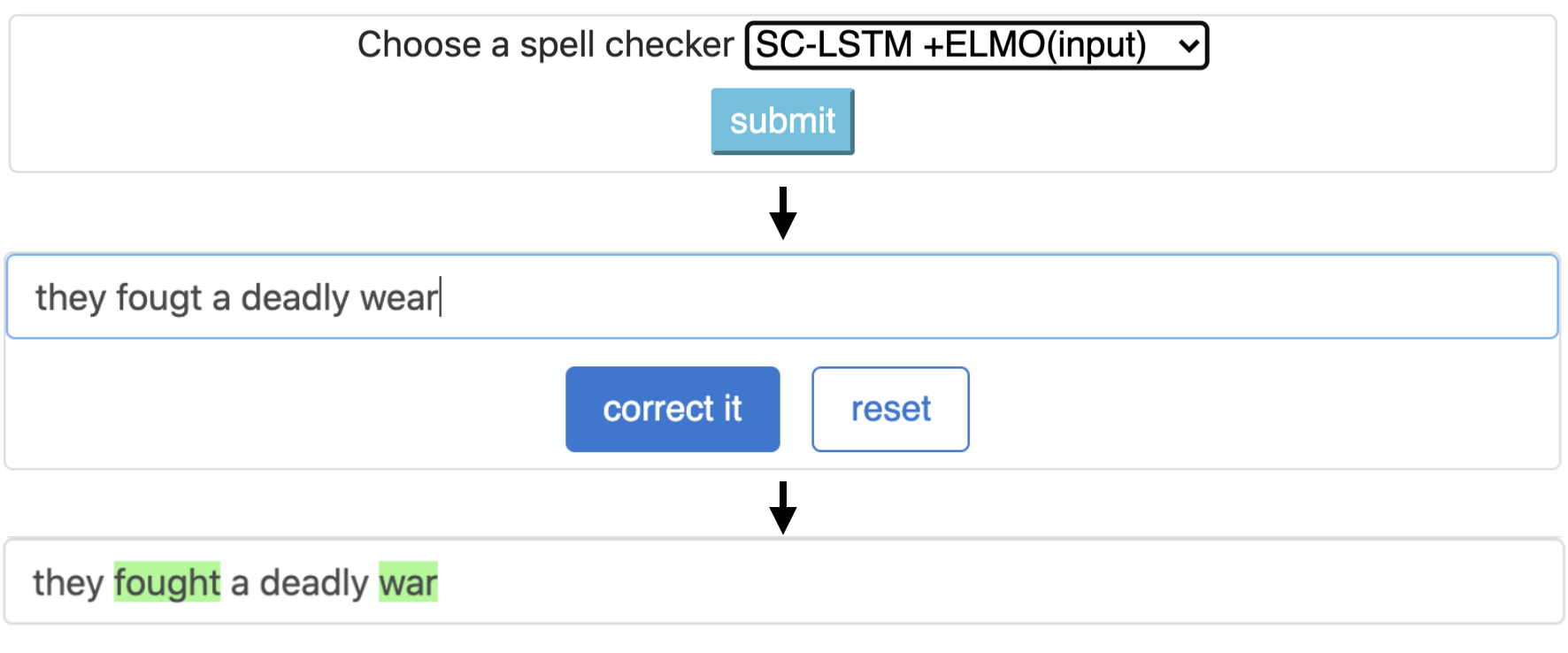
CNN-LSTMSC-LSTMNested-LSTMBERTSC-LSTM plus ELMO (at input)SC-LSTM plus ELMO (at output)SC-LSTM plus BERT (at input)SC-LSTM plus BERT (at output)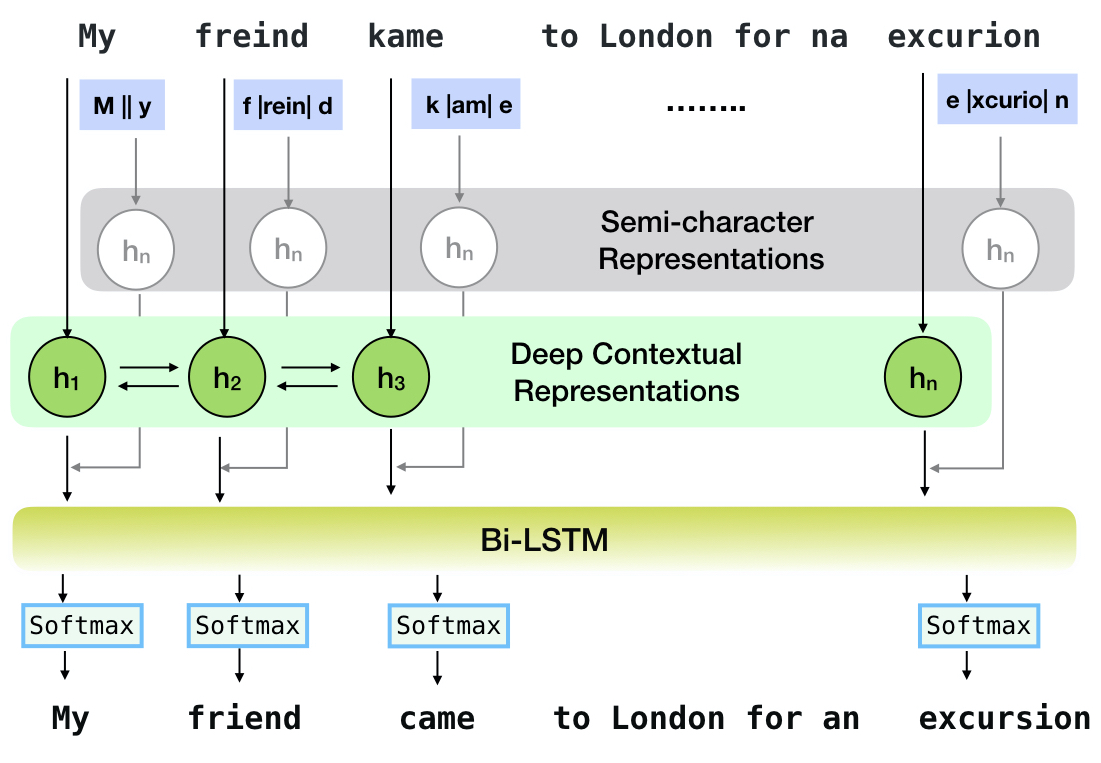
このパイプラインは、 `sclstm plus elmo(in input)`モデルに対応しています。
| スペル チェッカー | 言葉 修正 レート | あたりの時間 文 (ミリ秒単位) |
|---|---|---|
Aspell | 48.7 | 7.3* |
Jamspell | 68.9 | 2.6* |
CNN-LSTM | 75.8 | 4.2 |
SC-LSTM | 76.7 | 2.8 |
Nested-LSTM | 77.3 | 6.4 |
BERT | 79.1 | 7.1 |
SC-LSTM plus ELMO (at input) | 79.8 | 15.8 |
SC-LSTM plus ELMO (at output) | 78.5 | 16.3 |
SC-LSTM plus BERT (at input) | 77.0 | 6.7 |
SC-LSTM plus BERT (at output) | 76.0 | 7.2 |
実際のスペルミスを伴うBEA-60KデータセットのNeuspell Toolkitのさまざまな補正装置のパフォーマンス。 ∗ CPUの評価を示します(他の場合はGeForce RTX 2080 Ti GPUを使用します)。
選択したチェックポイントをダウンロードするには、下からチェックポイント名を選択して、ダウンロードを実行します。各チェックポイントは、テーブルに示すように、ニューラルスペルチェッカーに関連付けられています。
| スペルチェッカー | クラス | チェックポイント名 | ディスクスペース(約) |
|---|---|---|---|
CNN-LSTM | CnnlstmChecker | 'CNN-LSTM-PROBWORDNOISE' | 450 MB |
SC-LSTM | SclstmChecker | 「scrnn-probwordnoise」 | 450 MB |
Nested-LSTM | NestedlstmChecker | 'LSTM-LSTM-PROBWORDNOISE' | 455 MB |
BERT | BertChecker | 「subwordbert-probwordnoise」 | 740 MB |
SC-LSTM plus ELMO (at input) | ElmosclstmChecker | 「elmoscrnn-probwordnoise」 | 840 MB |
SC-LSTM plus BERT (at input) | BertsclstmChecker | 「Bertscrnn-probwordnoise」 | 900 MB |
SC-LSTM plus BERT (at output) | SclstmbertChecker | 「Scrnnbert-Probwordnoise」 | 1.19 GB |
SC-LSTM plus ELMO (at output) | SclstmelmoChecker | 「scrnnelmo-probwordnoise」 | 1.23 GB |
 import neuspell

neuspell . seq_modeling . downloads . download_pretrained_model ( "subwordbert-probwordnoise" )
または、以下を実行して、すべてのNeuspellニューラルモデルをダウンロードします(v1.0以降のバージョンで使用できます):
 import neuspell

neuspell . seq_modeling . downloads . download_pretrained_model ( "_all_" )
または、
ノースペルモデルをトレーニング/評価するために、いくつかの合成および天然データセットをキュレートします。詳細については、私たちの論文を確認してください。以下を実行して、すべてのデータセットをダウンロードします。
 cd data/traintest
python download_datafiles.py
詳細については、 data/traintest/README.mdを参照してください。
列車のファイルは、 .random 、 .word 、 .prob 、 .probwordという名前の名前で吹き替えられます。各戦略(合成データ作成を参照)について、クリーンコーパスのトークンの約20%をノイズします。私たちは、クリーンコーパスとしてOne billion word benchmarkデータセットから160万文を使用しています。
デモをセットアップするには、次の手順に従ってください。
pip install -e ".[flask]"CUDA_VISIBLE_DEVICES=0 python app.py (gpu)またはpython app.py (cpu)を実行することにより、フォルダーでフラスコサーバーを開始します。このツールキットは、3種類のノーシング戦略(既存の文献から識別された)を提供して、呪文修正のためにニューラルモデルをトレーニングするために合成並列トレーニングデータを生成します。戦略には、単純なルックアップベースのノイズの多いスペル置換( en-word-replacement-noise )、文字の交換/削除/追加/交換などの文字レベルのノイズ誘導( en-char-replacement-noise )、混乱マトリックスベースの確率的文字en-probchar-replacement-noise 。これらのアプローチの詳細については、論文をチェックアウトしてください。
以下は、上記のノイズキュレーションを利用するための対応するクラスマッピングです。いくつかの事前に構築されたデータファイルがいくつかの騒音に使用されているため、おおよそのディスクスペースも提供します。
| フォルダ | クラス名 | ディスクスペース(約) |
|---|---|---|
en-word-replacement-noise | WordReplacementNoiser | 2 MB |
en-char-replacement-noise | CharacterReplacementNoiser | - |
en-probchar-replacement-noise | ProbabilisticCharacterReplacementNoiser | 80 MB |
以下は、これらのノイザーを使用するためのスニペットです -
 from neuspell . noising import WordReplacementNoiser

example_texts = [
    "This is an example sentence to demonstrate noising in the neuspell repository." ,
    "Here is another such amazing example !!"
]

word_repl_noiser = WordReplacementNoiser ( language = "english" )
word_repl_noiser . load_resources ()
noise_texts = word_repl_noiser . noise ( example_texts )
print ( noise_texts ) Coming Soon ...
neuspellの前提条件モデルの上に微調整されています from neuspell import BertChecker
checker = BertChecker ()
checker . from_pretrained ()
checker . finetune ( clean_file = "sample_clean.txt" , corrupt_file = "sample_corrupt.txt" , data_dir = "default" )この機能は、 BertCheckerとElmosclstmCheckerでのみ利用できます。
現在、ハグFaceモデルの初期化をサポートし、カスタムデータで微調整することをサポートしています。これが次のことを示すコードスニペットです。
まず、クリーンで破損したテキストを含むファイルに、ラインセーパーの形式でマークします
 from neuspell . commons import DEFAULT_TRAINTEST_DATA_PATH

data_dir = DEFAULT_TRAINTEST_DATA_PATH
clean_file = "sample_clean.txt"
corrupt_file = "sample_corrupt.txt"
from neuspell . seq_modeling . helpers import load_data , train_validation_split
from neuspell . seq_modeling . helpers import get_tokens
from neuspell import BertChecker
# Step-0: Load your train and test files, create a validation split
train_data = load_data ( data_dir , clean_file , corrupt_file )
train_data , valid_data = train_validation_split ( train_data , 0.8 , seed = 11690 )
# Step-1: Create vocab file. This serves as the target vocab file and we use the defined model's default huggingface
# tokenizer to tokenize inputs appropriately.
vocab = get_tokens ([ i [ 0 ] for i in train_data ], keep_simple = True , min_max_freq = ( 1 , float ( "inf" )), topk = 100000 )
# # Step-2: Initialize a model
checker = BertChecker ( device = "cuda" )
checker . from_huggingface ( bert_pretrained_name_or_path = "distilbert-base-cased" , vocab = vocab )
# Step-3: Finetune the model on your dataset
checker . finetune ( clean_file = clean_file , corrupt_file = corrupt_file , data_dir = data_dir )次のように、カスタムデータでモデルをさらに評価できます。
 from neuspell import BertChecker

checker = BertChecker ()
checker . from_pretrained (
    bert_pretrained_name_or_path = "distilbert-base-cased" ,
    ckpt_path = f" { data_dir } /new_models/distilbert-base-cased"  # "<folder where the model is saved>"
)
checker . evaluate ( clean_file = clean_file , corrupt_file = corrupt_file , data_dir = data_dir )上記の使用に続いて、かつてはxlm-roberta-base 、 bert-base-multilingual-cased 、 distilbert-base-multilingual-cased -Multingual-Caseasedなどの多言語モデルを英語以外のスクリプトでシームレスに利用できるようになりました。
./applications/Adversarial-Misspellings-arxiv 。 readme.mdを参照してください。Aspell Checkerの要件:
 wget https://files.pythonhosted.org/packages/53/30/d995126fe8c4800f7a9b31aa0e7e5b2896f5f84db4b7513df746b2a286da/aspell-python-py3-1.15.tar.bz2
tar -C . -xvf aspell-python-py3-1.15.tar.bz2
cd aspell-python-py3-1.15
python setup.py install
Jamspell Checkerの要件:
 sudo apt-get install -y swig3.0
wget -P ./ https://github.com/bakwc/JamSpell-models/raw/master/en.tar.gz
tar xf ./en.tar.gz --directory ./
 @inproceedings{jayanthi-etal-2020-neuspell,
    title = "{N}eu{S}pell: A Neural Spelling Correction Toolkit",
    author = "Jayanthi, Sai Muralidhar  and
      Pruthi, Danish  and
      Neubig, Graham",
    booktitle = "Proceedings of the 2020 Conference on Empirical Methods in Natural Language Processing: System Demonstrations",
    month = oct,
    year = "2020",
    address = "Online",
    publisher = "Association for Computational Linguistics",
    url = "https://www.aclweb.org/anthology/2020.emnlp-demos.21",
    doi = "10.18653/v1/2020.emnlp-demos.21",
    pages = "158--164",
    abstract = "We introduce NeuSpell, an open-source toolkit for spelling correction in English. Our toolkit comprises ten different models, and benchmarks them on naturally occurring misspellings from multiple sources. We find that many systems do not adequately leverage the context around the misspelt token. To remedy this, (i) we train neural models using spelling errors in context, synthetically constructed by reverse engineering isolated misspellings; and (ii) use richer representations of the context. By training on our synthetic examples, correction rates improve by 9{%} (absolute) compared to the case when models are trained on randomly sampled character perturbations. Using richer contextual representations boosts the correction rate by another 3{%}. Our toolkit enables practitioners to use our proposed and existing spelling correction systems, both via a simple unified command line, as well as a web interface. Among many potential applications, we demonstrate the utility of our spell-checkers in combating adversarial misspellings. The toolkit can be accessed at neuspell.github.io.",
}
出版物のリンク。質問や提案はありますが、jsaimurali001 [at] gmail [dot] comの著者に連絡してください。





