AIlice
1.0.0


快速启动•演示•开发•Twitter•reddit
2024年6月22日:我们进入了当地运行的类似Jarvis的AI助手的时代!最新的开源LLMS使我们能够在本地执行复杂的任务!单击此处以了解更多信息。
AILICE是一种完全自主的通用AI代理。该项目旨在根据开源LLM创建与Jarvis类似的独立人工智能助理。 Ailice通过构建使用大型语言模型(LLM)作为其核心处理器的“文本计算机”来实现这一目标。目前,AILICE展示了一系列任务的熟练程度,包括主题研究,编码,系统管理,文献评论以及超出这些基本功能的复杂混合任务。
AILICE在日常任务中使用GPT-4达到了几乎完美的表现,并正在通过最新的开源型号进行实用。
我们最终将实现AI代理的自我发展。也就是说,AI代理人将自主建立自己的功能扩展和新型代理,将LLM的知识和推理能力释放到现实世界中。
要了解Ailice的当前能力,请观看以下视频:
AILICE的关键技术特征包括:
使用以下命令安装并运行AILICE。启动AILICE后,请使用浏览器打开其提供的网页,将出现对话接口。通过对话向AILICE发出命令,以完成各种任务。对于您的首次使用,您可以尝试在我们可以做的酷些命令中提供的命令,以快速熟悉。
git clone https://github.com/myshell-ai/AIlice.git
cd AIlice
pip install -e .
ailice_web --modelID=oai:gpt-4o --contextWindowRatio=0.2让我们列出一些典型的用例。我经常使用这些示例在开发过程中测试AILICE,以确保稳定的性能。但是,即使有这些测试,执行结果也会受到所选模型,代码版本甚至测试时间的影响。 (GPT-4在高载荷下的性能可能会下降。某些随机因素也可能导致多次运行模型的结果。有时LLM的性能非常聪明,但其他时间则没有)。基于多机构合作,作为用户,您也是“代理人”之一。因此,当Ailice需要其他信息时,它将寻求您的意见,并且您的详细信息对她的成功至关重要。此外,如果任务执行不足,您可以指导她朝着正确的方向指导,她将纠正她的方法。
要注意的最后一点是,Ailice当前缺乏运行的时间控制机制,因此她可能会陷入循环或跑步延长。使用商业LLM时,您需要密切监视她的操作。
“请列出当前目录的内容。”
“找到David Tong的QFT讲义,然后将其下载到当前目录中的“物理”文件夹中。您可能需要先创建文件夹。”
“使用烧瓶框架在该计算机上部署一个直接的网站。确保可访问性在0.0.0.0:59001。该网站应具有一个能够显示“图像”目录中的所有图像的单个页面。这个特别有趣。我们知道绘图无法在Docker环境中完成,并且需要使用“ Docker CP”命令复制我们生成的所有文件输出才能看到它。但是您可以让AILICE本身解决此问题:根据上述提示在容器中部署网站(建议使用端口映射的59001和59200之间的端口),目录中的图像将自动显示网页。这样,您可以动态地查看主机上生成的图像内容。您也可以尝试让她迭代以产生更复杂的功能。如果您在页面上没有看到任何图像,请检查网站的“图像”文件夹是否与此处的“图像”文件夹不同(例如,它可能在“ static/aimages”下)。
“请使用Python编程来解决以下任务:获取BTC-USDT的价格数据六个月并将其绘制到图表中,并将其保存在'Images'目录中。”如果您成功部署了上述网站,则可以直接在页面上查看BTC价格曲线。
“在端口59001上找到该过程并终止它。”这将终止刚刚建立的网站服务计划。
“请使用Cadquery实施杯子。”这也是一个非常有趣的尝试。 Cadquery是一个Python软件包,使用Python编程进行CAD建模。我们尝试使用Ailice自动构建3D型号!这可以让我们了解LLM的世界观中如何成熟的几何直觉。当然,在实施多模式支持之后,我们可以使Ailice能够看到她创建的模型,从而进一步调整并建立高效的反馈循环。这样,可以实现真正可用的语言控制的3D建模。
“请在Internet上搜索各种物理分支中的100个教程,并下载您发现的PDF文件,您发现的PDF文件''''''''''''''''''''''''''无需验证PDF的内容,我们现在只需要一个粗略的收集。”利用AILICE实现自动数据集收集和构建是我们正在进行的目标之一。目前,该功能的研究人员仍然有一些缺陷,但是它已经能够提供一些有趣的结果。
“请对开源PDF OCR工具进行调查,重点关注能够识别数学公式并将其转换为乳胶代码的人。将调查结果合并为报告。”
1。在YouTube上找到Feynmann演讲的视频,然后下载到Feynmann/ Subdir。您需要先创建文件夹。 2.从这些视频中提取音频,然后将其保存到Feynmann/Audio中。 3。将这些音频文件转换为文本并将其合并到文本文档中。您需要首先转到拥抱面孔,并找到Whisper-Large-V3的页面,找到示例代码,然后参考示例代码以完成此操作。 4。从您刚提取的文本文件中找到此问题的答案:为什么我们需要反粒子?这是一个基于多步骤的任务,您需要逐步与AILICE进行交互以完成任务。自然,沿途可能会有意外的事件,因此您需要与AILICE保持良好的沟通以解决您遇到的任何问题(使用“中断”按钮随时在任何时候中断ailice并给出提示是一个不错的选择! )。最后,根据下载的视频的内容,您可以向Ailice提出与物理相关的问题。收到答案后,您可以回头看看自己走了多远。
1。使用SDXL生成“胖橙猫”的图像。您需要在其拥抱面页面上找到示例代码,作为完成编程和图像生成工作的参考。将图像保存到当前目录并显示。 2。现在,让我们实现一个单页网站。网页的功能是将用户输入的文本描述转换为图像并显示。从之前请参阅文本到图像代码。该网站在127.0.0.1:59102上运行。运行之前,将代码保存到./image_gen;您可能需要先创建文件夹。
“请编写一个Ext-Module。模块的功能是通过关键字在Wiki上获得相关页面的内容。” AILICE可以自己构建外部交互模块(我们称其为Ext-Modules),从而赋予她无限的扩展性。它只需要您的一些提示。构造模块后,您可以说:“请加载新实施的Wiki模块,并利用其在相对论上查询条目。”
代理需要与周围环境的各个方面进行互动,其操作环境通常比典型软件更复杂。我们可能需要很长时间安装依赖项,但是幸运的是,这基本上是自动完成的。
要运行AILICE,您需要确保正确安装Chrome 。如果您需要在安全的虚拟环境中执行代码,则还需要安装Docker 。
如果要在虚拟机中运行AILICE,请确保关闭Hyper-V (否则无法安装Llama.cpp)。在虚拟盒环境中,您可以按照以下步骤禁用它:在VM的VirtualBox设置上禁用PAE/NX和VT-X/AMD-V(HYPER-V)。将paravirtualization接口设置为默认,禁用嵌套分页。
您可以使用以下命令安装AILICE(强烈建议使用Conda等工具来创建新的虚拟环境来安装AILICE,以避免依赖关系冲突):
git clone https://github.com/myshell-ai/AIlice.git
cd AIlice
pip install -e .
默认安装的AILICE将缓慢运行,因为它使用CPU作为长期内存模块的推理硬件。因此,强烈建议安装GPU加速支持:
ailice_turbo对于需要使用HuggingFace模型/语音对话/模型微调/PDF阅读功能的用户,您可以使用以下命令之一(安装太多功能会增加依赖关系冲突的可能性,因此建议仅安装该命令必要的零件):
pip install -e .[huggingface]
pip install -e .[speech]
pip install -e .[finetuning]
pip install -e .[pdf-reading]
您现在可以运行Ailice!在使用中使用命令。
默认情况下,AILICE中的Google模块受到限制,重复使用可能会导致错误需要一些时间来解决。这是AI时代的尴尬现实。传统搜索引擎仅允许访问真正的用户,而AI代理当前不属于“真正用户”的类别。尽管我们有其他解决方案,但它们都需要配置API键,这为普通用户设定了高障碍。但是,对于需要频繁访问Google的用户,我认为您愿意忍受申请Google官方API密钥的麻烦(我们是指自定义搜索JSON API创建时间)用于搜索任务。对于这些用户,请打开config.json并使用以下配置:
 {
    ...
    "services": {
        ...
        "google": {
          "cmd": "python3 -m ailice.modules.AGoogleAPI --addr=ipc:///tmp/AGoogle.ipc --api_key=YOUR_API_KEY --cse_id=YOUR_CSE_ID",
          "addr": "ipc:///tmp/AGoogle.ipc"
        },
        ...
    }
}
并安装Google-Api-Python-Client:
pip install google-api-python-client然后只是重新启动ailice。
默认情况下,代码执行使用本地环境。为了防止潜在的AI错误导致不可逆转的损失,建议安装Docker,构建容器并修改Ailice的配置文件(AILICE将在启动时提供配置文件位置)。配置其代码执行模块(ascripter)以在虚拟环境中运行。
docker build -t env4scripter .
docker run -d -p 127.0.0.1:59000-59200:59000-59200 --name scripter env4scripter
就我而言,当ailice启动时,它告诉我配置文件位于〜/.config/ailice/config.json,所以我以以下方式对其进行修改
nano ~ /.config/ailice/config.json修改“服务”下的“脚本”:
 {
    ...
    "services": {
        ...
        "scripter": {"cmd": "docker start scripter",
                     "addr": "tcp://127.0.0.1:59000"},
    }
}
现在已经完成了环境配置。
由于AILICE的持续开发状态,更新代码可能会导致现有配置文件与Docker容器与新代码之间的不兼容问题。对于这种情况,最彻底的解决方案是删除配置文件(确保事先保存任何API键)和容器,然后执行完整的重新安装。但是,对于大多数情况,您可以通过简单地删除配置文件并更新容器中的AILICE模块来解决问题。
rm ~ /.config/ailice/config.json
cd Ailice
docker cp ailice/__init__.py scripter:scripter/ailice/__init__.py
docker cp ailice/common/__init__.py scripter:scripter/ailice/common/__init__.py
docker cp ailice/common/ADataType.py scripter:scripter/ailice/common/ADataType.py
docker cp ailice/common/lightRPC.py scripter:scripter/ailice/common/lightRPC.py
docker cp ailice/modules/__init__.py scripter:scripter/ailice/modules/__init__.py
docker cp ailice/modules/AScripter.py scripter:scripter/ailice/modules/AScripter.py
docker cp ailice/modules/AScrollablePage.py scripter:scripter/ailice/modules/AScrollablePage.py
docker restart scripter您可以直接从下面的典型用例中复制命令以运行AILICE。
ailice_web --modelID=oai:gpt-4o --contextWindowRatio=0.2
ailice_web --modelID=anthropic:claude-3-5-sonnet-20240620 --contextWindowRatio=0.1
ailice_web --modelID=oai:gpt-4-1106-preview --chatHistoryPath=./chat_history
ailice_web --modelID=anthropic:claude-3-opus-20240229 --prompt= " researcher "
ailice_web --modelID=mistral:mistral-large-latest
ailice_web --modelID=deepseek:deepseek-chat
ailice_web --modelID=hf:Open-Orca/Mistral-7B-OpenOrca --quantization=8bit --contextWindowRatio=0.6
ailice_web --modelID=hf:NousResearch/Nous-Hermes-2-Mixtral-8x7B-DPO --quantization=4bit --contextWindowRatio=0.3
ailice_web --modelID=hf:Phind/Phind-CodeLlama-34B-v2 --prompt= " coder-proxy " --quantization=4bit --contextWindowRatio=0.6
ailice_web --modelID=groq:llama3-70b-8192
ailice_web   # Use models configured individually for different agents under the agentModelConfig field in config.json.
ailice_web --modelID=openrouter:openrouter/auto
ailice_web --modelID=openrouter:mistralai/mixtral-8x22b-instruct
ailice_web --modelID=openrouter:qwen/qwen-2-72b-instruct
ailice_web --modelID=lm-studio:qwen2-72b --contextWindowRatio=0.5
应该注意的是,最后一个用例要求您首先配置LLM推理服务,请参阅如何添加LLM支持。使用推理框架(例如LM Studio)可以使用有限的硬件资源来支持较大的模型,提供更快的推理速度和更快的AILICE启动速度,从而使其更适合普通用户。
首次运行它时,将要求您进入OpenAI的API-KEY。如果您只想使用开源LLM,则无需输入它。您也可以通过编辑config.json文件来修改API-KEY。请注意,首次使用开源LLM时,下载型号的权重需要很长时间,请确保您有足够的时间和磁盘空间。
当您第一次打开Secemon Switch时,您可能需要在启动时等待很长时间。这是因为语音识别和TTS模型的权重正在后台下载。
如示例所示,您可以通过AILICE_WEB使用代理,它提供了Web对话接口。您可以使用
ailice_web --help可以通过修改config.json中的相应参数来自定义所有命令行参数的默认值。
AILICE的配置文件命名为Config.json,其位置将在启动AILICE时输出到命令行。在本节中,我们将介绍如何通过配置文件配置外部交互模块。
在AILICE中,我们使用“模块”一词来专门指的是提供与外部世界互动功能的组件。每个模块作为一个独立的过程运行;它们可以从核心过程中的不同软件或硬件环境中运行,从而使AILICE能够分发。我们在AILICE操作所需的配置文件中提供了一系列基本模块配置(例如向量数据库,搜索,浏览器,代码执行等)。您还可以为任何第三方模块添加配置,并在AILICE启动并运行以启用自动加载后提供其模块运行时地址和端口。模块配置非常简单,仅由两个项目组成:
  "services" : {
    ...
    "scripter" : { "cmd" : " python3 -m ailice.modules.AScripter --addr=tcp://127.0.0.1:59000 " ,
	               "addr" : " tcp://127.0.0.1:59000 " },
    ...
  }
其中, “ CMD”下是用于启动模块过程的命令行。当Ailice启动时,它会自动运行这些命令来启动模块。用户可以指定任何命令,提供明显的灵活性。您可以在本地启动模块的过程,也可以利用Docker在虚拟环境中启动过程,甚至启动远程进程。一些模块具有多个实现(例如Google/Storage),您可以在此处配置以切换到另一个实现。
“ ADDR”是指模块进程的地址和端口号。用户可能会因为默认配置中的许多模块都具有包含地址和端口号的“ CMD”和“ ADDR”,从而引起冗余。这是因为“ CMD”原则上可以包含任何命令(可能包括地址和端口号,或根本不包含任何命令)。因此,需要单独的“ ADDR”项目,以告知AILICE如何访问模块流程。
中断。中断是AILICE支持的第二个交互模式,它使您可以随时向Ailice代理提供提示,以纠正错误或提供指导。在AILICE_WEB中,在AILICE的任务执行过程中,输入框的右侧出现了一个中断按钮。按下它会暂停AILICE的执行,并等待您的提示消息。您可以在输入框中输入提示,然后按Enter将消息发送给当前执行子任务的代理。熟练使用此功能需要很好地了解Ailice的工作,尤其是Agent Call Tree Architecture。它还涉及更多地关注命令行窗口,而不是在AILICE的任务执行过程中的对话接口。总体而言,这是一个非常有用的功能,尤其是在功能较低的语言模型设置上。
首先使用GPT-4成功运行一些简单的用例,然后以功率较小(但更便宜/开源)模型重新启动Ailice,以继续根据以前的对话历史记录继续运行新任务。这样,GPT-4提供的历史是一个成功的例子,为其他模型提供了宝贵的参考,并显着增加了成功的机会。
于2024年8月23日更新。
当前,AILICE可以使用本地运行的72B开源型号(QWEN-2-72B-INSTRUCTION在4090x2上运行)处理更复杂的任务,并且性能接近GPT-4级型号。考虑到开源型号的低成本,我们强烈建议用户开始使用它们。此外,本地化LLM操作可确保绝对的隐私保护,这是当时AI应用中罕见的质量。单击此处以了解如何在本地运行此模型。对于GPU条件不足以运行大型型号的用户,这不是问题。您可以使用在线推理服务(例如OpenRouter,下一步将提到)来访问这些开源模型(尽管这牺牲了隐私)。尽管开源模型尚无法完全与商业GPT-4级别模型完全匹配,但您可以根据其优势和劣势来利用不同的模型来使代理商表现出色。有关详细信息,请参考不同代理中使用不同型号。
Claude-3-5-Sonnet-20240620提供了最佳性能。
GPT-4O和GPT-4-1106-PREVIEW还提供顶级性能。但是由于代理商的运行时间很长,并且代币的大量消费,请谨慎使用商业模型。 GPT-4O-Mini运行良好,尽管它不是一流的,但其低价使该模型非常吸引人。 GPT-4-Turbo / GPT-3.5-Turbo令人惊讶地懒惰,我们从来没有找到稳定的及时表达。
在开源型号中,通常表现良好的模型包括:
meta-llama-3.1-405b-教学很好,但是太大了,无法在PC上实用。
对于那些硬件功能不足以在本地运行开源模型并且无法获得商业模型的API键的用户,他们可以尝试以下选项:
OpenRouter此服务可以将您的推理请求路由到各种开源或商业模型,而无需在本地部署开源模型或为各种商业模型申请API键。这是一个绝佳的选择。 AILICE自动支持OpenRouter中的所有型号。您可以选择AutorOuter:OpenRouter/Auto,让Autorouter自动为您路由,也可以指定在Config.json文件中配置的任何特定模型。感谢@babybirdprd向我推荐OpenRouter。
GROQ:Llama3-70B-8192当然,Ailice还支持Groq下的其他型号。在GROQ下运行的一个问题是,它易于超过速率限制,因此只能用于简单的实验。
我们将选择当前表现最好的开源模型,为开源模型的用户提供参考。
在所有型号中最好的: QWEN-2-72B-INSTRUCTY 。这是第一个具有实用价值的开源模型。这是一个很大的进步!它具有接近GPT-4的推理功能,尽管还没有。通过通过中断功能进行主动的用户干预,可以成功完成许多更复杂的任务。
第二好的表演模型: Mixtral-8x22b-Instruct和Meta-llama/Meta-llama-3-70b-Instruct 。值得注意的是,Llama3系列模型在量化后似乎表现出显着的性能下降,从而降低了其实际价值。您可以将它们与groq一起使用。
如果您找到更好的模型,请告诉我。
对于高级玩家来说,尝试更多模型是不可避免的。幸运的是,这并不难。
对于OpenAI/Mistral/Anthropic/Groq型号,您无需做任何事情。只需使用由“ OAI:”/“ MISTRAL:”/“ ANTHROPIC:”/“ GROQ:”前缀附加到“ OAI:”/“ MISTRAL:”的官方模型名称组成的模型ID。如果您需要使用AILICE支持的列表中未包含的模型,则可以通过在Config.json文件中添加此模型的条目来解决此问题。添加的方法是直接引用类似模型的输入,将上下文窗口修改为实际值,使SystemAsuser与类似的模型保持一致,并将args设置为空dict。
您可以使用与OpenAI API兼容的任何第三方推理服务器来替换AILICE中内置的LLM推理功能。只需使用与OpenAI模型相同的配置格式,然后修改baseurl,apikey,ContextWindow和其他参数(实际上,这就是Ailice支持GROQ模型的方式)。
对于不支持OpenAI API的推理服务器,您可以尝试使用Litellm将其转换为兼容OpenAI兼容的API(我们有下面的示例)。
重要的是要注意,由于AILICE的对话记录中存在许多系统消息,这不是LLM的常见用例,因此对此的支持水平取决于这些推理服务器的特定实现。在这种情况下,您可以将SystemAsuser参数设置为真实,以规避问题。尽管这可能会阻止该模型以其最佳性能运行,但它也使我们能够与各种有效的推理服务器兼容。对于普通用户,好处大于缺点。
我们以Ollama为例来解释如何增加对此类服务的支持。首先,我们需要使用Litellm将Ollama的界面转换为与OpenAI兼容的格式。
pip install litellm
ollama pull mistral-openorca
litellm --model ollama/mistral-openorca --api_base http://localhost:11434 --temperature 0.0 --max_tokens 8192
然后,在config.json文件中添加对此服务的支持(启动AILICE时将提示此文件的位置)。
{
  "maxMemory" : {},
  "quantization" : null ,
  "models" : {
    "oai" : {
      ...
    },
    "ollama" : {
      "modelWrapper" : " AModelChatGPT " ,
      "apikey" : " fake-key " ,
      "baseURL" : " http://localhost:8000 " ,
      "modelList" : {
        "mistral-openorca" : {
          "formatter" : " AFormatterGPT " ,
          "contextWindow" : 8192 ,
          "systemAsUser" : false ,
          "args" : {}
        }
      }
    },
    ...
  },
  ...
}
现在我们可以运行Ailice:
ailice_web --modelID=ollama:mistral-openorca在此示例中,我们将使用LM Studio运行我见过的最开源的模型: QWEN2-72B-INSTRUCT-Q3_K_S.S.GGUF ,为AILICE提供动力在本地计算机上运行。
使用LM Studio下载Qwen2-72b-instruct-q3_k_s.gguf的型号权重。
在LM Studio的“ Localserver”窗口中,如果仅使用GPU,将N_GPU_LAYERS设置为-1。将左侧的“上下文长度”参数调整为16384(或根据可用内存的较小值),然后更改“上下文溢出策略”以“保持系统提示和第一个用户消息,截断中间”。
运行服务。我们假设该服务的地址为“ http:// localhost:1234/v1/”。
然后,我们打开config.json并进行以下修改:
{
  "maxMemory" : {},
  "quantization" : null ,
  "models" : {
    "oai" : {
      ...
    },
    "lm-studio" : {
      "modelWrapper" : " AModelChatGPT " ,
      "apikey" : " fakekey " ,
      "baseURL" : " http://localhost:1234/v1/ " ,
      "modelList" : {
        "qwen2-72b" : {
          "formatter" : " AFormatterGPT " ,
          "contextWindow" : 32764 ,
          "systemAsUser" : true ,
          "args" : {}
        }
      }
    },
    ...
  },
  ...
}
最后,运行ailice。您可以根据可用的VRAM或内存空间调整“上下文Windowratio”参数。参数越大,需要越多的VRAM空间。
ailice_web --modelID=lm-studio:qwen2-72b --contextWindowRatio=0.5类似于我们在上一节中所做的事情,在使用LM Studio下载并运行LLAVA之后,我们将配置文件修改如下:
{
  "maxMemory" : {},
  "quantization" : null ,
  "models" : {
    "oai" : {
      ...
    },
    "lm-studio" : {
      "modelWrapper" : " AModelChatGPT " ,
      "apikey" : " fakekey " ,
      "baseURL" : " http://localhost:1234/v1/ " ,
      "modelList" : {
        "llava-1.6-34b" : {
          "formatter" : " AFormatterGPTVision " ,
          "contextWindow" : 4096 ,
          "systemAsUser" : true ,
          "args" : {}
        }
      },
    },
    ...
  },
  ...
}
但是,应该注意的是,当前的开源多模式模型远非足以执行代理任务,因此此示例是针对开发人员而不是用户的。
对于HuggingFace上的开源模型,您只需要了解以下信息即可添加对新模型的支持:模型的拥抱面,模型的提示格式和上下文窗口长度。通常,一行代码足以添加一个新型号,但是有时您不幸,您需要十几行代码。
这是添加新LLM支持的完整方法:
打开config.json,您应该将新llm的配置添加到Models.hf.modellist中,看起来如下:
{
  "maxMemory" : {},
  "quantization" : null ,
  "models" : {
    "hf" : {
      "modelWrapper" : " AModelCausalLM " ,
      "modelList" : {
        "meta-llama/Llama-2-13b-chat-hf" : {
          "formatter" : " AFormatterLLAMA2 " ,
          "contextWindow" : 4096 ,
          "systemAsUser" : false ,
          "args" : {}
        },
        "meta-llama/Llama-2-70b-chat-hf" : {
          "formatter" : " AFormatterLLAMA2 " ,
          "contextWindow" : 4096 ,
          "systemAsUser" : false ,
          "args" : {}
        },
        ...
      }
    },
  ...
  }
...
}
“格式化”是定义LLM及时格式的类。您可以在Core/LLM/Aformatter中找到它们的定义。您可以读取这些代码以确定要添加的模型所需的格式。如果您没有找到它,则需要自己写一个。幸运的是,格式器是一件非常简单的事情,可以在十几行代码中完成。我相信您将在阅读一些格式源代码后就可以理解如何做到这一点。
上下文窗口是变压器体系结构通常具有的LLM的属性。它确定模型可以一次处理的文本长度。您需要将新模型的上下文窗口设置为“ ContextWindow”键。
“ SystemAsuser”:我们将“系统”角色用作函数调用返回的消息的发件人。但是,并非所有LLM都对系统角色有明确的定义,并且不能保证LLM可以适应这种方法。因此,我们需要使用SystemAsuser设置是否将函数调用返回的文本放入用户消息中。尝试将其设置为假。
一切都完成了!使用“ HF:”作为模型名称的前缀以形成模型ID,并使用新模型的模型ID作为命令参数来启动ailice!
Ailice有两种操作模式。一种模式使用单个LLM驱动所有代理,而另一种允许每种类型的代理商指定相应的LLM。后一种模式使我们能够更好地结合开源型号和商业型号的功能,以较低的成本实现更好的性能。要使用第二种模式,您需要在Config.json中配置AgentModelConfig项目:
  "modelID" : " " ,
  "agentModelConfig" : {
    "DEFAULT" : " openrouter:qwen/qwen-2-72b-instruct " ,
    "coder" : " openrouter:deepseek/deepseek-coder "
  },
首先,确保将ModelID的默认值设置为一个空字符串,然后在AgentModelConfig中为每种类型的代理配置相应的LLM。
最后,您可以通过不指定模型ID来实现第二个操作模式:
ailice_web设计疾病时的基本原理是:
让我们简要解释这些基本原则。
从最明显的水平开始,高度动态的提示构造使代理商陷入循环的可能性较小。来自外部环境的新变量的涌入会不断影响LLM,从而避免了这一陷阱。此外,使用当前所有可用信息喂养LLM可以大大提高其输出。例如,在自动编程中,来自口译人员或命令行的错误消息有助于LLM不断修改代码,直到达到正确的结果为止。 Lastly, in dynamic prompt construction, new information in the prompts may also come from other agents, which acts as a form of linked inference computation, making the system's computational mechanisms more complex, varied, and capable of producing richer behaviors.
Separating computational tasks is, from a practical standpoint, due to our limited context window. We cannot expect to complete a complex task within a window of a few thousand tokens. If we can decompose a complex task so that each subtask is solved within limited resources, that would be an ideal outcome. In traditional computing models, we have always taken advantage of this, but in new computing centered around LLMs, this is not easy to achieve. The issue is that if one subtask fails, the entire task is at risk of failure. Recursion is even more challenging: how do you ensure that with each call, the LLM solves a part of the subproblem rather than passing the entire burden to the next level of the call? We have solved the first problem with the IACT architecture in Ailice, and the second problem is theoretically not difficult to solve, but it likely requires a smarter LLM.
The third principle is what everyone is currently working on: having multiple intelligent agents interact and cooperate to complete more complex tasks. The implementation of this principle actually addresses the aforementioned issue of subtask failure. Multi-agent collaboration is crucial for the fault tolerance of agents in operation. In fact, this may be one of the biggest differences between the new computational paradigm and traditional computing: traditional computing is precise and error-free, assigning subtasks only through unidirectional communication (function calls), whereas the new computational paradigm is error-prone and requires bidirectional communication between computing units to correct errors. This will be explained in detail in the following section on the IACT framework.
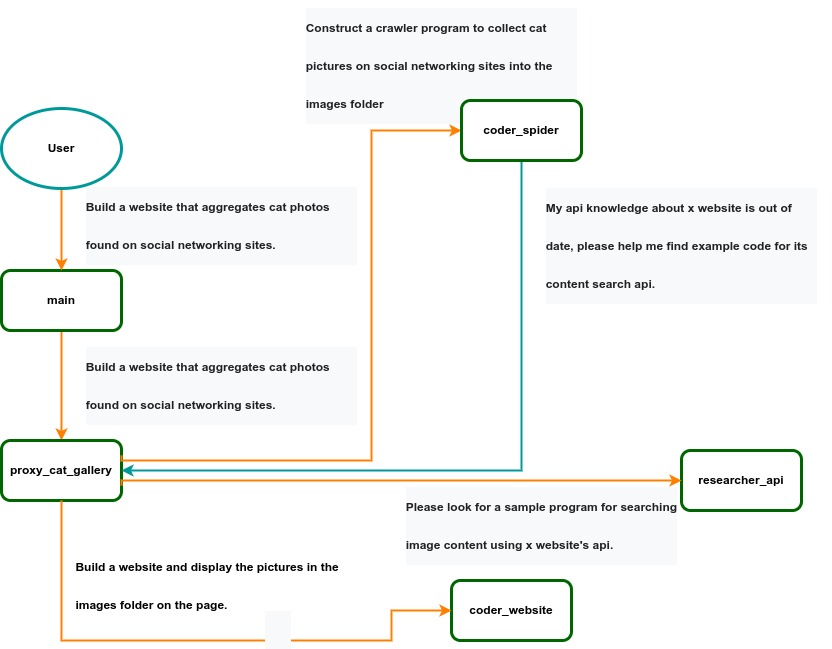 IACT Architecture Diagram. A user requirement to build a page for image collection and display is dynamically decomposed into two tasks: coder_spider and coder_website. When coder_spider encounters difficulties, it proactively seeks assistance from its caller, proxy_cat_gallery. Proxy_cat_gallery then creates another agent, researcher_api, and employs it to address the issue.
Ailice can be regarded as a computer powered by a LLM , and its features include:
Representing input, output, programs, and data in text form.
Using LLM as the processor.
Breaking down computational tasks through successive calls to basic computing units (analogous to functions in traditional computing), which are essentially various functional agents.
Therefore, user-input text commands are executed as a kind of program, decomposed into various "subprograms", and addressed by different agents , forming the fundamental architecture of Ailice. In the following, we will provide a detailed explanation of the nature of these basic computing units.
A natural idea is to let LLM solve certain problems (such as information retrieval, document understanding, etc.) through multi-round dialogues with external callers and peripheral modules in the simplest computational unit. We temporarily call this computational unit a "function". Then, by analogy with traditional computing, we allow functions to call each other, and finally add the concept of threads to implement multi-agent interaction. However, we can have a much simpler and more elegant computational model than this.
The key here is that the "function" that wraps LLM reasoning can actually be called and returned multiple times. A "function" with coder functionality can pause work and return a query statement to its caller when it encounters unclear requirements during coding. If the caller is still unclear about the answer, it continues to ask the next higher level caller. This process can even go all the way to the final user's chat window. When new information is added, the caller will reactivate the coder's execution process by passing in the supplementary information. It can be seen that this "function" is not a traditional function, but an object that can be called multiple times. The high intelligence of LLM makes this interesting property possible. You can also see it as agents strung together by calling relationships, where each agent can create and call more sub-agents, and can also dialogue with its caller to obtain supplementary information or report its progress . In Ailice, we call this computational unit "AProcessor" (essentially what we referred to as an agent). Its code is located in core/AProcessor.py.
Next, we will elaborate on the structure inside AProcessor. The interior of AProcessor is a multi-round dialogue. The "program" that defines the function of AProcessor is a prompt generation mechanism, which generates the prompt for each round of dialogue from the dialogue history. The dialogue is one-to-many. After the external caller inputs the request, LLM will have multiple rounds of dialogue with the peripheral modules (we call them SYSTEM), LLM outputs function calls in various grammatical forms, and the system calls the peripheral modules to generate results and puts the results in the reply message. LLM finally gets the answer and responds to the external caller, ending this call. But because the dialogue history is still preserved, the caller can call in again to continue executing more tasks.
The last part we want to introduce is the parsing module for LLM output. In fact, we regard the output text of LLM as a "script" of semi-natural language and semi-formal language, and use a simple interpreter to execute it . We can use regular expressions to express a carefully designed grammatical structure, parse it into a function call and execute it. Under this design, we can design more flexible function call grammar forms, such as a section with a certain fixed title (such as "UPDATE MEMORY"), which can also be directly parsed out and trigger the execution of an action. This implicit function call does not need to make LLM aware of its existence, but only needs to make it strictly follow a certain format convention. For the most hardcore possibility, we have left room. The interpreter here can not only use regular expressions for pattern matching, its Eval function is recursive. We don't know what this will be used for, but it seems not bad to leave a cool possibility, right? Therefore, inside AProcessor, the calculation is alternately completed by LLM and the interpreter, their outputs are each other's inputs, forming a cycle.
In Ailice, the interpreter is one of the most crucial components within an agent. We use the interpreter to map texts from the LLM output that match specific patterns to actions, including function calls, variable definitions and references, and any user-defined actions. Sometimes these actions directly interact with peripheral modules, affecting the external world; other times, they are used to modify the agent's internal state, thereby influencing its future prompts.
The basic structure of the interpreter is straightforward: a list of pattern-action pairs. Patterns are defined by regular expressions, and actions are specified by a Python function with type annotations. Given that syntactic structures can be nested, we refer to the overarching structure as the entry pattern. During runtime, the interpreter actively detects these entry patterns in the LLM output text. Upon detecting an entry pattern (and if the corresponding action returns data), it immediately terminates the LLM generation to execute the relevant action.
The design of agents in Ailice encompasses two fundamental aspects: the logic for generating prompts based on dialogue history and the agent's internal state, and a set of pattern-action pairs. Essentially, the agent implements the interpreter framework with a set of pattern-action pairs; it becomes an integral part of the interpreter. The agent's internal state is one of the targets for the interpreter's actions, with changes to the agent's internal state influencing the direction of future prompts.
Generating prompts from dialogue history and the internal state is nearly a standardized process, although developers still have the freedom to choose entirely different generation logic. The primary challenge for developers is to create a system prompt template, which is pivotal for the agent and often demands the most effort to perfect. However, this task revolves entirely around crafting natural language prompts.
Ailice utilizes a simple scripting language embedded within text to map the text-based capabilities of LLMs to the real world. This straightforward scripting language includes non-nested function calls and mechanisms for creating and referencing variables, as well as operations for concatenating text content . Its purpose is to enable LLMs to exert influence on the world more naturally: from smoother text manipulation abilities to simple function invocation mechanisms, and multimodal variable operation capabilities. Finally, it should be noted that for the designers of agents, they always have the freedom to extend new syntax for this scripting language. What is introduced here is a minimal standard syntax structure.
The basic syntax is as follows:
Variable Definition: VAR_NAME := <!|"SOME_CONTENT"|!>
Function Calls/Variable References/Text Concatenation: !FUNC-NAME<!|"...", '...', VAR_NAME1, "Execute the following code: n" + VAR_NAME2, ...|!>
The basic variable types are str/AImage/various multimodal types. The str type is consistent with Python's string syntax, supporting triple quotes and escape characters.
This constitutes the entirety of the embedded scripting language.
The variable definition mechanism introduces a way to extend the context window, allowing LLMs to record important content into variables to prevent forgetting. During system operation, various variables are automatically defined. For example, if a block of code wrapped in triple backticks is detected within a text message, a variable is automatically created to store the code, enabling the LLM to reference the variable to execute the code, thus avoiding the time and token costs associated with copying the code in full. Furthermore, some module functions may return data in multimodal types rather than text. In such cases, the system automatically defines these as variables of the corresponding multimodal type, allowing the LLM to reference them (the LLM might send them to another module for processing).
In the long run, LLMs are bound to evolve into multimodal models capable of seeing and hearing. Therefore, the exchanges between Ailice's agents should be in rich text , not just plain text. While Markdown provides some capability for marking up multimodal content, it is insufficient. Hence, we will need an extended version of Markdown in the future to include various embedded multimodal data such as videos and audio.
Let's take images as an example to illustrate the multimodal mechanism in Ailice. When agents receive text containing Markdown-marked images, the system automatically inputs them into a multimodal model to ensure the model can see these contents. Markdown typically uses paths or URLs for marking, so we have expanded the Markdown syntax to allow the use of variable names to reference multimodal content.
Another minor issue is how different agents with their own internal variable lists exchange multimodal variables. This is simple: the system automatically checks whether a message sent from one agent to another contains internal variable names. If it does, the variable content is passed along to the next agent.
Why do we go to the trouble of implementing an additional multimodal variable mechanism when marking multimodal content with paths and URLs is much more convenient? This is because marking multimodal content based on local file paths is only feasible when Ailice runs entirely in a local environment, which is not the design intent. Ailice is meant to be distributed, with the core and modules potentially running on different computers, and it might even load services running on the internet to provide certain computations. This makes returning complete multimodal data more attractive. Of course, these designs made for the future might be over-engineering, and if so, we will modify them in the future.
One of the goals of Ailice is to achieve introspection and self-expansion (which is why our logo features a butterfly with its reflection in the water). This would enable her to understand her own code and build new functionalities, including new external interaction modules (ie new functions) and new types of agents (APrompt class) . As a result, the knowledge and capabilities of LLMs would be more thoroughly unleashed.
Implementing self-expansion involves two parts. On one hand, new modules and new types of agents (APrompt class) need to be dynamically loaded during runtime and naturally integrated into the computational system to participate in processing, which we refer to as dynamic loading. On the other hand, Ailice needs the ability to construct new modules and agent types.
The dynamic loading mechanism itself is of great significance: it represents a novel software update mechanism . We can allow Ailice to search for its own extension code on the internet, check the code for security, fix bugs and compatibility issues, and ultimately run the extension as part of itself. Therefore, Ailice developers only need to place their contributed code on the internet, without the need to merge into the main codebase or consider any other installation methods. The implementation of the dynamic loading mechanism is continuously improving. Its core lies in the extension packages providing some text describing their functions. During runtime, each agent in Ailice finds suitable functions or agent types to solve sub-problems for itself through semantic matching and other means.
Building new modules is a relatively simple task, as the interface constraints that modules need to meet are very straightforward. We can teach LLMs to construct new modules through an example. The more complex task is the self-construction of new agent types (APrompt class), which requires a good understanding of Ailice's overall architecture. The construction of system prompts is particularly delicate and is a challenging task even for humans. Therefore, we pin our hopes on more powerful LLMs in the future to achieve introspection, allowing Ailice to understand herself by reading her own source code (for something as complex as a program, the best way to introduce it is to present itself), thereby constructing better new agents .
For developing Agents, the main loop of Ailice is located in the AiliceMain.py or ui/app.py files. To further understand the construction of an agent, you need to read the code in the "prompts" folder, by reading these code you can understand how an agent's prompts are dynamically constructed.
For developers who want to understand the internal operation logic of Ailice, please read core/AProcessor.py and core/Interpreter.py. These two files contain approximately three hundred lines of code in total, but they contain the basic framework of Ailice.
In this project, achieving the desired functionality of the AI Agent is the primary goal. The secondary goal is code clarity and simplicity . The implementation of the AI Agent is still an exploratory topic, so we aim to minimize rigid components in the software (such as architecture/interfaces imposing constraints on future development) and provide maximum flexibility for the application layer (eg, prompt classes) . Abstraction, deduplication, and decoupling are not immediate priorities.
When implementing a feature, always choose the best method rather than the most obvious one . The metric for "best" often includes traits such as trivializing the problem from a higher perspective, maintaining code clarity and simplicity, and ensuring that changes do not significantly increase overall complexity or limit the software's future possibilities.
Adding comments is not mandatory unless absolutely necessary; strive to make the code clear enough to be self-explanatory . While this may not be an issue for developers who appreciate comments, in the AI era, we can generate detailed code explanations at any time, eliminating the need for unstructured, hard-to-maintain comments.
Follow the principle of Occam's razor when adding code; never add unnecessary lines .
Functions or methods in the core should not exceed 60 lines .
While there are no explicit coding style constraints, maintain consistency or similarity with the original code in terms of naming and case usage to avoid readability burdens.
Ailice aims to achieve multimodal and self-expanding features within a scale of less than 5000 lines, reaching its final form at the current stage. The pursuit of concise code is not only because succinct code often represents a better implementation, but also because it enables AI to develop introspective capabilities early on and facilitates better self-expansion. Please adhere to the above rules and approach each line of code with diligence.
Ailice's fundamental tasks are twofold: one is to fully unleash the capabilities of LLM based on text into the real world; the other is to explore better mechanisms for long-term memory and forming a coherent understanding of vast amounts of text . Our development efforts revolve around these two focal points.
If you are interested in the development of Ailice itself, you may consider the following directions:
Explore improved long-term memory mechanisms to enhance the capabilities of each Agent. We need a long-term memory mechanism that enables consistent understanding of large amounts of content and facilitates association . The most feasible option at the moment is to replace vector database with knowledge graph, which will greatly benefit the comprehension of long texts/codes and enable us to build genuine personal AI assistants.
Multimodal support. The support for the multimodal model has been completed, and the current development focus is shifting towards the multimodal support of peripheral modules. We need a module that operates computers based on screenshots and simulates mouse/keyboard actions.
Self-expanding support. Our goal is to enable language models to autonomously code and implement new peripheral modules/agent types and dynamically load them for immediate use . This capability will enable self-expansion, empowering the system to seamlessly integrate new functionalities. We've completed most of the functionality, but we still need to develop the capability to construct new types of agents.
Richer UI interface . We need to organize the agents output into a tree structure in dialog window and dynamically update the output of all agents. And accept user input on the web interface and transfer it to scripter's standard input, which is especially needed when using sudo.
Develop Agents with various functionalities based on the current framework.
Explore the application of IACT architecture on complex tasks. By utilizing an interactive agents call tree, we can break down large documents for improved reading comprehension, as well as decompose complex software engineering tasks into smaller modules, completing the entire project build and testing through iterations. This requires a series of intricate prompt designs and testing efforts, but it holds an exciting promise for the future. The IACT architecture significantly alleviates the resource constraints imposed by the context window, allowing us to dynamically adapt to more intricate tasks.
Build rich external interaction modules using self-expansion mechanisms! This will be accomplished in AiliceEVO.
In addition to the tasks mentioned above, we should also start actively contemplating the possibility of creating a smaller LLM that possesses lower knowledge content but higher reasoning abilities .





