AIlice
1.0.0


クイックスタート•デモ•開発•Twitter•Reddit
2024年6月22日:地元で走っているジャービスのようなAIアシスタントの時代に入りました!最新のオープンソースLLMにより、ローカルで複雑なタスクを実行できます!詳細については、ここをクリックしてください。
Ailiceは、完全に自律的な汎用AIエージェントです。このプロジェクトは、オープンソースLLMに基づいて、Jarvisと同様に、スタンドアロンの人工知能アシスタントを作成することを目的としています。 Ailiceは、コアプロセッサとして大規模な言語モデル(LLM)を使用する「テキストコンピューター」を構築することにより、この目標を達成します。現在、Ailiceは、これらの基本的な機能を超えたテーマ研究、コーディング、システム管理、文献レビュー、複雑なハイブリッドタスクなど、さまざまなタスクの習熟度を示しています。
Ailiceは、GPT-4を使用して日常のタスクでほぼ完璧なパフォーマンスに達し、最新のオープンソースモデルで実用的なアプリケーションに向かって進んでいます。
最終的には、AIエージェントの自己進化を達成します。つまり、AIエージェントは独自の機能拡張と新しいタイプのエージェントを自律的に構築し、LLMの知識と推論能力を現実世界にシームレスに解き放ちます。
Ailiceの現在の能力を理解するには、次のビデオをご覧ください。
Ailiceの主要な技術的特徴は次のとおりです。
次のコマンドでAiliceをインストールして実行します。 Ailiceが起動したら、ブラウザを使用して提供するWebページを開き、ダイアログインターフェイスが表示されます。さまざまなタスクを達成するために、会話を通じてAiliceへのコマンドを発行します。最初に使用するために、クールなことで提供されたコマンドを試して、セクションをすばやく慣れさせることができます。
git clone https://github.com/myshell-ai/AIlice.git
cd AIlice
pip install -e .
ailice_web --modelID=oai:gpt-4o --contextWindowRatio=0.2いくつかの典型的なユースケースをリストしましょう。これらの例を頻繁に使用して、開発中にAiliceをテストし、安定した性能を確保します。ただし、これらのテストでも、実行結果は、選択したモデル、コードバージョン、さらにはテスト時間の影響を受けます。 (GPT-4は、高負荷の下でのパフォーマンスの低下を経験する可能性があります。いくつかのランダムな要因は、モデルを複数回実行することで異なる結果につながる可能性があります。LLMが非常にインテリジェントに機能する場合もありますが、そうでない場合もあります)。さらに、Ailiceはエージェントですマルチエージェントの協力に基づいて、ユーザーとして、あなたは「エージェント」の1人でもあります。したがって、Ailiceが追加情報を必要とする場合、それはあなたからの意見を求め、あなたの詳細の徹底性は彼女の成功に不可欠です。さらに、タスクの実行が不足している場合、あなたは彼女を正しい方向に導くことができ、彼女は彼女のアプローチを修正します。
注意すべき最後のポイントは、Ailiceには現在実行時間制御メカニズムがないため、ループで立ち往生しているか、長期間実行される可能性があるということです。商用LLMを使用する場合、彼女の操作を綿密に監視する必要があります。
「現在のディレクトリの内容をリストしてください。」
「David TongのQFT講義ノートを見つけて、現在のディレクトリの「Physics」フォルダーにダウンロードします。最初にフォルダーを作成する必要がある場合があります。」
「フラスコフレームワークを使用してこのマシンに簡単なWebサイトを展開します。0.0.0.0:59001でアクセシビリティを確認してください。ウェブサイトには、「画像」ディレクトリにあるすべての画像を表示できる単一のページが必要です。」これは特に興味深いです。 Docker環境では図面を実行できず、生成するすべてのファイル出力を「Docker CP」コマンドを使用してコピーする必要があります。ただし、Ailiceにこの問題を単独で解決できます。上記のプロンプトに従ってコンテナにWebサイトを展開することができます(ポートマッピングされた59001〜59200のポートを使用することをお勧めします)、ディレクトリ内の画像は自動的に表示されますWebページ。このようにして、ホストの生成された画像コンテンツを動的に見ることができます。また、より複雑な機能を生成するために、彼女に反復させてみることもできます。ページに画像が表示されない場合は、Webサイトの「画像」フォルダーがここの「画像」フォルダーとは異なるかどうかを確認してください(たとえば、「静的/画像」の下にある可能性があります)。
「Pythonプログラミングを使用して、次のタスクを解決してください。BTC-USDTの価格データを6か月間取得し、グラフに描画し、「画像」ディレクトリに保存します。」上記のWebサイトを正常に展開した場合、ページにBTC価格曲線が直接表示されるようになりました。
「ポート59001でプロセスを見つけて終了します。」これにより、確立されたばかりのウェブサイトサービスプログラムが終了します。
「カップを使用してカップを実装してください。」これも非常に興味深い試みです。 Cadqueryは、CADモデリングにPythonプログラミングを使用するPythonパッケージです。 Ailiceを使用して、3Dモデルを自動的に構築しようとします!これにより、LLMの世界観では、成熟した幾何学的直観がどれほど可能かを垣間見ることができます。もちろん、マルチモーダルサポートを実装した後、Ailiceが作成したモデルを確認し、さらに調整し、非常に効果的なフィードバックループを確立できるようにすることができます。これにより、真に使いやすい言語制御された3Dモデリングを実現することが可能かもしれません。
「物理学のさまざまなブランチで100のチュートリアルをインターネットで検索し、「物理学」という名前のフォルダーに見つけたPDFファイルをダウンロードしてください。PDFSのコンテンツを確認する必要はありません。今のところラフコレクションは必要です。」 Ailiceを利用して自動データセットの収集と構造を実現することは、継続的な目標の1つです。現在、この機能に雇用されている研究者にはまだいくつかの欠陥がありますが、既に興味深い結果を提供できます。
「数学的な式を認識し、それらをLaTexコードに変換できるものに焦点を当てて、オープンソースPDF OCRツールについて調査を実施してください。調査結果をレポートに統合してください。」
1. YouTubeでFeynmannの講義のビデオを見つけて、Feynmann/ Subdirにダウンロードします。最初にフォルダーを作成する必要があります。 2.これらのビデオからオーディオを抽出し、それらをFeynmann/Audioに保存します。 3.これらのオーディオファイルをテキストに変換し、テキストドキュメントにマージします。最初に顔を抱きしめて、Whisper-Large-V3のページを見つけ、サンプルコードを見つけて、これを成し遂げるためにサンプルコードを参照する必要があります。 4.抽出したテキストファイルからこの質問に対する答えを見つけてください。なぜ反粒子が必要なのですか?これは、タスクを完了するためにAiliceと段階的に対話する必要があるマルチステッププロンプトベースのタスクです。当然のことながら、途中で予期しないイベントがあるかもしれないので、遭遇する問題を解決するためにAiliceとの適切なコミュニケーションを維持する必要があります( 「割り込み」ボタンを使用してAiliceをいつでも邪魔し、プロンプトを与えることは良い選択肢です! )。最後に、ダウンロードされたビデオのコンテンツに基づいて、Ailiceに物理関連の質問をすることができます。答えを受け取ったら、振り返って、どこまで一緒に来たかを見ることができます。
1. SDXLを使用して、「太ったオレンジ色の猫」の画像を生成します。プログラミングと画像の生成作業を完了するための参照として、Huggingfaceページにサンプルコードを見つける必要があります。画像を現在のディレクトリに保存して表示します。 2。次に、単一ページのWebサイトを実装しましょう。 Webページの機能は、ユーザーが入力したテキストの説明を画像に変換して表示することです。以前のテキストから画像へのコードを参照してください。ウェブサイトは127.0.0.1:59102に実行されます。実行する前に、コードを./image_genに保存します。最初にフォルダーを作成する必要がある場合があります。
「extモジュールを書いてください。モジュールの機能は、キーワードを介してWiki上の関連ページの内容を取得することです。」 Ailiceは、外部相互作用モジュール(ext modulesと呼んでいます)を単独で構築することができ、それにより、無制限の拡張性を彼女に与えることができます。必要なのは、あなたからのいくつかのプロンプトだけです。モジュールが構築されたら、「新しく実装されたWikiモジュールをロードし、それを利用して相対性に関するエントリを照会してください」と言うことでAiliceに指示できます。
エージェントは、周囲の環境のさまざまな側面と対話する必要があります。その動作環境は、一般的なソフトウェアよりも複雑なことがよくあります。依存関係をインストールするのに長い時間がかかるかもしれませんが、幸いなことに、これは基本的に自動的に行われます。
Ailiceを実行するには、 Chromeが正しくインストールされていることを確認する必要があります。安全な仮想環境でコードを実行する必要がある場合は、 Dockerもインストールする必要があります。
仮想マシンでAiliceを実行する場合は、 Hyper-Vがオフになっていることを確認します(そうでなければllama.cppをインストールできません)。 VirtualBox環境では、VMのVirtualBox設定でPAE/NXおよびVT-X/AMD-V(Hyper-V)を無効にするこれらの手順に従って無効にできます。 Paravirtualizationインターフェイスをデフォルトに設定し、ネストされたページを無効にします。
次のコマンドを使用してAiliceをインストールできます(Condaなどのツールを使用して新しい仮想環境を作成してAiliceをインストールすることを強くお勧めします。
git clone https://github.com/myshell-ai/AIlice.git
cd AIlice
pip install -e .
デフォルトでインストールされたAiliceは、長期メモリモジュールの推論ハードウェアとしてCPUを使用するため、ゆっくりと実行されます。したがって、GPUアクセラレーションサポートをインストールすることを強くお勧めします。
ailice_turboHuggingfaceモデル/音声ダイアログ/モデルの微調整/PDF読み取り関数を使用する必要があるユーザーの場合、次のコマンドのいずれかを使用できます(多くの機能をインストールすると、依存関係の競合の可能性が増加するため、インストールすることをお勧めします。必要な部品):
pip install -e .[huggingface]
pip install -e .[speech]
pip install -e .[finetuning]
pip install -e .[pdf-reading]
今すぐエイリスを実行できます!使用するコマンドを使用します。
デフォルトでは、AiliceのGoogleモジュールが制限されており、使用することで解決するのに時間がかかるエラーが発生する可能性があります。これはAI時代の厄介な現実です。従来の検索エンジンは、本物のユーザーへのアクセスのみを許可しており、AIエージェントは現在「本物のユーザー」のカテゴリに該当しません。代替ソリューションはありますが、それらはすべてAPIキーを構成する必要があります。これは、通常のユーザーのエントリに高い障壁を設定します。ただし、Googleに頻繁にアクセスする必要があるユーザーの場合、Googleの公式APIキーを申請する手間に耐えることをいとわないと思います(カスタム検索JSON APIを参照しているため、インターネット全体の検索を指定する必要があります。作成の時間)検索タスク。これらのユーザーについては、config.jsonを開き、次の構成を使用してください。
 {
    ...
    "services": {
        ...
        "google": {
          "cmd": "python3 -m ailice.modules.AGoogleAPI --addr=ipc:///tmp/AGoogle.ipc --api_key=YOUR_API_KEY --cse_id=YOUR_CSE_ID",
          "addr": "ipc:///tmp/AGoogle.ipc"
        },
        ...
    }
}
Google-API-Python-Clientをインストールします。
pip install google-api-python-client次に、Ailiceを再起動するだけです。
デフォルトでは、コード実行はローカル環境を利用します。不可逆損失につながる潜在的なAIエラーを防ぐために、Dockerをインストールし、コンテナを構築し、Ailiceの構成ファイルを変更することをお勧めします(Ailiceは起動時に構成ファイルの場所を提供します)。仮想環境内で動作するように、コード実行モジュール(Ascripter)を構成します。
docker build -t env4scripter .
docker run -d -p 127.0.0.1:59000-59200:59000-59200 --name scripter env4scripter
私の場合、Ailiceが起動すると、構成ファイルは〜/.config/ailice/config.jsonにあることを通知します。
nano ~ /.config/ailice/config.json「サービス」の下で「スクリプター」を変更する:
 {
    ...
    "services": {
        ...
        "scripter": {"cmd": "docker start scripter",
                     "addr": "tcp://127.0.0.1:59000"},
    }
}
環境構成が完了したので。
AILICEの開発状況が進行しているため、コードを更新すると、既存の構成ファイルと新しいコードを使用してDockerコンテナの間に非互換性の問題が発生する可能性があります。このシナリオの最も徹底的なソリューションは、構成ファイル(事前にAPIキーを必ず保存するように)とコンテナを削除し、完全な再インストールを実行することです。ただし、ほとんどの状況では、構成ファイルを削除してコンテナ内のAiliceモジュールを更新するだけで問題に対処できます。
rm ~ /.config/ailice/config.json
cd Ailice
docker cp ailice/__init__.py scripter:scripter/ailice/__init__.py
docker cp ailice/common/__init__.py scripter:scripter/ailice/common/__init__.py
docker cp ailice/common/ADataType.py scripter:scripter/ailice/common/ADataType.py
docker cp ailice/common/lightRPC.py scripter:scripter/ailice/common/lightRPC.py
docker cp ailice/modules/__init__.py scripter:scripter/ailice/modules/__init__.py
docker cp ailice/modules/AScripter.py scripter:scripter/ailice/modules/AScripter.py
docker cp ailice/modules/AScrollablePage.py scripter:scripter/ailice/modules/AScrollablePage.py
docker restart scripter以下の典型的なユースケースからコマンドを直接コピーして、Ailiceを実行できます。
ailice_web --modelID=oai:gpt-4o --contextWindowRatio=0.2
ailice_web --modelID=anthropic:claude-3-5-sonnet-20240620 --contextWindowRatio=0.1
ailice_web --modelID=oai:gpt-4-1106-preview --chatHistoryPath=./chat_history
ailice_web --modelID=anthropic:claude-3-opus-20240229 --prompt= " researcher "
ailice_web --modelID=mistral:mistral-large-latest
ailice_web --modelID=deepseek:deepseek-chat
ailice_web --modelID=hf:Open-Orca/Mistral-7B-OpenOrca --quantization=8bit --contextWindowRatio=0.6
ailice_web --modelID=hf:NousResearch/Nous-Hermes-2-Mixtral-8x7B-DPO --quantization=4bit --contextWindowRatio=0.3
ailice_web --modelID=hf:Phind/Phind-CodeLlama-34B-v2 --prompt= " coder-proxy " --quantization=4bit --contextWindowRatio=0.6
ailice_web --modelID=groq:llama3-70b-8192
ailice_web   # Use models configured individually for different agents under the agentModelConfig field in config.json.
ailice_web --modelID=openrouter:openrouter/auto
ailice_web --modelID=openrouter:mistralai/mixtral-8x22b-instruct
ailice_web --modelID=openrouter:qwen/qwen-2-72b-instruct
ailice_web --modelID=lm-studio:qwen2-72b --contextWindowRatio=0.5
最後のユースケースでは、最初にLLM推論サービスを構成する必要があることに注意してください。LLMサポートの追加方法を参照してください。 LM Studioなどの推論フレームワークを使用すると、限られたハードウェアリソースを使用して、より大きなモデルをサポートし、より速い推論速度とAiliceの起動速度を高速化し、普通のユーザーにより適したものになります。
初めて実行すると、OpenaiのApi-Keyに入るように求められます。オープンソースLLMのみを使用する場合は、入力する必要はありません。 config.jsonファイルを編集して、api-keyを変更することもできます。オープンソースLLMを初めて使用するとき、モデルの重みをダウンロードするのに長い時間がかかることに注意してください。十分な時間とディスクのスペースがあることを確認してください。
Speechonスイッチを初めてオンにすると、起動時に長い間待つ必要があるかもしれません。これは、音声認識とTTSモデルの重みがバックグラウンドでダウンロードされているためです。
例に示すように、Ailice_Webを介してエージェントを使用できます。Webダイアログインターフェイスを提供します。使用して、各パラメーターのデフォルト値を表示できます
ailice_web --helpすべてのコマンドライン引数のデフォルト値は、config.jsonの対応するパラメーターを変更することでカスタマイズできます。
Ailiceの構成ファイルはconfig.jsonという名前で、その場所はAiliceが開始されるとコマンドラインに出力されます。このセクションでは、構成ファイルを介して外部インタラクションモジュールを構成する方法を紹介します。
Ailiceでは、「モジュール」という用語を使用して、外部世界と相互作用する機能を提供するコンポーネントを特異的に参照します。各モジュールは、独立したプロセスとして実行されます。コアプロセスからさまざまなソフトウェアまたはハードウェア環境で実行できるため、Ailiceを配布できます。 Ailiceの操作に必要な構成ファイル(Vectorデータベース、検索、ブラウザー、コード実行など)に一連の基本モジュール構成を提供します。また、任意のサードパーティモジュールの構成を追加し、自動負荷を有効にするためにAiliceが稼働している後にモジュールのランタイムアドレスとポートを提供することもできます。モジュール構成は非常にシンプルで、2つのアイテムのみで構成されています。
  "services" : {
    ...
    "scripter" : { "cmd" : " python3 -m ailice.modules.AScripter --addr=tcp://127.0.0.1:59000 " ,
	               "addr" : " tcp://127.0.0.1:59000 " },
    ...
  }
これらの中で、 「CMD」の下には、モジュールのプロセスを開始するために使用されるコマンドラインがあります。 Ailiceが起動すると、これらのコマンドを自動的に実行してモジュールを起動します。ユーザーは任意のコマンドを指定して、大幅に柔軟性を提供できます。モジュールのプロセスをローカルで開始したり、Dockerを利用して仮想環境でプロセスを開始したり、リモートプロセスを開始したりできます。一部のモジュールには複数の実装(Google/ストレージなど)があり、ここでは別の実装に切り替えるように設定できます。
「ADDR」とは、モジュールプロセスのアドレスとポート番号を指します。ユーザーは、デフォルト構成の多くのモジュールが「CMD」と「ADDR」の両方を含むアドレスとポート番号の両方を持ち、冗長性を引き起こすという事実に混乱する可能性があります。これは、「CMD」には原則として、コマンドが含まれる可能性があるためです(アドレスとポート番号が含まれる場合もあれば、まったく含まれない場合もあります)。したがって、モジュールプロセスへのアクセス方法をAiliceに通知するには、個別の「addr」アイテムが必要です。
割り込み。割り込みは、Ailiceがサポートする2番目のインタラクションモードです。これにより、エラーを修正したりガイダンスを提供したりするために、いつでもAiliceのエージェントにプロンプトを中断して提供できます。 Ailice_Webでは、Ailiceのタスク実行中に、入力ボックスの右側に割り込みボタンが表示されます。それを押すと、Ailiceの実行を一時停止し、迅速なメッセージを待ちます。プロンプトを入力ボックスに入力し、Enterを押して、現在サブタスクを実行しているエージェントにメッセージを送信できます。この機能を慎重に使用するには、Ailiceの動作、特にエージェントコールツリーアーキテクチャを十分に理解する必要があります。また、Ailiceのタスク実行中にダイアログインターフェイスよりもコマンドラインウィンドウに焦点を合わせることも含まれます。全体として、これは非常に有用な機能であり、特にそれほど強力ではない言語モデルのセットアップでです。
最初にGPT-4を使用して、いくつかの単純なユースケースを正常に実行し、その後、より強力な(ただし安い/オープンソース)モデルでAiliceを再起動して、以前の会話履歴に基づいて新しいタスクを実行し続けます。これにより、GPT-4が提供する履歴は成功した例として機能し、他のモデルに貴重な参照を提供し、成功の可能性を大幅に増やします。
2024年8月23日に更新されました。
現在、Ailiceは、ローカルに実行される72Bオープンソースモデル(4090x2で実行されているQWEN-2-72B-Instruct)を使用して、より複雑なタスクを処理でき、パフォーマンスはGPT-4レベルモデルのパフォーマンスに近づいています。オープンソースモデルの低コストを考慮すると、ユーザーを使用し始めることを強くお勧めします。さらに、LLMオペレーションをローカライズすると、絶対的なプライバシー保護が保証されます。これは、当時のAIアプリケーションではまれな品質です。このモデルをローカルに実行する方法を学ぶには、ここをクリックしてください。大規模なモデルを実行するにはGPU条件が不十分なユーザーにとって、これは問題ではありません。オンライン推論サービス(OpenRouter、これが次に言及されるなど)を使用して、これらのオープンソースモデルにアクセスできます(これはプライバシーを犠牲にします)。オープンソースモデルはまだ完全にライバルの商用GPT-4レベルモデルではありませんが、長所と短所に応じてさまざまなモデルを活用することでエージェントを優れていることがあります。詳細については、さまざまなエージェントで異なるモデルの使用を参照してください。
Claude-3-5-Sonnet-20240620は最高のパフォーマンスを提供します。
GPT-4OおよびGPT-4-1106-PREVIEWもトップレベルのパフォーマンスを提供します。しかし、エージェントの長時間の時間とトークンの大規模な消費により、慎重に商用モデルを使用してください。 GPT-4O-MINIは非常にうまく機能し、一流ではありませんが、その低価格はこのモデルを非常に魅力的にしています。 GPT-4-Turbo / GPT-3.5-Turboは驚くほど怠zyであり、安定した迅速な表現を見つけることができませんでした。
オープンソースモデルの中には、通常うまく機能するものは次のとおりです。
Meta-llama-3.1-405b-instructは素晴らしいですが、PCで実用的には大きすぎます。
ハードウェア機能がオープンソースモデルをローカルで実行するには不十分であり、商用モデルのAPIキーを取得できないユーザーの場合、次のオプションを試すことができます。
OpenRouterこのサービスは、オープンソースモデルをローカルに展開したり、さまざまな商用モデルにAPIキーを適用することなく、推論リクエストをさまざまなオープンソースまたは商用モデルにルーティングできます。それは素晴らしい選択です。 Ailiceは、OpenRouterのすべてのモデルを自動的にサポートします。 Autorouter:OpenRouter/Autoを選択して、Autorouterを自動的にルーティングできるようにするか、config.jsonファイルで構成された特定のモデルを指定できます。 OpenRouterを私に推薦してくれた@babybirdprdに感謝します。
GROQ:LLAMA3-70B-8192もちろん、AiliceはGROQの下で他のモデルもサポートしています。 GROQの下での実行に関する問題の1つは、レート制限を超えるのが簡単であるため、簡単な実験にのみ使用できることです。
現在最高のパフォーマンスを発揮しているオープンソースモデルを選択して、オープンソースモデルのユーザーにリファレンスを提供します。
すべてのモデルの中で最適: QWEN-2-72B-Instruct 。これは、実用的な価値のある最初のオープンソースモデルです。それは素晴らしい進歩です! GPT-4に近い推論機能がありますが、まだまったくありません。割り込み機能を介したアクティブなユーザー介入により、より多くの複雑なタスクを正常に完了できます。
2番目に優れたパフォーマンスモデル: Mixtral-8x22b-instructおよびMeta-llama/Meta-llama-3-70b-instruct 。 LLAMA3シリーズモデルが量子化後に大幅なパフォーマンス低下を示しているように見えることは注目に値します。これにより、実用的な価値が低下します。 Groqで使用できます。
より良いモデルを見つけたら、私に知らせてください。
上級者の場合、より多くのモデルを試すことは避けられません。幸いなことに、これを達成するのは難しくありません。
Openai/Mistral/Anthropic/Groqモデルの場合、何もする必要はありません。 「OAI:」/「Mistral:」に追加された公式モデル名で構成されるModelIDを使用してください。 Ailiceのサポートリストに含まれていないモデルを使用する必要がある場合は、Config.jsonファイルにこのモデルのエントリを追加することでこれを解決できます。追加の方法は、同様のモデルのエントリを直接参照し、 ContextWindowを実際の値に変更し、 SystemAsuserを同様のモデルと一致させ、 Argsを空のDICTに設定することです。
OpenAI APIと互換性のあるサードパーティの推論サーバーを使用して、Ailiceの組み込みLLM推論機能を置き換えることができます。 OpenAIモデルと同じ構成形式を使用して、 BaseURL、Apikey、ContextWindow、およびその他のパラメーターを変更するだけです(実際、これはAiliceがGROQモデルをサポートする方法です)。
Openai APIをサポートしていない推論サーバーの場合、 Litellmを使用してOpenaI互換APIに変換してみてください(以下の例があります)。
LLMの一般的なユースケースではないAiliceの会話記録に多くのシステムメッセージが存在するため、これのサポートレベルはこれらの推論サーバーの特定の実装に依存することに注意することが重要です。この場合、SystemAsuserパラメーターをtrueに設定して、問題を回避できます。これにより、モデルが最適なパフォーマンスでAiliceを実行することを妨げる可能性がありますが、さまざまな効率的な推論サーバーと互換性があることもできます。平均的なユーザーの場合、利点は欠点を上回ります。
このようなサービスのサポートを追加する方法を説明するために、オラマを例として使用します。まず、Litellmを使用して、OllamaのインターフェイスをOpenaiと互換性のある形式に変換する必要があります。
pip install litellm
ollama pull mistral-openorca
litellm --model ollama/mistral-openorca --api_base http://localhost:11434 --temperature 0.0 --max_tokens 8192次に、config.jsonファイルにこのサービスのサポートを追加します(このファイルの場所は、Ailiceの起動時にプロンプトが表示されます)。
{
  "maxMemory" : {},
  "quantization" : null ,
  "models" : {
    "oai" : {
      ...
    },
    "ollama" : {
      "modelWrapper" : " AModelChatGPT " ,
      "apikey" : " fake-key " ,
      "baseURL" : " http://localhost:8000 " ,
      "modelList" : {
        "mistral-openorca" : {
          "formatter" : " AFormatterGPT " ,
          "contextWindow" : 8192 ,
          "systemAsUser" : false ,
          "args" : {}
        }
      }
    },
    ...
  },
  ...
}
今、私たちはailiceを実行できます:
ailice_web --modelID=ollama:mistral-openorcaこの例では、LM Studioを使用して、これまでに見た中で最もオープンソースモデルを実行します: QWEN2-72B-Instruct-Q3_k_sguf 、ローカルマシンで実行するためにAiliceを動かします。
LM Studioを使用して、 QWEN2-72B-Instruct-Q3_k_sgufのモデル重量をダウンロードします。
LM Studioの「LocalServer」ウィンドウで、GPUのみを使用する場合は、N_GPU_Layersを-1に設定します。左側の「コンテキスト長」パラメーターを16384(または使用可能なメモリに基づいて値が小さい)を調整し、「コンテキストオーバーフローポリシー」を変更して、「システムプロンプトと最初のユーザーメッセージを維持し、中央を切り捨てます」。
サービスを実行します。サービスの住所は「http:// localhost:1234/v1/」であると仮定します。
次に、config.jsonを開き、次の変更を行います。
{
  "maxMemory" : {},
  "quantization" : null ,
  "models" : {
    "oai" : {
      ...
    },
    "lm-studio" : {
      "modelWrapper" : " AModelChatGPT " ,
      "apikey" : " fakekey " ,
      "baseURL" : " http://localhost:1234/v1/ " ,
      "modelList" : {
        "qwen2-72b" : {
          "formatter" : " AFormatterGPT " ,
          "contextWindow" : 32764 ,
          "systemAsUser" : true ,
          "args" : {}
        }
      }
    },
    ...
  },
  ...
}
最後に、Ailiceを実行します。使用可能なVRAMまたはメモリスペースに基づいて、「ContextWindoWratio」パラメーターを調整できます。パラメーターが大きいほど、より多くのVRAMスペースが必要です。
ailice_web --modelID=lm-studio:qwen2-72b --contextWindowRatio=0.5前のセクションで行ったことと同様に、LM Studioを使用してLLAVAをダウンロードして実行した後、次のように構成ファイルを変更します。
{
  "maxMemory" : {},
  "quantization" : null ,
  "models" : {
    "oai" : {
      ...
    },
    "lm-studio" : {
      "modelWrapper" : " AModelChatGPT " ,
      "apikey" : " fakekey " ,
      "baseURL" : " http://localhost:1234/v1/ " ,
      "modelList" : {
        "llava-1.6-34b" : {
          "formatter" : " AFormatterGPTVision " ,
          "contextWindow" : 4096 ,
          "systemAsUser" : true ,
          "args" : {}
        }
      },
    },
    ...
  },
  ...
}
ただし、現在のオープンソースマルチモーダルモデルはエージェントタスクを実行するのに十分ではないことに注意する必要があるため、この例はユーザーではなく開発者向けです。
Huggingfaceのオープンソースモデルの場合、新しいモデルのサポートを追加するために、次の情報を知る必要があります。モデルのハギングフェイスアドレス、モデルのプロンプト形式、およびコンテキストウィンドウの長さです。通常、新しいモデルを追加するのに十分なコードで十分ですが、時には不運であり、約12行のコードが必要です。
新しいLLMサポートを追加する完全な方法は次のとおりです。
config.jsonを開くと、新しいLLMの構成をmodels.hf.modellistに追加する必要があります。これは次のようになります。
{
  "maxMemory" : {},
  "quantization" : null ,
  "models" : {
    "hf" : {
      "modelWrapper" : " AModelCausalLM " ,
      "modelList" : {
        "meta-llama/Llama-2-13b-chat-hf" : {
          "formatter" : " AFormatterLLAMA2 " ,
          "contextWindow" : 4096 ,
          "systemAsUser" : false ,
          "args" : {}
        },
        "meta-llama/Llama-2-70b-chat-hf" : {
          "formatter" : " AFormatterLLAMA2 " ,
          "contextWindow" : 4096 ,
          "systemAsUser" : false ,
          "args" : {}
        },
        ...
      }
    },
  ...
  }
...
}
「Formatter」は、LLMのプロンプト形式を定義するクラスです。 Core/LLM/Aformatterで定義を見つけることができます。これらのコードを読んで、追加するモデルに必要な形式を決定できます。見つけられない場合は、自分で書く必要があります。幸いなことに、Formatterは非常に単純なものであり、12回以上のコードで完了することができます。いくつかのフォーマッタソースコードを読んだ後、あなたはそれを行う方法を理解すると思います。
コンテキストウィンドウは、トランスアーキテクチャのLLMに通常持っているプロパティです。モデルが一度に処理できるテキストの長さを決定します。新しいモデルのコンテキストウィンドウを「ContextWindow」キーに設定する必要があります。
「SystemAsuser」:関数呼び出しによって返されるメッセージの送信者として「システム」の役割を使用します。ただし、すべてのLLMがシステムロールの明確な定義を持っているわけではなく、LLMがこのアプローチに適応できるという保証はありません。そのため、SystemAsuserを使用して、ユーザーメッセージの関数呼び出しによって返されるテキストを配置するかどうかを設定する必要があります。最初にfalseに設定してみてください。
すべてが行われます!モデル名の接頭辞として「HF:」を使用してModelIDを形成し、新しいモデルのModelIDをコマンドパラメーターとして使用してAiliceを開始します。
Ailiceには2つの動作モードがあります。 1つのモードでは、単一のLLMを使用してすべてのエージェントを駆動し、もう1つのモードでは、各タイプのエージェントが対応するLLMを指定できます。後者のモードにより、オープンソースモデルと商用モデルの機能をよりよく組み合わせることができ、低コストでより良いパフォーマンスを実現できます。 2番目のモードを使用するには、config.jsonでagentmodelconfigアイテムを構成する必要があります。
  "modelID" : " " ,
  "agentModelConfig" : {
    "DEFAULT" : " openrouter:qwen/qwen-2-72b-instruct " ,
    "coder" : " openrouter:deepseek/deepseek-coder "
  },
まず、ModelIDのデフォルト値が空の文字列に設定されていることを確認し、AgentModelConfigの各タイプのエージェントに対応するLLMを構成します。
最後に、ModelIDを指定しないことにより、2番目の動作モードを達成できます。
ailice_webAiliceを設計する際の基本原則は次のとおりです。
これらの基本原則を簡単に説明しましょう。
最も明白なレベルから始めて、非常に動的なプロンプト構造により、エージェントがループに陥る可能性が低くなります。外部環境からの新しい変数の流入は、LLMに継続的に影響を与え、その落とし穴を回避するのに役立ちます。さらに、現在利用可能なすべての情報をLLMに供給すると、その出力を大幅に改善できます。 For example, in automated programming, error messages from interpreters or command lines assist the LLM in continuously modifying the code until the correct result is achieved. Lastly, in dynamic prompt construction, new information in the prompts may also come from other agents, which acts as a form of linked inference computation, making the system's computational mechanisms more complex, varied, and capable of producing richer behaviors.
Separating computational tasks is, from a practical standpoint, due to our limited context window. We cannot expect to complete a complex task within a window of a few thousand tokens. If we can decompose a complex task so that each subtask is solved within limited resources, that would be an ideal outcome. In traditional computing models, we have always taken advantage of this, but in new computing centered around LLMs, this is not easy to achieve. The issue is that if one subtask fails, the entire task is at risk of failure. Recursion is even more challenging: how do you ensure that with each call, the LLM solves a part of the subproblem rather than passing the entire burden to the next level of the call? We have solved the first problem with the IACT architecture in Ailice, and the second problem is theoretically not difficult to solve, but it likely requires a smarter LLM.
The third principle is what everyone is currently working on: having multiple intelligent agents interact and cooperate to complete more complex tasks. The implementation of this principle actually addresses the aforementioned issue of subtask failure. Multi-agent collaboration is crucial for the fault tolerance of agents in operation. In fact, this may be one of the biggest differences between the new computational paradigm and traditional computing: traditional computing is precise and error-free, assigning subtasks only through unidirectional communication (function calls), whereas the new computational paradigm is error-prone and requires bidirectional communication between computing units to correct errors. This will be explained in detail in the following section on the IACT framework.
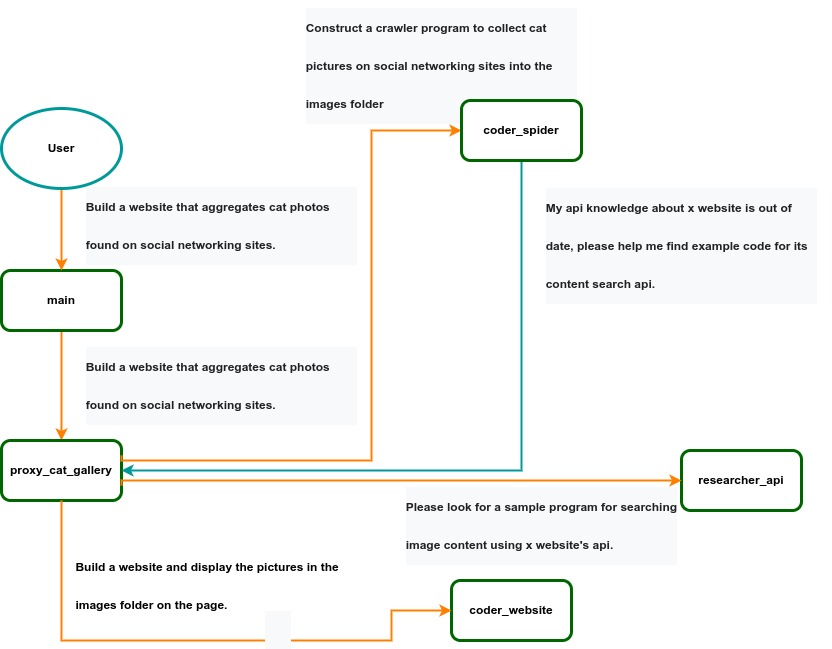 IACT Architecture Diagram. A user requirement to build a page for image collection and display is dynamically decomposed into two tasks: coder_spider and coder_website. When coder_spider encounters difficulties, it proactively seeks assistance from its caller, proxy_cat_gallery. Proxy_cat_gallery then creates another agent, researcher_api, and employs it to address the issue.
Ailice can be regarded as a computer powered by a LLM , and its features include:
Representing input, output, programs, and data in text form.
Using LLM as the processor.
Breaking down computational tasks through successive calls to basic computing units (analogous to functions in traditional computing), which are essentially various functional agents.
Therefore, user-input text commands are executed as a kind of program, decomposed into various "subprograms", and addressed by different agents , forming the fundamental architecture of Ailice. In the following, we will provide a detailed explanation of the nature of these basic computing units.
A natural idea is to let LLM solve certain problems (such as information retrieval, document understanding, etc.) through multi-round dialogues with external callers and peripheral modules in the simplest computational unit. We temporarily call this computational unit a "function". Then, by analogy with traditional computing, we allow functions to call each other, and finally add the concept of threads to implement multi-agent interaction. However, we can have a much simpler and more elegant computational model than this.
The key here is that the "function" that wraps LLM reasoning can actually be called and returned multiple times. A "function" with coder functionality can pause work and return a query statement to its caller when it encounters unclear requirements during coding. If the caller is still unclear about the answer, it continues to ask the next higher level caller. This process can even go all the way to the final user's chat window. When new information is added, the caller will reactivate the coder's execution process by passing in the supplementary information. It can be seen that this "function" is not a traditional function, but an object that can be called multiple times. The high intelligence of LLM makes this interesting property possible. You can also see it as agents strung together by calling relationships, where each agent can create and call more sub-agents, and can also dialogue with its caller to obtain supplementary information or report its progress . In Ailice, we call this computational unit "AProcessor" (essentially what we referred to as an agent). Its code is located in core/AProcessor.py.
Next, we will elaborate on the structure inside AProcessor. The interior of AProcessor is a multi-round dialogue. The "program" that defines the function of AProcessor is a prompt generation mechanism, which generates the prompt for each round of dialogue from the dialogue history. The dialogue is one-to-many. After the external caller inputs the request, LLM will have multiple rounds of dialogue with the peripheral modules (we call them SYSTEM), LLM outputs function calls in various grammatical forms, and the system calls the peripheral modules to generate results and puts the results in the reply message. LLM finally gets the answer and responds to the external caller, ending this call. But because the dialogue history is still preserved, the caller can call in again to continue executing more tasks.
The last part we want to introduce is the parsing module for LLM output. In fact, we regard the output text of LLM as a "script" of semi-natural language and semi-formal language, and use a simple interpreter to execute it . We can use regular expressions to express a carefully designed grammatical structure, parse it into a function call and execute it. Under this design, we can design more flexible function call grammar forms, such as a section with a certain fixed title (such as "UPDATE MEMORY"), which can also be directly parsed out and trigger the execution of an action. This implicit function call does not need to make LLM aware of its existence, but only needs to make it strictly follow a certain format convention. For the most hardcore possibility, we have left room. The interpreter here can not only use regular expressions for pattern matching, its Eval function is recursive. We don't know what this will be used for, but it seems not bad to leave a cool possibility, right? Therefore, inside AProcessor, the calculation is alternately completed by LLM and the interpreter, their outputs are each other's inputs, forming a cycle.
In Ailice, the interpreter is one of the most crucial components within an agent. We use the interpreter to map texts from the LLM output that match specific patterns to actions, including function calls, variable definitions and references, and any user-defined actions. Sometimes these actions directly interact with peripheral modules, affecting the external world; other times, they are used to modify the agent's internal state, thereby influencing its future prompts.
The basic structure of the interpreter is straightforward: a list of pattern-action pairs. Patterns are defined by regular expressions, and actions are specified by a Python function with type annotations. Given that syntactic structures can be nested, we refer to the overarching structure as the entry pattern. During runtime, the interpreter actively detects these entry patterns in the LLM output text. Upon detecting an entry pattern (and if the corresponding action returns data), it immediately terminates the LLM generation to execute the relevant action.
The design of agents in Ailice encompasses two fundamental aspects: the logic for generating prompts based on dialogue history and the agent's internal state, and a set of pattern-action pairs. Essentially, the agent implements the interpreter framework with a set of pattern-action pairs; it becomes an integral part of the interpreter. The agent's internal state is one of the targets for the interpreter's actions, with changes to the agent's internal state influencing the direction of future prompts.
Generating prompts from dialogue history and the internal state is nearly a standardized process, although developers still have the freedom to choose entirely different generation logic. The primary challenge for developers is to create a system prompt template, which is pivotal for the agent and often demands the most effort to perfect. However, this task revolves entirely around crafting natural language prompts.
Ailice utilizes a simple scripting language embedded within text to map the text-based capabilities of LLMs to the real world. This straightforward scripting language includes non-nested function calls and mechanisms for creating and referencing variables, as well as operations for concatenating text content . Its purpose is to enable LLMs to exert influence on the world more naturally: from smoother text manipulation abilities to simple function invocation mechanisms, and multimodal variable operation capabilities. Finally, it should be noted that for the designers of agents, they always have the freedom to extend new syntax for this scripting language. What is introduced here is a minimal standard syntax structure.
The basic syntax is as follows:
Variable Definition: VAR_NAME := <!|"SOME_CONTENT"|!>
Function Calls/Variable References/Text Concatenation: !FUNC-NAME<!|"...", '...', VAR_NAME1, "Execute the following code: n" + VAR_NAME2, ...|!>
The basic variable types are str/AImage/various multimodal types. The str type is consistent with Python's string syntax, supporting triple quotes and escape characters.
This constitutes the entirety of the embedded scripting language.
The variable definition mechanism introduces a way to extend the context window, allowing LLMs to record important content into variables to prevent forgetting. During system operation, various variables are automatically defined. For example, if a block of code wrapped in triple backticks is detected within a text message, a variable is automatically created to store the code, enabling the LLM to reference the variable to execute the code, thus avoiding the time and token costs associated with copying the code in full. Furthermore, some module functions may return data in multimodal types rather than text. In such cases, the system automatically defines these as variables of the corresponding multimodal type, allowing the LLM to reference them (the LLM might send them to another module for processing).
In the long run, LLMs are bound to evolve into multimodal models capable of seeing and hearing. Therefore, the exchanges between Ailice's agents should be in rich text , not just plain text. While Markdown provides some capability for marking up multimodal content, it is insufficient. Hence, we will need an extended version of Markdown in the future to include various embedded multimodal data such as videos and audio.
Let's take images as an example to illustrate the multimodal mechanism in Ailice. When agents receive text containing Markdown-marked images, the system automatically inputs them into a multimodal model to ensure the model can see these contents. Markdown typically uses paths or URLs for marking, so we have expanded the Markdown syntax to allow the use of variable names to reference multimodal content.
Another minor issue is how different agents with their own internal variable lists exchange multimodal variables. This is simple: the system automatically checks whether a message sent from one agent to another contains internal variable names. If it does, the variable content is passed along to the next agent.
Why do we go to the trouble of implementing an additional multimodal variable mechanism when marking multimodal content with paths and URLs is much more convenient? This is because marking multimodal content based on local file paths is only feasible when Ailice runs entirely in a local environment, which is not the design intent. Ailice is meant to be distributed, with the core and modules potentially running on different computers, and it might even load services running on the internet to provide certain computations. This makes returning complete multimodal data more attractive. Of course, these designs made for the future might be over-engineering, and if so, we will modify them in the future.
One of the goals of Ailice is to achieve introspection and self-expansion (which is why our logo features a butterfly with its reflection in the water). This would enable her to understand her own code and build new functionalities, including new external interaction modules (ie new functions) and new types of agents (APrompt class) . As a result, the knowledge and capabilities of LLMs would be more thoroughly unleashed.
Implementing self-expansion involves two parts. On one hand, new modules and new types of agents (APrompt class) need to be dynamically loaded during runtime and naturally integrated into the computational system to participate in processing, which we refer to as dynamic loading. On the other hand, Ailice needs the ability to construct new modules and agent types.
The dynamic loading mechanism itself is of great significance: it represents a novel software update mechanism . We can allow Ailice to search for its own extension code on the internet, check the code for security, fix bugs and compatibility issues, and ultimately run the extension as part of itself. Therefore, Ailice developers only need to place their contributed code on the internet, without the need to merge into the main codebase or consider any other installation methods. The implementation of the dynamic loading mechanism is continuously improving. Its core lies in the extension packages providing some text describing their functions. During runtime, each agent in Ailice finds suitable functions or agent types to solve sub-problems for itself through semantic matching and other means.
Building new modules is a relatively simple task, as the interface constraints that modules need to meet are very straightforward. We can teach LLMs to construct new modules through an example. The more complex task is the self-construction of new agent types (APrompt class), which requires a good understanding of Ailice's overall architecture. The construction of system prompts is particularly delicate and is a challenging task even for humans. Therefore, we pin our hopes on more powerful LLMs in the future to achieve introspection, allowing Ailice to understand herself by reading her own source code (for something as complex as a program, the best way to introduce it is to present itself), thereby constructing better new agents .
For developing Agents, the main loop of Ailice is located in the AiliceMain.py or ui/app.py files. To further understand the construction of an agent, you need to read the code in the "prompts" folder, by reading these code you can understand how an agent's prompts are dynamically constructed.
For developers who want to understand the internal operation logic of Ailice, please read core/AProcessor.py and core/Interpreter.py. These two files contain approximately three hundred lines of code in total, but they contain the basic framework of Ailice.
In this project, achieving the desired functionality of the AI Agent is the primary goal. The secondary goal is code clarity and simplicity . The implementation of the AI Agent is still an exploratory topic, so we aim to minimize rigid components in the software (such as architecture/interfaces imposing constraints on future development) and provide maximum flexibility for the application layer (eg, prompt classes) . Abstraction, deduplication, and decoupling are not immediate priorities.
When implementing a feature, always choose the best method rather than the most obvious one . The metric for "best" often includes traits such as trivializing the problem from a higher perspective, maintaining code clarity and simplicity, and ensuring that changes do not significantly increase overall complexity or limit the software's future possibilities.
Adding comments is not mandatory unless absolutely necessary; strive to make the code clear enough to be self-explanatory . While this may not be an issue for developers who appreciate comments, in the AI era, we can generate detailed code explanations at any time, eliminating the need for unstructured, hard-to-maintain comments.
Follow the principle of Occam's razor when adding code; never add unnecessary lines .
Functions or methods in the core should not exceed 60 lines .
While there are no explicit coding style constraints, maintain consistency or similarity with the original code in terms of naming and case usage to avoid readability burdens.
Ailice aims to achieve multimodal and self-expanding features within a scale of less than 5000 lines, reaching its final form at the current stage. The pursuit of concise code is not only because succinct code often represents a better implementation, but also because it enables AI to develop introspective capabilities early on and facilitates better self-expansion. Please adhere to the above rules and approach each line of code with diligence.
Ailice's fundamental tasks are twofold: one is to fully unleash the capabilities of LLM based on text into the real world; the other is to explore better mechanisms for long-term memory and forming a coherent understanding of vast amounts of text . Our development efforts revolve around these two focal points.
If you are interested in the development of Ailice itself, you may consider the following directions:
Explore improved long-term memory mechanisms to enhance the capabilities of each Agent. We need a long-term memory mechanism that enables consistent understanding of large amounts of content and facilitates association . The most feasible option at the moment is to replace vector database with knowledge graph, which will greatly benefit the comprehension of long texts/codes and enable us to build genuine personal AI assistants.
Multimodal support. The support for the multimodal model has been completed, and the current development focus is shifting towards the multimodal support of peripheral modules. We need a module that operates computers based on screenshots and simulates mouse/keyboard actions.
Self-expanding support. Our goal is to enable language models to autonomously code and implement new peripheral modules/agent types and dynamically load them for immediate use . This capability will enable self-expansion, empowering the system to seamlessly integrate new functionalities. We've completed most of the functionality, but we still need to develop the capability to construct new types of agents.
Richer UI interface . We need to organize the agents output into a tree structure in dialog window and dynamically update the output of all agents. And accept user input on the web interface and transfer it to scripter's standard input, which is especially needed when using sudo.
Develop Agents with various functionalities based on the current framework.
Explore the application of IACT architecture on complex tasks. By utilizing an interactive agents call tree, we can break down large documents for improved reading comprehension, as well as decompose complex software engineering tasks into smaller modules, completing the entire project build and testing through iterations. This requires a series of intricate prompt designs and testing efforts, but it holds an exciting promise for the future. The IACT architecture significantly alleviates the resource constraints imposed by the context window, allowing us to dynamically adapt to more intricate tasks.
Build rich external interaction modules using self-expansion mechanisms! This will be accomplished in AiliceEVO.
In addition to the tasks mentioned above, we should also start actively contemplating the possibility of creating a smaller LLM that possesses lower knowledge content but higher reasoning abilities .





